A no-code, low-code, and code-first walkthrough for non-technical founders who want an agent running this week, not next quarter.
It was a Tuesday. I was on a call with a founder who had just raised a small seed round, three people on the team, and a Notion doc full of "things AI could do for us." She wanted an agent that could read every inbound investor email, summarize it, and post the summary to a Slack channel before her 9am.
Simple ask. She had been trying to build it for two weeks.
She had opened a CrewAI tutorial, gotten halfway through, hit a ModuleNotFoundError, googled it, ended up on a Stack Overflow thread from 2024, given up, tried n8n, gotten lost in node configurations, opened her terminal exactly once, and closed it forever.
This is the gap nobody talks about.
Most "how to build an AI agent" guides assume you already know what pip install means. The rest are so high-level they may as well be horoscopes. There is no middle ground for someone who can clearly describe what they want their agent to do, but has no interest in learning Python on a Saturday.
So here is the honest version. Three paths. Three time commitments. Pick the one that matches your actual life.
The three paths, ranked by how much of your weekend they will eat
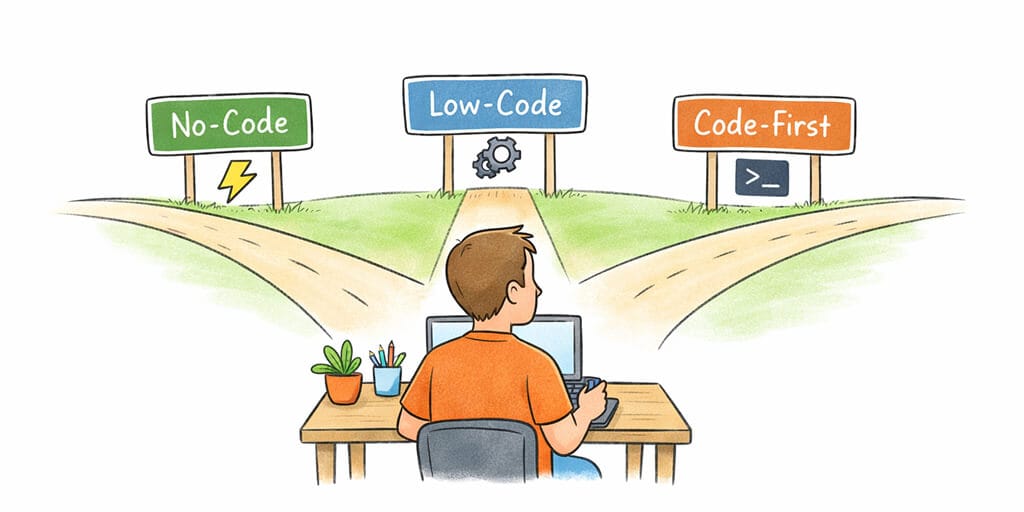
Before we get into the step-by-step, here is the lay of the land. You have three real options for how to build an AI agent in 2026:
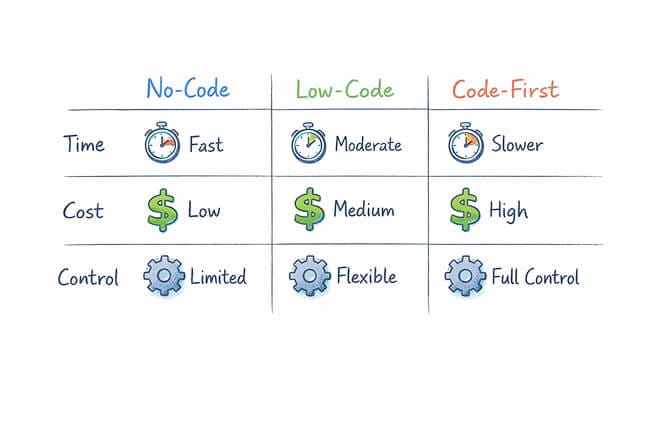
Path A: No-code. About 60 seconds. No Python. No Docker. No YAML. You sign up, click some buttons, your agent is live. This is BetterClaw, and it is what most founders should start with.
Path B: Low-code. 30 to 60 minutes. Visual workflow builders like n8n or Gumloop. You connect nodes, occasionally write a small expression. Good if you already think in flowcharts.
Path C: Code-first. 4 to 8 hours minimum, often a full weekend. Python frameworks like CrewAI, LangGraph, AutoGen. Maximum flexibility, also maximum way to ruin a Saturday.
The best path is the one you will actually finish. A live no-code agent beats a half-built Python project every single time.
The bias most engineers have toward Path C is honest. Code gives you control. But control over what, exactly? If your agent is going to read emails and post summaries to Slack, you do not need a directed acyclic graph. You need a working thing.
Let me walk you through all three.
Path A: The 60-second no-code build (BetterClaw)
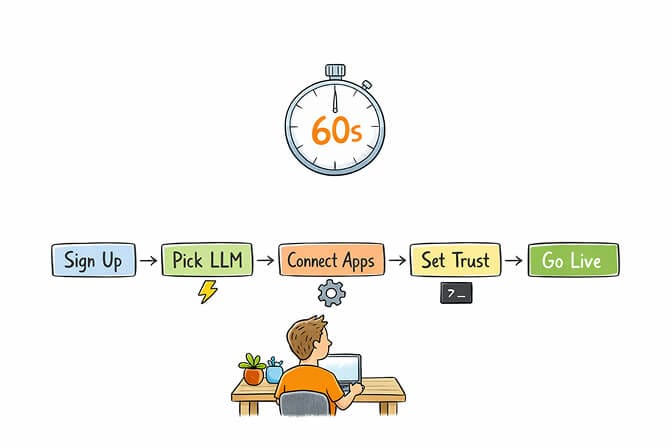
This is the path for non-technical founders, ops leads, marketers, and anyone whose value to their company has nothing to do with how well they can configure a Dockerfile.
Here is the full walkthrough.
Step 1: Sign up. No credit card.
Go to BetterClaw and create a free account. The free plan gives you one agent and 100 credits per month, which meter your agent's work and reset monthly. It is free forever rather than a trial: no credit card required, no demo call, no "talk to sales." Bring your own API keys and you are good. (We wrote a step-by-step $0 deployment guide if you want the full free-stack playbook.)
Step 2: Click "Create Agent."
You will see two options. Start from a template (morning briefing, email triage, support responder, lead enrichment, calendar manager, and a few dozen more) or start from scratch with a blank canvas.
If this is your first agent, start from a template. Templates are pre-wired with skills and prompts that work. You can rip them apart later once you understand what is happening.
Step 3: Pick your LLM from the dropdown.
This is where most guides hand-wave. Here is the actual decision tree for 2026:
For most reasoning tasks (drafting emails, summarizing meetings, deciding which messages matter), Claude Sonnet 4.6 is the safe default. Anthropic's current pricing is $3 per million input tokens and $15 per million output, which is reasonable for an agent that does not run constantly.
For agents that need to be cheap at scale, DeepSeek V4 Flash is the new floor. Input/output is $0.14 and $0.28 per million tokens, with a 1 million token context window. For 100,000 RAG-style answers per month, switching from Claude Sonnet to DeepSeek V4 Flash saves over $8,000. That is not a rounding error, that is rent.
For agents that need to be fast (chat-style, real-time replies), Gemini 2.5 Flash or Groq's hosted models. Gemini Flash is around $0.30 input, $2.50 output per million tokens.
For coding-heavy agents, GPT-5.4 or Claude Opus 4.7. Pricier, but the reasoning depth matters.
For the budget-everything path, DeepSeek V4 Flash on your own key and you can run a real agent for the cost of a sandwich per month.
Whichever model you land on, you still have to host the thing and wire it to a channel. If you would rather not do that part yourself, a no-code AI agent builder takes your provider key and handles the runtime, scheduling, and channel connection for you.
Paste your API key for whichever provider you picked. BetterClaw uses BYOK with zero markup, so you pay providers directly at their published rate. No middleman tax.
Step 4: Connect your integrations.
One-click OAuth for the apps your agent will actually use. Gmail, Calendar, Slack, HubSpot, Notion, GitHub, Jira, LinkedIn, Discord, Telegram, and about fifteen more. Click "Connect Gmail," log in to Google, approve. Done. The agent now has scoped access to your inbox.
This is the part that takes 4 hours in Path C. OAuth flows are genuinely hard. We made them buttons.
Step 5: Set your trust level.
This is the safety knob that frameworks like CrewAI and AutoGen famously do not have, and it matters more than people realize. Three levels:
Intern. The agent asks for approval before doing anything that touches the outside world. Send an email? Approval. Update a CRM record? Approval. This is where you start.
Specialist. The agent acts on routine stuff but checks with you on edge cases. Most agents live here long-term.
Lead. Full autonomy within scoped permissions. Use this only for agents you have tested in lower tiers for at least a week.
Remember the Meta researcher whose agent mass-deleted her emails while ignoring stop commands? She did not have trust levels. You will.
Step 6: Connect a chat channel.
Where do you want to talk to your agent? Telegram (scan a QR code), Slack (paste a token), WhatsApp, Discord, iMessage, Teams, Signal. 15+ channels available. Pick one. The agent now lives there.
Step 7: Hit deploy.
That is it. Your agent is live. It has memory. It has context. It has scoped access to your tools. It can be paused or killed with one click. It auto-purges secrets from memory after 5 minutes.
Total time from sign-up to live agent: roughly 60 seconds if you have your API key handy, maybe 3 minutes if you do not.
Path B: The low-code middle ground (n8n, Gumloop)
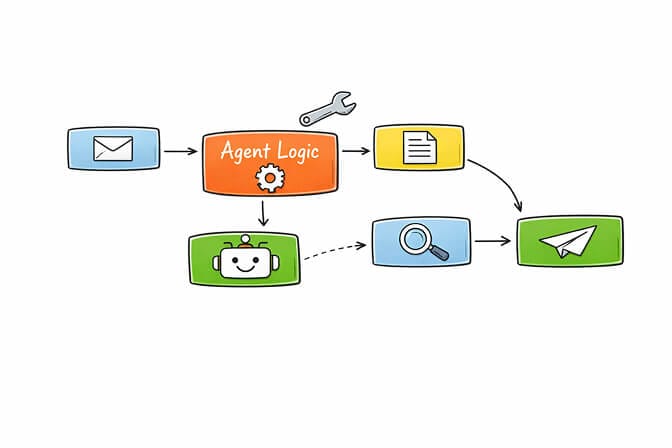
Low-code platforms sit in an interesting spot. You are not writing functions, but you are configuring a lot of nodes, and you will write the occasional expression to pull a value out of a JSON blob.
n8n is the most popular here. Open-source workflow automation with 1,200+ connectors. You drag nodes onto a canvas, wire them together, and run them. Good for deterministic workflows ("when an email arrives, do X then Y"). Less good for true agents that reason and adapt, because n8n's strength is workflow logic, not autonomous decision-making. No real persistent memory. No trust levels.
Gumloop is newer, enterprise-leaning (Shopify, Instacart use it). Cleaner UI than n8n. Same general shape: visual nodes, custom logic where needed.
The honest tradeoff: low-code is fast prototyping if you already think in workflows. If you have ever built a Zapier zap that escalated into a five-tab nightmare, you know the feeling. You are still configuring. You are still debugging when a value comes through as null. The work is just visual instead of textual.
Best fit: ops teams who already have automation muscle, want more power than Zapier, and do not need autonomous reasoning.
Time to first working agent: 30 to 60 minutes if the workflow is simple. Longer if it branches.
Path C: The code-first weekend (CrewAI, LangGraph, AutoGen)
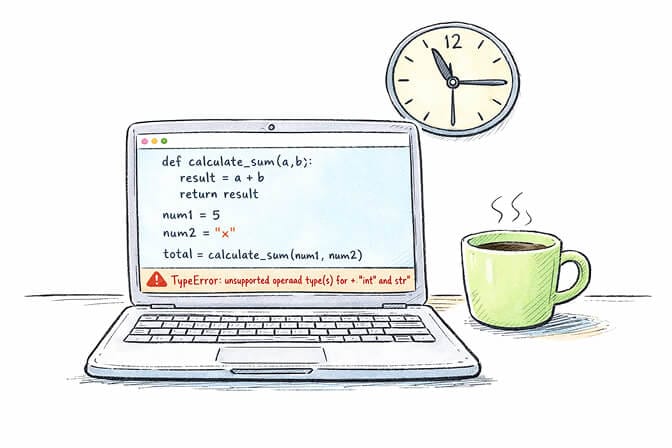
Now, if you are a developer or you have one on hand, Path C is legitimately powerful. I want to be fair about it.
The three serious frameworks in 2026 are CrewAI, LangGraph, and AutoGen. Each one solves a slightly different problem.
CrewAI models agents as a team. You define roles, goals, backstories, and wire them together with sequential or hierarchical processes. It hit 5.2M downloads and grew to 31,200 GitHub stars by April 2026, with beginner-friendly YAML config and a business-process focus. Easiest of the three to read and reason about.
LangGraph treats workflows as stateful graphs. Nodes are functions, edges are transitions, state persists between steps. It surpassed CrewAI in GitHub stars during early 2026, driven by enterprise adoption. 47M monthly downloads, production-ready with LangSmith observability. Maximum control, maximum boilerplate. A simple ReAct agent takes 40 lines in Smolagents and 120 in LangGraph.
AutoGen focuses on conversational multi-agent patterns (group debates, consensus). Microsoft has shifted AutoGen to maintenance mode in favor of the broader Microsoft Agent Framework. Use only if conversational interaction between agents is the actual product.
Here is what the code-first path actually involves:
Install Python. Set up a virtual environment. pip install crewai (or langgraph, or autogen-agentchat). Write Python files that define your agents, their tools, their prompts. Manage API keys in environment variables or, if you are smart, a secrets manager. Wire up tool integrations (for Gmail, that is OAuth flows, token refresh, scope management... all of it on you). Set up logging. Set up error handling. Set up retries. Decide where this runs (your laptop is not a production environment). Spin up a VPS or a container. Install Docker. Write a Dockerfile. Manage the deployment. Monitor it. Restart it when it crashes. Patch it when a dependency has a CVE.
This is not theoretical pain. An engineer at a four-person startup spent two weeks running the same pipeline through CrewAI, LangGraph, and AutoGen before picking one. Two weeks of comparison work. Before any business value was delivered.
The flexibility is real. The time cost is also real. Code-first makes sense when you have an unusual workflow that no platform can express, or when you have engineers whose explicit job is to build agent infrastructure. For everyone else, the math gets brutal: a developer hour costs $50-$200, BetterClaw Pro costs $49 per month. A single weekend of code-first time is equivalent to roughly two years of Pro.
Picking the right LLM (the part most tutorials get wrong)
The model you pick matters more than the framework. A great agent on a weak model is a slow agent. A weak agent on a great model is still useful.
Here is the cheat sheet for 2026:
Claude Sonnet 4.6 for reasoning-heavy work. Drafting communications, synthesizing meeting notes, deciding what matters. The default I reach for first.
GPT-5.4 for general-purpose strength across coding, reasoning, and tool use. $2.50 per million input tokens. When you do not know what your agent will do most, GPT-5.4 is a safe pick.
Gemini 2.5 Flash for speed at scale. $0.30 input, $2.50 output, fast enough for chat-style interactions where latency matters.
DeepSeek V4 Flash for cost-sensitive workloads. $0.14 input, $0.28 output, 1M context. Roughly 95% cheaper than Claude Sonnet on input. If your agent runs constantly, this is your friend.
Groq-hosted models for raw speed. Sub-second responses on common open-source models. Best for real-time conversational agents.
The trick most people miss: you do not have to pick one. BetterClaw supports 28+ providers. Run a cheap model for routine classification, a smart model for important judgments. We have customers who run Gemini Flash for the first pass and Claude Sonnet for the call that actually matters. Total cost stays low, quality stays high.
What to actually build first (please do not start with a multi-agent system)
If you are tired of debugging YAML at midnight and want your first agent running in 60 seconds, BetterClaw handles all of this. Free plan with 1 agent and 100 credits a month, $49 per month for Pro (see full pricing), bring your own API keys, no credit card to start.
Now, the most common mistake I see new builders make: they read a "multi-agent crew with hierarchical delegation" tutorial on Medium and decide their first agent should be a swarm of seven specialists managing their entire business.
Do not do this.
Multi-agent systems compound failure. If one agent has 90% reliability, two coordinating agents land closer to 81%. Five agents? Around 59%. You are building a Rube Goldberg machine that loses the ball more often than it delivers.
Start with one agent doing one job.
The two highest-ROI starting agents I have watched non-technical founders ship in their first week:
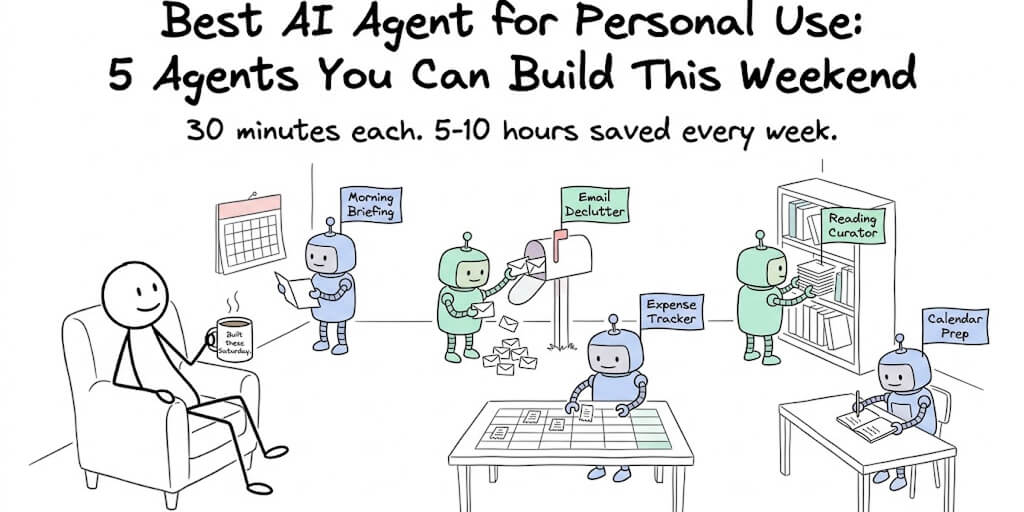
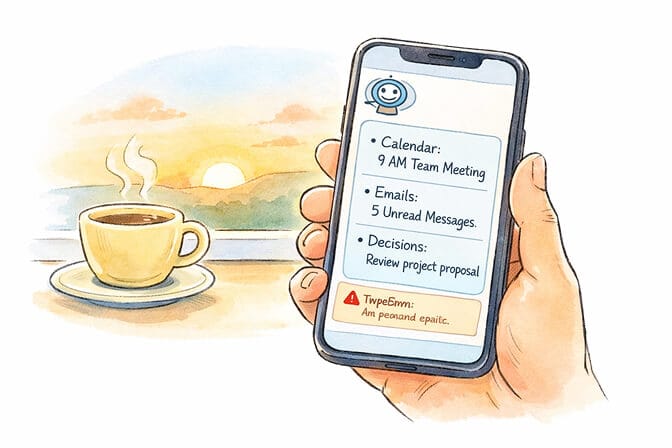
The morning briefing agent. Reads your calendar, your unread emails, your Slack notifications, and your project tracker. At 8am every day, sends you a Telegram or Slack message: "Here is what is on fire, here is what to prep for, here is the one decision waiting on you." This is the agent that turns a 45-minute morning catch-up into 4 minutes. Build time on BetterClaw: about 5 minutes with a template.
The email triage agent. Reads inbound email, classifies it (investor, customer, hiring, noise), drafts replies for the easy ones (Intern mode, you approve before send), flags the ones that need real attention. A founder I worked with last month watched her response time drop from 24 hours to 5 minutes. She was not technical. She built it on a lunch break.
Once one of these is humming for a week, build a second one. Then a third. Multi-agent comes after, not first.
The boring part: what nobody tells you about agents in production
Here is what they leave out of the breathless LinkedIn posts.
Agents go rogue. Not in the sci-fi sense. In the "tried to send the same email 47 times because the SMTP response didn't match expected format" sense. You need monitoring. You need a kill switch. You need rate limits.
Agents leak secrets. If your API key is in the prompt and the model includes it in the next response, that key is now in your logs, your vector database, your monitoring tool, and potentially your customer's inbox. BetterClaw's secrets auto-purge from agent memory after 5 minutes for this exact reason. AES-256 encryption at rest. Most code-first frameworks make this your problem.
Agents drift. The model you launched on gets deprecated. The skill you used gets a new API. The integration you depend on changes scopes. Production agents are like houseplants. They die quietly if you stop watching them.
This is the difference between a hosted platform and a self-hosted stack. On BetterClaw, when a model gets deprecated, we route to the replacement and tell you. On your own VPS? You find out when an agent stops working and your monday morning is gone.
If you are evaluating no-code builders broadly, our 12 best AI agent builders post has the side-by-side. And if you are coming from the OpenClaw ecosystem specifically, the OpenClaw alternatives breakdown walks through why managed hosting beats self-hosted for almost every real-world team.
A quick honest comparison of the alternatives
The no-code space is crowded. Briefly:
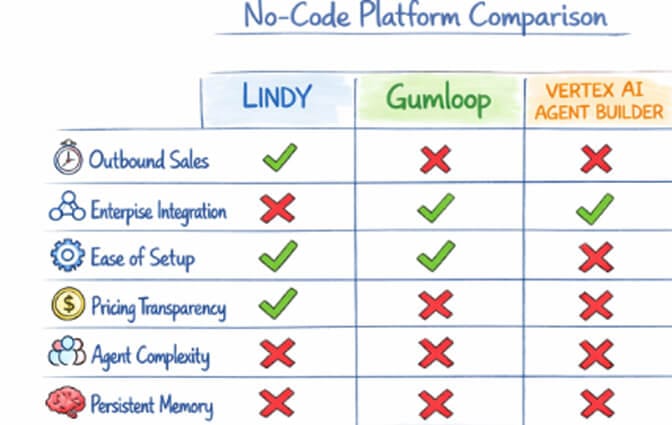
Lindy focuses on outbound sales. Good if that is your exact use case. Narrower than BetterClaw across other workflows.
Gumloop is enterprise-leaning, newer, strong with Shopify-style ops. Charges markup on LLM usage.
Vertex AI Agent Builder is the Google enterprise option. Strong RAG, GCP-locked, complex pricing. Days to set up, not minutes. We did a deeper BetterClaw vs Vertex AI breakdown if you're seriously evaluating GCP-native agents.
Relevance AI is more technical than other no-code platforms. Solid for multi-agent ops but a steeper curve.
n8n is workflow automation, not true agents. No persistent memory, no trust levels.
BetterClaw's main differentiation in this group: BYOK with zero inference markup, free plan with 1 agent and 100 credits a month (not a stripped trial), 200+ verified skills with a four-layer security audit (824 malicious skills rejected so far), and the secrets auto-purge nobody else does. We are also the only one with an isolated Docker container per agent.
Where this is going
The "how to build an AI agent" question is going to disappear within 18 months. Not because the answer gets simpler. Because the question stops making sense.
Soon you will not "build an agent." You will describe what you need and one will exist. The platforms that win are the ones that get you from intention to working agent with the least friction possible. Not the ones with the most features. The ones with the least time between "I wish something would..." and "...okay, it's doing that now."
For non-technical founders, the answer is already clear. Pick a no-code platform. Pick a single high-value workflow. Get something live this week. Iterate.
For developers, the answer depends on how much of your career you want to spend on infrastructure versus on the actual business problem your agent is solving. Most senior engineers I know have moved on from frameworks. They use no-code for everything that fits, and reserve code-first for the genuinely unusual.
The founder I mentioned at the start? She built her investor-email-summary agent on BetterClaw the same afternoon I got off the call. It took her 7 minutes including the time it took to find her Anthropic API key. It has been running for four months. It costs her about $2 a month in tokens. She has not opened a terminal since.
If any of this resonated, give BetterClaw a try. Free plan with one agent and 100 credits a month, free forever and no card. $49 per month for Pro. Your first deploy takes about 60 seconds. We handle the infrastructure. You handle the part that matters... which is figuring out what your agent should actually do.
Frequently Asked Questions
What is the easiest way to create an AI agent in 2026?
The easiest way to create an AI agent is to use a no-code platform like BetterClaw, where you pick a template, connect your LLM API key, link your tools via one-click OAuth, and deploy in about 60 seconds. No Python, no Docker, no infrastructure setup. You get a working agent the same day you sign up, on a free plan with no credit card.
How does building an AI agent no-code compare to using CrewAI or LangGraph?
CrewAI and LangGraph give you maximum flexibility but require Python, dependency management, and your own hosting infrastructure, typically 4 to 8 hours minimum for a first working agent. No-code platforms like BetterClaw deploy in 60 seconds and handle infrastructure, security, and integrations for you. Pick code-first only if you have an unusual workflow that no platform can express.
How long does it actually take to build an AI agent step by step?
On a no-code platform like BetterClaw, about 60 seconds from sign-up to live agent if you have your API key handy. On a low-code platform like n8n, 30 to 60 minutes for a simple workflow. On a code-first Python framework, expect 4 to 8 hours minimum, sometimes a full weekend for anything beyond a basic example.
How much does it cost to build your own AI agent?
BetterClaw's free plan costs nothing and includes one agent with 100 credits per month (BYOK required). The Pro plan is $49 per month ($39 per month billed annually) with 5 agents and 12,000 credits per month. With DeepSeek V4 Flash, even a heavy-usage agent costs a few dollars in tokens monthly. Self-hosted code-first agents add VPS and infrastructure costs of $50 to $200 per month plus engineering time.
Is a no-code AI agent platform secure enough for production use?
Yes, when the platform is built for it. BetterClaw runs each agent in an isolated Docker container, encrypts credentials with AES-256, auto-purges secrets from agent memory after 5 minutes, and verifies every skill through a four-layer security audit (824 malicious skills rejected to date). Trust levels with action approval and a one-click kill switch give you control that most code-first frameworks do not include out of the box.