OpenClaw on Railway Pro runs $28-73/month all-in. On Fly.io, $21-54. On a cheap VPS (Hetzner or Contabo), as low as $10-37. Here's every line item — platform fee, compute, storage, egress, API costs — plus the hidden charges most tutorials skip.
At a glance
| Option | Platform / VPS cost | + API (BYOK) | Total monthly | Setup | Maintenance | Monitoring + skill sandbox |
|---|---|---|---|---|---|---|
| Railway Pro | $23-43 | $5-30 | $28-73 | 1-5 hrs | 1-3 hrs/mo | None — DIY |
| Fly.io (2GB shared-cpu-2x) | $16-24 | $5-30 | $21-54 | 2-6 hrs | 1-3 hrs/mo | None — DIY |
| Render Standard (2GB) | $25 | $5-30 | $30-55 | 1-3 hrs | 1-3 hrs/mo | None — DIY |
| VPS — DigitalOcean Basic 2GB | $12 | $5-30 | $17-42 | 6-8 hrs | 2-4 hrs/mo | None — DIY |
| VPS — Hetzner CX22 (4GB) | ~$4.59 | $5-30 | $10-35 | 6-8 hrs | 2-4 hrs/mo | None — DIY |
| BetterClaw (managed) | $49 (Pro, 5 agents) | $5-30 BYOK | $54-79 | 60 sec | 0 hrs/mo | Included |
The rest of the post walks through where every number comes from, where the hidden costs hide, and how to cut your bill if you stay on Railway or Fly.io.
A developer in our community deployed OpenClaw on Railway because a tutorial said it would cost "about $5 a month." His first month's bill was $38. The second month was $47. By the third month he'd moved to a VPS.
The tutorial wasn't lying. Railway's compute for a small container can technically cost $5/month. But the tutorial didn't mention the platform subscription fee. It didn't mention persistent volume charges. It didn't mention egress costs. And it definitely didn't mention the API costs for the AI models running inside the container.
Railway and Fly.io are excellent platforms. They make container deployment genuinely easier than managing a raw VPS. But "easier" and "cheaper" are different things, and the total cost of running OpenClaw on these platforms surprises most people.
Here's the honest cost breakdown for deploying OpenClaw on Railway and Fly.io in 2026, including every line item that shows up on your bill.
Railway: what you'll actually pay
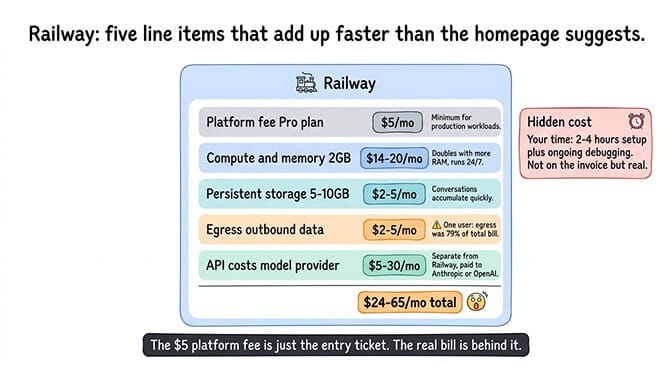
Railway uses usage-based pricing with a platform subscription. You pay a base fee plus compute, memory, storage, and bandwidth charges based on actual consumption.
The platform fee. Railway has two paid tiers most OpenClaw users land on. Hobby is $5/month per seat with $5 of included usage; Pro is $20/month per seat with $20 of included usage plus better support and limits. Tutorials that promise "about $5/month" are quoting Hobby and assuming you stay inside the included credit. The one-time $5 trial credit (no card, expires in 30 days) is enough to test OpenClaw for a weekend.
Compute and memory. Railway charges for CPU and RAM usage per minute. An OpenClaw container that stays running 24/7 with 1GB of memory and shared CPU costs roughly $10/month in compute charges. If you need 2GB (recommended for agents with more than 2-3 skills), that doubles to ~$20/month. Pro's included usage covers the first $20.
Persistent storage. OpenClaw needs persistent storage for conversation history, memories, and config files. Railway charges for attached volumes. A small 1GB volume is minimal, but realistic storage for a production agent (conversations accumulate quickly) runs 5-10GB over time.
Egress (the hidden cost). Railway charges $0.10/GB for outbound data transfer. OpenClaw generates egress through API calls to model providers, webhook responses to chat platforms, and any web search or browser automation traffic. For a moderately active agent, egress adds $2-8/month. One user reported egress constituting nearly 80% of their total Railway bill when serving content-heavy workloads.
Sleep on idle. Railway's Serverless mode (formerly "App Sleeping") is available on all plans including Pro — the service sleeps after ~10 minutes of no outbound traffic and wakes on incoming request (with a cold-boot delay). Useful for dev/staging or personal-use agents; less useful for an always-on production agent that needs to be reachable.
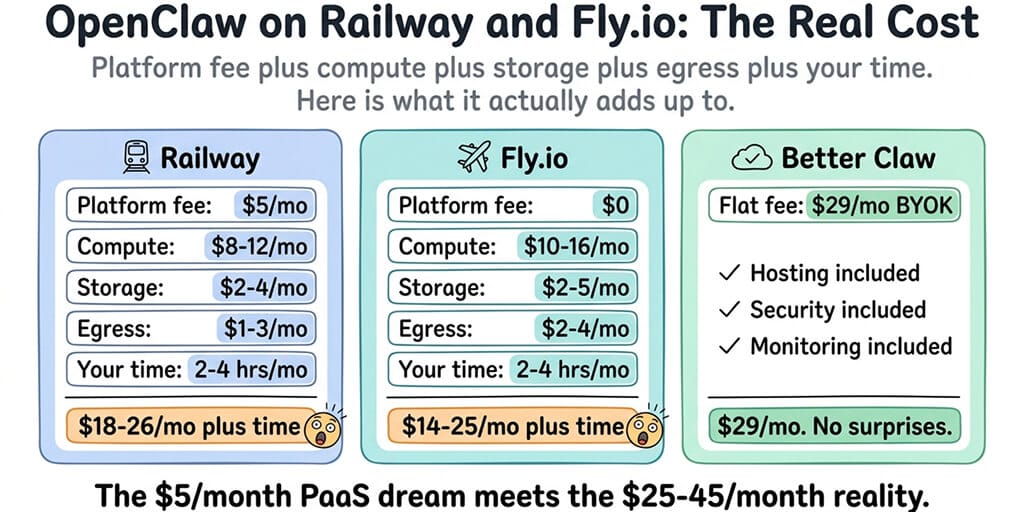
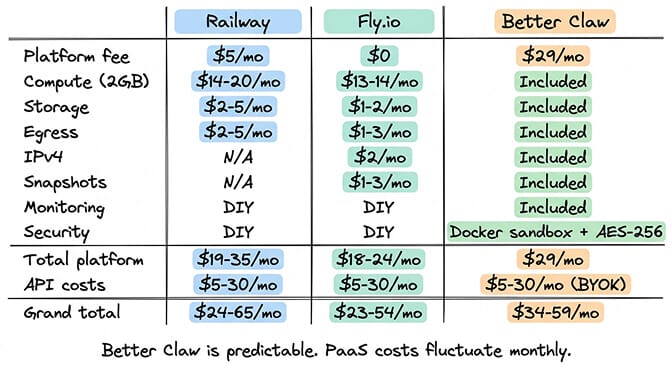
The realistic Railway total for OpenClaw on Pro: $20 (platform, includes $20 of usage) + $0-10 (compute/memory overage beyond included credits) + $1-5 (storage) + $2-8 (egress) = $23-43/month for the platform alone. Add API costs for your model provider ($5-30/month depending on model and usage), and the total lands at $28-73/month. Hobby is cheaper if your usage stays inside its $5 included credit, but a 24/7 OpenClaw container generally won't.
That's before you factor in your time setting up the deployment, configuring environment variables, managing volume mounts, and debugging the inevitable issues.
For the full breakdown of which model providers cost what, our provider comparison covers five options that keep the API portion of your bill under $15/month.
Fly.io: what you'll actually pay
Fly.io uses fully usage-based pricing with no base platform fee for compute (though support plans start at $29/month). You pay per second of machine uptime, plus storage, bandwidth, and optional add-ons.
Compute. A shared-cpu-1x machine with 1GB RAM running 24/7 on Fly.io costs roughly $5.70/month. With 2GB RAM (the recommended minimum for production OpenClaw) on shared-cpu-2x, it's about $13.94/month. The per-second billing sounds developer-friendly, but OpenClaw needs to run continuously, so you're paying for full uptime regardless.
Persistent volumes. Fly.io charges $0.15/GB/month for provisioned volume capacity. You're billed on provisioned size, not used size. If you create a 10GB volume but only use 2GB, you pay for 10GB. A practical 5GB volume for OpenClaw costs $0.75/month. Small, but it adds up if you're not careful about provisioning.
Volume snapshots. Starting January 1, 2026, Fly.io charges for volume snapshots at $0.08/GB-month with the first 10 GB free (incremental storage model). Automatic daily snapshots with 5-day retention are enabled by default. For most OpenClaw setups the first-10GB-free buffer absorbs the cost; if your conversation history grows past that, expect $1-3/month in snapshot charges.
IPv4 address. Need a dedicated IPv4 address for your OpenClaw deployment? That's $2/month per app. Many production deployments need this for reliable connectivity with chat platform webhooks.
Egress. Fly.io's regional egress pricing matters: $0.02/GB in North America and Europe, $0.04/GB in Asia-Pacific, up to $0.12/GB in Africa. Ingress is free. For a moderately active OpenClaw agent deployed in NA/EU, egress runs $1-3/month. Pick the right region — deploying in Africa instead of NA/EU can multiply your bandwidth bill 6x.
The realistic Fly.io total for OpenClaw: ~$13-14 (compute, 2GB shared-cpu-2x) + $0-2 (storage) + $0-3 (snapshots, often $0 within the 10GB-free band) + $2 (IPv4) + $1-3 (NA/EU egress) = $16-24/month for the platform. Add API costs ($5-30/month), and the total lands at $21-54/month.
Fly.io tends to be slightly cheaper than Railway for always-on containers because there's no platform subscription fee and the per-second billing is efficient. But the hidden costs (IPv4, snapshots, egress) add up in ways most people don't expect.
Teams regularly report Fly.io bills that are 2-4x their expected costs because the pricing model makes forecasting nearly impossible. The per-second compute billing sounds transparent until you realize how many separate line items contribute to the final number.
The setup time nobody accounts for
Platform costs are only half the story. The other half is your time.
Railway setup time. Connect your GitHub repo (or Docker image), configure environment variables for all your API keys and chat platform tokens, set up persistent volumes for OpenClaw data, configure the gateway port mapping, and test connectivity with your chat platforms. Experienced developers: 1-2 hours. First-timers: 3-5 hours. The Railway dashboard makes deployment straightforward, but OpenClaw's specific requirements (gateway port, WebSocket connections, volume paths for conversation persistence) still need manual configuration.
Fly.io setup time. Fly.io uses a CLI-first workflow. You need to install the Fly CLI, create a fly.toml configuration file, configure machine specs, set up secrets (Fly.io's way of handling environment variables), create persistent volumes, and deploy. The learning curve is steeper than Railway. Experienced developers: 2-3 hours. First-timers: 4-6 hours.
Ongoing maintenance for both. OpenClaw releases multiple updates per week. Updating on Railway means pushing a new image or triggering a redeploy. Updating on Fly.io means rebuilding and deploying through the CLI. Monitoring is DIY on both platforms (neither provides OpenClaw-specific health checks or anomaly detection). When something breaks at 2 AM, you're the on-call engineer.
For the full comparison of self-hosting infrastructure options including traditional VPS, our self-hosting guide covers the trade-offs between PaaS platforms and dedicated servers.
Where Railway and Fly.io genuinely shine
Real advantages, even with the higher costs:
- Deployment speed. Both compress what would be an 8-hour VPS setup into a 2-4 hour PaaS deployment. No SSH, no firewall configuration, no manual Docker installation.
- Auto-restarts. If your OpenClaw container crashes (and it will eventually — see OOM kills on undersized containers), both platforms restart it automatically. On a raw VPS, you configure PM2, systemd, or Docker restart policies yourself.
- Git-based deployments. Push to your repo, the platform redeploys. Useful when iterating on your SOUL.md or adding custom skills.
- Scaling flexibility. If your agent spikes in load (a busy week, a complex cron job), both platforms scale up without server reconfiguration. Railway scales based on usage; Fly.io resizes machines through the CLI.
The question is whether these are worth the premium over a $12-24/month VPS where you manage Docker yourself, or whether a managed platform that bundles all of this by default is a better use of your money.
Where Railway and Fly.io fall short for OpenClaw
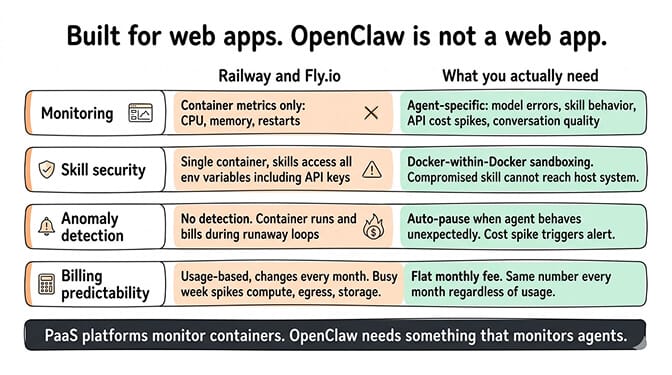
Both platforms are designed for general-purpose web applications. OpenClaw is not a general-purpose web application. It's an always-on agent framework with specific requirements that PaaS platforms handle awkwardly.
No OpenClaw-specific monitoring
Railway and Fly.io provide general container metrics (CPU, memory, restarts). They don't tell you if your agent's model provider is returning errors, if a skill is misbehaving, if API costs are spiking, or if conversation quality is degrading. You're monitoring the container, not the agent.
No security sandboxing for skills
When you run OpenClaw on Railway or Fly.io, the entire application runs in a single container. Skills have access to everything the container has access to, including your environment variables (where API keys live). There's no Docker-within-Docker sandboxing for skill execution. A compromised skill has full access. Given that Bitdefender's audit found 824+ malicious skills on ClawHub at the time (roughly 20% of the active registry), this matters.
No anomaly detection
If your agent starts making unexpected API calls at 3 AM, burning through tokens in a runaway loop, or exhibiting strange behavior, neither Railway nor Fly.io will notice. They'll happily keep the container running (and billing you) while the agent racks up costs or leaks data.
Unpredictable billing
Both platforms use usage-based pricing, which means your bill changes every month. A busy week can spike compute, egress, and storage charges in ways that are hard to predict. For a solo founder trying to budget monthly agent costs, this unpredictability is stressful.
For the full managed vs self-hosted security and feature comparison, our guide covers what you get (and what you're responsible for) with each deployment approach.
Free tier — can you test OpenClaw without paying?
Neither platform is a stable long-term home for an always-on agent, but both can host a short test deployment.
Railway gives new accounts a one-time $5 trial credit valid for ~30 days, no card required. That's enough to deploy OpenClaw and run a small container for roughly a weekend of testing before you'll need to add a paid plan. Apps on the trial sleep on inactivity, so an agent that needs to be reachable 24/7 won't really work on the trial alone.
Fly.io deprecated its free tier for new accounts in October 2024. Legacy users on the old Hobby/Launch/Scale plans (which included 3 free shared-cpu VMs plus 160GB of transfer) keep those allowances grandfathered, but new signups in 2026 get only a 2-hour to 7-day evaluation trial and then transition to pay-as-you-go with no included free machines. Plan to add a card.
If you want to run an agent without managing any of the infrastructure yourself, BetterClaw's free plan gives you 1 agent, 100 credits/month, and BYOK with managed hosting, no credit card required — it's the only path to a genuinely free, always-on test deployment.
How to reduce your Railway or Fly.io bill
If you've decided to stay on Railway or Fly.io, here are the five levers that cut bills the most:
- Right-size the container. Most OpenClaw deployments don't need 4GB. Start at 1-2GB and bump up only if you OOM. Each GB above what you actually need costs $7-13/month depending on platform.
- Provision Fly.io volumes minimally and grow them as needed. Fly.io bills on provisioned size, not used size. A 10GB volume costs the same whether you've stored 1GB or 9GB. Start at 3-5GB.
- Route heartbeats to a cheap model (DeepSeek V4-Flash or Gemini 3 Flash). The 48 daily heartbeats burn API tokens even when you're not talking to the agent — pointing them at a $0.14/M model instead of Sonnet 4.6 typically cuts API costs by 40-60%.
- Cap
maxIterationsto 10-15. A skill stuck in a retry loop generates 50+ API calls in a minute and spikes both your compute and your API bill. The cap costs nothing and prevents the worst surprise on your invoice. - Pick the right region for Fly.io. Egress is $0.02/GB in NA/EU vs up to $0.12/GB elsewhere. If your agent does a lot of web search or browser automation, deploying in a cheaper egress region saves 40-80% on bandwidth charges.
The honest cost comparison
Here's the bottom line, everything included.
| Option | Platform / VPS cost | + API (BYOK) | Total monthly | Setup | Maintenance | Monitoring + skill sandbox |
|---|---|---|---|---|---|---|
| Railway (Pro) | $23-43 | $5-30 | $28-73 | 1-5 hrs | 1-3 hrs/mo | None — DIY |
| Fly.io (shared-cpu-2x 2GB) | $16-24 | $5-30 | $21-54 | 2-6 hrs | 1-3 hrs/mo | None — DIY |
| Render (Standard 2GB) | $25 | $5-30 | $30-55 | 1-3 hrs | 1-3 hrs/mo | None — DIY |
| VPS — DigitalOcean Basic 2GB | $12 | $5-30 | $17-42 | 6-8 hrs | 2-4 hrs/mo | None — DIY |
| VPS — Hetzner CX22 (4GB) | ~$4.59 | $5-30 | $10-35 | 6-8 hrs | 2-4 hrs/mo | None — DIY |
| VPS — Contabo VPS S (8GB) | ~$6.99 | $5-30 | $12-37 | 6-8 hrs | 2-4 hrs/mo | None — DIY |
| BetterClaw managed | $49 (Pro, 5 agents) | $5-30 BYOK | $54-79 | 60 sec | 0 hrs/mo | Included |
A few notes on the table:
- Hetzner CX22 and Contabo VPS S overshoot 2GB — both are 4GB+ in their current SKU lineup, but the entry price is still the right anchor for comparing self-hosted infra to PaaS at the OpenClaw use case. Hetzner adjusted prices on April 1, 2026.
- Render's $25 Standard tier is the lowest 2GB option in their current pricing — Render is comparable to Railway/Fly.io on capability but typically the most expensive of the PaaS three on a 2GB-RAM workload.
- BetterClaw is the only row with "Monitoring + skill sandbox: Included" — agent-level health checks, anomaly detection, auto-pause, Docker-sandboxed skill execution, and AES-256 encrypted credentials.
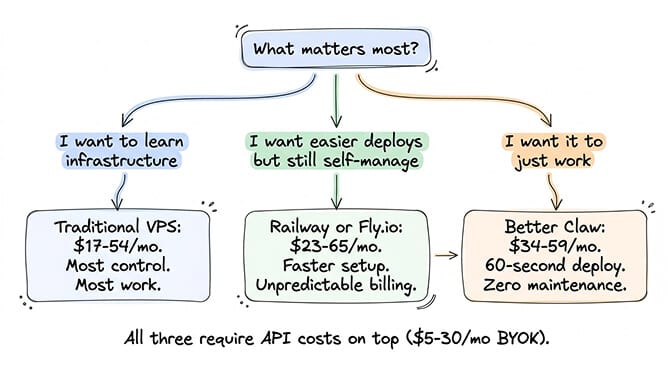
If managing your own infrastructure is a priority (learning, control, cost optimization at scale), BetterClaw's pricing may not be the right fit. Railway and Fly.io give you a middle ground between raw VPS and fully managed, with the trade-off being unpredictable billing and DIY monitoring.
If predictable costs, zero maintenance, and built-in security matter more than infrastructure control, BetterClaw handles the deployment layer so you focus on what the agent does. $49/month for Pro, 60-second deploy, 15+ chat platforms, Docker-sandboxed skill execution. The total cost comparison isn't just about the platform fee — it's about what's included and what you're building yourself.
The real question isn't where to host
The hosting platform matters less than most people think. A well-configured OpenClaw agent on a $12/month VPS outperforms a default-config agent on a $35/month PaaS — model routing, spending caps, a tight SOUL.md, and agent-level monitoring decide your bill more than the platform you picked. For the seven practices that every stable OpenClaw setup shares, our best practices guide covers the patterns that matter more than your hosting choice.
If you've done the configuration work and just want it deployed without thinking about containers, egress charges, or IPv4 fees, give BetterClaw a try. $49/month for Pro, BYOK with 28+ providers. We handle the rest.
Frequently Asked Questions
What does it cost to run OpenClaw on Railway?
On Railway Pro, the realistic total is $28-73/month: $20/seat platform fee with $20 of included usage credit, plus $0-10 in compute overage for a 2GB container 24/7, $1-5 in storage, $2-8 in egress at $0.10/GB, and $5-30 in AI model API costs (BYOK). Railway's usage-based billing means the exact amount varies monthly. Hobby ($5/seat with $5 included) is cheaper on paper but a 24/7 OpenClaw container usually exceeds the Hobby included credit.
How does Fly.io compare to Railway for hosting OpenClaw?
Fly.io is typically $5-20/month cheaper than Railway Pro because it has no platform subscription. A 2GB shared-cpu-2x machine costs ~$13.94/month, plus $2 for IPv4, $1-3 NA/EU egress, and small storage charges. The realistic Fly.io total for OpenClaw is $21-54/month including API costs. Hidden costs to watch: dedicated IPv4 ($2/month), volume snapshots ($0.08/GB-month with first 10GB free since Jan 2026), and steeper egress in non-NA/EU regions. Railway offers a simpler dashboard; Fly.io offers better multi-region deployment if latency matters.
How long does it take to deploy OpenClaw on Railway or Fly.io?
Railway: 1-2 hours for experienced developers, 3-5 hours for first-timers. The dashboard is intuitive but OpenClaw requires specific environment variable configuration, volume mounting for data persistence, and gateway port mapping. Fly.io: 2-3 hours for experienced developers, 4-6 hours for first-timers. The CLI-first workflow has a steeper learning curve. Both are significantly faster than a raw VPS setup (6-8 hours) but slower than managed platforms like BetterClaw (60 seconds).
Is Railway or Fly.io cheaper than a managed OpenClaw platform?
It depends on what you include. Railway Pro lands at $23-43/month platform-only. Fly.io is $16-24/month. BetterClaw is $49/month for Pro. On platform fee alone the PaaS options are cheaper, but neither includes OpenClaw-specific monitoring, security sandboxing for skills, anomaly detection, or multi-channel management, and both cover one deployment where Pro bundles 5 agents. Once you add the value of zero maintenance time (Railway and Fly.io require 1-3 hours/month of DevOps work), the effective cost difference narrows or reverses depending on your hourly rate. If you want to test without paying anything, BetterClaw's free plan runs 1 agent on 100 credits/month.
Is Railway or Fly.io better than a VPS for OpenClaw?
Different trade-offs. A Hetzner CX22 (~$4.59) or DigitalOcean Basic 2GB ($12) is cheaper than either PaaS platform, but you handle Docker, restart policies, log rotation, OS updates, and gateway monitoring yourself. Railway and Fly.io give you git-based deploys, automatic restarts, and managed networking — useful if your time is worth more than the $5-25/month price difference. Use a VPS if you want full control and don't mind 2-4 hours/month of maintenance; use Railway/Fly.io if you'd rather pay a small premium to avoid the operational work.
Is Railway or Fly.io secure enough for running OpenClaw?
Both platforms provide container isolation and encrypted environment variables. However, neither offers Docker-within-Docker sandboxing for OpenClaw skills, which means a compromised skill (Bitdefender's audit found 824+ malicious skills on ClawHub, roughly 20% of the active registry at the time) has access to your full container environment, including API keys stored as environment variables. For production agents handling sensitive data or customer conversations, add your own security layers (gateway authentication, skill vetting, spending caps) or use a platform that includes OpenClaw-specific security features like sandboxed skill execution and workspace scoping.