We've seen hundreds of OpenClaw deployments. The ones that survive past week two all share these patterns.
Three weeks ago, someone posted in our Discord: "My OpenClaw agent has been running perfectly for 47 days straight. No crashes. No surprise bills. No weird behavior. AMA."
The thread got 200+ replies. Not because a stable OpenClaw setup is impossible. But because it's rare enough to be noteworthy.
Most OpenClaw agents die in the first two weeks. They rack up unexpected API bills. They respond with hallucinated garbage after a memory overflow. They get compromised by a malicious skill the user installed without vetting. They break after an update because the config wasn't version-controlled.
We've watched hundreds of deployments through BetterClaw. We've helped debug dozens of self-hosted setups through our community. The OpenClaw best practices that separate stable agents from abandoned experiments are surprisingly consistent.
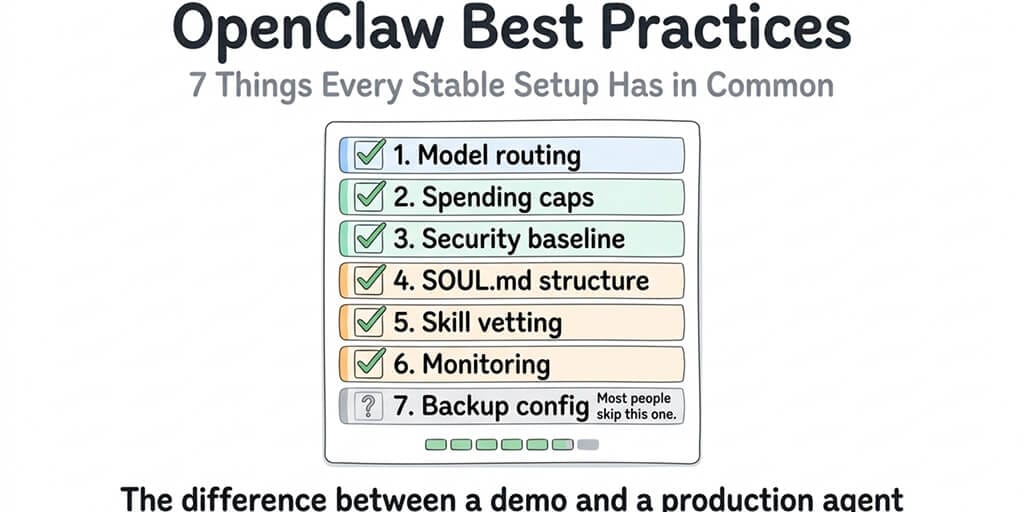
Here are the seven patterns every long-running setup shares.
Best practice 1: Model routing, not model loyalty
The single biggest predictor of whether an OpenClaw setup survives past month one is how the user configures their model provider.
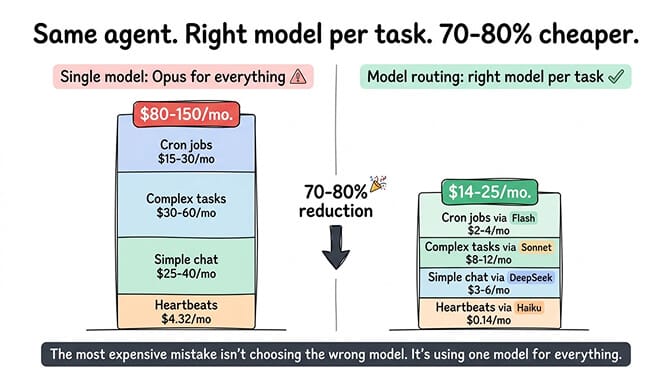
The setups that fail fast use one model for everything. Usually Claude Opus or GPT-4o. The agent works beautifully for a week. Then the API bill arrives and the user either panics or abandons the project entirely. The viral Medium post "I Spent $178 on AI Agents in a Week" exists because someone ran Opus on every task, including the 48 daily heartbeat checks that could have used a model 100x cheaper.
Stable setups route different tasks to different models. Heartbeats go to Haiku ($1/$5 per million tokens) or DeepSeek ($0.28/$0.42 per million tokens). Simple conversational responses go to Sonnet or Gemini Flash. Complex multi-step reasoning goes to Opus or GPT-4o. Each task hits the cheapest model that can handle it.
The math still adds up. Running everything on Opus ($5/$25 per million tokens) costs roughly $30-50/month in API fees for a moderately active agent. The same agent with proper routing costs $14-25/month. Same results. About half the money.
For the full routing configuration and cost-per-task data across providers, our model routing guide covers the specific savings for seven common agent tasks.
The most expensive OpenClaw mistake isn't choosing the wrong model. It's using one model for everything.
Best practice 2: Spending caps on every provider
Every stable OpenClaw setup has hard spending limits on every API provider account. Every one.
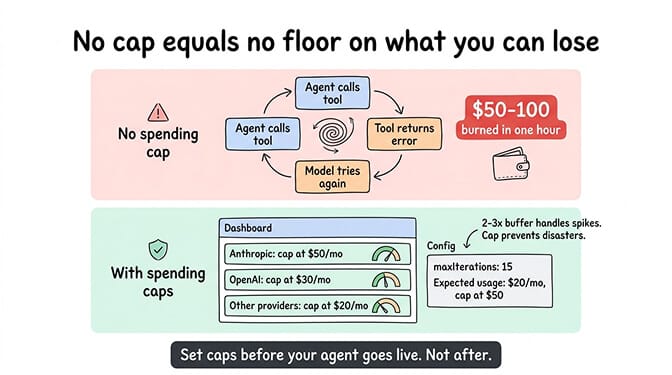
This isn't optional. OpenClaw agents can enter runaway loops where the model calls a tool, the tool returns an error, the model tries again, the tool errors again, and the cycle repeats until your spending cap stops it or your wallet runs dry. Without caps, a single bug in a skill or a misconfigured cron job can burn through $50-100 in API credits in an hour.
Set monthly spending caps on your Anthropic, OpenAI, and any other provider dashboards. Set them below what you'd be comfortable losing in a worst case. Most stable setups cap at 2-3x their expected monthly usage. If you expect $20/month in API costs, set the cap at $50. The buffer handles usage spikes. The cap prevents disasters.
Also set the maxIterations parameter in your OpenClaw config. This limits how many sequential tool calls the agent can make in a single response. Most stable setups use 10-15. Without this, a confused model can chain 50+ tool calls in a single turn, each one costing tokens.
For the detailed breakdown of how to cut your OpenClaw API bill, our cost optimization guide covers five specific changes that reduced one setup from $115/month to under $15/month.
Best practice 3: A structured SOUL.md (not "be helpful")
The SOUL.md file is your agent's personality and behavior definition. It's the most important file in any OpenClaw deployment, and the one most people write poorly.
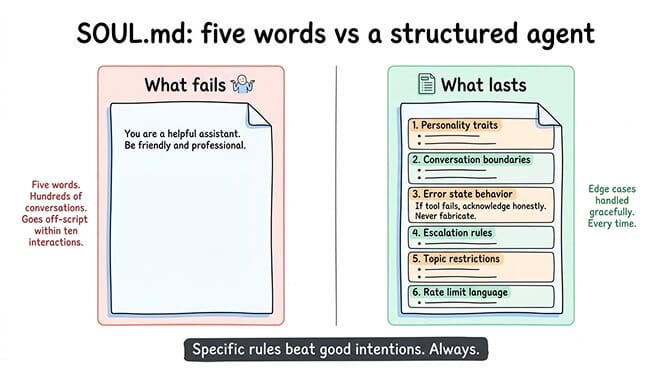
Here's what we see in setups that fail: a SOUL.md that says something like "You are a helpful assistant. Be friendly and professional." That's it. Five words of behavioral guidance for an autonomous agent that will handle hundreds of conversations.
Here's what we see in setups that last: a structured SOUL.md with distinct sections for personality traits, conversation boundaries, error handling behavior, escalation rules, topic restrictions, and response format preferences.
The specific sections that matter most:
Error state behavior. What does your agent say when a tool fails? Without this, it either hallucinates a response or tells the user something cryptic. Good SOUL.md files include explicit instructions: "If a tool call fails, acknowledge the failure honestly and suggest the user try again in a few minutes. Never fabricate results."
Conversation boundaries. When should the agent stop trying to help and suggest the user contact a human? Without boundaries, agents spiral into increasingly unhelpful responses trying to solve problems outside their capability.
Rate limit language. How does the agent communicate when it's pausing between responses or approaching usage limits? Without this, users experience awkward silences with no explanation.
Topic restrictions. What subjects should the agent refuse to engage with? This is critical for any agent that's customer-facing. You need explicit rules about what the agent won't discuss, not just what it will.
The difference between a five-word SOUL.md and a structured one shows up within the first ten conversations. Agents with specific rules handle edge cases gracefully. Agents without them go off-script fast.
Best practice 4: Security that isn't an afterthought
Every stable long-term OpenClaw setup has a security baseline. This isn't paranoia. It's math.
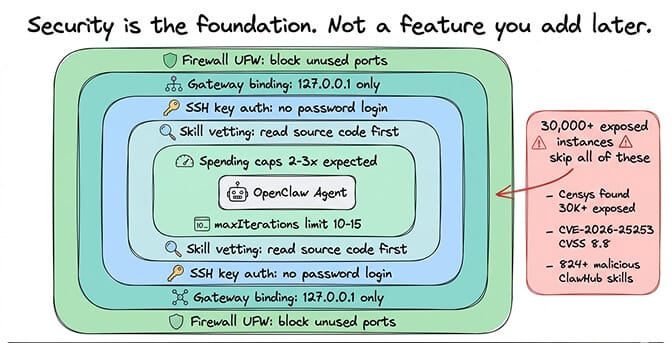
The numbers are sobering: 30,000+ OpenClaw instances found exposed on the internet without authentication (discovered by Censys, Bitsight, and Hunt.io). CVE-2026-25253, a one-click remote code execution vulnerability scored at CVSS 8.8, was patched in January but plenty of instances still run older versions. The ClawHavoc campaign found 824+ malicious skills on ClawHub, roughly 20% of the registry. CrowdStrike published an entire advisory about OpenClaw enterprise risks.
The OpenClaw best practices for security that every stable setup follows:
Gateway bound to 127.0.0.1, not 0.0.0.0. This prevents your agent's API from being accessible to anyone on the internet. It's the most common misconfiguration.
SSH key authentication instead of password auth. If you're self-hosting, disable password login. Period.
UFW firewall configured to allow only the ports you need. Block everything else.
Skills vetted before installation. Never install a ClawHub skill without reading the source code, checking the publisher's history, and testing in a sandboxed workspace first. For the full skill vetting process and security checklist, our security guide covers each step.
Regular updates. OpenClaw releases patches multiple times per week. Three CVEs dropped in a single week in early 2026. Staying current isn't optional.
The OpenClaw maintainer Shadow said it directly: "If you can't understand how to run a command line, this is far too dangerous of a project for you to use safely." Security isn't a feature you add later. It's the foundation.
Best practice 5: One channel first, then expand
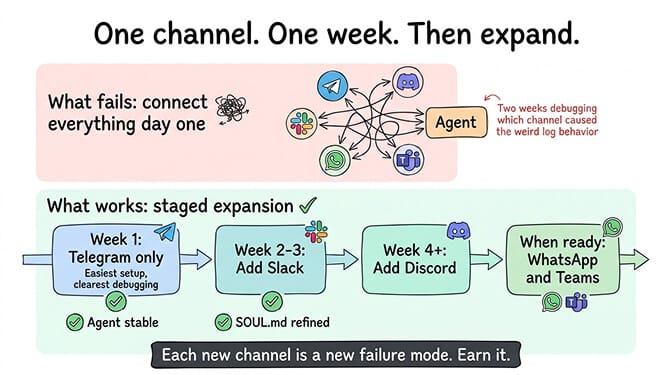
The temptation with OpenClaw is to connect every platform immediately. Telegram, Slack, Discord, WhatsApp, Teams. All at once. The framework supports 15+ channels, so why not?
Because each channel has different message formatting, different rate limits, different user expectations, and different failure modes. Debugging an agent that's misbehaving on five channels simultaneously is five times harder than debugging one channel.
Every stable setup starts with a single channel. Usually Telegram (it's the easiest to set up and test). Run the agent on one channel for at least a week. Refine the SOUL.md based on real conversations. Identify and fix the edge cases that only appear with actual usage. Once the agent is reliably handling that single channel, add the next one.
The setups that connect five channels on day one usually spend the next two weeks trying to figure out which channel is causing the weird behavior they're seeing in the logs.
For guidance on how OpenClaw's multi-channel architecture works and what each platform requires, our explainer covers the connection details.
Best practice 6: Monitoring that tells you before users do
Here's what nobody tells you about running an OpenClaw agent: it will fail silently.
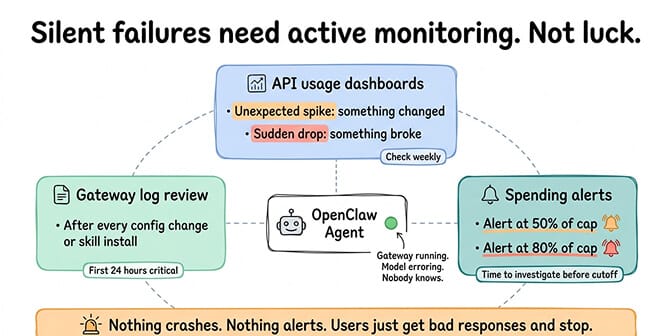
The gateway stays running. The process shows as alive. But the model provider returns errors. Or the agent gets stuck in a loop. Or memory fills up and responses start degrading. Nothing crashes. Nothing alerts you. Users just get bad responses and stop using the agent.
Stable setups have monitoring at three levels.
API usage dashboards checked weekly. Every provider has one. Unexpected spikes mean something changed. Sudden drops mean something broke. Both need investigation.
Gateway logs reviewed after changes. After installing a new skill, updating OpenClaw, or modifying the config, check the logs for the next 24 hours. Most problems show up within the first few hours of a change.
Spending alerts set at 50% and 80% of caps. If your cap is $50/month, get notified at $25 and $40. This gives you time to investigate before the cap triggers and the agent stops responding entirely.
The difference between a setup that runs for months and one that runs for weeks is almost always monitoring. Not the complexity of the monitoring. Just the existence of it.
If building and maintaining your own monitoring stack sounds like more infrastructure work than you signed up for, BetterClaw includes real-time health monitoring with auto-pause on anomalies and spending alerts built in. $49/month for Pro, BYOK. The monitoring is part of the platform because we learned the hard way that agents without monitoring are agents waiting to fail.
Best practice 7: Version control your config
This sounds obvious. It isn't practiced often enough.
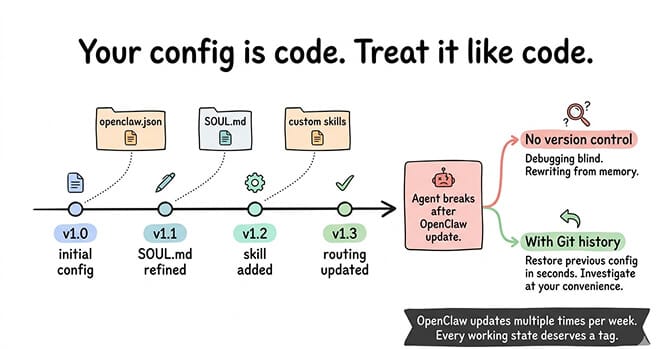
Your openclaw.json, SOUL.md, and any custom skills should be in a Git repository. Every change should be a commit. Every working state should be tagged.
The reason is simple: OpenClaw updates multiple times per week. Some updates change config behavior. If your agent breaks after an update and you don't have the previous config version, you're debugging blind. If you have the previous version, you restore it in seconds and investigate the breaking change at your convenience.
The same applies to SOUL.md changes. Personality tweaks that seem minor can cause dramatic behavior shifts. If you can't revert to the previous version, you're rewriting from memory.
Stable setups treat their OpenClaw config like code. Because it is code. It defines the behavior of an autonomous system. Treating it as a casual text file you edit on the fly is how agents develop mysterious behavior that nobody can trace.
The pattern underneath the patterns
Here's what all seven of these OpenClaw best practices share: they're about treating your agent as production software, not a toy.
The community is split right now. There are people experimenting with OpenClaw as a cool weekend project, and there are people running it as genuine infrastructure for their business or team. The first group tries things, breaks things, and moves on. The second group builds carefully, monitors constantly, and plans for failure.
Both are valid. But if you want an agent that's still running in three months, you need the second mindset. Model routing because costs compound. Spending caps because runaway loops are real. Security baseline because 30,000+ exposed instances prove most people skip it. Structured SOUL.md because "be helpful" isn't a behavior specification. Skill vetting because 20% of ClawHub was compromised. Monitoring because silent failures kill trust. Version control because you will need to roll back.
None of this is hard individually. The challenge is doing all seven consistently. The agents that survive do.
If you want a setup where most of these best practices are handled for you (model routing support, spending monitoring, Docker-sandboxed security, skill vetting, anomaly detection, auto-pause), give BetterClaw a try. $49/month for Pro, BYOK with 28+ providers. 60-second deploy. We built it because we got tired of maintaining the infrastructure around the agent instead of building what the agent actually does.
Frequently Asked Questions
What are the most important OpenClaw best practices?
The seven practices that every stable, long-running OpenClaw setup shares: model routing (using different models for different task types to cut costs 70-80%), spending caps on every API provider, a structured SOUL.md with specific behavioral sections, a security baseline (gateway binding, firewall, SSH keys, skill vetting), starting with one chat channel before expanding, active monitoring of API usage and gateway logs, and version-controlling your configuration files.
How do OpenClaw best practices compare to other AI agent frameworks?
Most OpenClaw best practices apply broadly to any autonomous agent system, but OpenClaw has specific considerations because of its open-source skill marketplace (ClawHub had 824+ malicious skills), its multi-model architecture (28+ providers make routing decisions critical), and its exposure surface (30,000+ instances found without authentication). Frameworks with closed ecosystems have fewer skill security concerns but also less flexibility.
How long does it take to implement OpenClaw best practices on a new setup?
For a self-hosted deployment, implementing all seven practices takes 4-8 hours on top of the initial installation. Model routing configuration takes 15-30 minutes. Spending caps take 10 minutes per provider. Writing a structured SOUL.md takes 30-60 minutes. Security baseline takes 1-2 hours. The monitoring and version control setup adds another 1-2 hours. On a managed platform like BetterClaw, most of these are preconfigured, reducing the setup to under an hour.
Is following OpenClaw best practices worth the extra setup time?
Absolutely. The average self-hosted OpenClaw agent without best practices lasts about two weeks before encountering a critical issue (runaway API costs, security compromise, or mysterious behavior degradation). Agents following these practices run for months without intervention. The 4-8 hours of upfront investment prevents the 10-20 hours of debugging, damage control, and rebuilding that poorly configured agents inevitably require.
Are OpenClaw agents secure enough for business use with proper best practices?
With proper best practices, yes. Without them, definitively no. The security baseline (gateway binding, firewall, SSH keys, skill vetting, regular updates) addresses the most common attack vectors. CrowdStrike's advisory focuses on unprotected deployments, not properly secured ones. For business use, consider adding Docker-sandboxed execution for skills, encrypted credential storage, and workspace scoping. Self-hosting requires you to implement all of this. Managed platforms like BetterClaw include these protections by default.