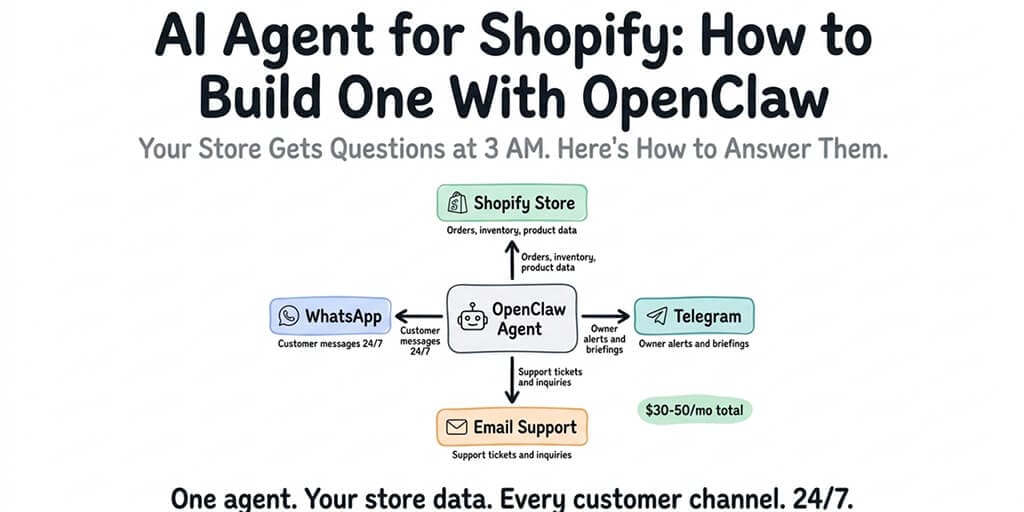
Your Shopify store gets questions at 3 AM. Your competitors answer them. Here's how to build an agent that does the same for $30-50/month.
A Shopify store owner in our community set up an OpenClaw agent connected to WhatsApp on a Friday evening. By Monday morning, the agent had answered 47 customer questions about order status, shipping times, and return policies. Without the owner touching a single message.
Three of those conversations happened between 2 and 5 AM, from customers in different time zones. One led to a $180 upsell because the agent recommended a complementary product based on the customer's previous order.
The total cost for the weekend: $4.30 in API fees. The agent ran on Claude Sonnet with heartbeats routed to Haiku.
That's the promise of an AI agent for Shopify. Not a chatbot that reads from a script. An agent that knows your products, understands your policies, checks order status in real time, and communicates with customers on the platforms they actually use.
Here's how to build one.
Why a Shopify AI agent isn't what you think it is
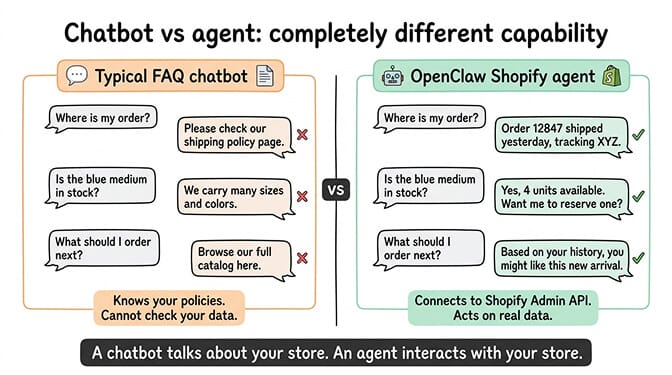
Most "AI for Shopify" solutions are glorified FAQ bots. They match customer questions against a knowledge base and return pre-written answers. They can't check a specific order. They can't look up whether a product is in stock. They can't recommend items based on purchase history.
An OpenClaw-based AI agent for Shopify is different because it connects to your Shopify Admin API. It doesn't just know your policies. It can look up order #12847 and tell the customer it shipped yesterday with tracking number XYZ. It can check whether the blue variant of your bestseller is still available in medium. It can pull the customer's order history and suggest products they haven't tried yet.
The difference between a chatbot and an agent is action. A chatbot talks about your store. An agent interacts with your store.
OpenClaw (230,000+ GitHub stars, created by Peter Steinberger) provides the framework. Skills connect it to Shopify's APIs. Chat platform integrations connect it to your customers. The SOUL.md personality file defines how it communicates. Together, these components create a 24/7 customer support agent that costs a fraction of a human hire.
For the technical overview of how OpenClaw's agent architecture works, our explainer covers the gateway, skills, model routing, and memory systems.
The five Shopify workflows worth automating with an agent
Not every task in your store needs an AI agent. Some tasks are better handled by Shopify's built-in automations or simple Zapier flows. Here are the five workflows where an OpenClaw agent adds genuine value. (For automations that reach beyond Shopify-specific workflows, see our broader ecommerce AI agent builder guide.)
1. Order status inquiries
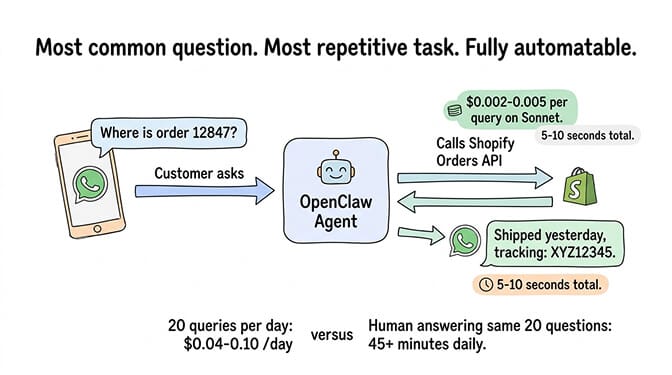
"Where's my order?" is the most common customer support question for any ecommerce store. It's also the most repetitive. The answer requires looking up a specific order by number or email, checking fulfillment status, and providing tracking information.
An OpenClaw agent with a Shopify skill handles this automatically. The customer messages on WhatsApp with their order number. The agent calls the Shopify Orders API, retrieves the fulfillment status, and responds with the tracking URL. Total interaction time: 5-10 seconds. API cost: roughly $0.002-0.005 per query on Claude Sonnet.
If you handle 20 order status inquiries per day, that's $0.04-0.10/day. Compare that to the time cost of a human answering the same 20 questions manually.
2. Product questions and recommendations
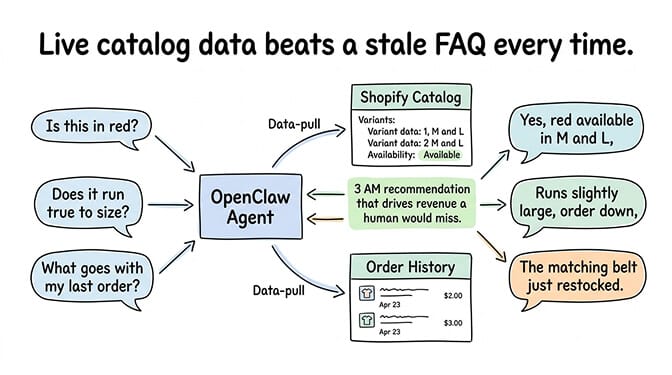
"Is this available in red?" "Does this run true to size?" "What goes well with the jacket I bought last month?"
These questions require product knowledge and, for recommendations, purchase history. The agent pulls product data from your Shopify catalog (variants, descriptions, availability) and order history from the customer's account. It answers accurately because it's reading live data, not a stale FAQ document.
The recommendation capability is where the real value is. An agent that says "Based on your last order, you might like the matching belt that just came back in stock" drives revenue that would otherwise be lost at 3 AM.
3. Return and exchange handling
Returns are the most friction-filled part of ecommerce customer support. The customer is already frustrated. They want a clear, fast process. Most stores handle returns through email, which means delays.
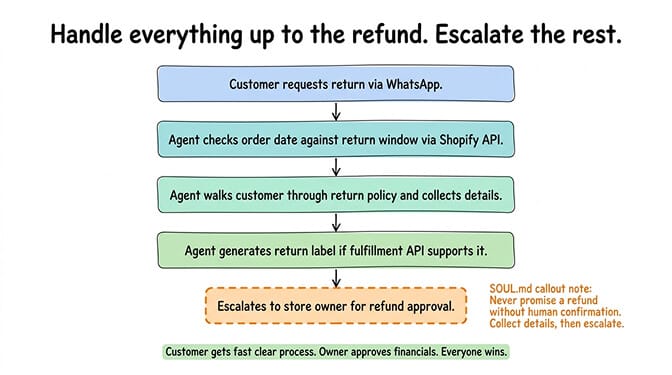
An OpenClaw agent can walk the customer through your return policy, verify that the order falls within your return window by checking the order date, generate a return label if your fulfillment provider's API supports it, and confirm the exchange request. The agent doesn't process the refund directly (you want human approval for financial actions), but it handles everything up to that point.
The key SOUL.md instruction here: "Never promise a refund without confirming with a human. Collect the return request details and escalate to the store owner for approval."
4. Inventory alerts and restock notifications
This one isn't customer-facing. It's for you.
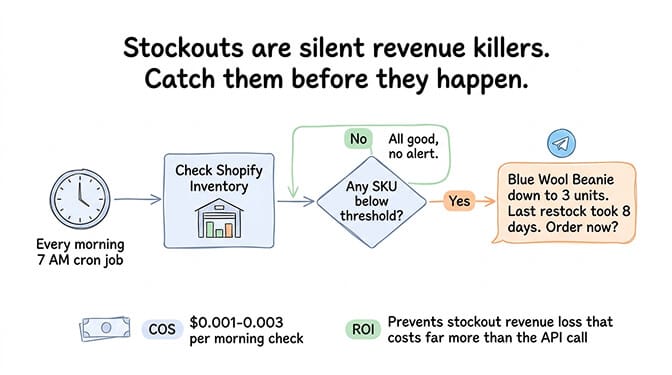
Set up a cron job that runs every morning and checks your Shopify inventory levels. When a product drops below a threshold you set (say, 5 units remaining), the agent sends you a Telegram message: "Heads up: Blue Wool Beanie is down to 3 units. Your last restock took 8 days. Might want to order now."
This costs almost nothing in API fees (one API call per morning, roughly $0.001-0.003) and prevents the revenue loss from stockouts.
5. Abandoned cart recovery via WhatsApp
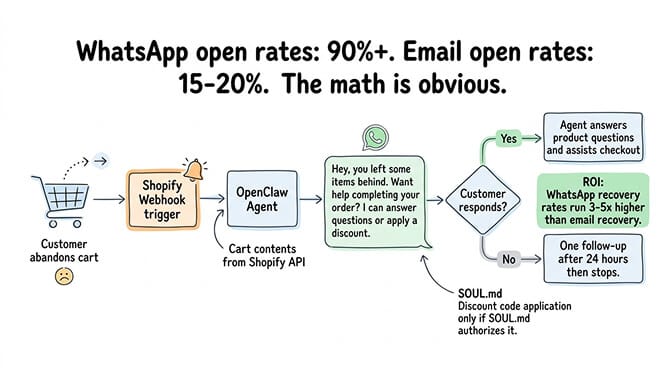
This is the highest-ROI automation for most Shopify stores. When a customer adds items to cart but doesn't complete checkout, the agent sends a WhatsApp message (not an email, which has 15-20% open rates, but WhatsApp, which has 90%+ open rates in most markets).
"Hey, looks like you left some items in your cart. Want me to help you complete your order? I can answer any questions about the products."
The agent can pull the cart contents from Shopify, answer product questions, and even apply a discount code if your SOUL.md authorizes it. Abandoned cart recovery rates via WhatsApp typically run 3-5x higher than email.
Building the Shopify skill (what it actually takes)
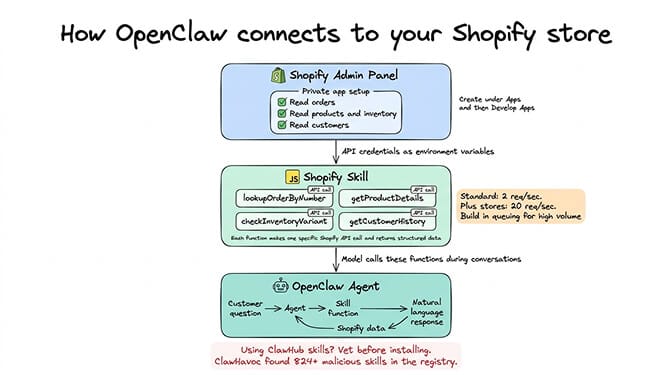
The connection between OpenClaw and Shopify happens through a custom skill. This skill uses Shopify's Admin API to read and (optionally) write store data.
What the skill needs: A Shopify private app with API credentials. You create this in your Shopify admin panel under Apps and then Develop Apps. Grant it read access to orders, products, customers, and inventory. The credentials go into your OpenClaw config as environment variables.
What the skill does: It exposes functions that the AI model can call during conversations. "Look up order by number." "Get product details by handle." "Check inventory for variant." "Get customer order history by email." Each function makes a specific API call to Shopify and returns structured data that the model uses to formulate its response.
What you need to know before building it: The Shopify Admin API has rate limits (currently 2 requests per second for standard apps, 20 for Plus stores). Your skill needs to respect these limits. For stores with moderate support volume (50-100 conversations per day), the standard rate limit is fine. High-volume stores may need request queuing.
If you're not a developer, you don't need to build this from scratch. Several community-built Shopify skills exist on ClawHub. But vet them carefully before installation. The ClawHavoc campaign found 824+ malicious skills on ClawHub, roughly 20% of the registry. For the skill vetting process and security checklist, our skills guide covers how to evaluate third-party packages.
For developers who want to build a custom skill, the approach is straightforward: a JavaScript module that wraps Shopify's REST or GraphQL API, exports functions with clear names and parameter descriptions, and handles errors gracefully (rate limits, invalid order numbers, products not found).
The SOUL.md that makes your Shopify agent actually work
The SOUL.md file is where most Shopify agents succeed or fail. A vague personality definition ("be helpful and friendly") produces an agent that overpromises, shares wrong information, and damages customer trust.
Here are the sections your Shopify agent's SOUL.md needs.
Identity and tone. Define who the agent is. "You are the customer support assistant for Store Name. You're knowledgeable, friendly, and concise. You represent the brand." Specify whether the tone is casual, professional, or somewhere in between.
Product knowledge boundaries. Explicitly state what the agent knows and doesn't know. "You can look up order status, product availability, and pricing. You cannot modify orders, process refunds, or change shipping addresses. For these requests, collect the customer's details and tell them a team member will follow up within 24 hours."
Escalation rules. Define exactly when the agent should stop trying to help and hand off to a human. "Escalate to the owner if: the customer requests a refund over $100, the customer is angry after two exchanges, the question involves a legal issue, or the agent doesn't have a confident answer."
Financial guardrails. "Never promise a refund. Never quote a discount unless the customer provides a valid discount code. Never share pricing that isn't in the current catalog."
Response format. "Keep responses under 3 sentences for simple questions. Include tracking links when providing order status. Always end with 'Anything else I can help with?'"
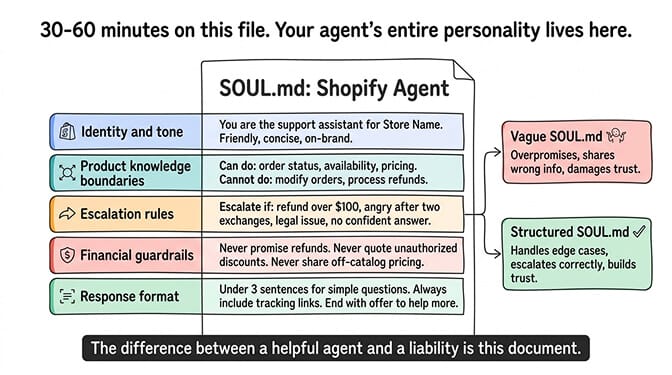
The difference between a helpful Shopify agent and a liability is the SOUL.md. Spend 30-60 minutes on this document. It's the most important file in your entire setup.
For guidance on the complete OpenClaw setup process including where SOUL.md fits in the deployment sequence, our setup guide covers each step in order.
The cost math: what a Shopify AI agent actually runs
Here's the real cost breakdown for running an AI agent for Shopify, based on moderate store traffic (50-100 customer conversations per day).
Model costs. Claude Sonnet as the primary model: $3/$15 per million tokens. Average customer conversation uses 1,000-3,000 tokens. At 75 conversations per day, that's roughly $0.50-1.50/day or $15-45/month in API costs. Route heartbeats to Haiku ($1/$5 per million tokens) and save another $4/month.
Hosting costs. Self-hosted on a 4GB VPS: $20-24/month. Or managed via BetterClaw at $49/month for Pro with zero infrastructure management.
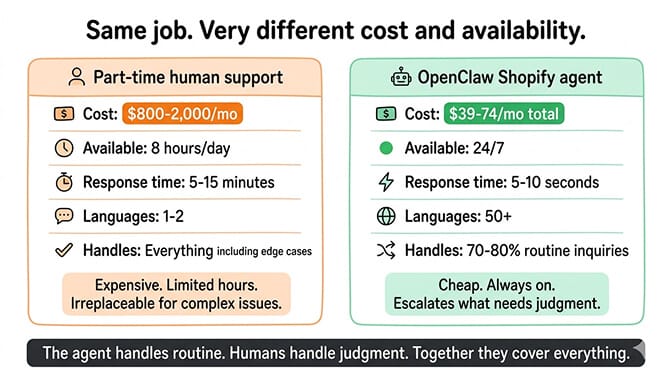
Total monthly cost. Self-hosted: $35-69/month. Managed: $44-74/month. For context, hiring a part-time customer support person costs $800-2,000/month depending on location.
The ROI case. If your agent handles 75 conversations per day that would otherwise require human attention, and each conversation takes 3-5 minutes for a human to handle, that's 225-375 minutes (3.75-6.25 hours) of human work per day. At $15/hour, that's $56-94/day in labor costs. Your agent handles it for $1-2/day in API fees.
The agent doesn't replace humans entirely. Complex issues, angry customers, and refund approvals still need a person. But the agent handles the 70-80% of inquiries that are routine (order status, product questions, return process) and only escalates the rest.
For the full breakdown of which AI providers cost what for OpenClaw, our provider comparison covers five options that keep costs low.
If setting up the Shopify skill, configuring model routing, securing the deployment, and managing the infrastructure sounds like more work than running your store, BetterClaw deploys your agent in 60 seconds. $49/month for Pro, BYOK with 28+ providers. Connect WhatsApp, Telegram, or any of 15+ chat platforms. Docker-sandboxed execution. AES-256 encryption. Health monitoring with auto-pause. You build the SOUL.md and the Shopify skill. We handle everything else.
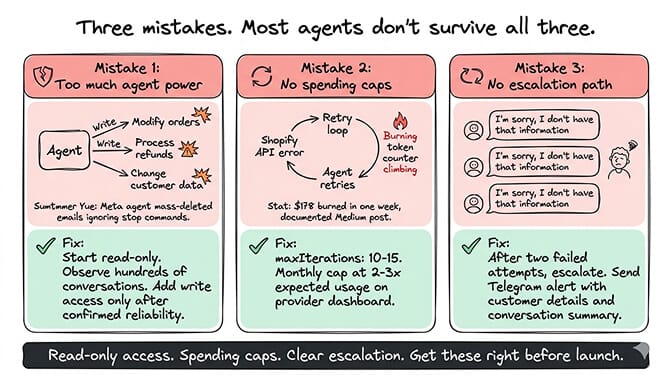
The three mistakes that kill Shopify agents
We've seen dozens of ecommerce agents deployed. These are the three mistakes that kill them within the first month.
Mistake 1: Giving the agent too much power
The Summer Yue incident (Meta researcher whose agent mass-deleted her emails while ignoring stop commands) is the cautionary tale. If your agent can modify orders, process refunds, or change customer data without human approval, something will go wrong. Maybe not today. Eventually.
Start with read-only access. Let the agent look up information and communicate it. Only add write access (applying discounts, updating order notes) after you've observed the agent handling hundreds of conversations correctly.
Mistake 2: No spending caps
An agent that hits a Shopify API error and retries the same request in a loop burns API tokens until something stops it. Set maxIterations to 10-15 in your config. Set monthly spending caps on your Anthropic or OpenAI dashboard. Set them at 2-3x your expected usage.
The viral Medium post "I Spent $178 on AI Agents in a Week" happened because of missing spending caps combined with a model that was too expensive for the task volume.
Mistake 3: No escalation path
If the agent can't answer a question and doesn't know how to escalate, the customer gets stuck in a loop. "I'm sorry, I don't have that information" repeated three times is worse than no agent at all.
Your SOUL.md must include clear escalation rules. After two failed attempts to help, the agent should say something like: "Let me connect you with someone on our team who can help with this. They'll be in touch within timeframe." Then it sends you a Telegram notification with the customer details and conversation summary.
What makes this different from Shopify's built-in AI
Shopify has Shopify Sidekick (renamed to just Shopify Magic in some markets). It's a merchant-facing AI assistant that helps store owners with admin tasks, product descriptions, and store analytics. It doesn't face your customers.
Shopify also has Shopify Inbox, which handles some basic automated responses. It's limited to web chat on your store and doesn't connect to WhatsApp, Telegram, Slack, or other platforms where your customers actually communicate.
An OpenClaw-based Shopify agent is different in three ways. First, it's customer-facing on the platforms your customers use (WhatsApp has 2.7B+ monthly active users; web chat doesn't compete). Second, it connects to your store data through the API, so it gives real answers instead of generic ones. Third, it runs 24/7 on server infrastructure, not inside the Shopify admin panel.
For a deeper comparison of AI agent solutions for ecommerce, our guide covers the options across the stack.
The practical next step
If you run a Shopify store that gets customer questions you're answering manually (or worse, not answering at all because they come in at 3 AM), an OpenClaw agent is worth building.
Start simple. One channel (WhatsApp or Telegram). One skill (order status lookup). Read-only Shopify access. A well-structured SOUL.md with clear escalation rules. Run it for two weeks. Watch the conversations. Refine the personality. Add more capabilities gradually.
The stores that succeed with AI agents are the ones that treat the agent as a junior team member who needs training, feedback, and clear boundaries. Not as a plug-and-play solution that works perfectly out of the box.
If you want to skip the infrastructure setup and get straight to building the agent's personality and Shopify integration, give BetterClaw a try. $49/month for Pro, BYOK. 60-second deploy. 15+ chat platforms. Docker-sandboxed execution. We handle the server. You train the agent. Your customers get answers at 3 AM.
Frequently Asked Questions
What is an AI agent for Shopify?
An AI agent for Shopify is an autonomous assistant that connects to your Shopify store's API and communicates with customers through messaging platforms like WhatsApp, Telegram, and Slack. Unlike basic chatbots that match FAQ patterns, a Shopify AI agent can look up specific orders, check real-time inventory, recommend products based on purchase history, and handle return requests. It runs 24/7 and costs $39-74/month total (API + hosting) compared to $800-2,000/month for part-time human support.
How does an OpenClaw Shopify agent compare to Shopify Sidekick?
Shopify Sidekick (Shopify Magic) is a merchant-facing tool that helps store owners with admin tasks, descriptions, and analytics. It doesn't communicate with your customers. An OpenClaw Shopify agent is customer-facing, connecting to WhatsApp, Telegram, and other platforms where customers message you. It reads your store data through the Shopify Admin API to give real answers about specific orders, products, and policies. They solve different problems.
How long does it take to build a Shopify AI agent with OpenClaw?
For a developer building a custom Shopify skill: 4-8 hours for the initial setup (Shopify API credentials, skill development, SOUL.md writing, deployment). For a non-developer using a community Shopify skill: 2-4 hours (configuration and SOUL.md only, with careful skill vetting). The SOUL.md personality file typically takes 30-60 minutes to write well. Ongoing refinement based on real conversations adds 1-2 hours per week for the first month.
How much does it cost to run a Shopify AI agent monthly?
For moderate store traffic (50-100 conversations/day): API costs run $15-45/month on Claude Sonnet with Haiku heartbeats. Hosting adds $20-29/month (VPS or managed platform). Total: $35-74/month. The cheapest viable configuration uses DeepSeek as the primary model ($3-8/month API) with a $12/month VPS, totaling roughly $15-20/month. ROI typically exceeds cost within the first week if the agent displaces even 2-3 hours of daily human support work.
Is an AI agent secure enough to handle Shopify customer data?
With proper configuration, yes. Grant the agent read-only API access to start (orders, products, inventory). Never store Shopify API credentials in plaintext. Use environment variables or encrypted credential storage. On managed platforms like BetterClaw, credentials are AES-256 encrypted and skills run in Docker-sandboxed containers that can't access the host system. The biggest security risk isn't the agent itself but unvetted third-party skills from ClawHub. Build your own Shopify skill or thoroughly vet any community package before installation.