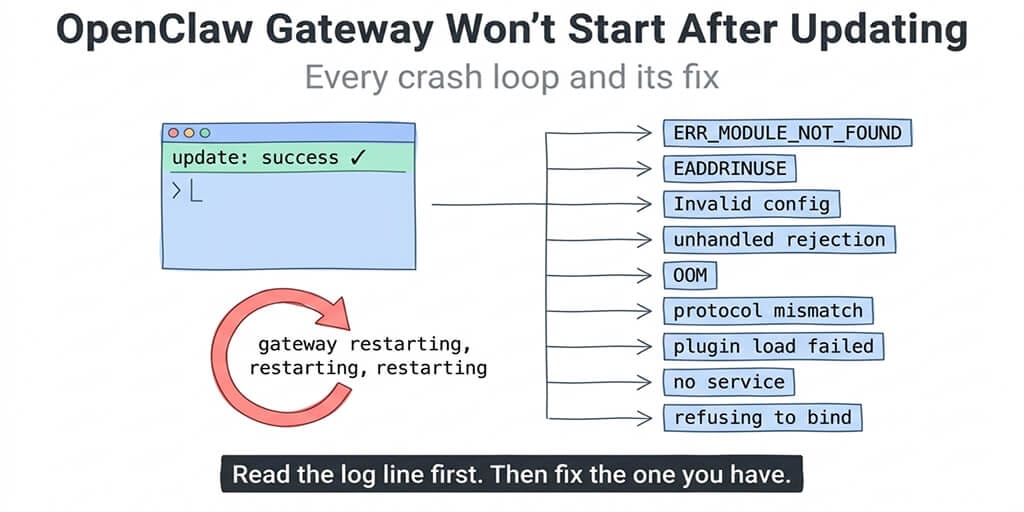
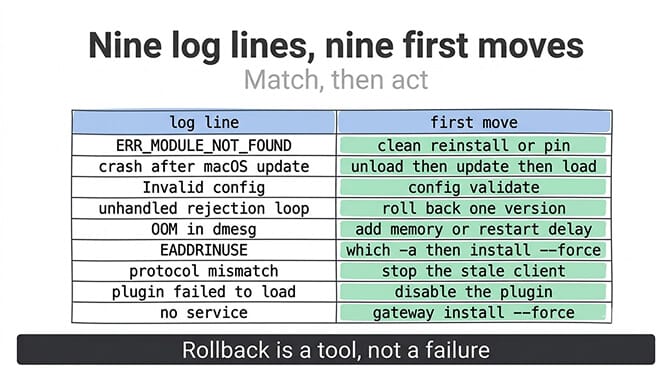
The update said it succeeded. The Gateway says otherwise. Here are the ten failures people actually hit after an OpenClaw update, matched to the exact log line each one prints, with the fix and the rollback for each.
openclaw update finishes. It prints a version number. You go to send a message and nothing answers. openclaw gateway status says stopped, or says running with the port closed, or the log is a wall of the same three lines every sixteen seconds because launchd keeps restarting a process that keeps dying.
This happens often enough that the project's own troubleshooting runbook has a section titled "After an update." What that runbook doesn't do is walk you through each distinct failure with the log signature that identifies it. That's this post. Find your log line, jump to its section, skip the rest.
The first sixty seconds, in order
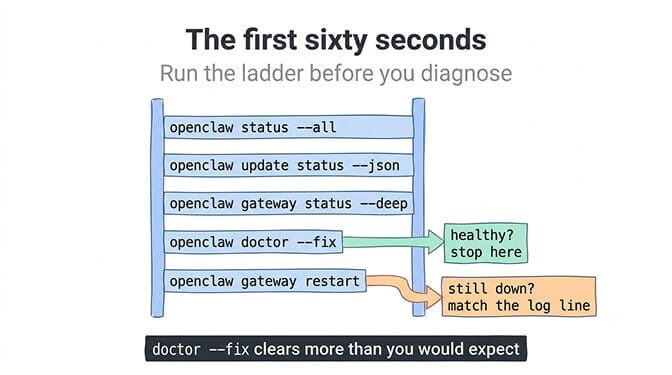
Before diagnosing anything, run the official command ladder. It fixes a surprising share of post-update breakage on its own and surfaces the log line you need for the rest.
openclaw status --all
openclaw update status --json
openclaw gateway status --deep
openclaw doctor --fix
openclaw gateway restart
Then read the logs. openclaw logs --follow is the preferred path. If the Gateway won't stay up long enough to serve logs, go to the files: /tmp/openclaw/openclaw-YYYY-MM-DD.log by default, ~/.openclaw/logs/gateway.err.log on a macOS LaunchAgent install, or journalctl --user -u openclaw-gateway.service -n 200 --no-pager on Linux systemd.
If the Gateway is healthy after doctor --fix and a restart, you're done. If not, match the log to one of the ten below. If you are on 2026.9.4, read section 10 first, because on that release doctor --fix itself can be the thing that fails.
An update that prints "success" has only proven that npm finished. Whether the files on disk are complete, the config still validates, and the service came back up are three separate questions. If openclaw update status reports "Update failure: reconcile:abandoned", see the reconcile:abandoned decoder.
1. ERR_MODULE_NOT_FOUND pointing at a file in dist/
The log: Cannot find module '.../node_modules/openclaw/dist/<something>.js'
What happened: the install is incomplete. The clearest documented case was the 2026.4.24 npm release, where a postinstall step timed out (spawnSync /usr/bin/node ETIMEDOUT in the install output) and silently pruned 1,617 of the package's 4,116 dist files on Linux. The update reported success. The Gateway then failed on every start because the modules it imported no longer existed, and plugin runtime directories held symlinks pointing at nothing.
The fix: don't try to repair the tree. Reinstall cleanly, and if the current version is the problem, pin the last known good one.
openclaw gateway stop
npm install -g openclaw@<previous-version>
openclaw doctor --fix
openclaw gateway restart
Verify with ls node_modules/openclaw/dist | wc -l before and after if you want to see the difference. If reinstalling the current version keeps losing files, the postinstall is timing out on your machine; a slow disk or a starved container will do it. Pin, wait for the next release, and read the how to update OpenClaw guide's section on staged updates before trying again.
2. The update ran while the Gateway was still running (macOS)
The log: varies, but the shape is "crash immediately after openclaw update," often with module or JSON parse errors on files that look fine a minute later.
What happened: on macOS, openclaw update has historically run npm's file replacement while the LaunchAgent still had the old process holding those files open. npm can't cleanly overwrite files a live Node process has mapped, launchctl kickstart -k then restarts against a half-written tree, and you get a Gateway that dies on boot. Issue #66390 documents it as consistent across versions.
The fix: stop the service yourself before updating, then start it yourself after.
launchctl unload ~/Library/LaunchAgents/ai.openclaw.gateway.plist
openclaw update --no-restart
launchctl load ~/Library/LaunchAgents/ai.openclaw.gateway.plist
The September 2026.9.2 release improved this path (Gateway restarts after Git updates are restored, and chat-triggered updates now report success, failure, or skip with recovery guidance), but stop-then-update remains the safe habit on any supervised install.
3. Invalid config, Unrecognized key, or config validation failed
The log: Gateway rejected invalid config on startup, or hot-reload logs saying it skipped an invalid edit.
What happened: the config schema moved and your openclaw.json didn't. A key that was valid last month is unknown now, or a new key was written by the update that an older component can't read. This is also the classic post-rollback failure: newer releases add plugin entries (2026.4.24 added plugins.entries.feishu and plugins.entries.whatsapp) that require that version or later, so if you downgrade, the config still references them and the older Gateway refuses to boot.
The fix:
openclaw config file
openclaw config validate
openclaw doctor --fix
config validate names the offending key. doctor --fix removes or migrates known drift, including cleaning out those version-gated plugin entries after a rollback. If you edited the file by hand, remember it's JSON5; a trailing comma or comment that was fine before a parser change can be the whole problem. The config validation failed decoder covers the specific key errors. For the exact "channels.whatsapp: Unrecognized key: "enabled"" message, see the WhatsApp unrecognized key decoder.
4. Tight crash loop with an unhandled promise rejection
The log: the same stack trace every ten to twenty seconds, ending in an unhandled rejection from a plugin or subsystem. The documented case is [plugins] bonjour: watchdog detected non-announced service followed by CIAO ANNOUNCEMENT CANCELLED, on 2026.4.24, Apple Silicon.
What happened: a watchdog restarted the mDNS advertiser when it stayed in "announcing" past about eight seconds. The cancellation surfaced as a rejected promise nobody was awaiting, the process died, launchd restarted it, and the loop repeated every sixteen seconds. Downgrading fixed it instantly.
The fix: this class of bug is version-specific, and the honest fix is to go back one version until the patch lands.
npm i -g openclaw@<previous-version>
openclaw doctor --fix
openclaw gateway restart
Run doctor --fix after the downgrade, not before, so it can strip the config keys the newer version wrote (see section 3). Then check the release notes and issue tracker for your exact log line before you try the new version again.
5. The process dies with no error, and dmesg says OOM
The log: nothing useful in the Gateway log. journalctl or dmesg shows the kernel's OOM killer taking the process, often during "sidecar startup" right after boot.
What happened: newer releases start more at boot (sidecars, plugin runtimes, embedding caches), and on a small Linux box the startup spike exceeds available memory. The OOM killer stops the process, systemd or npm restarts it immediately with no delay, the same spike hits again, and you have an infinite loop that looks like a crash but is actually a resource ceiling. Reported on Ubuntu 24 npm installs from 2026.4.24 onward.
The fix: confirm it first, because it's easy to misdiagnose.
dmesg -T | grep -i "killed process"
journalctl --user -u openclaw-gateway.service -n 200 --no-pager | grep -i oom
Then either give the box more memory, add swap as a stopgap, or add a restart delay to the systemd unit so the loop can't spin. Disable plugins you don't use; each one adds startup memory. The OpenClaw OOM errors post has the sizing numbers.
6. EADDRINUSE or "Port 18789 is already in use"
The log: exactly that, or gateway status says running while the connectivity probe fails.
What happened: two things think they own the port. The most common post-update version is a split-brain install: the update put a new openclaw somewhere, the supervisor is still pointing at the old one, and both try to bind. The docs call it out by name.
The fix: find the duplicate, then reinstall the service from the install you actually want.
which -a openclaw
openclaw --version
openclaw gateway status --deep
openclaw gateway install --force
openclaw gateway restart
which -a showing two paths is your answer. If you changed gateway.port at any point, the supervisor unit keeps the old port until doctor --fix or gateway install --force rewrites it. The port 18789 in use decoder handles the non-update variants.
7. protocol mismatch after a rollback
The log: protocol mismatch ... client=... min= max= expected=, repeating, after you downgraded.
What happened: the old Gateway is running fine. A newer client process (a dashboard, an editor integration, a long-running openclaw logs --follow shell, an app-server helper) is still trying to reconnect with a protocol range the older Gateway can't speak. The Gateway isn't broken; it's correctly refusing a client from the future.
The fix: openclaw gateway status --deep lists established clients with PIDs and command lines. Stop or restart the one whose command line points at the newer install. Restart any apps that embed OpenClaw. Do not try to make the old Gateway accept the new protocol; the version gate is there to stop exactly the corruption you're avoiding.
8. Plugin load failure after a partial upgrade
The log: plugin ... failed to load, a plugin blocked by dangerous-code scanning during the update, or a plugin referencing an SDK alias that no longer exists.
What happened: plugins update on their own schedule, and an update can leave one of them referencing core modules that moved. Two documented shapes: plugin updates failing with ERR_MODULE_NOT_FOUND against a dist file while core was mid-update (2026.4.9 on macOS), and, from September 8, 2026, the removal window opening for deprecated untrusted-named prompt-context aliases in the Plugin SDK. A plugin that never migrated to the channel-named fields and buildChannelMetadata can stop loading on a current core.
The fix: disable the failing plugin, get the Gateway up, then deal with the plugin.
openclaw doctor --fix
# if a specific plugin is named in the log, disable it in openclaw.json and restart
openclaw gateway restart
2026.9.2 added repair of retired plugin install configuration before service startup and stopped warning about intentionally disabled plugins, so on a current version this section is shorter than it used to be. Check the plugin's own changelog for a compatible release; the ClawHub skills security audit post covers what to do when the blocker is the dangerous-code scan rather than a missing module.
The variant doctor --fix cannot repair. If the Gateway loops without ever reporting ready and the log points at plugin install metadata, you have the conflict tracked as issue #108528: the startup migration finds one plugin recorded differently in the legacy plugins/installs.json and the newer shared SQLite plugin index, and refuses to continue. doctor --fix does not reconcile the two. This is the failure behind the reports of people running the repair eleven times in a row; the pass count was never the problem. Reconcile it by hand, letting the SQLite index win:
openclaw gateway stop
mv ~/.openclaw/plugins/installs.json ~/.openclaw/plugins/installs.json.bak
openclaw plugins install <plugin-id>
openclaw gateway restart
If the plugin used to be built in, it is not missing, it moved. WhatsApp, Discord, Brave, Perplexity and roughly twenty other channel and provider extensions became external @openclaw/* packages at 2026.5.2, and the migration installed none of them automatically (issue #77483). A config that still references one produces a failed load on every start. Reinstall the ones you actually use, then let doctor --fix clear the references you do not:
openclaw plugins install @openclaw/whatsapp
openclaw doctor --fix
Non-interactive shells are where this bites twice. Installing a plugin that needs capability consent cannot prompt, so it fails in a script or a provisioning run unless you grant consent explicitly:
openclaw plugins install clawhub:<package> --accept-capabilities
openclaw plugins update <plugin-id> --accept-capabilities
Bundled and verified first-party plugins do not need the flag. Third-party ones do, and Perplexity is the one people trip over, because it ships as its own plugin (@openclaw/perplexity-plugin) rather than a provider you can simply configure. A config naming Perplexity on a host where that plugin was never installed and consented to will keep failing its load every start. Our plugin externalization breakdown lists everything that moved.
9. Runtime: stopped and "no service," or "refusing to bind gateway without auth"
The log: gateway status reports no supervised service at all, or the last gateway error mentions refusing to bind without auth.
What happened: the update rewrote or dropped the supervisor config (launchd plist, systemd unit, scheduled task), or your gateway.bind is non-loopback and the update's stricter defaults now refuse to start without an auth token configured.
The fix:
openclaw gateway install --force
openclaw gateway restart
# Linux user services: survive logout
sudo loginctl enable-linger "$USER"
For the auth refusal, either keep gateway.bind on loopback and reach the host over SSH (ssh -N -L 18789:127.0.0.1:18789 user@host), or set gateway.auth.mode and gateway.auth.token and restart. Also watch for Gateway start blocked: set gateway.mode=local if a remote mode is set without the expected local stamp; the OpenClaw gateway guide explains the modes.
10. 2026.9.4: "existing managed handoff lease is incompatible"
The log: existing managed handoff lease is incompatible; retain diagnostics and run openclaw triage manually, on every config write. On the managed-update path you may also see [sqlite/transaction] slow SQLite transaction hold and [infra/exec-approvals] exec approvals SQLite state is unavailable; denying host execution before the update gives up.
What happened: this one is a release-cut accident, and it is the newest thing on the list. The fix for it, PR #144208, fix(update): keep retired handoff records from refusing unrelated sources, landed on main as commit 00edac8 at 17:16 UTC on 10 September 2026 — after the 2026.9.4 release branch had already been cut. 2026.9.4 published on 11 September without it. The fix shipped in 2026.9.5 (19 September), together with PR #144715, and issue #144742 was closed on 27 September. If you are still on 2026.9.4, updating is the fix.
The mechanism is narrow and unlucky. Every config write on 2026.9.4 goes through withConfigWriteLock → assertSourceUnborrowed → readRetainedSources, which scans every row in the machine-global handoff lease store and throws on any payload the current schema cannot parse. Older updaters wrote {"version":1,...} rows into that same table. The 2026.9.4 schema accepts only versions 2 and 3. So one leftover row from a previous update, on a host that has updated before, fails every config write from then on: openclaw config set, Doctor repairs, plugin convergence, and even an already-current update.
Worth being precise about, because it doesn't look like the other nine: this is not a tight crash loop. The Gateway may be running and simply unconfigurable, or it may be down after a managed update rolled back. That second path is the nastier one. Issue #145192 documents a 2026.9.2 → 2026.9.4 managed update failing at candidate-Doctor on a live v1 lease — the cleanup escape hatch, canCleanupLegacyManagedHandoff, requires the lease owner process to be dead, and during a self-update the owner is very much alive. The package then rolls back to 2026.9.2 while the state migrations 2026.9.4 already applied stay applied, which leaves you running an old binary against a newer data schema. That is the worst state on this whole page, because neither version is wrong on its own.
The fix: every release from 2026.9.5 on includes both fixes. Delete the lease store and install a fixed release directly rather than through the managed update path.
openclaw gateway stop
rm -f "${TMPDIR:-/tmp}/openclaw/managed-update-handoffs.sqlite"
npm install -g openclaw@latest
openclaw doctor --non-interactive
openclaw gateway restart
With the stale store gone, openclaw doctor --non-interactive exits 0 and the Gateway comes up on the new release. Take the config copy from the rollback section below before you start, because if you have already been through a failed managed update you may be in the mismatched-schema state and a clean reinstall is the way out of it, not a repair pass.
If your update fails earlier than this, check issue #146887 as well: it documents a 2026.9.3 → 2026.9.4 update dying in four separate stages, starting with a stdio MCP server that misses its 30-second initialize window (MCP server "<stdio-mcp>" timed out: did not complete initialize within 30s) and takes the candidate Doctor down with an unhandled rejection, then a lint check that was a warning in 2026.9.3 and is a hard upgrade gate in 2026.9.4. Removing the stdio MCP server long enough to get through the rehearsal is the documented way past the first stage. Issue #145252 is the umbrella tracker for the whole 2026.9.3 / 2026.9.4 update and recovery cluster.
How to roll back without making it worse
Rollback is fine. Rolling back badly causes sections 3 and 7. The order that works:
- Stop the service first, on every platform.
- Install the previous version with an explicit pin.
- Run
openclaw doctor --fixafter the downgrade so it strips config the newer version wrote. - Start the service.
- Run
openclaw gateway status --deepand kill any client still pointing at the newer install.
And before the next update, take the backup that makes every section above survivable. Three commands, thirty seconds:
cp ~/.openclaw/openclaw.json ~/.openclaw/openclaw.json.$(date +%F)
cp -r ~/.openclaw/state ~/.openclaw/state.$(date +%F)
openclaw --version > ~/.openclaw/last-known-good.txt
That last line is the one everyone skips and then needs at 2am. Our safe update process covers the full routine and the four checks worth running afterwards. Stop the Gateway before copying state/, since a raw copy of a live SQLite database can be torn; openclaw backup create --verify is safe either way, and the backup and restore guide walks through it.
Take that config copy before you run doctor --fix, not after. Users report the repair path pruning config keys it does not recognise, occasionally taking provider credentials parked in a field the current schema no longer knows about. The official doctor documentation does not describe this behaviour either way, so treat it as reported rather than specified, and keep the copy you took thirty seconds ago.
Then read the release notes for defaults that changed (2026.9.2 flipped two, covered in the 2026.9.2 update breakdown), and update at a time when you can afford ten minutes of the Gateway being down. If you run agents for other people, "update on Friday at 6pm" is how you meet section 5 on a Saturday.
On which version to land on: this has not improved. ClawStat.us rated 2026.9.3 "skip" on 23 credible blocking issues, and its 15 September 2026 assessment gives 2026.9.4 the same verdict on 27 — "none widespread," but the headline problem is the upgrade path from section 10 rather than a runtime bug, and there is no pre-release staging the fix. Its recommendation is still 2026.9.1: twelve days in the field, eleven credible known issues, none widespread. If you are on 9.1 and stable, staying there is a defensible choice this cycle rather than a failure to keep up.
We built BetterClaw, a no-code AI agent platform, because we hit almost every one of these on our own Gateways over the first six months. Updates are staged, the service is stopped and restored around them, config is migrated before restart, and if a release breaks your agent it rolls back automatically. Free plan, bring your own keys.
What the ten have in common
Look at them again and it's really three problems wearing ten coats. Files on disk don't match the version the Gateway thinks it is (1, 2, 6, 8). State or config on disk doesn't match the schema the Gateway expects (3, 4's rollback path, 9, and 10 in its purest form — a single leftover row written by an older updater). Or the process is fine and something around it isn't: memory (5), a stale client (7), a missing supervisor (9).
That's why the ladder works so often. doctor --fix reconciles config drift, gateway install --force reconciles the supervisor, and a clean pinned install reconciles the files. When you know which of the three you have, the fix is rarely more than four commands. When you don't, you end up deleting things at 2am. Read the log line first.
If any of this resonated, give BetterClaw a try. Free plan with 1 agent and 100 credits a month, bring your own API keys, no inference markup. Pro is $49 a month for 5 agents. Unlimited skills and updates you don't have to babysit. Start free or see full pricing.
Frequently Asked Questions
What does it mean when the OpenClaw gateway won't start after an update?
It almost always means one of three things: the installed files don't match the version (an incomplete npm install, or an update that ran while the old process still held the files), the config on disk no longer validates against the new schema, or something around the process failed such as memory, a stale client, or a missing supervisor entry. The log line identifies which; openclaw doctor --fix followed by openclaw gateway restart resolves a large share of the config and supervisor cases.
How does rolling back OpenClaw compare to reinstalling the current version?
Reinstall first if the log shows a missing module or an incomplete tree, since that's usually a bad install rather than a bad release. Roll back when the failure is a version-specific crash loop (an unhandled rejection from a subsystem, for example) that the previous version didn't have. After any rollback, run openclaw doctor --fix to strip config keys the newer version wrote, and check gateway status --deep for stale clients causing protocol mismatch.
Why does OpenClaw 2026.9.4 say "existing managed handoff lease is incompatible"?
Because 2026.9.4 shipped without PR #144208, which merged to main on 10 September 2026 after the release branch was cut. Every config write on 2026.9.4 scans the machine-global handoff lease store and throws on any row it cannot parse, and older updaters wrote version: 1 rows that the 2026.9.4 schema (versions 2 and 3 only) rejects. That breaks openclaw config set, Doctor repairs and plugin convergence on any host that has updated before. Stop the Gateway, delete <tmp>/openclaw/managed-update-handoffs.sqlite, install 2026.9.4 directly rather than through the managed update, then run openclaw doctor --non-interactive. It is tracked as issue #144742 and is still open.
How do I find the OpenClaw gateway logs when it won't stay running?
Use openclaw logs --follow if the Gateway runs at all. Otherwise read the files directly: /tmp/openclaw/openclaw-YYYY-MM-DD.log by default, ~/.openclaw/logs/gateway.err.log for a macOS LaunchAgent install, and journalctl --user -u openclaw-gateway.service -n 200 --no-pager on Linux systemd. For a suspected OOM loop, dmesg -T | grep -i "killed process" is the confirming signal.
Is it worth running openclaw update on a production Gateway?
Yes, but not casually. Stop the service before updating on macOS (the update has historically run while the LaunchAgent held files open), back up openclaw.json and the state directory, read the release notes for changed defaults, and update when a ten-minute outage is acceptable. Pin the previous version's number somewhere you can find it at 2am.
Is openclaw doctor --fix safe to run when the gateway is down?
Yes; it's the fourth rung of the project's own post-update ladder and is designed to run against a stopped Gateway. It migrates config drift, cleans version-gated plugin entries after a rollback, rewrites stale supervisor metadata such as a changed port, and reports the last gateway error from the logs. It won't repair an incomplete install; for missing dist/ files, reinstall or pin a version instead. Two caveats the documentation does not cover: users report it pruning config keys it does not recognise, so copy openclaw.json before running it, and it does not reconcile a legacy plugins/installs.json that conflicts with the shared SQLite plugin index, which is the one crash loop that repeat passes will never clear.