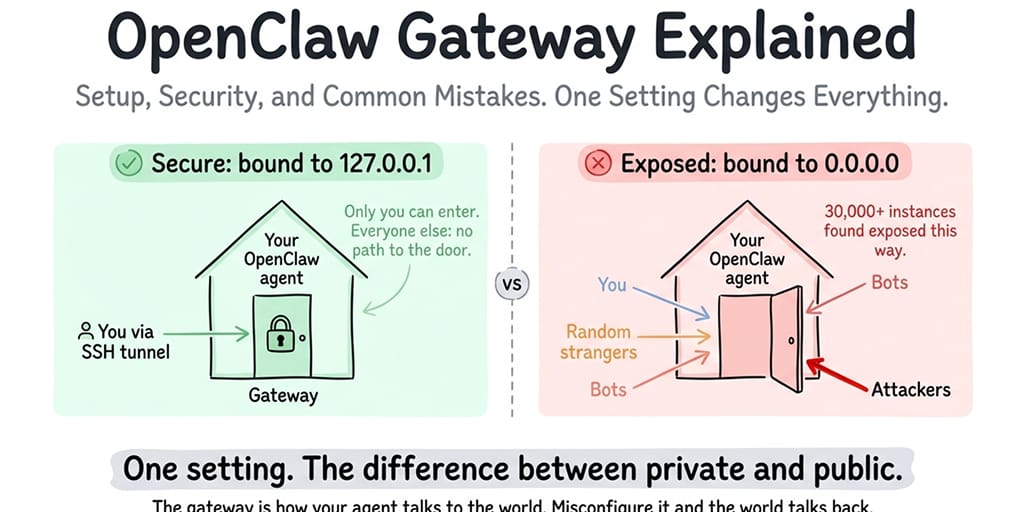
The OpenClaw gateway is the single process that owns every connection to your agent, serving WebSocket and HTTP on port 18789. The most important setting is gateway.bind: leave it on "loopback" (the default, which listens on 127.0.0.1) and reach it remotely through an SSH tunnel or Tailscale Serve. Switching to "lan" (0.0.0.0) on a server without a firewall is how gateways end up on the public internet, and security researchers counted 30,000+ exposed OpenClaw instances.
The gateway is how your agent talks to the world. If it's misconfigured, anyone on the internet can talk to your agent too. Here's what you need to know, checked against the docs for OpenClaw v2026.9.6.
Thirty thousand OpenClaw instances. That's how many Bitsight observed exposed on the internet in its analysis. Censys watched the count climb from about 1,000 to more than 21,000 in a single week in late January. Many of them had weak or no authentication.
The OpenClaw gateway is the single most important security surface in your entire setup, and it's the one most people never think about. If you get this wrong, strangers can try to connect to your agent, and with a weak or missing token they can read your conversations and reach whatever your agent has access to (your files, your API keys, your connected platforms).
Here's what the gateway actually is, which settings make it dangerous on a server, and the configuration that keeps it private.
What the OpenClaw gateway actually is
Think of the OpenClaw gateway as the front door to your agent. It's one long-running process that multiplexes a WebSocket API and an HTTP server on a single port (18789 by default). When you open the Control UI in your browser, you're connecting through the gateway. When Telegram delivers a message to your agent, the gateway receives it. When an automation fires, the gateway runs it. The CLI, the desktop and mobile apps, and any paired devices all talk to it over the same WebSocket.
Every interaction with your agent flows through the gateway. It enforces authentication, pairs new devices, manages sessions, receives messages from connected platforms, and serves the web Control UI. The docs are clear that there's one gateway per host.
On your local machine, this is straightforward. The gateway runs on your computer. Only you can access it. The front door is inside your house.
On a VPS or remote server, the situation changes entirely. The gateway runs on a server connected to the public internet. If the front door is open and facing the street, anyone can walk up and try the handle.
For the complete OpenClaw security checklist, our security guide covers the gateway alongside the other hardening steps.
Loopback vs LAN: the setting that matters most (this is the dangerous part)
This is where most people get it wrong. Stay with me here because this single setting is behind most exposed OpenClaw instances.
gateway.bind takes a mode, not an IP address:
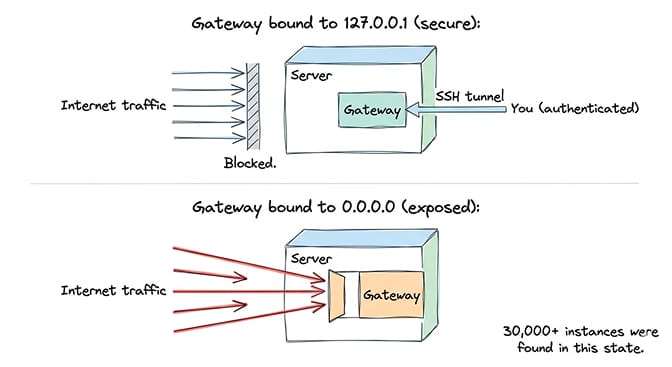
"loopback"(the default) listens on127.0.0.1. Only the machine the gateway runs on can connect. If someone on the internet tries to connect, they can't. The door only opens from inside the house. This is what you want on a server."lan"listens on0.0.0.0, which means every interface: your machine, your local network, and, on a VPS, the entire internet. The door is open to the street."tailnet"listens on your Tailscale address, and"custom"on one IPv4 address you choose.
The docs are blunt about the last three: they expand the attack surface, and you should only use them with gateway auth and a real firewall.
The Docker trap. Here's how a lot of people end up on lan without meaning to. Inside a Docker container, the default loopback bind listens on the container's own 127.0.0.1, so with normal bridge networking (-p 18789:18789) the gateway is unreachable. The fix the docs give is bind: "lan" or host networking. That works, but now the gateway listens on every interface, and Docker's published ports bypass ordinary UFW INPUT rules. If you haven't added rules to Docker's DOCKER-USER chain, your "firewalled" VPS may be publishing the gateway to the world anyway.
A note on history: an older GitHub issue, #5263, is often cited as "the gateway defaults to 0.0.0.0." It was actually about the Canvas host server binding to 0.0.0.0, and it was closed as "not planned." The current gateway default is loopback.
CVE-2026-25253 (CVSS 8.8) made exposure worse. OpenClaw versions before 2026.1.29 took a gatewayUrl from a link's query string and connected to it automatically, sending the gateway token along. One click on a malicious link could hand an attacker your token, and with it control of the agent. It's patched, but it's a good reminder that the gateway token is the key to everything.
If your OpenClaw gateway binds to lan on a server without a firewall in front of it, your agent is reachable from the internet. Put it back on loopback. This is the single most important security setting in your configuration.
The configuration you want on a server
In ~/.openclaw/openclaw.json, the gateway block for a private server looks like this:
{
  gateway: {
    port: 18789,
    bind: "loopback",
    auth: {
      mode: "token",
      token: "a-long-random-secret",
    },
  },
}
Use the mode names (loopback, lan, tailnet, custom, or auto) in gateway.bind. Host aliases like 0.0.0.0 or 127.0.0.1 are treated as legacy values.
Authentication is on by default now. Gateway auth is required, and it fails closed: with no valid auth path configured, the gateway refuses WebSocket connections. Onboarding generates a token even for loopback-only setups. Startup rejects blank tokens and published placeholder values, and openclaw doctor --generate-gateway-token will make one for you. Non-loopback binds require auth. There is still an explicit auth.mode: "none", but the docs reserve it for trusted loopback setups, and onboarding never offers it.
New devices also have to be paired. Direct loopback connections can be auto-approved, but LAN and tailnet connections, even from the same machine, need explicit approval.
But wait, how do I access my agent remotely if it only listens locally?
Two ways. The docs prefer Tailscale Serve, which keeps the gateway on loopback while Tailscale handles who can reach it. The fallback that works from any machine is an SSH tunnel: an encrypted tunnel from your personal machine to the server that forwards the gateway port to your localhost.
Either way, you get remote access to the gateway without exposing it to the internet. Only someone on your tailnet, or with SSH credentials, can reach it. Everyone else sees nothing.
On BetterClaw, gateway binding is handled and locked down by default. This isn't something you configure or can accidentally misconfigure. The gateway is never publicly exposed. Free plan with 1 agent and BYOK, $49/month for Pro with 5 agents. The security configuration is part of the platform.
How to set up secure remote access
The SSH tunnel is the standard fallback for reaching a loopback-bound gateway remotely. From your personal machine:
ssh -N -L 18789:127.0.0.1:18789 user@your-server
-N means "forward ports only, don't run a remote command." Leave that running, then open http://localhost:18789 in your browser. The traffic travels through the encrypted SSH tunnel to the server, reaches the loopback-bound gateway, and works exactly as if you were sitting at the server. The gateway's normal token and device pairing still apply over the tunnel.
If you use Tailscale, Serve is the smoother option: the gateway stays on loopback, the Control UI gets HTTPS, and Tailscale identity can authenticate the Control UI. It assumes the gateway host itself is trusted, so if untrusted code might run on that machine, keep token or password auth on as well.
Why not just open the port publicly with a strong token? Because the gateway was designed loopback-first. The docs recommend Tailscale Serve over LAN binds, and if you must bind to LAN, firewalling the port to a tight source-IP allowlist rather than opening it broadly. They also say never to expose the gateway unauthenticated on 0.0.0.0. A reverse proxy (nginx, Caddy, Traefik) is supported, but you then need gateway.trustedProxies set correctly so proxied connections aren't mistaken for local ones. SSH or Tailscale gives you encrypted, authenticated access with far less to get wrong.
For the complete VPS setup walkthrough including firewall configuration and SSH hardening, our self-hosting guide covers the full server security stack.
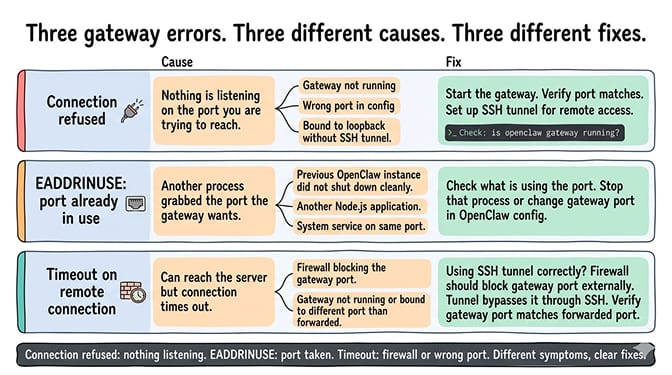
Common gateway errors and what they mean
Connection refused
You're trying to connect to the gateway and getting "connection refused."
This means nothing is listening on the port you're trying to reach. Either the gateway isn't running (check with openclaw gateway status or openclaw gateway health), you're using the wrong port (the default is 18789, but --port, OPENCLAW_GATEWAY_PORT and gateway.port can change it), or the gateway is bound to loopback and you're connecting from outside the machine without a tunnel (set up the tunnel).
Gateway already in use (EADDRINUSE)
The port the gateway wants to use is already occupied by another process.
OpenClaw holds a lock so two gateways can't fight over the same state, and it fails fast with a clear error when another gateway already owns the port. Common culprits: a previous OpenClaw instance that didn't shut down cleanly, a second install started by a service manager, another Node.js application, or a system service. Stop the other process (openclaw gateway restart handles the managed service), or change gateway.port.
Timeout on remote connection
You can reach the server but the gateway connection times out.
This usually means a firewall is blocking the port, which is what you want. The tunnel reaches the gateway through the SSH connection instead. If you're getting timeouts through an SSH tunnel, the gateway isn't running or is listening on a different port than the one you're forwarding.
For the broader OpenClaw troubleshooting guide covering all first-hour errors, our error guide covers the most common problems new users hit, and the gateway-won't-start guide covers post-update failures.
How to know if your gateway is exposed right now
If you're running OpenClaw on a server and you're not sure whether your gateway is exposed, check immediately.
Start with openclaw security audit on the server. It flags risky settings, including blank or weak gateway credentials and known dangerous flags.
Then test from a different machine (not the server). Try to open http://<your-server-ip>:18789 in a browser, or scan it with nmap -p 18789 <your-server-ip>. If you see the OpenClaw Control UI or any response other than a timeout or connection refused, your gateway is publicly reachable. If you run OpenClaw in Docker, scan the whole port range, because published container ports can slip past UFW.
If you get a connection timeout or connection refused, the gateway is either not exposed or a firewall is blocking external access. Both are acceptable states.
If your gateway is exposed: set gateway.bind back to "loopback" (or add a proper firewall in front of it). Restart the gateway. Verify external access no longer works. Then rotate the gateway token and every API key stored in your configuration, because if the gateway was exposed, someone may have already accessed your setup. The docs have an operator incident-response runbook for exactly this.
Check your OpenClaw logs and session history for unfamiliar conversations, paired devices you don't recognize, or requests you didn't send. If you see them, someone else was using your agent.
The managed vs self-hosted comparison covers how different deployment approaches handle gateway security, including which platforms prevent exposure by default.
The honest takeaway
The OpenClaw gateway is simple in concept (it's the one process your agent uses to communicate) and dangerous when you move it off loopback without thinking (it can expose your agent to the entire internet with one setting).
Keep it on loopback. Use a strong token. Reach it through an SSH tunnel or Tailscale Serve. Firewall the port, including Docker's DOCKER-USER chain if you use containers. Together these take about 10 minutes and prevent the kind of exposure that affected 30,000+ instances.
The OpenClaw maintainer Shadow warned in the project's Discord that "if you can't understand how to run a command line, this is far too dangerous of a project for you to use safely." The gateway is a big part of why. It's the difference between a private assistant and a public service that anyone can abuse.
If gateway security, firewall configuration, and SSH tunnel management isn't something you want to handle, give Better Claw a try. Free plan with 1 agent and BYOK, $49/month for Pro with 5 agents, 28+ providers. Gateway security is locked down by default. AES-256 encrypted credentials. Docker-sandboxed execution. The infrastructure security is handled so you focus on what your agent does, not on whether someone else is using it.
Frequently Asked Questions
What is the OpenClaw gateway?
The OpenClaw gateway is the long-running process that handles all communication between your agent and the outside world. It serves a WebSocket API and HTTP on one port (18789 by default), receives messages from connected platforms (Telegram, WhatsApp, Slack), serves the web Control UI, authenticates and pairs clients, and routes work to the agent. Every interaction with your OpenClaw agent flows through the gateway.
What's the difference between 127.0.0.1 and 0.0.0.0 in OpenClaw gateway settings?
In current OpenClaw these are set as bind modes. "loopback" (the default) listens on 127.0.0.1, so only the local machine can connect. "lan" listens on 0.0.0.0, all interfaces, including the public internet on a VPS. On a server, a lan bind without a firewall makes your gateway reachable by anyone who finds your IP. Keep gateway.bind: "loopback" on servers and use an SSH tunnel or Tailscale Serve for remote access.
How do I securely access my OpenClaw gateway remotely?
The docs recommend Tailscale Serve, which keeps the gateway on loopback. The universal fallback is an SSH tunnel: run ssh -N -L 18789:127.0.0.1:18789 user@your-server on your own machine, then open http://localhost:18789. Traffic travels through the encrypted SSH connection, and the gateway's token and device pairing still apply. Neither approach exposes the gateway to the internet.
How do I check if my OpenClaw gateway is exposed?
Run openclaw security audit on the server, then from a different machine try to reach your server's IP on port 18789 in a browser or with nmap. If you see the OpenClaw interface or get any response other than a timeout, your gateway is publicly reachable. Fix immediately: set the bind back to loopback, restart the gateway, and rotate the gateway token and all API keys. 30,000+ OpenClaw instances were found exposed online.
Is the default OpenClaw gateway configuration secure?
The current defaults are reasonable: the gateway binds to loopback, auth is required and fails closed, and onboarding generates a token. The risk comes from changes people make on servers, such as switching to a lan bind (often to make Docker networking work), leaving the port unfirewalled, or using weak credentials. On any server deployment, keep loopback where you can, firewall everything else, and run openclaw security audit. Managed platforms like BetterClaw handle this automatically.
Related Reading
- OpenClaw Security Checklist — Nine more security measures alongside gateway binding
- OpenClaw Security Risks Explained — Why 30,000+ instances were exposed and what attackers do with them
- OpenClaw VPS Setup: The Real Cost of $8/Month Hosting — Full server security stack including firewall and SSH hardening
- OpenClaw Not Working: Every Fix in One Guide — Connection errors and other first-hour issues
- OpenClaw Gateway Won't Start After Updating — Ten post-update failures, matched to the log line each one prints
- BetterClaw vs Self-Hosted OpenClaw — How managed deployment handles gateway security automatically