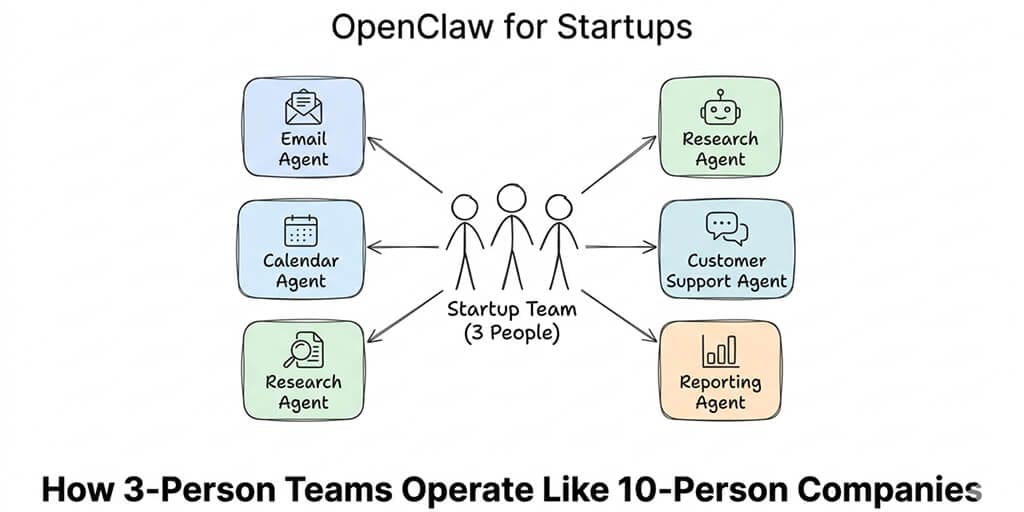
A 3-person startup replaced their virtual assistant, their email manager, and their morning standup. Monthly cost: $45 in API fees.
My cofounder texted me at 6:47 AM on a Wednesday. "Did you see the competitor pricing change?"
I hadn't. I was asleep. But our OpenClaw agent had. It had checked three competitor websites at 6:00 AM, noticed a price drop on one of them, summarized the change, and sent an alert to our Slack channel.
By the time I opened my laptop at 8:00 AM, the agent had also compiled my morning briefing (calendar, priority emails, overnight GitHub issues), drafted responses to two customer support messages that came in overnight, and flagged an invoice that was three days overdue.
Three people. One AI agent. Running like a team twice our size.
That was the moment I stopped thinking about OpenClaw for startups as a nice-to-have and started thinking of it as infrastructure. As fundamental as Slack or Google Workspace. Not because it's flashy. Because at 3 AM, when nobody's working, the agent is.
The "one-person company" thesis is real now
The Chinese government calls it the OPC model. One-Person Company. The idea that a single developer or founder, armed with AI agents, can build and operate a competitive business.
Last week, Shenzhen and Wuxi published policies offering up to $1.4 million in grants to startups building on OpenClaw. Tencent hosted a free installation event that drew a thousand people, including children and retirees. ByteDance launched ArkClaw. JD.com partnered with Lenovo for paid setup services.
This isn't theoretical anymore. OpenClaw has 230,000+ GitHub stars, 1.27 million weekly npm downloads, and an ecosystem that includes Crypto.com, Bitget, and dozens of vertical applications. Peter Steinberger, the creator, joined OpenAI to build the next generation of AI agents.
The question for startup founders isn't whether AI agents will matter. It's how to use them today, practically, without burning through your runway on API costs or spending your weekends debugging Docker configs.
Here are five ways small teams are actually doing it.
1. The 6 AM briefing that replaces your morning routine
This is the entry point. The gateway drug. The use case that makes every founder who tries it wonder how they operated without it.
A cron job runs at 6:00 AM. Your OpenClaw agent checks your calendar for the day, scans priority emails, pulls overnight updates from GitHub or your project management tool, checks the weather, and compiles it into a clean summary. Sends it to Telegram or WhatsApp.
You wake up. Glance at your phone. Know exactly what your day looks like before your feet hit the floor.
The startup version: Add competitor monitoring (price changes, new blog posts, product updates), key metrics from your analytics dashboard, and any customer support messages that came in overnight. One message. Everything you need.
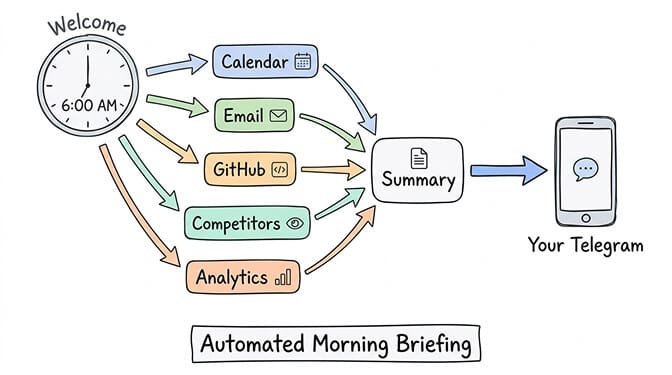
Cost: roughly $0.10-0.20 per briefing on Claude Sonnet. $3-6 per month.
For a full breakdown of which tasks cost what in API fees, our cost guide covers the exact math per operation.
2. Customer support that works while you sleep
Here's what nobody tells you about running a startup: the first customer message that arrives at 2 AM and sits unanswered until 9 AM is the moment your "small team" becomes visible to the customer.
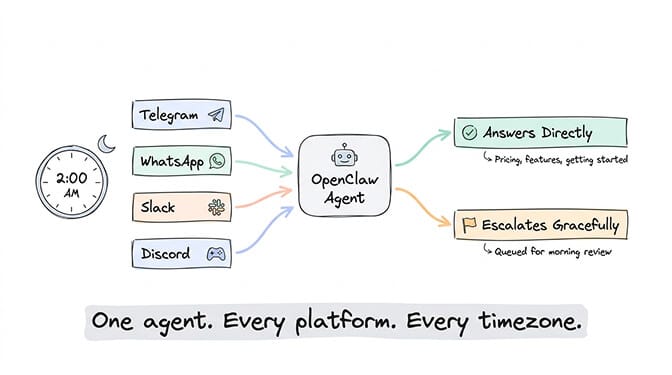
OpenClaw agents can triage incoming messages across multiple platforms simultaneously. One agent. Telegram, WhatsApp, Slack, Discord. A customer writes on WhatsApp at midnight in a different timezone. The agent reads the message, checks your knowledge base, and either answers directly (for common questions) or categorizes it and queues it for your morning review.
The key: configure the agent to answer confidently on topics it knows (pricing, features, getting started) and escalate gracefully on topics it doesn't ("I've flagged this for the team, they'll respond in the morning"). That boundary is what makes it useful instead of dangerous.
A real estate team leader documented this approach in detail. His OpenClaw agent handles lead inquiries across WhatsApp and Telegram, pulls market data from Zillow and Redfin, and generates weekly seller reports automatically. Before OpenClaw, this was a full-time assistant role.
The best startup use of OpenClaw isn't replacing people. It's covering the hours when no person is available.
For more ideas on high-value workflows that OpenClaw handles well, our use case guide ranks the top 10 by hours saved per week.
3. Email triage that turns inbox chaos into action items
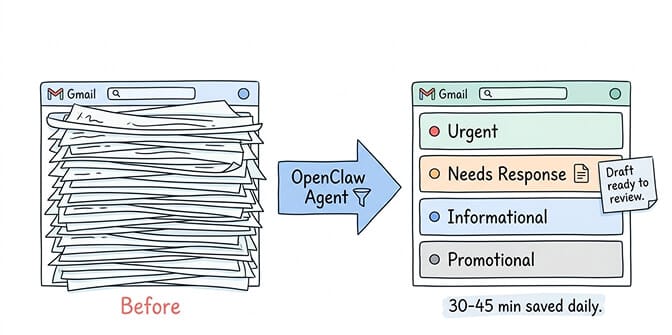
This one saves me personally 30-45 minutes per day.
The agent monitors your inbox (via email skill or scheduled check). It categorizes every message: urgent, needs response, informational, promotional, spam. It drafts responses to the straightforward ones. It flags anything that requires your judgment.
By the time you open Gmail, your inbox isn't a wall of 50 unread messages. It's a prioritized list with draft responses ready to review and send.
The startup-specific twist: Configure the agent to watch for specific signals. Investor emails get flagged immediately. Customer complaints get categorized as urgent. Partnership inquiries get a draft response within minutes instead of hours.
Meta researcher Summer Yue's experience is the cautionary tale here. Her agent mass-deleted her emails while ignoring stop commands. The lesson: set explicit permissions on what the agent can and cannot do with your inbox. Read access? Yes. Delete access? Absolutely not. Draft and send with confirmation? That's the sweet spot.
Cost: roughly $0.09-0.11 per triage run (20 emails on Claude Sonnet). Run it 2-3 times per day. Under $10/month.
4. Research that would take an intern a full day
You're preparing for a fundraise. You need to know what comparable companies raised, at what valuations, from which investors. Or you're evaluating three potential partners and need background on each. Or you're writing a product spec and need technical benchmarks from five different sources.
This is where OpenClaw for startups earns its keep against the time cost.
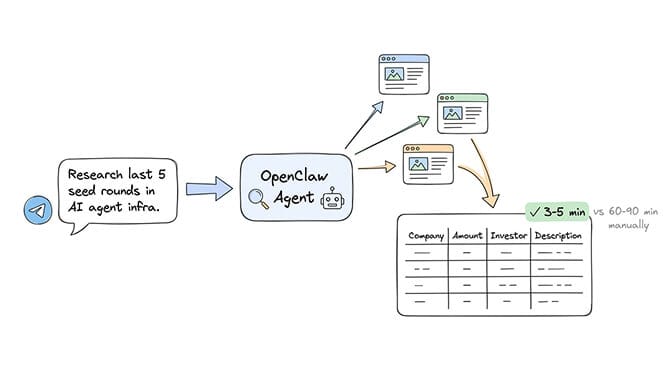
Tell your agent via Telegram: "Research the last 5 seed rounds in AI agent infrastructure. Include company name, amount raised, lead investor, and what the company does. Format as a table."
It uses web search, processes multiple sources, compiles the data, and sends you a formatted table. Total time: 3-5 minutes. Total cost: $0.15-0.30 per research task on Sonnet.
The same task, done manually, takes 60-90 minutes of tab switching, reading, copying, and formatting. Every day you run a research task like this, you're getting back an hour.
Watch: How Founders Are Using OpenClaw for Daily Productivity - If you want to see how a solo founder set up OpenClaw for morning briefings, email management, and research tasks (with real demos of each workflow), this community walkthrough covers the practical setup with honest cost numbers. Watch on YouTube
5. The weekly report that writes itself
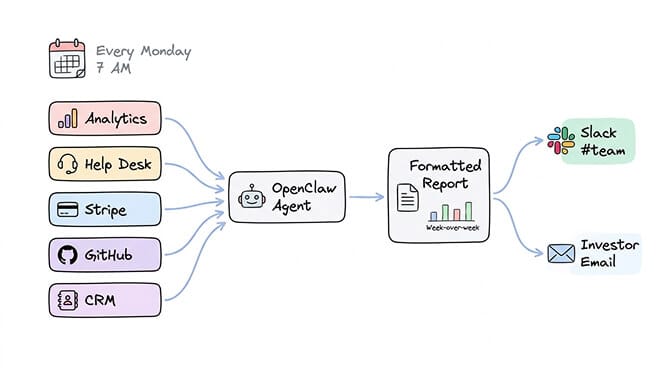
Every Monday morning, your agent compiles a report: website traffic (from your analytics dashboard via browser relay), customer support metrics (from your help desk), revenue numbers (from Stripe or your payment processor), and key events from the week.
It formats everything, adds week-over-week comparisons, highlights anomalies, and sends it to your team Slack channel. Or to your investors' update email. Or both.
For a 3-person startup, this eliminates the "who's going to write the weekly update?" conversation entirely. The agent writes it. A human reviews it. Done in 5 minutes instead of an hour.
One developer used OpenClaw with Microsoft's Qlib framework to generate weekly performance reports for his investment portfolio. The same pattern works for any recurring reporting need: pull data, format it, deliver it, flag anything unusual.
If you want to set this up without managing Docker, YAML, and VPS security yourself, BetterClaw deploys all of this at $49/month for Pro with zero configuration. BYOK, 15+ platforms, 28+ model providers. Your agent runs in 60 seconds. You focus on your startup.
The cost math that makes startup founders smile
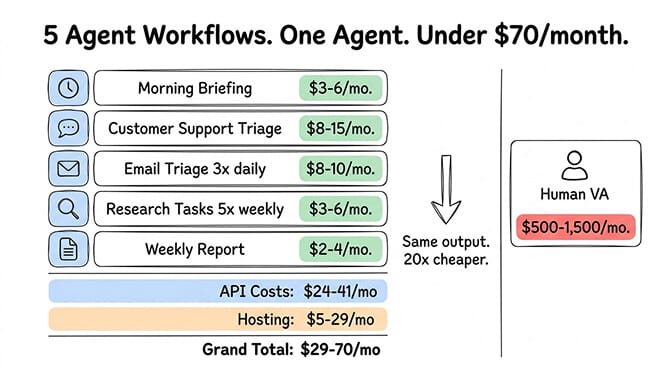
Here's the practical budget for all five use cases running on a single OpenClaw agent with smart model routing (Sonnet primary, Haiku for heartbeats):
- Morning briefing: $3-6/month
- Customer support triage (across 3 platforms): $8-15/month
- Email triage (3x daily): $8-10/month
- Research tasks (5 per week): $3-6/month
- Weekly report generation: $2-4/month
Total API cost: $24-41/month.
Plus hosting: $5-19/month (VPS vs managed platform).
Grand total: $24-60/month for the equivalent of a part-time virtual assistant that works 24/7, never takes sick days, and remembers every conversation across every platform.
Compare that to a human virtual assistant at $500-1,500/month. Or the cost of the founder's time doing all of this manually, which at a reasonable hourly rate is worth far more.
For a detailed breakdown of how to optimize model selection to keep costs low, our routing guide shows the exact config changes that drop API bills by 50-80%.
Five agent workflows. One agent. Under $60/month total. Covers tasks that would take 2-3 hours per day if done manually.
The security reality check (because your startup data matters)
OpenClaw is powerful. It's also risky if you don't configure it correctly.
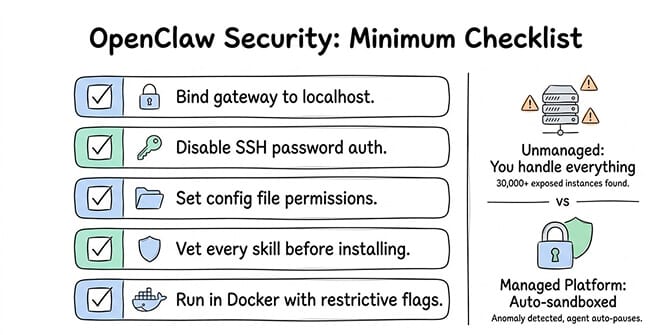
CrowdStrike published a full security advisory on enterprise risks. Researchers found 30,000+ exposed instances without authentication. The ClawHavoc campaign compromised 824+ skills on ClawHub (roughly 20% of the registry). Cisco found a skill performing data exfiltration without user awareness.
For a startup handling customer data, investor communications, or financial information, security isn't optional.
The minimum checklist: bind your gateway to localhost, disable SSH password auth, set file permissions on your config directory, vet every skill before installing, and run OpenClaw in Docker with restrictive security flags. Our complete guide to OpenClaw security risks covers every documented incident.
Or skip the checklist entirely. Managed platforms like Better Claw handle Docker sandboxing, AES-256 encryption, and anomaly detection out of the box. When your agent does something unexpected, it auto-pauses instead of auto-deleting your emails.
What founders get wrong about OpenClaw
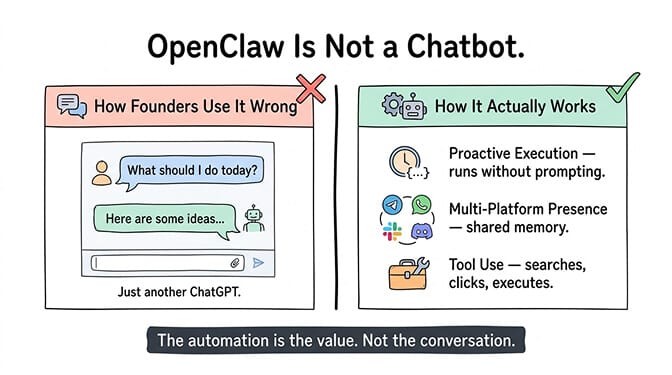
The biggest mistake I see: founders treat OpenClaw like a chatbot. They install it, ask it questions, and wonder why it's not that different from ChatGPT.
OpenClaw isn't a chatbot. It's an agent framework. The value comes from three things chatbots can't do:
Proactive execution. Cron jobs that run without prompting. Morning briefings. Scheduled checks. The agent works when you're not looking.
Multi-platform presence. The same agent responds on Telegram, WhatsApp, Slack, and Discord simultaneously. Shared memory across all channels. Tell it something on WhatsApp, reference it on Slack. It remembers.
Tool use. Web search, browser automation, file management, API calls, shell commands. The agent doesn't just talk about tasks. It does them.
The founders who get the most from OpenClaw are the ones who spend their first week setting up cron jobs and skill configurations, not chatting. The conversation is the interface. The automation is the value.
For understanding how OpenClaw's architecture actually enables this, our explainer covers the gateway, agent loop, and skill execution model.
The honest admission
OpenClaw for startups is not a magic wand. The agent will occasionally misunderstand instructions. Cron jobs will sometimes fail silently. Context windows will grow unbounded if you don't set limits. API costs will spike if you don't configure model routing.
It requires setup. It requires maintenance. It requires judgment about what to automate and what to keep human.
But here's what changed my mind about the investment: the compound effect. Each workflow you automate saves 15-30 minutes per day. Five workflows save 2-3 hours. Over a month, that's 40-60 hours of founder time recovered. For a startup, those hours are worth more than almost anything.
The question isn't whether your startup should use AI agents. The Chinese government is literally paying people to build businesses around them. Tencent, ByteDance, and JD.com are all building OpenClaw into their platforms. The ecosystem has 230,000+ stars and growing.
The question is whether you want to spend your first week on Docker configuration and YAML debugging, or on building the workflows that actually save you time.
If you'd rather skip the infrastructure and start building workflows today, give BetterClaw a try. $49/month for Pro, BYOK, 60-second deploy. We handle the Docker, the security, and the monitoring. You handle building your company.
Frequently Asked Questions
What is OpenClaw for startups and how does it help small teams?
OpenClaw is an open-source AI agent framework (230K+ GitHub stars) that lets you deploy autonomous assistants connected to chat platforms like Telegram, WhatsApp, and Slack. For startups, it replaces manual tasks like morning briefings, email triage, customer support, research, and reporting. A single agent running five common workflows saves 2-3 hours per day for $24-60/month total (API costs plus hosting).
How does OpenClaw compare to hiring a virtual assistant?
A human virtual assistant costs $500-1,500/month, works set hours, and handles one platform at a time. An OpenClaw agent costs $24-60/month (API + hosting), works 24/7 across 15+ platforms simultaneously, and maintains persistent memory across all interactions. The tradeoff: a VA handles ambiguity and judgment better. OpenClaw handles volume, consistency, and overnight coverage better. Most startups use both.
How long does it take to set up OpenClaw for a startup?
Self-hosted: 4-8 hours for initial setup (Docker, model config, channel auth, security hardening) plus 2-4 hours per month for maintenance. On a managed platform like BetterClaw: under 2 minutes from signup to a live agent. The real time investment is in configuring workflows (cron jobs, skill selection, model routing), which takes 2-5 hours regardless of hosting method.
How much does it cost to run OpenClaw for startup automation?
API costs with smart model routing (Sonnet primary, Haiku heartbeats): $24-41/month for five common workflows. Hosting: $5-19/month (VPS vs managed). Total: $24-60/month. Without model routing (everything on Opus or GPT-4o): $80-200/month. The biggest cost lever is model selection, not hosting. DeepSeek and Gemini Flash can reduce costs further for non-critical tasks.
Is OpenClaw secure enough for startup customer data?
With proper configuration, yes. Without it, no. CrowdStrike and Cisco have published advisories on OpenClaw security. Researchers found 30,000+ exposed instances and 824+ malicious skills. The minimum: bind gateway to localhost, Docker isolation, SSH key auth, skill vetting, and spending caps. Managed platforms like BetterClaw handle this automatically with Docker sandboxing, AES-256 encryption, and anomaly detection.
Related Reading
- OpenClaw for Enterprise Teams — Scaling OpenClaw beyond a single founder to team-wide deployment
- OpenClaw for Autonomous Trading — Another high-leverage startup use case: automated trading agents
- Best OpenClaw Use Cases — Full catalog of startup-relevant automation workflows
- OpenClaw Multi-Agent Setup Guide — Run multiple specialized agents for different startup functions