I had three OpenClaw agents running on one server. Then one of them read the other's diary.
That's not a metaphor. I'd set up a research agent, a writing agent, and a project management agent - each with its own personality file, its own skills, its own purpose. They were supposed to be independent. Separate brains, separate jobs.
Except I'd made a mistake with workspace scoping. The writing agent discovered the research agent's memory files, ingested them as context, and started confidently citing "sources" that were actually the research agent's speculative notes. It took me two days to figure out why my writing agent kept referencing competitors that didn't exist.
This is the OpenClaw multi-agent problem in a nutshell. The framework supports running multiple agents. The docs barely acknowledge it. And the gap between "technically possible" and "actually works in production" is filled with footguns that nobody warns you about.
I've spent the last three months building, breaking, and rebuilding multi-agent setups. This is the guide I wish existed when I started.
Why You'd Want Multiple Agents in the First Place
Before we get into the how, let's talk about the why - because not every use case needs multiple agents.
A single OpenClaw agent connected to the right skills can handle most personal productivity workflows. Email triage, calendar management, daily briefings, research - one agent does all of this beautifully.
But there's a ceiling. And you hit it faster than you'd expect.
The context window problem. A single agent carrying a sales persona, customer service templates, code review instructions, and project management workflows burns through context tokens before it even starts working. We covered this in depth in our API costs breakdown - a bloated agent can waste $6+ per day in pure overhead.
The personality collision problem. An agent optimized for empathetic customer support writes terrible code reviews. An agent tuned for blunt technical feedback sounds awful in customer emails. One persona can't serve conflicting communication styles.
The permission problem. You want your research agent to browse the web freely. You absolutely do not want your finance agent browsing the web freely. Single-agent setups force you into one permission profile that's either too restrictive or too permissive.
When one agent tries to do everything, it ends up doing nothing particularly well. Multi-agent isn't about scale - it's about specialization.
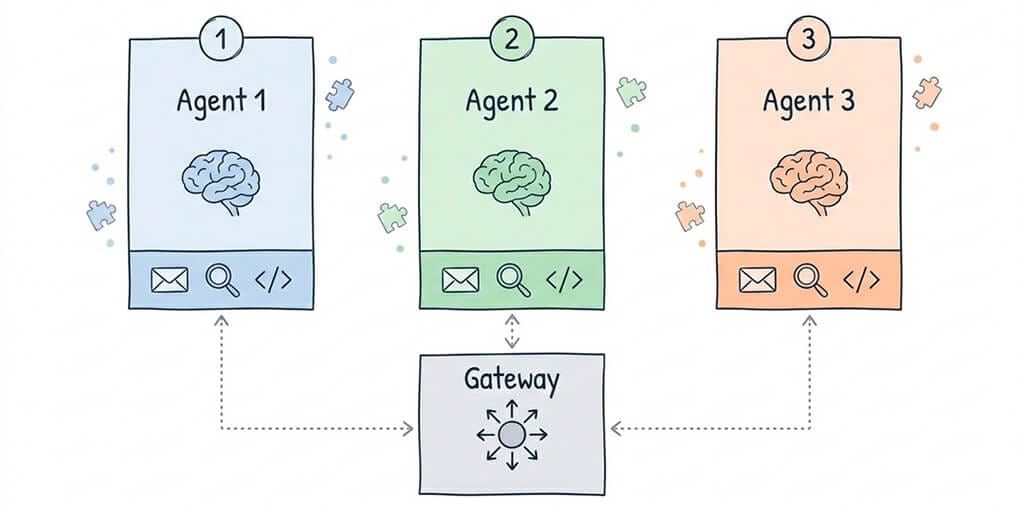
This is where a multi-agent setup makes sense: specialized agents with focused contexts, isolated memories, and appropriate permissions. Like hiring three specialists instead of one overworked generalist.
The Architecture Nobody Documented
Here's the weird part. OpenClaw's multi-agent architecture isn't really an architecture at all. It's a collection of conventions that evolved from community experimentation.
The official docs give you this: you can run multiple OpenClaw instances. Each instance is an independent agent with its own configuration.
That's it. That's the documentation.
Everything else - memory isolation, session binding, agent-to-agent communication, shared context management - you're figuring out yourself. Here's what I've learned from building this four times over.
The Workspace Isolation Model
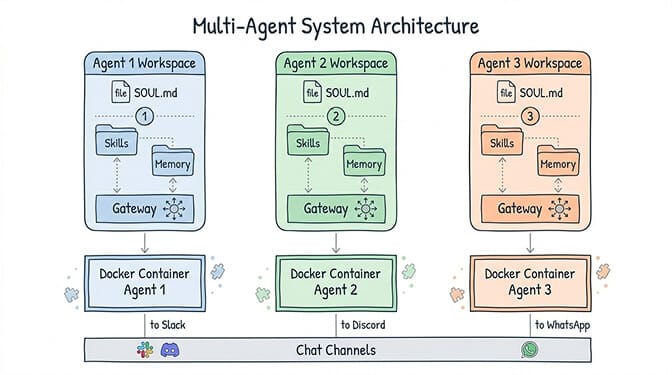
Each agent needs its own workspace directory. This isn't optional - it's the single most important thing to get right.
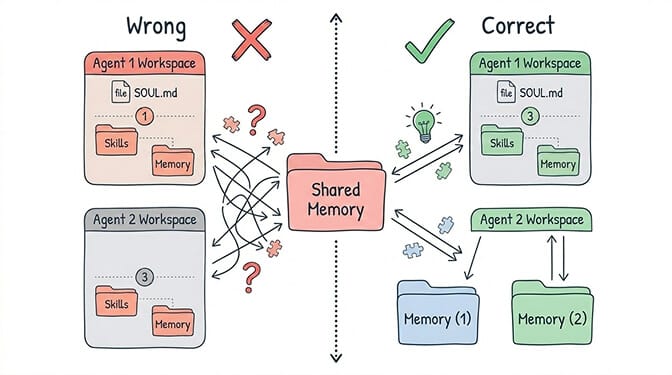
OpenClaw agents read and write memory to their workspace. If two agents share a workspace, they share memory. And shared memory between agents with different purposes creates the exact problem I described in my opening: contaminated context, confused outputs, and bugs that are nearly impossible to trace.
The structure looks like this:
/openclaw/
├── agent-research/
│   ├── SOUL.md
│   ├── IDENTITY.md
│   ├── skills/
│   └── memory/
├── agent-writer/
│   ├── SOUL.md
│   ├── IDENTITY.md
│   ├── skills/
│   └── memory/
└── agent-pm/
    ├── SOUL.md
    ├── IDENTITY.md
    ├── skills/
    └── memory/
Each agent gets its own Soul file, its own identity, its own skill set, and critically - its own memory directory. This is your foundation. Skip it and everything downstream breaks.
Session Binding (The Part That Breaks First)
Here's where most people get stuck.
When you connect OpenClaw to a chat platform - say Slack - you need to decide which agent handles which conversations. This is session binding, and OpenClaw has no built-in solution for it.
The community has converged on three approaches:
Channel-per-agent. Each agent owns a specific Slack channel. #research goes to the research agent, #writing goes to the writer, #project-mgmt goes to the PM. Simple, reliable, zero ambiguity. The downside: your team has to remember which channel to use for what.
Keyword routing. A lightweight proxy inspects incoming messages and routes based on keywords or prefixes. Messages starting with /research go to one agent, /write to another. More flexible, but you're now maintaining a proxy service.
Gateway multiplexing. You run a single OpenClaw Gateway that manages multiple agent connections. This is the most sophisticated approach and the closest thing to "proper" multi-agent orchestration. It's also the most complex to configure and maintain.
For most teams, channel-per-agent wins. It's boring. It works. And when something breaks at 2 AM, you can debug it without a PhD in distributed systems.
Memory Isolation: Where Things Get Really Messy
I need to be blunt about something. OpenClaw's memory system has fundamental limitations that get exponentially worse in multi-agent setups.
A single agent dealing with context compaction is annoying. Three agents with leaking memory boundaries is a disaster.
Here's the problem. Even with separate workspace directories, agents can still accidentally access shared resources if your Docker volume mounts overlap, if skills write to common directories, or if you're using a shared database for any custom integrations.
The checklist for true memory isolation:
- Separate workspace directories (covered above)
- Separate Docker containers with non-overlapping volume mounts
- Separate API keys per agent (so you can track costs individually)
- Separate credential stores (one compromised agent shouldn't expose another's secrets)
- No shared skills that write to common paths
That last point catches people off guard. A popular logging skill that writes to /var/log/openclaw/ creates a shared surface between agents. Your research agent's browsing history ends up in the same log as your customer service agent's email drafts. For security-conscious deployments, this matters - CrowdStrike's advisory on OpenClaw enterprise risks specifically flagged inadequate isolation as a key concern.
Agent-to-Agent Communication (The Hard Part)
Now for the question everyone eventually asks: how do my agents talk to each other?
The honest answer: OpenClaw doesn't have a native agent-to-agent communication protocol. There's no built-in message bus, no shared memory API, no orchestration layer.
But people have built working solutions. Here are the three patterns I've seen succeed.
Pattern 1: File-Based Handoffs
The simplest approach. Agent A writes output to a shared handoff directory. Agent B monitors that directory and picks up new files on its next heartbeat cycle.
Example: your research agent compiles a competitor analysis and writes it to /handoffs/research-output-2026-02-27.md. Your writing agent's heartbeat checks that directory, finds the new file, and uses it as source material for a blog draft.
It's crude. It works. The latency is tied to your heartbeat interval, so expect delays of minutes, not seconds. And you need to handle file locking, deduplication, and cleanup yourself.
Pattern 2: Message Queue Integration
A more structured approach. Set up a lightweight message queue (Redis, RabbitMQ, or even a simple SQLite-backed queue) and create custom skills that let agents publish and subscribe to channels.
Agent A publishes a message: {type: "research_complete", payload: "competitor-analysis.md"}. Agent B subscribes to research_complete events and triggers its workflow when a new message arrives.
This gives you proper async communication, retry logic, and message persistence. The tradeoff: you're now operating a message queue alongside your agents. That's another piece of infrastructure to monitor and maintain.
Pattern 3: Shared Database with Scoped Access
For teams running agents against a shared knowledge base or CRM, a database-backed approach makes sense. Each agent has read/write access to specific tables or collections, with clear ownership boundaries.
Your sales agent writes lead qualification notes to the leads table. Your outreach agent reads from leads but writes to campaigns. Your analytics agent has read-only access to both.
This is the most powerful pattern and the closest thing to a true multi-agent system. It's also the most complex to set up, secure, and debug when something goes wrong.
The best agent-to-agent communication pattern is the simplest one that solves your problem. Start with file handoffs. Graduate to message queues only when the latency hurts.
Watch: OpenClaw Architecture Deep Dive
If you want to understand the Gateway, agent loop, and runtime architecture that underpins multi-agent deployments - including how session management and memory assembly actually work - this 55-minute walkthrough from freeCodeCamp covers the full system. Understanding the Gateway is essential before attempting multi-agent routing.
The cost math: single agent vs multi-agent
Before scaling to multiple agents, understand the cost multiplication. Using Claude Sonnet with Haiku heartbeats:
Single agent, optimized: Heartbeats (Haiku): $0.14/month. Primary interactions (Sonnet): $8-15/month. Sub-agents (Haiku): $1.50/month. Cron jobs (capped context): $2-5/month. Total: $12-22/month in API costs.
Three agents, same optimization: Heartbeats: $0.42/month (3x). Primary interactions: $24-45/month. Sub-agents: $4.50/month. Cron jobs: $6-15/month. Orchestration overhead (inter-agent webhooks, duplicate context): $5-10/month. Total: $40-75/month in API costs.
That's 3.5x the cost, not 3x, because orchestration overhead adds a tax on top of the linear scaling. Before going multi-agent, make sure a single well-configured agent with sub-agents can't handle your workload. Most of the time, it can.
The Infrastructure Tax Nobody Mentions
Stay with me here, because this is the part that changed how I think about multi-agent deployments.
Running one self-hosted OpenClaw agent requires: a server, Docker, YAML configuration, SSL, monitoring, and ongoing security maintenance. The DigitalOcean 1-Click deployment makes some of this easier, but community members still report broken self-update scripts and fragile Docker setups.
Running three agents triples the infrastructure. Three Docker containers. Three sets of volume mounts. Three security profiles. Three monitoring configurations. Three points of failure at 2 AM when you'd rather be sleeping.
And the coordination layer - session binding, memory isolation, agent-to-agent communication - is entirely on you. There's no docker-compose up that gives you a working multi-agent system. You're assembling it piece by piece, and every piece is a maintenance commitment.
This is exactly why we built BetterClaw with multi-agent in mind from day one. Each agent deploys independently with its own isolated workspace, its own Docker sandbox, its own encrypted credential store. Memory isolation isn't a config you hope you got right - it's enforced by the platform. At $49/month for Pro, three specialized agents cost less than most teams spend on coffee, and you never touch a YAML file.
A Realistic Multi-Agent Setup (What I'd Actually Build)
After three months of experimentation, here's the multi-agent configuration I'd recommend to most teams.
Agent 1: The Researcher. Configured with web browsing, document analysis, and RSS monitoring skills. Runs on a cheap model (Haiku or GPT-4o-mini) since most of its work is information retrieval. Heartbeat set to check for new research requests every 30 minutes.
Agent 2: The Operator. Handles email drafting, calendar management, Slack summaries, and daily briefings. Uses a mid-tier model (Sonnet or GPT-4o) for nuanced communication. Connected to your team's primary chat channel.
Agent 3: The Specialist. This one depends on your business. For a dev team, it's a code review agent. For an ecommerce brand, it's a product and inventory agent. For a content team, it's a writer. Uses the best model you can afford for its specific domain.
Communication between them: file-based handoffs for now. The researcher drops reports into a shared directory. The operator summarizes them in the morning briefing. The specialist references them when relevant.
Total cost self-hosted: $6-15/month infrastructure + $30-90/month in API costs + 8-12 hours/month in maintenance.
Total cost managed: $49/month for Pro, which includes five agents + your API costs. Zero maintenance hours.
The Honest Truth About Where Multi-Agent Is Headed
OpenClaw's multi-agent story is early. Really early.
The framework was designed as a single-agent system. Multi-agent is an emergent pattern built on top of it by the community - with duct tape, clever hacks, and a lot of trial and error. The 7,900+ open issues on GitHub include several requests for native multi-agent orchestration, and the project's move to an open-source foundation should bring more contributors to the problem.
But waiting for perfect tooling means waiting while your competitors are already deploying. The patterns in this guide work today. They're not elegant. They're not what multi-agent AI will look like in two years. But they solve real problems right now.
The teams getting the most value from OpenClaw aren't the ones with the most sophisticated architectures. They're the ones who deployed three focused agents last month and have been iterating ever since.
If multi-agent has been on your roadmap but the infrastructure complexity kept pushing it to "next quarter" - give BetterClaw a try. $49/month for Pro. Isolated workspaces. Sandboxed execution. Deploy your first agent in 60 seconds, your second in another 60, and spend your time on the part that actually matters: deciding what each agent should do.
Frequently Asked Questions
What is OpenClaw multi-agent setup and how does it work?
An OpenClaw multi-agent setup runs multiple independent OpenClaw instances, each configured as a specialized agent with its own personality, skills, memory, and permissions. There's no built-in orchestration layer - you handle isolation through separate workspace directories and Docker containers, and communication through file handoffs, message queues, or shared databases. Each agent connects to its own chat channels and operates autonomously within its defined scope.
How does OpenClaw multi-agent compare to single-agent setups?
A single agent is simpler to deploy and maintain but hits limitations with context bloat, personality conflicts, and permission granularity. Multi-agent lets you specialize - a research agent with broad web access, an operator agent with email permissions, a code review agent with repository access. The tradeoff is infrastructure complexity: you're managing multiple containers, isolation boundaries, and communication patterns instead of one agent.
How do I set up memory isolation between multiple OpenClaw agents?
Each agent needs its own workspace directory, its own Docker container with non-overlapping volume mounts, separate API keys, and separate credential stores. Avoid shared skills that write to common directories. The most common mistake is overlapping volume mounts that let one agent access another's memory files - this causes context contamination where agents start referencing each other's data. On managed platforms like BetterClaw, memory isolation is enforced automatically per agent.
How much does it cost to run multiple OpenClaw agents?
Self-hosted: $6-15/month for server infrastructure plus $10-30/month in API costs per agent, plus 8-12 hours/month in maintenance time. With BetterClaw: $49/month for Pro with isolated workspaces, sandboxed execution, and zero maintenance - three agents run $49/month total, since Pro includes five. API costs depend on your model choice and usage volume; using tiered model routing (cheap models for simple tasks, premium models for complex reasoning) can reduce API spend by 50-70%.
Is it safe to run multiple OpenClaw agents with access to business data?
Only with proper isolation. Without it, one compromised agent can access another's credentials and data. CrowdStrike flagged inadequate isolation as a key enterprise risk, and 30,000+ OpenClaw instances have been found exposed without authentication. For production multi-agent deployments, each agent needs its own sandboxed container, encrypted credential store, and scoped permissions. BetterClaw enforces all of this by default - Docker-sandboxed execution, AES-256 encryption, and workspace scoping per agent.