Claude Code can build your OpenClaw config in minutes. But it can't run your agent. Here's where the line is.
I asked Claude Code to set up my entire OpenClaw configuration from scratch. Model provider, Telegram bot integration, SOUL.md personality, cron jobs, the works.
Seven minutes later, I had a working config file, a custom SOUL.md tuned for customer support, and three cron job definitions. All syntactically correct. All in the right directories. All without me opening the OpenClaw docs once.
Then someone in our Discord asked: "Can I use Claude Code as my OpenClaw model?"
And I realized most people confuse what Claude Code does with OpenClaw versus what Claude (the model) does inside OpenClaw. They're completely different relationships. One builds your agent. The other powers it.
This guide separates the two, explains what the Claude Code and OpenClaw integration actually looks like in practice, and covers the specific workflows where Claude Code saves you hours of configuration pain.
Claude Code and OpenClaw: two tools, one workflow, zero overlap
Here's the distinction that matters.
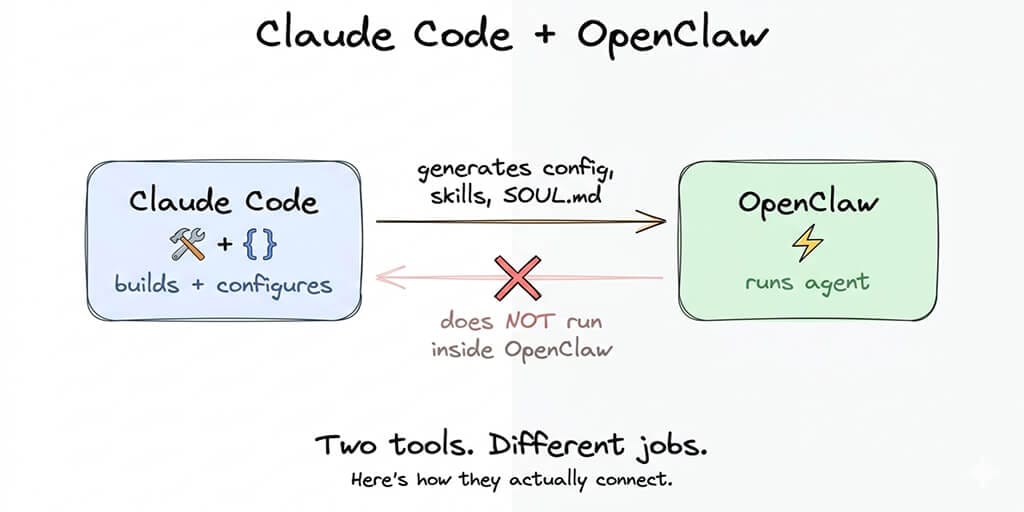
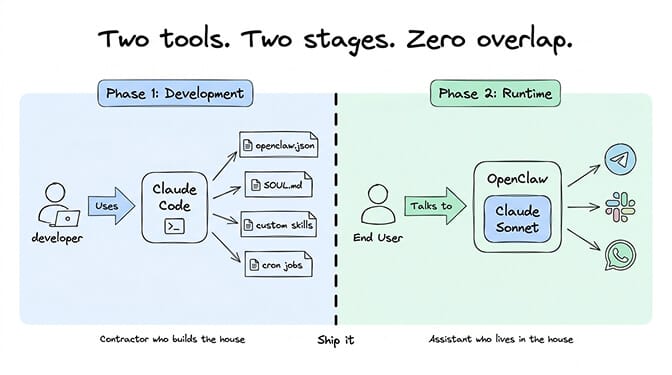
Claude Code is Anthropic's command-line coding agent. It reads your project files, understands your codebase, writes code, runs terminal commands, and builds things. It's a developer tool. You talk to it in your terminal. It edits files on your machine.
OpenClaw is an autonomous agent framework. It connects to chat platforms (Telegram, Slack, WhatsApp), uses AI models to respond to messages, calls tools and skills, and operates continuously. It's a deployment platform. End users talk to it.
Claude Code helps you build your OpenClaw setup. Claude (Sonnet, Opus, Haiku) can power your OpenClaw agent as the underlying model. These are different things happening at different stages.
Think of it this way: Claude Code is the contractor who builds the house. Claude Sonnet is the assistant who lives in the house and answers the door.
Claude Code builds your OpenClaw configuration. Claude the model runs inside your OpenClaw agent. One is a development tool. The other is a runtime dependency. Don't confuse them.
What Claude Code actually does for OpenClaw (the useful part)
Once you understand the relationship, Claude Code becomes genuinely powerful for OpenClaw work. Here are the specific tasks where it saves hours.
Generating your config from scratch
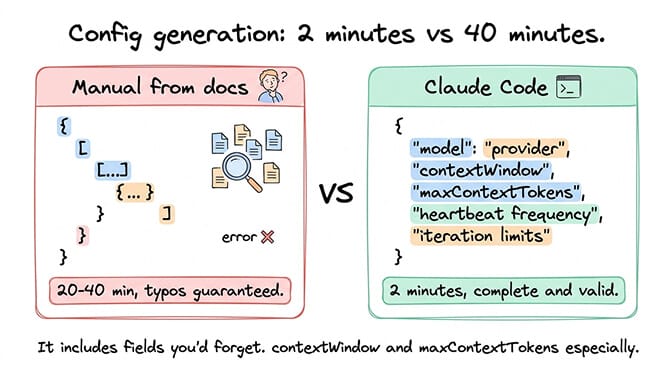
The OpenClaw config file is a nested JSON structure with model providers, API keys, chat platform settings, security parameters, and agent behavior definitions. Writing it by hand means cross-referencing docs, remembering field names, and getting the nesting right.
Claude Code generates the entire file from a natural language description. Tell it what model provider you want, which chat platform, your context window size, heartbeat frequency, and iteration limits. It reads the OpenClaw project structure, understands the config schema, and produces a complete, valid config. It includes fields you'd forget, like contextWindow, maxContextTokens, and the correct API format for each provider.
The whole process takes about two minutes. Doing it manually from documentation takes 20-40 minutes for a first-timer, and that's assuming you don't introduce a typo that takes another 30 minutes to find.
For the full config structure and what each field does, our complete OpenClaw setup guide walks through the installation in the correct order.
Writing and editing SOUL.md
The SOUL.md file defines your agent's personality, behavior rules, and working context. It's the most important file in your OpenClaw setup and the one most people write poorly.
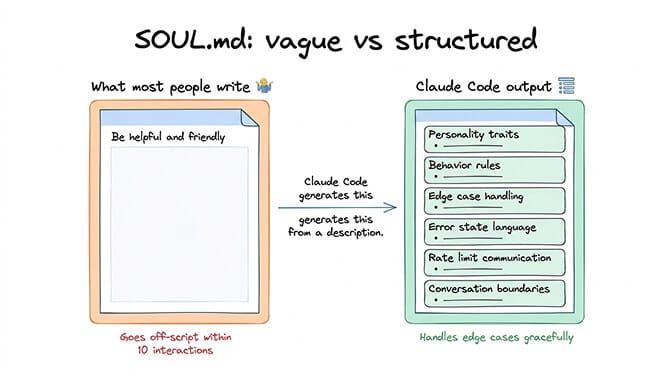
Claude Code is excellent at this because it understands both the Markdown format and the nuance of prompt engineering. Describe your agent's purpose (customer support, research assistant, scheduling bot), its tone (professional, casual, terse), its boundaries (what it should never do, when to escalate), and Claude Code produces a structured SOUL.md with personality traits, behavior rules, edge case handling, and escalation logic.
The difference between a vague SOUL.md and a well-structured one is dramatic. Agents with specific behavioral rules handle edge cases gracefully. Agents with "be helpful and friendly" as their entire personality go off-script within the first ten interactions.
Claude Code's output consistently includes sections most people forget: error state behavior (what the agent says when a tool fails), rate limit language (how it communicates when it's pausing), and conversation boundary rules (how to end circular discussions without being rude).
Building custom skills
OpenClaw skills are JavaScript or TypeScript packages that add capabilities. Web search, calendar access, file operations, API integrations. Writing a custom skill means following a specific function signature, handling errors correctly, and registering the skill properly.
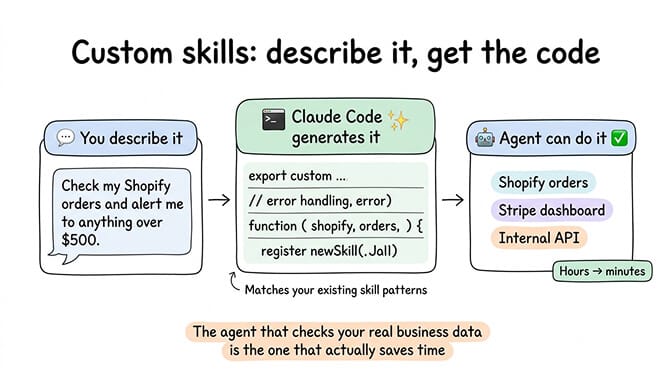
Claude Code handles all of this. Describe what you want the skill to do, and it generates the complete skill file with the correct exports, error handling, and configuration. It reads your existing skills, matches the pattern, and produces code that fits your project structure.
This matters because custom skills are often what separate a useful agent from a demo. The agent that checks your Shopify orders, monitors your Stripe dashboard, or queries your internal API is the one that actually saves time. Claude Code reduces the friction of building these custom integrations from hours to minutes.
For guidance on which skills are safe to install and how to vet third-party packages, our skills guide covers the security checklist alongside the best community options.
Debugging config issues
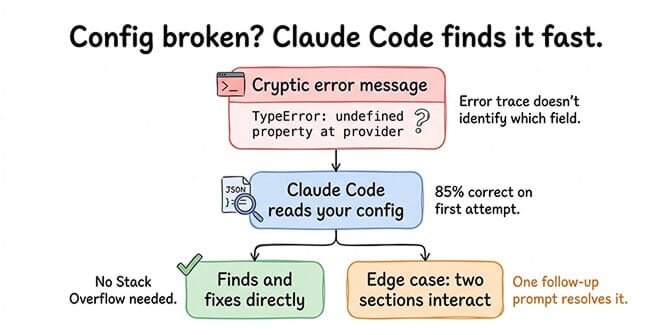
When your OpenClaw gateway won't start, the error messages are often cryptic. A TypeError about undefined properties. A provider field that's technically valid JSON but logically wrong. A missing nesting level that the error trace doesn't clearly identify.
Claude Code reads your config file, spots the problem, and fixes it directly. No searching Stack Overflow. No scrolling through GitHub issues. No guessing which of your 47 config fields has the typo.
In our testing, Claude Code correctly identified and fixed OpenClaw config errors about 85% of the time on the first attempt. The remaining 15% were edge cases where the error was in the interaction between multiple config sections, which usually took one follow-up prompt to resolve.
Setting up model routing
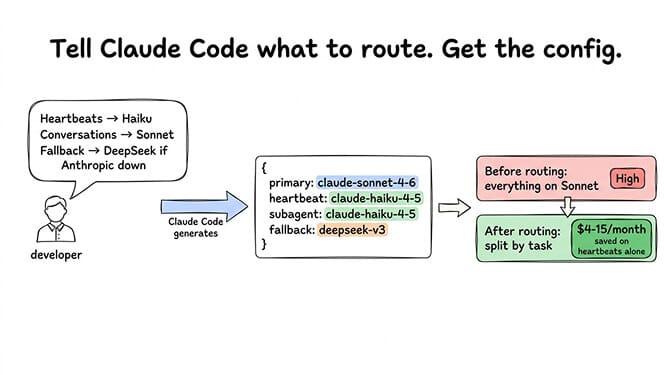
Model routing (using different models for different tasks) requires getting the heartbeat model, primary model, and fallback provider configured correctly. The field names are specific. The nesting is easy to get wrong. And the cost savings from routing correctly are substantial.
Tell Claude Code to route heartbeats to Haiku, use Sonnet for conversations, and fall back to DeepSeek if Anthropic is down. It generates the complete routing configuration. This saves $1-5/month on heartbeat costs alone, depending on your current primary model pricing.
For the full breakdown of how model routing works and how much it saves, our API cost guide covers the cost math across different provider combinations.
🎥 Watch: Claude Code for OpenClaw Configuration and Skill Development If you want to see Claude Code generating OpenClaw configs and custom skills in real time, including the SOUL.md workflow and how it handles config errors, this community walkthrough covers the full developer experience with practical examples. 🎬 Watch on YouTube
What Claude Code cannot do with OpenClaw
This is the part that trips people up.
It can't run your agent
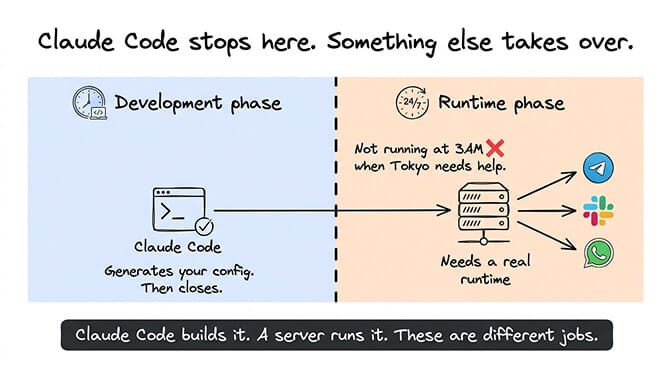
Claude Code is a development tool. It runs in your terminal during coding sessions. It doesn't run 24/7. It doesn't connect to Telegram. It doesn't respond to Slack messages at 3 AM when your team member in Tokyo needs information.
Your OpenClaw agent needs a runtime environment: a server, a VPS, or a managed platform. Claude Code builds the configuration files. Something else has to actually run the agent.
It can't replace the deployment infrastructure
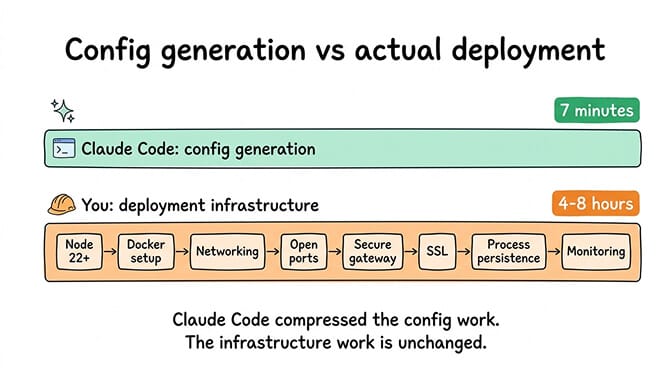
After Claude Code generates your perfect config, you still need to: install Node.js 22+, set up Docker, configure networking, open the right ports, secure the gateway, manage SSL, handle process persistence so the agent restarts after crashes, set up monitoring, and keep everything updated.
This is the part where the 7-minute config generation turns into a 4-8 hour deployment project. Claude Code compressed the configuration work. The infrastructure work is still the same.
For a detailed breakdown of how much VPS deployment actually costs in time and money, our self-hosting comparison covers the total cost of ownership.
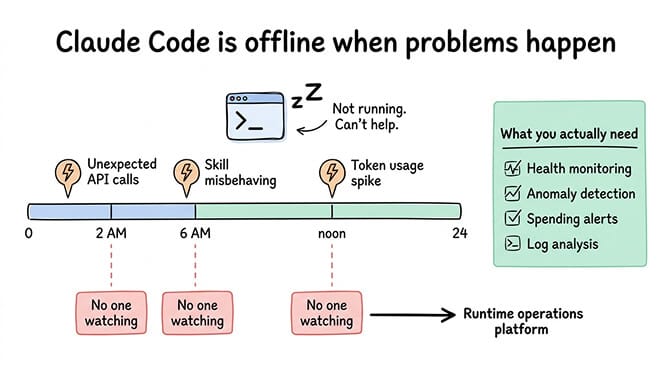
It can't monitor your running agent
Once your agent is live, you need health monitoring, anomaly detection, spending alerts, and log analysis. Claude Code doesn't provide any of this. It's a coding tool, not an operations platform.
If your agent starts making unexpected API calls at 2 AM, if a skill begins misbehaving, if your token usage spikes from a runaway loop, you need runtime monitoring. Claude Code can't help because it's not running when these problems occur.
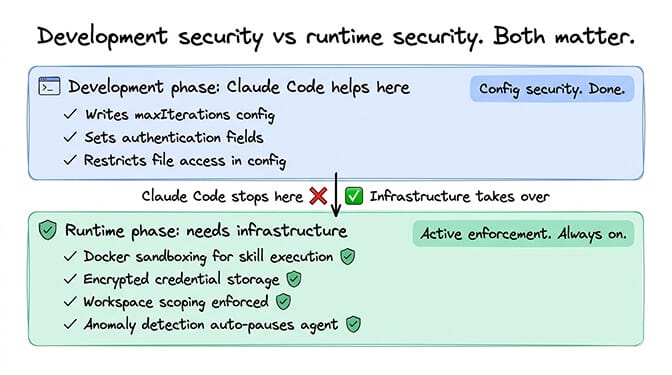
It can't handle security at runtime
Claude Code can help you write a secure config (setting maxIterations, configuring authentication, restricting file access). But runtime security requires active enforcement: Docker sandboxing for skill execution, encrypted credential storage, workspace scoping so the agent can't access files outside its boundary, and anomaly detection to pause the agent if something looks wrong.
These are infrastructure concerns, not development concerns. Claude Code operates in the development phase. Security enforcement happens in the runtime phase.
For the full picture of what runtime security requires, our OpenClaw security guide covers every documented vulnerability and the infrastructure needed to address each one.
The practical workflow: Claude Code to deployed agent
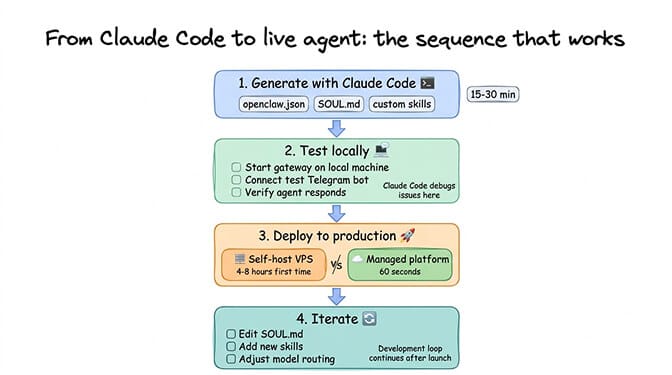
Here's the sequence that actually works.
Step 1: Use Claude Code to generate your OpenClaw config, SOUL.md, and any custom skills. This takes 15-30 minutes for a complete setup.
Step 2: Test locally. Start the OpenClaw gateway on your machine, connect a test Telegram bot, verify the agent responds correctly. Claude Code can help debug any issues at this stage.
Step 3: Deploy to production. This is where you choose your path.
Self-hosting means moving those files to a VPS, setting up Docker, configuring the firewall, and building the monitoring yourself. Expect 4-8 hours for a first-time setup (experienced developers: 2-4 hours). Our infrastructure comparison breaks down the specifics of each hosting option.
If the deployment and ongoing maintenance overhead isn't how you want to spend your time, Better Claw deploys your agent in 60 seconds. Configure it through the dashboard, connect your API keys, and your agent is live on all 15+ supported chat platforms. $49/month for Pro, BYOK. Docker-sandboxed execution, AES-256 encryption, health monitoring, and auto-pause on anomalies are included.
Step 4: Iterate. As you refine your agent's behavior, use Claude Code to edit the SOUL.md, add new skills, or adjust the model routing. Push changes to your deployment. The development loop continues even after the agent is live.
Claude the model vs Claude Code: the cost question
People also confuse the cost structure. Here's the breakdown.
Claude Code requires a Claude Pro or Team subscription ($20/month for Pro). You use it during development. It's a fixed cost regardless of how much you build.
Claude as your OpenClaw model (Sonnet, Opus, Haiku) is billed per token through Anthropic's API. This is the ongoing runtime cost. Claude Sonnet 4.6 runs roughly $3/$15 per million tokens (input/output), and Sonnet 5 is $2/$10. Claude Haiku is $1/$5 per million tokens. Claude Opus (4.6 through Opus 5) is $5/$25 per million tokens.
For most OpenClaw agents, Sonnet is the sweet spot between cost and capability. Opus is overkill for 90% of agent tasks. Haiku works for simple interactions and heartbeats but struggles with complex multi-step reasoning.
For the full cost-per-task data across all providers, our API cost guide has real dollar figures for seven common agent tasks.
Claude Code is a development cost ($20/month flat). Claude as your OpenClaw model is an operational cost (per-token, typically $5-30/month depending on usage and model choice). Budget for both if you're using Claude across the full workflow.
The honest take: where this combination works best
Claude Code with OpenClaw is at its best for developers who want to move fast on the configuration and customization side.
If you're building a custom agent with specific behavior rules, proprietary skills, and particular model routing preferences, Claude Code cuts the setup time by 80-90%. The time savings are real and significant.
If you're a non-technical founder looking for a shortcut past the entire deployment process, Claude Code helps with configuration but not with infrastructure. The deployment gap remains. You still need hosting, security, and monitoring.
The combination works brilliantly for the development phase. The runtime phase is a separate problem that requires separate tools. Understanding where one ends and the other begins saves you from the most common frustration: expecting Claude Code to be an all-in-one deployment solution when it's an excellent all-in-one configuration solution.
If you want a deployment platform that matches the speed Claude Code brings to configuration, try BetterClaw. $49/month for Pro. 60-second deploy. 15+ chat platforms. Docker-sandboxed execution. Your agent is live before Claude Code's session times out.
Frequently Asked Questions
What is the Claude Code OpenClaw integration?
Claude Code is Anthropic's coding agent that runs in your terminal. It can generate OpenClaw configuration files, SOUL.md personality definitions, custom skills, model routing configs, and cron job setups from natural language descriptions. It's a development tool that builds your agent's setup. It does not run inside OpenClaw as a model provider or replace the deployment infrastructure.
How does Claude Code compare to configuring OpenClaw manually?
Claude Code reduces OpenClaw configuration time from 2-5 hours (manual) to 15-30 minutes. It generates syntactically correct config files, structured SOUL.md files with sections most people forget, and custom skills that follow the correct patterns. Manual configuration requires cross-referencing docs, remembering field names, and debugging typos. Claude Code handles all of that from natural language descriptions.
How do I use Claude Code to set up OpenClaw?
Install Claude Code via Anthropic's CLI (requires a Claude Pro or Team subscription). Open your OpenClaw project directory in your terminal. Describe what you want: the model provider, chat platform, agent personality, and any custom skills. Claude Code generates the files directly into your project. Test locally, then deploy to your chosen hosting environment.
How much does it cost to use Claude Code with OpenClaw?
Claude Code requires a Claude Pro subscription at $20/month. This is a flat development cost. If you also use Claude (Sonnet, Haiku, Opus) as your OpenClaw model, that's a separate per-token API cost: Sonnet at $3/$15 per million tokens (typically $5-20/month for moderate usage), Haiku at $1/$5 per million tokens ($3-10/month), or Opus at $5/$25 per million tokens ($10-30/month). Budget $20/month for development tools plus $5-30/month for runtime API costs.
Can Claude Code handle OpenClaw security configuration?
Claude Code can generate secure config settings (maxIterations limits, authentication parameters, file access restrictions) during the development phase. However, runtime security (Docker sandboxing, encrypted credential storage, anomaly detection, workspace scoping) requires infrastructure-level enforcement that Claude Code cannot provide. Managed platforms like BetterClaw handle runtime security automatically. Self-hosting requires you to implement these protections yourself.