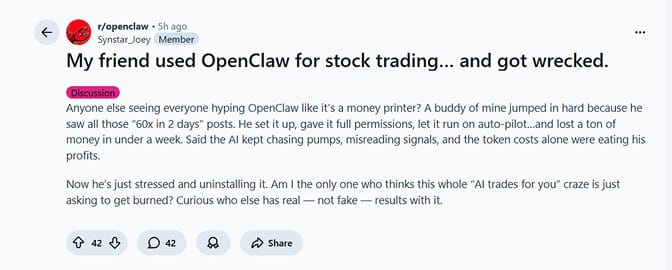
Yes, technically. Should you? That depends on how much you enjoy watching an AI agent gamble with real money at 3 AM.
A developer on Medium ran OpenClaw as an autonomous crypto trading agent for two weeks. His conclusion, published four days ago, is the most honest thing I've read about OpenClaw trading in 2026:
"I've stripped back OpenClaw's permissions. It no longer executes trades directly."
He'd built the whole thing: OpenClaw on a Mac Mini M4, connected to OpenAlgo for broker API access, Claude Sonnet as the reasoning model, Telegram as the chat interface. It worked. The agent monitored markets, generated signals, and executed trades autonomously.
And then he watched it misinterpret a data feed during volatility and place an order he didn't intend.
That's the honest answer to "can OpenClaw trade stocks autonomously?" Yes, it can. No, you probably shouldn't let it. At least not in the way most people imagine when they search for OpenClaw trading setups.
Let me explain exactly what's possible, what's dangerous, and what actually makes sense.
What OpenClaw trading actually looks like in 2026
OpenClaw is not a trading bot. It's a general-purpose AI agent framework with 230,000+ GitHub stars that can connect to exchange APIs through community-built skills. The trading capability is bolted on, not built in.
As of March 2026, the ClawHub marketplace hosts over 13,700 skills, with 311+ in the finance and investing category. A curated third-party registry tracks another 5,400+. Some of these skills connect to real brokerages and exchanges.
Here's what's already live:
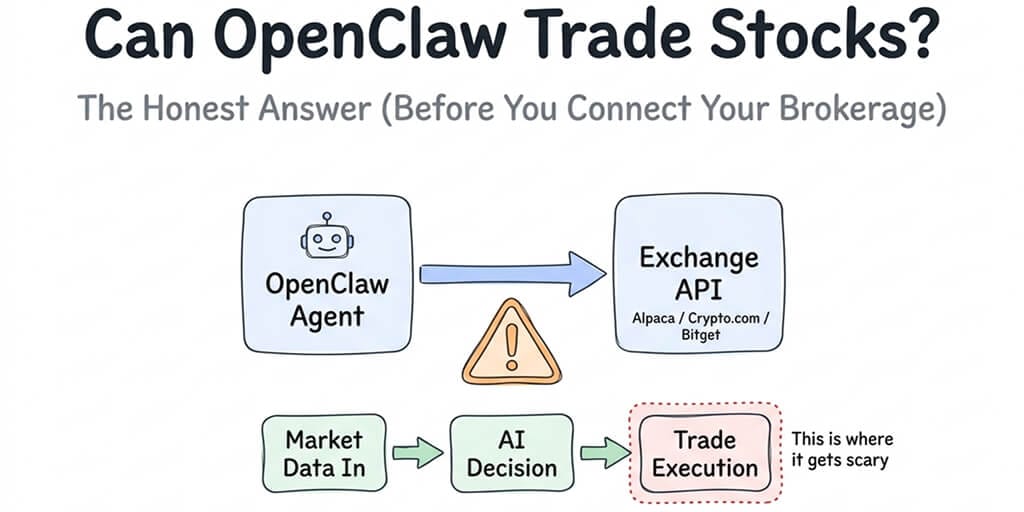
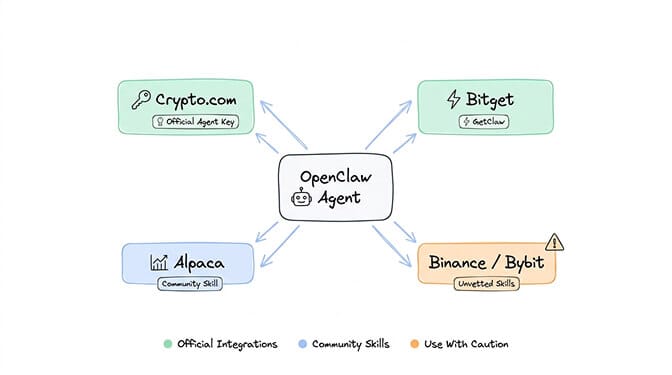
Crypto.com launched an official OpenClaw integration called "Agent Key." You generate an API key in the Crypto.com app, connect it to your OpenClaw agent, and the agent can execute trades on your behalf through Telegram. They built in safety controls: custom weekly trading limits, flexible permissions, and a manual confirmation requirement for trades.
Bitget just launched "GetClaw," an autonomous AI trading agent built on the OpenClaw framework. Zero installation. Runs directly from their web interface. Market monitoring, signal generation, and trade execution with multi-layer isolation for security.
Alpaca (the commission-free stock trading API) works through community skills like OpenAlgo. Connect the API, and your OpenClaw agent can place stock and ETF orders.
Various crypto exchanges have community-built skills for Binance, Bybit, and others. These are not officially vetted. More on why that matters later.
For understanding how OpenClaw's skill and agent architecture works at a technical level, our explainer covers the gateway model and tool execution flow.
The three things that actually work
Let me be specific about what OpenClaw does well in the trading context.
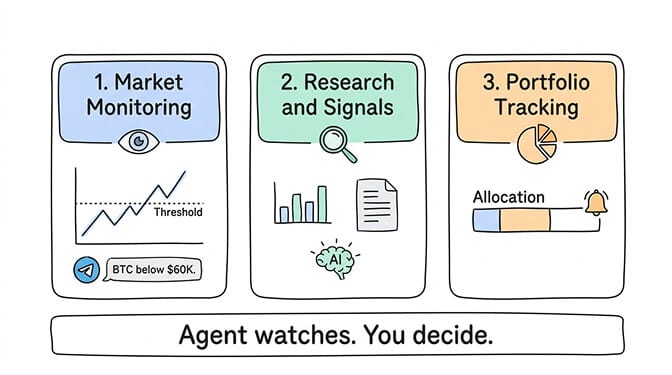
1. Market monitoring and alerting
This is where OpenClaw genuinely shines for traders. Set up a cron job that monitors prices, volumes, technical indicators, or news feeds. When conditions match your criteria, the agent texts you on Telegram or WhatsApp.
"BTC just dropped below your $60K threshold." "AAPL volume is 3x the 20-day average." "Your portfolio has drifted 5% from target allocation."
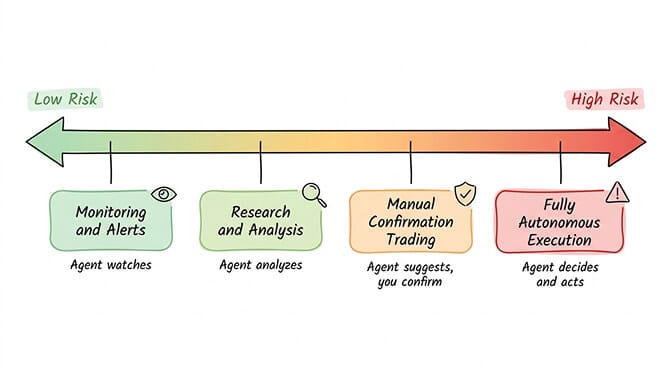
This requires no trade execution permissions. The agent reads data and sends messages. The risk profile is completely different from autonomous execution. You maintain control. The agent is your eyes, not your hands.
2. Research and signal generation
Ask your agent to analyze a stock, summarize earnings reports, aggregate sentiment from multiple sources, or backtest a strategy against historical data. Claude Sonnet and Opus are genuinely capable at financial analysis.
One developer used OpenClaw with Microsoft's Qlib framework for backtesting and reported 59% annualized returns in simulation. As the Qlib documentation notes, backtest returns and live performance are structurally different (slippage, transaction costs, overfitting). But the analytical capability is real.
3. Portfolio tracking and rebalancing alerts
For allocation-focused investors, OpenClaw can monitor portfolio drift and alert you when rebalancing is needed. "Bitcoin is now 35% of the portfolio, target is 25%." The agent watches. You decide whether to act.
The safest use of OpenClaw in trading is as a research assistant and signal generator, not as an autonomous executor. You get the analytical power without the risk of an agent misinterpreting your intent.
The three things that are genuinely dangerous
Here's where most OpenClaw trading guides lose their honesty.
1. Autonomous trade execution without guardrails
OpenClaw processes natural language instructions. It interprets. It makes decisions. Unlike a traditional trading bot with fixed logic (if price < X, buy Y), an AI agent dynamically interprets what you mean. That flexibility is what makes it powerful. It's also what makes it dangerous.
During a volatile market session, the difference between "buy the dip" and "buy aggressively into a falling knife" is a judgment call. LLMs make judgment calls based on training data, not your risk tolerance.
Meta researcher Summer Yue's agent mass-deleted her emails while ignoring stop commands. Now imagine that same behavior pattern with a brokerage account.
2. Unvetted trading skills from ClawHub
The ClawHavoc campaign found 824+ malicious skills on ClawHub, roughly 20% of the entire registry. Cisco independently found a skill performing data exfiltration without user awareness. Some of those malicious skills were categorized under financial trading, disguised as Polymarket bots, Bybit integrations, and crypto wallet tools.
One malicious package had been downloaded 14,285 times before being caught.
If you install a trading skill that hasn't been security-audited, you're giving an unknown developer access to your exchange API keys. That's not a theoretical risk. It's already happened to people.
For the full scope of what's been documented in the OpenClaw security risk ecosystem, our security guide covers every incident from CrowdStrike, Cisco, and the ClawHavoc campaign.
3. API key exposure on poorly secured setups
OpenClaw stores API keys in ~/.openclaw/openclaw.json in plaintext. On a VPS with default security settings, those keys are one compromised SSH password away from being stolen.
Exchange API keys with trading permissions are particularly valuable targets. The February 2026 infostealer campaign specifically hunted for these files. Stolen exchange API keys don't just cost you data. They cost you money. Directly. From your brokerage account.
📹 Watch: OpenClaw Crypto Trading Setup and Security Considerations - If you want to see what an OpenClaw trading configuration actually looks like in practice (and the security considerations that most tutorials skip), this community analysis covers the real-world experience of running an AI trading agent with honest assessment of the risks. Watch on YouTube
The regulatory reality nobody mentions
The SEC's 2026 "AI Washing" enforcement focus means falsely claiming a strategy uses "AI" or "deep learning" when it runs simple rules constitutes fraud. That's for fund managers, but it signals regulatory attention on AI-driven trading broadly.
The CFTC has published rules around automated trading systems. Autonomous OpenClaw agents that execute trades could fall under these regulations depending on the volume and pattern of activity.
Polymarket, a popular target for OpenClaw trading skills, now requires KYC and a licensed broker for US users. Direct crypto wallet trading is no longer available. Multiple states have filed challenges.
None of this means you can't use OpenClaw for trading. It means the regulatory environment is actively evolving, and building a fully autonomous trading system on an open-source agent framework that's four months old carries legal risk alongside financial risk.
What I'd actually recommend (the sensible approach)
After months of watching the OpenClaw trading community, here's the setup that makes sense to me.
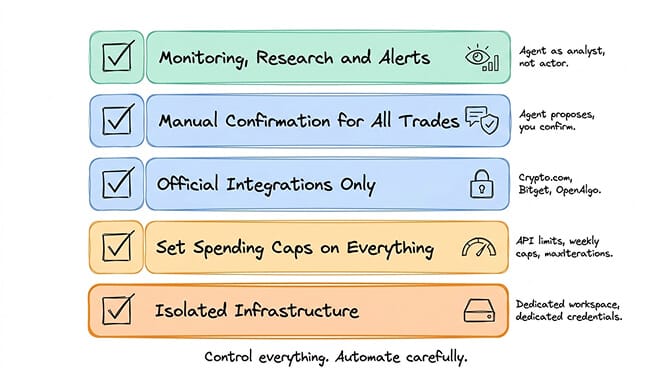
Use OpenClaw for monitoring, research, and alerts. Set up price alerts, portfolio drift detection, earnings summaries, and market sentiment analysis. Let the agent be your analytical assistant. This is where the AI genuinely adds value with minimal risk.
Use manual confirmation for any trade execution. Both Crypto.com's Agent Key and Bitget's GetClaw offer this. The agent proposes a trade. You confirm via chat. The agent executes. You maintain control of every decision.
Never use unvetted ClawHub skills for financial operations. Only use officially integrated exchange connections (Crypto.com Agent Key, Bitget GetClaw) or well-known open-source bridges like OpenAlgo that you can audit yourself.
Set spending caps on everything. Weekly trading limits in your exchange API settings. Daily API spending caps for your model provider. maxIterations in your skill configs. Belt and suspenders.
Keep your trading agent on isolated infrastructure. Not on your personal machine. Not sharing API keys with your other OpenClaw skills. Dedicated workspace, dedicated credentials, dedicated security.
If you're running OpenClaw for non-trading tasks (email, calendar, research, productivity automation) and want zero-config deployment with built-in security, BetterClaw handles all of the infrastructure at $49/month for Pro. Docker sandboxing, AES-256 encryption, anomaly detection. BYOK with any of the 28+ supported providers.
For the full range of what OpenClaw agents can do beyond trading (and where they excel), our use case guide covers the workflows that don't involve putting real money at risk.
The honest bottom line
Can OpenClaw trade stocks and crypto autonomously? Yes. Crypto.com, Bitget, and Alpaca integrations make it technically straightforward.
Should you let it? Not without guardrails. Not without manual confirmation on trades. Not without vetted skills. And definitely not with your retirement account.
The Medium developer who tested OpenClaw trading for two weeks landed in exactly the right place: AI-assisted trading, not AI-autonomous trading. The agent researches, monitors, and generates signals. The human decides and confirms.
That middle ground is where real value lives right now. The gap between "technically possible" and "reliably safe with real money" is still enormous. Models hallucinate. Skills get compromised. Agents ignore stop commands. Markets move in ways that training data didn't prepare the model for.
Fully autonomous AI trading will come. The infrastructure is improving every month. But in March 2026, the wisest use of OpenClaw for trading is as the smartest research assistant you've ever had - not as a replacement for your judgment.
Your portfolio will thank you for keeping the human in the loop.
If you want to build a well-configured OpenClaw agent for the non-trading parts of your life (productivity, communication, research, automation) with enterprise security and zero infrastructure headaches, give BetterClaw a try. $49/month for Pro, BYOK, 60-second deploy. We handle the Docker, security, and monitoring. You build the workflows that matter.
Frequently Asked Questions
Can OpenClaw actually trade stocks and crypto?
Yes. OpenClaw can connect to exchange APIs through official integrations (Crypto.com Agent Key, Bitget GetClaw) and community skills (Alpaca via OpenAlgo). It can monitor markets, analyze data, generate signals, and execute trades. However, autonomous trade execution without human confirmation carries significant risk due to AI interpretation errors, compromised skills, and security vulnerabilities. Most experienced users recommend manual confirmation for all trades.
How does OpenClaw trading compare to traditional trading bots?
Traditional trading bots execute fixed logic (if/then rules) with predictable behavior. OpenClaw uses AI models that dynamically interpret natural-language instructions, making it more flexible but also more unpredictable. A trading bot does exactly what it's programmed to do. An OpenClaw agent interprets what you mean, which introduces judgment errors. OpenClaw excels at research and analysis. Traditional bots excel at consistent, rule-based execution.
How do I set up OpenClaw for stock trading?
The safest path: connect to Alpaca (commission-free stock API) through the OpenAlgo community skill. Configure your agent with read-only permissions initially. Start with monitoring and alerts only. If you enable trade execution, require manual confirmation for every order. Set weekly trading limits in your exchange API settings and maxIterations limits in your skill config. Never use unvetted ClawHub skills for financial operations.
How much does it cost to run an OpenClaw trading agent?
API costs for the AI model (monitoring, analysis, signal generation) run $15–50/month with smart model routing. Exchange API access is typically free (Alpaca, Crypto.com). Hosting costs $5–29/month depending on VPS vs managed platform. The hidden cost is time: security hardening, skill vetting, monitoring, and updates require ongoing attention. Our API cost breakdown covers the full picture.
Is OpenClaw safe enough for autonomous trading with real money?
Not without significant guardrails. Risks include: AI misinterpretation during volatility, malicious skills (824+ found on ClawHub), plaintext API key storage, prompt injection attacks via market data feeds, and agents that ignore stop commands (documented in the Meta email deletion incident). Use manual trade confirmation, official exchange integrations only, dedicated infrastructure, and strict spending caps. The safest approach is using OpenClaw for research and signals while maintaining human control over execution.
Related Reading
- Best OpenClaw Use Cases — Full list of automation workflows beyond trading
- OpenClaw for Startups — Other high-ROI automation for founders and small teams
- OpenClaw Security Risks Explained — Critical security considerations for financial automation
- OpenClaw Agents for Ecommerce — Another commerce-focused use case with OpenClaw