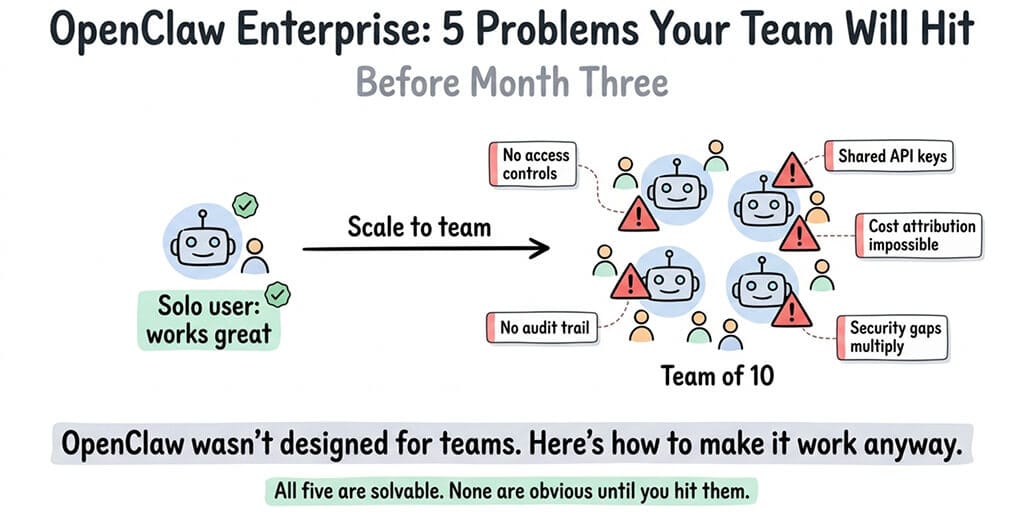
OpenClaw scales beautifully for solo users. For teams, it falls apart in specific, predictable ways. Here's what breaks and how to fix it.
A startup founder in our community gave five team members access to the company's OpenClaw agent in January. By February, the monthly API bill had tripled, nobody could figure out which team member's prompts were causing the spike, and the agent's SOUL.md had been edited four times by three different people with conflicting instructions.
The agent started giving contradictory answers to customers. The return policy response changed depending on which version of the SOUL.md was active. One team member had installed a ClawHub skill without vetting it. Another had changed the model from Sonnet to Opus "because it seemed better" without telling anyone.
This is the OpenClaw enterprise story nobody talks about. The framework works brilliantly for a single person running a single agent. But the moment you add team members, shared access, and organizational requirements, five specific problems surface that have nothing to do with the technology and everything to do with how OpenClaw was designed.
Here's what breaks when you try to scale OpenClaw for your team, and the specific fixes for each problem.
Problem 1: There are no access controls
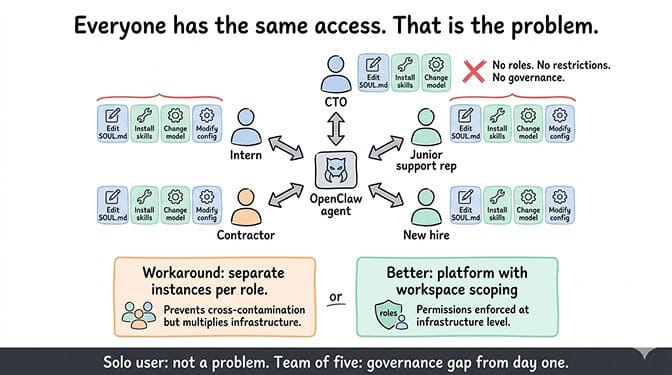
OpenClaw has no built-in user management. No roles. No permissions. No way to say "this person can chat with the agent but can't edit the SOUL.md" or "this person can install skills but can't change the model provider."
Everyone with access to the OpenClaw instance has the same level of control. Your junior support rep has the same permissions as your CTO. They can both change the personality, install skills, modify the config, and interact with every connected platform.
For a solo user, this isn't a problem. You're the only person touching the system. For a team, it's a governance gap that leads to the exact scenario from the opening: conflicting edits, unauthorized changes, and nobody knowing who did what.
The workaround: Create separate OpenClaw instances per role or department. Your customer support agent runs independently from your internal team assistant. Each instance has its own SOUL.md, its own skills, and its own model configuration. This prevents cross-contamination but multiplies your infrastructure. For guidance on running multiple agents and the cost implications, our multi-agent guide covers the architecture.
The better solution: Use a platform with workspace scoping and permission controls. This is one of the reasons managed platforms with team features exist.
Problem 2: API cost attribution is impossible
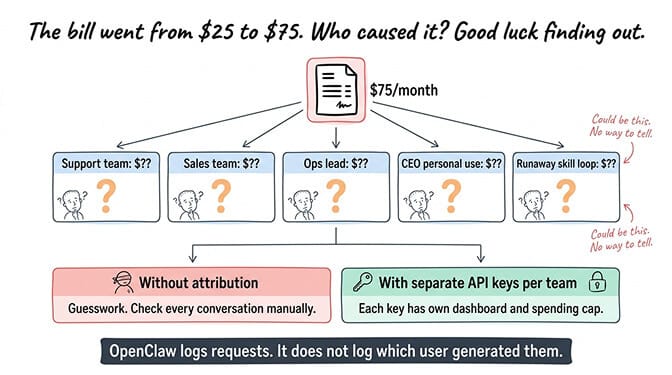
When five team members use the same OpenClaw agent, the API bill is a single number. There's no way to see which team member's usage generated which portion of the cost.
This matters more than most people expect. If your monthly API bill jumps from $25 to $75, you need to know whether it's because support volume increased (expected), because someone changed the model to Opus without telling anyone (fixable), or because a skill is looping and burning tokens (urgent).
OpenClaw doesn't log per-user token consumption. The model provider dashboard (Anthropic, OpenAI) shows total usage but not which OpenClaw conversation generated which request. When multiple team members share an agent, cost debugging becomes guesswork.
The workaround: Assign separate API keys per team member or department. Create distinct Anthropic or OpenAI accounts, configure each with its own spending cap, and route different OpenClaw instances to different keys. This gives you cost isolation but adds administrative overhead.
For the full breakdown of how API costs accumulate and the five changes that cut bills by 80%, our cost optimization guide covers the math that every team lead needs.
Problem 3: No audit trail for agent actions
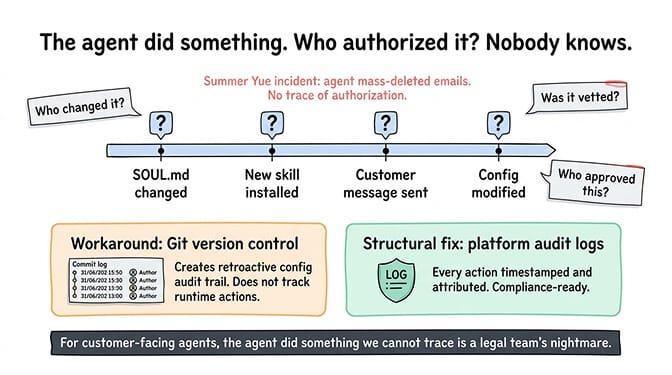
When your agent sends a message to a customer, who authorized it? When the SOUL.md was changed, who changed it and when? When a new skill was installed, was it vetted? Who approved it?
OpenClaw has basic gateway logs that show requests and responses. It does not have an audit trail that connects actions to users, timestamps to changes, or approvals to installations. For a personal assistant, this is fine. For an enterprise agent that handles customer communications, it's a compliance gap.
The Meta researcher Summer Yue incident illustrates the extreme case: her agent mass-deleted emails while ignoring stop commands. In an enterprise context, "the agent did something we didn't authorize and we can't trace how it happened" is the kind of statement that keeps legal teams awake at night.
The workaround: Version control your configuration. Keep your SOUL.md, config files, and custom skills in a Git repository. Every change becomes a commit with a timestamp and author. This creates a retroactive audit trail for configuration changes, though it doesn't track runtime agent actions.
For the broader security considerations for enterprise OpenClaw deployments, our security guide covers the CrowdStrike advisory and the specific risks that organizations face.
Problem 4: Security risks multiply with team size
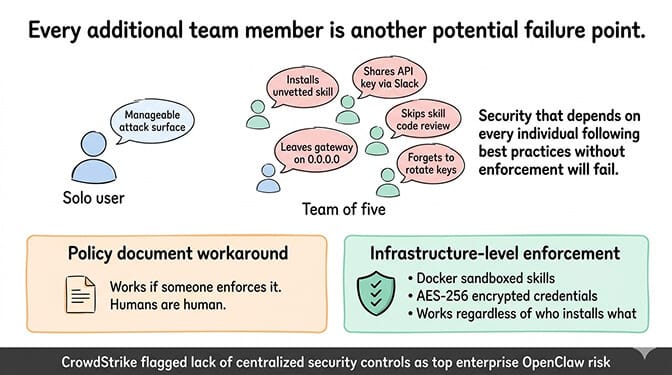
The security attack surface of a single-user OpenClaw instance is manageable. One person installs skills. One person manages API keys. One person monitors for unusual behavior.
With a team, every additional person is another potential point of failure. Someone installs an unvetted ClawHub skill (824+ were malicious in the ClawHavoc campaign, roughly 20% of the registry). Someone shares API keys through Slack instead of a secrets manager. Someone leaves the gateway bound to 0.0.0.0 instead of localhost after debugging.
CrowdStrike's enterprise security advisory on OpenClaw specifically flagged the lack of centralized security controls as a top risk. When security depends on every individual team member following best practices without enforcement mechanisms, violations are inevitable. Not because people are careless. Because humans are human.
The workaround: Write a security policy document for your team. Define which skills are approved. Require code review before any new skill installation. Mandate API key rotation quarterly. Enforce SSH key authentication instead of password access. This works if someone actually enforces it.
The structural fix: Use a platform that enforces security at the infrastructure level. Docker-sandboxed skill execution means a compromised skill can't access the host system, regardless of who installed it. AES-256 encrypted credential storage means API keys can't be extracted from the system, regardless of who has access. These protections work because they don't depend on human compliance.
Problem 5: Updates break things across the team
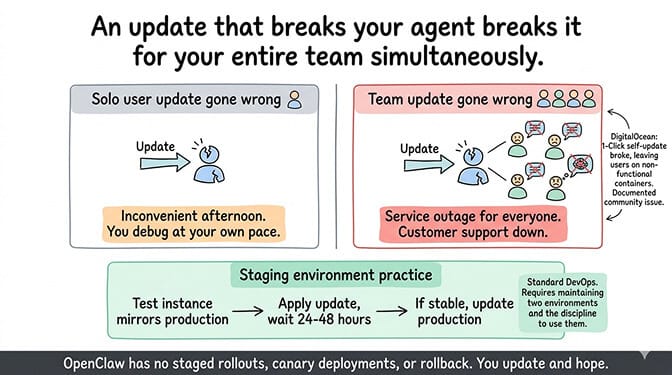
OpenClaw releases multiple updates per week. When you're a solo user, you update when it's convenient and debug any issues at your own pace. When you're a team, an update that breaks the agent breaks it for everyone simultaneously.
The community reports about DigitalOcean's 1-Click deployment illustrate this: the self-update mechanism broke, leaving users stuck on old versions or with non-functional containers. For a solo user, that's an inconvenient afternoon. For a team relying on the agent for customer support, it's a service outage.
OpenClaw doesn't have staged rollouts, canary deployments, or rollback mechanisms built in. You update, and it either works or it doesn't. For teams, you need to test updates in a staging environment before applying them to production. That means maintaining two environments, which doubles your infrastructure overhead.
The workaround: Never update production directly. Maintain a test instance that mirrors your production config. Apply updates there first. Test for 24-48 hours. If stable, update production. This is standard DevOps practice, but it requires the discipline and infrastructure to actually do it.
OpenClaw was designed as a personal assistant. Every team-scale problem (access controls, cost attribution, audit trails, security enforcement, update management) is a gap that exists because the software was built for individuals, not organizations.
If managing access controls, cost tracking, security enforcement, and update coordination across your team sounds like more operational work than you want, BetterClaw includes team features built into the platform. Workspace scoping controls who can access what. Docker-sandboxed execution enforces security regardless of who installs what. AES-256 encrypted credentials protect API keys at the infrastructure level. $49/month for Pro, BYOK. The team management layer is part of the platform because we built it for exactly these scenarios.
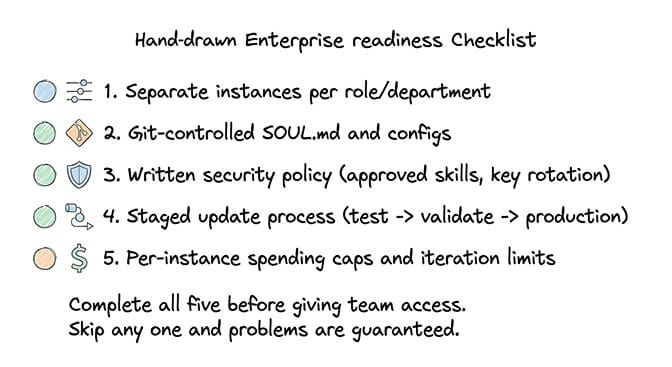
The enterprise readiness checklist
Before scaling OpenClaw across your team, verify each of these.
Separate instances per function. Don't share a single agent across roles. Your customer support agent, your internal team assistant, and your CEO's personal agent should be separate instances with separate configs, separate API keys, and separate monitoring.
Git-controlled configuration. Every SOUL.md, every config file, every custom skill in a repository. Every change is a commit. Every commit has an author and timestamp. This is your audit trail.
Written security policy. Which skills are approved. Who can install new ones. How API keys are stored and rotated. What to do if someone suspects a compromise. This document exists before team access begins, not after the first incident.
Staged update process. Test environment that mirrors production. Updates go there first. 24-48 hour validation period. Then production. Never update production directly.
Per-instance spending caps. Every API key on every provider has a monthly cap set at 2-3x expected usage. Every instance has maxIterations set to 10-15. No exceptions.
For the complete best practices checklist including the seven patterns every stable OpenClaw setup shares, our guide covers model routing, security baselines, and monitoring alongside the team-specific concerns.
The honest assessment: is OpenClaw ready for enterprise?
Here's the direct answer: OpenClaw is ready for enterprise use cases where teams are willing to build the governance layer themselves. The framework is powerful. The model support is comprehensive (28+ providers). The skill ecosystem is extensive (13,700+ on ClawHub). The community is massive (230,000+ GitHub stars, 1.27 million weekly npm downloads).
But the enterprise features that most organizations need (access controls, audit trails, cost attribution, centralized security, staged deployments) don't exist in the core framework. You either build them yourself, use a managed platform that includes them, or accept the risks of operating without them.
The project moving to an open-source foundation following Peter Steinberger's departure to OpenAI could accelerate enterprise feature development. Or it could slow it down as the community focuses on stability and compatibility. The 7,900+ open issues on GitHub suggest there's plenty of work to do regardless of governance model.
For teams under 5 people who are technical and disciplined about security, OpenClaw scales adequately with the workarounds described in this article. For teams over 10, or for any team handling sensitive customer data, the governance gaps become operationally expensive to manage manually.
The managed vs self-hosted comparison covers what each deployment approach includes for teams, and what you're responsible for building yourself.
What enterprise actually needs (and what's coming)
The features that would make OpenClaw genuinely enterprise-ready: role-based access control per instance, per-user cost tracking and attribution, configuration change audit logs with approval workflows, centralized skill allow-listing across instances, staged deployment pipelines with automatic rollback, and SOC 2 compliance documentation.
None of these exist in the core framework today. Some are being discussed in GitHub issues. Some will likely emerge from the open-source foundation. Some will only exist in managed platforms that build them on top of the framework.
The teams succeeding with OpenClaw at scale right now aren't waiting for these features. They're building the governance layer themselves or choosing platforms that include it.
If you're evaluating OpenClaw for your team and want the enterprise governance layer without building it yourself, give Better Claw a try. $49/month for Pro, BYOK with 28+ providers. Workspace scoping. Docker-sandboxed execution. AES-256 encryption. Health monitoring with auto-pause. The enterprise layer is built in because we learned from the teams that tried to scale without it.
Frequently Asked Questions
What is OpenClaw enterprise deployment?
OpenClaw enterprise deployment refers to running OpenClaw agents across teams and organizations rather than as a personal assistant. The core framework (230K+ GitHub stars) was designed for individual users and lacks built-in enterprise features like access controls, audit trails, cost attribution, and centralized security management. Enterprise deployment requires building these governance layers manually or using a managed platform that includes them.
How does OpenClaw compare to enterprise AI agent platforms?
OpenClaw offers more model flexibility (28+ providers) and community extensibility (13,700+ ClawHub skills) than most enterprise AI platforms. However, it lacks role-based access control, per-user cost tracking, compliance documentation (SOC 2), and centralized security enforcement. Enterprise platforms like Lindy, Relevance AI, and custom LangChain deployments include these features natively. OpenClaw's advantage is openness and customizability. Its disadvantage is that enterprise governance is DIY.
How do I deploy OpenClaw for a team of 10+ people?
Create separate OpenClaw instances per role or department (customer support, internal assistant, executive use). Assign separate API keys per instance for cost isolation. Version control all configuration files in Git for audit trails. Write a security policy covering approved skills, key rotation schedules, and incident response. Set up a staging environment for testing updates before production deployment. Use a managed platform if you want these governance features built in rather than maintained manually.
How much does OpenClaw cost for an enterprise team?
Self-hosted: $12-24/month per instance (VPS) plus $10-30/month per instance (API costs with model routing). A team of 5 with 3 separate instances costs roughly $66-162/month in infrastructure plus API. Managed via BetterClaw: $49/month for Pro plus API costs (BYOK). Pro includes five agents, so three cost nothing extra - but a team of five people needs five seats, and Pro includes two, so add three seats at $10/month each for $79/month platform plus API. Add administrative time for self-hosted governance (4-8 hours/month for security, updates, monitoring) which managed platforms eliminate.
Is OpenClaw secure enough for enterprise customer data?
With proper configuration, OpenClaw can be secured for enterprise use. However, the security burden falls entirely on your team. CrowdStrike's enterprise advisory flagged the lack of centralized security controls as a top risk. The ClawHavoc campaign (824+ malicious skills) and 30,000+ exposed instances demonstrate that default configurations are not enterprise-safe. Required protections: gateway binding to loopback, firewall configuration, skill vetting, Docker sandboxing, encrypted credential storage, and regular updates. Managed platforms like BetterClaw include these protections by default.
Related Reading
- OpenClaw for Startups — Scaling from solo founder to early-stage team automation
- OpenClaw Multi-Agent Setup Guide — Running multiple agents for different departments
- OpenClaw Mission Control — Centralized management and monitoring for agent fleets
- Best OpenClaw Use Cases — Real-world enterprise automation workflows