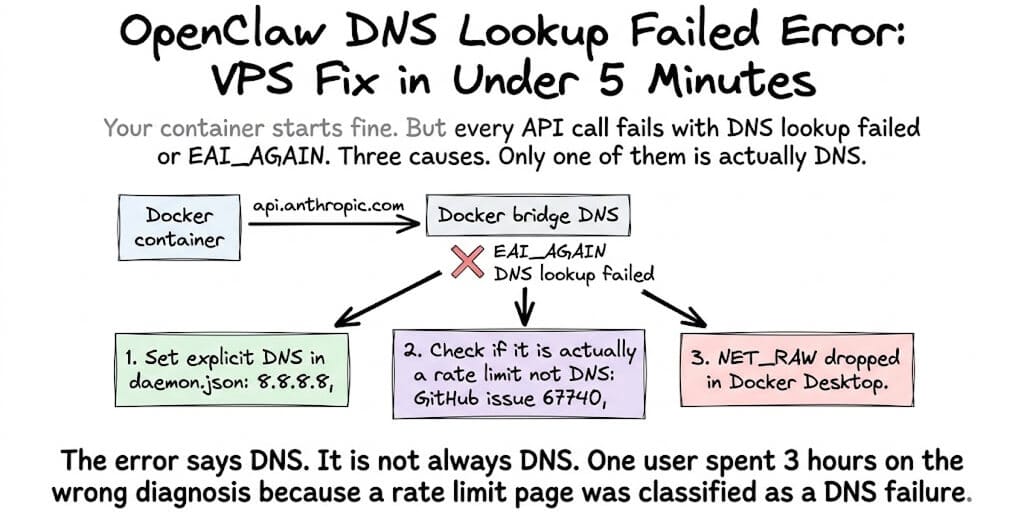
A user filed GitHub issue #67740 after spending three hours debugging a "DNS lookup failed" error. They checked their network configuration. They verified their VPS DNS settings. They restarted Docker. They rebuilt the container. Nothing worked.
The error wasn't DNS. It was a Cloudflare rate-limit page being misclassified as a DNS failure by OpenClaw's error handler.
Three hours of debugging. The wrong diagnosis. Because the error message lied.
This is the most common networking failure in Docker-hosted OpenClaw. The error always says "DNS lookup failed." The cause is one of three things, and only one of them is actually DNS.
Cause 1: "DNS lookup failed" because Docker bridge DNS isn't forwarding (the real DNS fix)
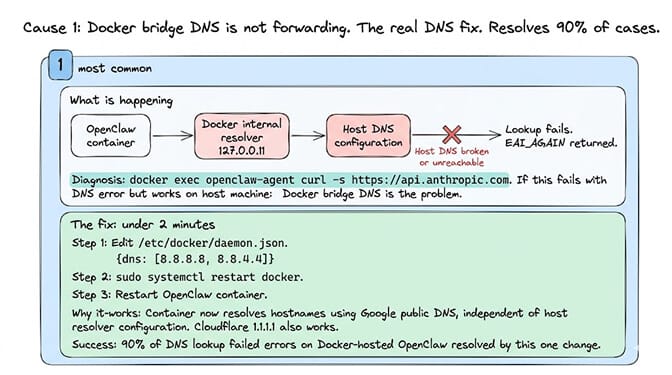
What happens: Docker's default bridge network uses an internal DNS resolver (127.0.0.11). That resolver forwards to the host's DNS configuration. If the host's DNS resolver is broken, unreachable, or misconfigured, every DNS lookup from inside the container fails.
What the error looks like:
Error: getaddrinfo EAI_AGAIN api.anthropic.com
How to diagnose: Run a DNS test from inside the container:
docker exec openclaw-agent curl -s https://api.anthropic.com
If that fails with a DNS error but curl https://api.anthropic.com works on the host machine, the Docker bridge DNS is the problem.
The fix (under 2 minutes): Add explicit DNS servers to Docker's daemon configuration. Edit /etc/docker/daemon.json:
{
  "dns": ["8.8.8.8", "8.8.4.4"]
}
Then restart Docker and your OpenClaw container:
sudo systemctl restart docker   # apply the new daemon.json DNS config
docker restart openclaw-agent   # restart the OpenClaw container
Why this works: You're telling Docker to use Google's public DNS (8.8.8.8) instead of forwarding to the host's resolver. Cloudflare's 1.1.1.1 works too. The container now resolves hostnames independently of the host's DNS configuration.
The 90% fix: Setting explicit DNS in daemon.json resolves 90% of "DNS lookup failed" errors in Docker-hosted OpenClaw. If this doesn't fix it, the problem isn't DNS. Read on.
For the complete Docker troubleshooting guide, our OpenClaw Docker troubleshooting post covers the other 7 common Docker errors beyond DNS.
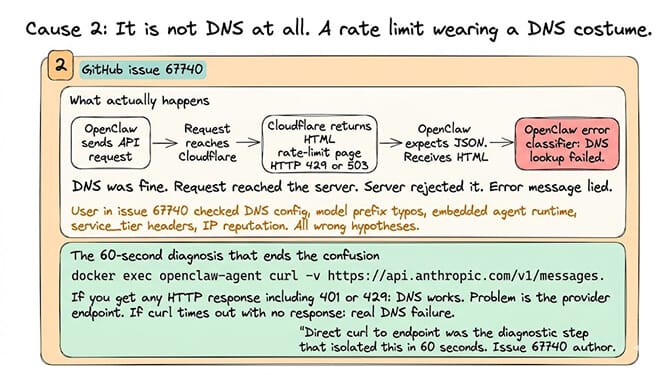
Cause 2: It's not DNS at all (the mislabeled rate limit)
Here's where most people get it wrong.
GitHub issue #67740 documents this clearly: OpenClaw's error classifier mislabels Cloudflare rate-limit responses as "DNS lookup failed." A user spent 3 hours on "wrong hypotheses before isolating: DNS/network config, model prefix typos, embedded agent runtime, service_tier header rejection, DigitalOcean IP reputation vs Cloudflare."
What actually happens: Your request reaches the provider's endpoint. Cloudflare returns an HTML rate-limit page (HTTP 429 or 503 with an HTML body). OpenClaw's error classifier receives an HTML response where it expected JSON. It classifies this as a connection-level failure. The error message says "DNS lookup failed." The DNS was fine. The request reached the server. The server rejected it.
How to diagnose: Test the provider endpoint directly with curl from inside the container:
docker exec openclaw-agent curl -v https://api.anthropic.com/v1/messages
If you get an HTTP response (even an error response like 401 or 429), DNS is working. The problem is the provider endpoint, not your network.
The fix: If it's a rate limit — reduce your request frequency, check your API key billing status, or switch providers temporarily. If it's an OpenAI Codex OAuth issue specifically (the exact case in #67740): the Codex endpoint rejects requests with store:true, which OpenClaw sends by default. Switch to a direct API key or wait for the fix.
The meta-lesson from #67740: "Direct curl to endpoint directly was the diagnostic step that isolated this in 60 seconds. Suggest adding 'curl test against provider endpoint directly' to OpenClaw's troubleshooting docs." Always test with curl before debugging DNS.
Cause 3: NET_RAW dropped in Docker Desktop (the security fix that breaks networking)
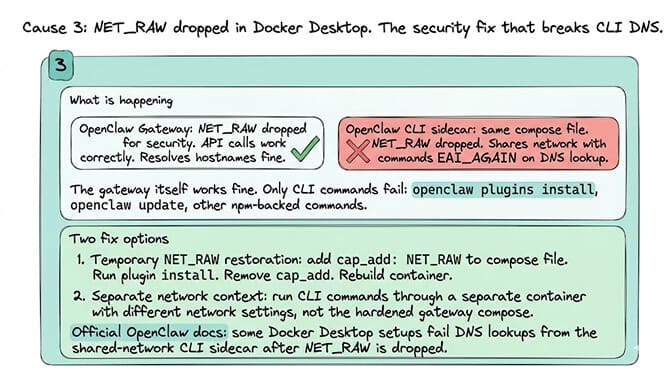
What happens: OpenClaw's hardened Docker Compose configuration drops the NET_RAW capability for security. In some Docker Desktop setups, this prevents the CLI sidecar from performing DNS lookups at all.
From the official OpenClaw docs:
"Some Docker Desktop setups fail DNS lookups from the shared-network
openclaw-clisidecar afterNET_RAWis dropped, which shows up asEAI_AGAINduring npm-backed commands such asopenclaw plugins install."
What this looks like: The gateway itself works fine (API calls succeed). But openclaw plugins install and other CLI commands fail with EAI_AGAIN. The CLI sidecar can't resolve hostnames. The gateway can.
The fix: The official docs recommend keeping the hardened compose file for gateway operation (NET_RAW dropped) and running CLI commands that need DNS through a separate network context. Or temporarily add NET_RAW back for plugin installation:
cap_add:
  - NET_RAW
Run the install, then remove it.
If debugging Docker bridge DNS, differentiating real DNS failures from mislabeled rate limits, and managing NET_RAW capabilities in compose files sounds like more networking work than agent building, BetterClaw eliminates the Docker networking layer entirely. No containers. No bridge DNS. No daemon.json. No NET_RAW. The agent connects to 28+ providers through managed infrastructure. DNS is our problem. Free tier with 1 agent and BYOK. $49/month for Pro.
The diagnostic checklist (run this before debugging anything)
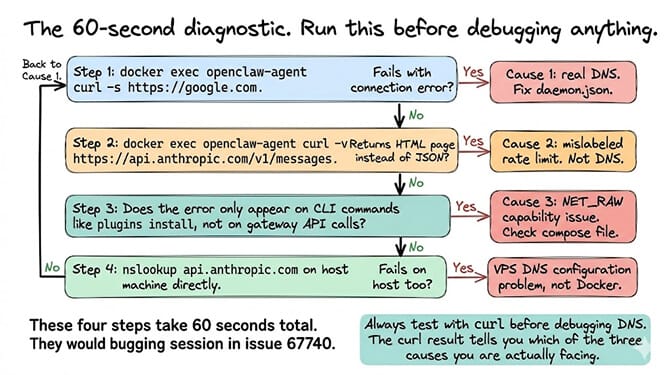
Here's the 60-second diagnostic that saves hours:
Step 1:
docker exec openclaw-agent curl -s https://google.com
If this fails: real DNS issue. Fix daemon.json (Cause 1).
Step 2:
docker exec openclaw-agent curl -v https://api.anthropic.com/v1/messages
If this returns HTML (not JSON): rate limit or provider issue, not DNS (Cause 2).
Step 3: Check if the error only appears on CLI commands (not gateway API calls). If so: NET_RAW capability issue (Cause 3).
Step 4: Check your host's DNS independently: nslookup api.anthropic.com on the host machine. If this fails, the problem is your VPS's DNS configuration, not Docker.
For the best practices for stable VPS deployment, our secure OpenClaw VPS guide covers the network configuration patterns that prevent DNS issues.
The "DNS lookup failed" error is the most misleading error in OpenClaw. It's sometimes DNS (fix the daemon.json). It's sometimes a rate limit wearing a DNS costume (test with curl). It's sometimes a security capability restriction (check NET_RAW). The error message doesn't distinguish between these three causes. You have to.
If you want an agent without Docker networking, DNS configuration, and error messages that lie about what's actually wrong, give BetterClaw a try. Free plan. $49/month Pro. No Docker. No DNS. No daemon.json. The agent connects. The networking is managed. The error messages are honest.
Frequently Asked Questions
Why does OpenClaw show "DNS lookup failed"?
Three causes: Docker's bridge DNS isn't forwarding to a working resolver (fix: add {"dns": ["8.8.8.8"]} to /etc/docker/daemon.json), a provider rate limit is being mislabeled as DNS failure (fix: test with curl directly), or NET_RAW capability is dropped in Docker Desktop (fix: add NET_RAW temporarily for CLI commands). The error message doesn't distinguish between these causes.
How do I fix EAI_AGAIN in OpenClaw Docker?
EAI_AGAIN means DNS resolution failed. The fastest fix: add {"dns": ["8.8.8.8", "8.8.4.4"]} to /etc/docker/daemon.json and restart Docker. This tells the container to use Google's public DNS instead of forwarding to the host's resolver. Takes under 2 minutes. Fixes 90% of cases.
Why does my OpenClaw agent work on the host but not in Docker?
Docker containers use an internal DNS resolver (127.0.0.11) that forwards to the host's configuration. If the host's DNS works but the Docker bridge forwarding doesn't, the container can't resolve hostnames even though the host can. Setting explicit DNS servers in daemon.json bypasses the forwarding and resolves the mismatch.
Is the "DNS lookup failed" error always a real DNS problem?
No. GitHub issue #67740 documents a case where OpenClaw classified a Cloudflare rate-limit page as "DNS lookup failed." The DNS was fine. The request reached the server. The server returned an HTML error page that OpenClaw's error classifier mislabeled. Always test with curl from inside the container before debugging DNS.
Does BetterClaw have DNS lookup errors?
No. BetterClaw doesn't use Docker for agent deployment. The agent runs on managed infrastructure with professional DNS configuration. There's no bridge DNS, no daemon.json, and no NET_RAW capability to manage. DNS resolution is handled at the platform level. Free tier with 1 agent and BYOK. $49/month for Pro.
Related Reading
- OpenClaw Docker Troubleshooting Guide — The other 7 common Docker errors beyond DNS
- 10 Most Common OpenClaw Errors — Quick-reference index of failure modes including the rate-limit/DNS mislabel
- Secure OpenClaw VPS Guide — VPS networking and DNS configuration patterns that prevent these errors
- OpenClaw Rate Limit — When the "DNS" error is actually a rate limit in disguise
- OpenClaw VPS Setup — Bootstrap a VPS with working DNS from the start
- Deploy AI Agent Without Docker — Skip the Docker networking layer entirely