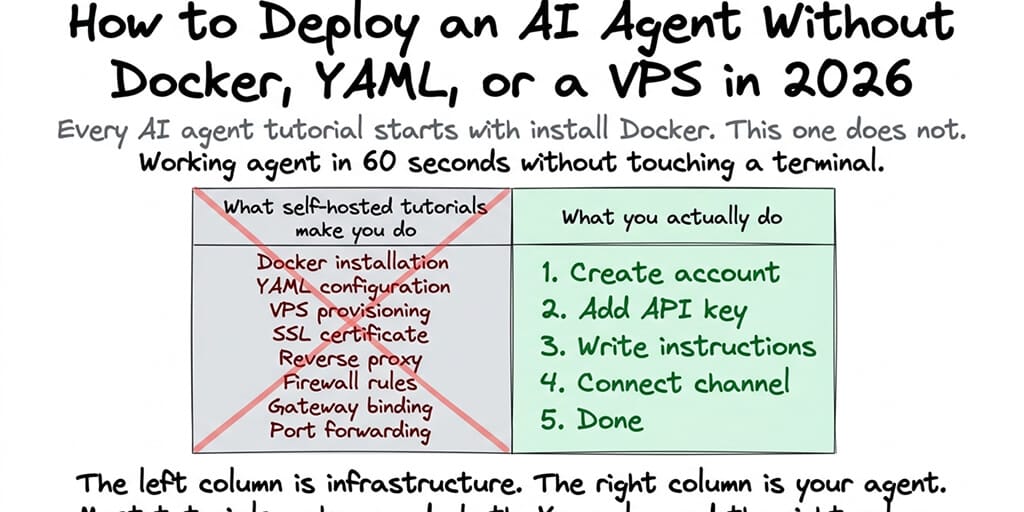
Every AI agent tutorial starts with "install Docker." This one doesn't. Here's how to get a working agent in 60 seconds without touching a terminal.
I watched a non-technical founder spend an entire Saturday trying to deploy an AI agent. She'd read the OpenClaw tutorial. She'd downloaded Docker Desktop. She'd opened a terminal for the first time in her life.
By 3 PM, she had Docker running. By 5 PM, she had OpenClaw installed. By 7 PM, she had given up on connecting it to Telegram because the gateway binding documentation assumed she knew what "localhost:3000" meant.
I just want a bot that answers my customers on WhatsApp. Why do I need to know what a port is?
She's not alone. The AI agent space has a massive accessibility problem. The technology works. The tutorials assume you're a developer. If you're not a developer, every tutorial starts with a wall of infrastructure requirements that have nothing to do with the agent itself. A no-code AI agent builder exists precisely to delete that wall: the agent is the first thing you configure, not the last.
Here's how to deploy an AI agent without Docker, YAML, a VPS, or a terminal. Four steps. 60 seconds. No technical knowledge required.
Why every tutorial starts with Docker (and why you can skip it)
Here's what nobody tells you about AI agent deployment.
Docker is a tool that creates isolated containers for running software. AI agent frameworks like OpenClaw (230,000+ GitHub stars) use Docker for two reasons: sandboxed skill execution (security) and consistent environment (avoids "works on my machine" problems).
Both of these are real, legitimate reasons. Docker isn't unnecessary. It's unnecessary for you. The distinction: if you're self-hosting an agent on your own server, you need Docker. If you're using a managed platform, the platform runs Docker for you. You never see it. You never configure it. You never debug it.
The same applies to YAML config files (the platform configures itself), VPS provisioning (the platform provides hosting), SSL certificates (handled automatically), and gateway binding (managed by the platform).
You skip all of it because someone else did all of it. That's what managed platforms are.
The four-step deploy (no terminal required)
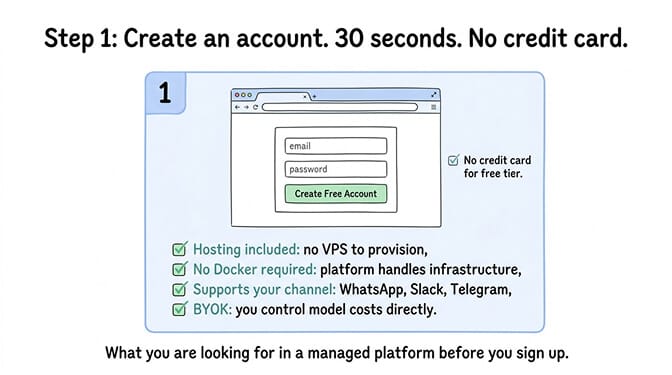
Step 1: Create an account on a managed AI agent platform (30 seconds)
Open a browser. Go to a managed AI agent platform. Create an account with email. No credit card required for free tiers.
What you're looking for: a platform that includes hosting, doesn't require Docker or server setup, supports your preferred messaging channel (WhatsApp, Slack, Telegram), and lets you bring your own API key (BYOK) so you control model costs.
For the complete list of channels and use cases supported, our use cases page covers which platforms work for which scenarios.
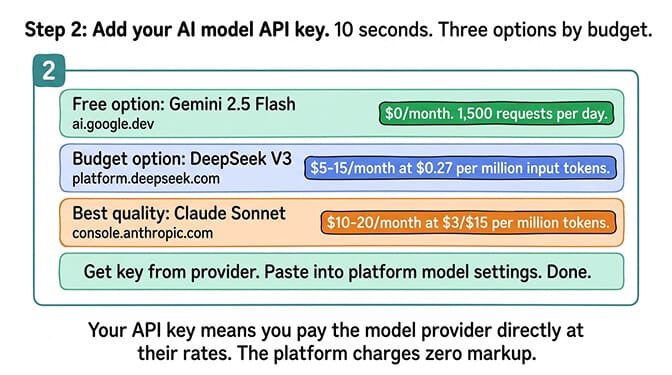
Step 2: Add your AI model API key (10 seconds)
You need an API key from a model provider. Three options depending on budget:
Free: Gemini 2.5 Flash from Google (1,500 free requests/day). Go to ai.google.dev, create a key, paste it.
Budget ($5-15/month): DeepSeek V3 ($0.27 per million input tokens). Go to platform.deepseek.com, create a key, paste it.
Best quality ($10-20/month): Claude Sonnet from Anthropic ($3/$15 per million tokens). Go to console.anthropic.com, create a key, paste it.
Paste the key into the platform's model settings. Done.
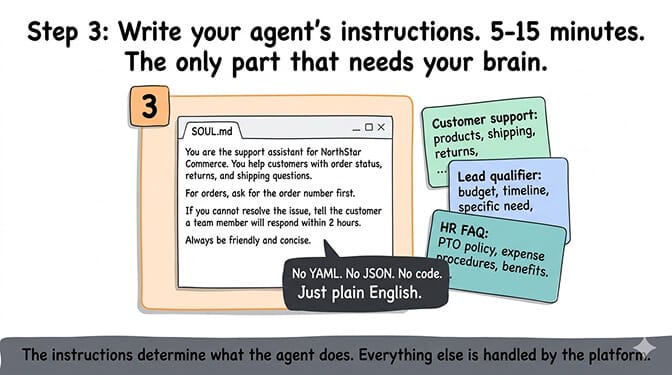
Step 3: Write your agent's instructions (5-15 minutes)
This is the part that actually matters. Your agent's personality, knowledge, and behavior are defined by its instructions (called SOUL.md in OpenClaw-based platforms).
For a customer support agent: "You are the customer support assistant for Company Name. You answer questions about our products, shipping, and return policy using the knowledge base provided. For complex issues, ask the customer for their order number and tell them a team member will follow up within 2 hours."
For a lead qualifier: "You are a sales assistant for Company Name. When someone reaches out, ask three questions: their budget range, their timeline, and their specific need. Based on the answers, rate the lead as hot, warm, or cold. Post hot leads to the #sales channel immediately."
For an internal FAQ bot: "You are the HR assistant for Company Name. Answer questions about PTO policy, expense procedures, and benefits using the employee handbook. If you're unsure about an answer, say so and suggest the employee contact HR directly."
The instructions determine what the agent does. Everything else (hosting, security, model routing) is handled by the platform.
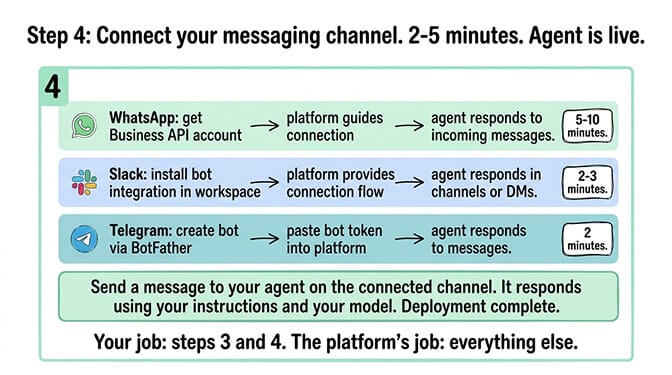
Step 4: Connect your messaging channel (2-5 minutes)
Pick where your agent will respond: WhatsApp, Telegram, Slack, Discord, Teams, or any of 15+ supported platforms.
For WhatsApp: You need a WhatsApp Business API account. The platform guides you through connecting it. The agent responds to incoming WhatsApp messages automatically.
For Slack: Install the bot integration in your Slack workspace. The platform provides the connection flow. The agent responds in channels or direct messages.
For Telegram: Create a bot via BotFather on Telegram (2 minutes). Paste the bot token into the platform. The agent responds to Telegram messages. See our Telegram integration guide for the step-by-step.
That's it. Agent is live. Send it a message on your chosen channel. It responds using your instructions and your model.
The entire deployment is four steps: account, API key, instructions, channel. Everything else (hosting, security, updates, monitoring) is handled by the platform. Your job is steps 3 and 4. The platform's job is everything else.
What you're giving up (honest trade-offs)
Here's the honest take on managed versus self-hosted.
You give up root access. You can't SSH into a server, read raw logs, or modify the framework's source code. If you need that level of control (developers building custom integrations), self-hosted is the right choice.
You give up visual flow building. Managed agent platforms configure agents through instructions and settings, not visual node canvases. If you need drag-and-drop pipeline design (RAG tuning, complex retrieval chains), Flowise or Langflow are better tools.
You get infrastructure handled for you. Hosting, security updates (540+ CVEs tracked against OpenClaw as of September 2026), credential protection (secrets auto-purge), skill vetting (1,400+ malicious skills found on ClawHub), and monitoring. For non-technical teams, this trade-off is almost always worth it.
If the four-step deploy resonates and you want an agent running on WhatsApp or Slack without the infrastructure project, BetterClaw's free tier gives you 1 agent with BYOK and hosting included. No credit card. $49/month for Pro when you need more. 60-second deploy. Smart context management keeps API costs low. Verified skills keep the supply chain safe. You handle the instructions. We handle everything else.
What happens after deployment (the part people forget)
Here's where most people get it wrong.
The agent works. Then what? The first week is testing. Send it the questions your customers or team members actually ask. See how it responds. Adjust the instructions. Add more context to the knowledge base. Remove instructions that cause confusion.
Week 2 is refinement. You'll notice patterns: questions the agent handles well, questions it struggles with, and questions it should route to a human. Adjust the routing rules. Add specific answers for the top 10 most-asked questions.
By week 3, the agent handles 60-70% of incoming messages automatically. The remaining 30-40% get routed to humans with context attached. Your team handles the complex issues. The agent handles the repetitive ones. For the customer support use case specifics, our support use case page covers the routing patterns that work best.
The agent doesn't replace your team. It handles the part of their job they don't want to do anyway: answering "what's your return policy" for the 47th time today.
The AI agent space is becoming accessible to non-technical teams. Not because the technology got simpler (it didn't). Because the infrastructure layer is being abstracted away by managed platforms. You shouldn't need to know what Docker is to have an AI answer your customers. Now you don't.
If you want to deploy your first agent right now, give BetterClaw a try. Free tier. 1 agent. BYOK. 60-second deploy. No Docker. No YAML. No VPS. No terminal. Just the agent, the channel, and the conversations.
Frequently Asked Questions
Can I deploy an AI agent without Docker?
Yes. Managed AI agent platforms handle all infrastructure (Docker, hosting, security, updates) on your behalf. You create an account, add an API key, write your agent's instructions, and connect a messaging channel. The agent is live in 60 seconds. No Docker, no VPS, no terminal. BetterClaw's free tier includes 1 agent with BYOK and hosting.
What is the easiest no-code AI agent platform?
For conversational agents on messaging channels (WhatsApp, Slack, Telegram), BetterClaw deploys in 60 seconds from a browser with no technical setup. For visual pipeline building, Flowise has a drag-and-drop canvas (but requires Docker). For workflow automation, n8n Cloud has a visual editor ($20/month). The "easiest" depends on your use case: conversational agent versus pipeline versus workflow.
How long does it take to deploy an AI agent without coding?
On a managed platform: 60 seconds for deployment, plus 5-15 minutes for writing instructions and connecting your messaging channel. Testing and refinement takes 1-2 weeks. By week 3, a well-configured agent handles 60-70% of repetitive messages automatically. Compare to self-hosted: 4-8 hours for initial setup, plus 2-4 hours/month ongoing maintenance.
How much does a no-code AI agent cost?
BetterClaw: $0/month (free tier, 1 agent, BYOK) or $49/month for Pro. Plus AI model API costs: $0 (Gemini free tier), $5-15/month (DeepSeek), or $10-20/month (Claude Sonnet). Total cost for a basic agent: $0-34/month depending on model choice and plan. No infrastructure costs. No server rental. No maintenance time.
Is a no-code AI agent secure enough for business use?
On managed platforms with proper security architecture, yes. BetterClaw includes Docker-sandboxed execution, AES-256 encryption, verified skills (tested before marketplace publication), and secrets auto-purge (credentials erased after 5 minutes). On self-hosted setups without hardening: 500K+ exposed instances, 540+ CVEs, 1,400+ malicious skills. The security depends on the deployment method, not the concept.