Your AI agent isn't broken. It's drowning in its own conversation history. Here's the diagnosis, the cause, and the actual fix.
It started with a customer email.
The agent had been running perfectly for three weeks. Answering support tickets, tagging them by priority, escalating the tricky ones. Then one Tuesday morning, it started responding to billing questions with onboarding instructions. It forgot the customer's name mid-conversation. It repeated the same canned response four times in a row.
The agent wasn't hallucinating. It wasn't misconfigured. It was losing context.
If you've built an AI agent that works brilliantly for the first 20 interactions and then starts acting like it has amnesia, you're not alone. Context loss is the single most common failure mode for deployed AI agents, and it's the one that gets misdiagnosed the most.
Here's what nobody tells you: the fix is almost never "use a bigger model."
What's Actually Happening When Your Agent Loses Context
Every large language model has a context window. Think of it as working memory. GPT-4o gives you 128K tokens. Claude gives you 200K. Gemini stretches to a million. Sounds enormous, right?
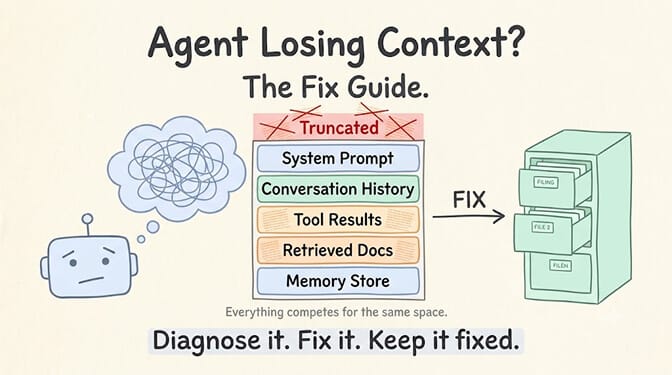
Here's the problem. Your agent doesn't just put the user's latest message into that window. It stuffs in the system prompt, every previous message in the conversation, tool call results, retrieved documents, function definitions, and whatever memory layer you've bolted on. All of it competes for the same finite space.
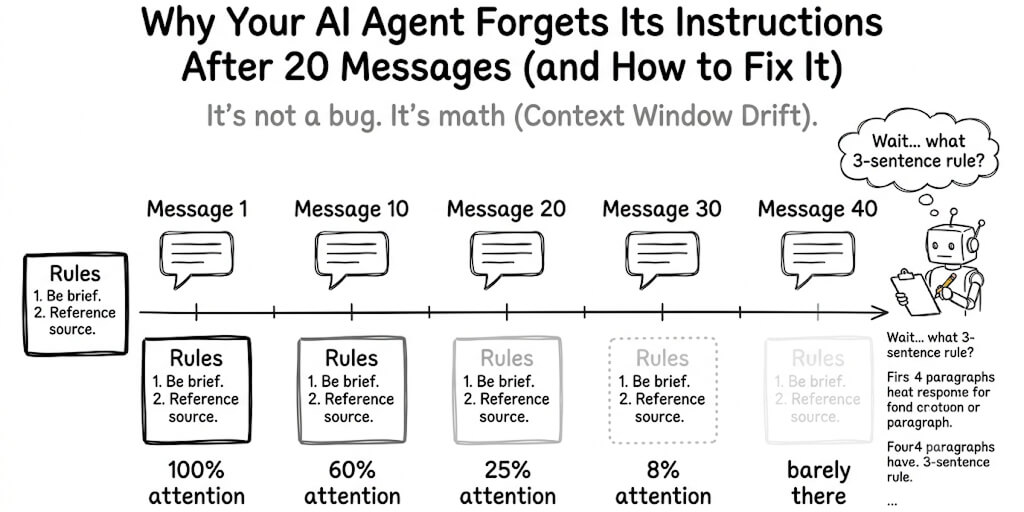
When the window fills up, one of two things happens. Either the model starts ignoring information at the edges (typically the middle of long contexts), or your framework silently truncates older messages to make room for new ones.
Both look identical from the outside: your agent "forgets."
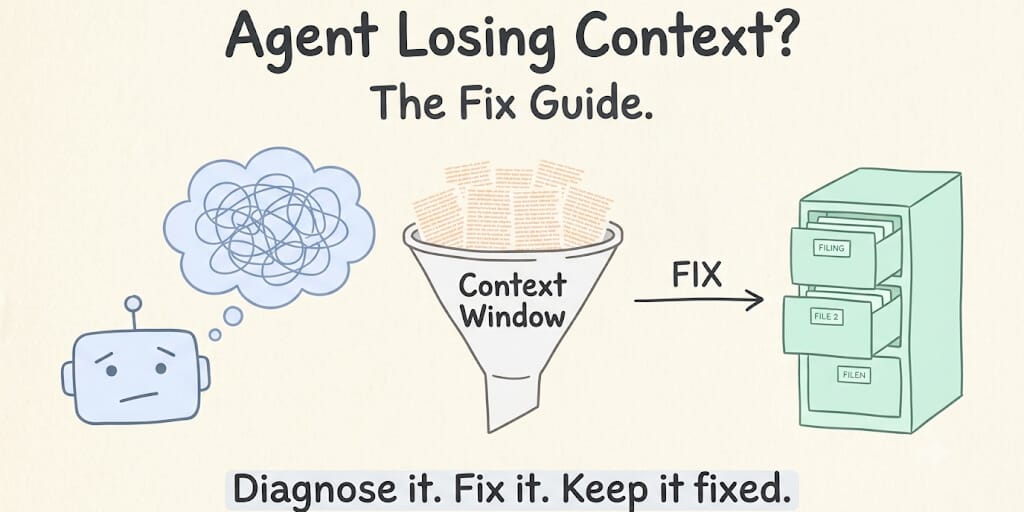
The context window isn't a hard drive. It's a desk. And most agents have papers stacked six inches high with no filing system.
The Five Reasons Your Agent Is Forgetting Everything
Before you start tweaking model parameters or rewriting your system prompt, figure out which problem you actually have. These are the five most common culprits that cause an agent to lose context, ranked by how often we see them.
1. Token Bloat From Conversation History
This is the big one. Every message in a multi-turn conversation stays in the context window. A 50-message support conversation can eat 15,000 to 30,000 tokens before you even account for the system prompt or tools.
Most frameworks handle this with a naive "drop the oldest messages" strategy. That works until the agent needs information from message three to answer message fifty-one.
The fix: Implement a sliding window with summarization. Instead of keeping raw conversation history, periodically compress older messages into a summary. The summary stays in context. The raw messages get stored externally and retrieved only when relevant.
2. Oversized System Prompts
We've seen system prompts that run 8,000 tokens. That's a small blog post sitting permanently in your context window, eating capacity on every single turn.
The worst offenders pack every possible instruction, every edge case, every formatting rule into a single monolithic prompt. The model can't prioritize when everything is labeled "important."
The fix: Trim your system prompt to its core identity and behavioral rules. Move specific instructions (like "how to handle refund requests") into retrievable documents that get pulled in only when relevant. Your system prompt should be a compass, not an encyclopedia.
3. Unfiltered Tool and API Responses
This one sneaks up on you. Your agent calls an API. The API returns a 4,000-token JSON blob. Your framework dumps the entire response into the context window. Multiply that by five tool calls in a single conversation, and you've burned 20,000 tokens on raw JSON that the model has to parse through on every subsequent turn.
The fix: Parse and compress tool responses before they enter the context. If your agent calls a CRM API and gets back a full customer record, extract only the fields the agent actually needs. Return "Customer: Jane Smith, Plan: Pro, Last ticket: June 12, Status: Active" instead of the full 200-field JSON object.
4. Retrieval Augmented Generation (RAG) Overload
RAG is supposed to give your agent access to external knowledge without stuffing everything into the prompt. But poorly tuned RAG does exactly the opposite. It retrieves too many chunks, the chunks are too long, or the relevance threshold is too low.
The result? Your context window fills up with marginally relevant document fragments that push out the actual conversation history.
The fix: Set strict top-k limits (3 to 5 chunks max). Use hybrid search that combines vector similarity with keyword matching to improve relevance. And set a minimum similarity threshold so your agent isn't pulling in documents that scored 0.4 on a 0 to 1 relevance scale.
5. No Persistent Memory Layer
This is the most fundamental issue, and it's the one that separates toy demos from production agents. If your agent relies entirely on the context window for "memory," it will always lose context eventually. The window is finite. Conversations are not.
The fix: Add a persistent memory layer that exists outside the context window. The agent writes important facts and context to this layer. On each new turn, only the relevant memories get retrieved and injected. The context window stays lean. For a deeper look at why agents forget and how memory layers solve it, see our guide on why AI agents forget and how to fix it.
How Context Management Actually Works (When Done Right)
Here's where it gets practical.
A well-designed agent doesn't just have a context window. It has a context strategy. That strategy involves three layers working together.
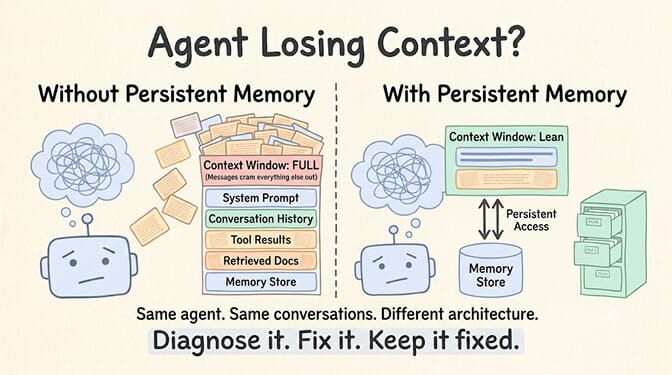
Layer 1: The Active Context. This is your context window. It holds the system prompt, the last N messages (or a summary of older ones), any currently relevant retrieved documents, and the results of the most recent tool calls. Think of this as what the agent is actively thinking about right now.
Layer 2: The Session Memory. This sits just outside the context window but within the same conversation session. It stores the full conversation history, intermediate reasoning, and tool results that might be needed later. When the agent detects a callback to an earlier topic, it pulls from session memory into active context.
Layer 3: The Persistent Memory. This survives across sessions. Customer preferences learned in January should still be available in June. Key facts, user profiles, learned patterns. This layer uses a combination of vector search (for semantic queries like "what does this customer usually complain about") and keyword search (for exact lookups like customer ID or order number).
When these three layers work together, your agent never "forgets." It just files things away and retrieves them when needed. Exactly like a competent human assistant would.
If this sounds like a lot of infrastructure to build yourself... it is. It's one of the reasons we built BetterClaw as a no-code AI agent builder. The platform handles smart context management, persistent memory with hybrid vector and keyword search, and automatic token optimization. You focus on what your agent should do. The context plumbing is handled. Free plan available, full pricing here, bring your own API keys with zero markup.
The Hidden Cost of Getting This Wrong
Context management isn't just a technical problem. It's a cost problem.
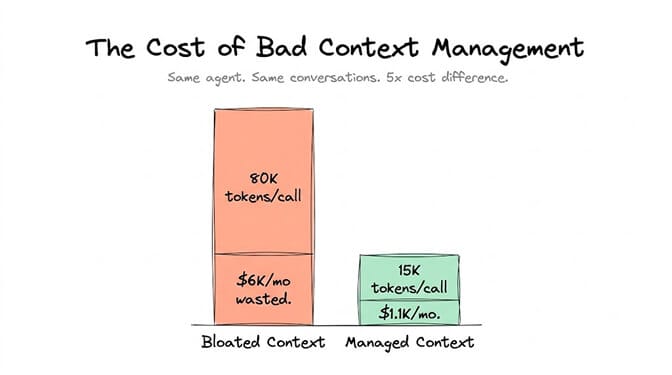
Every token in your context window costs money. With GPT-4o, input tokens run about $2.50 per million. If your agent is stuffing 80,000 tokens of unnecessary history into every API call, and it handles 1,000 conversations per day, you're burning roughly $200/day on wasted context. That's $6,000 a month in pure overhead.
Gartner projects that 40% of enterprise applications will have embedded AI agents by end of 2026. McKinsey estimates the addressable value at $2.6 to $4.4 trillion. But none of that value materializes if your agents are hemorrhaging money on bloated context windows and losing context mid-conversation.
The agents that actually make it to production share three traits: lean context management, persistent memory, and graceful degradation when context limits are hit.
When to Reach for Persistent Memory vs. a Bigger Context Window
There's a tempting shortcut: just use a model with a larger context window. Gemini's million-token window feels like it should solve everything, right?
Not really. Here's why.
Larger context windows are slower. They cost more per call. And research consistently shows that model performance degrades on information in the middle of very long contexts, a phenomenon researchers call "lost in the middle." Throwing more tokens at the problem is like buying a bigger desk instead of learning to file.
Use a bigger context window when you genuinely need the model to reason over a large, interconnected document in a single pass. A legal contract. A full codebase file. A research paper.
Use persistent memory when you need information to survive across conversations, when relevance varies by turn, or when you want to keep costs predictable. For most agent use cases (support, sales, ops automation, personal assistants), persistent memory wins.
BetterClaw's context management approach combines both: smart context windowing that prevents token bloat within a session, plus persistent memory with hybrid search across sessions. Agents built on the platform support 28+ AI model providers, so you can pick the right context window size for your specific use case without restructuring your entire agent.
A Quick Diagnostic Checklist
If your agent is losing context right now, run through this:
- Is your conversation history growing unbounded? Add summarization after every 10 to 15 turns.
- Is your system prompt over 2,000 tokens? Split it. Core identity stays in the prompt. Specific instructions go into retrievable docs.
- Are tool responses entering the context window raw? Parse them down to only the fields your agent needs.
- Is your RAG pulling more than 5 chunks per query? Tighten the top-k and raise your similarity threshold.
- Does your agent need information from previous sessions? You need persistent memory, period. No context window hack will substitute for this.
If you're self-hosting an agent framework like CrewAI (47K+ GitHub stars, but requires Python and your own infrastructure) or LangGraph, you'll need to implement each of these layers yourself. That's engineering time measured in weeks, not hours.
If the idea of building context management infrastructure sounds like the wrong use of your time, that's exactly the problem BetterClaw's visual agent builder solves. Free plan, no credit card, 1 agent and 500 credits a month. Pro is $49/month for teams that need more. Your first deploy takes about 60 seconds. We handle the context plumbing. You handle the interesting part.
Start free here or see full pricing.
The Part That Actually Matters
Context management isn't glamorous. Nobody's posting "just shipped a sliding window summarizer" on Twitter. But it's the difference between an agent that demos well and an agent that runs in production for months without someone paging you at 2 AM because it started sending gibberish to customers.
The agents that survive are the ones built on boring, reliable infrastructure. Memory that persists. Context that stays lean. Costs that stay predictable.
The exciting part isn't the plumbing. It's what your agent does once the plumbing works.
Frequently Asked Questions
What is agent context loss and why does it happen?
Agent context loss is when an AI agent "forgets" information from earlier in a conversation or from previous sessions. It happens because every LLM has a finite context window, and when that window fills up with conversation history, tool responses, and retrieved documents, older information gets truncated or ignored. It's not a model deficiency. It's an architecture problem that requires smart context management and persistent memory to solve.
How does persistent memory compare to just using a larger context window?
A larger context window (like Gemini's 1M tokens) lets you fit more information in a single call, but it costs more, runs slower, and research shows models struggle with information in the middle of very long contexts. Persistent memory stores facts externally and retrieves only what's relevant for each turn, keeping costs low and performance consistent. For most agent use cases, persistent memory paired with a moderately sized context window outperforms brute-forcing everything into one giant prompt.
How do I fix my AI agent that keeps forgetting instructions?
Start by checking the most common causes: unbounded conversation history (add summarization), oversized system prompts (trim to essentials), raw tool responses entering context (parse them down), over-retrieval from RAG (tighten top-k limits), and no persistent memory layer (add one). In most cases, implementing a sliding window with periodic summarization plus a basic persistent memory store resolves 90% of context loss issues.
How much does agent context bloat actually cost?
It depends on your model and volume, but the math adds up fast. If your agent stuffs 80,000 unnecessary tokens into each call at GPT-4o input pricing (~$2.50/million tokens), and handles 1,000 conversations daily, you're spending roughly $6,000/month on wasted tokens alone. Smart context management can cut that to a fraction by keeping only relevant information in the active window. Platforms like BetterClaw include context optimization as a built-in feature starting at $0/month on the free plan.
Is persistent memory safe for handling sensitive customer data?
It can be, but only with the right safeguards. You need encryption at rest (AES-256 minimum), strict access controls, and ideally an auto-purge mechanism for sensitive data like credentials or payment information. BetterClaw's persistent memory uses AES-256 encryption and automatically purges secrets from agent memory after 5 minutes. Agents run in isolated Docker containers with real-time health monitoring, so sensitive data never leaks between agents or persists longer than necessary.