Does Hermes Agent support Grok?
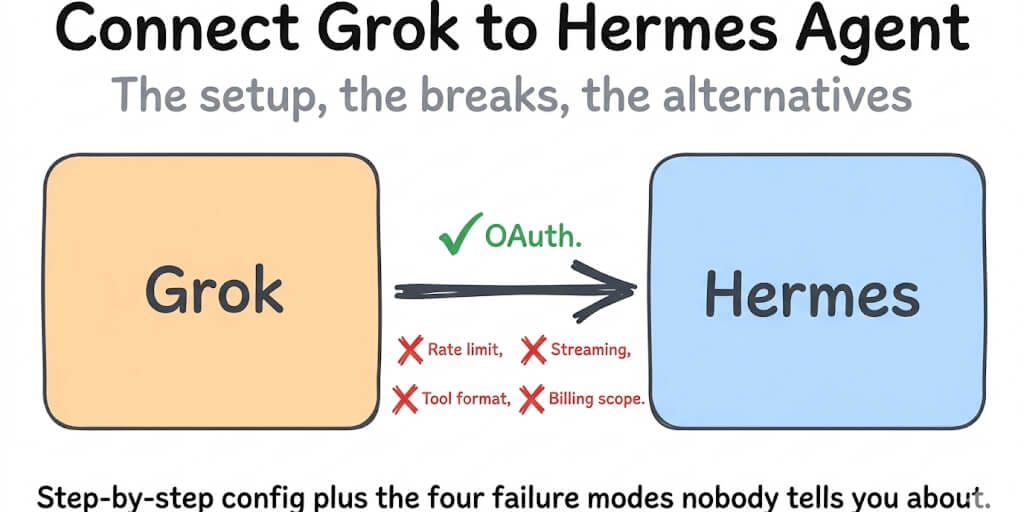
Yes. Hermes Agent has a first-class xAI Grok OAuth provider, xai-oauth, that shipped in v0.14.0 (May 16, 2026). You can connect Grok two ways: SuperGrok OAuth, which signs in with your SuperGrok subscription or an X Premium+ subscription on your linked X account, or an xAI API key billed per token.
The current default model on the OAuth provider is grok-4.6. That's xAI's flagship, with a 500K-token context window. If you set this up back in May, your config probably still says grok-4.3. That model still works; it's just no longer the default.
Here's the part the happy-path tutorials skip. Signing in successfully doesn't mean inference will work. The most common failure right now is an HTTP 403 after login, and it has two completely different causes. Both are covered below. (New to the framework? Our overview of what Hermes Agent is explains how the gateway, memory, and model providers fit together.)
Prerequisites
- Hermes Agent v0.14.0 or later. Run
hermes updateeither way: the OAuth provider has changed a lot since launch (see the headless section). - An active SuperGrok subscription on your xAI account, or X Premium+ on the X account you sign in with. Hermes's docs say xAI links Premium+ to your xAI session automatically.
- A browser anywhere. It doesn't have to be on the machine running Hermes.
- For the API-key path: a key from console.x.ai. No subscription needed.
SuperGrok OAuth vs xAI API Key: Which Path to Use
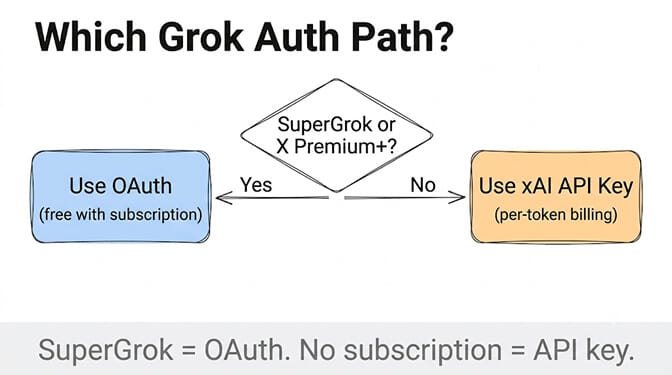
These are two separate billing systems. A SuperGrok subscription doesn't give you API credit, and an API balance doesn't give you a subscription.
SuperGrok OAuth (provider: xai-oauth)
- No per-token bill. Usage comes out of your subscription.
- Device-code login. Tokens save to
~/.hermes/auth.jsonand refresh automatically. - One login also covers xAI TTS, image generation, video generation, transcription, and X Search in Hermes.
- The catch: xAI enforces its own allowlist on OAuth API access. Some subscribers get a 403 even though their subscription is active (details below).
- Best for: personal agents, testing, people already paying for SuperGrok.
xAI API key (provider: xai)
- Pay per token from a pre-paid balance at console.x.ai. At the time of writing, xAI lists
grok-4.6at $2.00 input / $6.00 output per million tokens under 200K context, andgrok-4.3at $1.25 / $2.50. Check xAI's model pricing before you commit, because it changes often. - Not subject to the OAuth tier gate. Hermes's own docs point 403'd OAuth users here.
- Best for: production agents, predictable cost visibility, anyone stuck on the 403.
Grok OAuth Setup on Hermes (Step by Step)
Step 1: Update Hermes
hermes update
hermes --version
Step 2: Start the login
Use the model picker:
hermes model
Select "xAI Grok OAuth (SuperGrok / X Premium+)."
Or skip the picker and log in directly:
hermes auth add xai-oauth
Older tutorials (including an earlier version of this one) say hermes auth xai. That isn't a documented command. The auth subcommand is hermes auth add <provider>, and the provider ID is xai-oauth.
Step 3: Approve in the browser
Hermes requests a device code from xAI, then opens (or prints) an accounts.x.ai verification URL. Sign in with the account that holds your subscription, enter the displayed code if prompted, and approve. Hermes polls until xAI confirms, then saves tokens to ~/.hermes/auth.json.
The code expires. If you wait too long, Hermes raises a timeout. Just re-run the command.
Step 4: Confirm and chat
hermes doctor   # the Auth Providers section shows xai-oauth status
hermes          # send a test message
Step 5: Pick a model (optional)
After login, ~/.hermes/config.yaml contains:
model:
  default: grok-4.6
  provider: xai-oauth
  base_url: https://api.x.ai/v1
According to Hermes's docs, the OAuth picker lists these chat models:
grok-4.6: the default, pinned to the top of the listgrok-build-0.1: xAI's coding-oriented Grok Build modelgrok-4.3: previous generation, with a 1M-token context window- the
grok-4.20-0309reasoning, non-reasoning, and multi-agent variants
The list is built live, so run hermes model to see what your account actually gets. To switch without the picker:
hermes config set model.default grok-4.6
hermes config set model.provider xai-oauth
Headless Grok Setup (VPS, Docker, SSH)
This changed, and a lot of guides are still wrong about it.
When the xAI provider first merged in May 2026, it used a loopback callback on 127.0.0.1, so on a remote box you had to forward the callback port over SSH first. The current provider uses the OAuth device-code flow instead. No tunnel, no callback listener.
hermes auth add xai-oauth --no-browser
Hermes prints the verification URL and a user code. Open the URL on your laptop, phone, or cloud console, enter the code, approve, and the server picks up the token on its next poll. The same applies to Cloud Shell, Codespaces, and containers. If you haven't got Hermes running on the server yet, start with our Hermes Docker setup guide. If Hermes on a server still asks you to set up an SSH tunnel for xAI, you're on an old build. Run hermes update.
Don't want OAuth on a server at all? Use the API-key path below. That's the other clean headless option.
xAI API Key Setup on Hermes (Alternative)
This is also the documented fallback for the entitlement 403. The same key works if you later deploy an AI agent on a hosted platform, so nothing you set up here is wasted.
Step 1: Create an API key at console.x.ai.
Step 2: Add it to ~/.hermes/.env:
XAI_API_KEY=xai-your-key-here
Step 3: Point Hermes at the API-key provider:
hermes config set model.provider xai
hermes config set model.default grok-4.6
Step 4: Test with hermes.
Keep the two providers straight. xai-oauth doesn't read XAI_API_KEY at all, and xai doesn't use your OAuth token for chat. If you're "sure" you switched and nothing changed, model.provider is the first thing to check. Note one exception: X Search works with either credential, and it prefers OAuth when both are present.
Fix: HTTP 403 After a Successful Grok Login
This is the error most people land here for. OAuth completes, auth.json gets written, and then chat fails with a 403. There are two distinct 403s, and they have opposite fixes, so read the error body first.
403 "does not have permission": subscription tier gate (#26847)
What you see: Inference (or token refresh) returns HTTP 403 with a message like:
The caller does not have permission to execute the specified operation. You have either run out of available resources or do not have an active Grok subscription.
What's going on: Issue #26847 was filed on May 16, 2026, the day v0.14.0 shipped, by a subscriber on standard SuperGrok. For them, login and token storage worked but every inference call returned 403. Their hypothesis was that xAI's backend only allowed OAuth API access for SuperGrok Heavy. The issue was closed as not planned, because this is xAI's gate, not a Hermes bug.
Hermes now documents the behavior: xAI "has been seen to restrict OAuth API access to specific SuperGrok tiers despite the in-app subscription being active." Hermes also raises it as a separate tier-denied error and deliberately doesn't tell you to log in again.
Fix:
- Don't bother re-running
hermes modelor deletingauth.json. It's not a stale token, and a fresh login gets the same 403. - Switch to the API-key path:
export XAI_API_KEY=xai-... hermes config set model.provider xai - Or, if you specifically need the OAuth route, upgrade your plan at x.ai/grok. Neither xAI nor Hermes publishes which tiers pass the gate, so don't upgrade on the assumption that a particular one will work.
403 "access token could not be validated": stale token on a gateway (#108122)
What you see: A long-running gateway (the report used Telegram) that has worked for hours suddenly aborts turns with:
HTTP 403: {"code":"unauthenticated:bad-credentials","error":"The OAuth2 access token could not be validated."}
What's going on: Issue #108122 was opened September 11, 2026 and is still open. xAI access tokens rotate every 6 hours. When another Hermes process sharing the same grant rotates the token, a cached agent keeps sending the old one. Hermes's automatic refresh-and-retry only fires on HTTP 401, and xAI signals a stale token with 403, so recovery never runs. A second guard that stops account swaps also blocks the legitimate same-account rotation.
Fix (until the patch lands): Restart the gateway. The issue's own reproduction shows a fresh client picks up a fresh token and works immediately. If you run several gateways or profiles against one xAI grant, expect this to recur roughly on the token lifetime. Watch the issue for the fix, which proposes treating xAI's 403 stale-token marker like a 401 and adopting rotated tokens from the same account.
Telling them apart: "permission / active Grok subscription" means a tier gate, so switch to an API key. "OAuth2 access token could not be validated" means a stale token, so restart. Neither one is fixed by rm ~/.hermes/auth.json.
Other Grok Errors on Hermes
If your problem isn't Grok-specific, Hermes Agent troubleshooting covers the broader failure modes.
"User Not Found" or expired token
What you see: HTTP 401 User not found, or a "re-authentication required" message.
Fix: Hermes refreshes xAI tokens before each session and again on a 401. When a refresh fails terminally (revoked grant, invalid_grant), Hermes quarantines the dead token instead of retrying forever. Start clean:
hermes auth logout xai-oauth
hermes auth add xai-oauth
Sign in with the exact account that holds your SuperGrok or X Premium+ subscription. If you have both a grok.com login and an X login, use the one that's paying. Then confirm model.provider is xai-oauth, not a leftover xai. For other credential rejections, our Hermes auth error fixes walk through the common authentication breaks across providers.
HTTP 400 with Grok
Cause 1: tool schemas xAI rejects (#27197). In May 2026, xAI's Responses endpoint returned 400 whenever a tool schema carried pattern or format keywords, which MCP tools such as Firecrawl commonly do. Hermes fixed this the next day by stripping those keywords for xAI. Fix: hermes update.
Cause 2: switching a long session to Grok (#32617). If you switch an existing conversation to xai-oauth, Hermes replays earlier encrypted reasoning items that xAI can't decrypt. The error reads "Could not decrypt the provided encrypted_content." Fix: start a fresh session with /new and resend.
For every other trigger of a 400, our Hermes Agent error 400 guide ranks each cause by frequency.
Messages silently disappearing after rate limits (#7100)
Older Hermes builds dropped your message from the transcript when every retry of a 429 or timeout failed, so the next turn loaded a history missing what you'd just said. This wasn't Grok-specific, and it's fixed and closed. Fix: hermes update. If you still hit rate limits, check your usage at console.x.ai and space out tool-heavy runs.
Grok Bot vs Grok Build vs SuperGrok vs Hermes Agent
These four names get mashed together constantly, including in our own earlier copy.
- SuperGrok is xAI's paid subscription on grok.com. The tiers are SuperGrok, SuperGrok Plus, and SuperGrok Heavy, and X Premium+ bundles Grok access too. For Hermes, SuperGrok is just the credential: it's what
xai-oauthsigns you in with, subject to the tier gate above. - Grok Build is xAI's terminal coding agent, a CLI in the same category as Claude Code and Codex CLI. You install it with
curl -fsSL https://x.ai/cli/install.sh | bash. It runs interactively in your terminal, headlessly with-p, or inside other apps over the Agent Client Protocol. It launched on May 25, 2026 for SuperGrok and X Premium+ subscribers. Thegrok-build-0.1model it's named after is also selectable in Hermes. - Grok Bot is a different product: always-on AI "teammates" that run on a persistent cloud computer with a browser, filesystem, and terminal, and work across your apps. It launched on August 11, 2026. There's no standalone Grok Bot price. According to xAI's August 26 announcement, it's included with SuperGrok, SuperGrok Plus, SuperGrok Heavy, Cursor Pro, Cursor Pro+, Cursor Ultra, and Cursor Teams (Standard and Premium). Figures like "$200" and "$120" are Cursor's prices, for Cursor Ultra ($200/month) and a Teams Premium seat ($120/user/month). They aren't xAI prices for Grok Bot. We cover its pricing, usage limits and alternatives in Grok Bot vs BetterClaw.
- Hermes Agent is a model-agnostic framework from Nous Research that you self-host. Grok is one of many providers. You own
~/.hermes/config.yaml, the gateway, memory, and tools, and you can swap models without rebuilding the agent.
Pick Grok Build if you want a Grok-native coding agent in your terminal. Pick Grok Bot if you want xAI to host always-on agents for you. Pick Hermes Agent if you want to own the stack and keep the option to switch models. The trade-off is the setup and the 403s above.
When OAuth Makes Sense (and When It Doesn't)
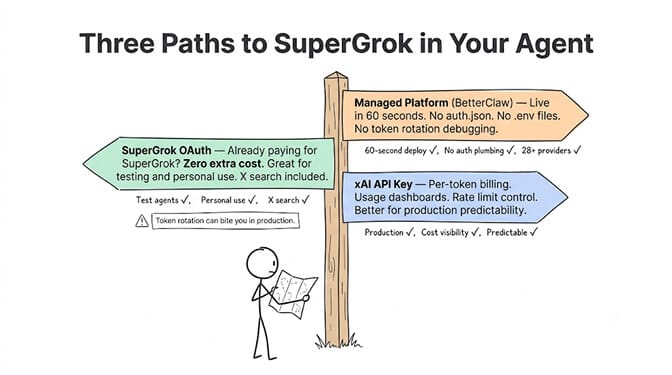
Use SuperGrok OAuth when: you already pay for SuperGrok or X Premium+, your tier gets past the 403, and you want chat plus xAI's TTS, image, video, and X Search on one login at no extra cost.
Use an xAI API key when: you hit the entitlement 403, you're deploying to production, or you want per-token billing and usage dashboards.
Use a managed platform when: you don't want to debug OAuth tiers, token rotation across gateways, or provider config at all.
Skip the Config: Grok on BetterClaw
BetterClaw supports xAI/Grok as one of 28+ BYOK providers. Paste your xAI API key, pick a Grok model, and your agent is live in about 60 seconds. There's no auth.json, no device codes, and no gateway restarts when a token rotates. The Free plan gives you 1 agent and 100 credits a month and never asks for a card. Basic is $19/month for 1 agent with 500 credits, and Pro is $49/month for 5 agents. See full pricing.
Frequently Asked Questions
How do I connect SuperGrok to Hermes Agent?
Run hermes auth add xai-oauth, or choose "xAI Grok OAuth (SuperGrok / X Premium+)" in hermes model. Open the verification URL, enter the code, and approve with the account that holds your subscription. Tokens save to ~/.hermes/auth.json and refresh automatically. No API key is needed.
Is the command hermes auth xai or hermes auth add xai-oauth?
hermes auth add xai-oauth. The provider ID is xai-oauth (aliases: grok-oauth, x-ai-oauth, xai-grok-oauth). To log out, run hermes auth logout xai-oauth.
What is the default Grok model in Hermes?
grok-4.6 on the xai-oauth provider, and it's pinned to the top of the picker. grok-4.3 is still available as the previous generation.
Why do I get HTTP 403 right after logging in with SuperGrok?
If the message says the caller "does not have permission" or you "do not have an active Grok subscription," xAI is restricting OAuth API access by tier (issue #26847). Logging in again won't help. Set XAI_API_KEY and switch to provider: xai. If the message says "OAuth2 access token could not be validated" on a long-running gateway, it's the stale-token bug (#108122), and restarting the gateway clears it.
Can I set up Grok on Hermes on a headless server?
Yes. Run hermes auth add xai-oauth --no-browser, open the printed URL on any device, enter the code, and approve. It's a device-code flow, so you don't need an SSH tunnel or port forwarding. You can also skip OAuth and use an xAI API key.
Does X Premium+ work, or only SuperGrok?
Hermes's docs support both. If you sign in with an X account that has Premium+, xAI links the subscription to your xAI session. Either way, xAI's tier gate can still return a 403.
Is Grok Build the same as Grok Bot?
No. Grok Build is xAI's terminal coding agent CLI. Grok Bot is xAI's always-on cloud "teammates" product, included with SuperGrok and several Cursor plans. Neither one is Hermes Agent, which is a self-hosted, model-agnostic framework.
Do I need SuperGrok to use Grok on Hermes?
Only for the OAuth path. The API-key path needs just an xAI API key from console.x.ai, billed per token, with no subscription.
Run Grok without the OAuth dance.
Paste your xAI key, pick a Grok model, and deploy a managed agent in 60 seconds. No device codes, no tier-gated 403s. BYOK, free forever, not a trial. Start free →