I bought an RTX 4080 specifically to run AI locally. That was January. I had visions of a private, fast, free AI assistant sitting on my desk. No API bills. No data leaving my network. Full control.
Three months later, I was back to using cloud APIs for 90% of my work.
Not because local AI doesn't work. It does. Surprisingly well, actually. But because what it works well for and what I expected it to work well for were two different things. And nobody told me that upfront.
So here's what I wish someone had written before I spent $1,200 on a GPU: an honest breakdown of what local AI can realistically do on consumer hardware in 2026, what it can't, and where cloud APIs (or a managed platform) still make more sense.
The one number that matters: VRAM
Forget clock speed. Forget cores. Forget what tier your CPU is. For local AI, the single most important number is VRAM (video memory on your GPU) or unified memory (on Apple Silicon Macs).
Think of it like a kitchen counter. The AI model is the recipe spread out in front of the chef. A bigger counter means a bigger recipe fits. If the recipe is too big for the counter, either you can't make the dish at all, or you're constantly shuffling pages on and off the counter (which makes everything painfully slow).
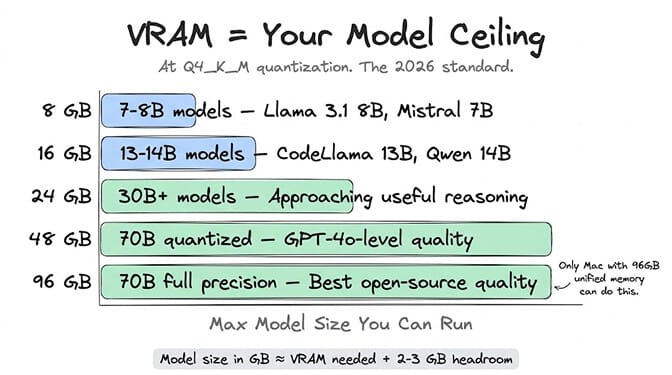
Here's the cheat sheet for 2026 at Q4_K_M quantization (the standard everyone uses):
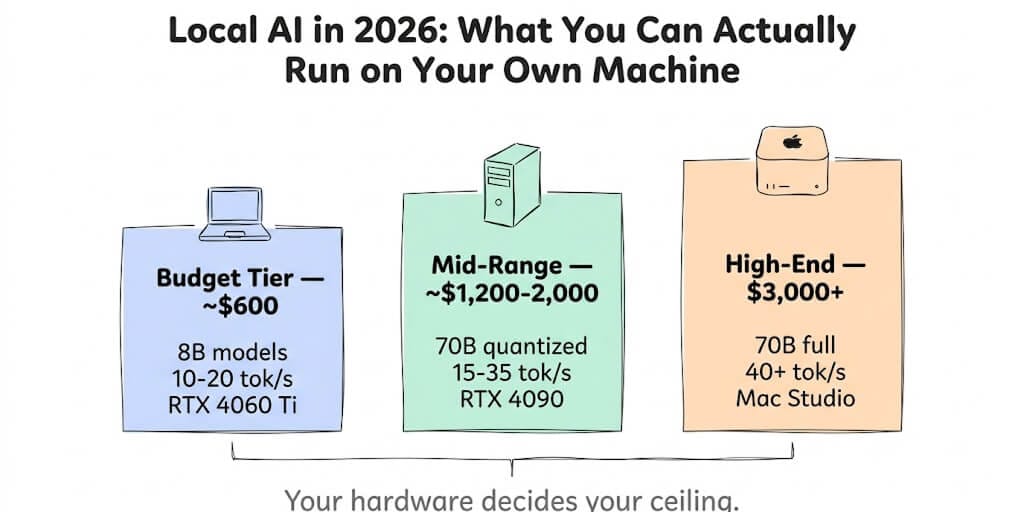
8 GB VRAM: Runs 7-8B parameter models. Llama 3.1 8B, Mistral 7B, Phi-3 Mini. Useful for basic chat, simple coding help, summarization. 10-20 tokens per second on an RTX 4060 Ti.
16 GB VRAM: Runs 13-14B models and small 30B models. Llama 3.1 13B, CodeLlama 13B, Qwen3 14B. Better quality. Still not frontier-level. 15-25 tokens per second.
24 GB VRAM: Runs 30B+ models comfortably. RTX 4090 territory. Approaching useful reasoning quality. 20-35 tokens per second on larger models.
48-96 GB unified memory (Mac): Runs 70B models. MacBook Pro M3 Max with 96 GB unified memory is one of the few consumer machines that can run Llama 3.3 70B entirely in memory. The RTX 4090 at 24 GB VRAM literally cannot fit it. The capacity-vs-speed split between the two platforms is the heart of our Apple Silicon vs NVIDIA comparison.
The golden rule of local AI: your model's size on disk in gigabytes roughly equals the VRAM it needs, plus 2-3 GB of headroom for your OS and context window.
The two tools everyone uses: Ollama and LM Studio
If you want to run AI locally in 2026, you'll use one of two tools. Both are free.
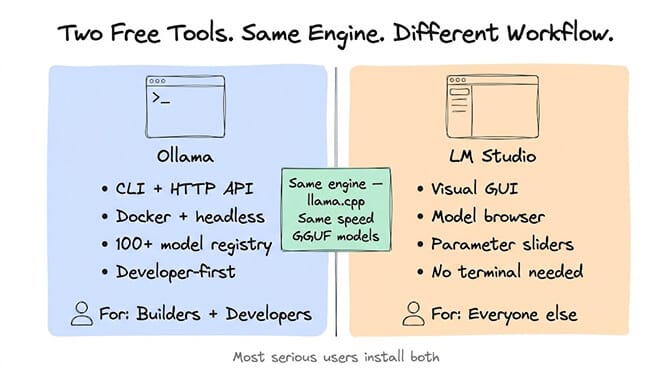
Ollama is the developer's choice. Command-line interface. Install it, run ollama pull llama3, start chatting via the terminal or its OpenAI-compatible API on port 11434. Docker support. Runs headless on servers. Over 100 model families in its registry. If you're wiring local AI into code, Ollama is the default.
LM Studio is the everyone-else choice. Polished desktop GUI. Model browser, chat window, parameter sliders, side-by-side model comparison. Download a model, click "Chat," and you're talking to a local AI. No terminal required. If you want a local ChatGPT-like experience, this is it.
Both use the same underlying engine (llama.cpp). Both support the GGUF model format. Raw inference speed is nearly identical on the same hardware. The difference is how you interact with models: Ollama treats local AI as a developer service, LM Studio treats it as a desktop product.
Most serious users install both. LM Studio for exploring new models and testing prompts. Ollama for production infrastructure and API access. If you go the Ollama route for agents, our Ollama setup guide walks through wiring it into an agent runtime.
Whichever you pick, the free BetterClaw desktop app connects it (or llama.cpp) to always-on BetterClaw agents in the cloud, with no ports to open.
What runs well locally (honest assessment)
Let me group by hardware budget.
Budget tier ($600-800): entry-level GPU or integrated Mac
Hardware: RTX 4060 Ti 8GB, 32GB system RAM, Ryzen 5. Or Mac Mini M2 with 16GB.
What works: Llama 3.1 8B at 10-20 tokens per second. Basic chat. Simple Q&A. Short document summarization. Lightweight coding suggestions. Autocomplete for text editors.
What doesn't work: Anything requiring deep reasoning. Multi-step tasks. Long document analysis. Complex code generation. Anything where you'd normally reach for GPT-5.5 or Claude Opus 4.8.
Honest verdict: This tier is great for learning and experimenting. It's not a replacement for cloud APIs on serious work. For comparing what different LLM providers cost at cloud rates, the pricing gap has narrowed enough that local inference at this tier rarely saves money after you factor in electricity and hardware amortization.
Mid-range tier ($1,200-2,000): dedicated GPU
Hardware: RTX 5070 Ti 16GB or RTX 4090 24GB, 48-64GB system RAM, Ryzen 7.
What works: Llama 3.3 70B (quantized to fit in 24GB) at 15-25 tokens per second. GPT-4o-level quality on most tasks. Good code generation. Solid reasoning. The 70B models are genuinely useful for daily work.
What doesn't work: Frontier-quality reasoning (Opus 4.8, GPT-5.5 level). Long-context tasks (local models typically max at 4K-8K effective context without quality degradation). Multi-model workflows where you'd need different models for different tasks.
Honest verdict: This is where local AI starts making economic sense for heavy users. If you run 50+ hours of inference per month, owning the hardware pays back within 3-6 months versus cloud API costs. The quality ceiling is real, though. Llama 70B is excellent. It's not Opus 4.8.
High-end tier ($3,000+): Apple Silicon or multi-GPU
Hardware: MacBook Pro M4 Max 64-128GB unified memory. Or Mac Studio M3 Ultra 128GB. Or dual RTX 4090 (48GB combined VRAM).
What works: Llama 3.3 70B at full precision, 35-50 tokens per second on Apple Silicon. Some 130B+ models with quantization. Multiple models loaded simultaneously for routing between tasks.
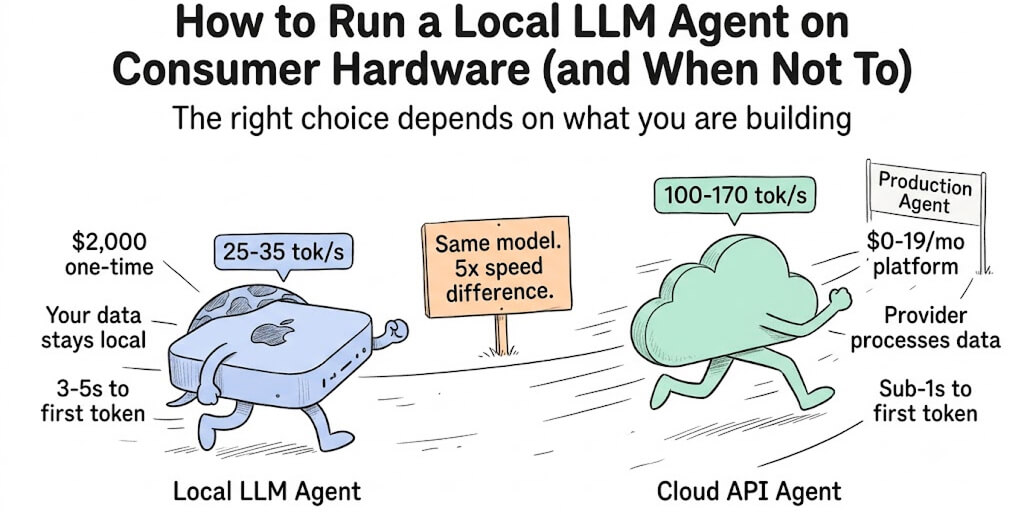
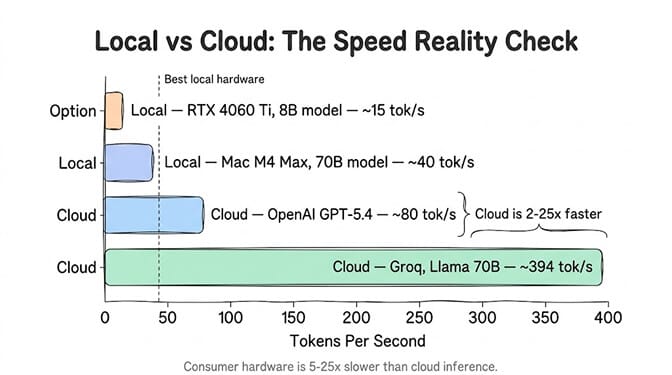
What doesn't work: Still can't match cloud inference speed (40 tok/s local vs 300-960 tok/s on Groq). Still limited to open-source models. No GPT-5.5 or Claude running locally.
Honest verdict: The best local AI experience available on consumer hardware. Apple Silicon's unified memory architecture is uniquely suited for this. But you're paying $3,000-5,000 for hardware that still can't access proprietary models. At this tier you'll also be cross-shopping NVIDIA's 128 GB desktop, so our DGX Spark alternatives guide is worth a read before you commit.
Where local AI actually makes sense
After three months of running both local and cloud, here's where local inference genuinely wins.
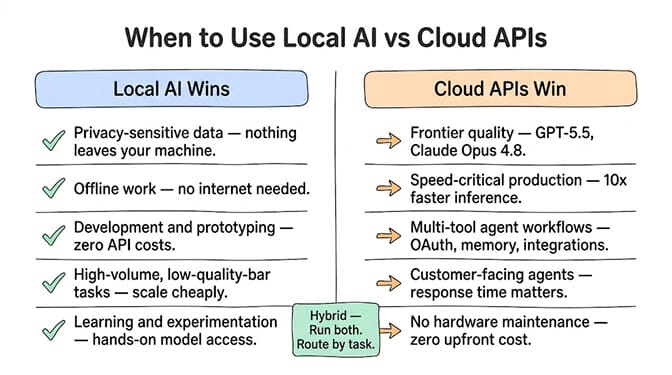
Privacy-sensitive tasks. Medical records, financial documents, legal contracts, personal journals. If the data can't leave your machine, local is the only option. Cloud APIs require sending your data to someone else's server. Local AI processes everything on your hardware. Nothing leaves your network.
Offline work. Flights, trains, rural areas, anywhere without reliable internet. Your local model doesn't need a connection. It's always available.
Development and prototyping. When you're iterating on prompts, testing agent workflows, or building integrations, running a local model means zero API costs during development. Ollama's free tier has no rate limits, no daily caps, no cost per token.
High-volume, low-quality-bar tasks. Autocomplete, basic classification, text formatting, simple extraction. Tasks where Llama 3.1 8B quality is perfectly sufficient and you're running thousands of inferences per day. The cost savings are real at scale.
Learning. Understanding how models work, experimenting with parameters, comparing quantization levels, building intuition for what different model sizes can do. There's no substitute for hands-on local experience.
Where local AI doesn't make sense (yet)
And here's where cloud APIs or a managed agent platform still wins.
Frontier quality tasks. If you need GPT-5.5 or Opus 4.8 quality, you can't run those locally. They're proprietary, they require massive compute, and no consumer hardware can match their performance.
Speed-critical production. Your local 70B model runs at 40 tokens per second. Groq runs the same Llama 70B at 394 tokens per second. For customer-facing agents where response time matters, cloud inference is 10x faster. We broke down that exact tradeoff in Groq vs OpenAI for agent builders.
Multi-tool agent workflows. An AI agent that reads your email, checks your CRM, drafts a response, and updates your project management tool needs OAuth connections, persistent memory, and a reliable execution environment. Running that locally means building all the plumbing yourself: OAuth token management, tool integration, error handling, retry logic, memory storage.
This is exactly where a managed agent platform fills the gap. You get the model flexibility (BYOK, so you can use any provider including running a local Ollama endpoint), the integrations (120+ connectors with one-click OAuth), and the infrastructure (isolated containers, monitoring, auto-pause) without building it yourself. We built BetterClaw for this specific use case. Free plan, no credit card, $49/month on Pro, unlimited skills, deploy in 60 seconds.
The hybrid setup that actually works
The setup I landed on after three months of experimentation:
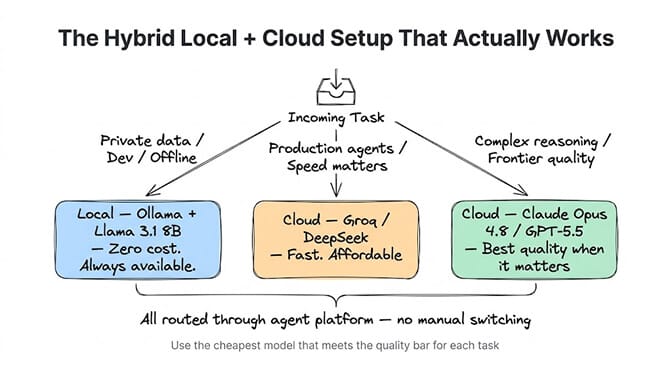
Local (Ollama + Llama 3.1 8B): Development, testing, private note analysis, offline work. Zero cost. Always available.
Cloud (Groq for speed, DeepSeek for cost): Production agents handling customer-facing tasks where latency and quality both matter.
Cloud (Claude Opus 4.8): Complex reasoning tasks, long-form writing, code review. Frontier quality when it matters.
All routed through BetterClaw so I don't manage the switching manually. The model routing strategy is: use the cheapest model that meets the quality bar for each specific task. Sometimes that's free (local). Sometimes that's $0.05/MTok (Groq). Sometimes that's $5/MTok (Opus 4.8). The agent platform handles the routing — here's the deeper logic behind model routing to reduce AI costs.
The best local AI setup in 2026 isn't "run everything locally." It's "run the right things locally and the right things in the cloud." Most teams end up using both.
What's coming that changes the math
Two trends are worth watching.
Apple Silicon keeps getting better. This landed: Apple refreshed the Mac Studio on 25 August 2026 with the M5 Ultra, which scales to 512GB of unified memory at 1.2 TB/s (the 512GB tier arrives late October). That is enough to run 200B+ parameter models locally, and it approaches frontier quality on hardware you can buy off the shelf.
Model sizes are shrinking for the same quality. Llama 3.1 8B in 2026 is better than Llama 2 70B was in 2024. The efficiency gains mean that within a year, today's mid-range hardware will run models that match today's cloud-only quality tiers.
The ceiling is rising. But it hasn't risen yet. And waiting for the ceiling to rise while your competitor deploys agents today is a strategic risk worth measuring.
If you want AI agents running now, on whatever models and providers make sense for your specific workload, give BetterClaw a look. Free plan with 1 agent and 100 credits a month. $49/month for Pro. Connect local Ollama endpoints, cloud APIs, or both. Zero inference markup. We handle the integrations, the memory, and the security. You handle choosing the right model for the right task.
Frequently Asked Questions
What is local AI and how does it work?
Local AI means running artificial intelligence models directly on your own hardware (laptop, desktop, or home server) instead of sending data to cloud API providers like OpenAI or Anthropic. You download an open-source model, install a runtime like Ollama or LM Studio, and run inference entirely on your machine. Your data never leaves your device, and there are no per-token API costs.
How does local AI compare to cloud APIs like OpenAI in 2026?
Local AI runs at 10-50 tokens per second on consumer hardware versus 80-960 tokens per second on cloud providers. Local models are limited to open-source options (Llama, Mistral, Qwen, DeepSeek Coder) while cloud APIs offer proprietary frontier models (GPT-5.5, Claude Opus 4.8). Local wins on privacy and zero ongoing cost. Cloud wins on speed, quality ceiling, and model variety.
How much does it cost to build a local AI setup?
Entry-level hardware for running 8B models starts around $600 (RTX 4060 Ti, 32GB RAM). A mid-range setup handling 70B models costs $1,200-2,000 (RTX 4090, 64GB RAM). Apple Silicon Macs with 96-128GB unified memory for optimal local AI run $3,000-5,000. After the initial hardware purchase, inference is free. No monthly API bills.
Is local AI good enough for production AI agents?
For simple tasks (classification, summarization, basic Q&A), local AI at the 70B model tier is production-ready. For complex agent workflows requiring multi-step reasoning, tool calling, persistent memory, and OAuth integrations, cloud APIs combined with a managed platform like BetterClaw are more practical. Most production setups in 2026 use a hybrid approach: local for development and privacy-sensitive tasks, cloud for speed and quality.
Can I run ChatGPT or Claude locally on my computer?
No. ChatGPT (GPT-5.5) and Claude (Opus 4.8) are proprietary models that only run on their respective company's cloud infrastructure. You cannot download or run them locally. However, open-source alternatives like Llama 3.3 70B deliver GPT-4o-level quality and run on consumer hardware with 48-96GB of VRAM or unified memory. Tools like Ollama and LM Studio make this straightforward.