A security researcher named Jamieson O'Reilly gained access to Anthropic API keys, Telegram bot tokens, Slack OAuth credentials, and months of complete chat histories from an OpenClaw instance. He could send messages on behalf of the user. He could execute commands with full system administrator privileges.
The credentials had been sitting in plaintext files for weeks. Not encrypted. Not scoped. Not time-limited. Just... there. Waiting.
This is the AI agent security problem that nobody is solving the right way. Every conversation about agent security focuses on CVEs and gateway vulnerabilities. Those matter. But the credential exposure problem is worse because it compounds over time. Every day your API keys sit in plaintext is another day they can be stolen. And on OpenClaw, they sit there forever.
Here's the attack scenario, why it works, and how secrets auto-purge eliminates it.
How credentials get stored (the default is terrifying)
When you configure OpenClaw, you provide credentials: API keys for your model provider, OAuth tokens for Slack or Gmail, bot tokens for Telegram, passwords for services your agent needs to access.
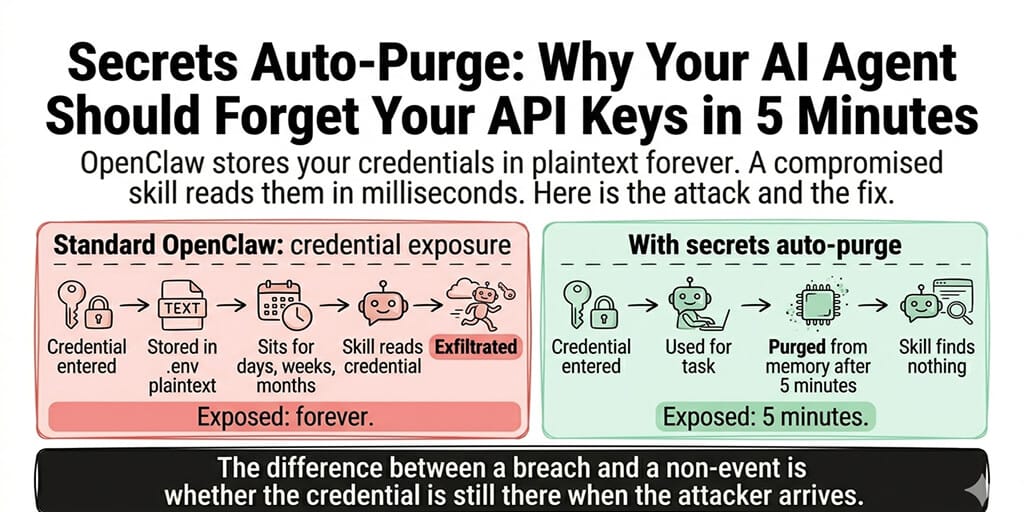
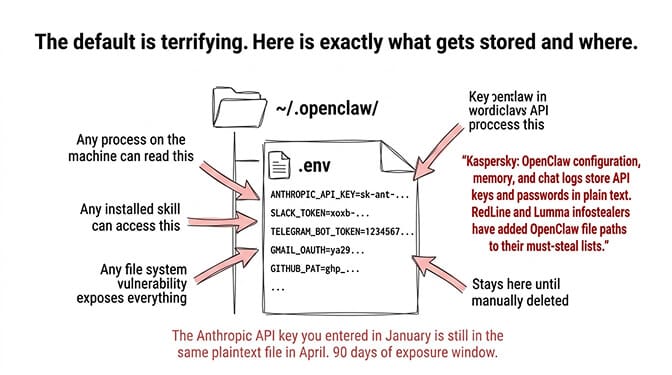
These credentials are stored in ~/.openclaw/.env as plaintext JSON. No encryption. No access control. No expiration. Any process on the machine that can read files can read your credentials. Any skill installed on the agent can access them. Any vulnerability that grants file system access (CVE-2026-25253 did exactly this) exposes every credential simultaneously.
Kaspersky's security audit confirmed this directly: "OpenClaw's configuration, memory, and chat logs store API keys, passwords, and other credentials for LLM and integration services in plain text." They then reported that RedLine and Lumma infostealers had already added OpenClaw file paths to their must-steal lists.
The credentials don't expire. They're written once and persist until you manually delete or rotate them. Most users never rotate. The Anthropic API key you entered in January is still in the same plaintext file in April. That's 90 days of exposure window.
For the complete analysis of OpenClaw's security vulnerabilities, our security guide covers all three attack surfaces.
The attack that credentials enable (it's not what you think)
Here's where most people get it wrong.
The primary risk isn't someone stealing your Anthropic API key and running up a bill. That's bad but recoverable. You rotate the key, dispute the charges, and move on.
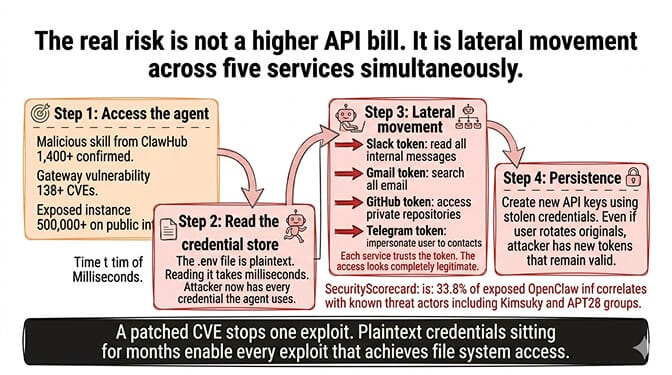
The real risk is lateral movement. Your agent has credentials for 5-10 different services. Anthropic API. Gmail OAuth. Slack bot token. Telegram bot token. GitHub personal access token. A compromised credential for one service gives the attacker access to that service. Five compromised credentials give the attacker access to your email, your team's Slack workspace, your Telegram contacts, and your code repositories. Simultaneously.
The attack chain works like this:
Step 1: Access the agent. Through a malicious skill (1,400+ on ClawHub), a gateway vulnerability (138+ CVEs), or an exposed instance (500,000+ on the public internet).
Step 2: Read the credential store. The .env file is plaintext. Reading it takes milliseconds. The skill or exploit now has every credential the agent uses.
Step 3: Lateral movement. Use the Slack token to read internal messages. Use the Gmail token to search email. Use the GitHub token to access private repositories. Use the Telegram token to impersonate the user. Each service trusts the token. The access looks legitimate.
Step 4: Persistence. Create new API keys or OAuth tokens using the stolen credentials. Even if the user rotates the original credentials, the attacker has created new ones that remain valid.
This is exactly what Jamieson O'Reilly demonstrated. And SecurityScorecard found that 33.8% of exposed OpenClaw infrastructure correlates with known threat actor activity, including Kimsuky and APT28 groups. Nation-state actors are already looking at these credential stores.
The credential exposure window is the single most dangerous aspect of AI agent security. A patched CVE stops one exploit. Plaintext credentials sitting for months enable every exploit that achieves file system access.
What secrets auto-purge actually does (the 5-minute TTL)
Secrets auto-purge is the architecture we built to eliminate the credential exposure window.
Here's how it works:
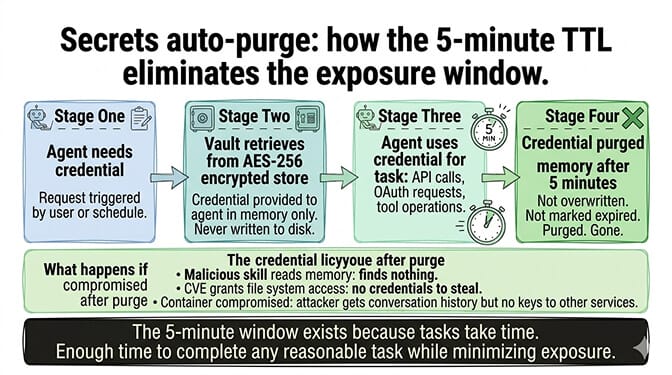
When your agent needs a credential (API key, OAuth token, bot token), the platform retrieves it from an encrypted vault, provides it to the agent for the specific task, and starts a 5-minute countdown. After 5 minutes, the credential is purged from the agent's memory. Not overwritten. Not marked as expired. Purged. It's gone.
If a malicious skill reads the agent's memory after the purge, it finds nothing. If a CVE grants file system access after the purge, there are no credentials to steal. If the agent's container is compromised after the purge, the attacker gets conversation history but no keys to other services.
The 5-minute window exists because tasks take time. A Gmail search might take 30 seconds. A multi-step workflow with API calls might take 2-3 minutes. 5 minutes provides enough time for the agent to complete any reasonable task using the credential while minimizing the exposure window.
Why 5 minutes and not 30 seconds (the design trade-off)
We tested shorter windows. 30 seconds was too aggressive. Multi-step workflows (search Gmail, compose response, send via Slack) sometimes chain three API calls across different services. At 30 seconds, the credential for the second service would purge before the agent finished using the first service's results to formulate the second request.
5 minutes covers 99%+ of single-task workflows while reducing the exposure window from "forever" (OpenClaw default) to a controlled interval. The math: if an agent uses credentials for 3 tasks per day at 5 minutes each, the total daily exposure is 15 minutes. On OpenClaw, the same credentials are exposed for 1,440 minutes (24 hours). That's a 96% reduction in attack surface.
| Platform | Credential Storage | Exposure Window | Daily Exposure (3 tasks) |
|---|---|---|---|
| OpenClaw default | Plaintext .env | Forever | 1,440 min (24h) |
| OpenClaw + manual rotation | Plaintext .env | Until next rotation | ~hundreds of min |
| BetterClaw auto-purge | AES-256 vault + 5-min TTL | 5 min per use | 15 min |
For enterprise deployments where the credential vault architecture matters for compliance, our security vetting documentation covers how skill permissions interact with the credential system.
What secrets auto-purge doesn't solve (honest limitations)
Here's the honest take on what auto-purge does and doesn't cover.
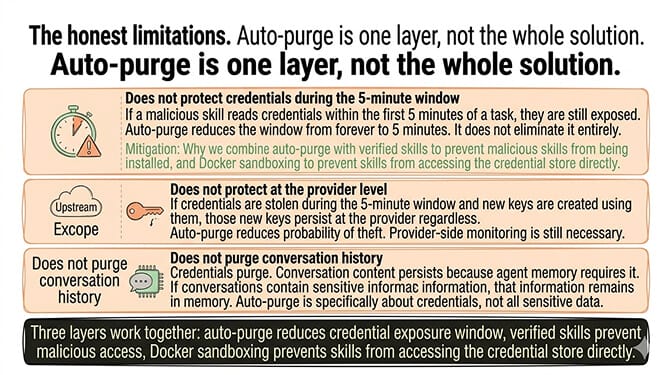
It doesn't protect credentials during the 5-minute window. If a malicious skill reads credentials within the first 5 minutes of a task, the credentials are still exposed. Auto-purge reduces the window from "forever" to "5 minutes." It doesn't eliminate it entirely. That's why we combine auto-purge with verified skills (to prevent malicious skills from being installed in the first place) and Docker-sandboxed execution (to prevent skills from accessing the credential store directly).
It doesn't protect credentials at the provider level. If someone steals your Anthropic API key during the 5-minute window and creates new keys using it, those new keys persist at Anthropic regardless of what happens on the agent. Auto-purge reduces the probability of theft. Provider-side key rotation and monitoring are still necessary.
It doesn't protect conversation history. Credentials purge. Conversation content persists (it has to, for the agent's memory to work). If your conversations contain sensitive information, that information remains in the agent's memory. Auto-purge is specifically about credentials, not about all sensitive data.
If protecting credentials, vetting skills, and sandboxing execution sounds like the security architecture your team needs but doesn't want to build from scratch, BetterClaw includes all three layers. Secrets auto-purge. Verified skills marketplace. Docker-sandboxed execution. AES-256 encryption at rest. Workspace isolation. Free tier with 1 agent and BYOK. $49/month for Pro. $149/month for Business. Enterprise is custom-priced, with SAML SSO and audit logs.
Why nobody else is doing this (the uncomfortable reason)
Here's what nobody tells you about AI agent security.
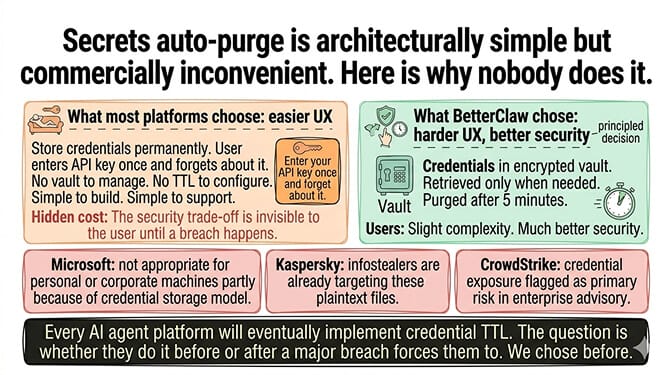
Secrets auto-purge is architecturally simple but commercially inconvenient. Most agent platforms store credentials permanently because it's easier to build and easier to support. "Enter your API key once and forget about it" is a better user experience than "your credential expired and needs to be retrieved from the vault." The security trade-off is invisible to the user until a breach happens.
We chose the harder UX because the alternative is indefensible. Microsoft's security blog explicitly warned against running OpenClaw on work machines, partly because of the credential storage model. Kaspersky documented that infostealers are already targeting these files. CrowdStrike's enterprise advisory flagged credential exposure as a primary risk.
Every AI agent platform will eventually implement some form of credential TTL. The question is whether they do it before or after a major breach forces them to. We chose before.
The broader lesson extends beyond AI agents. Any system that stores third-party credentials indefinitely is creating a compounding risk that grows every day. The longer the credential sits, the more opportunities an attacker has to reach it. Time-limited credentials aren't a new concept (JWT tokens expire, OAuth refresh tokens rotate, session cookies timeout). AI agents are the last category of software that still stores credentials like it's 2005.
For the complete security checklist for self-hosted OpenClaw deployments, our checklist covers manual credential rotation as a partial mitigation for users who can't implement auto-purge.
If you want secrets auto-purge, verified skills, and sandboxed execution without building the architecture yourself, give BetterClaw a try. Free tier with 1 agent and BYOK. $49/month for Pro. The credentials purge automatically. The skills are pre-vetted. The execution is sandboxed. The security isn't a configuration you maintain. It's a foundation you stand on.
Frequently Asked Questions
What is secrets auto-purge in AI agents?
Secrets auto-purge is a security architecture where credentials (API keys, OAuth tokens, bot tokens) are automatically erased from an AI agent's memory after a fixed time window, typically 5 minutes. The agent retrieves credentials from an encrypted vault when needed, uses them for the task, and the credentials are purged after the TTL expires. This reduces the credential exposure window from "forever" (OpenClaw default) to minutes.
Why does OpenClaw store API keys in plaintext?
OpenClaw stores credentials in ~/.openclaw/.env as plaintext JSON files. This was a design choice prioritizing simplicity over security. Kaspersky confirmed this in their audit, noting that configuration, memory, and chat logs store API keys and passwords in plain text. RedLine and Lumma infostealers have already added OpenClaw file paths to their must-steal lists. Microsoft's security blog recommended against running OpenClaw on personal or corporate machines partly because of this.
How does secrets auto-purge protect against credential theft?
Auto-purge reduces the attack window from permanent to 5 minutes. If an agent uses credentials for 3 tasks per day at 5 minutes each, total daily exposure is 15 minutes versus 1,440 minutes (24 hours) on OpenClaw. A malicious skill or vulnerability that accesses the agent's memory after the purge window finds no credentials. Combined with verified skills and Docker sandboxing, this addresses the full attack chain from access to exfiltration.
Is 5 minutes enough time for AI agent tasks?
Yes. 99%+ of single-task workflows (API calls, email searches, message sends, data lookups) complete within 2-3 minutes. The 5-minute TTL provides buffer for multi-step workflows that chain several API calls. Shorter windows (30 seconds) were tested but caused failures in legitimate multi-service workflows. 5 minutes balances security (96% reduction in exposure) with functionality.
Does BetterClaw encrypt stored credentials?
Yes. Credentials are stored in an encrypted vault using AES-256 encryption, not in plaintext files. They're retrieved from the vault only when needed for a specific task, provided to the agent in memory, and purged after 5 minutes. Even at rest in the vault, credentials are encrypted. This is layered with Docker-sandboxed execution (skills can't access the vault directly) and verified skills (malicious skills aren't installed in the first place).