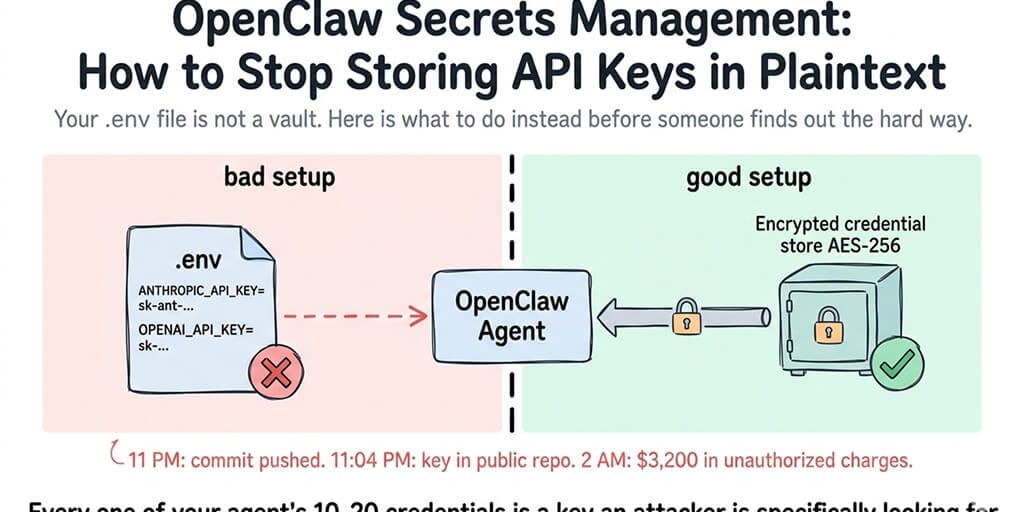
Your .env file is not a vault. Here's what to do instead before someone finds out the hard way.
A founder I know pushed a commit at 11 PM.
By 11:04 PM, his OpenAI key was sitting in a public GitHub repo. By 2 AM, the key had been scraped, used, and racked up $3,200 in API charges running someone's crypto research project across three continents. By morning, he was on the phone with OpenAI's support begging for a billing adjustment and rotating every credential he owned.
He'd stored his API key in a .env file. He'd meant to add it to .gitignore. He forgot.
This is what OpenClaw secrets management is actually about. Not certificates. Not enterprise compliance frameworks. Not some abstract security posture you draft in a Notion doc and never follow. It's about the thousand small places where your API keys accidentally end up in plaintext, and the attackers who are specifically looking for that.
Why OpenClaw agents make this harder than normal apps
Most apps have a few credentials. A database URL. A payment provider key. Maybe a third-party API or two.
OpenClaw agents don't work that way.
A real production OpenClaw agent is carrying 10 to 20 credentials at any given time. The model provider API key. Slack bot tokens. GitHub personal access tokens. Database connection strings. Webhook signing secrets. Skill-specific keys for every integration you've installed. BYOK credentials for each model you route between.
Every one of those is a live credential sitting somewhere on your infrastructure. Every one of them is a key an attacker would love to find.
Here's the weird part. The OpenClaw ecosystem has made this worse, not better, as it's grown. When Censys, Bitsight, and Hunt.io scanned the internet earlier this year, they found 30,000+ OpenClaw instances exposed without authentication. Many of those instances had API keys sitting in config files or environment variables, one reverse-shell away from being harvested.
Secrets management isn't a nice-to-have in this space. It's the thing standing between your agent and a $3,200 bill you didn't authorize.
The five places your secrets are probably sitting in plaintext right now
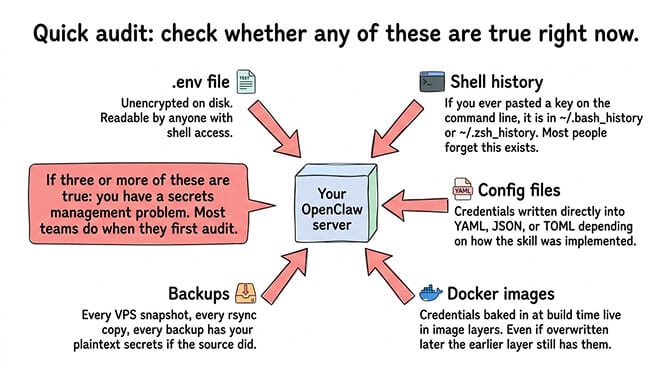
Quick audit. Open a terminal, go to wherever you run your OpenClaw agent, and check whether any of these are true.
Your .env file. The default home for most environment variables. Usually on disk, unencrypted, readable by anyone with shell access to the machine. If the machine is compromised, the keys are gone.
Your shell history. If you ever pasted an API key directly on the command line, it's in ~/.bash_history or ~/.zsh_history. Most people forget this exists.
Your config files. Some OpenClaw setups write credentials directly into config files, depending on how the skill was implemented. YAML, JSON, TOML, whatever flavor.
Your Docker images. If you built credentials into the image at build time, they're in the image layers. Anyone with the image has the keys. Even if you overwrite the variable later, the earlier layer still has it.
Your backups. Every backup of your VPS, every snapshot, every archive, every rsync copy. All of those have your plaintext secrets if the source did.
If you checked three or more of those, congratulations, you have a secrets management problem. Most teams do when they first audit.
What "stop storing API keys in plaintext" actually means
This phrase gets thrown around in security posts without anyone defining it. Let me define it specifically for OpenClaw deployments.
Plaintext storage means: the credential exists somewhere on your infrastructure in a form that can be read directly without a decryption step. Your .env file is plaintext. A YAML config is plaintext. An environment variable inside a running container is plaintext to anything inside that container.
The fix isn't "don't store credentials." You need them to exist somewhere or your agent can't work. The fix is "store them encrypted at rest, decrypt them just-in-time when the agent actually needs them, and make sure the decrypted version never lives longer than it has to."
A secret you can read in a text editor is not a secret. It's a liability with a timer on it.
In practice, this means one of three approaches. Let me walk through each.
Option 1: Secret manager service
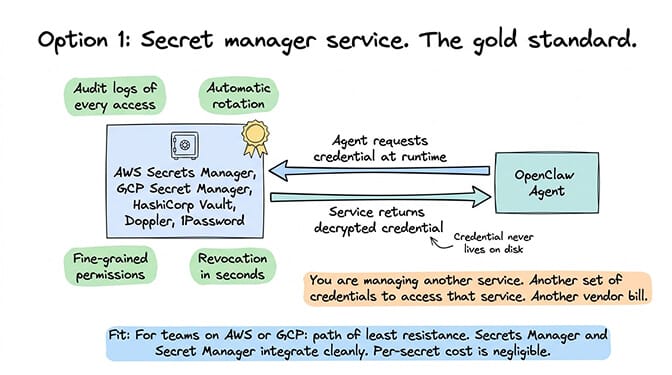
The gold standard. Use a dedicated secret management service like AWS Secrets Manager, Google Secret Manager, HashiCorp Vault, Doppler, or 1Password Secrets Automation. Your agent requests the credential at runtime, the service returns it, the credential never lives on disk.
The benefits are real. Audit logs of every access. Automatic rotation. Fine-grained permissions. Revocation takes seconds.
The tradeoff: you're now managing another service. Another set of credentials to access that service. Another vendor bill. Another thing to configure correctly.
For teams already running on AWS or GCP, this is the path of least resistance. Secrets Manager and Secret Manager integrate cleanly and the per-secret cost is negligible.
Option 2: Encrypted env var at rest, decrypted at runtime
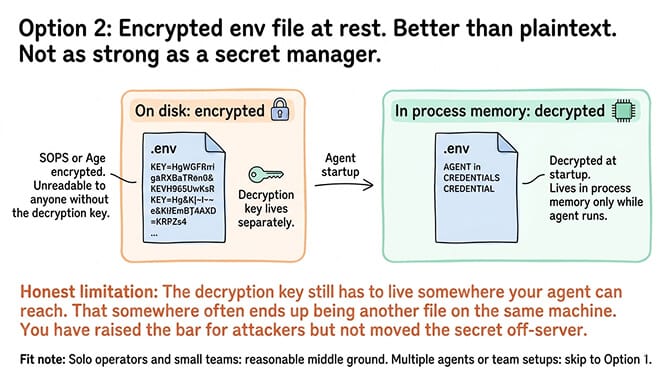
If a full secret manager is overkill, the next best thing is encrypting your environment files at rest using a key you control separately. SOPS from Mozilla is the usual tool. Age is another. Both work by encrypting your env file with a key that lives in a different location than the file itself.
Your agent decrypts the env file at startup. The decrypted values live in the process's memory while it runs. The file on disk stays encrypted.
This is materially better than a plaintext .env. It's not as strong as a secret manager because the decryption key still has to live somewhere your agent can reach it, and "somewhere" often ends up being another file on the same machine. You've raised the bar for attackers but you haven't moved the secret off-server.
For solo operators and small teams, SOPS-encrypted env files are a reasonable middle ground. For anyone running multiple agents or team setups, skip to option 1.
Option 3: Managed platform handles it for you
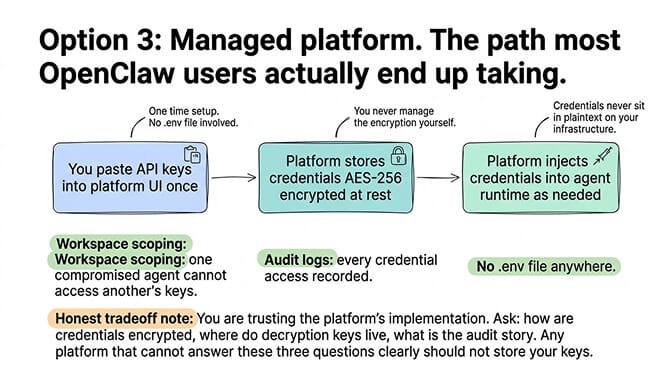
The third path is the one most OpenClaw users actually end up taking. Run your agent on a platform that handles secrets management as a built-in feature. You paste your API keys into a UI once. The platform stores them encrypted at rest (AES-256 is table stakes). The platform injects them into your agent's runtime as needed. You never touch a .env file.
This is how BetterClaw's no-code AI agent platform handles it. $49/month for Pro includes encrypted credential storage, workspace scoping so one compromised agent can't access another agent's keys, and audit logs of credential access. The keys never sit in plaintext anywhere your ops team has to protect.
The honest tradeoff: you're trusting the platform's implementation. Ask them specifically how credentials are encrypted, where the decryption keys live, and what their audit story looks like. Any managed platform that can't answer those three questions clearly shouldn't be storing your keys.
The rotation problem nobody talks about
Here's what nobody tells you about secrets management. Encryption at rest is the easy part. Rotation is the hard part.
Every credential you store should have a rotation schedule. API keys rotated every 90 days. Webhook secrets rotated whenever someone leaves the team. Service account tokens rotated whenever their scope changes.
Most teams rotate credentials approximately never.
The reason is dumb but honest: rotation is annoying. You have to generate the new credential, update it in every place that uses it, verify nothing broke, and revoke the old one. For a production agent with 15 credentials, that's a half day of work every quarter. Nobody schedules it. Nobody does it.
This is where managed platforms earn their keep again. The OpenClaw security checklist lists rotation as a top-three priority, and on a managed platform it's usually a two-click operation. On self-hosted, rotation means SSH-ing in, updating multiple files, restarting services, and praying nothing breaks.
Guess which one actually gets done.
The part that catches everyone eventually
Here's the thing about plaintext secrets. You don't notice the problem until the problem notices you.
The founder at the top of this post didn't have a secrets management strategy because nothing bad had happened yet. The 30,000 exposed OpenClaw instances weren't run by negligent operators. They were run by smart people who figured they'd set up auth later. The Cisco researchers who found a third-party skill exfiltrating data? That skill was running on machines with the owner's API keys in environment variables, sitting there for the taking.
Every one of those incidents started with someone choosing convenience over security for a credential that seemed "not that important." Until it was.
Stay with me here. The failure mode isn't malicious. It's inertia. You set up the agent. You get it working. You put the credentials in a .env because that's what the docs showed. You mean to harden it later. Later never comes. Six months in, you've got fifteen credentials in that file and no idea how to untangle them.
This is why the right time to fix your OpenClaw secrets management is week one, not month six. The setup cost is small when you have two credentials. It's massive when you have twenty.
The self-hosted reality check
Running self-hosted OpenClaw with proper secrets management is doable. I've watched teams do it well. They're the exception.
The typical self-hosted OpenClaw setup uses environment variables on a VPS, with the env file sitting right next to the agent process. The right way to secure that VPS requires enabling full disk encryption, restricting SSH access, configuring firewall rules, setting up log monitoring, and ideally moving to a secret manager for the credentials themselves.
That's a real day of work for one agent. Multiply by the number of agents you run and the ongoing maintenance burden.
The cost math I've seen play out: teams running three or more self-hosted OpenClaw agents spend more on secrets management infrastructure, rotation work, and incident response than they'd spend on a managed platform at $49/month for Pro. The savings from self-hosting get eaten by the security work nobody enjoys doing.
If you just want your agent credentials stored correctly from day one without building your own secrets infrastructure, give BetterClaw a try. $49/month for Pro, BYOK, AES-256 encryption of credentials at rest, workspace scoping built in, and your first deploy takes about 60 seconds. We handle the vault. You handle the agent work.
One last thing
The uncomfortable truth about OpenClaw secrets management is that nobody cares about it until they've had a credential leak, and after that, they care about nothing else for about a month.
You don't have to learn this lesson the expensive way. The practices in this post (encrypted storage, no secrets in config files, rotation schedules, scoped permissions, audit logs) are all available to anyone running an OpenClaw agent today. The managed path makes them defaults. The self-hosted path makes them homework.
Either way, pick one. Pick it this week.
Agents are going to be handling more credentials, more actions, and more sensitive workflows every month. The operators who treat credential hygiene as a first-class concern are going to sleep through the next security news cycle. The operators who didn't are going to be the next news cycle.
The .env file was never meant to hold the keys to your business. Stop asking it to.
Frequently Asked Questions
What is OpenClaw secrets management?
OpenClaw secrets management is the practice of securely storing, accessing, and rotating the API keys and credentials your OpenClaw agent needs to function. This includes model provider keys, chat platform tokens, third-party service credentials, and any other sensitive strings your agent uses. The goal is to ensure those credentials never exist in plaintext on disk or in backups, and that access to them is audited and revocable.
How does OpenClaw secrets management compare to standard web app secrets?
Standard web apps usually handle two or three credentials. OpenClaw agents regularly handle 10 to 20, across model providers, chat platforms, and installed skills. The attack surface is larger, the rotation burden is higher, and a single leaked key can expose multiple downstream systems. Best practices are the same (encrypted at rest, scoped permissions, regular rotation), but the volume makes automation much more important.
How do I stop storing OpenClaw API keys in plaintext?
Three realistic paths: use a secret manager service (AWS Secrets Manager, Vault, Doppler) and have your agent fetch credentials at runtime, encrypt your env file at rest using SOPS or Age with a separately managed key, or use a managed OpenClaw platform that handles encrypted credential storage as a built-in feature. The right choice depends on how many agents you run and how much infrastructure work you want to own.
Is a managed secrets solution worth it for a solo OpenClaw operator?
Yes, usually. A managed platform at $49/month for Pro handles credential encryption, rotation support, and audit logs that would take a weekend to set up correctly on your own. For solo operators, the time saved is almost always worth more than the subscription cost. The math changes for teams already running their own security infrastructure.
Are managed OpenClaw platforms actually more secure than self-hosted with SOPS?
A well-configured self-hosted setup with SOPS, disk encryption, restricted SSH, and proper monitoring can be very secure. The catch is "well-configured." Most self-hosted setups don't get there. Managed platforms enforce the defaults by design, including AES-256 encryption, workspace scoping, and signed tool execution. Pair that with proper skill security vetting and you've covered the main attack vectors most teams miss.