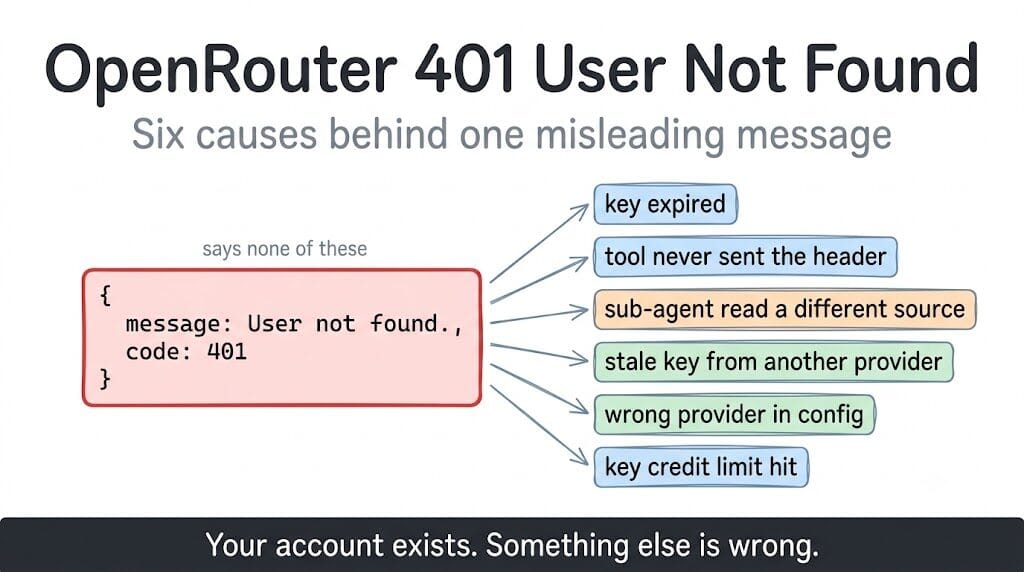
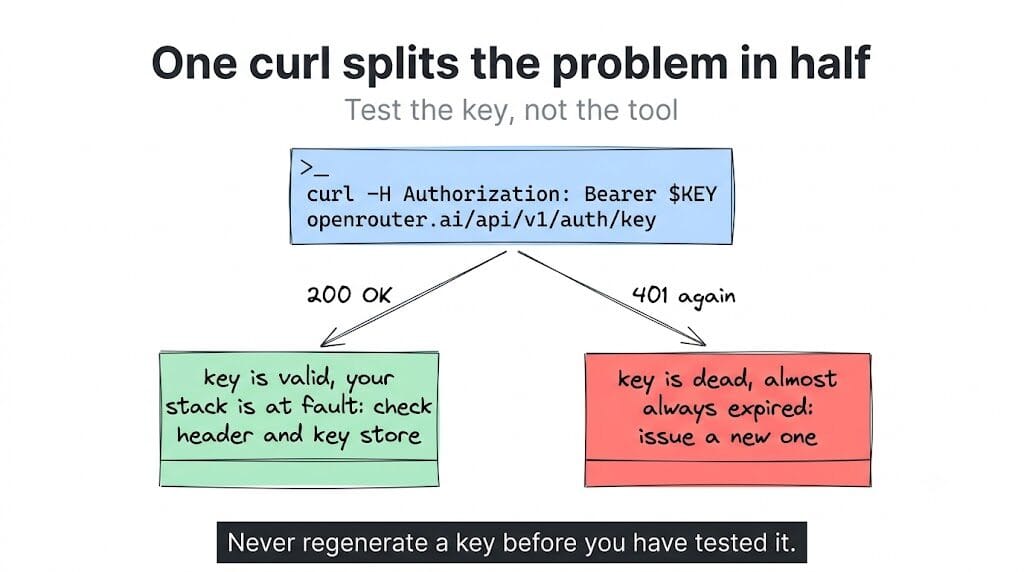
The error says your user doesn't exist. Your account is fine. In most cases the key is expired, or something in your stack never sent it. Here is how to tell which in one curl.
curl -H "Authorization: Bearer $OPENROUTER_API_KEY" \
  https://openrouter.ai/api/v1/auth/key
Use /auth/key, not /models. It returns your key's label, usage, limit and rate limits, so a success tells you the key is live rather than just that the endpoint is public.
If curl succeeds: the key is valid and your stack is the problem. Jump to causes 2 through 5. If curl returns the same 401: the key itself is dead. Almost always expired rather than deleted. Go to cause 1.
Cause 1: the key expired, and OpenRouter told you the wrong thing
This is the one that wastes the most time, because the error message actively misleads you.
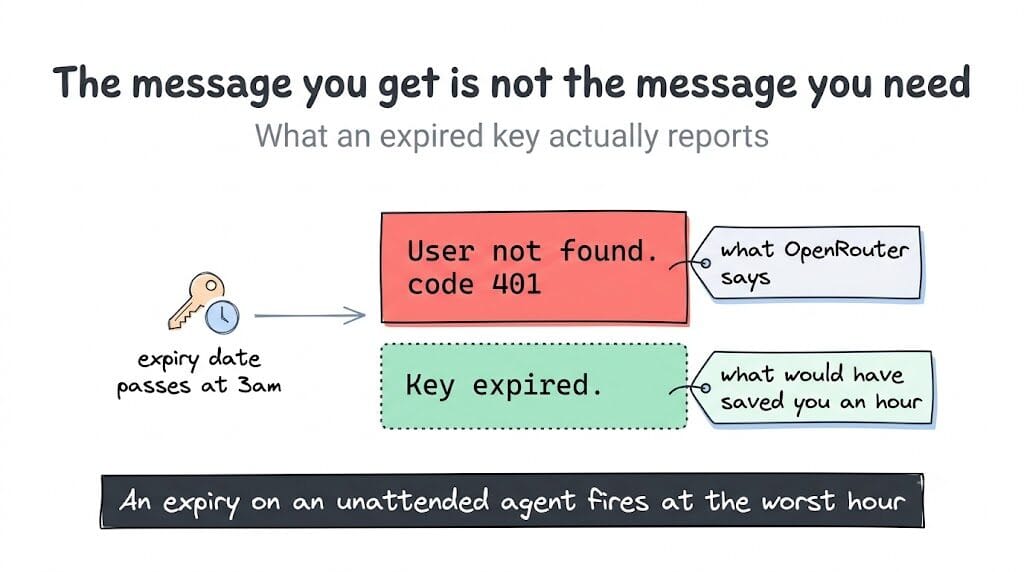
When you call an authenticated OpenRouter endpoint with an expired key, the API returns {"message": "User not found.", "code": 401}. Not "key expired." Not "credential expired." It reports that your user cannot be found, which sends you off checking whether your account still exists, whether you got banned, whether the email changed.
Someone filed this against OpenRouter's docs repo asking for a distinct error, pointing out that "User not found" cannot distinguish between an invalid or malformed key, a revoked key, an expired key, and a missing account. It's a fair complaint and it's still the behaviour.
If you ever set an expiry on an OpenRouter key, "User not found" is the message you get when that date passes. Your account is fine. The clock ran out.
The fix is unglamorous: go to the keys page, check whether the key has an expiration date, and issue a new one. While you're there, decide deliberately whether you want expiring keys on an agent at all. An expiry that fires at 3am on an unattended agent produces exactly this error with exactly this unhelpful message.
Cause 2: your tool never sent the key
If curl worked and your framework still 401s, the key is not the problem. Your tool is either sending nothing or sending the wrong thing.
This is a documented class of bug, not a rare edge case. OpenCode had an issue where the key validated against /auth/key, direct curl calls to paid models worked, and the tool still returned "User not found" because of how it constructed the request. The reporter's own conclusion was that the error was misleading and the credentials were fine. OpenClaw has had reports of the same shape, and Continue had keys that worked in PowerShell and failed inside the IDE.
The pattern is consistent enough to be diagnostic. Works in curl, fails in the tool means credential resolution or header construction, and no amount of regenerating keys will fix it.
One specific trap inside this cause: the variable name. OpenRouter's is OPENROUTER_API_KEY, one word. An OpenClaw report of this error came from a .env file containing OPEN_ROUTER_API_KEY, with an extra underscore, which the tool never reads, so the header goes out empty and OpenRouter answers "User not found." If a tool asks you for an OPENROUTER_TOKEN or anything else that isn't the exact name it reads, you get the same outcome. Check the spelling character by character before anything else in this section.
What else actually helps:
- Check whether your tool reads the key from the environment or from its own key store, and confirm which one it's actually using. If both exist and disagree, the stored one usually wins.
- Turn on request logging or debug output and look for the
Authorizationheader on the outgoing request. If it's absent, that's your answer. - Check your tool's issue tracker for your exact version before assuming you misconfigured it.
Cause 3: the main agent works and a spawned sub-agent 401s
This one is specific to agent frameworks and it is invisible if you only test the main session.
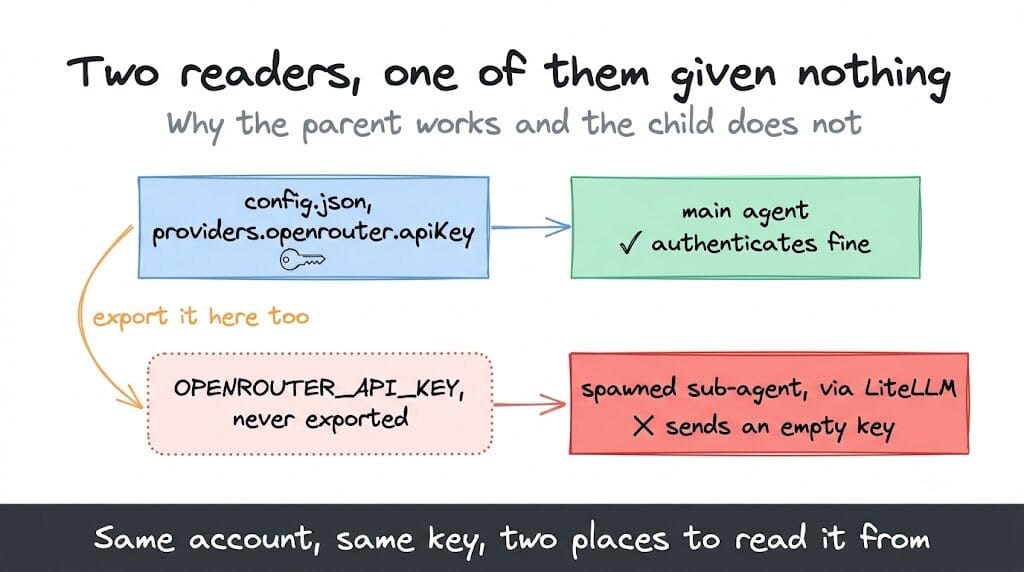
The mechanism: your framework reads the key from its own config file, so the parent agent authenticates fine. Then it spawns a sub-agent that routes through a different library, commonly LiteLLM, which reads the key from the OPENROUTER_API_KEY environment variable instead. If that variable was never exported, the library sends an empty key and OpenRouter answers "User not found." A Raven user documented exactly this: the key sat in config.json under providers.openrouter.apiKey, the main session worked, and every spawned sub-agent failed immediately.
The tell is unmistakable once you know to look for it. The parent works and the child fails, with the same account and the same key. No credential is wrong; there are just two readers and only one of them was given anything.
The fix is to export the key into the environment as well as leaving it in config, so whichever layer reads it finds it:
export OPENROUTER_API_KEY="sk-or-v1-..."
If your framework spawns sub-agents as separate processes, confirm the variable actually reaches them rather than only the shell you typed it in.
Cause 4: key drift, a stale key from a provider you stopped using
The version we see most in single-session agent setups. You tried a provider, saved its key, moved to OpenRouter, and the old key is still sitting in the key store taking precedence.
In Hermes this shows up as a documented case (issue #14637): your OpenRouter key works in curl, you've confirmed the value in ~/.hermes/.env looks right, and Hermes still returns 401 because it's sending a leftover key from a previous provider config. Check ~/.hermes/.env or your tool's equivalent, remove keys for providers you no longer use, and confirm the active provider is OpenRouter with the matching key. The Hermes auth error guide walks through the Hermes side in more detail.
The same applies anywhere a tool merges multiple credential sources. One stale entry is enough.
Cause 5: the provider, model prefix and key don't agree
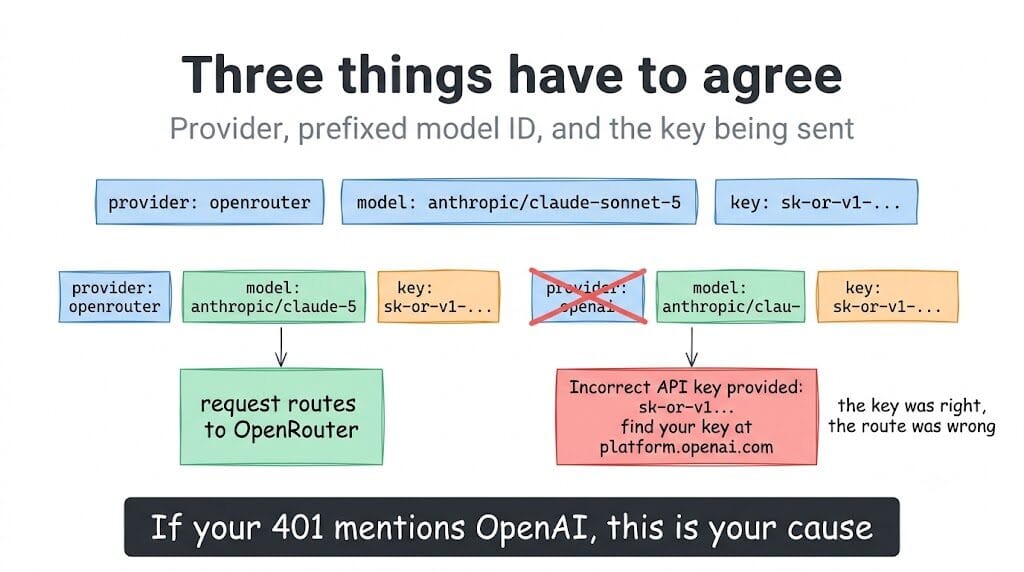
OpenRouter model IDs carry a provider prefix, like anthropic/claude-sonnet-5 or google/gemini-2.5-flash. Three things have to line up: the provider set in your config, the prefixed model ID, and the key being sent.
Get this wrong in a particular way and the error stops even mentioning OpenRouter. A LiteLLM user configured OpenRouter as a custom provider with a perfectly good sk-or-v1- key and got back "Incorrect API key provided: sk-or-v1... You can find your API key at platform.openai.com", because the request was being treated as OpenAI. The key was right. The route was wrong.
If your 401 mentions OpenAI while you're holding an OpenRouter key, this is your cause.
There's a narrower version worth knowing: if the 401 only appears on one model, or only in one mode of your tool, it is not your credentials. A Roo Code user hit "User not found" on a single Anthropic model in Code mode while every other model and mode worked on the same key. A credential problem cannot be that selective. Something about that one request shape or that one model's routing is being rejected, and the message is just wrong about why.
Cause 6: it isn't really a 401
Two neighbours worth ruling out before you spend an hour on auth.
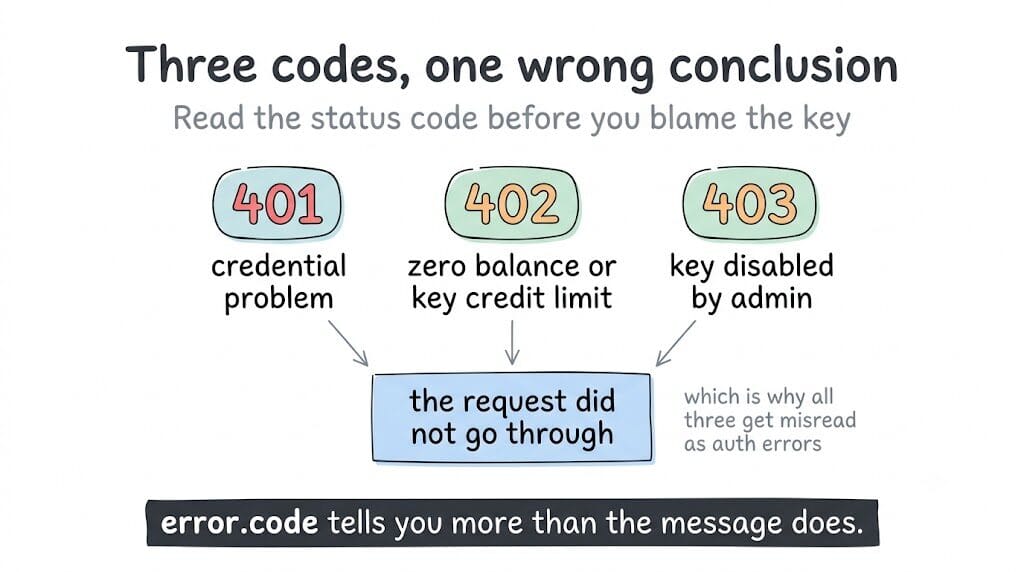
A 402 means credits, not credentials: either a zero balance or a per-key credit limit you set and forgot. A 403 with key_disabled means the key was disabled rather than expired. Both get misread as auth failures because the request "didn't go through."
So read the status code and the error.code field, not just the message. OpenRouter's error body also carries error.metadata.provider_name, which tells you whether OpenRouter rejected the request or an upstream provider did. On a 401 that field is the difference between your key and someone else's outage.
The diagnostic most guides skip: check the activity log
Open your OpenRouter activity page and look for the failed request.
If the 401 is not there, and especially if the log shows only successful calls, the request never reached OpenRouter carrying your key. That rules out causes 1 and 6 completely and puts you squarely in causes 2 through 5. This confuses people badly the other way round: an OpenClaw user reporting this error went to their OpenRouter logs, saw what looked like a successful call, and concluded the problem must be on OpenRouter's side. It was the opposite. A request that fails before it authenticates is a request OpenRouter has little to tell you about.
Two tools, thirty seconds, and between them they narrow six causes to two: /auth/key tells you whether the key is alive, and the activity log tells you whether your request ever arrived.
About "sk-or-v2"
Worth saying plainly, because it comes up in searches: every current OpenRouter key begins sk-or-v1-. That prefix appears in OpenRouter's own SDK documentation, its error references, and every real-world report. I could not find any evidence of an sk-or-v2 prefix existing.
So if you're searching for that because a config template, tutorial or generated snippet gave you a key shaped that way, treat the key as wrong rather than the docs as outdated. Copy a fresh one from the keys page, and check the variable name while you're in there, since that's cause 2 waiting to happen.
The 30-second order of operations
curl .../auth/key. Success means skip to step 3.- Key failed: check for an expiry date on the key, then issue a new one.
- Key worked: check your OpenRouter activity log. If the 401 isn't there, the request never arrived authenticated.
- Check the variable name character by character, then look for the
Authorizationheader in debug output. - If the parent agent works and only sub-agents fail, export the key into the environment as well as config.
- Clear stale keys from other providers out of the key store.
- Confirm provider, prefixed model ID and key all point at OpenRouter. If only one model or one mode fails, it isn't the key.
- Read the status code and
error.code. A 402 is credits, a 403 is a disabled key.
One last thing worth noting about this error class generally: five of these six causes are credential plumbing rather than credentials, and they fail at whatever hour your agent happens to run. That's a large part of why BetterClaw stores provider keys once, encrypted, and purges them from agent memory after use rather than leaving them in .env files for the next tool to misread. You can bring your own keys and see how it's wired without changing anything else in your setup.
Related: the OpenRouter fee calculator if you're weighing whether to stay on OpenRouter at all, and OpenRouter alternatives for AI agents for the gateways worth comparing it against. If the 401 is coming from a self-hosted setup rather than OpenRouter itself, the gateway log checklist narrows it faster.
Frequently Asked Questions
What does OpenRouter's 401 "User not found" actually mean?
It means the request arrived without a usable credential, not that your account is missing. The most common concrete cause is an expired API key, because OpenRouter returns "User not found" rather than a key-expired message once a key passes its expiration date. Test with curl -H "Authorization: Bearer $KEY" https://openrouter.ai/api/v1/auth/key to tell a dead key from a tool that isn't sending it.
My OpenRouter key works in curl but my agent returns 401. Why?
Because the key is fine and the tool is at fault, which is a documented bug class rather than a misconfiguration on your part. OpenCode, OpenClaw and Continue have all had versions that failed to send the Authorization: Bearer header or resolved the wrong stored credential while the same key validated by hand. Check the variable name first, then which credential source your tool reads, then look for the header in debug output.
Why does my main agent work but spawned sub-agents get 401?
Because they read the key from different places. Your framework reads it from its config file, and the sub-agent routes through a library such as LiteLLM that reads the OPENROUTER_API_KEY environment variable, which was never set, so it sends an empty key. Export the key into the environment as well as leaving it in config, and confirm the variable reaches the spawned process.
How do I check whether my OpenRouter key is expired?
Open the keys page in the OpenRouter dashboard and look for an expiration date on that key, since expiry is optional and easy to set and forget. A curl to /api/v1/auth/key returning 401 with a key you know was valid is a strong signal it expired. For unattended agents, avoid setting expiry dates at all, since the failure surfaces as this misleading error at whatever hour the key lapses.
Should I regenerate my OpenRouter key when I see this error?
Not first. Regenerating a working key wastes the change and hides the real cause, which is often credential resolution inside your tool. Only regenerate if curl to /auth/key fails with that same key, which means the key really is dead. If curl succeeds, the problem is downstream and a new key will fail in exactly the same way.
Is an sk-or-v2 OpenRouter key valid?
There is no evidence of an sk-or-v2 prefix. OpenRouter's own SDK docs and error references use sk-or-v1-, so a key in any other shape should be treated as incorrect rather than as a newer format. Copy a fresh key from the dashboard, and separately confirm the environment variable name your tool expects, since a mismatch there produces an empty header and the same 401.