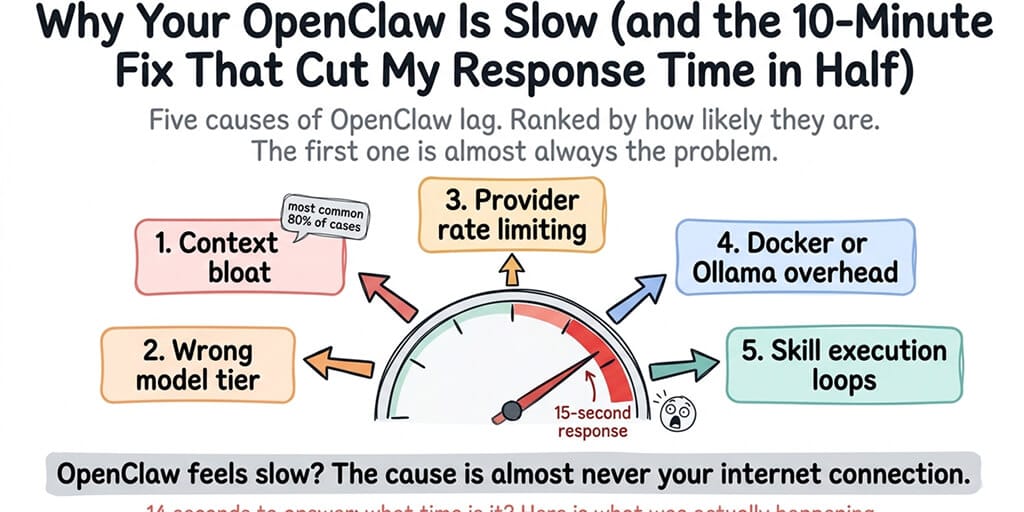
OpenClaw is usually slow because of context bloat — as your conversation grows, every message sends more input tokens to the API, increasing processing time. By message 40, a session can contain 25,000+ tokens. Type /new directly in your agent chat to reset the conversation buffer and response times drop back to message-1 speeds instantly. This is the cause 80% of the time. The other four causes are below, ranked by likelihood.
Is your OpenClaw slow from the very first message? Skip Cause 1 (context bloat) — that only explains progressive slowdown. Jump straight to Cause 2 (slow model tier), Cause 3 (rate limiting), Cause 4 (Docker / Ollama overhead on the local machine), or Cause 5 (a skill stuck in a retry loop).
My agent took 14 seconds to respond to "What time is it?"
Not a complex research task. Not a multi-tool workflow. A question that should take under two seconds. Fourteen seconds. I watched the spinner and thought, something is very wrong here.
Turns out nothing was wrong with the agent's logic. The problem was the context. By message 40 in the session, every request was sending 28,000 input tokens to the API. The model was processing my entire conversation history, SOUL.md, tool results, and memory injections just to tell me the time. This is the most common reason OpenClaw feels slow — and it has nothing to do with your internet connection, your server, or the model itself.
Cause 1: Context bloat (this is almost always it)
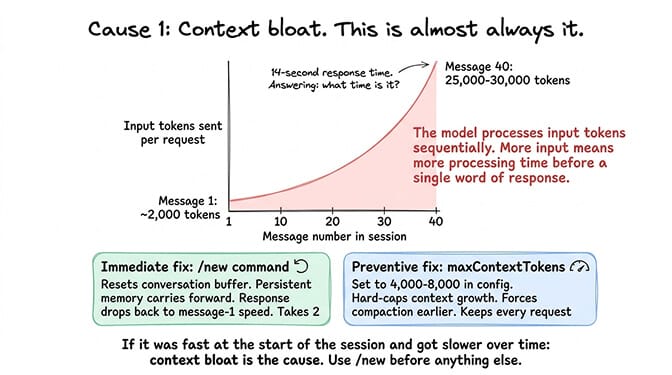
Every message you send to your OpenClaw agent includes the full conversation history as input tokens. Message 1 sends maybe 2,000 tokens. Message 20 sends 12,000. Message 40 sends 25,000-30,000. Each additional message makes every subsequent request larger and slower.
The model doesn't get faster at reading. It processes input tokens sequentially. More input tokens means more processing time before it can start generating a response. A 28,000-token input takes noticeably longer than a 3,000-token input, even on the fastest models.
The fix
Use /new every 20-25 messages to start a fresh session (type /new directly in your agent chat — it's a chat command, not a config flag, and it leaves your persistent memory in MEMORY.md and memory-wiki untouched). Only the conversation buffer resets. Response time drops back to message-1 speeds immediately. If you need the thread's context, use /compact instead: it summarizes the history so far and continues from the summary.
There's no maxContextTokens key in OpenClaw, despite what older guides say. These are the settings that actually keep per-request input bounded:
// ~/.openclaw/openclaw.json
{
  agents: {
    defaults: {
      // Trim old tool results before each request (off by default)
      contextPruning: { mode: "cache-ttl" },
      compaction: {
        // Compact before a run once the transcript passes this size (bytes, not tokens)
        maxActiveTranscriptBytes: 200000,
      },
      heartbeat: {
        isolatedSession: true, // heartbeats stop dragging your chat history along
      },
    },
  },
}
Auto-compaction otherwise waits until the session nears the model's context window. On today's 1M-token models, that's far past the point where responses get slow. The heartbeat setting matters too: OpenClaw's docs estimate a heartbeat at about 100K tokens in the main session versus 2-5K in an isolated one.
For the detailed breakdown of how session length drives both cost and latency, our OpenClaw API cost and latency optimization guide covers the token accumulation math.
If your agent was fast when you started the session and got progressively slower, context bloat is the cause. Use /new. It takes two seconds and fixes the problem immediately.
Cause 2: You're on a model that's too slow for agent tasks
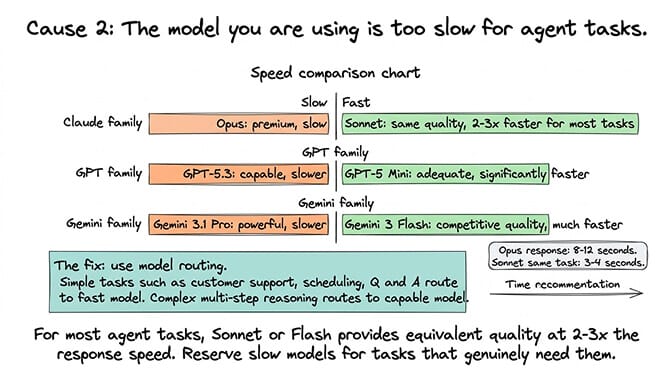
Not all models respond at the same speed. The current heavyweights (Claude Opus 5.5, GPT-6 Astra, Gemini 3.1 Pro) take noticeably longer per response than their lighter siblings (Claude Haiku 5.5, GPT-6 Luna, Gemini 3.1 Flash-Lite). Claude Sonnet 5.5, GPT-6.1 Sol and Gemini 3.8 Flash sit in the middle.
Two notes on the light tier. Claude Haiku 5.5 (released 7 October 2026) is the current Haiku. Haiku 4.5 still works, but Anthropic will retire it no sooner than 15 October 2026, so don't build on it. Gemini 3.1 Flash-Lite still works but shuts down on 7 May 2027, and Google names Gemini 3.5 Flash-Lite as its replacement.
Thinking level matters as much as the model. A model reasoning at a high effort level spends seconds thinking before it writes anything. DeepSeek V4.1 Flash, for example, runs in thinking mode by default.
Haiku 5.5 is the first Haiku with adjustable effort, and its default is medium, not low. Low effort is the fastest and cheapest setting. Telling it to "answer directly" in the prompt does not stop it thinking. If you call the API yourself, you can turn thinking off with thinking: {"type":"disabled"}, but effort is the better lever for speed.
What "normal" response time looks like
Use these as rough baselines for a short reply with thinking kept low, so you know whether you have a real problem:
| Tier | Typical models | Rough response time |
|---|---|---|
| Fast | Claude Haiku 5.5 (low effort), GPT-6 Luna, Gemini 3.1 Flash-Lite, DeepSeek V4.1 Flash (thinking off) | 1-3 seconds |
| Mid | Claude Sonnet 5.5, GPT-6.1 Sol, Gemini 3.8 Flash | 2-5 seconds |
| Heavyweight | Claude Opus 5.5, GPT-6 Astra, Gemini 3.1 Pro, DeepSeek V4 Pro | 4-10+ seconds |
If your 14-second response is on Haiku at low effort, something is wrong. If it's on Opus 5.5 at a high thinking level, that's closer to expected behavior.
The fix
Switch your primary model to a faster tier and turn the default thinking level down. For most agent tasks (customer support, scheduling, Q&A, simple research), Haiku 5.5, GPT-6 Luna or a Flash model is good enough and answers noticeably faster. Keep the heavyweight model for the complex tasks that actually need it.
// ~/.openclaw/openclaw.json
{
  agents: {
    defaults: {
      model: { primary: "anthropic/claude-haiku-5-5" },
      thinkingDefault: "low", // off | minimal | low | medium | high | ...
    },
  },
}
Or from the terminal: openclaw models set anthropic/claude-haiku-5-5. In chat, /think off or /think low changes the thinking level for the current session. /fast on asks the provider for its faster processing tier where OpenClaw supports one (OpenAI's priority processing and native fast mode on some Opus models; Sonnet 5 has neither). Check your provider's pricing before you leave it on.
Model routing helps here. Route simple tasks to a fast model and complex tasks to a capable one. For the cheapest and fastest provider options, our provider guide covers speed alongside cost.
Cause 3: Provider rate limiting is throttling you
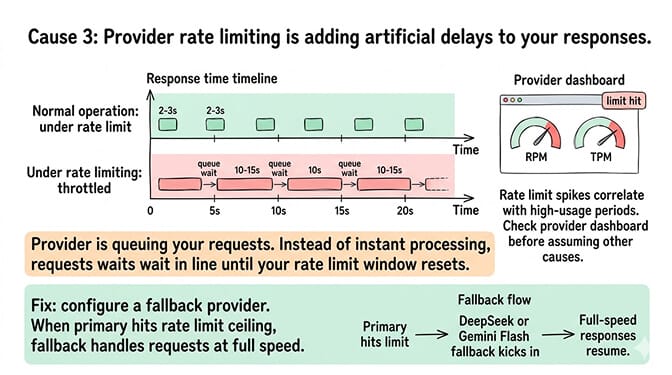
If you're hitting your model provider's rate limit (requests per minute or tokens per minute), the provider adds artificial delays to your responses. Instead of a 2-second response, you get a 10-second response because the provider is queuing your request.
How to identify it
Check your provider's usage dashboard for rate-limit metrics:
- Anthropic console → Settings → Usage → Rate Limits. If your RPM or ITPM column is consistently at 100% during slow periods, you're throttled.
- OpenAI platform → Settings → Limits. Watch the "current usage" gauge against your tier's per-minute caps.
- Google AI Studio → API key → quota. The "Requests per minute" graph should show clear ceilings if you're being throttled.
The response time spikes will correlate with high-usage periods.
The fix
Configure a fallback chain on a different provider. When your primary is rate-limited, OpenClaw rotates auth profiles and then moves down the chain:
// ~/.openclaw/openclaw.json
{
  agents: {
    defaults: {
      model: {
        primary: "anthropic/claude-sonnet-5-5",
        fallbacks: ["deepseek/deepseek-flash", "google/gemini-3.8-flash"],
      },
    },
  },
}
Or openclaw models fallbacks add deepseek/deepseek-flash. Run openclaw models status to see the resolved chain. Profiles currently in cooldown show up under Unavailable auth profiles.
One catch: if you picked the model in chat with /model, that choice is strict and won't fall back. The run fails visibly instead. Send /model default to put the session back on your configured chain. For the rate limit troubleshooting guide, the rate-limit post covers the three types of rate limits and how to identify which one you're hitting.
Cause 4: Docker or Ollama overhead on the local machine
If you're running OpenClaw locally with Docker-sandboxed execution or using Ollama for local models, the host machine's resources matter.
Docker overhead
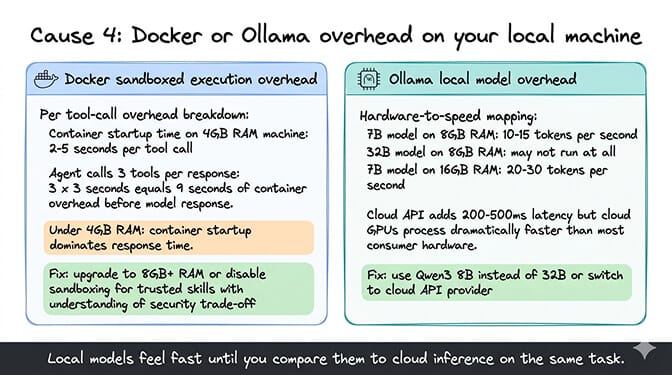
Every sandboxed skill execution spins up a container. On machines with limited RAM (4GB or less), container startup adds 2-5 seconds per tool call. If your agent calls three tools per response, that's 6-15 seconds of container overhead alone.
Ollama overhead
Local model inference speed depends entirely on your hardware. On a CPU-only 8GB machine, a 7B model realistically runs at 1-5 tokens per second — slow enough that the agent feels frozen. With an 8GB consumer GPU you can get into the 30+ tokens-per-second range. A 32B model needs significantly more memory and on most laptops won't run at usable speed at all. For the local model hardware requirements, the hardware guide covers the specific RAM and GPU requirements per model size.
The fix for Docker
If you're on a low-memory machine, disable sandboxed execution for trusted skills (understanding the security trade-off) or upgrade to a machine with 8GB+ RAM.
The fix for Ollama
Use a smaller model (gemma4:12b, a 7.6 GB download, or qwen3:8b instead of the 18 GB qwen3.8:27b) or switch to a cloud API provider. The API call adds network latency (200-500ms) but the model processes far faster on cloud GPUs than on most local hardware.
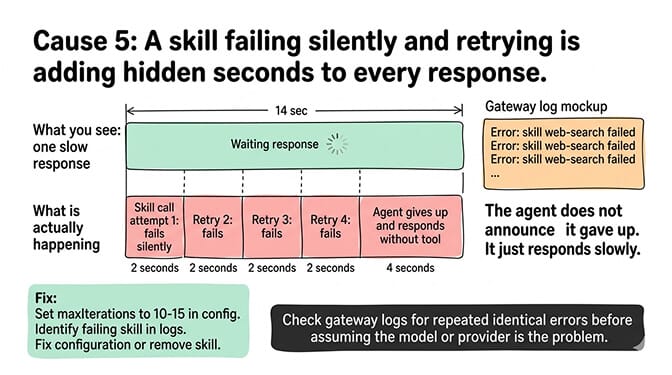
Cause 5: A skill is stuck in a retry loop
Sometimes the slowness isn't the model. It's a skill that's failing silently, retrying, failing again, and adding 5-10 seconds of loop time before the agent gives up and responds.
How to identify it
Check the gateway logs for repeated tool call errors (openclaw logs --follow tails them live). If you see the same skill being called and failing multiple times in sequence, the loop is adding latency to every response that triggers that skill.
The fix
Turn on OpenClaw's tool-loop detection. It's disabled by default, and there's no maxIterations setting despite what older guides say:
// ~/.openclaw/openclaw.json
{
  tools: {
    loopDetection: { enabled: true }, // catches repeated calls and repeated errors
  },
  agents: {
    defaults: {
      timeoutSeconds: 600, // cap each agent run at 10 minutes (default is 48 hours)
    },
  },
}
Loop detection watches recent tool calls for repeated patterns that make no progress (same tool, same inputs, same errors) and stops them, so a broken skill can't loop indefinitely. Identify the failing skill, check its configuration, and either fix or remove it. For the complete guide to diagnosing agent loops, the loop troubleshooting post covers the specific patterns.
If diagnosing context bloat, tuning model routing, managing rate limits and monitoring skill loops feels like more performance engineering than you signed up for, BetterClaw is a no-code AI agent platform and managed OpenClaw alternative with smart context management that keeps token usage down automatically. The Free plan is 1 agent with 100 credits a month and BYOK. Pro is $49/month for 5 agents.
The diagnostic checklist (10 minutes)
When your OpenClaw agent is slow, check these five things in this order:
- Reset the session with
/new— if it was fast at the start of the session and got slower, that's context bloat. Fixed in 2 seconds. - Switch to a faster model tier and lower the thinking level (Haiku 5.5, GPT-6 Luna, Gemini 3.1 Flash-Lite;
/think low) — fixed in 30 seconds. - Add a fallback provider to bypass rate limits — check the provider dashboard and
openclaw models statusfirst; fixed in ~5 minutes. - Check Docker/Ollama RAM usage or switch to a cloud API — fixed in ~10 minutes on the local-hardware path.
- Enable
tools.loopDetectionto stop skill retry loops — checkopenclaw logsfor repeated errors; fixed in ~10 minutes.
80% of the time, it's #1. Try /new before anything else.
The deeper issue behind most OpenClaw performance problems is the same: the default configuration doesn't optimize for speed. It optimizes for completeness. Every message sends the full conversation history. Tool-loop detection is off. Every heartbeat uses your primary model in your main session. The agent works, but it works slowly because the defaults are generous rather than efficient.
If you want an agent where the performance optimization is built into the platform instead of configured manually, give BetterClaw a try. The Free plan is 1 agent with 100 credits a month and BYOK. Pro is $49/month for 5 agents. Smart context management keeps the context lean automatically. Your agent stays fast at message 1 and message 100. 60-second deploy. No performance tuning required.
Frequently Asked Questions
Why is my OpenClaw agent slow?
The most common cause (roughly 80% of cases) is context bloat: long conversations accumulate input tokens, making every subsequent request larger and slower. By message 40, a single request can contain 25,000-30,000 input tokens. The fix: use /new every 20-25 messages to reset the conversation buffer. If it was fast when you started and got slower over time, context bloat is almost certainly the cause.
How do I speed up OpenClaw response time?
Five fixes in order: reset the session with /new (context bloat), switch to a faster model tier like Haiku 5.5, GPT-6 Luna or Gemini 3.1 Flash-Lite and lower the thinking level (model speed), add a fallback provider (rate limit throttling), upgrade hardware or switch to a cloud API (Docker/Ollama overhead), and enable tools.loopDetection (skill retry loops). Try /new first. It fixes the problem 80% of the time in 2 seconds.
Does the model affect how fast OpenClaw responds?
Significantly. Claude Opus 5.5 takes noticeably longer per response than Haiku 5.5, with Sonnet 5.5 in the middle. GPT-6 Astra is slower than GPT-6.1 Sol, which is slower than GPT-6 Luna. Gemini 3.1 Pro is slower than the Flash models. The thinking level matters too: high effort adds seconds before the first word. For most agent tasks, a faster model with low thinking is good enough and responds much sooner. Use model routing to send simple tasks to fast models and complex tasks to capable ones.
How much RAM does OpenClaw need to run fast?
For cloud API usage (no local models), OpenClaw runs fine on 2GB+ RAM. For Docker-sandboxed execution, 4GB minimum, 8GB recommended. For local models via Ollama, 16GB+ RAM for 7B-8B models, 32GB+ for 32B models. Insufficient RAM causes container startup delays (Docker) or extremely slow token generation (Ollama). Cloud APIs are faster than local models on most consumer hardware.
Does BetterClaw fix OpenClaw performance issues?
BetterClaw is a no-code AI agent platform, not an OpenClaw host, so it doesn't fix an OpenClaw install. It is an alternative with smart context management built in, which keeps token usage down without manual /new resets. The Free plan is 1 agent with 100 credits a month and BYOK. Pro is $49/month for 5 agents.