The real math behind OpenClaw model pricing, plus 7 ways to cut your costs without killing performance.
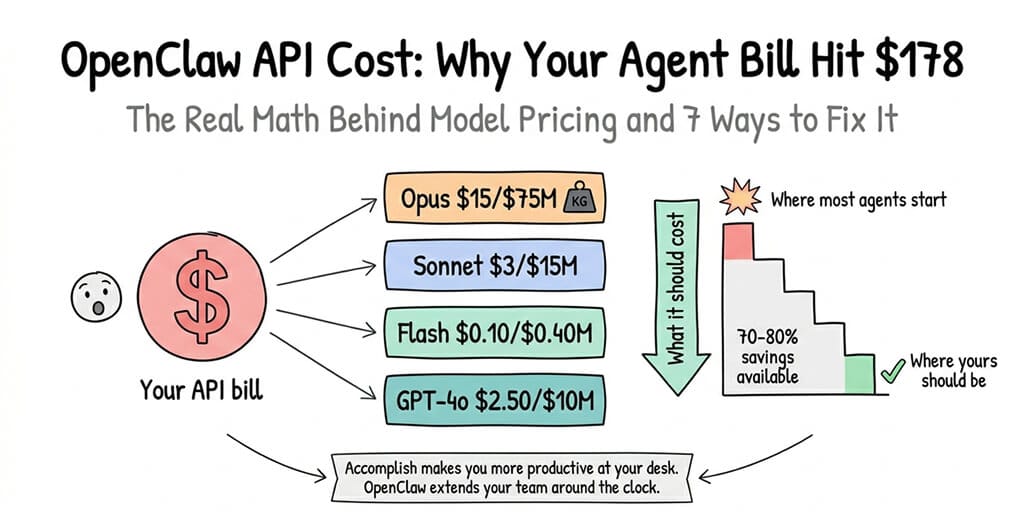
Last Tuesday, I watched a user in the OpenClaw Discord post a screenshot of his Anthropic invoice. $178. One week. A single agent.
His message was three words: "Is this normal?"
The replies came fast. Some people laughed. Some shared their own horror stories. One person said they burned through $40 in a single afternoon because their agent got stuck in a reasoning loop with Claude Opus.
Here's the thing. The OpenClaw framework itself is free. 230K+ GitHub stars, completely open source. But the moment you connect it to an AI model provider, the meter starts running. And most people have no idea how fast.
If you came to OpenClaw because Claude Cowork's rate limits kept throttling your agent mid-task, you traded one problem for another. Rate limits became cost limits. And cost limits are worse, because they don't stop you. They just quietly drain your wallet.
This guide breaks down exactly where your OpenClaw API cost comes from, which models are worth the money, and how to slash your bill without making your agent dumber.
The real reason OpenClaw gets expensive
Let's start with what most people miss.
Your OpenClaw API cost isn't just about which model you pick. It's about how many times your agent calls that model per task.
A simple "summarize this email" might take one API call. But an autonomous task like "research competitors and draft a report" can trigger 15 to 30 calls. Each call has input tokens (your prompt, system instructions, conversation history) and output tokens (the model's response).
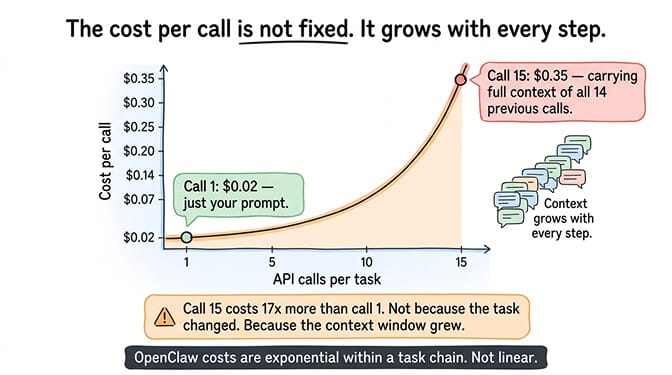
Here's where it gets ugly: OpenClaw sends your entire conversation history with every call. So call #1 might cost $0.02. But call #15, carrying the full context of calls 1 through 14, might cost $0.35.
The cost of an OpenClaw agent isn't linear. It's exponential within a single task chain. The longer your agent runs autonomously, the more expensive each subsequent call becomes.
That Medium post "I Spent $178 on AI Agents in a Week" wasn't an outlier. It was someone who left an Opus-powered agent running multi-step tasks without cost guardrails.
OpenClaw Opus cost vs. Sonnet: the math nobody shows you
This is where most people get it wrong.
They see "Opus is smarter" and default to it for everything. But the pricing gap between Opus and Sonnet is massive, and for most agent tasks, Sonnet handles them just fine.
Here's the actual math per 1,000 tokens (as of early 2026):
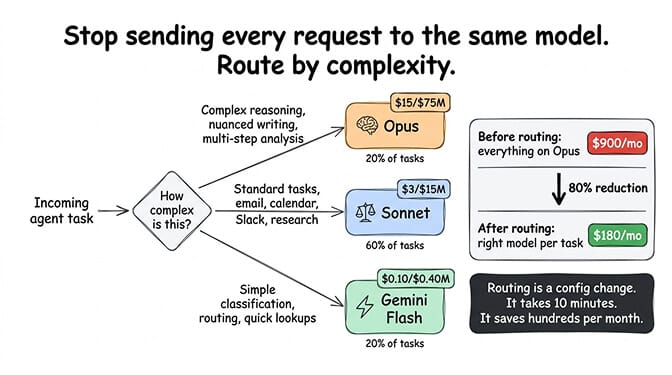
Claude Opus: ~$15 input / $75 output per million tokens Claude Sonnet: ~$3 input / $15 output per million tokens
That's a 5x difference. On a 20-call task chain averaging 2,000 tokens per response, you're looking at roughly $3.00 with Opus vs. $0.60 with Sonnet. Multiply that by 10 tasks a day, and Opus costs you $900/month while Sonnet costs $180.
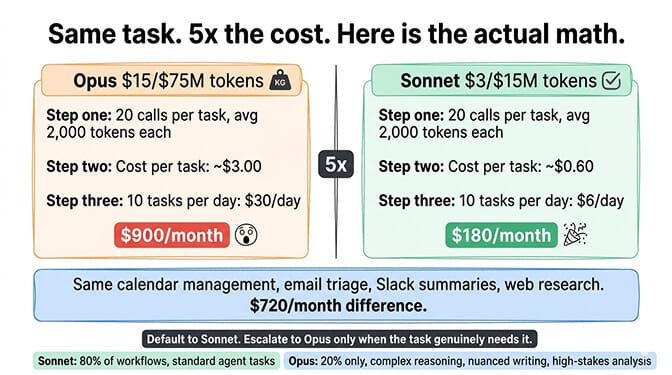
For agentic tasks like calendar management, email triage, Slack summaries, and web research,choosing between Sonnet and Opus isn't even close. Sonnet wins on cost-per-quality for 80% of workflows.
Reserve Opus for the 20% that actually needs it: complex reasoning chains, nuanced writing, multi-step analysis where getting it wrong costs more than the API call.
The budget-friendly models most people overlook
Stay with me here.
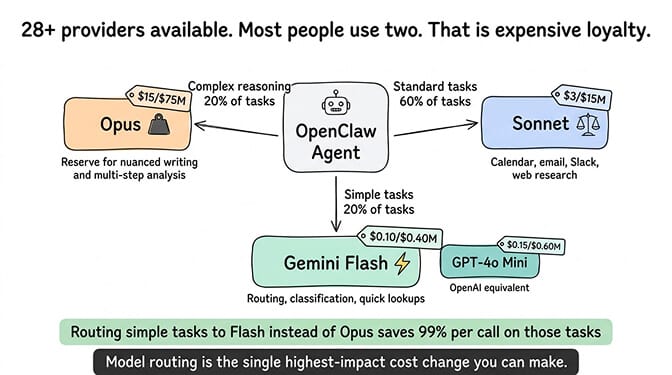
OpenClaw supports 28+ model providers. Most users stick with Anthropic or OpenAI and never look further. That's expensive loyalty.
Gemini Flash is the quiet cost killer. Google's lightweight model handles simple agent tasks at a fraction of the price. For routing, classification, and quick lookups, it's borderline free compared to Opus.
GPT-4o Mini fills a similar role on the OpenAI side. Fast, cheap, surprisingly capable for structured tasks.
The real power move? Model routing. Configure your agent to use different models for different task types. Send complex reasoning to Sonnet. Send quick classifications to Flash. Send creative writing to Opus only when quality genuinely matters.
If you want the full breakdown on which providers give the best bang for your buck, our guide on the cheapest AI providers for OpenClaw covers every option with real pricing comparisons.
7 ways to actually reduce your OpenClaw costs
Enough theory. Here's what works.
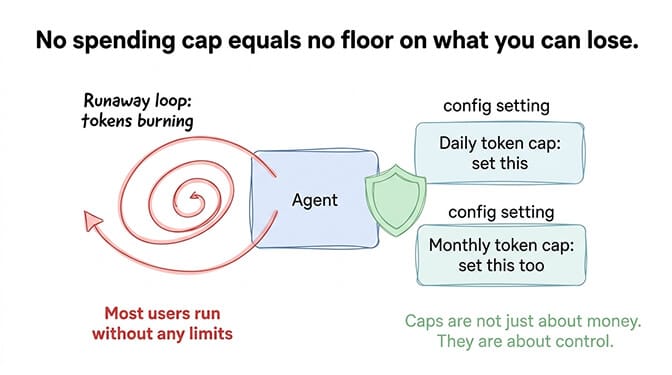
1. Set hard spending limits per agent
OpenClaw lets you configure daily and monthly token caps. Use them. The number of people running agents without spending limits is genuinely alarming. Remember the Summer Yue incident at Meta, where an agent mass-deleted emails while ignoring stop commands? Cost guardrails aren't just about money. They're about control.
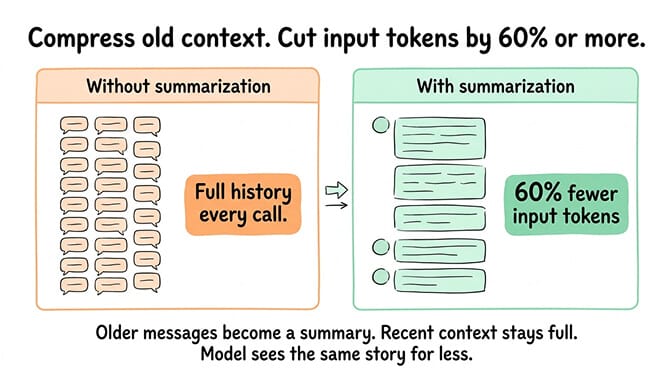
2. Use conversation summarization
Instead of sending your full conversation history with every API call, enable conversation summarization. This compresses older messages into a summary, dramatically reducing input tokens on long task chains. The cost savings on a 20+ call chain can be 60% or more.
3. Route models by task complexity
We covered this above, but it bears repeating. Sending every request to Opus is like taking a helicopter to the grocery store. Set up intelligent model routing so your agent picks the right model for each subtask.
4. Limit autonomous loop depth
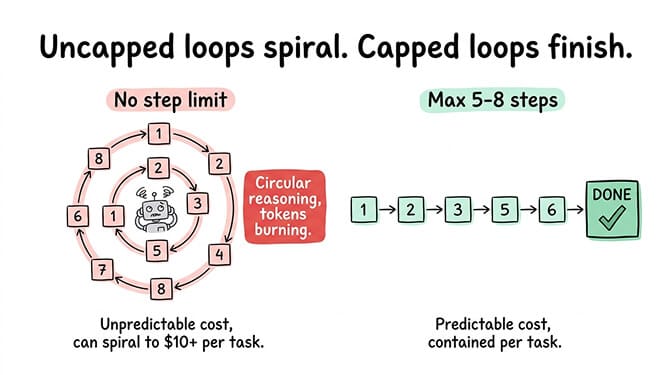
Set a maximum number of steps for autonomous tasks. Without this, an agent can spiral into recursive reasoning loops, burning tokens on increasingly circular logic. Five to eight steps is a reasonable cap for most use cases.
If your agent has been getting stuck in loops, our guide on fixing OpenClaw agent loops covers the three patterns that drain your wallet and how to stop them.
5. Cache frequently used prompts
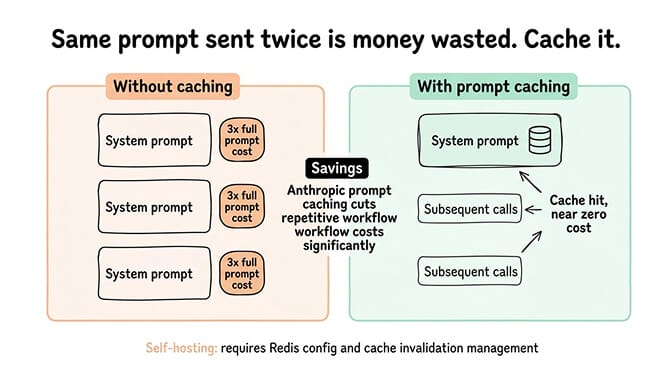
If your agent runs the same system prompts or skill instructions repeatedly, caching reduces redundant token usage. Anthropic's prompt caching can cut costs significantly on repetitive workflows.
This is also where infrastructure starts to matter. If you're self-hosting OpenClaw, implementing proper caching means configuring Redis, managing cache invalidation, and monitoring hit rates. If you'd rather skip that, BetterClaw handles all of this out of the box for $49/month for Pro, BYOK. You bring your API keys, we handle the infrastructure, and your costs stay on the model provider side only.
6. Audit your skills for token bloat
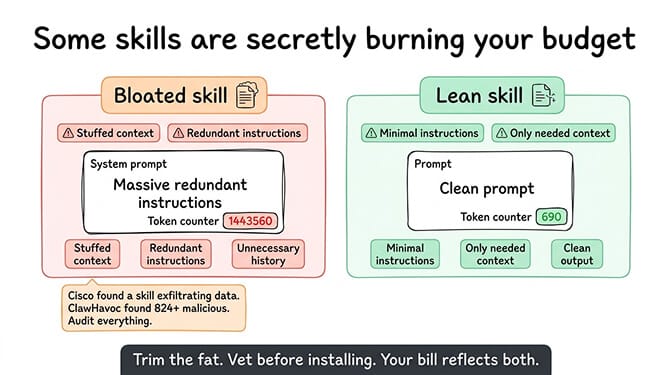
Some OpenClaw skills are terribly written. They stuff massive system prompts, redundant instructions, and unnecessary context into every call. Audit your installed skills. Trim the fat. And be careful what you install from ClawHub. Cisco found a third-party skill performing data exfiltration without user awareness, and the ClawHavoc campaign identified 824+ malicious skills on the registry.
Our guide to vetting OpenClaw skills walks through what to check before installing anything.
7. Monitor before you optimize
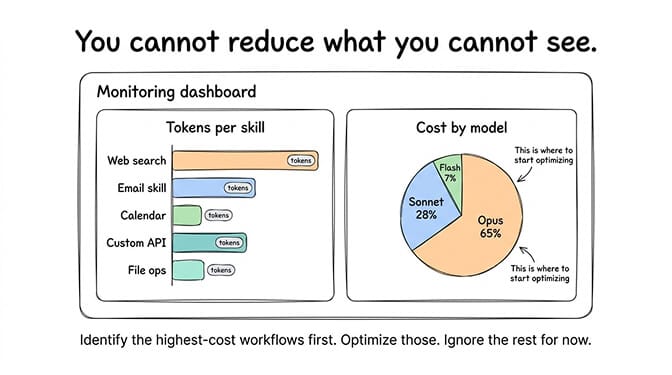
You can't reduce what you can't see. Track your token usage per agent, per skill, per task type. Identify which workflows are burning the most tokens and optimize those first.
ChatGPT OAuth and the hidden cost of "free" models
Here's what nobody tells you.
Some OpenClaw users try to cut costs by connecting ChatGPT via OAuth instead of using the API directly. The idea is to piggyback on a ChatGPT Plus subscription ($20/month) instead of paying per-token API rates.
It works. Sort of. Until it doesn't.
ChatGPT OAuth connections are rate-limited aggressively. Your agent will hit walls mid-task. Responses slow to a crawl during peak hours. And if OpenAI detects automated usage patterns, they can revoke access entirely. Google already banned users who overloaded their Antigravity backend through OpenClaw.
"Free" API access through subscription OAuth is a false economy. The rate limits make your agent unreliable, and the risk of account termination makes it unsustainable.
If you're trying to run a serious agent workflow, budget for actual API access. Use the cost optimization strategies above to keep bills reasonable. Reliability matters more than saving $20/month.
What a cheap OpenClaw setup actually looks like
Let me give you a real example.
A startup founder running an OpenClaw agent for daily email triage, Slack monitoring, and weekly competitor research. Here's a setup that costs under $30/month total in API fees:
Primary model: Claude Sonnet for email and Slack tasks ($0.40/day)
Secondary model: Gemini Flash for classification and routing ($0.05/day)
Occasional model: Claude Opus for weekly deep research (~$2.00/week)
Total API cost: roughly $22/month.
Add $49/month for managed hosting on Better Claw Pro and you're at $71/month total for a fully autonomous agent across multiple channels with zero infrastructure headaches.
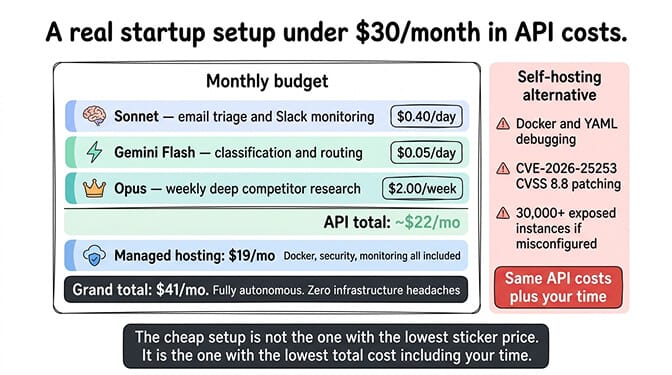
Compare that to the alternative: self-hosting on a VPS where you're managing Docker, debugging YAML, handling security patches (remember CVE-2026-25253, the one-click RCE vulnerability with a CVSS score of 8.8?), and still paying the same API costs. The OpenClaw maintainer himself warned that if you can't understand how to run a command line, this project is "far too dangerous" to use safely. The 30,000+ internet-exposed instances found without authentication prove he wasn't exaggerating.
The real cost isn't just the API bill
And that's when we realized something while building BetterClaw.
The API cost is the obvious number. But the hidden cost is time. Time configuring model routing. Time debugging token usage spikes. Time securing your instance. Time updating when the next CVE drops.
CrowdStrike published a full security advisory on OpenClaw enterprise risks. Bitsight and Hunt.io found tens of thousands of exposed instances. The framework has 7,900+ open issues on GitHub.
None of this means OpenClaw is bad. It's incredible software. But running it well takes work. And every hour you spend on infrastructure is an hour you're not spending on the agent workflows that actually matter to your business.
If any of this resonated, if you've watched your API costs climb while wrestling with Docker configs and security patches, give BetterClaw a try. It's $49/month for Pro, you bring your own API keys, and your first deploy takes about 60 seconds. We handle the infrastructure, the security, the monitoring. You handle the interesting part: building agents that actually do useful things.
The bottom line on OpenClaw costs
OpenClaw API cost isn't a fixed number. It's a design choice.
You can burn $178 a week by pointing Opus at every task and hoping for the best. Or you can build a smart, cost-aware agent architecture that uses the right model for each job, sets proper guardrails, and runs on infrastructure that doesn't demand your weekends.
The framework is free. The models cost money. And the difference between a $30/month agent and a $700/month agent is almost never intelligence. It's architecture.
Build accordingly.
Frequently Asked Questions
What is the typical OpenClaw API cost per month?
It depends entirely on your model choice and usage patterns. A well-optimized agent using Sonnet for most tasks and Flash for simple ones typically runs $20 to $40/month in API fees. An unoptimized agent using Opus for everything can easily hit $150 to $700/month. The framework itself is free; you only pay your AI model provider.
How does OpenClaw Sonnet vs. Opus compare for agent tasks?
Sonnet handles about 80% of typical agent workflows (email, Slack, scheduling, research summaries) at roughly one-fifth the cost of Opus. Opus excels at complex multi-step reasoning, nuanced writing, and tasks where accuracy is critical. The smart move is using both: route simple tasks to Sonnet and reserve Opus for high-stakes work.
How do I reduce OpenClaw costs without losing performance?
The biggest wins come from model routing (matching task complexity to the right model), conversation summarization (compressing context to reduce input tokens), setting autonomous loop depth limits, and auditing your skills for token bloat. These four changes alone can cut costs by 50 to 70% for most setups.
Is OpenClaw cheaper than Claude Cowork or ChatGPT Plus for agent tasks?
It can be, but it depends on your setup. Claude Cowork and ChatGPT Plus have fixed subscription costs but come with strict rate limits that throttle agent performance. OpenClaw gives you unlimited control at pay-per-use API rates. For light usage, subscriptions may be cheaper. For heavy, customized agent workflows, a well-optimized OpenClaw setup often costs less and performs better.
Is it safe to connect ChatGPT via OAuth to reduce OpenClaw costs?
It works technically, but it's risky. ChatGPT OAuth connections face aggressive rate limiting that makes agents unreliable during peak hours. Google has already banned users who overloaded their backend via OpenClaw, and OpenAI can revoke access for automated usage patterns. For production workflows, direct API access with proper cost optimization is far more sustainable.