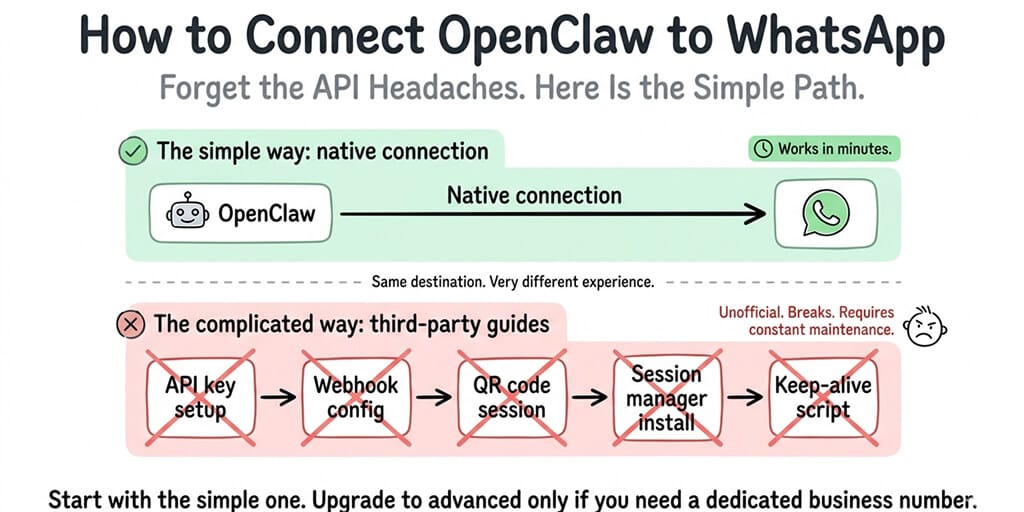
Forget the unofficial API guides and QR code nightmares. OpenClaw connects to WhatsApp natively. Here's the simple path and the advanced one.
If you've been reading about WhatsApp bots and unofficial APIs and QR code sessions that expire every 20 minutes, stop. OpenClaw connects to WhatsApp natively through the chat interface for most setups. Here's how it actually works.
I spent a full Saturday trying to set up an OpenClaw WhatsApp connection using an unofficial API library before I discovered the native method existed. That Saturday is gone forever. Yours doesn't have to be.
The native WhatsApp connection (this is what most people need)
The native connection links your WhatsApp account directly to your OpenClaw agent. You message the agent through WhatsApp like you'd message a friend. The agent responds in the same chat. No API keys. No webhook URLs. No session management.
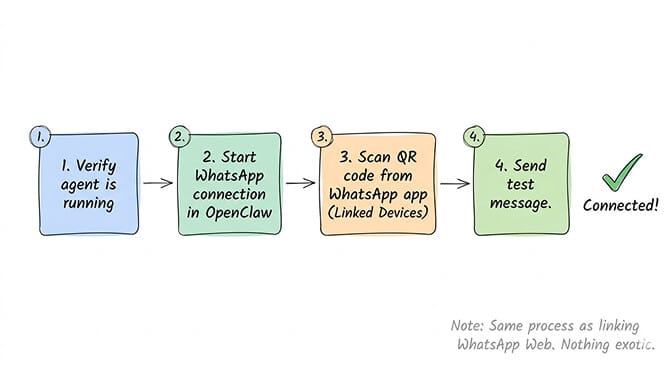
Step 1: Make sure your OpenClaw agent is running and responsive. Send a test message through the web interface first. If the agent responds there, the gateway is healthy and ready for channel connections.
Step 2: Start the WhatsApp connection from OpenClaw. In the OpenClaw interface, navigate to the channel connection flow and select WhatsApp. OpenClaw will generate a QR code for WhatsApp Web pairing.
Step 3: Scan the QR code from your WhatsApp app. Open WhatsApp on your phone, go to Linked Devices, and scan the QR code. This is the same process as linking WhatsApp Web to your phone. You're giving OpenClaw access as a linked device.
Step 4: Send a test message. Open WhatsApp and send "hello" to the agent chat. If you get a response, you're connected.
The whole process takes about 3-5 minutes. Most of that is waiting for the QR code to appear and getting your phone out to scan it.
What works once you're connected
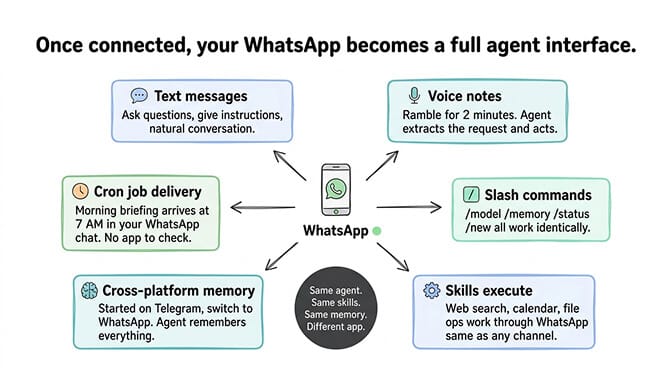
Once your OpenClaw WhatsApp setup is complete, the agent works through WhatsApp with the same capabilities as any other channel.
Text messages and responses. Type naturally. Ask questions. Give instructions. The agent responds in the same chat thread. Conversations feel like texting a knowledgeable friend.
Voice notes. This is where WhatsApp genuinely shines for OpenClaw. Send a voice note and the agent processes the audio, transcribes it, and responds in text. You can ramble for two minutes about what you need, and the agent extracts the actual request and acts on it. This is especially useful when you're walking, driving, or just don't feel like typing.
All OpenClaw commands work. The slash commands (/model, /memory, /status, /new) work identically in WhatsApp. Type them in the chat and the agent processes them.
Skills execute normally. Web search, calendar, file operations, and any installed skills work through WhatsApp the same way they work through the web interface or Telegram. The agent receives your message, processes it through the skill pipeline, and sends the result back to WhatsApp.
Memory persists across platforms. If you started a conversation on Telegram and switch to WhatsApp, the agent remembers everything. Same persistent memory, same context, different app. This cross-platform memory is one of the reasons WhatsApp is popular with users who also connect Telegram or Discord to the same agent.
Cron jobs deliver to WhatsApp. Set up a morning briefing and the agent sends it to your WhatsApp at 7 AM. No browser to open. No app to check. The information arrives in the same place as your other messages.
For a broader look at the best workflows to run through an OpenClaw agent, our use cases guide covers the setups that provide the most value across all channels.
WhatsApp-specific things to know
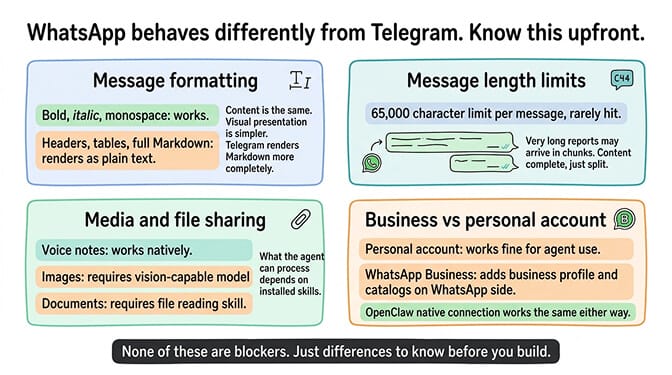
WhatsApp isn't Telegram. A few things behave differently, and knowing them upfront saves confusion.
Message formatting
WhatsApp supports basic formatting (bold with asterisks, italic with underscores, monospace with backticks) but doesn't render full Markdown. If your agent generates responses with headers, tables, or complex formatting, they'll appear as plain text in WhatsApp. The content is the same. The visual presentation is simpler.
This rarely matters for conversational interactions but can look cluttered if your agent generates structured reports or formatted data. If formatted output matters to you, Telegram or Discord render Markdown more completely.
Message length limits
WhatsApp has a per-message character limit (roughly 65,000 characters, which is generous). Your agent's responses will almost never hit this limit. But if the agent generates a very long response (a detailed research report, for example), WhatsApp may split it across multiple messages. The content is complete. It just arrives in chunks.
Media and file sharing
The agent can receive images, documents, and voice notes through WhatsApp. Whether it can process them depends on the skills you have installed. Voice note processing works natively. Image analysis requires a vision-capable model. Document processing requires a file reading skill.
WhatsApp Business vs personal account
Both work with the native OpenClaw connection. You don't need a WhatsApp Business account for personal agent use. If you're building a customer-facing bot and want the Business features (business profile, catalogs, auto-replies), a WhatsApp Business account adds those on the WhatsApp side. The OpenClaw connection works the same either way.
When the native connection isn't enough
Here's where most people get it wrong. They read about the unofficial WhatsApp API and assume they need it. Most don't.
The native connection covers personal use, family use, small team use, and even modest customer-facing scenarios. It breaks down only when you need specific capabilities that WhatsApp Web pairing can't provide.
What the unofficial API approach gives you
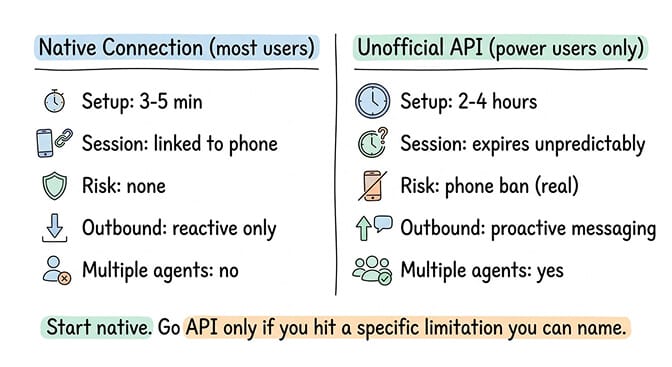
Multiple agents on one WhatsApp number. The native connection is one agent per linked account. If you need to route different conversations to different agents based on topic or customer segment, you need API-level access.
Automated outbound messages at scale. The native connection is reactive. Someone messages you, the agent responds. If you need to proactively message hundreds of customers (order updates, marketing campaigns, appointment reminders), you need the WhatsApp Business API.
Persistent sessions without phone dependency. The native connection relies on your phone being online (same as WhatsApp Web). If your phone goes offline, the agent loses the connection. API-based setups run independently of your phone.
The real risks of the unofficial API path
Stay with me here. This matters.
The unofficial WhatsApp API libraries (like Baileys, whatsapp-web.js, and similar projects) reverse-engineer WhatsApp's protocol. They work. But Meta explicitly prohibits this in their Terms of Service.
QR code sessions expire. The linked device session needs periodic re-authentication. If you don't re-scan the QR code, the connection drops. Some community setups report sessions lasting days. Others report expiry within hours. It's unpredictable.
Phone number flagging and banning. Meta actively detects unofficial API usage. Numbers using unofficial clients get flagged and can be temporarily or permanently banned. Losing your primary phone number to a WhatsApp ban is a real risk, and one that multiple community members have reported.
No support or recourse. If your account gets banned for unofficial API usage, Meta's support won't help. The ban is for violating their terms. You agreed to those terms when you signed up.
For the broader security considerations of running OpenClaw, our security guide covers the risks across the entire stack, not just WhatsApp-specific ones.
Who should actually consider the API path
Business-scale operations that need proactive outbound messaging to hundreds or thousands of customers. Companies that need the official WhatsApp Business API (which is separate from the unofficial libraries) for compliance and reliability. High-volume customer support operations where the native connection's session dependency isn't acceptable.
For everyone else, the native connection works. Don't overcomplicate it.
The native WhatsApp connection handles 90% of use cases. The unofficial API adds complexity, instability, and real ban risk. Only go down that path if you specifically need outbound messaging at scale or phone-independent sessions.
If managing WhatsApp connections, session stability, and re-authentication isn't how you want to spend your time, Better Claw handles WhatsApp as a pre-configured channel from the dashboard. $49/month for Pro, BYOK. Connect your WhatsApp, pick your model, deploy in 60 seconds. The connection management is handled so you don't wake up to a dropped session.
Telegram vs WhatsApp for OpenClaw: which should you use?
This isn't a feature comparison. It's a practical recommendation based on your situation.
If you just want to chat with your agent personally: Telegram is easier to set up and has no phone dependency for the connection. The native Telegram connection is simpler than WhatsApp's QR-code-based linking. If you don't already use WhatsApp heavily, start with Telegram.
If your daily life already runs through WhatsApp: Use WhatsApp. The whole point of OpenClaw is meeting you where you already communicate. If every conversation you have is in WhatsApp, adding your AI agent there means you never leave the app. The voice note feature makes WhatsApp especially good for people who prefer talking over typing.
If you want to share the agent with family or a small team: WhatsApp group chats are more natural for non-technical people. Your family already knows how WhatsApp works. Creating a group and adding the agent (via the native connection) is straightforward. Telegram requires people to install a new app if they don't already have it. The friction difference matters for non-technical users.
If you want a customer-facing business bot: This is a different conversation entirely. For customer-facing bots at scale, you need the official WhatsApp Business API (not the unofficial libraries), proper compliance, and infrastructure that doesn't depend on your personal phone. Our guide on building a WhatsApp AI support agent that escalates to humans covers the escalation logic these bots need. For the full ecommerce agent setup including WhatsApp customer support, our ecommerce guide covers the architecture.
For the companion guide on connecting OpenClaw to Telegram, our Telegram setup post covers the native connection, BotFather setup, and when you need a dedicated bot.
The part most WhatsApp guides skip
Here's what nobody tells you about running your agent on WhatsApp long-term.
WhatsApp has 2.7 billion monthly active users. It's the dominant messaging platform in most of the world outside the US. When you put your OpenClaw agent on WhatsApp, you're putting it on the platform where most of your customers, family, and contacts already spend their time.
That's powerful. It's also a responsibility. Every message your agent sends appears in the same app as messages from your partner, your kids, your boss. A badly configured agent that sends late-night notifications or gives wrong information doesn't just annoy a user. It damages trust in a space that's personal.
Write your SOUL.md carefully. Set response hours if appropriate. Define escalation rules. Test the agent with friends before exposing it to customers. WhatsApp conversations feel more personal than Telegram or Discord. Your agent's tone should match.
The managed vs self-hosted comparison covers how different deployment approaches handle multi-channel management, including the WhatsApp-specific connection considerations.
WhatsApp is available as a pre-configured channel on BetterClaw. You connect your account from the dashboard, no config files or API keys. One click and your agent is live on WhatsApp.
Frequently Asked Questions
How do I set up OpenClaw with WhatsApp?
The fastest method is the native connection through OpenClaw's chat interface. Start the WhatsApp connection in OpenClaw, scan the QR code from your WhatsApp app (same process as linking WhatsApp Web), and send a test message. The whole process takes 3-5 minutes. No unofficial API libraries, no webhook configuration, no API keys needed for personal use.
How does WhatsApp compare to Telegram for OpenClaw?
Telegram has an easier native connection (no QR code dependency), better Markdown rendering, and a dedicated bot system for multi-user access. WhatsApp has a larger user base (2.7B+ monthly active users), voice note support that works naturally with OpenClaw, and is the default messaging app in most markets. For personal use, either works. For reaching non-technical users or customers, WhatsApp wins because people already have it installed.
Does OpenClaw WhatsApp work with voice notes?
Yes. Send a voice note through WhatsApp and OpenClaw processes the audio, transcribes it, and responds in text. This makes WhatsApp especially useful for hands-free interaction. You can ramble a two-minute request while walking and the agent extracts the actual ask and acts on it. Voice note processing works natively without additional skills or configuration.
Does the OpenClaw WhatsApp connection cost anything extra?
No. The WhatsApp connection itself is free. The costs of running an OpenClaw agent are hosting ($12-29/month depending on self-hosted VPS or managed platform) and AI model API fees ($5-30/month depending on model and usage). WhatsApp adds zero additional cost. On a no-code AI agent platform like BetterClaw ($49/month for Pro), WhatsApp is included as one of 15+ pre-configured channels.
Is connecting OpenClaw to WhatsApp safe?
The native connection (WhatsApp Web pairing) is as safe as using WhatsApp Web on your computer. The unofficial API route carries real risks: Meta detects unauthorized API usage and can flag or ban your phone number. Multiple community members have reported temporary and permanent bans. For personal and small-scale use, stick with the native connection. For business-scale operations, use the official WhatsApp Business API through proper channels, not unofficial libraries.
Related Reading
- OpenClaw Telegram Setup Guide — Companion guide for the other major messaging channel
- Best OpenClaw Use Cases — Workflows that work especially well through chat channels
- OpenClaw Security Risks Explained — Broader security considerations for any deployment
- OpenClaw Agents for Ecommerce — Customer-facing bots at scale
- BetterClaw vs Self-Hosted OpenClaw — Multi-channel management across deployment options