No API bill. No credit card. No infrastructure headaches. Here's exactly how we did it.
Someone dropped a comment on one of our Reddit threads last week that stopped me mid-scroll.
"BYOK sounds great but what if I don't want to pay for an API key either?"
Fair. Really fair.
We've been saying "bring your own API keys" like it's the generous option. But for someone who just wants to test whether an AI agent is actually useful before spending a dollar, even getting an OpenRouter key feels like one more step in a wall of friction.
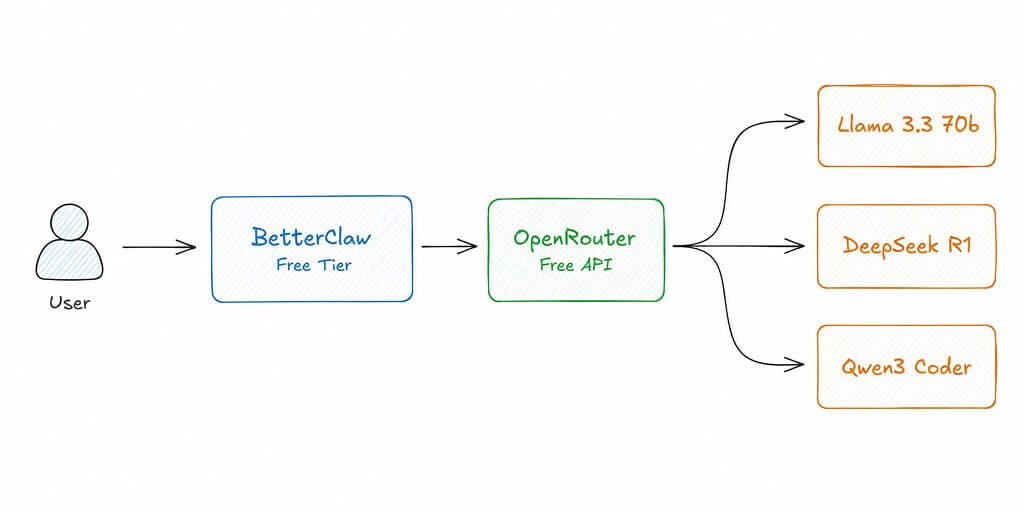
So we tried something. We set up a completely working OpenClaw agent, on BetterClaw's free tier, using only free models from OpenRouter.
$0 total. Not "$5 free credits." Not "basically free." Zero.
Here's exactly what we did, what we ran into, and what you should know before you try it.
Step 1: Get a Free API Key from OpenRouter (2 Minutes)
Go to openrouter.ai. Sign up. That's it.
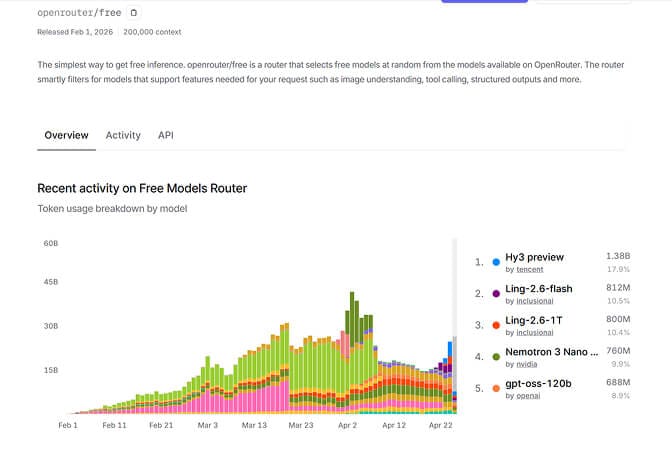
You now have access to 30+ free models. The ones worth knowing about for agent work: Llama 3.3 70b, DeepSeek R1, and Qwen3 Coder 480b. The base limit is 50 requests per day on most free models, but some go up to 1,000 free requests per day.
For a daily briefing agent or a lightweight personal assistant? 1,000 requests per day is more than enough. Most real-world agent usage runs 10 to 30 requests per session.
Step 2: Sign Up for BetterClaw Free Tier (2 Minutes)
Go to the BetterClaw app. No card. No trial countdown. Takes about 2 minutes.
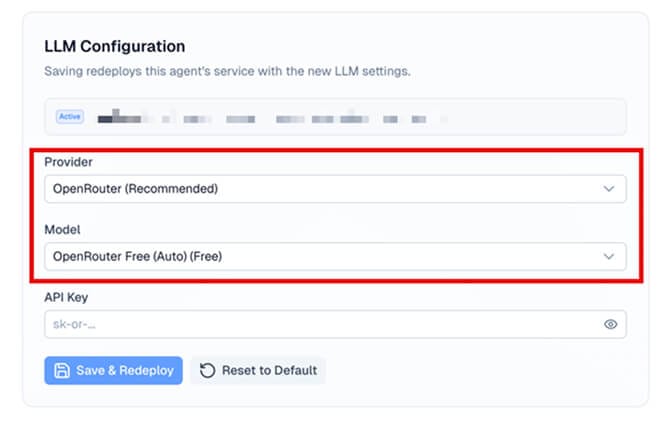
When it asks for your API key, paste in the OpenRouter key you just generated. Then select one of the free models as your default.
Which free model should you pick? Honestly, for most agent tasks, Llama 3.3 70b or DeepSeek R1 handle daily briefings, summarization, email triage, and basic research just fine. They're not Claude Sonnet. But for a free agent doing routine tasks, they're more than good enough.
Step 3: Connect Your Channel (1 Minute, Requires Pro)
One honest note before you follow this step: the first two steps run on the free plan, this one doesn't. Channel delivery runs over webhooks, and Telegram and Slack webhooks are a Pro feature at $49/month ($39/month billed annually). If you want to stay at $0, stop after step 2 and drive the agent from the BetterClaw dashboard instead. The agent is real either way; the messaging channel is the paid part.
On Pro, Telegram is the cleanest option. Takes about 60 seconds to get a bot token from BotFather and paste it into the channel config. For the step-by-step Telegram walkthrough, our setup guide covers BotFather and pairing.
If you want to connect to Slack instead, the process is similar. The agent starts responding on whatever channel you pick.
And that's it. You're done.
Five minutes from nothing to a working AI agent.
"What's the Catch With Free Models?"
Here's where we'll be straight with you.
Free models are slower than paid models. You'll notice the latency. Not unbearable, but noticeable. Expect 3 to 8 seconds per response instead of under 2.
Complex multi-step tasks get shaky. If you need your agent to run a 10-step research chain with tool calls at each step, free models stumble. They'll misinterpret instructions, skip steps, or hallucinate a tool result. Single-step and two-step tasks? Totally fine.
Rate limits exist. You're on shared infrastructure. During peak hours you might get queued. Not often, but it happens.
Quality varies by model and by day. Some days DeepSeek R1 is sharp. Some days it rambles. You learn which model handles which task better over time. This is the honest part of "free."
But for a "try before you spend" setup or a simple daily assistant use case, free models work better than most people expect. We were surprised.
If you're curious about how different models perform on OpenClaw tasks generally, we've done a detailed LLM comparison for OpenClaw use cases that goes deeper into benchmarks and tradeoffs.
"Will I Hit the 500 Credit Limit?"
The free plan gives you 500 credits a month. Credits meter your agent's work and reset monthly, so the real question is how busy you keep it.
Here's the rough shape of a light setup:
- 1 daily briefing cron: ~30 runs per month
- 1 weekly report cron: ~4 runs per month
- 15 to 20 ad-hoc requests per week: ~70 runs per month
Roughly 100 agent runs a month. Free includes basic cost tracking, so you can watch your actual credit balance in the dashboard rather than guess at it. Run five daily crons instead of one and you'll draw down the allowance a lot faster.
If you find yourself constantly hitting the limit, that's the signal the agent is useful enough to upgrade. Pro raises it to 12,000 credits a month, and you can top up with 1,000-credit packs at $5 each.
Why We Built This Option
We've talked to a lot of people who got interested in OpenClaw after seeing it hit 230,000+ GitHub stars and land on the front page of Hacker News. They followed a setup tutorial, ran into Docker issues or YAML configs, and quietly gave up.
The OpenClaw maintainer himself once warned: "if you can't understand how to run a command line, this is far too dangerous of a project for you to use safely."
That's a real barrier. Not everyone needs to cross it just to try an AI agent.
BetterClaw exists because we think more people should be able to experience what a well-configured autonomous agent actually feels like, without the infrastructure tax. The free tier plus OpenRouter's free models is the lowest-friction version of that we've been able to build.
If you've been curious about what managed OpenClaw hosting actually includes versus spinning something up on a VPS yourself, that page walks through the full comparison.
The Moment It Actually Starts Feeling Useful
Here's what we didn't expect to be true: the first time your free-tier agent quietly runs a morning briefing, summarizes your overnight Slack threads, or answers a question without you lifting a finger, something clicks.
It's not the technology that lands. It's the time.
Most people who try this setup report the same thing. The agent does something useful. They go back to their day. Then they check the output an hour later and think, "I would have spent 20 minutes on that."
That's when the "is this worth paying for" question answers itself.
If you want your OpenClaw agent running in 60 seconds with your own API keys and real room to work, BetterClaw's Pro plan is $49/month ($39/month billed annually) with 5 agents and 12,000 credits a month. Bring your own keys, pick any of 28+ model providers, and the infrastructure is completely managed. No Docker. No YAML. No 2 AM debugging.
What Happens When You're Ready to Upgrade
The free tier is a starting point, not a ceiling.
When you move to Pro at $49/month, you get 5 agents, 12,000 credits a month, memory retention that stretches from 7 days to 90, real-time health monitoring, auto-pause on anomalies, and the Telegram and Slack webhooks that put your agent on a messaging channel. You can also swap in Claude Sonnet or GPT-4o the moment you want sharper reasoning on complex tasks.
The upgrade takes about 30 seconds inside the same dashboard.
If you've been running agents on a VPS or trying to self-host OpenClaw and the maintenance burden is getting old, take a look at how BetterClaw compares to self-hosting and managed alternatives. The hidden costs of DIY infrastructure add up faster than most people realize.
Give It a Try
If you've been on the fence about whether AI agents are actually useful, this is the lowest-stakes test you can run.
No credit card. No infrastructure decision. No API bill waiting at the end of the month.
Sign up for BetterClaw's free tier, grab a free OpenRouter key, and have a working agent in 5 minutes. If it's useful, you'll know. If it's not, you've lost nothing but 5 minutes.
We handle the infrastructure. You handle the interesting part.
Frequently Asked Questions
What is a free OpenClaw agent and how does it work?
A free OpenClaw agent is a fully functional AI assistant built on OpenClaw, the open-source agent framework with 230,000+ GitHub stars, deployed on BetterClaw's free tier and powered by OpenRouter's free model tier. BetterClaw handles the hosting and security. OpenRouter provides access to models like Llama 3.3 70b and DeepSeek R1 at no cost. You get a working autonomous agent at $0, with 1 agent and 500 credits a month on the free plan.
How does OpenRouter's free tier compare to a paid API key for OpenClaw?
OpenRouter's free models are slower (3 to 8 seconds per response vs. under 2 for paid) and less reliable on complex multi-step tasks. For simple daily tasks like briefings, summarization, and research lookups, the quality gap is small. For sophisticated chains with multiple tool calls, a paid model like Claude Sonnet or GPT-4o will perform significantly better. The free setup is ideal for evaluation and lightweight personal use.
How long does it take to set up a free OpenClaw agent with BetterClaw?
About 5 minutes total. Getting a free API key from OpenRouter takes roughly 2 minutes. Signing up for BetterClaw's free tier takes another 2 minutes. Connecting a Telegram channel takes about 1 minute, though that step needs Pro at $49/month because channel delivery runs on webhooks. The agent starts responding immediately after setup. No Docker, no YAML, no terminal required.
Is BetterClaw's free tier actually free, or are there hidden costs?
The free tier is genuinely free. No credit card required, no trial period, no automatic upgrade. You get 1 agent slot and 500 credits per month at $0. If you use OpenRouter's free models, your total monthly cost is $0. It is a narrow plan rather than a full one, though: 3 connectors on a single account, 7-day memory, basic skills, and no webhooks, which means no Telegram or Slack channel. If you run out of credits or want messaging channels, longer memory, and more agents, the Pro plan is $49/month ($39/month billed annually) with 5 agents, 12,000 credits, and bring-your-own API keys.
Is it safe to run an OpenClaw agent on a free plan?
Yes. BetterClaw runs all agents in Docker-sandboxed execution environments with AES-256 encryption for credentials, regardless of which plan you're on. The security architecture is the same on free as on Pro. Your API keys are never stored in plaintext. Given that security researchers have found over 30,000 internet-exposed OpenClaw instances without authentication, using a managed platform with built-in sandboxing is significantly safer than a self-hosted setup, especially for someone new to agent infrastructure.