Your AI agent can click buttons, fill forms, and scrape data from real websites. Here's how Browser Relay works and which tasks are genuinely worth the setup.
I asked my OpenClaw agent to check the price of a product on three different websites and alert me if any dropped below $200. Via Telegram. While I was walking the dog.
Fifteen minutes later, my phone buzzed. "BestBuy: $189. Dropped below your threshold. Here's the link."
The agent had navigated to three retailer websites, found the product pages, extracted the prices, compared them to my target, and messaged me the result. No API. No scraper script. No Selenium config. Just a text message and an AI that knows how to use a web browser.
That was the moment the OpenClaw Browser Relay stopped being a novelty feature and started being genuinely useful.
But here's the thing: most OpenClaw users either don't know Browser Relay exists, don't understand what it does, or set it up for the wrong tasks. This guide covers all three problems.
What the OpenClaw Browser Relay actually is (in plain terms)
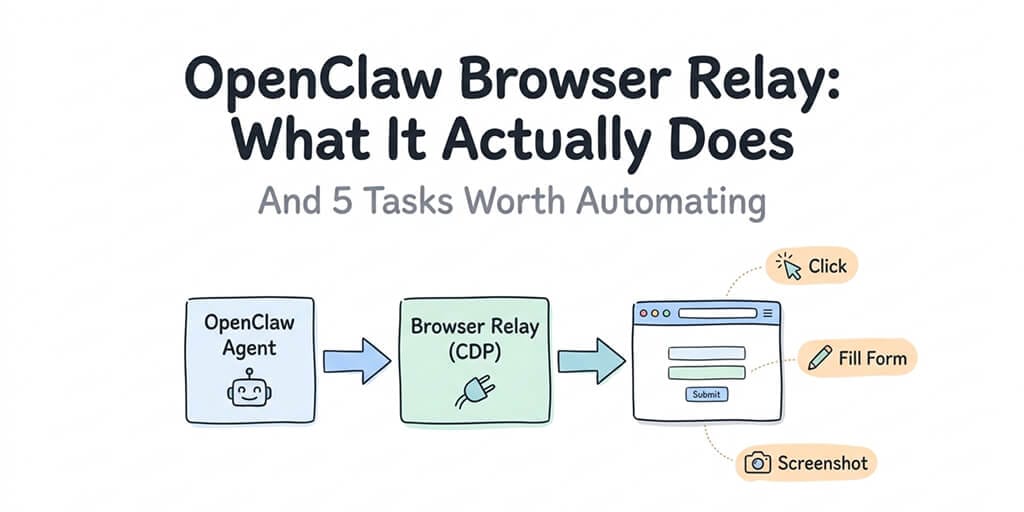
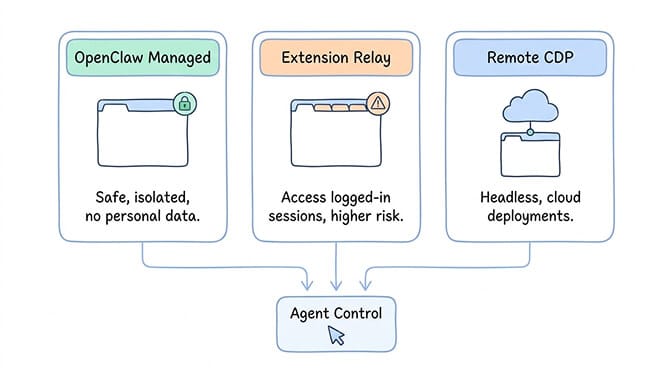
The Browser Relay is OpenClaw's tool for controlling a real web browser through the Chrome DevTools Protocol (CDP). It operates on port 18792 by default and comes in three modes:
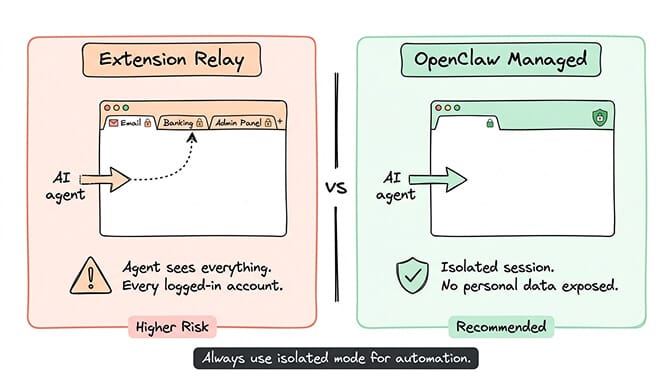
OpenClaw Managed launches a separate Chromium instance in an isolated environment. It has its own cookies, history, and session data. It never touches your personal browser profile. This is the recommended default for automation tasks.
Extension Relay attaches to your existing Chrome browser through a Chrome extension. The agent can see and interact with your logged-in tabs. This is powerful (it can access sites where you're already authenticated) but risky (it can also see every other tab you have open, including banking and email).
Remote CDP connects to a browser running on a different machine. Useful for cloud deployments where the browser runs headless on a server.
The core idea: instead of using traditional web scraping (parsing HTML, managing selectors, dealing with JavaScript rendering), the agent just uses the browser the way a human would. Navigate to a page. Click a button. Read the content. Fill a form. Take a screenshot.
For a deeper look at how OpenClaw's agent architecture works and where browser control fits into the agent loop, our explainer covers the full execution flow.
How the snapshot system makes this actually work
Here's the part that makes Browser Relay different from old-school browser automation.
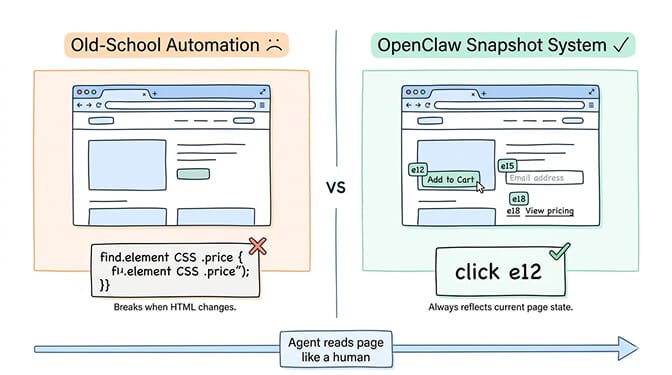
Traditional tools like Selenium require you to write CSS selectors or XPath expressions to target specific page elements. If the website changes its HTML structure, your selectors break. Maintenance is constant.
OpenClaw's snapshot system works differently. The agent takes an accessibility snapshot of the page and assigns reference numbers to every interactive element. Instead of writing driver.find_element(By.CSS_SELECTOR, ".price-display"), the agent sees:
[e12] Button: "Add to Cart"
[e15] Input: "Email address"
[e18] Link: "View pricing"
Then it uses natural language instructions: "click e12" or "type e15 'name@example.com'." The reference numbers are generated fresh with each snapshot, so they always reflect the current page state.
Browser Relay doesn't parse HTML like a scraper. It reads the page like a human using assistive technology. That's why it handles dynamic JavaScript-heavy sites that traditional scrapers choke on.
The trade-off: every browser action costs AI tokens. The agent needs to take screenshots, process the snapshot, decide what to click, and verify the result. A single complex browser task can use 500-2,000 tokens per step. Across 50-200 steps for a full workflow, that adds up.
For a breakdown of how these token costs accumulate across different tasks, our cost guide covers browser automation specifically.
The security warning you need to hear
Before the 5 automation tasks, one important caveat.
Extension Relay mode attaches to your real browser. The AI model can click, type, navigate, read page content, and access whatever the tab's logged-in session can access. Email. Banking. Admin panels. Social media. Everything.
If you use Extension Relay with your daily browser profile, you're giving the agent access to every logged-in account. And OpenClaw's agent can perform actions without explicit prompting during heartbeats and cron jobs.
This isn't theoretical. CrowdStrike's security advisory specifically flagged browser automation as an enterprise risk vector. A compromised skill or prompt injection attack through a malicious webpage could trigger unintended browser actions.
The safe approach: Use OpenClaw Managed mode (the isolated browser) for all automation tasks. Only use Extension Relay for tasks that specifically require your logged-in session, and create a dedicated Chrome profile for it. Never attach the relay to your primary browser profile.
For the full picture of documented OpenClaw security risks, our guide covers every advisory from CrowdStrike, Cisco, and the ClawHavoc campaign.
Task 1: Price monitoring across multiple retailers
This is the task that sold me on Browser Relay. It's simple, high-value, and runs reliably.
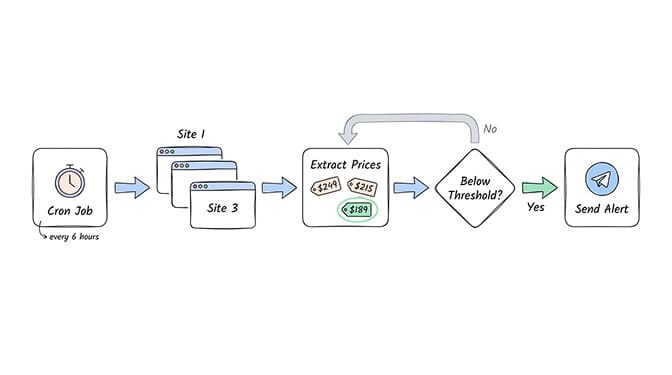
Set up a cron job that runs every 6 hours. The agent navigates to 3-5 product pages (Amazon, BestBuy, Walmart, or whatever retailers you care about), extracts the current price, compares it to your threshold, and messages you if any drop below your target.
Why Browser Relay instead of a price-tracking service: Most price trackers use APIs or HTML parsing that break when retailers change their page structure. Browser Relay reads the rendered page the way you would. If a human can see the price, the agent can see the price.
Cost per run: Roughly 1,500-3,000 tokens across 3-5 sites. At Claude Sonnet rates ($3/$15 per million tokens), that's about $0.05-0.10 per check. At 4 checks per day, roughly $6-12/month.
Setup: Write a simple skill instruction: "Navigate to URL. Find the product price. If it's below $threshold, send me an alert with the price and link." Add it as a cron job.
Task 2: Daily analytics dashboard summaries
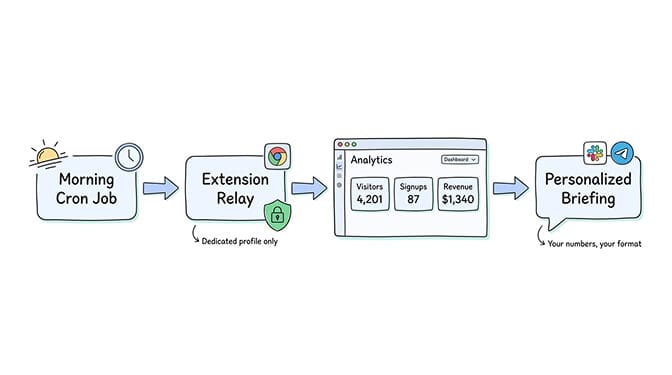
"Every morning, check my analytics dashboard and send me yesterday's key metrics: visitors, signups, and revenue."
This is where Extension Relay (with a dedicated profile) becomes necessary. Your analytics dashboard requires authentication. The agent logs in, navigates to the dashboard, reads the metrics, and sends you a summary via your chat platform.
Why this is better than email reports: Most analytics platforms send generic email digests. Your OpenClaw agent can extract exactly the numbers you care about, format them however you want, and include comparison to previous days. It's a personalized briefing, not a template.
Cost per run: 2,000-4,000 tokens per dashboard. One check per day. Roughly $0.10-0.20/day.
Task 3: Form filling and submission
Repetitive web forms are where automation saves the most time per individual task.
Job applications with the same information across 20 platforms. Expense reports that require the same fields every week. Contact forms you submit regularly. Government or compliance portals with recurring submissions.
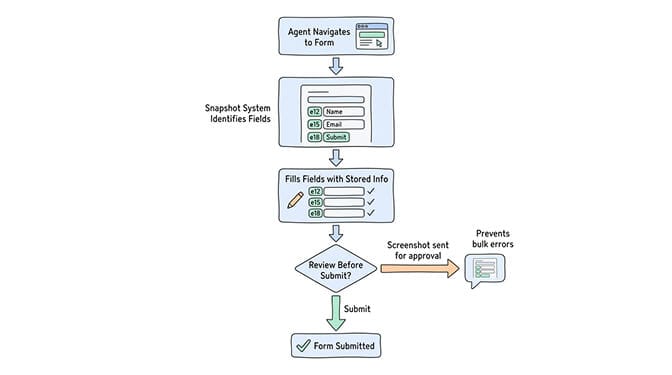
The agent navigates to the form, uses the snapshot system to identify fields, fills them with your stored information, and either submits automatically or pauses for your review before clicking "Submit."
The safety guardrail: Configure the agent to screenshot the completed form and send it to you for approval before submission. This prevents errors from snowballing (submitting wrong data 50 times in a row because you weren't watching).
Why not Zapier/Make: Those tools work great when the form has an API. Many don't. Government portals, old-school CRM interfaces, internal tools: they're browser-only. Browser Relay handles them all.
If you'd rather not manage Browser Relay configuration, Docker, and security settings yourself, BetterClaw supports browser automation with Docker-sandboxed execution, pre-installed browser runtime, and zero configuration. $49/month for Pro, BYOK.
Task 4: Competitor monitoring and content tracking
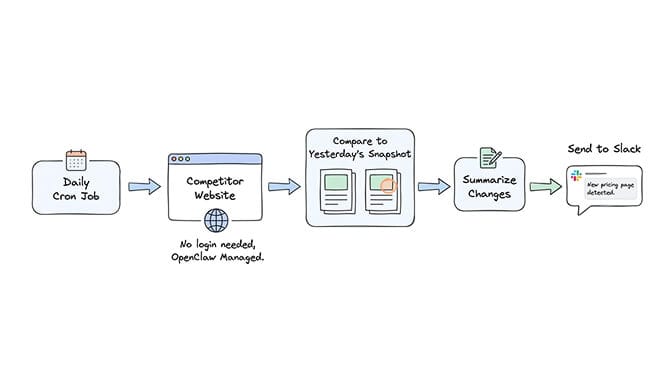
"Check competitor website every morning. If they publish a new blog post, product update, or pricing change, summarize what changed and send it to my Slack."
This runs as a cron job on OpenClaw Managed mode (no login needed since competitor websites are public). The agent takes a daily snapshot of the page, compares it to yesterday's version, identifies changes, and generates a natural language summary of what's different.
Why this is underrated: Most competitor monitoring tools cost $50-200/month and focus on SEO metrics. What you actually want to know is "did they change their pricing page?" or "did they publish something about feature I'm building?" An OpenClaw agent with Browser Relay does exactly this for the cost of a few thousand tokens per day.
For ideas on other high-value tasks worth automating with OpenClaw, our use case guide ranks workflows by impact and complexity.
Task 5: Screenshot and visual change detection
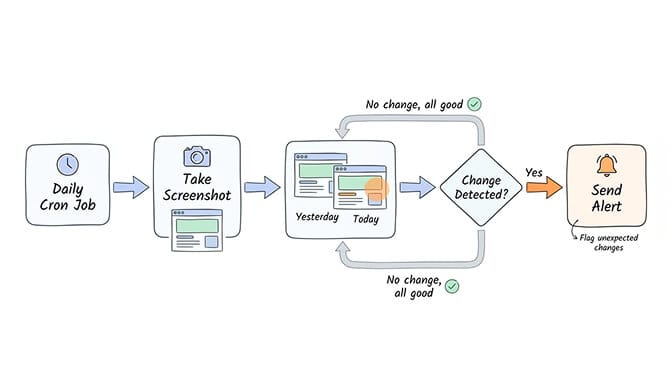
"Take a screenshot of my website's homepage every day. Alert me if anything looks different."
This is monitoring, but visual. The agent takes daily screenshots and either compares them pixel-level (using image analysis) or describes what it sees and flags deviations from expected content.
Use cases: monitoring your own site for unexpected changes (useful if multiple people edit it). Tracking a competitor's landing page for A/B test variations. Verifying that deployments didn't break the frontend. Checking that third-party embeds (ads, widgets, chatbots) are still rendering correctly.
Cost per run: Screenshots are cheap in token terms. The comparison step costs 500-1,500 tokens depending on whether you use AI vision (more expensive, more accurate) or hash-based detection (cheaper, catches bigger changes only).
What Browser Relay is not good at (the honest list)
Browser automation sounds like magic until you hit the edges.
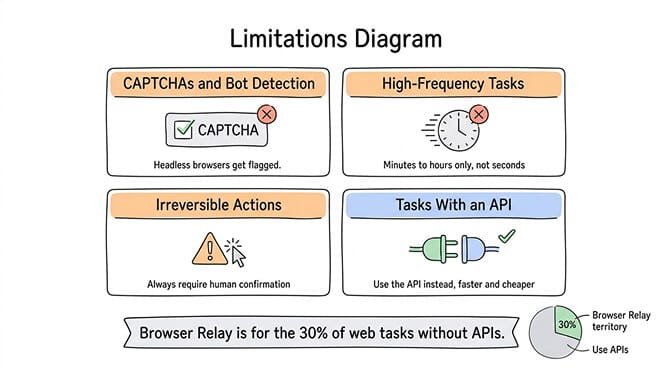
Anything with CAPTCHAs or bot detection. Sophisticated sites detect automated browsers. OpenClaw Managed mode is a headless Chromium instance, which many anti-bot systems flag immediately. Extension Relay on your actual browser fares better but still triggers some detection.
High-frequency tasks. Each browser action takes real time (page load, rendering, screenshot, AI processing). A task that needs to execute every 30 seconds isn't practical. Browser automation is for minutes-to-hours cadence, not seconds.
Tasks requiring absolute precision. The AI interprets pages and makes decisions. It might click the wrong button occasionally. For financial transactions, legal submissions, or anything with irreversible consequences, always require human confirmation before final actions.
Anything you could do with an API. If the service has a proper API, use that instead. Browser Relay is for the tasks that only exist in a browser. Using it when an API exists is slower, more expensive, and less reliable.
Browser Relay is for the 30% of web tasks that don't have APIs. For everything else, use the direct integration.
The cost equation: when Browser Relay is worth it
Browser automation burns tokens faster than most other agent tasks. Each step requires the model to process visual information, make decisions, and generate tool calls.
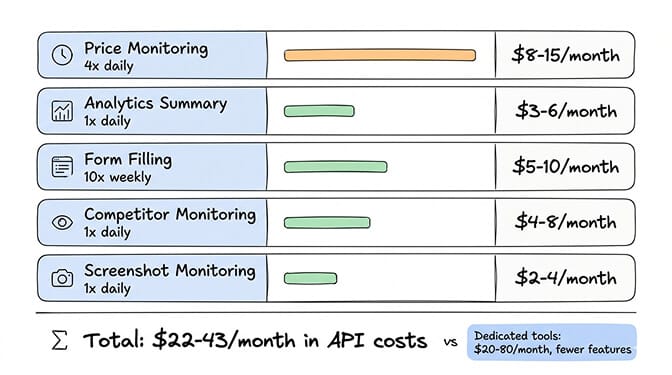
A rough budget guide for the five tasks above, running on Claude Sonnet ($3/$15 per million tokens):
- Price monitoring (4x/day across 5 sites): ~$8-15/month
- Daily analytics summary (1x/day): ~$3-6/month
- Form filling (10 forms/week): ~$5-10/month
- Competitor monitoring (1x/day, 3 competitors): ~$4-8/month
- Screenshot monitoring (1x/day, 5 pages): ~$2-4/month
Total for all five: roughly $22-43/month in API costs. Plus hosting ($5-29/month depending on VPS vs managed platform).
For comparison, dedicated browser automation tools like Browsing AI or Distill cost $20-80/month and only handle monitoring, not the full range of tasks OpenClaw covers.
Setting it up (the quick version)
OpenClaw Managed mode (the safe default) is the simplest:
# Start the browser service
openclaw browser start

# Take a snapshot of any page
openclaw browser --browser-profile openclaw open https://example.com
openclaw browser snapshot --interactive
The snapshot shows numbered elements. Your agent uses these numbers to interact with the page.
For the Chrome Extension Relay (when you need logged-in sessions):
- Install the OpenClaw Browser Relay extension from the Chrome Web Store.
- Create a dedicated Chrome profile (never use your main profile).
- Pin the extension and click it on the tab you want to control.
- The badge shows "ON" when attached.
Minimum specs for browser automation: 4GB RAM (browser automation is resource-heavy). A decent model (Claude Sonnet or GPT-4o; smaller models struggle with complex page interpretation). If running on a VPS, consider the infrastructure requirements for reliable hosting.
The bigger picture
Browser Relay represents the transition from "AI that chats" to "AI that acts." Your agent isn't just generating text. It's navigating websites, filling forms, extracting data, and monitoring changes in the real web. Through a Telegram message.
The rough edges are real. Token costs add up. CAPTCHAs block you. Precision isn't guaranteed. But for the specific tasks where browser automation shines (monitoring, data extraction, repetitive form filling), the time savings are genuine.
The five tasks above save me roughly 3-4 hours per week. That's 12-16 hours per month. For $22-43 in API costs. The math works if your time is worth anything at all.
Start with price monitoring. It's the simplest, safest, and most immediately satisfying. Tell your agent to watch something you actually want to buy. When it messages you with a deal you'd have missed, you'll understand why Browser Relay matters.
If you want browser automation running without managing Docker, Playwright installation, or VPS security, give BetterClaw a try. $49/month for Pro, BYOK, browser runtime pre-installed, and your first agent deploys in 60 seconds. We handle the infrastructure. You build the automations.
Frequently Asked Questions
What is the OpenClaw Browser Relay?
Browser Relay is OpenClaw's tool for controlling a real web browser through the Chrome DevTools Protocol (CDP). It lets your AI agent navigate websites, click buttons, fill forms, extract data, and take screenshots using natural language instructions. It operates in three modes: OpenClaw Managed (isolated browser, recommended), Extension Relay (attaches to your real Chrome tabs), and Remote CDP (headless cloud browsers).
How does Browser Relay compare to traditional web scraping tools?
Traditional scrapers parse HTML using CSS selectors or XPath, breaking when sites update their structure. Browser Relay reads the rendered page using an accessibility snapshot system, making it resilient to HTML changes. It handles JavaScript-heavy dynamic sites that scrapers can't process. The trade-off: Browser Relay costs more in AI tokens per operation and is slower than API-based data extraction.
How do I set up OpenClaw Browser Relay for automation?
For the safe default (OpenClaw Managed mode), run openclaw browser start and use openclaw browser open [URL] to navigate. The snapshot system automatically numbers interactive elements. For Extension Relay, install the Chrome extension, create a dedicated Chrome profile, and click the extension icon to attach to a tab. Minimum requirements: 4GB RAM, a capable AI model (Claude Sonnet or GPT-4o recommended).
How much does OpenClaw browser automation cost per month?
API costs depend on task frequency and complexity. Price monitoring across 5 sites 4x daily runs roughly $8-15/month. Daily analytics summaries cost $3-6/month. All five recommended tasks combined total approximately $22-43/month in API costs at Claude Sonnet pricing ($3/$15 per million tokens). Hosting adds $5-29/month. Each browser step consumes 500-2,000 tokens.
Is Browser Relay safe to use with my personal accounts?
Only with proper precautions. OpenClaw Managed mode is safe because it uses an isolated browser with no access to your personal accounts. Extension Relay mode attaches to your real browser and can access every logged-in session. CrowdStrike has flagged browser automation as an enterprise risk vector. Always use a dedicated Chrome profile for Extension Relay, never attach it to your primary browser, and configure human confirmation for any actions with irreversible consequences.