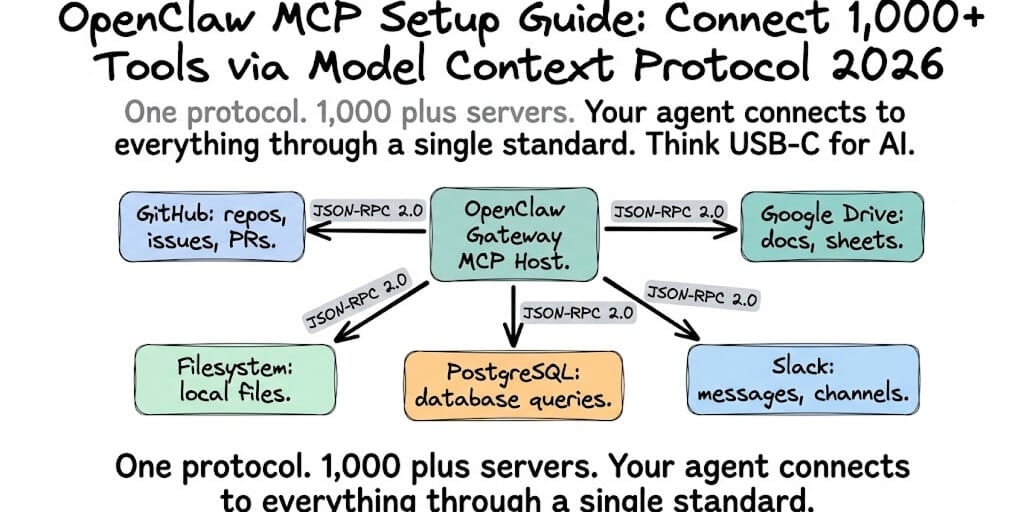
MCP is the reason your agent can read your GitHub repos, query your database, and search your Notion. Here's how to set it up on OpenClaw, the 5 servers worth installing first, and the security trap that comes with giving your agent access to everything.
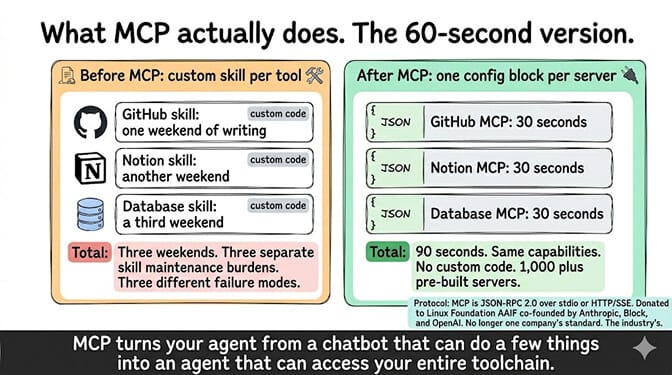
Before MCP, connecting OpenClaw to GitHub meant writing a custom skill. Connecting to Notion meant writing another custom skill. Connecting to your database meant a third. Each skill had its own API contract, its own authentication pattern, and its own failure modes.
I spent a weekend building a GitHub skill that could read issues. It worked. Then I needed it to create PRs. That was a different API endpoint with different parameters. Another weekend.
Two weekends for one integration that MCP handles in 30 seconds.
MCP (Model Context Protocol) is Anthropic's open standard for connecting AI agents to external tools. OpenClaw adopted it natively. As of May 2026, there are 1,000+ community-built MCP servers covering GitHub, Slack, Notion, PostgreSQL, Google Drive, Stripe, Jira, and hundreds more. The protocol was donated to the Linux Foundation's Agentic AI Foundation (AAIF), co-founded by Anthropic, Block, and OpenAI. It's no longer one company's standard. It's the industry's.
Here's how to set it up, which servers to install first, and the security considerations that most guides skip.
What MCP actually does (the 60-second version)
MCP is JSON-RPC 2.0 over stdio or HTTP/SSE. That's it. A server exposes tools (functions the agent can call), resources (data the agent can read), and prompts (templates the agent can use). OpenClaw acts as the MCP host, connecting to multiple servers simultaneously. When you ask your agent "What issues are open in my repo?", OpenClaw routes the request to the GitHub MCP server, which calls the GitHub API, and returns structured data.
Before MCP: Every tool needed a custom OpenClaw skill. Each skill was a black box. Security was per-skill. Maintenance was on you.
After MCP: One protocol. One configuration format. 1,000+ pre-built servers. Your agent gains capabilities by adding a JSON block to your config, not by writing code.
The shift: MCP turns your OpenClaw agent from "a chatbot that can do a few things" into "an agent that can access your entire toolchain." The skill ecosystem isn't dead, but for standard tool integrations, MCP is faster, safer, and more maintainable.
How to set up your first MCP server (5 minutes)
Step 1: Make sure you're on OpenClaw v2026.3+ (MCP support ships natively). Check with:
openclaw --version
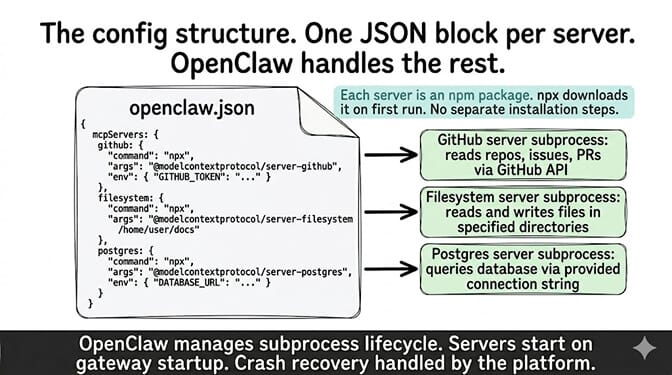
Step 2: Add the MCP server to your config. Edit ~/.openclaw/openclaw.json (or use openclaw mcp add):
{
  "mcpServers": {
    "filesystem": {
      "command": "npx",
      "args": ["-y", "@modelcontextprotocol/server-filesystem", "/home/you/Documents"],
      "env": {}
    },
    "github": {
      "command": "npx",
      "args": ["-y", "@modelcontextprotocol/server-github"],
      "env": {
        "GITHUB_PERSONAL_ACCESS_TOKEN": "ghp_xxxxxxxxxxxx"
      }
    }
  }
}
Add an mcpServers block with the server name, command (typically npx), arguments (the npm package and any config), and environment variables (API tokens). If hand-editing JSON for every server is not how you want to spend your week, a no-code AI agent builder exposes the same connections as one-click OAuth instead.
Step 3: Restart your gateway. The server starts automatically as a subprocess. OpenClaw discovers the available tools and makes them available to your agent.
Step 4: Test it. Ask your agent a question that requires the tool. "What files are in my Documents folder?" (filesystem server). "What issues are open in openclaw/openclaw?" (GitHub server). If the agent uses the tool and returns data, the server is working.
For the best practices for agent configuration, our OpenClaw best practices guide covers the broader config patterns that keep MCP servers stable alongside your other OpenClaw settings.
The 5 MCP servers worth installing first
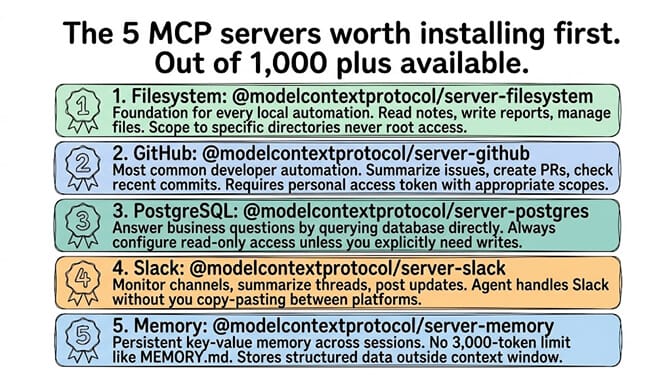
Out of 1,000+ available servers, here are the five the community installs most often and why.
1. Filesystem (@modelcontextprotocol/server-filesystem)
What it does: Gives your agent read/write access to specific directories on your machine. List files, read contents, search by name, create files.
Why it's first: It's the foundation for every local automation. Your agent can read your notes, write reports, and manage files without browser automation. Scope it to specific directories (never give it root access).
2. GitHub (@modelcontextprotocol/server-github)
What it does: Read repos, list issues, create PRs, manage branches, search code. Requires a personal access token with appropriate scopes.
Why it matters: The most common developer automation. "Summarize open issues." "Create a PR from this branch." "What changed in the last 3 commits?" All work through one server.
3. PostgreSQL / MySQL / SQLite (@modelcontextprotocol/server-postgres, etc.)
What it does: Query databases directly. Run SELECT statements, describe schemas, list tables.
Why it matters: Your agent can answer business questions ("How many users signed up this week?") by querying the database instead of you writing a script. Always configure read-only access unless you explicitly need writes.
4. Slack (@modelcontextprotocol/server-slack)
What it does: Read messages, post messages, manage channels, search conversation history.
Why it matters: Your agent can monitor Slack channels, summarize threads, and post updates without you copy-pasting between Telegram and Slack.
5. Memory (@modelcontextprotocol/server-memory)
What it does: Persistent key-value memory that survives across sessions. The agent can store and retrieve facts without relying on OpenClaw's built-in memory files.
Why it matters: OpenClaw's MEMORY.md has a 3,000-token limit. MCP memory servers don't. They store structured data outside the context window, so your agent remembers without burning tokens.
The security problem nobody's talking about (this matters)
Here's what nobody tells you about MCP.
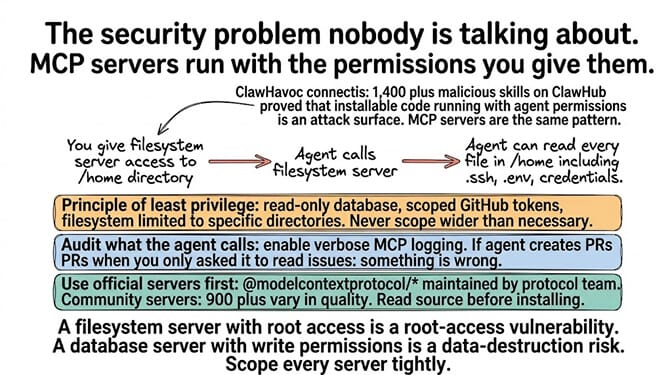
Every MCP server runs as a subprocess with the permissions you give it. The filesystem server can read every file in the directories you specify. The database server can run every query your credentials allow. The GitHub server can create PRs and modify repos.
The ClawHavoc lesson applies here. When 1,400+ malicious skills were found on ClawHub, the community learned that "installable code that runs with your agent's permissions" is an attack surface. MCP servers are the same pattern: code that runs with your credentials, accessed by an AI model that might hallucinate tool calls.
Three security rules for MCP:
- Principle of least privilege. Give each server the minimum permissions it needs. Read-only database access. Scoped GitHub tokens. Filesystem access limited to specific directories. Never scope wider than necessary.
- Audit what the agent calls. Enable verbose MCP logging so you can see every tool call the agent makes. If your agent is calling the GitHub server to create PRs when you only asked it to read issues, something is wrong.
- Use official servers first. The
@modelcontextprotocol/*namespace is maintained by the protocol team. Community servers (the other 900+) vary in quality. Read the source before installing a community server. The ClawHavoc campaign proved that "it's on a public registry" doesn't mean "it's safe."
For the security implications of running third-party code with your agent, our OpenClaw security checklist covers the broader attack surface.
The MCP security rule: MCP servers are as dangerous as the permissions you give them. A filesystem server with root access is a root-access vulnerability. A database server with write permissions is a data-destruction risk. Scope every server tightly. Log every call. Trust official packages first.
If managing MCP server configurations, security scoping, credential injection, subprocess lifecycle, and verbose logging across 5-10 servers sounds like more infrastructure work than building agent workflows, BetterClaw handles MCP integrations at the platform level. Connect tools from the dashboard. Security scoping is built in. Credential management uses secrets auto-purge (credentials erased from agent memory after 5 minutes). No subprocess management. No JSON config files. Free tier with 1 agent and BYOK. $49/month for Pro.
MCP vs OpenClaw Skills (when to use which)
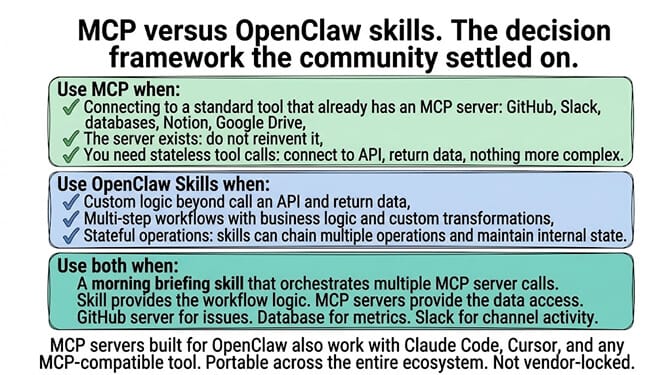
Here's the decision framework the community settled on.
Use MCP when: You're connecting to a standard tool that already has an MCP server (GitHub, Slack, databases, file systems, Google Drive, Notion). The server exists. The protocol is standard. Don't reinvent it.
Use OpenClaw Skills when: You need custom logic that goes beyond "call an API and return data." Multi-step workflows. Business logic. Custom transformations. Skills can chain multiple operations and maintain internal state. MCP servers are stateless tool providers.
Use both when: You need a skill that orchestrates multiple MCP server calls. Example: a "morning briefing" skill that queries your database MCP server, reads your GitHub MCP server, checks your Slack MCP server, and compiles a summary.
For the verified skills that work alongside MCP, our ClawHub skills security audit covers how to evaluate which skills are safe to run alongside your MCP servers.
The token cost trap (MCP tools add to your system prompt)
But that's not even the real problem.
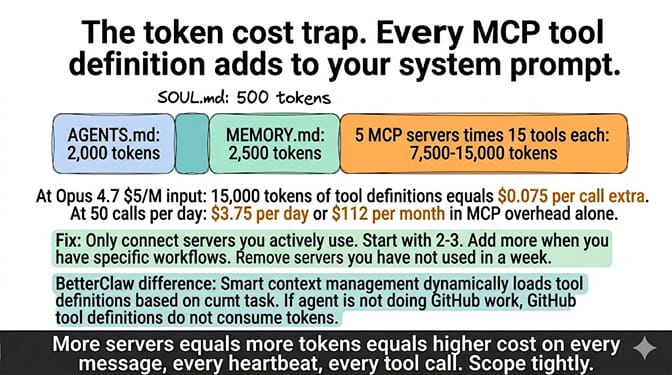
Every MCP tool definition is added to your system prompt. Each tool includes its name, description, and input schema. A server with 15 tools adds approximately 1,500-3,000 tokens to your system prompt. Five servers with 15 tools each: 7,500-15,000 tokens of tool definitions on every API call.
This is the same bootstrap overhead problem from the AGENTS.md optimization post. More tools = more tokens = higher cost on every message, every heartbeat, every tool call.
The fix: Only connect the MCP servers you actively use. Don't install 10 servers "just in case." Start with 2-3. Add more when you have specific workflows that need them. Remove servers you haven't used in a week.
BetterClaw's approach: Smart context management dynamically loads tool definitions based on the current task, not statically on every call. If the agent isn't doing GitHub work, the GitHub tool definitions don't consume tokens. This is one of the technical differences that makes BetterClaw's context management genuinely different from self-hosted OpenClaw.
The bigger picture (MCP is becoming the standard)
Here's the honest take.
MCP is no longer Anthropic's protocol. It's the industry's. In December 2025, it was donated to the Linux Foundation under the Agentic AI Foundation, co-founded by Anthropic, Block, and OpenAI. Claude, ChatGPT, VS Code, Cursor, and OpenClaw all speak MCP. A server built for one agent works with all of them.
The practical implication: Every MCP server you set up for OpenClaw also works with Claude Code, Cursor, and any other MCP-compatible tool. You're not building vendor-specific integrations. You're building portable ones.
This matters because the agent market is still splitting and consolidating. If you invest in ClawHub-specific skills, you're locked to OpenClaw. If you invest in MCP servers, you're portable across every major agent platform. That portability is worth the setup time.
If you want MCP integrations without the setup time, subprocess management, and security configuration, give BetterClaw a try. Free tier with 1 agent and BYOK. $49/month for Pro. MCP server support included. Connect tools from the dashboard. Secrets auto-purge. Smart context management. The protocol is universal. The infrastructure doesn't have to be yours.
Frequently Asked Questions
What is MCP (Model Context Protocol) in OpenClaw?
MCP is an open standard (originally by Anthropic, now under Linux Foundation governance) that lets OpenClaw connect to external tools and data sources through a universal JSON-RPC 2.0 interface. Instead of writing custom skills for each integration, you add an MCP server to your config. There are 1,000+ pre-built servers for GitHub, Slack, databases, file systems, Google Drive, Notion, and more.
How do MCP servers compare to OpenClaw skills?
MCP servers are standardized, stateless tool providers (connect to an API, return data). Skills are custom, stateful workflows (multi-step logic, business rules, internal state). Use MCP for standard tool integrations. Use skills for custom business logic. Many advanced setups use both: skills that orchestrate multiple MCP server calls.
How do I install an MCP server on OpenClaw?
Add a mcpServers block to your ~/.openclaw/openclaw.json with the server name, command (npx), npm package, and any required environment variables (API tokens). Restart the gateway. The server starts as a subprocess and OpenClaw discovers the available tools automatically. Test by asking the agent a question that requires the tool. Setup takes about 5 minutes per server.
How much does MCP add to my OpenClaw token costs?
Each MCP tool definition adds approximately 100-200 tokens to your system prompt. A server with 15 tools adds 1,500-3,000 tokens. Five servers: 7,500-15,000 tokens of overhead on every API call. At Opus 4.7 pricing ($5/M input), that's $0.037-0.075 per call just in tool definitions. Only connect servers you actively use. BetterClaw's smart context management dynamically loads definitions by task to avoid this overhead.
Are MCP servers secure enough for production use?
With proper configuration, yes. Use official @modelcontextprotocol/* packages first (maintained by the protocol team). Apply least-privilege (read-only database, scoped GitHub tokens, limited filesystem directories). Enable verbose MCP logging. Audit tool calls regularly. Community servers (900+ of the 1,000+) vary in quality. The ClawHavoc campaign showed that public registries are actively targeted. Treat MCP servers with the same caution as ClawHub skills.
Related Reading
- OpenClaw Best Practices — Config patterns that keep MCP servers stable alongside the rest of your setup
- ClawHub Skills Security Audit — Lessons from the 1,400+ malicious-skill campaign that apply to MCP servers too
- OpenClaw Security Checklist — Least-privilege patterns, credential scoping, audit logging
- Stop Making Your OpenClaw Agent Re-Read Files — Same token-overhead math applies to MCP tool definitions
- AI Agent Secrets Auto-Purge — Credential lifecycle for agents that hold tokens for many tools
- OpenClaw Agent Hallucinating? 5 Fixes That Actually Work — Why an agent with MCP access can still call the wrong tool with invented parameters