A 64-character fingerprint, the ClawHavoc fallout, and why the next skill you install is finally something you can verify.
A developer I know installed an OpenClaw skill that worked perfectly for three weeks.
Then it stopped working perfectly.
It still ran. It still did what its README said it did. But somewhere in a silent update he hadn't approved, it had started doing one extra thing on the side: quietly sending certain payloads to an endpoint that wasn't his.
He's not alone. Cisco's research team published a case where a third-party skill exfiltrated data without the user's awareness. CrowdStrike put out a security advisory on OpenClaw enterprise risks. And the ClawHavoc campaign turned out to have placed 824+ malicious skills on ClawHub, somewhere around 20% of the registry at the time.
The thing that breaks this whole class of attack? SHA-256 verification. And ClawHub now has it.
What SHA-256 verification actually is, in plain English
You don't need to be a cryptographer for this. The concept is simpler than the name.
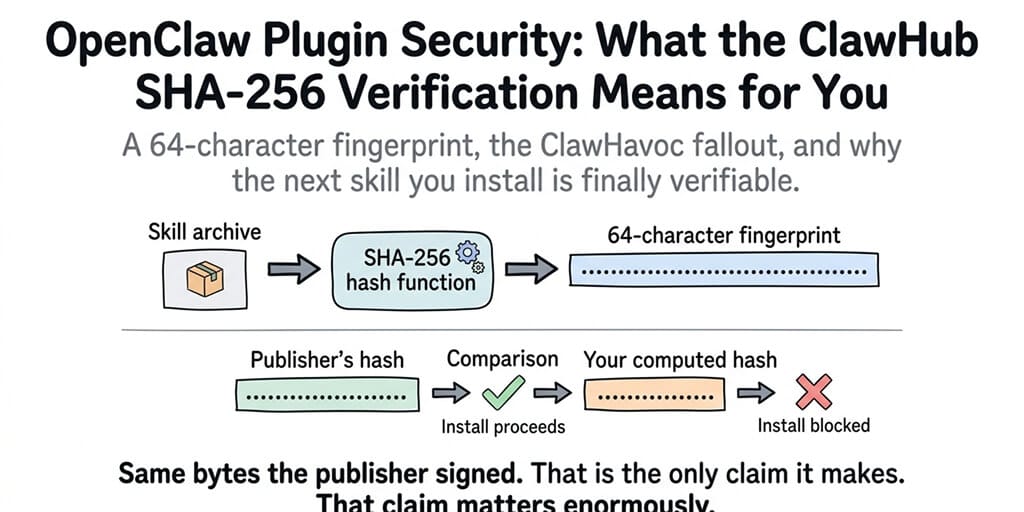
A SHA-256 hash is a 64-character fingerprint of a file. Run any file through the SHA-256 algorithm and you get back a unique string. Change a single byte in that file (a comma, a space, anything) and the entire fingerprint changes completely.
That's the whole trick.
When ClawHub publishes a skill archive, it also publishes the hash of that archive. When you download the skill, your client computes the hash on its own. If the two match, you're holding exactly the bytes the skill author intended. If they don't, something changed between the publisher and you.
It's like buying a sealed package. The shrink wrap doesn't tell you what's inside. It tells you nobody opened the box on the way to your door.
SHA-256 verification doesn't tell you a skill is good. It tells you the skill is the same one the publisher put up.
That distinction matters more than people realize.
Why this matters more than any feature ClawHub has shipped
The OpenClaw skill ecosystem has scaled fast. The npm package alone is hitting 1.27M weekly downloads. The skill registry has thousands of contributors. Most of them are good actors.
But the ClawHub skills directory has had real, documented compromises. The ClawHavoc campaign is the most visible case. 824+ malicious skills. Real users running them. Real data flowing out.
Most of those weren't planted by villains writing villainous code from day one. Some of them were legitimate skills whose maintainers got socially engineered, whose accounts got compromised, or who got bought out and started pushing tampered versions to existing users.
The skill name stayed the same. The README stayed the same. The hash didn't.
That's the exact gap SHA-256 verification closes.
The three attacks it actually kills
Let me be specific about what changes when verification is in place. There are three attack scenarios it stops cold.
Man-in-the-middle tampering. Someone intercepts your skill download (compromised CDN, hijacked DNS, malicious proxy) and swaps the archive for a tampered version. Without hash verification, you'd never know. With it, the hash mismatch fires immediately and the install fails.
Silent maintainer compromise. A maintainer's account gets compromised. The attacker pushes a new version of an existing trusted skill with a backdoor added. If you're auto-updating without verification, you ship that backdoor to production. With verification plus pinned hashes, you can require explicit re-verification before any version change.
Registry-level corruption. Even ClawHub itself, if breached, can't quietly modify an existing archive without changing its hash. The published hash creates a public commitment. Tampering becomes visible.
What it doesn't protect against is also worth saying out loud.
It doesn't make a malicious skill safe. If a publisher writes hostile code on day one and publishes it with a valid hash, the hash is still valid. Verification proves origin, not intent.
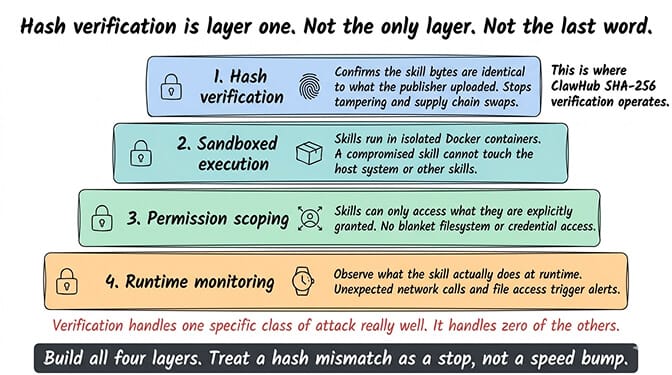
This is why hash verification is one layer, not a full strategy. The other layers (sandboxing, permissions, proper skill security vetting) still have to do their jobs.
How the actual install flow works
The mechanics are simple enough that I can walk through them without naming any specific OpenClaw config fields (the implementation details are evolving, so always check current docs for exact syntax).
Step one: the publisher uploads a skill archive to ClawHub. Step two: the registry computes the SHA-256 hash and publishes it alongside the listing. Step three: your client downloads the archive. Step four: your client recomputes the hash locally. Step five: if the hashes match, install proceeds. If they don't, install aborts with a security warning.
Five steps. Most of them invisible to you.
The interesting part is what happens at step five when things don't match. Some clients will warn and continue. Some will block hard. Some will let you set the policy yourself.
The security default people should be using is "block, no override without manual approval."
The part that surprises people
Here's the weird part. Most teams running OpenClaw skills today don't actually enforce hash verification, even when the system supports it.
Why? Because the verification step adds friction at install time. You have to handle the failure case. You have to decide what your policy is when a hash mismatch happens at 11 PM the night before a launch. You have to teach your team not to just click through the warning.
This is the same story we've already lived with TLS certificate warnings. Browsers added them because invalid certs are a real signal of attack. People got annoyed. People started clicking "Proceed anyway." The security primitive got hollowed out by humans wanting to ship.
SHA-256 verification on plugins is going through the same adoption curve. The teams who use it correctly are the ones who treat a hash mismatch as a stop, not a speed bump.
If you don't want to make that policy decision yourself for every skill in your stack, BetterClaw enforces hash verification by default on every managed deployment. You get the security primitive without having to write the override policy yourself. $49/month for Pro, BYOK.
Why self-hosted teams need this even more
If you're running self-hosted OpenClaw, hash verification isn't a nice-to-have. It's the thing standing between your VPS and a supply chain attack.
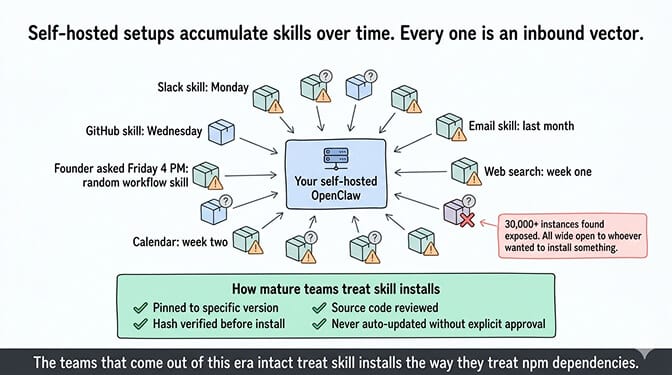
Self-hosted setups accumulate skills over time. You install one for Slack, one for GitHub, one for some niche workflow your founder asked for at 4 PM on a Friday. Every one of those is an inbound vector. Every update is a chance for something to slip in.
The 30,000+ OpenClaw instances Censys, Bitsight, and Hunt.io found exposed on the internet without authentication weren't all running malicious skills. But they were all wide open to whoever wanted to install something on them. The secure OpenClaw VPS guide covers the full hardening sequence for that specific exposure.
The teams that come out of this era of agent infrastructure intact will be the ones who treat skill installs the way mature teams treat npm dependencies: pinned, hashed, reviewed, and never auto-updated.
What you still need to do, even with verification on
Hash verification gives you integrity. It doesn't give you trust. Building actual trust in your skill stack is a layered job, and verification is layer one of about five.
The next four, in rough order: review the skill's source code before installing, scope its permissions narrowly, run it sandboxed, and monitor what it actually does at runtime. The OpenClaw security checklist walks through each of these in detail and is the document I'd send to anyone setting up a new agent in production this week.
The thing that took me a while to internalize: most security failures in the OpenClaw ecosystem so far haven't been clever cryptographic attacks. They've been people skipping the basics. Installing skills without reading them. Granting full filesystem access by default. Running unsandboxed agents on machines with personal data on them. Meta researcher Summer Yue's agent mass-deleted her emails while ignoring stop commands; that was a permissions failure, not a crypto failure.
SHA-256 verification handles one specific class of attack really well. It handles zero of the others. Pretending otherwise is how teams end up with "secure" agents that quietly burn down their inbox.
One last thing
The skill verification story is going to get richer over the next year. Sigstore-style signing. Reproducible builds. Maintainer attestations. Provenance metadata that tells you not just that the file is intact but who built it, when, and how.
SHA-256 verification is the first step of that bigger picture. It's not the whole picture.
But it's the step that turns "I trust this skill because it has 5,000 downloads" into "I trust this skill because the bytes I'm running are mathematically the same bytes the publisher signed."
If you've been hand-rolling skill installs without thinking about supply chain risk, give BetterClaw a try. $49/month for Pro, BYOK, hash verification on by default, sandboxed execution, encrypted credentials, and your first deploy takes about 60 seconds. We handle the verification, the sandbox, and the policy enforcement. You handle the part where you decide which skills are actually worth installing.
Agents are about to get a lot more powerful and a lot more autonomous. The window for getting their supply chain right is now, before half your business runs through them.
Frequently Asked Questions
What is ClawHub SHA-256 verification?
ClawHub SHA-256 verification is a security check that uses a 64-character cryptographic fingerprint to confirm a downloaded skill archive is byte-for-byte identical to what the publisher uploaded. The registry publishes the hash, your client recomputes it on download, and the install only proceeds if they match. It's the same primitive package managers like npm and pip have used for years, finally arriving in the OpenClaw skill ecosystem.
How does SHA-256 verification compare to other OpenClaw plugin security measures?
Hash verification protects file integrity. It tells you the skill is the same one the publisher uploaded. Sandboxing protects runtime behavior, permission scoping protects what the skill can touch, and a skill audit checks the actual code logic. You need all four. Verification is the first layer, not the only one.
How do I check if a skill's SHA-256 hash matches the published one?
Modern OpenClaw clients do this automatically on install, but you can also run the SHA-256 algorithm on a downloaded file using built-in tools on macOS, Linux, and Windows, then compare the output against the hash published on the skill's ClawHub page. If the two strings match exactly, character for character, the file is intact. If even one character differs, do not install.
Is SHA-256 verification enough security for production AI agents?
No, and anyone telling you otherwise is selling something. Verification stops tampering attacks. It doesn't stop a malicious publisher who signs hostile code on day one, an over-permissioned skill, or a runtime compromise. For production agents, treat verification as one of five layers (verification, source review, permission scoping, sandboxing, runtime monitoring) and run all of them.
Are managed OpenClaw platforms actually safer than self-hosted with verification turned on?
A well-configured self-hosted setup with hash verification, sandboxing, and proper permission scoping can be very safe. The catch is "well-configured." On managed platforms like BetterClaw, those defaults are enforced for you, including Docker-sandboxed execution and AES-256 encryption of credentials. On self-hosted, every one of those defaults is a decision you have to make and maintain yourself.
Related Reading
- OpenClaw Skill Audit — How to vet a skill before you install it
- OpenClaw Security Checklist — The full five-layer skill security approach
- Secure OpenClaw on a VPS — Hardening the host your skills run on
- OpenClaw Security Risks Explained — The broader threat landscape including ClawHavoc
- OpenClaw Skills Install Guide — The safe install workflow end to end