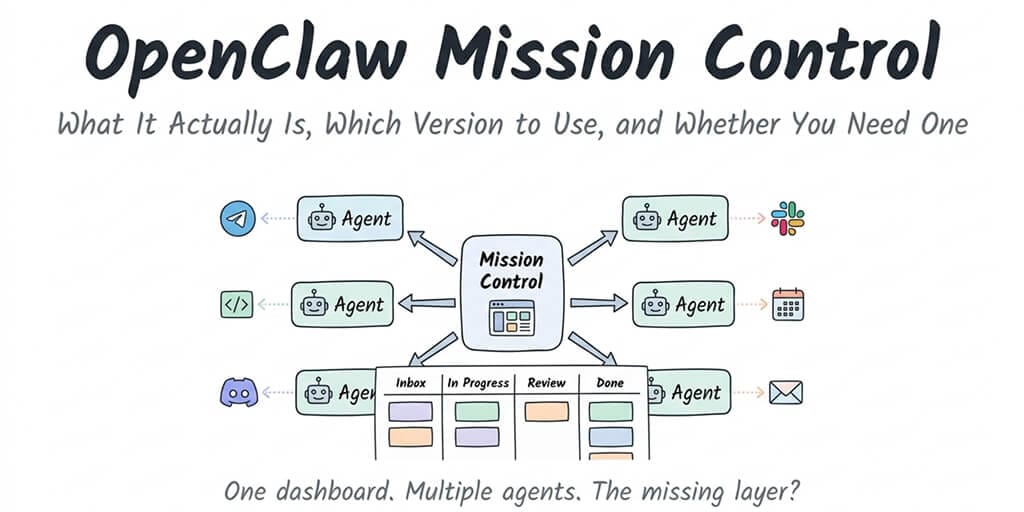
OpenClaw Mission Control is a community-built ecosystem of dashboards and monitoring tools for managing OpenClaw agents — not an official OpenClaw feature. The common implementations include local GUI dashboards (robsannaa's), enterprise orchestration platforms (abhi1693's), feature-rich monitoring tools (builderz-labs'), and hosted task managers (ClawDeck). Each connects to the OpenClaw Gateway via WebSocket.
Key takeaways
- "Mission Control" isn't one product — it's at least four competing community projects and three different definitions (dashboard / multi-agent orchestrator / Kanban task manager).
- Most users: start with robsannaa/openclaw-mission-control — local, zero-config, runs in ~5 minutes.
- Teams with governance needs: use abhi1693/openclaw-mission-control for approval workflows and audit trails.
- You probably don't need one if you're running a single agent. Spending caps, model routing, and a tight SOUL.md fix more problems than a prettier dashboard.
- The biggest risk Mission Control can't fix: agents in retry loops that burn money overnight (see the $60 Reddit example below). That's an agent-reliability problem, not a UI problem.
Last month I counted seven different GitHub repositories all called some variation of "OpenClaw Mission Control." Each one solves a different problem. Each one defines "Mission Control" differently. And the community is split on whether any of them are actually necessary.
One developer runs five OpenClaw master instances coordinated by an orchestrator he calls the "Godfather." He claims a 1,000x productivity multiplier. Another developer built a Mission Control dashboard, used it for a few weeks, and then abandoned it because the real bottleneck wasn't coordination UI. It was persistence and mobile access.
Meanwhile, someone on Reddit burned $60 overnight when a scheduled scraper hit an error and kept retrying for six hours straight. Their "Mission Control" was a browser tab they forgot to check.
So what is OpenClaw Mission Control? Which version should you actually use? And do you even need one?
The three definitions of OpenClaw Mission Control (and why the confusion exists)
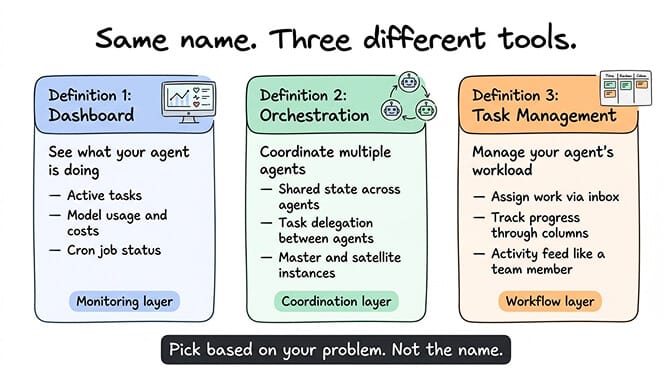
Here's the core issue: "Mission Control" is not an official OpenClaw feature. It's a community concept with at least three distinct interpretations, and each one attracts a different type of user.
Definition 1: A web dashboard for your agent. This is the most common version. A local or hosted web interface that shows you what your OpenClaw agent is doing: active tasks, conversation logs, model usage, cron job status, and system health. Think of it like the dashboard on a car. It shows speed, fuel, and engine status. Removing it doesn't stop the car from driving.
Definition 2: A multi-agent coordination layer. This is the advanced version. Instead of monitoring one agent, you're orchestrating multiple agents that communicate with each other, delegate tasks, and maintain shared state. Jonathan Tsai, a UC Berkeley-trained engineer, runs five OpenClaw master instances and ten satellite agents coordinated through what he calls a "Command Center."
Definition 3: A task management system. Kanban boards where you assign work to agents, track progress through columns (inbox, in progress, review, done), and see real-time activity feeds. Less about monitoring the agent and more about managing the agent's workload like you'd manage a human team member.
Most of the confusion comes from people using the same name for these very different tools. When someone says "you need a Mission Control for OpenClaw," they might mean any of the three, and the one they recommend depends on which problem they're solving.
4 OpenClaw Mission Control Projects, Compared
The ecosystem has matured fast. Here are the main options, what each one does, and who it's built for. A side-by-side comparison table follows the four descriptions.
robsannaa/openclaw-mission-control: The power user's local dashboard
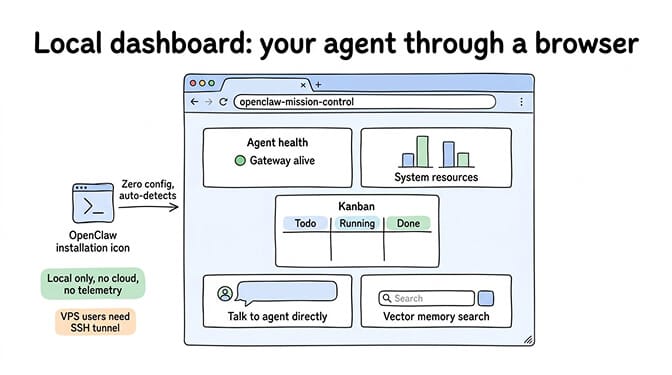
This is the purest "dashboard on your car" implementation. It runs entirely locally on your machine, auto-detects your OpenClaw installation, and requires zero configuration. No cloud, no telemetry, no accounts.
What you get: a live overview of active agents, gateway health, running cron jobs, and system resources (CPU, memory, disk). A built-in chat interface for talking to any agent directly in your browser. A Kanban task board that syncs with your workspace. An integrated terminal so you don't need to switch between windows. And vector memory search so you can query what your agent remembers.
Who it's for: Individual developers or power users running OpenClaw on their own machine who want visibility without leaving their browser. If you just want to know what your agent is doing without opening a terminal, this is it.
The key limitation: it only works on your local machine. If your OpenClaw runs on a VPS or remote server, you need SSH tunneling to access it. And it's a monitoring layer, not a coordination layer. It won't help you orchestrate multiple agents.
abhi1693/openclaw-mission-control: The enterprise orchestration platform
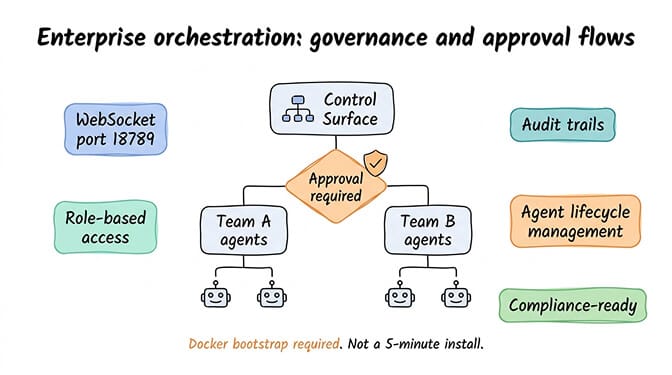
This is the governance-focused version. Organizations, board groups, Kanban tasks, and explicit approval workflows. Think of it as project management software that happens to be connected to your OpenClaw gateway.
What you get: work orchestration across organizations and teams, agent lifecycle management from a unified control surface, governance with approval flows for sensitive actions, and gateway management for distributed environments. It connects via WebSocket to the OpenClaw Gateway on port 18789.
Who it's for: Teams running multiple agents who need audit trails, role-based access, and approval workflows before agents take actions. If compliance matters in your environment, this is the version that addresses it.
The setup is heavier: Docker bootstrap, environment configuration, and a real database. This isn't a 5-minute install. An AI agent builder that ships the task board as part of the product is the shortcut if the dashboard is the only reason you were reaching for Mission Control.
builderz-labs/mission-control: The feature-rich option
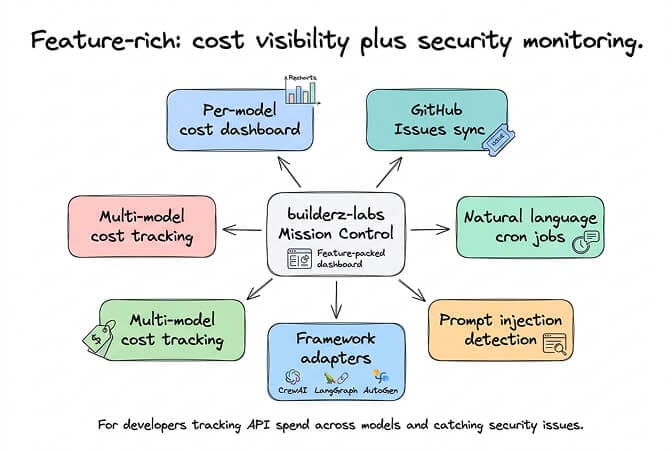
This one goes wide on features. Per-model cost dashboards (using Recharts), GitHub Issues sync, recurring natural-language cron jobs, security scanners for prompt injection detection, and six framework adapters that normalize agent registration, heartbeats, and task reporting across OpenClaw, CrewAI, LangGraph, AutoGen, the Claude SDK, and a generic fallback. There's a hosted demo at mc.builderz.dev for evaluation.
Who it's for: Developers running a mixed stack of agent frameworks (not just OpenClaw) who want detailed cost visibility and security monitoring in one place. If you're tracking API spend across multiple models and want to catch prompt injection attempts, this covers both.
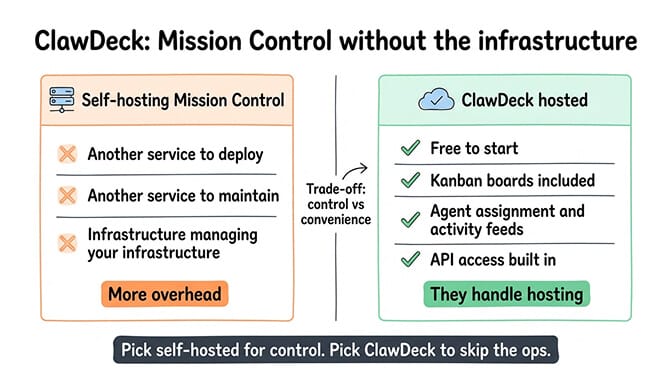
ClawDeck: The hosted alternative (winding down)
ClawDeck originally offered a hosted Kanban-style Mission Control at clawdeck.io. Heads-up before you set this up: the hosted service is shutting down on May 30, 2026 and migrating to a new product called lst.so. The self-hosted version remains operational at github.com/clawdeckio/clawdeck — Kanban boards, agent assignment, activity feeds, and API access, but you run it yourself.
Who it's for now: Anyone who liked ClawDeck's Kanban + task-assignment model and is willing to self-host the open-source repo. If you signed up for the hosted free tier, plan a migration before May 30. For a hosted experience without the migration, see the Quick Setup section below for robsannaa's local dashboard.
For the full breakdown of how OpenClaw agents work under the hood and what the gateway architecture looks like, our explainer covers the system components that Mission Control connects to.
Mission Control projects side-by-side
| Project | Where it runs | Setup time | Best for | Multi-agent | Cost |
|---|---|---|---|---|---|
| robsannaa/openclaw-mission-control | Local (localhost:3333) | ~5 min | Solo devs, zero-config local visibility | Limited | Free |
| abhi1693/openclaw-mission-control | Self-hosted | 1-2 hours | Teams needing approvals + audit trails | Yes | Free |
| builderz-labs/mission-control | Self-hosted (demo at mc.builderz.dev) | ~30 min | Mixed frameworks (CrewAI/LangGraph/AutoGen) + cost & security tracking | Yes | Free |
| ClawDeck (self-hosted) | Self-hosted | ~30 min | Kanban + agent assignment | Yes | Free (hosted clawdeck.io shuts down May 30, 2026) |
All four connect to the OpenClaw Gateway over WebSocket on the default port 18789.
Quick Setup: robsannaa's local Mission Control (~5 minutes)
For the simplest path — local dashboard, zero config, no cloud:
cd ~/.openclaw
git clone https://github.com/robsannaa/openclaw-mission-control.git
cd openclaw-mission-control
./setup.sh
When the setup script finishes, open http://localhost:3333 in your browser. The dashboard auto-detects your ~/.openclaw install and starts streaming agent status, cron jobs, system resources, and the Kanban board. The OpenClaw Gateway itself stays on its default port 18789 — the Mission Control UI is a separate process on 3333 that talks to the gateway over WebSocket.
For remote access (when OpenClaw runs on a different machine), expose port 3333 over Tailscale rather than opening it to the public internet — Mission Control inherits OpenClaw's gateway-exposure risks (see the security review on this).
The honest question: do you actually need a Mission Control?
Here's what nobody tells you about the OpenClaw Mission Control ecosystem.
The people running impressive multi-agent setups are either very technical (Jonathan Tsai has 20+ years of Silicon Valley engineering experience) or they're spending an unsustainable amount of time on it. Tsai himself describes hacking on his setup until 4 and 5 AM every night. That's not an efficiency gain. That's a new project.
Dan Malone, a software developer who actually built and then abandoned a Mission Control dashboard, wrote the most honest assessment: the gap wasn't a coordination UI. It was persistence, mobile access, and cross-agent collaboration. He pivoted to running specialized agents directly in a Telegram forum with per-topic routing, where each bot owns a conversation thread. No dashboard needed.
The Reddit thread "Am I doing something wrong or is OpenClaw incredibly overblown?" is also instructive. People aren't struggling because they lack a dashboard. They're struggling because their agents hit errors and keep retrying for hours, burning money with no circuit breaker. That's a fundamental agent reliability problem, not a Mission Control problem.
A Mission Control dashboard gives you visibility. It doesn't fix the underlying issues. If your agent doesn't have spending caps, model routing, and error boundaries, a prettier interface for watching it fail won't help.
For the foundational practices that actually keep agents stable (spending caps, model routing, security baselines, structured SOUL.md), our OpenClaw best practices guide covers the seven patterns every reliable setup shares.
When Mission Control genuinely makes sense
That said, there are three scenarios where a Mission Control layer genuinely improves your OpenClaw experience.
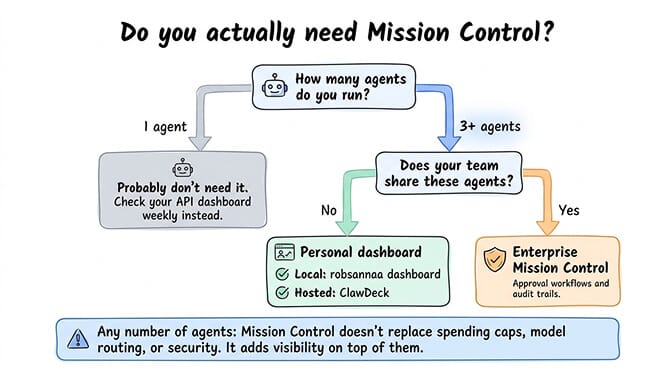
Scenario 1: You run 3+ agents and lose track
If you have one agent, you don't need a dashboard. You know what it's doing because you just talked to it. But once you're running three or more agents across different channels with different cron jobs and different model providers, the coordination overhead gets real. You forget which agent handles which scheduled task. You can't remember if the email agent's cron is set to daily or weekly. You notice your API bill spiked but don't know which agent caused it.
A Kanban-style Mission Control (like robsannaa's or ClawDeck) gives you the overview. One screen. All agents. All tasks. All costs.
For guidance on running multiple OpenClaw agents and the cost implications, the architecture and pricing math are covered there.
Scenario 2: Your team shares agents
When multiple people interact with the same agent, you need governance. Who approved this agent's access to the company email? Who changed the SOUL.md last Tuesday? Why is the customer support agent suddenly refusing to process returns?
The enterprise-focused Mission Control (abhi1693's) adds approval workflows and audit trails. This matters for any business where agent actions have real-world consequences.
Scenario 3: You want cost visibility across providers
If you're using model routing (which you should be), you're splitting API costs across Anthropic, DeepSeek, maybe Gemini Flash. Each provider has its own dashboard. Checking three dashboards weekly to understand your total agent costs is tedious.
The builderz-labs Mission Control aggregates cost data across providers into a single view. This is genuinely useful if you're tracking spend carefully. For the cheapest AI providers for OpenClaw and how to set up model routing, our provider comparison covers the cost math.
What Mission Control can't replace
The Mission Control hype implies the missing piece in your OpenClaw setup is a dashboard. For most users, the missing piece is far more basic.
Take the $60 overnight burn story from the intro — a scheduled scraper hit an error and retried for six hours straight. A Mission Control would have shown that happening, but the fix wasn't a prettier UI. It was a circuit breaker, a per-task spending cap, and a Heartbeat that paused the agent on repeated failure. None of those live in the dashboard layer.
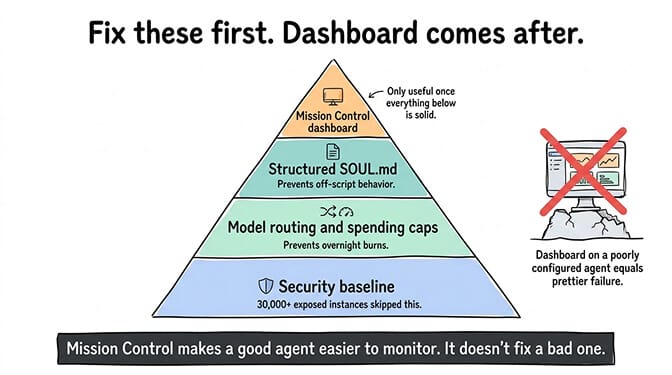
The same pattern holds across the most common OpenClaw pain points: spending caps prevent runaway bills; model routing stops you from running Opus on heartbeat checks; a structured SOUL.md prevents off-script behavior; security configuration stops your gateway from being one of the 30,000+ instances Bitsight identified as exposed without authentication on the internet (and ~63% of those were flagged vulnerable).
A Mission Control dashboard makes a well-configured agent easier to monitor. It doesn't make a poorly configured agent work better.
If you're still setting up your first agent or your current agent isn't reliably handling its basic tasks yet, skip Mission Control. Get the foundational setup right first. Model routing. Spending caps. Security baseline. Structured SOUL.md. Once those are solid and you're scaling to multiple agents or bringing team members into the workflow, then consider adding a monitoring layer.
If managing infrastructure, monitoring, and security feels like work you'd rather not do yourself, BetterClaw includes real-time health monitoring, anomaly detection, and multi-agent management built into the platform. $49/month for Pro, BYOK. Docker-sandboxed execution, AES-256 encryption, auto-pause on anomalies. The monitoring isn't a separate tool you bolt on. It's part of the deployment.
Should Mission Control be built into OpenClaw?
The real open question is whether Mission Control stays a separate tool or gets absorbed into OpenClaw itself. With the project moving to an open-source foundation supported by OpenAI after Peter Steinberger joined the company in February 2026, there's a strong argument that basic monitoring and task management should be native features rather than community add-ons. Until that lands, pick the version that matches your actual problem — and make sure the agent itself is configured well before you spend time building a prettier way to watch it fail.
If you'd rather skip the Mission Control infrastructure entirely and get monitoring, security, and multi-agent management out of the box, try BetterClaw. $49/month for Pro. 60-second deploy. Real-time health monitoring included. Your agents run. You watch the parts that matter. No extra tools required.
Frequently Asked Questions
What is OpenClaw Mission Control?
OpenClaw Mission Control is not a single official product but a community ecosystem of dashboards and orchestration tools built for managing OpenClaw agents. The most common implementations include local GUI dashboards (robsannaa's, which runs on your host machine with zero cloud dependencies), enterprise orchestration platforms (abhi1693's, with governance and approval workflows), and hosted task management tools (ClawDeck). Each connects to the OpenClaw Gateway via WebSocket to provide monitoring, task assignment, and agent coordination.
How does OpenClaw Mission Control compare to BetterClaw's monitoring?
Mission Control implementations are separate tools you install and maintain alongside your OpenClaw deployment. They add visibility but require their own infrastructure (Docker, databases, port configuration). BetterClaw includes real-time health monitoring, anomaly detection with auto-pause, and multi-agent management built into the platform with zero additional setup. Mission Control gives you more customization options. BetterClaw gives you monitoring without the extra maintenance.
How do I set up OpenClaw Mission Control?
For the simplest option (robsannaa's local dashboard): clone the repository into your OpenClaw directory, run the setup script, and open localhost:3333 in your browser. It auto-detects your OpenClaw installation and requires no configuration. For enterprise options (abhi1693's): use the Docker bootstrap, configure environment variables including your authentication token and WebSocket URL, and set up the database. Setup time ranges from 5 minutes (local dashboard) to 1-2 hours (enterprise with full governance).
Is OpenClaw Mission Control worth the setup effort?
It depends on your scale. If you run one agent, probably not. Your API provider dashboards and OpenClaw's built-in logs give you sufficient visibility. If you run three or more agents, a Mission Control dashboard saves time by consolidating status, costs, and task tracking into one view. If your team shares agents, the enterprise version with approval workflows becomes genuinely important for governance. For most individual users, the foundational agent configuration (model routing, spending caps, security) matters more than a monitoring dashboard.
Is OpenClaw Mission Control secure enough for business use?
The local-only versions (robsannaa's) are inherently secure because nothing leaves your machine. The hosted versions and enterprise platforms introduce additional attack surface since they involve web servers, databases, and authentication systems. abhi1693's enterprise Mission Control includes role-based access and approval workflows specifically for business governance. ClawDeck's hosted version handles security on their infrastructure. For any implementation, ensure WebSocket connections to the OpenClaw Gateway are authenticated and not exposed publicly.