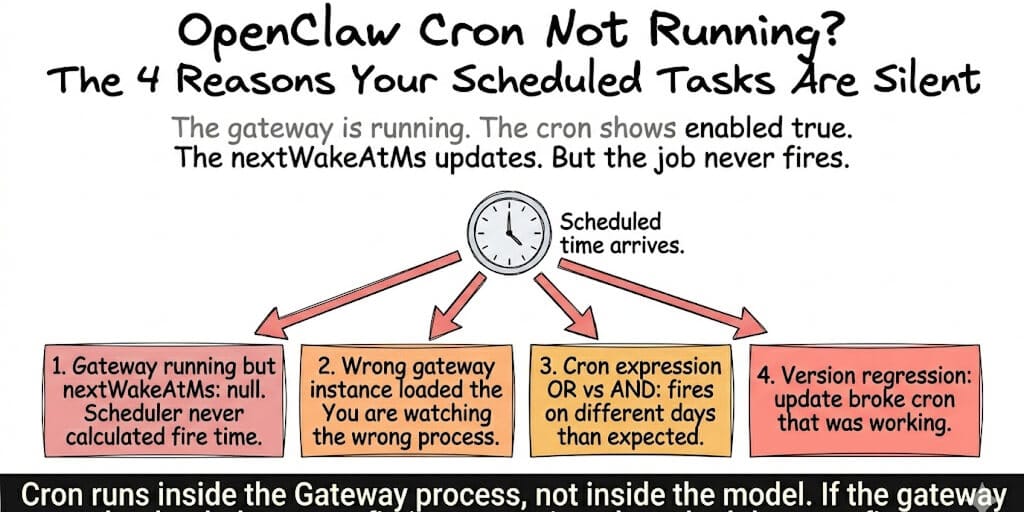
The gateway is running. The cron shows enabled: true. The nextWakeAtMs updates. But the job never fires. Here are four causes from real GitHub issues, starting with the one that wastes the most debugging time.
A user on GitHub issue #13929 set up 25 cron jobs on Windows. The gateway was running continuously. Web-heartbeat entries appeared every minute from 00:32 through 07:15. The cron scheduler initialized with cron: started showing all jobs loaded.
The morning briefing was scheduled for 6:55 AM. At 6:50, 6:55, 7:00, 7:05... only heartbeat logs. No cron execution. The job was configured. The gateway was alive. The scheduler loaded the jobs.
Nothing fired. Not once.
This is the second most common complaint in the OpenClaw community after "bot not responding." Your cron jobs are configured correctly. The gateway is running. The scheduler says it loaded them. But the scheduled time passes and nothing happens.
Here are four causes, sourced from real GitHub issues, ranked by how often they're the actual problem.
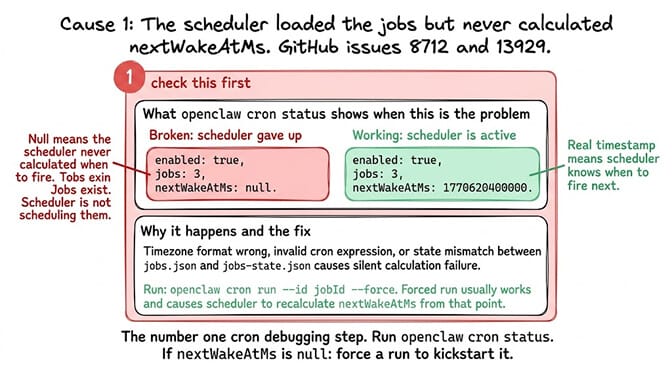
Cause 1: The gateway loaded the config but the scheduler never calculated nextWakeAtMs
GitHub issues: #8712, #13929.
What happens: You run openclaw cron status and see nextWakeAtMs: null. The scheduler initialized. It loaded the jobs from ~/.openclaw/cron/jobs.json. But it never calculated when to fire them. The jobs exist in the config. The scheduler never scheduled them.
Why this happens: The cron scheduler runs inside the gateway process. It calculates the next run time from the cron expression, timezone, and current time. If the calculation fails silently (wrong timezone format, invalid cron expression, or a runtime state mismatch between jobs.json and jobs-state.json), the nextWakeAtMs stays null.
The fix: Check openclaw cron status. If nextWakeAtMs is null, the scheduler never calculated the next fire time. Force a recalculation:
openclaw cron run --id <jobId> --force
If the forced run works (it usually does), the scheduler recalculates the next fire time from that point. If it doesn't work, check your cron expression and timezone format.
The diagnostic that saves hours: nextWakeAtMs: null versus nextWakeAtMs: 1770620400000 (a real timestamp). Null means the scheduler gave up. A timestamp means it knows when to fire. Check this first.
The #1 cron debugging step: Run openclaw cron status. If nextWakeAtMs is null, the scheduler never scheduled your jobs. Force one run to kickstart it. If nextWakeAtMs is a real timestamp and the job still doesn't fire, the problem is downstream (causes 2-4).
For the general troubleshooting guide when OpenClaw stops working, our OpenClaw not working guide covers the broader diagnosis beyond cron-specific issues.
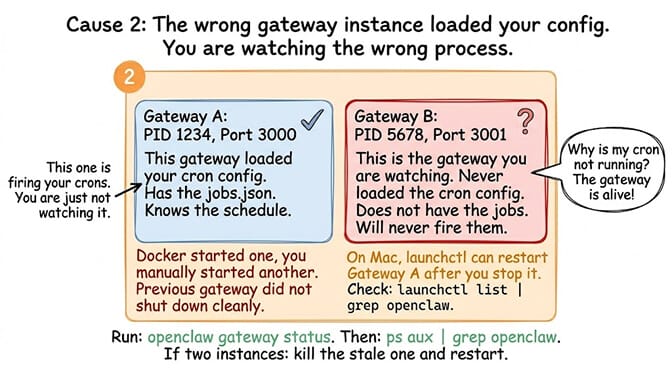
Cause 2: The wrong gateway instance loaded your config
Here's where most people get it wrong.
What happens: You have two gateway processes running. Maybe Docker started one and you manually started another. Maybe a previous gateway didn't shut down cleanly. The cron config is loaded by gateway A. You're monitoring gateway B. Gateway B doesn't have the cron jobs. Gateway A has them but you're not watching its logs.
From the LangCopilot analysis:
"The biggest conceptual mistake is assuming that scheduled work runs from whichever CLI process you used to configure it. In OpenClaw, scheduled jobs are backed by the gateway service. The first troubleshooting question is: which gateway is actually running, and did that gateway load the config that contains this job?"
The fix: Check the running gateway, then look for duplicate instances. If there are two, kill the stale one and restart. The gateway that loaded your cron config is the one that fires the jobs.
openclaw gateway status        # check the PID and port of the running gateway
ps aux | grep openclaw         # or: docker ps — look for multiple instances
The macOS trap (from SSHMac): On Mac, launchctl can restart the gateway after you stop it. You stop gateway A, start gateway B, but launchd restarts gateway A on the original port. Now you have two gateways competing. Check for the relaunched job:
launchctl list | grep openclaw
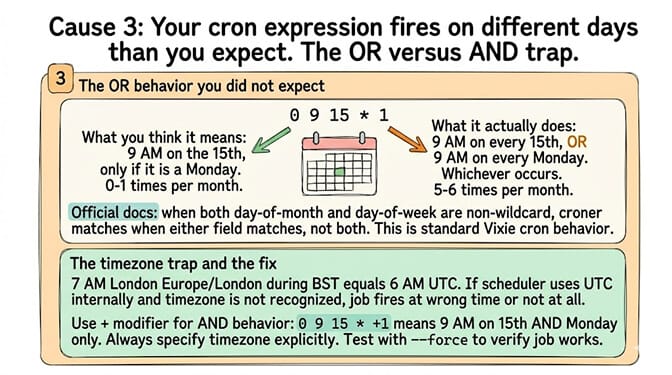
Cause 3: Your cron expression fires differently than you think (the OR vs AND trap)
What happens: Your cron expression has both day-of-month AND day-of-week set. You think "9 AM on the 15th, only if it's a Monday." The scheduler thinks "9 AM on every 15th, AND 9 AM on every Monday." Your job fires 5-6 times per month instead of 0-1.
From the official docs:
"When both the day-of-month and day-of-week fields are non-wildcard, croner matches when either field matches, not both. This is standard Vixie cron behavior."
The opposite problem: You set a cron expression that should fire daily but it fires zero times because the timezone offset means the UTC time falls on a different day boundary. Your 7 AM London briefing is scheduled as 0 7 * * * with timezone Europe/London. During BST (UTC+1), 7 AM London = 6 AM UTC. If the scheduler uses UTC internally and your timezone isn't recognized, the job fires at 7 AM UTC (8 AM London) or not at all.
The fix: Use the + day-of-week modifier for AND behavior: 0 9 15 * +1. Always specify timezone explicitly. Test with openclaw cron run --id <jobId> --force to verify the job itself works, then verify the schedule with openclaw cron list showing the next calculated fire time.
If debugging gateway instances, cron expression semantics, timezone conversions, and scheduler state files sounds like more scheduling infrastructure than building agent workflows, BetterClaw handles scheduled tasks at the platform level. Configure schedules from the dashboard. The platform handles gateway lifecycle, timezone management, and execution reliability. No jobs.json to debug. No dual-gateway conflicts. No nextWakeAtMs: null mysteries. Free tier with 1 agent and BYOK. $49/month for Pro.
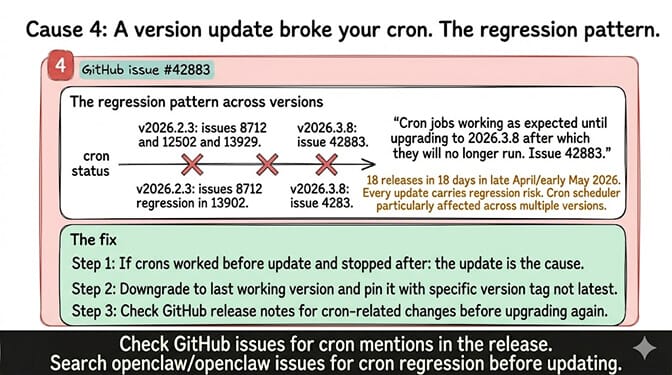
Cause 4: A version update broke your cron (the regression pattern)
GitHub issue: #42883. After upgrading to v2026.3.8, cron jobs that worked perfectly stopped firing. "Cron jobs working as expected until upgrading to 2026.3.8 after which they will no longer run."
The pattern: OpenClaw's rapid release cadence (18 releases in 18 days in late April/early May 2026) means every update carries regression risk. The cron scheduler has been particularly affected: issues #8712 (v2026.2.3), #12502 (v2026.2.3), #13929 (v2026.2.3), and #42883 (v2026.3.8) all document cron failures after updates.
The fix: If your crons were working before an update and stopped after, the update is the cause. Downgrade to the last working version and pin it. Check the GitHub release notes for cron-related fixes before upgrading again. For the version stability tracker, our OpenClaw 2026.4.7 update post covers which versions are safe and which to avoid.
The diagnostic checklist (run this before debugging anything)
Step 1:
openclaw cron status
Is nextWakeAtMs null or a timestamp? Null = scheduler didn't calculate. Force a run.
Step 2:
openclaw gateway status
Check PID and port. Then ps aux | grep openclaw to verify only one gateway is running.
Step 3:
openclaw cron list
Check the next fire time for each job. Does the time make sense for your timezone?
Step 4:
openclaw cron run --id <jobId> --force
Does the forced run work? If yes, the job itself is fine. The scheduler timing is the issue. If no, the job is broken.
Step 5: Check your OpenClaw version. Was there a recent update? Compare with the known regression versions.
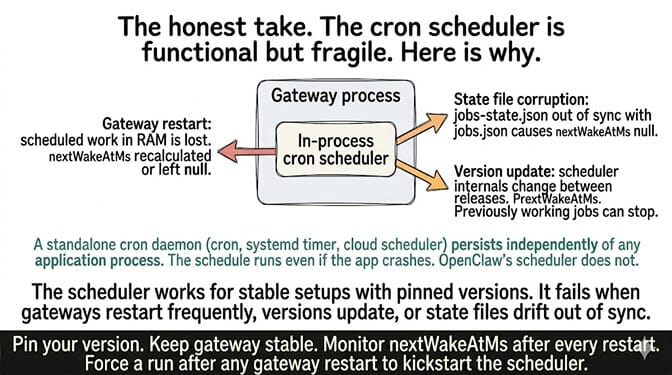
The cron scheduler in OpenClaw is functional but fragile. It runs inside the gateway process. If the gateway restarts, scheduled work in RAM is lost. If jobs-state.json gets out of sync with jobs.json, nextWakeAtMs can go null. If a version update changes the scheduler internals, previously working jobs can stop.
If you want scheduled tasks that survive gateway restarts, version updates, and state file corruption, give BetterClaw a try. Free tier with 1 agent and BYOK. $49/month for Pro. Scheduled tasks are backed by platform infrastructure, not an in-process timer. The schedule runs. The gateway lifecycle is managed. The cron fires.
Frequently Asked Questions
Why is my OpenClaw cron not running?
Four main causes: the scheduler loaded jobs but never calculated the next fire time (nextWakeAtMs: null), the wrong gateway instance loaded your config, your cron expression uses OR logic when you expected AND (day-of-month + day-of-week), or a version update introduced a regression. Run openclaw cron status first to check if nextWakeAtMs is null or a real timestamp.
How do I check if OpenClaw cron is enabled?
Run openclaw cron status. It shows enabled (true/false), number of jobs loaded, and nextWakeAtMs (the next scheduled fire time). If enabled is true but nextWakeAtMs is null, the scheduler loaded the jobs but never calculated when to fire them. Force a run with openclaw cron run --id <jobId> --force to kickstart the scheduler.
Why does openclaw cron run --force work but automatic scheduling doesn't?
The forced run bypasses the scheduler and executes the job directly. If forced runs work but automatic scheduling doesn't, the issue is in the scheduler's timing calculation, not the job itself. Check timezone configuration, verify only one gateway is running, and check if nextWakeAtMs is being calculated. This is the most common pattern reported in GitHub issues #12502, #13929, and #8712.
Did OpenClaw 2026.3.8 break cron jobs?
Yes. GitHub issue #42883 documents a regression where cron jobs stopped running after upgrading to v2026.3.8. The fix: downgrade to the previous working version and pin it, or upgrade to a later version where the regression is fixed. Always check release notes for cron-related changes before updating.
Does BetterClaw have the same cron reliability issues?
No. BetterClaw's scheduled tasks run on platform infrastructure, not inside an in-process timer in the gateway. There's no nextWakeAtMs state to corrupt, no dual-gateway conflict, and no version regression risk. Schedules are configured from the dashboard and execute reliably. Free tier with 1 agent and BYOK. $49/month for Pro.
Related Reading
- Your OpenClaw Cron Jobs Are Burning Money — Once your crons fire, this is the audit that stops them burning your bill
- 10 Most Common OpenClaw Errors — Quick-reference index that maps GitHub issues #8712, #12502, #13929, #42883 to their fixes
- OpenClaw Not Working — General triage when nothing seems to be running
- OpenClaw Agent Stuck in Loop — Adjacent failure mode: scheduler fires the job, then the job loops
- OpenClaw 2026.4.7 Update — Version-by-version notes including the cron regressions
- Hidden OpenClaw Costs: Heartbeats and Token Overhead — The heartbeat-vs-cron distinction that confuses most users