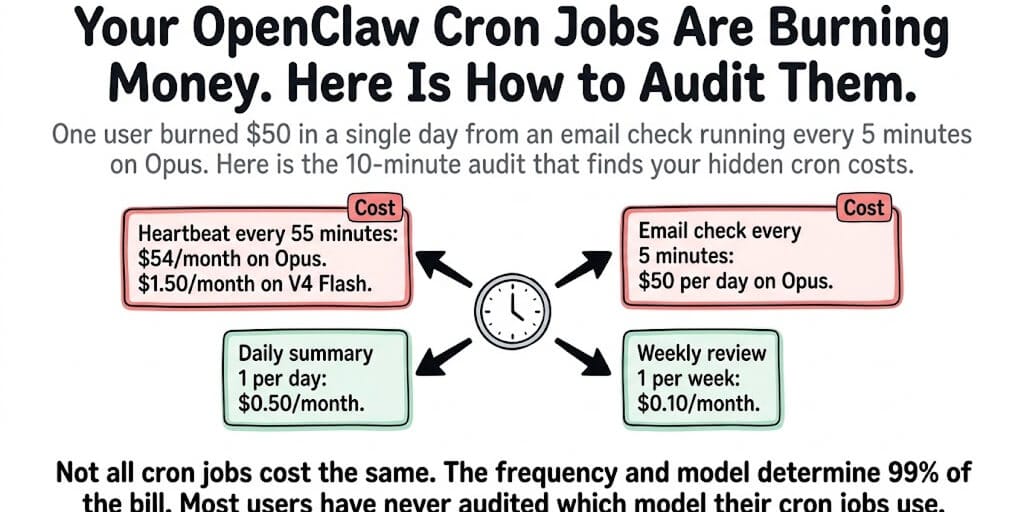
One user burned $50 in a single day from an email check running every 5 minutes on Opus. Another spent $54/month just on heartbeats. Here's the 10-minute audit that finds your hidden cron costs.
A user on the OpenClaw blog reported their first month's bill: $87. Most of it was wasted on a frontier model doing simple file reads and periodic checks.
After optimization, the bill dropped to $27.
The same agent. The same tasks. 68% less money.
The #1 source of OpenClaw bill shock isn't your conversations. It's your cron jobs. The scheduled tasks that run in the background, 24/7, whether you're awake or not, each one a full API call with your entire system prompt attached.
Here's the 10-minute audit that finds the money you're burning.
Step 1: List every cron job (most people don't know what's running)
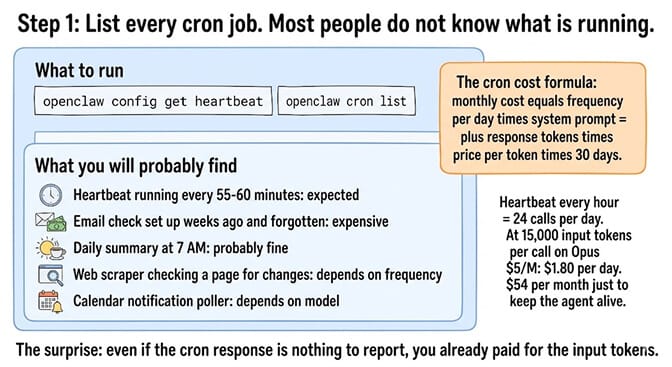
Run openclaw config get heartbeat to see your heartbeat configuration. Then check your cron jobs with openclaw cron list.
What you'll probably find: A heartbeat running every 55-60 minutes. An email check you set up weeks ago and forgot about. A "daily summary" that triggers at 7 AM. Maybe a web scraper that checks a page for changes. Maybe a notification check that polls your calendar.
The surprise: Each of these is a full API call. Every cron trigger sends your complete system prompt (15,000+ tokens of AGENTS.md, SOUL.md, MEMORY.md, tool schemas) plus the cron instruction. Even if the cron's response is "nothing to report," you've already paid for the input tokens.
The cron cost formula: Monthly cost = (frequency per day) × (system prompt tokens + response tokens) × (price per token) × 30 days. A heartbeat every hour = 24 calls/day. At 15,000 input tokens per call on Opus ($5/M), that's $1.80/day or $54/month just to keep the agent alive.
Step 2: Check which model each cron uses (this is where the money hides)
Here's what nobody tells you about OpenClaw cron costs.
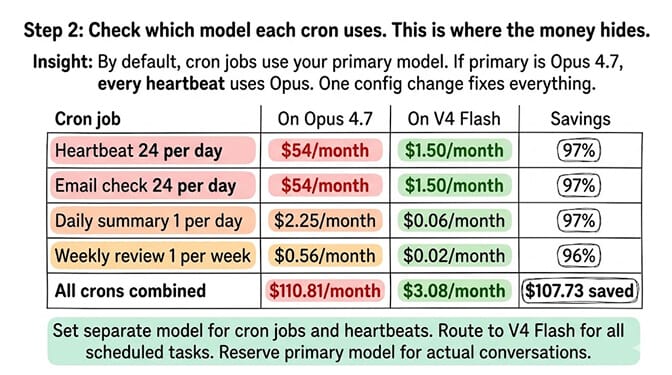
By default, cron jobs use your primary model. If your primary model is Claude Opus 4.7 ($5/$25/M tokens), every cron job — including the heartbeat — uses Opus. OpenClaw's default config doesn't distinguish between a user conversation (worth Opus-level reasoning) and a heartbeat check (worth the cheapest model available).
The fix is one config change: Set a separate model for cron jobs and heartbeats.
Route heartbeats to DeepSeek V4 Flash ($0.14/$0.28/M tokens). Route simple cron checks (email poll, calendar check, file monitor) to Gemini 2.5 Flash (free tier: 1,500/day) or DeepSeek V4 Flash. Reserve your primary model for actual conversations.
The cost difference:
| Cron Job | On Opus 4.7 | On V4 Flash | Savings |
|---|---|---|---|
| Heartbeat (24/day) | $54/month | $1.50/month | 97% |
| Email check (24/day) | $54/month | $1.50/month | 97% |
| Daily summary (1/day) | $2.25/month | $0.06/month | 97% |
| Weekly review (1/week) | $0.56/month | $0.02/month | 96% |
| Total | $110.81 | $3.08 | $107.73 |
For the complete model cost optimization guide, our OpenClaw cost reduction guide covers per-task model routing beyond cron jobs.
Step 3: Reduce frequency (the cheapest cron is the one that doesn't run)
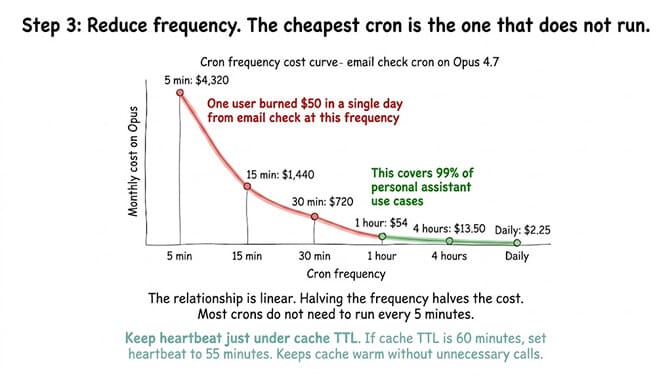
The email check at 5-minute intervals: One user reported burning $50 in a single day because their email monitoring cron ran every 5 minutes on Opus. That's 288 API calls/day, each with 15,000+ tokens of system prompt. At Opus pricing: $4,320/month for checking email.
The fix: Does your email really need checking every 5 minutes? Every 30 minutes covers 99% of use cases. Every hour is fine for most personal agents. Every 5 minutes is for emergency response systems, not personal assistants.
Reduce heartbeat frequency carefully. The heartbeat keeps your prompt cache warm. If your model's cache TTL is 60 minutes, set the heartbeat to 55 minutes (just under the TTL). This keeps the cache warm without paying for unnecessary calls. Faster heartbeats waste money. Slower heartbeats invalidate the cache, which costs more on subsequent messages (full-price input instead of 90% cached discount). The hidden heartbeats and token overhead post covers the cache-TTL math in depth.
Step 4: Disable thinking mode on cron jobs (free savings)
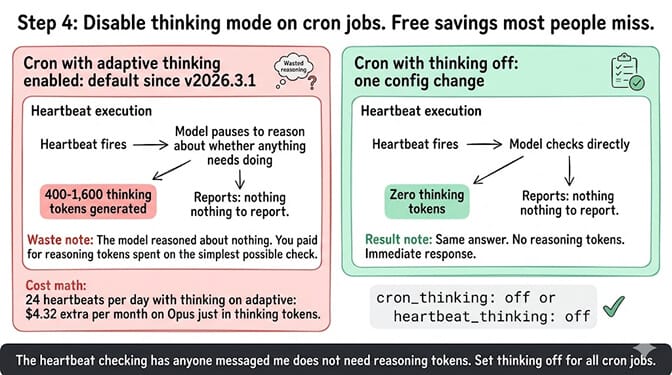
Thinking tokens on cron jobs are pure waste. If your thinking mode is set to "adaptive" or "high" (default for Claude 4.6 since v2026.3.1), every cron run generates thinking tokens. The heartbeat doesn't need to "think" about whether anything has changed. It needs to check and report.
The fix: Set thinking to "off" for all cron jobs and heartbeats. Either in your global config or per-cron. The heartbeat checking "has anyone messaged me?" doesn't need reasoning tokens. For the thinking mode configuration guide, our OpenClaw thinking mode reference covers per-agent thinking levels and the eight-level spectrum.
If auditing cron jobs, routing models per-task, optimizing heartbeat frequency, managing prompt cache TTLs, and disabling thinking mode on scheduled tasks sounds like more cost engineering than you want, BetterClaw's smart context management handles cron optimization at the platform level. Heartbeats don't burn tokens on system prompt overhead. Scheduled tasks use appropriate models automatically. No cron audit needed. Free tier with 1 agent and BYOK. $49/month for Pro.
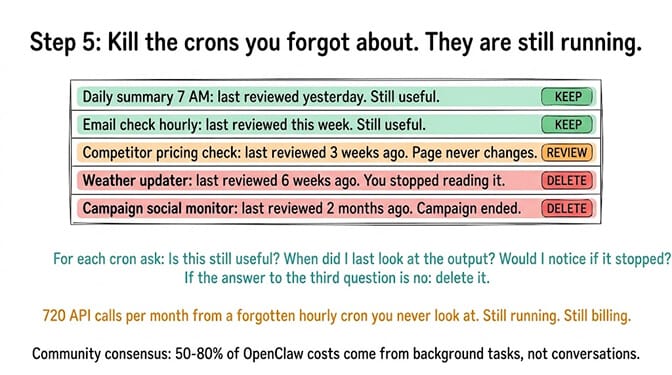
Step 5: Kill the crons you forgot about
Here's where most people get it wrong.
You set up a cron three weeks ago. It's still running. You wanted to monitor a competitor's pricing page. The page hasn't changed. The cron checks every hour. That's 720 API calls/month you've forgotten about.
The audit: Run openclaw cron list. For each cron, ask:
- Is this still useful?
- When did I last look at the output?
- Would I notice if it stopped?
If the answer to the third question is "no," delete it.
Common forgotten crons: Web scraper checks for pages that never change. Weather updates you stopped reading. Social media monitors for campaigns that ended. File system watchers for projects you finished.
The community consensus from the "$178 in one week" viral Medium post and dozens of Reddit threads: 50-80% of OpenClaw costs come from background tasks, not conversations. Your agent is expensive because it works while you sleep, not because you talk to it.
The before/after (real community numbers)
Before audit: Primary model (Opus) for everything. Heartbeat every 55 minutes. Email check every 15 minutes. Three forgotten cron jobs. Thinking mode on adaptive. Total: $87-166/month.
After audit: Heartbeats on V4 Flash. Email check hourly on Gemini free tier. Two cron jobs deleted. Thinking off for all crons. Primary model only for conversations. Total: $18-27/month.
Time to complete the audit: 10 minutes. Monthly savings: $60-140.
The ten minutes you spend auditing your cron jobs will save more money than any model switch, any prompt optimization, or any infrastructure change. It's the highest-ROI optimization in the entire OpenClaw stack.
If you want cron cost optimization handled automatically, give BetterClaw a try. Free tier with 1 agent and BYOK. $49/month for Pro. Smart context management means heartbeats and scheduled tasks don't carry the 15,000-token system prompt overhead. The platform optimizes what self-hosted OpenClaw makes you optimize manually. The agent runs. The crons are cheap. The bill makes sense.
Frequently Asked Questions
What are OpenClaw cron jobs and why do they cost money?
Cron jobs are scheduled tasks that OpenClaw runs automatically (heartbeats, email checks, web scraping, calendar monitoring). Each cron trigger is a full API call that includes your entire system prompt (15,000+ tokens). If crons run on your primary model (Opus at $5/M tokens), they can cost $54-166/month in background processing alone, even when you're not using the agent.
How much do OpenClaw heartbeats cost per month?
On Opus 4.7: approximately $54/month (24 calls/day, 15,000+ tokens each). On DeepSeek V4 Flash: approximately $1.50/month. On Gemini 2.5 Flash free tier: $0/month (within the 1,500/day limit). The heartbeat checks if anything needs doing and keeps the prompt cache warm. It doesn't need a frontier model.
How do I audit my OpenClaw cron costs?
Run openclaw config get heartbeat and openclaw cron list to see all scheduled tasks. Check which model each cron uses (default is your primary model). Calculate the monthly cost: frequency × tokens × price × 30. Route crons to cheap models, reduce frequency, disable thinking mode, and delete forgotten crons. The audit takes about 10 minutes and typically saves $60-140/month.
Can I use free models for OpenClaw cron jobs?
Yes. Gemini 2.5 Flash offers 1,500 free requests/day (no credit card). A heartbeat every hour is 24 calls/day, well within the free tier. Email checks hourly add 24 more. Daily summaries add 1. You can run all background tasks on free models and reserve paid models for conversations only.
Does BetterClaw have the same cron cost problem?
No. BetterClaw's smart context management doesn't inject the full 15,000-token system prompt on every scheduled task. Heartbeats and background checks use optimized, lightweight context. The platform handles model routing for background tasks automatically. You don't need to audit cron costs because the platform manages them. Free tier with 1 agent and BYOK. $49/month for Pro.
Related Reading
- Hidden OpenClaw Costs: Heartbeats and Token Overhead — Why heartbeats with the wrong config burn money silently
- How to Reduce OpenClaw Costs — Per-task model routing, cache warmth, and the other levers that move the bill
- OpenClaw Thinking Mode Explained — Why "adaptive" thinking on cron jobs quietly triples your cost
- Stop Making Your OpenClaw Agent Re-Read Files — Trim the
AGENTS.md+SOUL.md+MEMORY.mdpayload every cron is dragging along - OpenClaw Best Practices — Multi-agent config patterns including per-cron model overrides
- OpenClaw Session Length Costs — Cron-adjacent: long sessions multiply the cron pain