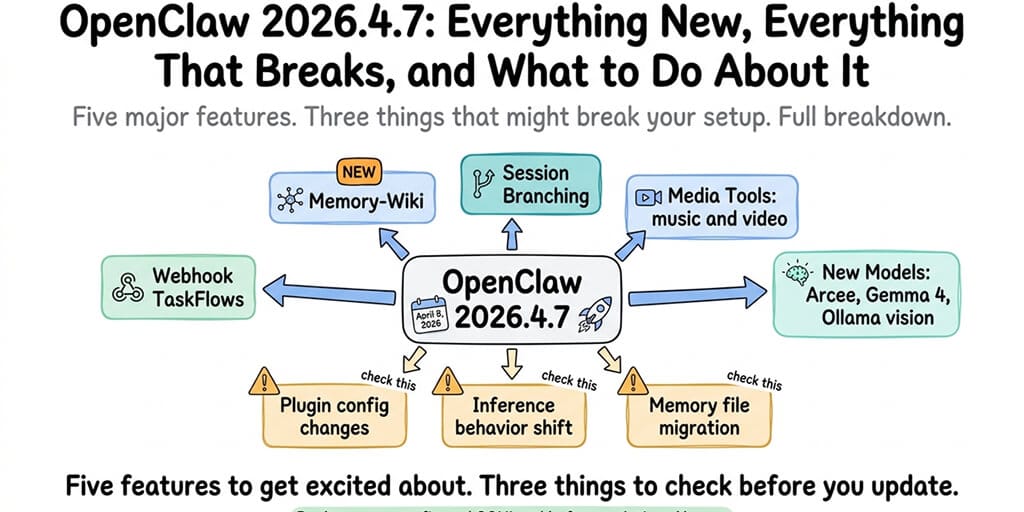
The April 8 release is the biggest OpenClaw update since launch. Five major features. Three things that might break your setup. Here's the full breakdown.
I updated to OpenClaw 2026.4.7 on April 8 without reading the changelog. By April 9, one of my cron jobs had stopped firing, a skill that worked fine on 2026.4.5 was throwing validation errors, and my agent was giving slightly different responses to the same prompts.
None of these were bugs. They were intended changes in how plugins load, how inference works, and how the memory system operates. The release notes explained all of it. I just hadn't read them before hitting the update command.
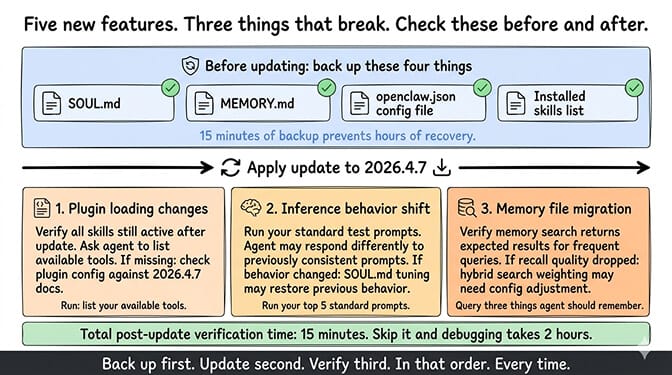
This is the complete breakdown of OpenClaw 2026.4.7: what each new feature does, what changed under the hood, and the three things you need to check after updating. For the safe update process including backup and rollback, back up your SOUL.md, MEMORY.md, and config before touching anything.
Webhook TaskFlows (the feature that changes how you start workflows)
Before 2026.4.7, every agent interaction started the same way: someone sends a message, the agent responds. Every workflow was conversation-initiated.
TaskFlows change that. A webhook receives an HTTP request from an external system, authenticates it, and triggers a predefined agent workflow without any chat message. Stripe sends a webhook when a payment fails. Your CRM fires an event when a lead reaches a threshold. A monitoring service detects an anomaly. The webhook reaches your OpenClaw agent, and the TaskFlow executes automatically.
This is the difference between "my agent responds to questions" and "my agent acts on events." The agent doesn't wait for someone to ask. It processes triggers and takes action.
What this means practically: You can now build agent workflows that fire from external events. A customer dispute in Stripe triggers a workflow that checks order history, drafts a response, and sends it for human review. A Slack alert about downtime triggers a workflow that checks your monitoring dashboards and posts a summary. A scheduled webhook fires daily at 7 AM to run a research task and deliver results to Telegram.
This is a meaningful step toward agents as automation infrastructure, not just chat assistants.
For the broader view of how to use OpenClaw agents for business workflows, our use cases page covers the scenarios where TaskFlows fit naturally.
Memory-wiki (your agent now builds its own knowledge base)
This is arguably the biggest feature in the release. Memory-wiki adds a structured, persistent knowledge base that the agent can read, write, update, and search across sessions.
Unlike MEMORY.md (raw text notes), memory-wiki entries have structured claims with evidence, source provenance, timestamps, and staleness tracking. The agent knows what it knows and when it learned it. Wiki tools (wiki_search, wiki_get, wiki_apply, wiki_lint) give the agent full CRUD access to its knowledge base.
We covered memory-wiki in detail in our complete memory-wiki guide. The short version: it's the third memory layer (alongside session context and MEMORY.md) that turns your agent from a note-taker into a knowledge manager.
The practical impact: Your agent can now answer "who manages auth?" with a structured claim that includes the source conversation, confidence level, and freshness status. Not a text chunk that might contain the answer. A verified fact.
Session branching and recovery (the undo button you always wanted)
Before 2026.4.7, conversations were linear. Every message moved forward. If your agent went down a bad path (wrong approach, bad tool call, hallucinated response), your only option was /new, which reset everything.
Session branching lets you fork a conversation. Try a risky approach in a branch. If it works, merge it back. If it fails, restore the previous state. The conversation continues from the point before the branch as if the failed experiment never happened.
This matters most for complex, multi-step tasks where the agent needs to try different approaches. Code generation, research synthesis, document drafting. Instead of committing to the first approach and hoping it works, you can explore alternatives without losing context.
Recovery complements branching. If a session crashes or a skill errors out mid-conversation, the recovery mechanism can restore the session to a known good state. No more losing 30 minutes of conversation context because a Docker container timed out.
New model support (Arcee, Gemma 4, Ollama vision)
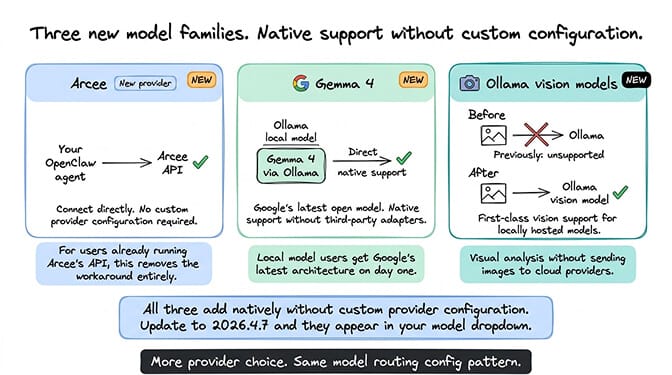
2026.4.7 adds three model families to the supported roster.
Arcee joins as a new provider option. If you're already using Arcee's API, you can now connect it directly without custom provider configuration.
Gemma 4 (Google's latest open model) is now natively supported. This matters for users running local models through Ollama who want Google's latest architecture without waiting for third-party adapters.
Ollama vision models get first-class support. You can now send images to Ollama-hosted vision models and get visual analysis responses. This was previously unsupported. For the complete guide to Ollama and OpenClaw compatibility, our Ollama guide covers which models work and which don't.
Media generation tools (music and video editing)
2026.4.7 expands the agent's creative toolkit with music and video editing capabilities. The agent can now generate music tracks, edit video clips, and process media iteratively through conversation.
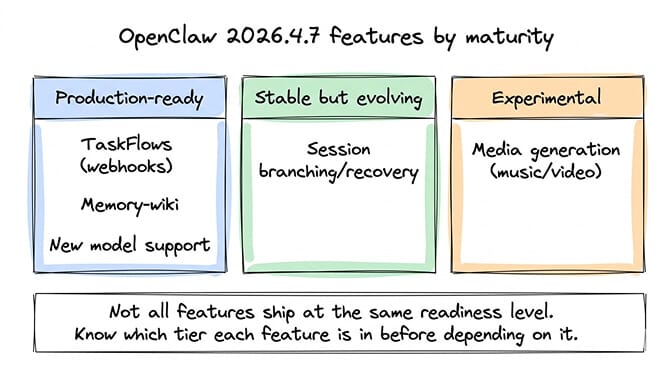
Honest assessment: This feature is early-stage and the UX varies significantly depending on your gateway and installed skills. The media generation tools are more of a foundation for future creative workflows than a production-ready media suite. If you're building content creation pipelines, the tools are worth experimenting with. If you need reliable media output today, set expectations accordingly.
What breaks when you update (check these three things)
Here's where most people get it wrong. They see five new features, update immediately, and spend the next two hours debugging failures that the changelog predicted.
Plugin loading changes
2026.4.7 changes how plugins are loaded and activated. Some plugins that worked in 2026.4.5 may need their config entries updated. Skills that were installed globally might need to be re-registered under the new plugin manifest system.
What to check: After updating, verify all your skills are still active. Ask your agent to list its available tools. If a tool is missing, check the plugin configuration against the 2026.4.7 documentation.
Inference behavior differences
The release includes reasoning improvements aimed at more reliable multi-step answers, especially for tool-heavy workflows. This is generally positive, but it means your agent may respond differently to prompts that produced consistent results before.
What to check: Run your standard test prompts after updating. If the agent's behavior changed on prompts you rely on, the inference adjustments may require SOUL.md tuning to restore the previous behavior.
Memory file migration
With memory-wiki now available, the memory system's file handling has subtle changes. Existing MEMORY.md and daily log files aren't affected, but the way the active memory plugin interacts with these files during recall has been updated.
What to check: Verify your memory search still returns expected results for queries you use frequently. If recall quality dropped, the hybrid search weighting may need adjustment in your config.
Before updating to 2026.4.7: back up SOUL.md, MEMORY.md, your config file, and your installed skills list. After updating: check skills are active, test your standard prompts, verify memory search. This takes 15 minutes and prevents hours of debugging.
If managing version updates, plugin migrations, and inference adjustments feels like more maintenance than you want, Better Claw applies OpenClaw updates on a managed cadence with config preservation and compatibility testing. $49/month for Pro, BYOK. Updates land after they've been verified against common configurations. Your setup doesn't break because we test it before you see it.
The bigger picture: where 2026.4.7 fits in OpenClaw's trajectory
Stay with me here. This matters.
2026.4.7 is the release where OpenClaw shifted from "personal AI assistant" to "automation platform." TaskFlows mean external events can trigger agent workflows. Memory-wiki means the agent maintains structured knowledge. Session branching means complex tasks can be explored safely. New model support means more options at every price point.
The project has 230,000+ GitHub stars and 1.27 million weekly npm downloads. Peter Steinberger has moved to OpenAI and the project is transitioning to an open-source foundation. The release cadence is accelerating. 2026.4.7 dropped April 8. 2026.4.9 (adding Dreaming, the memory consolidation system) dropped April 9. 2026.4.11 (ChatGPT import ingestion for memory-wiki) landed days later.
This pace means two things for you. First, the features you want are probably coming soon. Second, the updates you need to manage are also coming fast. Staying current with OpenClaw requires weekly attention to changelogs, compatibility testing, and config adjustments.
For self-hosters, that's part of the deal. For everyone else, that's why managed platforms exist.
If you want 2026.4.7's features without managing the update yourself, give Better Claw a try. $49/month for Pro, BYOK with 28+ providers. Updates are tested and applied automatically. TaskFlows, memory-wiki, session branching, and new model support all land when they're ready. You focus on what your agent does. We handle what version it runs.
Frequently Asked Questions
What's new in OpenClaw 2026.4.7?
OpenClaw 2026.4.7 (released April 8, 2026) adds five major features: Webhook TaskFlows (external events trigger agent workflows), memory-wiki (structured persistent knowledge base with claims and provenance), session branching and recovery (fork conversations, try alternatives, restore if needed), media generation tools (music and video editing), and new model support (Arcee, Gemma 4, Ollama vision models).
What breaks when updating to OpenClaw 2026.4.7?
Three things to check: plugin loading changes may deactivate some skills (verify all tools are active after updating), inference behavior improvements may change how your agent responds to existing prompts (test standard prompts), and memory file handling changes may affect recall quality (verify memory search results). Back up SOUL.md, MEMORY.md, and your config before updating.
What are OpenClaw TaskFlows?
TaskFlows are webhook-triggered agent workflows introduced in 2026.4.7. An HTTP endpoint receives a request from an external system (Stripe, CRM, monitoring service), authenticates it, and triggers a predefined agent workflow without a chat message. This enables event-driven automation: a payment failure triggers a customer response workflow, a Slack alert triggers a diagnostic workflow, a scheduled webhook triggers a daily briefing.
Should I update to OpenClaw 2026.4.7 immediately?
If you need TaskFlows, memory-wiki, or session branching, yes. Back up first (SOUL.md, MEMORY.md, config, skills list), update, then check skills, test prompts, and verify memory search. If your current setup works and you don't need the new features, wait a few days for the community to identify edge cases. Security patches should always be applied immediately. Feature updates can wait.
Does BetterClaw support OpenClaw 2026.4.7 features?
BetterClaw applies OpenClaw updates on a managed cadence with compatibility testing. When 2026.4.7 features are verified stable, they're available to all BetterClaw agents automatically. You don't manage the update process. Config is preserved. Skills stay active. The managed cadence means you get features after they've been tested, not the day they drop.
Related Reading
- OpenClaw Memory Wiki: What It Is and How to Use It — Deep dive on the biggest 2026.4.7 feature
- How to Update OpenClaw Without Breaking Your Setup — The safe update process for any version
- Best OpenClaw Use Cases — Workflows where TaskFlows fit naturally
- OpenClaw Ollama Guide — Ollama vision models now supported in 2026.4.7
- The OpenClaw SOUL.md Guide — How to tune your SOUL.md for the new inference behavior