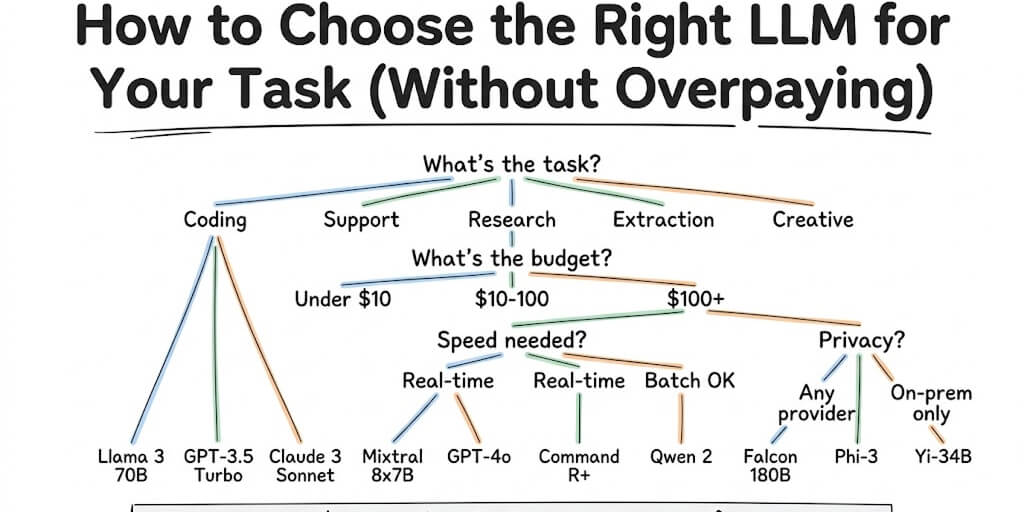
A four-question decision framework that tells you exactly which model to use. No benchmarks required. Just answer four questions and get your answer.
A founder asked me last week which LLM she should use for her startup's AI agent. I asked what the agent does. She said "customer support on WhatsApp." I asked her budget. She said "under $50 a month in API costs."
The answer took me ten seconds: Gemini 3.5 Flash or DeepSeek V4 Pro.
She'd spent three weeks reading benchmark comparisons. Three weeks. For a question that has a clear answer once you know two things: what the task is and what your budget is.
This is the problem with every "how to choose an LLM" article. They give you comparison tables with 50 models and 12 columns. They list benchmark scores you don't know how to interpret. They end with "it depends on your use case" and leave you exactly where you started.
Here's a different approach. Four questions. Each one eliminates 80% of the options. By the end, you have one or two specific models with exact pricing. Bookmark this page and come back every time a new model drops.
Question 1: What's your primary task type?
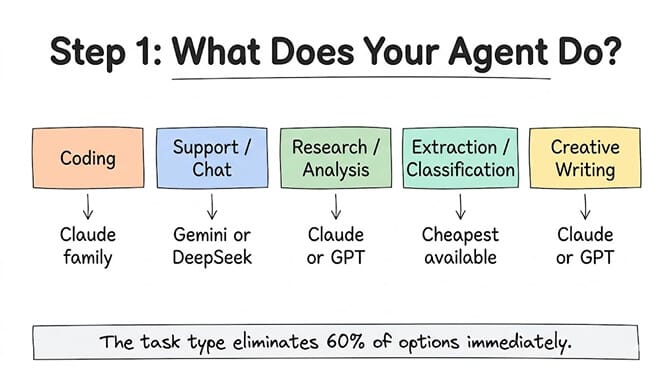
This is the most important filter. Different model families dominate different tasks.
Coding and technical tasks: Claude wins. Opus 4.7 leads SWE-Bench Verified at 87.6%. Sonnet 5.5 ($2/$10), the newest Sonnet, is the sensible production default for coding agents. If your agent reviews PRs, writes tests, generates code, or debugs... start with Claude. On a tight budget, the open-weight challengers are closing the gap fast: our GLM 5.2 vs Sonnet 4.6 comparison shows where a free coding model now holds up.
Customer support and conversation: Speed and cost matter more than raw reasoning power. Gemini 3.5 Flash (289 tok/s, free tier available) or DeepSeek V4 Pro ($0.435/$0.87) are the sweet spots. Your support agent doesn't need frontier intelligence. It needs fast, accurate answers from your knowledge base.
Research and document analysis: Long context matters most. Claude Opus 4.7 and Sonnet 4.6 offer 1M tokens at flat pricing (no surcharges). Grok 4.3 has 2M tokens at $0.20/$0.60 if you need even more. GPT-5.5's context surcharge above 272K tokens makes it expensive for document-heavy workflows.
Data extraction and classification: Use the cheapest model that works. GPT-4.1 Nano at $0.10/$0.40, DeepSeek V4 Flash at $0.14/$0.28, or Gemini Flash-Lite at $0.10/$0.40. These tasks don't need reasoning ability. They need pattern matching, which even budget models handle well.
Creative writing and content: This is the most subjective category. Claude models are generally preferred for nuanced, natural-sounding output. GPT-5.5 is strong for structured content. Test both on 10 prompts from your actual workflow and judge by your own quality bar, not benchmarks.
The task type alone narrows your options from 50+ models to 3 to 5. That's the most useful filter nobody applies first.
Question 2: What's your monthly budget for API costs?
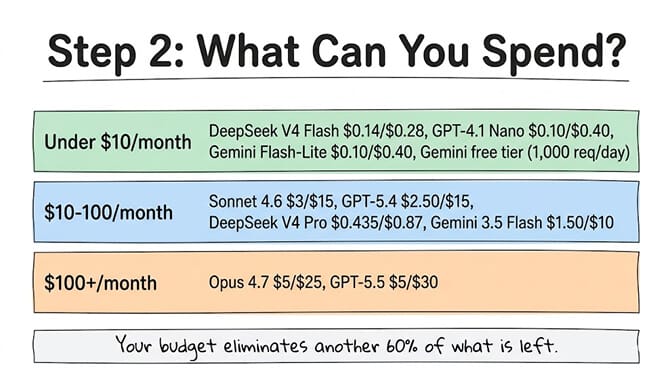
Under $10/month in token costs: You need budget models. DeepSeek V4 Flash at $0.14/$0.28, GPT-4.1 Nano at $0.10/$0.40, or Google's free tier (1,000 requests/day on Gemini Flash models, no credit card). At these prices, a simple agent handling 100-200 interactions/day costs $3 to $8/month. For the fully free options ranked and tested, see our guide to the best free model for OpenClaw.
$10 to $100/month: The sweet spot for most production agents. Claude Sonnet 4.6 at $3/$15, GPT-5.4 at $2.50/$15, DeepSeek V4 Pro at $0.435/$0.87, or Gemini 3.5 Flash at $1.50/$10. A support agent handling 3,000 conversations/month runs $16 to $180 depending on model choice. For detailed cost math by use case, our AI agent cost guide breaks down five real scenarios.
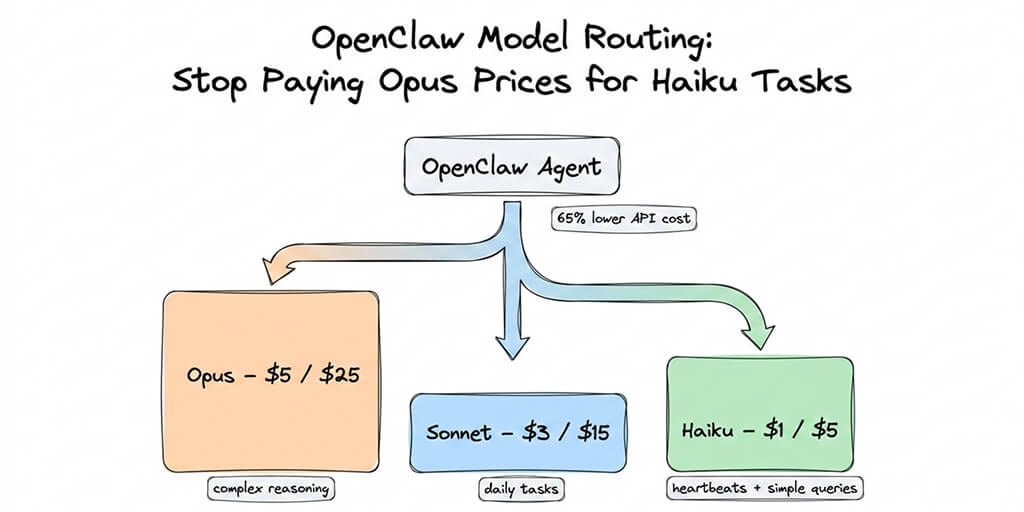
$100+/month: Frontier models for demanding workloads. Claude Opus 4.7 at $5/$25, GPT-5.5 at $5/$30. Coding agents reviewing 100+ PRs/day. Research agents processing entire document repositories. Complex multi-step reasoning workflows. If your tasks genuinely need frontier capability, this is where you spend. But check whether model routing can push 80% of your requests to a cheaper tier first.
No budget constraint: Use Claude Opus 4.7 for everything and move on. It's the best general-purpose model in May 2026. But even with unlimited budget, routing saves money without reducing quality. There's no reason to spend $600/month when $100/month produces identical results on 80% of tasks.
Question 3: How fast does the response need to be?
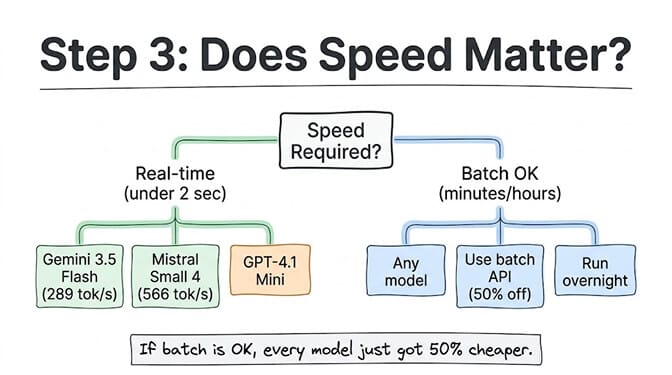
Real-time (response needed in under 2 seconds): This eliminates most frontier models under heavy load. Gemini 3.5 Flash leads at 289 tokens/second. Mistral Small 4 hits 566 tok/s (fastest overall). GPT-4.1 Mini is fast and cheap. Claude Sonnet 4.6 is fast enough for most real-time use cases.
Batch processing OK (minutes or hours is fine): Use any model and take the batch discount. Both OpenAI and Anthropic offer ~50% off through their batch APIs with a 24-hour SLA. A GPT-5.5 request that costs $30/MTok at standard rate costs $15/MTok in batch mode. For report generation, nightly data processing, or non-urgent analysis, batch pricing changes the math entirely.
This is where most people leave money on the table. If your agent generates morning briefings, they can be computed overnight on batch pricing. If it analyzes uploaded documents, those can process async. Only customer-facing interactions need real-time speed.
This is also where platform choice matters. BetterClaw's heartbeat scheduling lets you set per-agent task intervals. A research agent that runs every 6 hours doesn't need real-time speed. A customer support agent does. Different agents, different speed needs, different cost profiles. All managed from the same dashboard. Free plan to start, $49/month on Pro.
Question 4: Do you have privacy or compliance requirements?
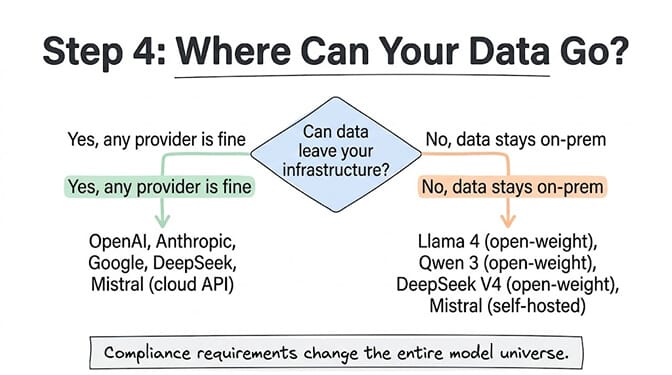
No restrictions (most startups and small businesses): Use any cloud API. OpenAI, Anthropic, Google, DeepSeek, Mistral. All charge per token. Your data is processed on their servers. For most non-regulated businesses, this is fine and the most cost-effective path.
Data must stay on your infrastructure (healthcare, finance, government, legal): Open-weight models are your only option. Meta's Llama 4, Alibaba's Qwen 3, DeepSeek V4 (downloadable), Mistral (self-hosted option). You run these on your own servers or your own cloud instances. The models are free. The compute isn't. Expect $200+/month for a capable GPU instance.
Moderate restrictions (no Chinese providers, no data in China): This eliminates DeepSeek but keeps OpenAI, Anthropic, Google, and Mistral. For a full pricing comparison across every provider, our complete LLM pricing guide covers every model and hidden cost.
The cheat sheet: your task + your budget = your model
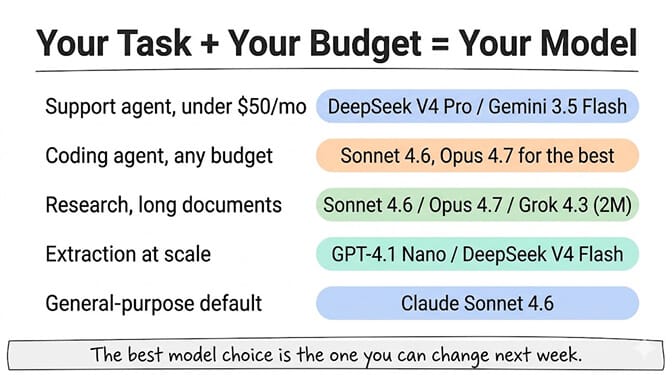
Here's the quick-reference that puts it all together.
Support agent, under $50/month: DeepSeek V4 Pro ($0.435/$0.87) or Gemini 3.5 Flash ($1.50/$10). Both handle conversational tasks well at high volume.
Coding agent, any budget: Claude Sonnet 5.5 ($2/$10) for production. Opus 4.7 ($5/$25) when you need the absolute best. DeepSeek V4 Pro ($0.435/$0.87) if budget is the priority over the last 7% of quality.
Research agent, long documents: Claude Sonnet 4.6 or Opus 4.7 (flat 1M context, no surcharges). Grok 4.3 ($0.20/$0.60, 2M context) for the absolute longest documents.
Extraction/classification at scale: GPT-4.1 Nano ($0.10/$0.40) or DeepSeek V4 Flash ($0.14/$0.28). The cheapest models that handle pattern matching.
General-purpose agent, don't want to think about it: Claude Sonnet 5.5 ($2/$10). Best balance of quality, speed, and cost for the widest range of tasks. This is the default most agent builders should start with.
The best model choice is the one you can change next week. Start with your best guess. Measure. Adjust. The frameworks that make model switching easy are worth more than the frameworks that promise to pick the perfect model upfront.
Why the choice matters less than you think
Here's the honest part that no model comparison will tell you.
The difference between the #1 and #3 model on any benchmark is usually 5 to 10%. The difference between a $0.14 model and a $25 model is 178x. For 80% of real-world tasks, the quality gap is invisible while the cost gap is enormous.
The teams that succeed with AI agents don't spend weeks optimizing model selection. They pick a reasonable model, deploy, measure, and swap if needed. The ability to swap quickly matters more than the initial choice.
If any of this helped clarify your decision, give BetterClaw a look. BYOK across 28+ model providers with zero inference markup. Pick a model, deploy in 60 seconds, and if it's wrong, swap with one click. No rebuild. No migration. No new API integration. Free plan with 1 agent and 100 credits a month. $49/month for Pro.
The right LLM isn't the one with the highest benchmark score. It's the one that handles your actual task at a price you can sustain. And in 2026, that answer changes every few weeks.
Frequently Asked Questions
How do I choose the right LLM for my use case?
Ask four questions: What's the task type (coding, support, research, extraction, creative)? What's your budget? Does it need real-time speed? Are there privacy constraints? Each answer eliminates most options. For coding, start with Claude. For support, start with Gemini Flash or DeepSeek. For extraction, use the cheapest available model. The task type is the most important filter.
What's the cheapest LLM that still works well?
DeepSeek V4 Flash at $0.14/$0.28 per million tokens and GPT-4.1 Nano at $0.10/$0.40 are the cheapest capable models from major providers. Google Gemini also offers a free tier with 1,000 requests/day. For simple tasks like classification, formatting, and status checks, these budget models produce results indistinguishable from models that cost 50x more.
How long does it take to switch LLMs if I pick the wrong one?
On a code-first framework (CrewAI, LangGraph), switching models means updating API endpoints, adjusting prompt formatting, and retesting. Expect 2 to 8 hours. On a managed no-code platform like BetterClaw, it's a dropdown change that takes 30 seconds. The model is swapped live with no rebuild needed.
Is it worth paying for expensive frontier models like Claude Opus or GPT-5.5?
Only for the 10 to 20% of tasks that genuinely need frontier capability: complex multi-step reasoning, advanced code generation, nuanced creative work. For the remaining 80% of tasks, mid-tier models ($1 to $3/MTok) or budget models ($0.10 to $0.50/MTok) produce identical results. The smart strategy is using frontier models sparingly and routing simple tasks to cheap models. This typically cuts costs by 70 to 90%.
Can I use multiple LLMs in the same AI agent?
Yes. Multi-model routing is the recommended approach in 2026. Use a budget model for simple tasks, a mid-tier model for standard work, and a frontier model for complex reasoning. Platforms like BetterClaw support BYOK across 28+ providers, letting you assign different models to different tasks within the same agent. For the full routing strategy, see our model routing guide.