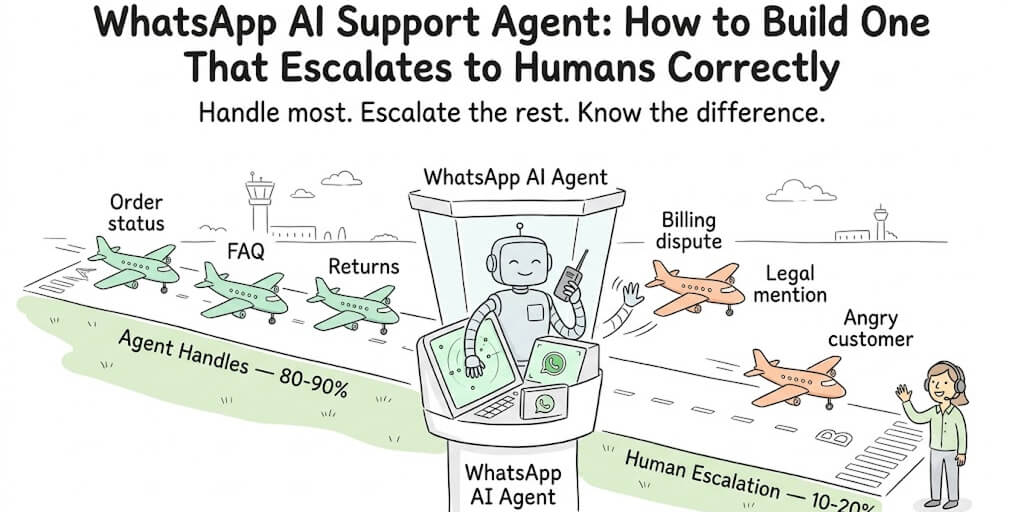
Most WhatsApp bots either answer everything badly or escalate everything uselessly. Here's how to build the one that knows the difference.
A customer messaged our WhatsApp support channel at 11 PM on a Saturday. "My order arrived damaged. I need this fixed NOW."
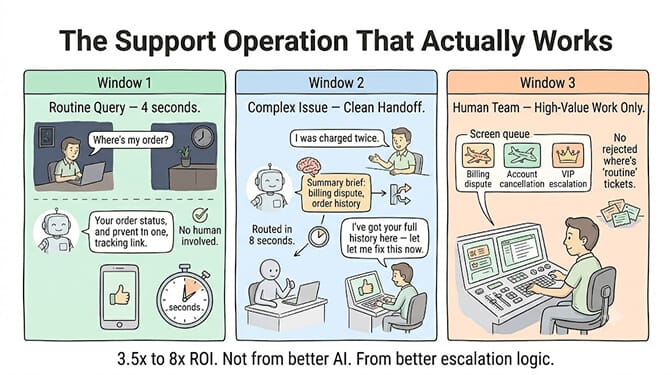
The AI agent responded in 4 seconds. It identified the order from the phone number, pulled up the shipping record, confirmed the delivery address, and offered three options: full refund, replacement shipment, or store credit with a 15% bonus.
The customer chose the replacement. Done. Resolved. No human involved. Saturday night.
Here's the thing. The exact same agent, the day before, received this message: "I was charged twice for my subscription and I want to cancel everything and I'm considering legal action."
That one, it escalated to a human in 8 seconds flat. It didn't try to handle it. It didn't offer scripted options. It said, "I'm connecting you with a team member who can resolve this fully. They'll have all the context from our conversation."
A WhatsApp AI support agent that handles everything is a liability. One that escalates everything is useless. The one that knows when to handle and when to hand off... that's the one that actually works.
Here's how to build it.
Why WhatsApp specifically (the numbers are hard to ignore)
WhatsApp isn't just another channel. For most businesses outside North America, it's THE channel.
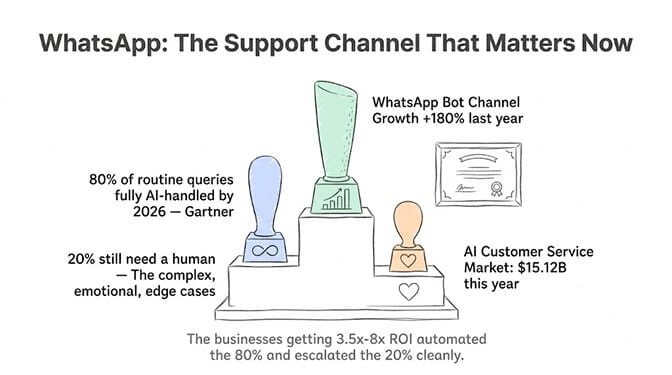
Industry data shows WhatsApp experienced 180% growth as a chatbot channel in the past year alone. Gartner projects conversational AI will reduce contact center labor costs by $80 billion by 2026. The AI customer service market itself is projected at $15.12 billion this year.
But the stat that matters most: 80% of routine customer service interactions will be fully handled by AI in 2026, according to Gartner. The remaining 20% are the complex, emotional, or edge cases that still need humans.
The businesses getting 3.5x to 8x ROI on AI support are the ones that automated the 80% correctly and escalate the 20% cleanly. The businesses getting frustrated are the ones whose bot either answers incorrectly or punts every conversation to a queue.
The ROI difference between a mediocre WhatsApp bot and a great one isn't the AI. It's the escalation logic.
The escalation logic that actually works
Most WhatsApp bots use keyword-based escalation. Customer says "agent" or "human" and they get routed. That's a start, but it's crude. Customers who need a human often don't ask for one. They just get increasingly frustrated.
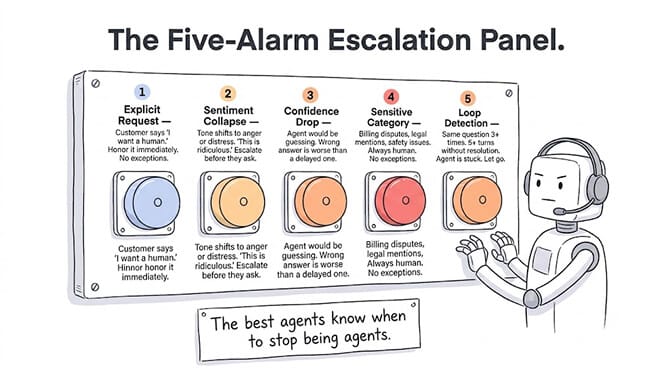
Here are the five escalation triggers that work in production.
Trigger 1: Explicit request
The customer asks for a human. "Let me talk to someone." "I want a real person." "Agent." This one is obvious, and your bot should honor it immediately. Never make a customer ask twice.
Trigger 2: Sentiment collapse
The tone shifts from neutral to angry or distressed. "This is ridiculous." "I've been trying for days." "Nobody is helping me." The AI should detect this and escalate preemptively, before the customer asks. This is where LLM-based agents have a massive advantage over rule-based bots. They can read emotional context.
Trigger 3: Confidence drop
The agent doesn't have enough information to answer confidently. If the customer's question doesn't match any known patterns and the agent's response would be a guess, escalate. A wrong answer is worse than a delayed one.
Trigger 4: Sensitive categories
Billing disputes. Legal mentions ("lawyer," "sue," "complaint to authorities"). Medical or safety issues. Account closures. These categories should always go to a human, regardless of whether the AI could technically handle them.
Trigger 5: Loop detection
The customer has asked the same question three times, or the conversation has gone back and forth more than 5 turns without resolution. The agent is stuck. Escalate.
What good escalation actually looks like
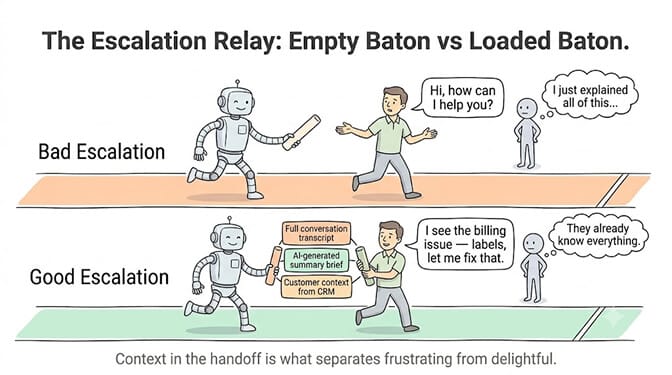
Bad escalation: "Your request has been forwarded to our team. Please wait."
The customer starts over when the human arrives. No context. No history. They repeat everything they already told the bot. This is worse than having no bot at all, because you wasted their time twice.
Good escalation transfers three things:
The full conversation transcript. Every message exchanged between the customer and the AI, so the human agent can read the history in 30 seconds instead of re-asking questions.
A structured summary. The AI generates a one-paragraph briefing: "Customer ordered product X on date. It arrived damaged. They want a replacement. Attempted automated resolution but customer mentioned possible legal action regarding a separate billing issue. Escalating for billing review."
Customer context from connected systems. Order history from your CRM. Previous tickets. Account status. Subscription details. The human agent should open the conversation with more context than the customer expects.
This is where persistent memory matters. An agent that remembers this customer complained last month and was offered a discount is more useful than one that starts fresh every time. BetterClaw's hybrid vector plus keyword memory keeps customer history across conversations, not just within a single session.
The setup (simpler than you think)
Building a WhatsApp AI support agent doesn't require the WhatsApp Business API documentation rabbit hole. No webhooks. No server infrastructure. No Twilio account. (If you're new to the channel, our OpenClaw WhatsApp setup guide covers connecting WhatsApp in the first place.)
Here's the practical path.
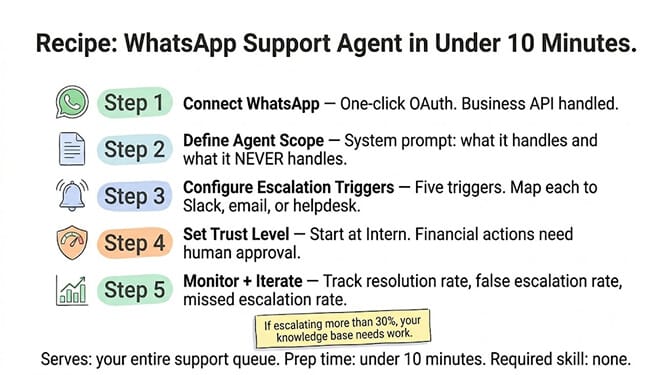
Step 1: Connect WhatsApp to your agent platform
One honest caveat first: WhatsApp isn't available on BetterClaw yet. BetterClaw agents connect to Telegram, Slack, Discord and Gmail, plus webhooks and 120+ connectors. To run this agent on WhatsApp today, you need a platform that connects to the WhatsApp Business API, or a self-hosted setup like OpenClaw's WhatsApp channel. Steps 2 to 5 apply whichever channel your agent runs on.
Step 2: Define what the agent handles
Write your agent's system prompt with clear instructions: "You handle order status inquiries, return requests, FAQ questions, and appointment scheduling. You do NOT handle billing disputes, account cancellations, or any conversation where the customer mentions legal action."
The clearer the boundaries, the better the escalation works. Ambiguity is the enemy.
Step 3: Configure escalation rules
Set your five triggers. Map each to a notification channel: Slack message to the support team (Slack webhooks are a Pro feature), email to the on-call agent, or direct handoff within your helpdesk tool. Include the conversation transcript and AI-generated summary in every escalation.
Step 4: Set trust levels
Start your WhatsApp agent at the "Intern" trust level. It responds to customers but requires human approval before taking any action with financial implications (processing refunds, applying credits, modifying subscriptions). Upgrade to "Specialist" once you've validated its accuracy over 200+ conversations.
Step 5: Monitor and iterate
Track three metrics: resolution rate (what percentage of conversations did the agent handle without escalation), false escalation rate (how often did it escalate unnecessarily), and missed escalation rate (how often should it have escalated but didn't). The third one is the most dangerous.
This is exactly the kind of agent we built BetterClaw for, on Telegram, Slack, Discord and Gmail today (WhatsApp isn't available yet). 28+ model providers to choose from. Trust levels built in. Persistent memory across conversations. Per-agent cost caps so your support agent doesn't burn through your LLM budget on a busy weekend. Free plan with 1 agent and 100 credits a month. $49/month on Pro. BYOK with zero markup.
The three mistakes that kill WhatsApp support agents
Mistake 1: No escalation at all
The agent tries to handle everything. It responds to angry customers with scripted FAQ answers. It attempts to resolve billing disputes it doesn't have authority to fix. Customers get increasingly frustrated and leave one-star reviews mentioning "terrible bot."
Seventy-two percent of chatbot deployments now use no-code platforms, which is great for speed but dangerous if the builder doesn't configure escalation. The tool makes it easy to build. A no-code agent builder worth using should make the escalation path as easy to configure as the happy path. It doesn't make it easy to build well.
Mistake 2: Escalating too aggressively
The agent escalates every slightly ambiguous question to a human. "What's your return policy?" Escalated. "Do you ship to Germany?" Escalated. Your human team is drowning in tickets the bot should have handled, and you're paying humans to answer FAQ questions.
The ideal split: 80-90% AI-handled, 10-20% escalated. If you're escalating more than 30%, your agent's knowledge base needs work.
Mistake 3: No context in the handoff
The customer spends 5 minutes explaining their issue to the bot. The bot escalates. The human agent opens the chat and says "Hi, how can I help you?" The customer has to start over.
This destroys trust. If your escalation doesn't include the full transcript and a summary, you're making things worse, not better.
What it looks like when it's working
When a WhatsApp AI support agent is working correctly, three things happen:
Customers get instant responses to routine questions. Order tracking, store hours, return policies, shipping updates. These are answered in 4-8 seconds, any time of day.
Complex issues reach a human with full context. The human agent opens the conversation already knowing the customer's name, order history, what they asked the bot, and why the bot escalated. Resolution time drops dramatically.
Your support team focuses on high-value work. Instead of answering "where's my package" 200 times a day, they handle the billing disputes, the edge cases, and the genuinely upset customers who need empathy and authority that an AI can't provide.
Businesses implementing AI support properly are seeing 3.5x to 8x ROI, according to industry research. The difference between the low and high end isn't the AI itself. It's the quality of the escalation logic, the context in the handoff, and the ongoing iteration based on real conversation data.
The best customer support isn't choosing between AI and humans. It's designing the handoff so cleanly that the customer barely notices the transition.
Give BetterClaw a look if you want a support agent with this escalation logic running before the end of the day on Telegram, Slack, Discord or Gmail (WhatsApp isn't available on BetterClaw yet). Free plan with 1 agent and 100 credits a month. $49/month on Pro. Persistent memory. Trust levels. Escalation built in. We handle the infrastructure. You handle the customers.
Frequently Asked Questions
What is a WhatsApp AI support agent?
A WhatsApp AI support agent is an autonomous AI-powered system that responds to customer messages on WhatsApp Business, handling routine inquiries (order status, FAQs, returns) automatically while escalating complex issues to human agents with full context. Unlike simple rule-based chatbots, AI support agents understand natural language, maintain conversation history, and intelligently determine when to involve a human based on sentiment, confidence, and topic sensitivity.
How does a WhatsApp AI agent compare to a traditional chatbot?
Traditional WhatsApp chatbots use keyword matching and decision trees, meaning customers must follow scripted paths. AI agents understand natural language, handle unexpected questions, and maintain context across multiple messages. The biggest practical difference is escalation quality: traditional bots escalate based on keywords ("agent", "human"), while AI agents detect sentiment, confidence drops, and sensitive topics to escalate proactively before a customer has to ask.
How do I set up a WhatsApp AI support agent for my business?
Connect your WhatsApp Business account to an AI agent platform that supports the WhatsApp Business API (BetterClaw doesn't support WhatsApp yet). Define what the agent handles in a system prompt, configure escalation triggers for complex or sensitive topics, set trust levels (start at "Intern" for human approval on financial actions), and monitor resolution rates. Total setup time on a no-code platform is under 10 minutes. You'll need a WhatsApp Business account and an LLM API key.
How much does a WhatsApp AI support agent cost?
Costs vary by platform. BetterClaw's free plan includes 1 agent, 100 credits/month, and 3 connectors. Pro at $49/month includes 5 agents, 12,000 credits/month, unlimited connectors, and Slack escalation webhooks. LLM costs depend on conversation volume: a support agent handling 100 conversations/day with ~2,000 tokens per conversation costs roughly $15-30/month in API fees on Claude Sonnet. Enterprise chatbot platforms typically charge $200-500+/month with per-conversation pricing on top.
Can a WhatsApp AI agent handle customer data securely?
Yes, with the right platform. BetterClaw encrypts credentials with AES-256 and auto-purges secrets from agent memory after 5 minutes. Each agent runs in an isolated Docker container. Trust levels prevent the agent from taking sensitive actions without human approval. For GDPR compliance, verify your LLM provider's Data Processing Agreement and ensure conversation data is handled within your retention policies. BetterClaw's BYOK model means the platform itself doesn't process your customer data through its own models.