You keep seeing "MCP" in every AI agent conversation. Here's what it actually does, why it matters, and whether you need to care about it.
I was in a founder Slack group last month when someone asked a question that stopped the conversation: "Everyone keeps saying their agent supports MCP. What does that actually mean for me?"
Twelve responses came in. Eight of them used the words "protocol," "standard," "interoperability," and "tool integration." None of them actually explained what MCP does in a way a non-developer could understand.
That's the problem with MCP. The Model Context Protocol is one of the most important developments in the AI agent space in the last year. It fundamentally changes how agents connect to the tools they need. But almost every explanation assumes you already know what an API is, what a protocol does, and why standardization matters. For concrete examples, see our notion mcp server and linear mcp server pages, or how to connect Stripe to an AI agent.
If you've been seeing "MCP" everywhere and feeling like you're the only person who doesn't get it, you're not. Most people don't. They just nod along.
Let me fix that.
MCP in one sentence (then we'll unpack it)
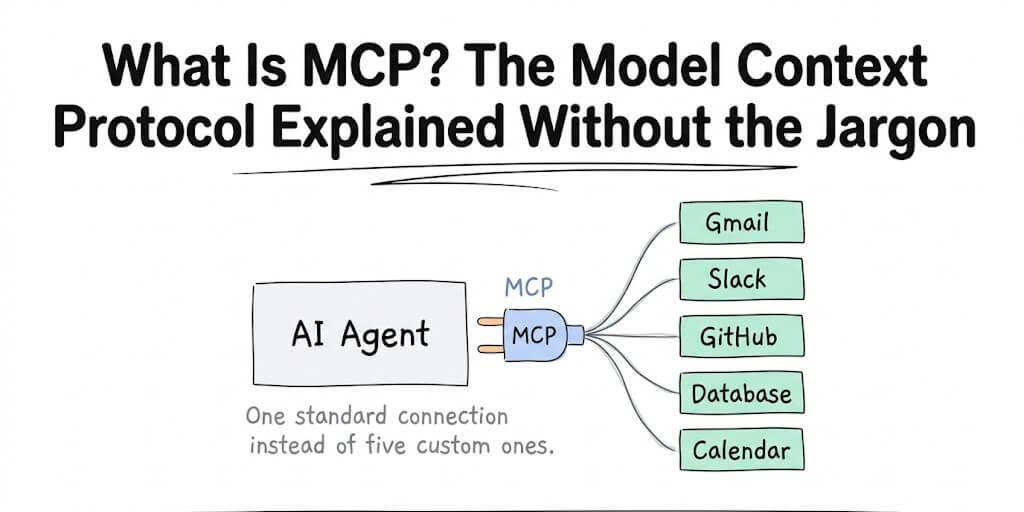
MCP (Model Context Protocol) is a universal standard that lets AI agents connect to any tool, data source, or service through a single, consistent interface instead of requiring a custom integration for each one.
That's it. That's the core idea.
Now let me explain why that matters with an analogy that actually works.
The USB analogy (the one that actually clicks)
Remember when every phone had a different charger? Motorola had one plug. Nokia had another. Samsung had a third. Your desk drawer was a graveyard of cables you couldn't use anymore.
Then USB happened. One connector. Every device. Didn't matter who made the phone or who made the charger. If it was USB, it worked.
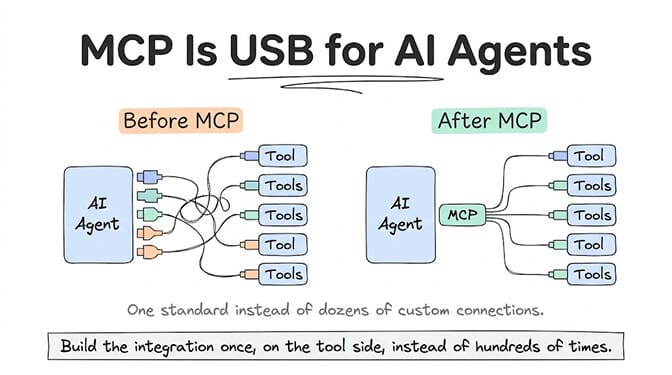
MCP is USB for AI agents.
Before MCP, every AI agent platform had to build custom integrations for every tool. Want your agent to use Gmail? Build a Gmail integration. Slack? Build a Slack integration. HubSpot? Build a HubSpot integration. Each one required different code, different authentication handling, different data formats, different error handling.
This meant two things. First, agent platforms spent enormous engineering time building and maintaining integrations instead of building the agent itself. Second, the number of tools your agent could use was limited by how many custom integrations your platform had built.
MCP changes this. Instead of each platform building custom integrations, tool providers build one MCP server that describes their tool's capabilities in a standardized format. Any agent that speaks MCP can connect to that server immediately. No custom integration needed.
Gmail builds one MCP server. Every MCP-compatible agent platform can use Gmail. Slack builds one MCP server. Every MCP-compatible agent platform can use Slack. The integration work happens once, on the tool side, instead of hundreds of times across hundreds of agent platforms.
Before MCP, every agent platform was building the same integrations from scratch. After MCP, integrations are built once and work everywhere.
What MCP actually does (the three things)
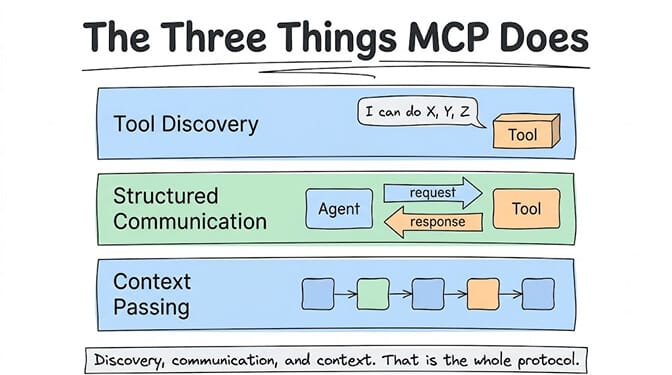
When you hear "MCP," there are three specific capabilities it provides. Understanding these will make every future MCP conversation make sense:
1. Tool discovery
Your agent needs to know what tools are available and what each tool can do. MCP provides a standard way for tools to describe themselves: "I'm Gmail. I can send emails, read emails, search emails, and create drafts. Here are the parameters I need for each action."
Without MCP, this description was baked into each custom integration. With MCP, the tool describes itself at connection time, and the agent learns its capabilities automatically.
2. Structured communication
When your agent wants to use a tool, MCP defines exactly how to ask. The request format, the response format, and the error format are all standardized. This means the agent doesn't need special code for each tool. It speaks MCP, and every MCP-compatible tool understands the same language.
3. Context passing
This is the "Context" in "Model Context Protocol." When your agent calls a tool, it can pass relevant context about what it's trying to accomplish. The tool can use that context to provide a better response. And the tool's response comes back in a format the agent can immediately use for the next step.
This context flow is what makes multi-step agent workflows possible. The agent reads an email (tool 1), extracts the customer name (its own reasoning), looks up the customer in HubSpot (tool 2), checks their order status (tool 3), and drafts a response (its own reasoning). MCP ensures each tool call feeds cleanly into the next one.
For a comparison of how MCP stacks up against other agent communication protocols, we published a detailed breakdown of A2A vs MCP vs ACP covering when to use each one. And if you're weighing how to extend an agent's abilities, our Agent Skills vs MCP guide explains where each approach fits.
Why MCP matters if you're not a developer
"Great," you might be thinking. "That's a nice technical standard. But I'm a founder / marketer / ops lead. Why do I care?"
Here's why.
More tools, faster. Before MCP, the agent platform you chose determined which tools your agent could use. If your platform only had 15 integrations and you needed HubSpot, you were out of luck (or writing custom code). With MCP, any tool that publishes an MCP server works with any MCP-compatible platform. The ecosystem of available tools grows independently of any single platform.
Less vendor lock-in. If your agent's integrations are custom to one platform, switching platforms means rebuilding every integration. If your integrations run through MCP, switching platforms means pointing the new platform at the same MCP servers. Your tool connections survive a platform migration.
Better agent performance. MCP's structured communication and context passing mean cleaner tool calls, fewer errors, and more reliable multi-step workflows. When the agent and tool speak the same language natively, there are fewer translation errors.
Anthropic released MCP as an open standard in late 2024, and adoption accelerated rapidly through 2025 and into 2026. By mid-2026, major platforms including Claude, Cursor, Windsurf, and dozens of AI agent frameworks support MCP natively. Google, Microsoft, and OpenAI have all acknowledged MCP or announced compatibility plans.
MCP vs API: what's the difference?
This is the question I hear most often, and it's a good one.
An API (Application Programming Interface) is how software talks to other software. Every tool already has an API. Gmail has an API. Slack has an API. HubSpot has an API. APIs have existed for decades.
So why do we need MCP if APIs already exist?
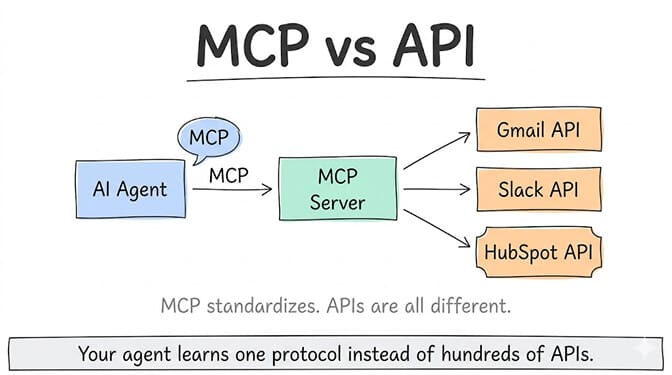
Because APIs are all different. Gmail's API has different authentication, different endpoints, different request formats, and different response structures than Slack's API. Building a connection to Gmail's API is a completely separate engineering project from building a connection to Slack's API.
MCP standardizes the interface layer on top of APIs. The tool's MCP server handles the translation between MCP's standard format and the tool's specific API. The agent only needs to speak MCP. The MCP server handles the API-specific details.
Think of it this way: every country has its own electrical outlets. That's the API. MCP is the universal travel adapter. You plug into the adapter. The adapter plugs into whatever outlet the country uses. You don't need to know or care about the outlet format.
APIs are specific. MCP is universal. Your agent learns one protocol instead of hundreds of APIs. (Whether your agent actually needs MCP, given the token overhead of tool definitions, is a separate question we cover in MCP vs direct API calls.)
What this looks like in an actual agent
Let me make this concrete with a scenario.
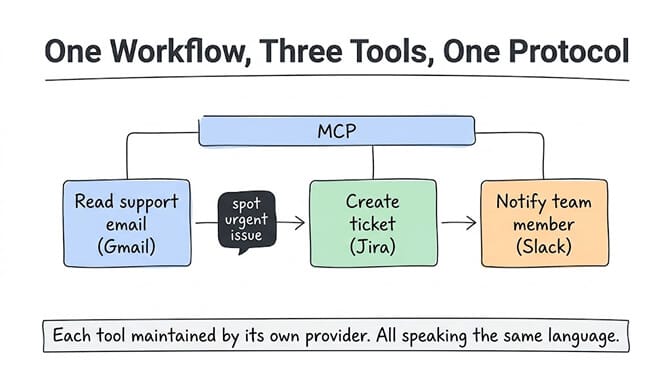
You're a founder. You want an AI agent that monitors your customer support inbox, identifies urgent issues, creates tickets in your project management tool, and notifies the right team member on Slack.
Without MCP: Your agent platform needs a custom Gmail integration (to read emails), a custom Jira integration (to create tickets), and a custom Slack integration (to send notifications). If any of those integrations aren't available, you either wait for the platform to build them, write custom code, or use a third-party bridge like Zapier. Each integration was built by a different developer, possibly at different times, with different quality levels.
With MCP: Gmail publishes an MCP server. Jira publishes an MCP server. Slack publishes an MCP server. Your agent platform connects to all three through MCP. The integrations are standardized, maintained by the tool providers themselves, and guaranteed to work with any MCP-compatible platform.
If you want to try this without writing a config file, BetterClaw agents can now connect to any MCP server from the dashboard: paste the URL, sign in, and tick the tools the agent should have.
This is why we've invested heavily in MCP compatibility at BetterClaw. Our 120+ connectors already cover the most common tools, but MCP expands the universe of what your agent can connect to. And because we support unlimited skills, with a 4-layer security audit on our curated set, MCP-connected tools go through the same vetting process. Free plan includes everything. $49/month on Pro. BYOK with zero inference markup.
The security question MCP raises
MCP makes it easier for agents to connect to more tools. That's the benefit. But "easier to connect" also means "more surface area for things to go wrong."
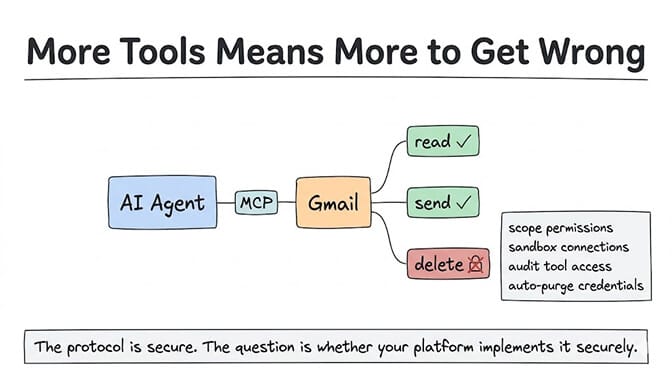
When your agent connects to a tool via MCP, it's given access to that tool's capabilities. If the MCP server says "I can read, write, and delete emails," your agent might use all three of those capabilities. Including delete.
This is why permission scoping matters. A well-designed MCP implementation lets you control which capabilities your agent can use, even if the MCP server offers more. Your agent can read and send emails but not delete them. It can create Jira tickets but not close them. It can send Slack messages to specific channels but not DM anyone.
The ClawHavoc campaign in January 2026 found 1,400+ malicious skills that exploited exactly this kind of over-permissioned access. A skill that looked legitimate could access capabilities the user never intended to grant. This isn't an MCP-specific problem (it happened through custom integrations too), but MCP makes it more important to audit what your agent can actually do.
Platforms with strong security architecture handle this by sandboxing MCP connections, auditing tool access, and enforcing least-privilege principles. Secrets auto-purge (like BetterClaw's 5-minute AES-256 purge) ensures that tool credentials don't linger in agent memory after use.
What MCP means for the future of AI agents
Here's where I'll give you my honest perspective on where this goes.
MCP is doing for AI agents what HTTP did for the web. Before HTTP, every networked application had its own communication protocol. After HTTP, every application spoke the same language and the web exploded. MCP is creating that same universal layer for agent-to-tool communication.
The Salesforce 2026 enterprise benchmark found that the average enterprise runs 12 AI agents. By 2027, that number is expected to reach 20, with 50% operating autonomously. Every one of those agents needs to connect to tools. MCP makes that connection standardized instead of custom.
The practical implication for you: when evaluating AI agent platforms, ask whether they support MCP. It's not a feature you'll use directly (you'll never type "MCP" into the platform). But it determines how many tools your agent can access, how reliable those connections are, and how portable your agent is if you ever switch platforms.
The simplest way to think about it
If someone asks you "what is MCP?" at a dinner party (weird dinner party, but it could happen), here's your answer:
"MCP is a universal standard that lets AI agents connect to any software tool through one consistent interface. Think of it as USB for AI. Before MCP, every connection was custom. After MCP, one standard works everywhere."
That's genuinely all you need to know as a non-developer. The protocol is doing important work under the hood. You don't need to see it, configure it, or understand its JSON-RPC implementation. You just need to know it exists, that it makes agents more capable and more portable, and that the platform you choose should support it.
If any of this resonated, give BetterClaw a look. We support MCP alongside 120+ connectors, with unlimited skills and the same security standards regardless of how your agent connects. Free plan with 1 agent and 100 credits a month. $49/month for Pro. Deploy in 60 seconds. We handle the protocols. You handle the outcomes.
Frequently Asked Questions
What is MCP (Model Context Protocol)?
MCP stands for Model Context Protocol. It's an open standard, originally released by Anthropic, that lets AI agents connect to tools, data sources, and services through a single, consistent interface. Think of it as a universal plug: instead of every agent platform building custom integrations for every tool, MCP provides one standard format that works across all MCP-compatible platforms and tools.
How does MCP compare to a regular API?
APIs are tool-specific. Every tool (Gmail, Slack, HubSpot) has its own API with different authentication, request formats, and response structures. MCP sits on top of APIs as a standardization layer. The tool's MCP server translates between the universal MCP format and the tool's specific API. Your agent learns one protocol (MCP) instead of learning hundreds of individual APIs.
How do I use MCP with my AI agent?
As a non-developer, you typically don't interact with MCP directly. Your agent platform handles MCP connections behind the scenes. When choosing a platform, check whether it supports MCP natively (most major platforms do as of mid-2026). If your platform supports MCP, any tool that publishes an MCP server will be available to your agent automatically. No custom integration work required on your end. For a hands-on walkthrough, see our OpenClaw MCP setup guide.
Does MCP cost extra to use?
MCP itself is an open standard with no licensing fees. However, individual MCP servers may have their own pricing (usually tied to the underlying tool's API pricing). On platforms like BetterClaw, MCP-connected tools work through the same BYOK model as any other integration: you pay the tool provider directly. No markup from the platform.
Is MCP secure enough for production AI agents?
MCP as a protocol is transport-agnostic and supports standard security measures. The security risk comes from implementation, not the protocol itself. Look for platforms that scope MCP permissions (your agent can only use approved capabilities), sandbox MCP connections (isolating tool access per agent), audit MCP activity (logging what tools were called and why), and purge credentials after use. The protocol is secure. The question is whether your platform implements it securely.