A 3.8B model on a Raspberry Pi. A 14B model on an old laptop. A 12B model on a Mac Mini tucked behind the TV. Three setups, three always-on personal agents, zero API costs. Here's how to build each one.
My morning briefing agent runs on a Mac Mini tucked behind the TV in my living room. Qwen 3.6. 35 billion parameters. It wakes up at 6:45 AM, reads my calendar, pulls overnight email threads, and drops a Slack message before I've poured my coffee.
It's been running for six weeks. Zero API costs. Zero outages (the Mac Mini doesn't sleep because I disabled Energy Saver). Zero per-token billing surprises. The electricity cost is roughly $3/month.
This is what small language models make possible in 2026. Not toy demos. Not "it kind of works." Actual useful agents running continuously on hardware you already own or can buy for under $500.
Gartner predicts organizations will use task-specific SLMs 3x more than general-purpose LLMs by 2027. The shift is already happening in personal agent setups. Here's how to build one.
The 3 hardware tiers (pick yours)
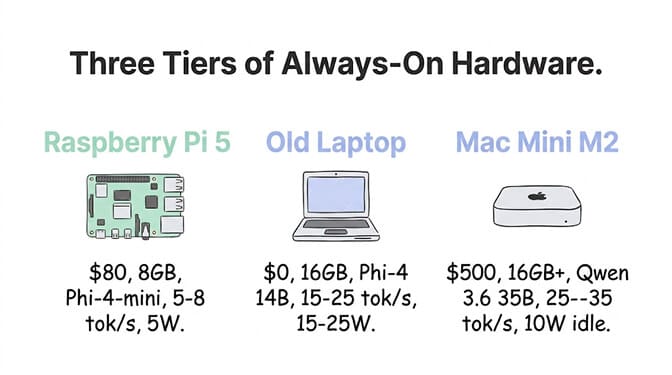
Tier 1: Raspberry Pi 5 ($80, 8 GB)
Model: Phi-4-mini (3.8B) at Q4.
Speed: 5-8 tok/s. Slow for chat. Fine for scheduled agents that run overnight or process batches.
Power: 5W under load. $0.50/month electricity.
Best for: Simple classification, routing, and extraction agents. Email triage (classify into 5 categories). Daily digest summarization. Sensor data processing (IoT). The 128K context window on Phi-4-mini handles surprisingly long inputs.
Limitations: Too slow for real-time chat. Can't run models above ~4B parameters. No GPU (CPU-only inference). Tool calling works but responses take 10-30 seconds.
# Raspberry Pi 5 setup
curl -fsSL https://ollama.com/install.sh | sh
ollama pull phi4-mini
sudo systemctl enable ollama
Tier 2: Old laptop or desktop ($0, already own)
Model: Phi-4 (14B) at Q4 or Gemma 4 12B at Q8.
Speed: 15-25 tok/s on a laptop with 16 GB RAM. Faster on NVIDIA GPUs.
Power: 15-25W under load. $2-4/month electricity.
Best for: The sweet spot for personal agents. Phi-4's 84.8% MMLU handles classification, extraction, summarization, and math. Gemma 4 12B adds multimodal (image + audio + video processing). Fast enough for near-real-time responses via Telegram or Slack.
Limitations: Laptop sleep kills the agent. Disable sleep mode or use a desktop. No battery backup unless on a UPS. Fan noise on sustained inference.
The sleep problem: This is the #1 failure mode. Your laptop goes to sleep. Ollama stops responding. Your agent dies silently. On macOS: System Settings -> Displays -> turn off "Automatically turn off display." On Linux: systemd-inhibit --what=idle ollama serve.
Tier 3: Mac Mini M2/M4 ($500-600, dedicated)
Model: Qwen 3.6 35B-A3B at Q4.
Speed: 25-35 tok/s. Fast enough for real-time chat agents.
Power: 10W idle, 30W under load. $3-5/month electricity.
Best for: The production-grade personal agent setup. Qwen 3.6's MoE architecture runs 3B active parameters from a 35B pool. Tool calling works (disable thinking mode). 128K context. Apache 2.0. Multiple agents simultaneously if they don't overlap inference.
Why Mac Mini specifically: Silent. Tiny. 10W idle. Apple Silicon runs Ollama natively on the neural engine. No fan noise at moderate load. Tuck it behind a TV, in a closet, on a shelf. It disappears.
# Mac Mini always-on setup
# 1. Disable sleep
sudo pmset -a sleep 0
sudo pmset -a disablesleep 1

# 2. Install Ollama
brew install ollama

# 3. Pull the model
ollama pull qwen3.6:35b-a3b

# 4. Start on boot (launchd handles this automatically on macOS)
# Ollama is already configured to start on boot via the Ollama app
Which small model for which agent task
| Task | Best SLM | Min Hardware | Speed |
|---|---|---|---|
| Email classification | Phi-4-mini (3.8B) | 8 GB RAM | 5-8 tok/s |
| Morning briefing | Phi-4 (14B) | 16 GB RAM | 15-25 tok/s |
| Image analysis | Gemma 4 12B | 16 GB RAM | 15-20 tok/s |
| Code review (simple) | Phi-4 (14B) | 16 GB RAM | 15-25 tok/s |
| Expense extraction | Phi-4-mini (3.8B) | 8 GB RAM | 5-8 tok/s |
| Slack digest | Qwen 3.6 35B-A3B | 16 GB RAM | 25-35 tok/s |
| Meeting prep | Qwen 3.6 35B-A3B | 16 GB RAM | 25-35 tok/s |
| Research summary | Qwen 3.6 35B-A3B | 16 GB RAM | 25-35 tok/s |
The pattern: Phi-4-mini (3.8B) for anything that needs minimal reasoning and can tolerate slow responses. Phi-4 or Gemma 4 (12-14B) for tasks needing moderate intelligence and near-real-time speed. Qwen 3.6 (35B MoE) for tasks needing strong reasoning and real-time interaction.
The always-on checklist (the stuff that breaks at 2 AM)
Prevent sleep/hibernate
- macOS:
sudo pmset -a sleep 0 && sudo pmset -a disablesleep 1 - Linux:
sudo systemctl mask sleep.target suspend.target hibernate.target hybrid-sleep.target - Windows: Settings -> System -> Power -> Screen and sleep -> Never
Auto-restart Ollama on crash
Linux (systemd):
sudo systemctl enable ollama
# Ollama's service file already includes Restart=always
macOS (launchd): The Ollama app installs a LaunchAgent that auto-restarts. If using Homebrew, create a plist with KeepAlive: true.
Monitor memory
Small models on constrained hardware can run out of RAM if the context grows too large. Cap your context window in the Modelfile:
FROM qwen3.6:35b-a3b
PARAMETER num_ctx 16384
PARAMETER num_predict 1024
Handle network outages
Your always-on agent doesn't need the internet for inference. But it needs the internet to read emails, check calendars, and post to Slack. Add retry logic for API calls to external services. A 30-second retry with 3 attempts handles most brief network blips.
If managing always-on hardware, sleep prevention, auto-restart, memory monitoring, and network retry logic sounds like more infrastructure than you bargained for, BetterClaw handles all of this at the platform level. Your agent runs on managed infrastructure. No hardware to maintain. No sleep mode to disable. Free plan with 1 agent and 100 credits a month. $49/month on Pro. Connect cloud APIs via BYOK or point to your local Ollama instance.
3 always-on agents you can build this weekend
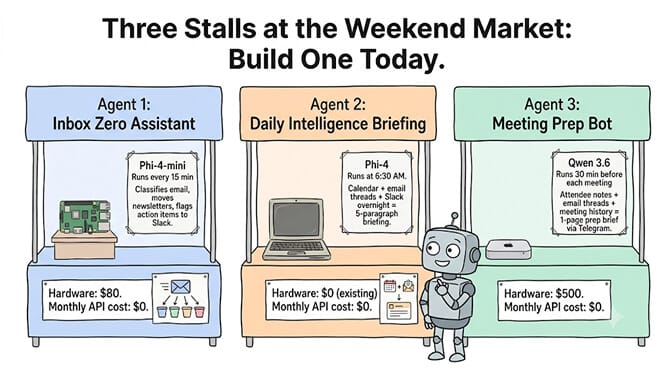
Agent 1: The inbox zero assistant (Phi-4-mini, Raspberry Pi)
Runs every 15 minutes. Reads new emails via IMAP. Classifies into: action required, FYI, newsletter, spam, personal. Moves newsletters and spam automatically. Flags action-required items in a Slack channel. Total hardware: $80. Total API cost: $0.
Agent 2: The daily intelligence briefing (Phi-4, old laptop)
Runs at 6:30 AM. Reads calendar for the day. Pulls email threads with today's meeting attendees. Summarizes overnight Slack messages. Generates a 5-paragraph briefing. Posts to your preferred channel. Total hardware: $0 (existing laptop). Total API cost: $0.
Agent 3: The meeting prep bot (Qwen 3.6, Mac Mini)
Runs 30 minutes before each meeting. Looks up attendee LinkedIn profiles (via saved notes, not scraping). Pulls related email threads. Summarizes previous meeting notes. Generates a 1-page prep brief. Sends via Telegram. Total hardware: $500 (Mac Mini). Total API cost: $0.
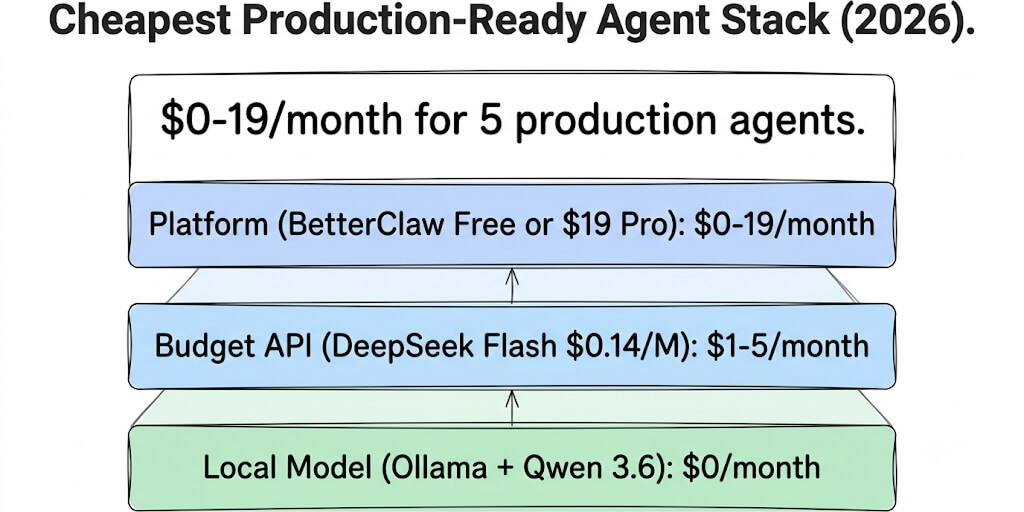
For the full build guide on each, see our personal agent use cases. And for the cheapest complete stack breakdown, including when to add cloud APIs for overflow, see our cheapest production agent stack guide.
The honest tradeoffs (read this before buying a Raspberry Pi)
Speed. 5-8 tok/s on Phi-4-mini means a classification response takes 3-5 seconds. A summarization takes 15-30 seconds. That's fine for scheduled agents. Not fine for real-time chat. If you need instant responses, you need Tier 2 or Tier 3 hardware, or cloud APIs.
Quality ceiling. Small models make mistakes that large models don't. Phi-4-mini at 3.8B occasionally misclassifies ambiguous emails. Phi-4 at 14B misses edge cases on complex extraction. Sonnet's 3% tool hallucination vs SLMs at 12-20% is a real gap. For tasks where wrong answers cost money or embarrassment, cloud APIs are worth the cost.
Maintenance. Always-on hardware needs maintenance. OS updates. Ollama updates. Model updates. Power outages. Network issues. A Mac Mini running in a closet is low-maintenance. But it's not zero-maintenance. Cloud-hosted agents on BetterClaw are genuinely zero-maintenance from your side.
No proprietary models. You can't run Claude or GPT locally. Period. If your agent needs Sonnet's instruction following or Opus's reasoning depth, local SLMs can't substitute. The hybrid approach (local for simple, cloud for complex) is covered in our model routing guide.
The magic of small language models in 2026 isn't that they're as good as large models. They aren't. The magic is that they're good enough for 60-70% of personal agent tasks, and they run on hardware that costs $0-500 and $0.50-5/month in electricity. A year ago, this required a $50/month API bill. Now it requires a device you probably already own.
Give BetterClaw a look if you want the best of both worlds. Connect your local Ollama instance for simple tasks. Connect cloud APIs for complex ones. Route automatically. Free plan with 1 agent and 100 credits a month. $49/month for Pro. We handle the orchestration. You handle the interesting part.
Frequently Asked Questions
What is the best small language model for always-on agents?
Qwen 3.6 35B-A3B is the best SLM for always-on agents on 16 GB hardware. Its MoE architecture runs only 3B active parameters, giving it speed (25-35 tok/s) and quality (strong tool calling, 128K context). For ultra-lightweight agents on 8 GB hardware, Phi-4-mini (3.8B) with 128K context and built-in function calling is the best option. For multimodal agents (image, audio, video), Gemma 4 12B on 16 GB is the best choice.
Can I run an AI agent on a Raspberry Pi?
Yes. A Raspberry Pi 5 (8 GB, $80) runs Phi-4-mini (3.8B) at 5-8 tok/s via Ollama. This is fast enough for scheduled agents (email classification, daily digests, sensor processing) but too slow for real-time chat. Power consumption is approximately 5W ($0.50/month electricity). The Raspberry Pi is the cheapest always-on hardware for a personal AI agent.
How much electricity does an always-on local AI agent use?
A Raspberry Pi 5 uses approximately 5W ($0.50/month). An old laptop uses 15-25W ($2-4/month). A Mac Mini M2 uses 10W idle, 30W under load ($3-5/month). Compare to cloud API costs of $5-50/month for the same tasks. The electricity cost of local inference is negligible compared to API costs over any timeframe beyond 2-3 months.
Are small language models good enough for production agents?
For structured personal tasks (classification, routing, extraction, summarization), yes. Phi-4 (14B) achieves 94-96% accuracy on classification tasks. For complex multi-step tool chains, customer-facing output, and long-context work, small models have 12-20% tool-call hallucination rates vs 3% for Claude Sonnet. The practical approach: use SLMs for the 60-70% of tasks they handle well, route the rest to cloud APIs.
Should I buy dedicated hardware or use cloud APIs?
For personal agents running 100-500 tasks/day, a Mac Mini M2 ($500) pays for itself in 3-5 months vs cloud API costs ($15-50/month). For business agents at higher volumes, cloud APIs offer better reliability (no sleep mode, no crashes, SLAs). The hybrid approach works best: dedicated hardware for always-on personal agents, cloud APIs for production business agents. BetterClaw supports both via BYOK ($0 free plan, $49/month Pro).