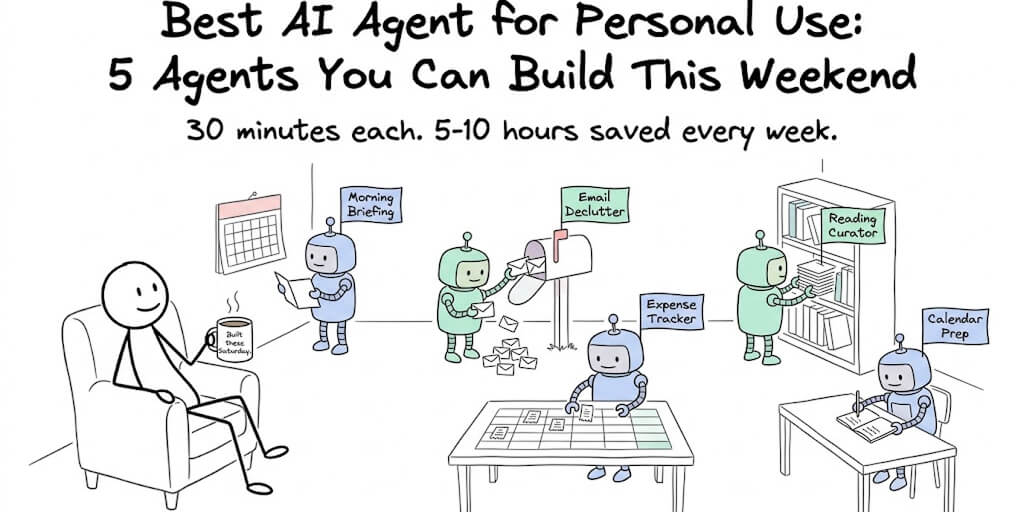
You don't need a team, a budget, or a technical background to run your own AI agents. These five take 30 minutes each and save 5-10 hours every week.
Your first agent by Sunday evening.
A visual builder, one-click integrations, scheduling built in. No code, no Docker. Free forever, not a trial. Start free → No credit card · No Docker · No config files
Last Saturday morning I woke up to 47 unread emails, a calendar packed with meetings I hadn't prepped for, and a credit card statement I'd been ignoring for three weeks.
By Sunday evening, I had five agents handling all of it. Not five complex agents that took weeks to build. Five simple ones, each set up in about 30 minutes.
The morning briefing agent sends me a Slack message at 7 AM with today's meetings, weather, and top news. The email declutter agent sorts my inbox overnight. None of them took more than half an hour, because you build an AI agent in your browser and the slow parts (hosting, OAuth, scheduling) are already handled. The expense tracker catches every receipt. The reading list agent curates articles based on topics I care about. The calendar prep agent writes briefs for tomorrow's meetings.
Total monthly cost: $49 (a BetterClaw Pro plan, which covers all five) plus about $8 in API costs across all five. Total time saved: roughly 8 hours per week.
Here are the five best AI agents for personal use that anyone can build this weekend. No code. No terminal. No Docker.
Agent 1: The Morning Briefing (the one you'll use first)
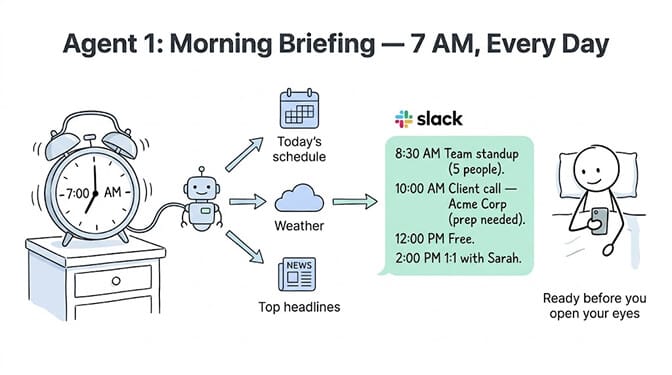
What it does: Every morning at 7 AM, this agent checks your calendar, pulls today's schedule, and sends you a formatted digest on Slack or Telegram. Meetings listed with time, attendee names, and a one-line context note. Gaps highlighted. Conflicts flagged.
Why it matters: You stop checking your calendar app six times before 9 AM. The briefing is there when you pick up your phone. You know what's coming without opening anything.
How to build it (30 minutes): Connect Calendar (OAuth, one click). Connect Slack or Telegram (one click). Set the schedule: daily at 7 AM. Write the system prompt: "Every morning, read today's calendar events. For each event, list the time, title, attendees, and a one-sentence context note based on the meeting title. Flag any scheduling conflicts. Format as a clean, scannable Slack message."
What it costs: Under $2/month in API tokens. The model reads 5-10 calendar events and generates a 200-word summary daily. At DeepSeek Flash pricing ($0.14/M), that's pennies.
Agent 2: The Email Declutter (the one that saves the most time)
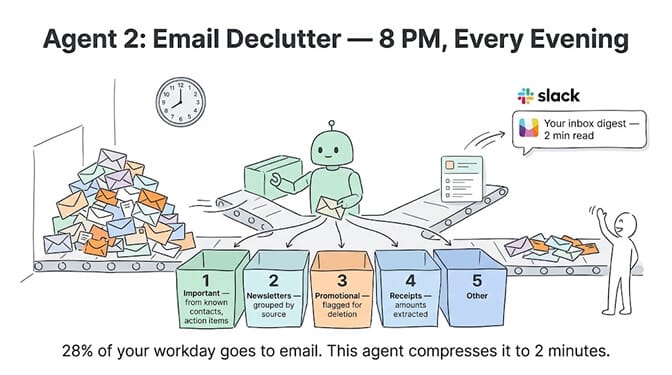
What it does: This agent scans your inbox every evening, classifies emails into categories (important, newsletter, promotional, receipts, action-required), and sends you a summary. Important emails get a one-line synopsis. Newsletters get grouped. Promotional emails get flagged for deletion.
Why it matters: The average professional spends 28% of their workday on email (McKinsey). For a solopreneur, that's 2-3 hours daily. This agent compresses that to a 2-minute scan of the summary.
How to build it (30 minutes): Connect Gmail (OAuth). Set the schedule: daily at 8 PM. Write the system prompt: "Read today's unread emails. Classify each as: important (from known contacts or containing action items), newsletter, promotional, receipt, or other. For important emails, write a one-line synopsis. Group newsletters by source. Count promotional emails. List receipts with amounts. Send the summary to Slack."
The honest caveat: This agent reads your email subjects and senders, not full email bodies (unless you configure it to). For most people, subject-line classification is accurate enough. For sensitive emails, review the original.
Agent 3: The Expense Tracker (the one that pays for itself)
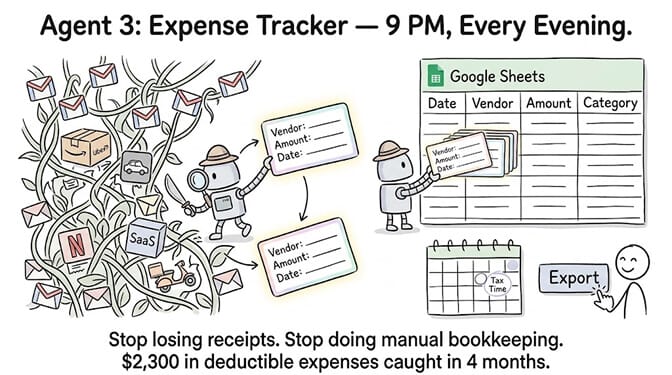
What it does: This agent monitors your Gmail for receipt emails (Amazon, Uber, subscriptions, restaurants), extracts the vendor name, amount, date, and category, and logs everything into a Google Sheet.
Why it matters: You stop losing receipts. Tax time becomes a spreadsheet export instead of a shoebox dig. And you actually see where your money goes because the data is already organized.
How to build it (30 minutes): Connect Gmail. Connect Google Sheets. Set the schedule: daily at 9 PM. Write the system prompt: "Search today's emails for receipts and purchase confirmations. For each, extract: vendor name, amount, currency, date, and category (food, transport, subscription, shopping, other). Append each as a new row in the connected Google Sheet with columns: Date, Vendor, Amount, Category, Source Email Subject."
What it catches: Amazon orders, Uber rides, subscription renewals (Netflix, Spotify, SaaS tools), restaurant delivery, airline bookings. Most receipt emails follow predictable formats, and the extraction accuracy is high on structured emails.
This is the agent from our Gmail invoice tutorial adapted for personal use. The tutorial covers edge cases and advanced configuration.
Agent 4: The Reading List Curator (the one that makes you smarter)
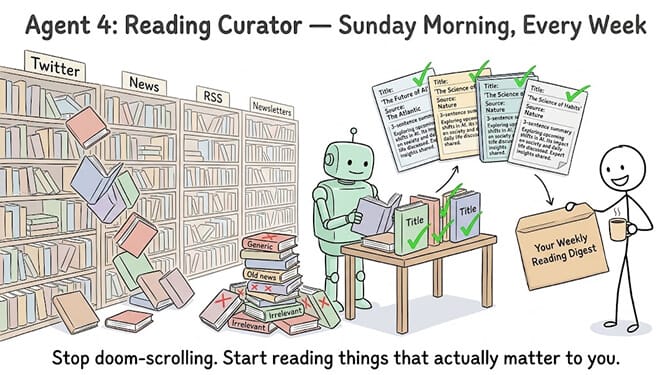
What it does: Once a week, this agent searches for articles on topics you specify (AI, startups, your industry), summarizes the top 5-10 pieces, and sends you a formatted digest with titles, one-paragraph summaries, and links.
Why it matters: You stop doom-scrolling Twitter for industry news. You get a curated weekly digest that's actually relevant to what you care about. And you read deeper because the summaries tell you which articles are worth your time.
How to build it (30 minutes): Connect a web scraping skill. Connect Slack or Gmail. Set the schedule: weekly on Sunday morning. Write the system prompt: "Search for the top articles published this week on these topics: your topics. For each article, extract the title, source, publication date, and write a 3-sentence summary. Rank by relevance to my interests: your specific interests. Send the top 10 as a formatted digest."
Personalization tip: Add a line to the system prompt: "I'm especially interested in specific angle. Deprioritize generic news and prioritize analysis, data, and contrarian takes." The more specific you are about what you care about, the better the curation gets over time.
If you're building agents for the first time and want all five of these running by Sunday evening, BetterClaw's no-code visual builder handles the OAuth connections, scheduling, and model routing through a point-and-click interface. No code, no YAML, no Docker. The free plan gives you 1 agent and 100 credits a month. $49/month for Pro gives you 5 agents, 12,000 credits a month, and hourly scheduling, which covers all five. BYOK with zero inference markup.
Agent 5: The Calendar Prep Agent (the one that makes you look prepared)
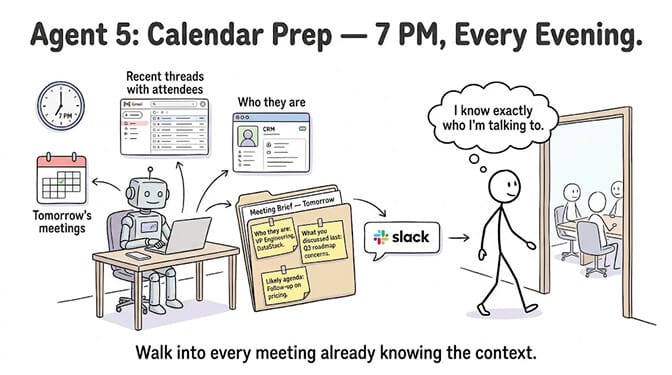
What it does: Every evening, this agent reads tomorrow's calendar, looks up each attendee in your CRM or Sheets, pulls any recent email threads with them, and generates a one-page meeting brief. Who they are, what you last discussed, and what this meeting is probably about.
Why it matters: You walk into every meeting knowing the context. No more "remind me, what did we discuss last time?" moments. No more scrambling through emails five minutes before the call.
How to build it (30 minutes): Connect Calendar. Connect Gmail. Connect Google Sheets (where you keep contact notes) or CRM. Set the schedule: daily at 7 PM. Write the system prompt: "Read tomorrow's calendar events. For each meeting with external attendees: look up the attendee in Sheets/CRM, pull the last 3 email threads with them, and generate a brief including: who they are, what you last discussed, and likely agenda items for tomorrow. Send each brief to Slack."
This is the most impressive agent to show someone. When a non-technical friend asked me what AI agents actually do, I showed them this one. They set up their own version that evening.
The Build Order (Start With This One)
Don't try to build all five at once. Start with Agent 1 (Morning Briefing). It's the simplest, the most immediately useful, and the one that will convince you the other four are worth building.
Once you see your schedule appear on Slack at 7 AM without opening a single app, you'll understand what AI agents are for. Not grand, abstract "AI transformation." Just... things that used to take 10 minutes now happening automatically.
Then build Agent 2 (Email Declutter) because email is where your time goes. Then Agent 3 (Expense Tracker) because it pays for itself at tax time. Agent 4 and 5 come last because they're nice-to-haves, not need-to-haves.
Total build time for all five: about 2.5 hours. A lazy Saturday afternoon. By Sunday evening, they're all running.
Gartner projects 40% of enterprise applications will embed AI agents by end of 2026. But the most underrated use case isn't enterprise. It's personal. Five simple agents, built in a weekend, saving you 8+ hours every week for the rest of the year.
That's not a productivity hack. That's 400+ hours back. Almost two months of working days.
Build the first one today.
Give BetterClaw a look if you want all five running by Sunday evening. Free plan with 1 agent and 100 credits a month. $49/month for Pro with 5 agents, 12,000 credits a month, and scheduling. We handle the infrastructure. You handle the interesting part.
Frequently Asked Questions
What is the best AI agent for personal use?
The best personal AI agents are ones that handle repetitive daily tasks: morning briefings (calendar digest), email classification, expense tracking, content curation, and meeting prep. Each takes about 30 minutes to build on a no-code platform like BetterClaw and saves 1-2 hours per week. Start with a morning briefing agent (calendar to Slack) as it's the simplest and most immediately useful.
How much does a personal AI agent cost per month?
A personal AI agent on BetterClaw costs $0/month on the free plan (1 agent, 100 credits) or $49/month on Pro (5 agents, 12,000 credits/month, scheduling). LLM API costs are separate via BYOK and typically run $1-3/month per agent for personal workloads using budget models like DeepSeek Flash ($0.14/M tokens). Total cost for 5 agents: approximately $49 (platform) + $8 (API) = $57/month.
Can I build an AI agent without coding?
Yes. No-code platforms like BetterClaw let you build agents through a visual builder with point-and-click OAuth integrations (Gmail, Calendar, Slack, Sheets, and more). You write a natural language system prompt describing what the agent should do, connect your integrations, set a schedule, and the agent runs. No Python, no Docker, no terminal. Setup takes about 30 minutes per agent.
How long does it take to build a personal AI agent?
About 30 minutes per agent on a no-code platform. The time breaks down into: connecting integrations via OAuth (2-3 minutes per integration), writing the system prompt (10-15 minutes), configuring the schedule (2 minutes), and testing (10-15 minutes). A set of 5 personal agents takes approximately 2.5 hours total, easily completable in a weekend afternoon.
Are personal AI agents safe with my email and calendar data?
On BetterClaw, agent credentials are encrypted with AES-256 and auto-purge from agent memory after 5 minutes. Each agent runs in an isolated Docker container. OAuth connections use standard protocols (the same ones Gmail and Slack use for any third-party app). Trust levels let you require approval before the agent takes actions. For maximum security, use the Intern trust level (read-only, no actions) for agents that only need to read and summarize data.
Build all five this weekend.
Visual builder, one-click Gmail/Calendar/Slack/Sheets, scheduling, managed security. Free forever, not a trial. Start free →