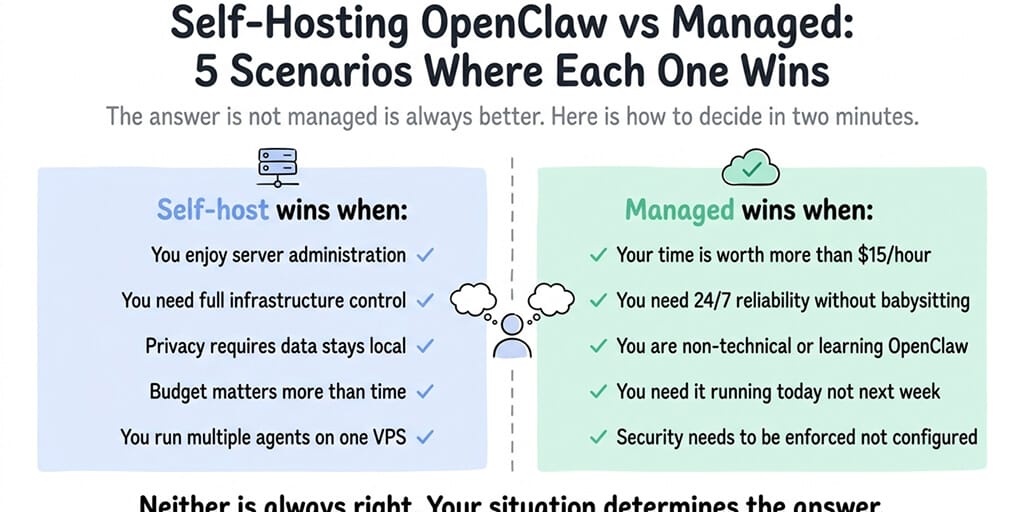
The answer isn't "managed is always better." It depends on five specific things about you. Here's how to decide in two minutes.
A developer in our community self-hosted OpenClaw on a Hetzner VPS for three months. Loved it. Full control. Custom Docker config. SSH access whenever he wanted. Cost: $8/month for the server plus API.
His co-founder, a non-technical marketer, tried the same thing on the same VPS. Broke the Docker installation within two hours. Accidentally exposed the gateway to the public internet. Rotated API keys in a panic. Gave up. Signed up for a managed platform that evening.
Same tool. Same server. Completely different outcomes. The difference wasn't the technology. It was the person using it.
The self-hosting vs managed OpenClaw hosting debate doesn't have a universal answer. It has a personal one. Here are five specific scenarios where self-hosting wins and five where managed wins, so you can match your situation instead of following generic advice.
When self-hosting OpenClaw is the right call
Scenario 1: You're a developer who enjoys infrastructure
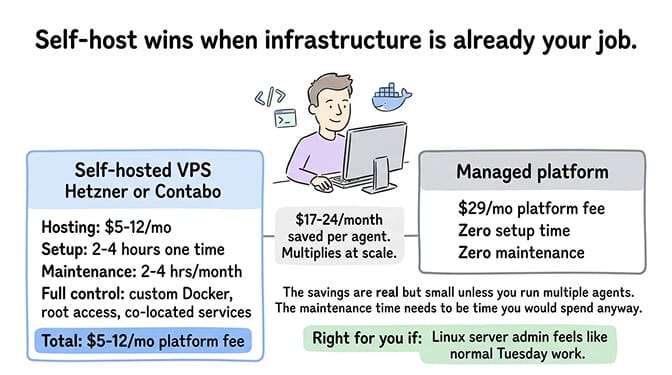
If configuring Docker, writing firewall rules, and tuning YAML files is something you do anyway (or even enjoy), self-hosting OpenClaw is straightforward. The setup takes 2-4 hours for someone comfortable with Linux servers. Ongoing maintenance adds 2-4 hours per month for updates, monitoring, and troubleshooting.
You get full control over every setting. Custom Docker configurations. Root server access. The ability to run other services alongside OpenClaw on the same VPS. No platform limitations.
The cost advantage is real. A Hetzner or Contabo VPS costs $5-12/month versus $49/month for a managed platform like BetterClaw Pro. That's $37-44/month you keep, and it's yours to keep only if the maintenance time is something you'd spend anyway.
For the complete VPS setup walkthrough, our self-hosting guide covers every step from server provisioning to security hardening.
Scenario 2: You need to run other services on the same server
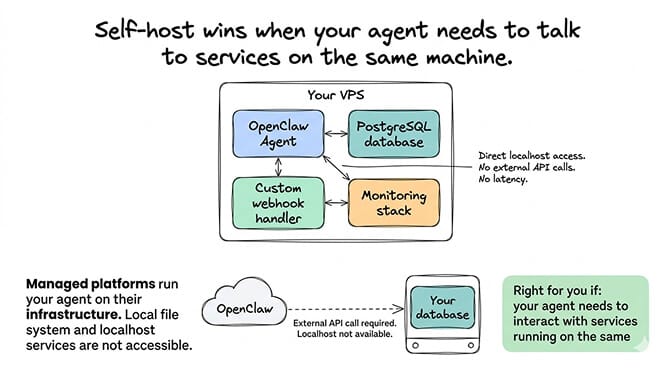
If your OpenClaw agent needs to interact with a local database, a custom API, or other services running on the same machine, self-hosting gives you that co-location. Managed platforms run your agent on their infrastructure, which means local file system access and localhost services aren't available.
A developer running OpenClaw alongside a PostgreSQL database, a custom webhook handler, and a monitoring stack benefits from having everything on one server with direct network access between services.
Scenario 3: You want to modify OpenClaw's core code
If you're contributing to the OpenClaw project, building custom extensions that modify the core framework, or running a forked version, self-hosting is necessary. Managed platforms run the standard OpenClaw release. Custom builds need your own infrastructure.

Scenario 4: You need to run a lot of agents and cost per agent matters
At scale, the platform fee still adds up, though less sharply than it used to. BetterClaw's Pro plan bundles 5 agents into its $49/month, so five agents no longer multiply out to five subscriptions. Five agents on a single $24/month VPS costs $24/month total (they share the server). The gap at five agents is real but modest.
It widens as you go up. Past five agents you're either adding agents at $12/month each or moving to Business at $149/month for 25. A VPS with 25 agents on it still costs $24/month. If you're running many agents and you have the DevOps capacity to manage them, self-hosting saves real money at the high end.

Scenario 5: Data residency or compliance requires specific infrastructure
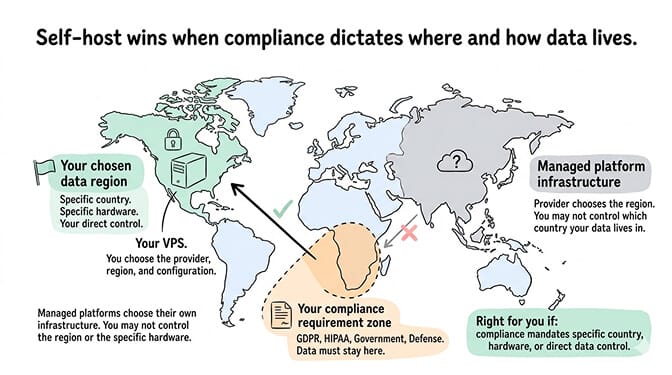
If your compliance requirements mandate that data stays in a specific country, on specific hardware, or under your direct control, self-hosting lets you choose exactly where and how the agent runs. Managed platforms choose their own infrastructure. You may not control the region or provider.
Self-hosting wins when you have DevOps skills, need infrastructure flexibility, run many agents, or have compliance requirements. The common thread: you're willing to trade time for control.
When managed OpenClaw hosting is the right call
Scenario 6: You're not a developer (and don't want to become one)
The OpenClaw maintainer Shadow warned: "if you can't understand how to run a command line, this is far too dangerous of a project for you to use safely." He's right. Self-hosted OpenClaw requires terminal access, Docker knowledge, firewall configuration, and ongoing server management.
If you're a founder, marketer, solopreneur, or anyone whose primary skill isn't server administration, managed hosting eliminates the entire infrastructure layer. You configure what your agent does (SOUL.md, skills, channels). The platform handles where it runs and keeping it running.

Scenario 7: Security is a priority but not your expertise
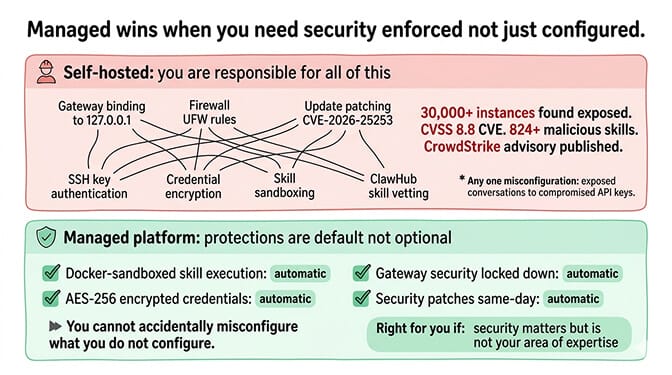
30,000+ OpenClaw instances were found exposed without authentication. CVE-2026-25253 was a CVSS 8.8 vulnerability. The ClawHavoc campaign compromised 824+ skills on ClawHub. CrowdStrike published an enterprise security advisory. Cisco found skills performing data exfiltration.
The security surface of a self-hosted OpenClaw agent is wide. Gateway binding, firewall rules, credential encryption, skill sandboxing, update patching, and more. If any one of these is misconfigured, the consequences range from exposed conversations to compromised API keys.
Managed platforms like BetterClaw include security protections by default: Docker-sandboxed execution, AES-256 encrypted credentials, gateway security locked down automatically. You can't accidentally misconfigure what you don't configure.
Scenario 8: You want the agent running in under an hour
Self-hosted setup takes 2-8 hours depending on experience. Managed deployment takes under 60 seconds. If you need the agent running today, not next weekend, managed wins on time-to-value.
This matters especially for business use cases where the agent is solving a current problem (customer support backlog, after-hours inquiries, repetitive task automation). Every day the agent isn't running is a day the problem isn't being solved.

Scenario 9: You need multi-channel support without per-channel configuration
Connecting OpenClaw to Telegram, WhatsApp, Slack, and Discord on a self-hosted setup requires configuring each channel individually. Each platform has its own authentication flow, webhook setup, or API configuration.
On managed platforms, channels are pre-configured. You connect platforms from a dashboard. BetterClaw supports 15+ platforms from a single interface. The channel configuration layer is handled.

For the Telegram setup guide and the WhatsApp connection walkthrough, our channel guides cover the self-hosted configuration if you want to do it manually.
Scenario 10: Updates and maintenance aren't something you want to think about
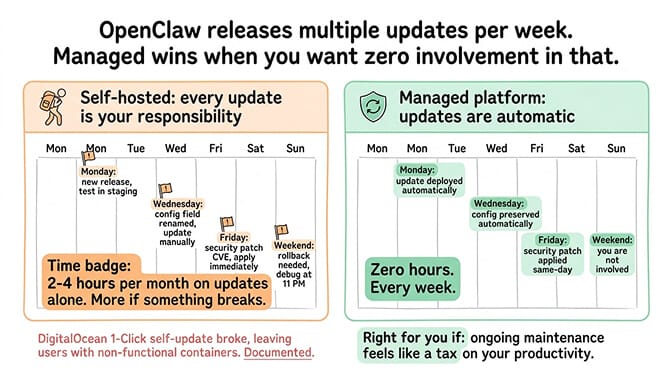
OpenClaw releases multiple updates per week. Some break configs. Some rename settings. Some change gateway behavior. On a self-hosted setup, you manage every update: testing, applying, rolling back if something breaks.
On managed platforms, updates are automatic. Config is preserved. Security patches land same-day. You never touch any of this. For the safe update process if you do self-host, our update guide covers the backup and rollback procedure.
Managed wins when you value your time over control, security matters but isn't your expertise, you need fast deployment, or ongoing maintenance feels like a tax on your productivity.
The real question nobody asks
Here's what nobody tells you about the self-hosting vs managed OpenClaw debate.
The decision isn't really about infrastructure. It's about where you want to spend your time.
Both approaches end up at the same place: a working OpenClaw agent that handles tasks autonomously across your communication platforms. The agent's quality depends on the same things regardless of hosting: the SOUL.md, the model choice, the skill configuration, the session management.
The difference is how much of your week goes to infrastructure versus agent development. Self-hosting allocates roughly 35% of your OpenClaw time to infrastructure maintenance. Managed platforms reduce that to near zero.
If infrastructure work is something you enjoy or already do for other projects, that 35% isn't wasted. It's a normal part of your workflow. If infrastructure work is something you tolerate to get to the interesting part (the agent itself), that 35% is an expensive tax on your productivity.
Neither answer is wrong. But only you know which one describes your situation.
If you've been self-hosting and the maintenance hours are starting to feel like a second job, or if you're evaluating OpenClaw for the first time and want to skip straight to the agent configuration, give Better Claw a try. $49/month for Pro, BYOK with 28+ providers. 60-second deploy. Docker-sandboxed execution and AES-256 encryption included. The infrastructure becomes invisible. You focus on what the agent does, not where it runs.
Frequently Asked Questions
What is the difference between self-hosting and managed OpenClaw hosting?
Self-hosting means you rent a server (VPS), install OpenClaw yourself, and manage everything: Docker, security, updates, channel connections, monitoring. Managed hosting means a platform handles the infrastructure and you configure the agent (SOUL.md, skills, model choice). Self-hosting gives you full control for $5-24/month. Managed hosting gives you zero infrastructure work for $24-49/month. Both require separate AI model API costs (BYOK).
Is self-hosting OpenClaw cheaper than managed hosting?
On paper, yes, and by a wider margin than it looks. A VPS costs $5-24/month versus $49/month for managed platforms like BetterClaw Pro. But self-hosting requires 2-4 hours/month of maintenance (updates, monitoring, security, troubleshooting). At $50/hour, that's $100-200/month in time cost, which puts self-hosting at $105-224/month all-in against $49. The total cost of ownership (hosting plus time) makes managed hosting cheaper for most non-developers. For developers who already manage servers, self-hosting is genuinely cheaper.
How long does it take to set up self-hosted vs managed OpenClaw?
Self-hosted: 2-8 hours depending on your Linux and Docker experience. This covers server provisioning, Docker installation, OpenClaw setup, channel connections, and basic security hardening. Managed (BetterClaw): under 60 seconds for deployment, plus 30-60 minutes for SOUL.md and channel configuration. The infrastructure setup time is the main difference. Agent configuration time is the same for both.
Can I switch from self-hosted to managed (or vice versa)?
Yes. Your SOUL.md, memory files, and skill configurations are portable. Moving from self-hosted to managed means copying your SOUL.md and skill configs to the managed platform and reconnecting your channels. Moving from managed to self-hosted means setting up a VPS and importing the same files. The agent's personality and knowledge travel with you. The infrastructure doesn't.
Is self-hosted OpenClaw secure enough for business use?
It can be, but the security burden is entirely on you. CrowdStrike's advisory flagged the lack of centralized security controls in self-hosted setups. 30,000+ instances were found exposed without authentication. Required protections: gateway bound to loopback, firewall configured, skills vetted (824+ malicious on ClawHub), regular security patches applied. Managed platforms include these protections by default. Self-hosting requires you to implement and maintain each one individually.
Related Reading
- OpenClaw Hosting Costs Compared — Total cost of ownership across all 4 hosting options
- Best Managed OpenClaw Hosting Compared — 7 managed providers side by side
- OpenClaw VPS Setup: The Real Cost of $8/Month Hosting — Full self-hosting walkthrough with security hardening
- Do You Need a VPS to Run OpenClaw? — Local vs VPS vs managed decision framework
- BetterClaw vs Self-Hosted OpenClaw — Feature-by-feature comparison