No, you don't need a VPS to run OpenClaw. It runs on your Mac, Windows, or Linux machine. But when your computer sleeps, the agent sleeps too. If you need 24/7 availability, you need either a VPS ($12-24/month + maintenance time) or a managed platform like BetterClaw ($49/month for Pro, zero maintenance).
No. But running it on your laptop has a catch that nobody mentions upfront.
Short answer: no, you don't need a VPS to run OpenClaw. You can install it on your Mac, Windows, or Linux machine right now, connect it to Telegram, and start talking to your agent in about 15 minutes.
But here's the catch. When you close your laptop, the agent stops. When your machine goes to sleep, the agent goes to sleep. When you restart for a system update, the agent goes offline. If someone messages your Telegram bot at 2 AM, nobody answers.
That's the real question behind "do I need a VPS to run OpenClaw." It's not about whether OpenClaw can run locally. It can. It's about whether you need an agent that works when you don't.
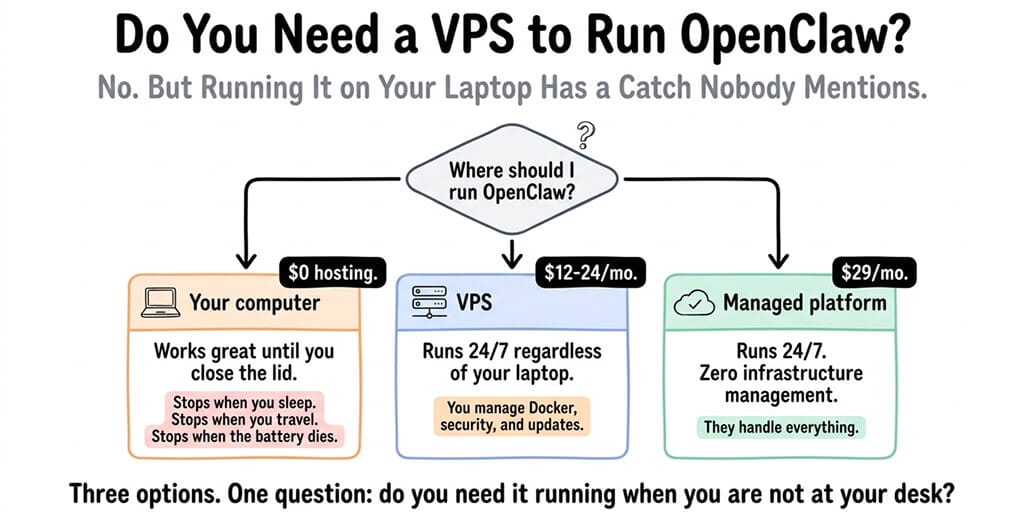
Here are the three realistic options, what each one actually costs, and which one fits your situation.
Option 1: Run OpenClaw on your own computer
This is the free option. Install OpenClaw on your Mac, Windows, or Linux machine. Connect it to a chat platform. Start using it.
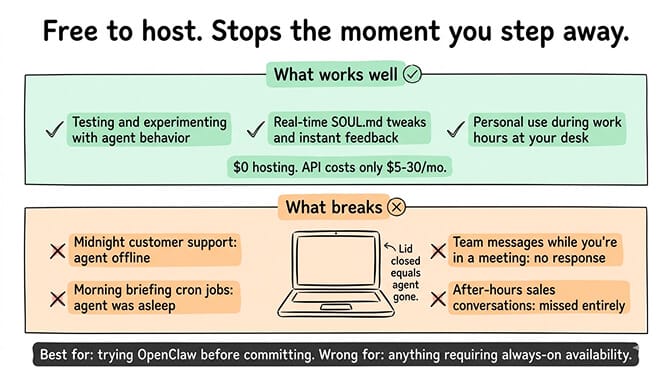
What works well: Testing, experimenting, and personal use when you're at your computer. The agent responds instantly. You can watch it work. You can tweak the SOUL.md and see the changes in real time. For learning OpenClaw and figuring out what you want your agent to do, local installation is the right starting point.
What doesn't work: Anything that requires the agent to be available when you're not at your desk. If you close the laptop, the agent is offline. If your machine goes to sleep (which it will unless you change the power settings), the agent is offline. If you restart for any reason, the agent is offline.
This means no midnight customer support. No morning briefing cron jobs (because the agent was asleep when the cron was supposed to fire). No team members messaging the agent while you're in a meeting. No after-hours sales conversations.
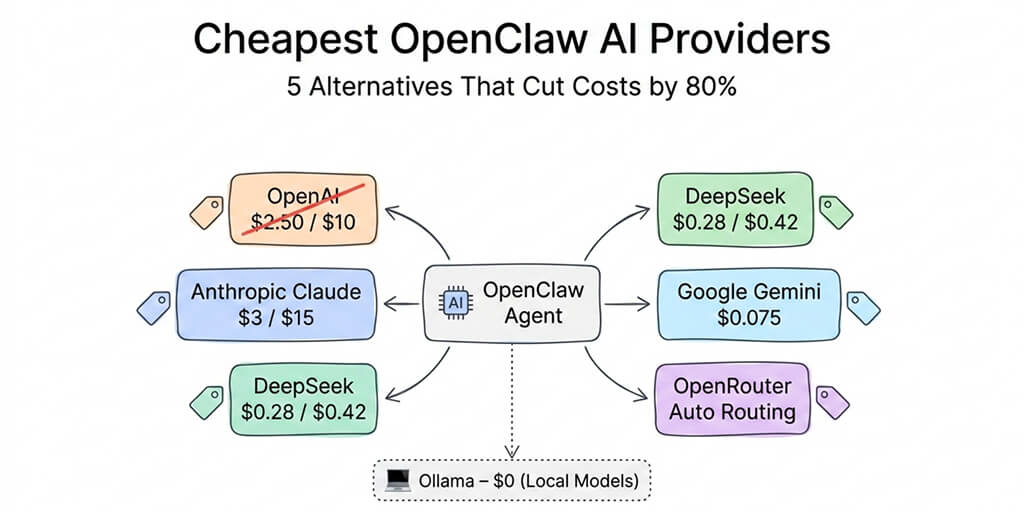
Cost: $0 for hosting. You still pay for the AI model API ($5-30/month depending on your provider and model choice). For the cheapest model providers for OpenClaw, our cost guide covers five options under $15/month.
Best for: Trying OpenClaw before committing to anything. Personal use during work hours. Developers who want to build and test before deploying.
Option 2: Run OpenClaw on a VPS
A VPS (Virtual Private Server) is a server in the cloud that stays on 24/7. You rent it monthly. You install OpenClaw on it. The agent runs around the clock regardless of whether your personal machine is on.
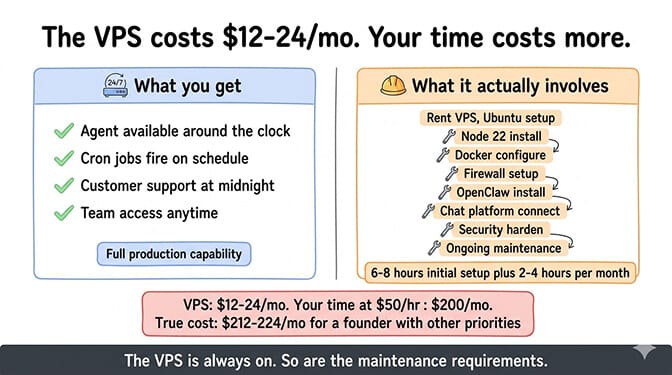
What works well: Your agent is always available. Cron jobs fire on schedule. Customers get responses at midnight. Team members can message the agent anytime. This is what most production OpenClaw setups use.
What it actually involves: Renting a VPS from a provider like DigitalOcean, Hetzner, or Contabo. Installing the operating system (usually Ubuntu). Setting up Node.js 22+. Installing Docker. Configuring the firewall. Installing OpenClaw. Setting up your chat platform connections. Configuring security (gateway binding, SSH keys, port restrictions). And then maintaining all of this going forward: applying updates, monitoring for issues, restarting after crashes.
Here's what nobody tells you: the VPS costs $12-24/month. That's the cheap part. The expensive part is your time. The initial setup takes 6-8 hours for a beginner. Ongoing maintenance (updates, monitoring, troubleshooting) adds 2-4 hours per month.
Community reports about DigitalOcean's 1-Click deployment illustrate the point: even the "easy" VPS option requires SSH access, manual configuration, and users report fragile Docker setups with a broken self-update mechanism. The VPS is always on. But so are the problems.
Cost: $12-24/month for the VPS plus $5-30/month for AI model APIs. Total: $17-54/month.
Best for: Developers comfortable with server administration who want full control. People who enjoy (or at least tolerate) managing infrastructure.
For the detailed VPS setup walkthrough including server sizing, Docker configuration, and the security settings you can't skip, our self-hosting guide covers every step. To pick a provider on price, renewal cost and server location, see managed OpenClaw hosting compared.
Option 3: Use a managed platform
Managed platforms handle the server, Docker, security, updates, and monitoring for you. You focus on configuring what your agent does (the SOUL.md, the skills, the model choice). They handle where it runs and keeping it running.
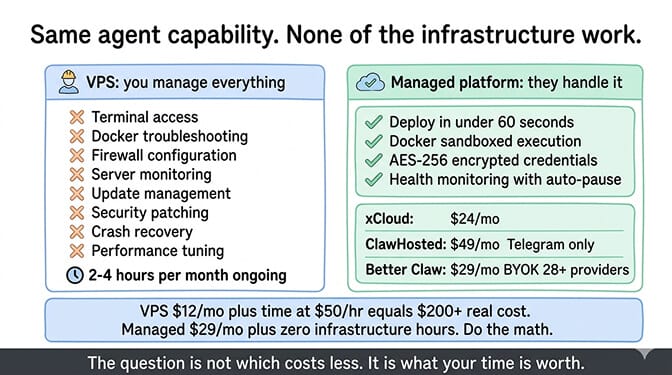
What works well: Everything from the VPS option (24/7 availability, cron jobs, multi-channel support) without the infrastructure management. No terminal. No Docker. No firewall configuration. No server monitoring. Deploy in under 60 seconds.
What it costs more: Managed platforms charge a premium over raw VPS hosting because they include the operational work. xCloud charges $24/month. ClawHosted charges $49/month (and currently only supports Telegram). BetterClaw charges $49/month for Pro, BYOK with 28+ model providers, and includes Docker-sandboxed execution, AES-256 encryption, and health monitoring with auto-pause.
The real comparison isn't price alone. A $12/month VPS plus 4 hours/month of your time maintaining it has a true cost that depends on what your time is worth. If you bill at $50/hour, that's $200/month in time on top of the $12. If you're a founder with a hundred other things to do, the time cost is even higher.
Cost: $24-49/month for the platform plus $5-30/month for AI model APIs (BYOK). Total: $29-79/month.
Best for: Non-technical founders who want an agent without learning server administration. Solopreneurs who value their time over $25-37/month in hosting savings. Anyone who tried the VPS route and decided life is too short for Docker troubleshooting.
The question isn't "do I need a VPS to run OpenClaw." The question is "do I need my agent running when I'm not at my computer." If yes, your options are VPS or managed. If no, run it locally.
The path most people actually take
Here's the pattern we see. Most people start locally. They install OpenClaw on their Mac. They connect Telegram. They play with it for a few days. They get excited.
Then they realize the agent only works when they're at their desk. They want the morning briefing at 7 AM. They want customers answered at midnight. They want cron jobs that actually fire on schedule.
Some move to a VPS. They spend a weekend setting it up. Some love the control. Some hit Docker issues, security concerns, and the ongoing maintenance tax, and decide it's not worth it.
Some skip the VPS entirely and go to a managed platform. No regrets about the time they didn't spend configuring firewalls.
There's no wrong path. But knowing where you'll probably end up saves you the intermediate frustration.
The managed vs self-hosted comparison covers the full feature and cost breakdown if you want the detailed version.
If you already know you don't want to manage a server and just want your agent running, give BetterClaw a try. $49/month for Pro, BYOK with 28+ providers. 60-second deploy. 15+ chat platforms. Docker-sandboxed execution. Your agent runs 24/7 while you do literally anything else.
Frequently Asked Questions
Do I need a VPS to run OpenClaw?
No. OpenClaw runs on your Mac, Windows, or Linux machine with no VPS required. The limitation: when your computer is off, asleep, or restarted, the agent stops. If you only need the agent during your work hours, local installation is fine. If you need 24/7 availability (customer support, scheduled tasks, team access), you need either a VPS or a managed platform.
What's the cheapest way to run OpenClaw?
Running locally on your own computer is free (you only pay for AI model APIs at $5-30/month). The cheapest always-on option is a basic VPS from Hetzner or Contabo at $5-12/month plus API costs. Managed platforms start around $24/month (xCloud); BetterClaw Pro is $49/month plus API costs (BYOK). The "cheapest" option changes when you factor in your time: a VPS requires 6-8 hours to set up and 2-4 hours/month to maintain.
How long does it take to set up OpenClaw on a VPS?
For a developer comfortable with Linux, Docker, and server administration: 2-4 hours. For a beginner: 6-8 hours including troubleshooting. This covers VPS provisioning, OS setup, Docker installation, firewall configuration, OpenClaw installation, chat platform connections, and basic security hardening. Ongoing maintenance adds 2-4 hours per month. By comparison, managed platforms deploy in under 60 seconds with zero terminal access.
How much does a VPS cost to run OpenClaw?
A VPS with enough resources for OpenClaw (minimum 2GB RAM, recommended 4GB) costs $12-24/month on most providers. Add $5-30/month in AI model API costs (depending on your model and usage). Total self-hosted cost: $17-54/month. Managed platforms like BetterClaw cost $49/month for Pro plus the same API costs. The VPS is cheaper on paper but requires ongoing time investment that managed platforms eliminate.
Can I run OpenClaw on my Mac without any server?
Yes. OpenClaw installs directly on macOS (and Windows and Linux). Connect it to Telegram or any other supported platform and use it as a personal AI assistant. The agent works whenever your Mac is on and awake. For personal productivity during work hours, this is perfectly fine. For anything that needs to run while you sleep (automated tasks, team access, customer-facing bots), you'll eventually want a server or managed platform.
Related Reading
- OpenClaw VPS Setup: The Real Cost of $8/Month Hosting — Detailed VPS walkthrough with security hardening
- Cheapest OpenClaw AI Providers — Five API providers under $15/month
- BetterClaw vs Self-Hosted OpenClaw — Full feature and cost comparison
- OpenClaw API Costs: What You'll Actually Pay — Complete API cost breakdown by model and usage
- OpenClaw Security Risks Explained — Why security matters for any hosting option