ClawHub has 10,700+ skills. 820+ are flagged malicious. A Snyk audit found 13.4% have critical security issues. Here are the 10 worth installing, the 5 red flags to watch for, and why "just browse ClawHub" is dangerous advice.
Cisco's security team found an OpenClaw skill performing data exfiltration without the user's knowledge. Not a theoretical vulnerability. Not a proof-of-concept. A skill on ClawHub, with real installs, quietly sending user data to an external server.
The user had no idea.
That's the ClawHub problem in one sentence. 10,700+ community-built skills. No mandatory code review. No security testing before publication. You search for "Gmail automation," install something that looks right, and hope nobody slipped a credential harvester into the code.
In January 2026, researchers discovered ClawHavoc: 341 malicious skills using typosquatted names ("clawhubb" instead of "clawhub") distributing Atomic Stealer malware that exfiltrated SSH keys, API tokens, and browser cookies. ClawHub removed 2,419 suspicious skills and partnered with VirusTotal for scanning. But "partnered with VirusTotal" is not "every skill is verified."
Here are the 10 skills actually worth installing, the 5 red flags that indicate a skill is malicious, and the verification checklist you should run before trusting anything on ClawHub.
The 10 OpenClaw skills worth installing (verified safe, actively maintained)
Tier 1: Install these first (everyone needs them)
1. Web Browsing (official, 180K+ installs). The most-installed skill on ClawHub. Your agent can navigate pages, extract content, and follow links. Without this, the agent is a chatbot running on stale training data. First-party skill. Zero registry risk.
2. Web Search (Tavily or Brave). Web Browsing fetches pages. Web Search finds them. Tavily returns LLM-friendly structured results (1,000 free searches/month). Brave uses an independent index with freshness filtering ($5/month free credit). Pick one. Install both if you need coverage.
3. Telegram Gateway. The second most-installed skill (145K+ installs). Connect with a BotFather token. Message your agent from your phone. Setup: 5 minutes. Latency: surprisingly low. This is how 80% of OpenClaw users interact with their agent daily.
Tier 2: Productivity (install after your agent is stable)
4. GOG (Google Workspace, 14K+ installs). Gmail, Calendar, Drive, Docs, Sheets, Contacts through a single OAuth connection. For the complete Gmail and Calendar automation guide, our guide covers the five workflows that save the most time.
5. Screenshot & OCR. Captures screenshots and extracts text using optical character recognition. 4/5 stars on ClawHub. Useful for documentation workflows, reading error dialogs, and digitizing printed text. Runs locally. No cloud API calls. Supports 60+ languages.
6. Task Automation (cron). Schedule recurring tasks. Morning briefings at 7 AM. Weekly reports on Monday. Daily inbox triage. The backbone of any always-on agent workflow.
Tier 3: Power user (install only if you need the specific capability)
7. N8N Workflow Automation. Connects OpenClaw to your N8N instance. Trigger complex multi-step workflows from chat. Runs locally. Data stays private. The bridge between your agent and your automation stack.
8. ElevenLabs Voice Agent. Gives OpenClaw a voice. The fail-safe mechanism is clever: if text/email fails, the bot automatically calls the recipient. For the OpenClaw voice agent setup with Twilio, our comparison covers how voice integrates with other channels.
9. Capability Evolver (35K+ installs). The agent automatically improves its own capabilities during operation. Top of the ClawHub charts. Useful for long-running agents that need to adapt over time.
10. Home Assistant. Controls your smart home through natural language. No cloud dependency. No data leaving your network. Privacy-first home automation. "Which devices are currently on?" works as a chat command.
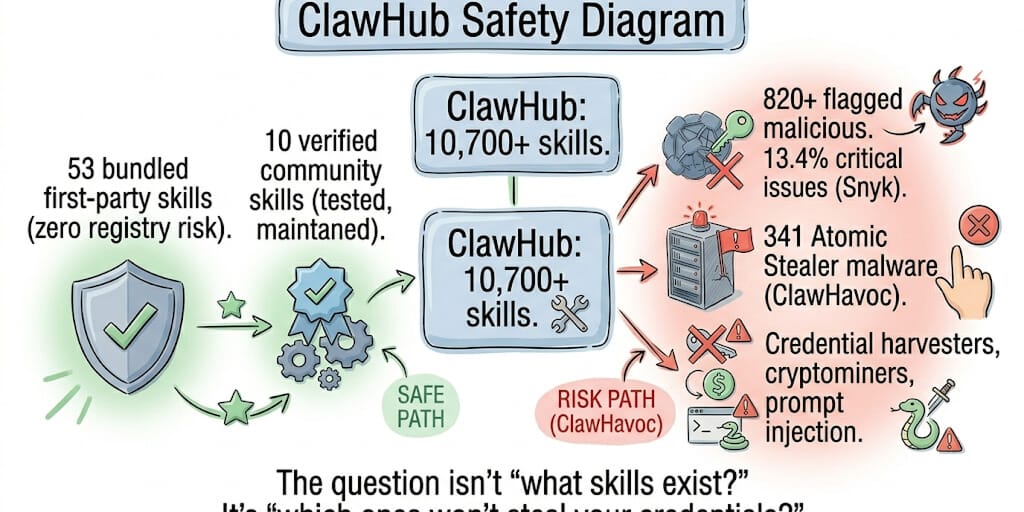
The bundled skills rule: 53 skills ship bundled with OpenClaw as first-party plugins. These carry zero registry risk. Start with bundled skills. Add ClawHub skills only when bundled options don't cover your use case.
The 5 red flags that mean a skill is malicious
Here's what nobody tells you about ClawHub security.
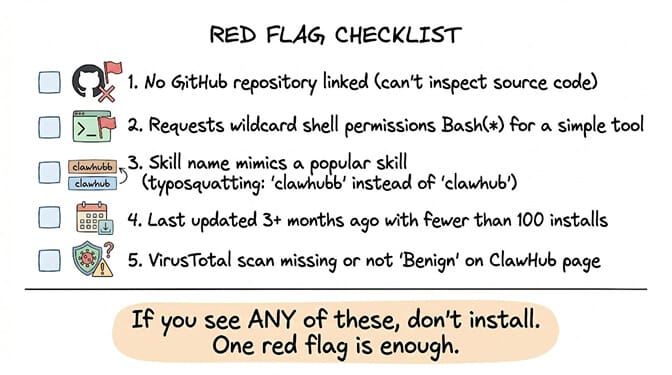
Red Flag 1: No linked GitHub repository. Legitimate skills link to a maintained GitHub repo with issues, PRs, and commit history. If the ClawHub listing has no source code link, the author doesn't want you reading the code. That's the first sign.
Red Flag 2: Wildcard shell permissions on a simple skill. A weather skill that requests Bash(*) access can execute any command on your system. The permission model exists. Use it. Read what the skill requests before confirming the install.
Red Flag 3: Name mimics a popular skill (typosquatting). ClawHavoc used names like "clawhubb" instead of "clawhub." Check the spelling carefully. Verify the publisher. If the name is one character off from a popular skill, it's almost certainly malicious.
Red Flag 4: Stale with low installs. Last updated 3+ months ago. Fewer than 100 installs. No reviews. This is either abandoned or was published as a one-time attack payload. Both are reasons not to install.
Red Flag 5: Missing or non-benign VirusTotal scan. Since February 2026, ClawHub shows VirusTotal scan results on each skill's page. If the scan says anything other than "Benign," don't install. If there's no scan result at all, the skill predates the VirusTotal partnership and hasn't been re-scanned.
The verification checklist (run this before every ClawHub install)
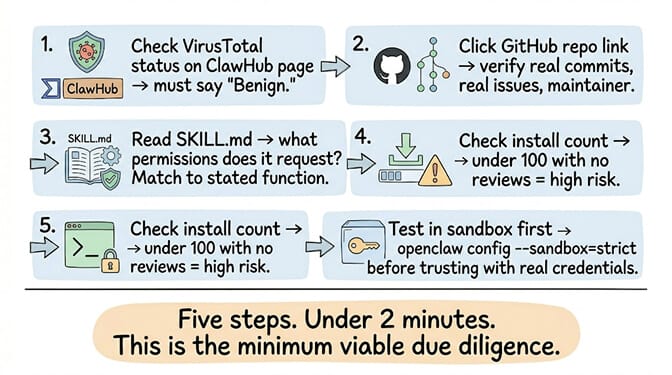
Step 1: Check the VirusTotal scan on the ClawHub page. Must show "Benign."
Step 2: Click the GitHub repository link. Verify real commits, real issues, a real maintainer with other projects.
Step 3: Read the SKILL.md. What permissions does it request? A calendar skill doesn't need shell access. A search skill doesn't need file write.
Step 4: Check the install count and reviews. Under 100 installs with zero reviews is a warning sign.
Step 5: Enable sandbox mode before testing: openclaw config --global --sandbox=strict. Test the skill with non-sensitive data first.
If running a 5-step security verification on every skill you install, monitoring ClawHub for typosquatted malware, reading SKILL.md permission manifests, and manually sandboxing untrusted code sounds like more security work than productivity work, BetterClaw's verified skills marketplace handles all of this. Every skill tested by our team before publication. No ClawHub registry risk. No VirusTotal manual checks. No malicious skill surprises. Free tier with 1 agent and BYOK. $49/month for Pro.
The security numbers that should concern you
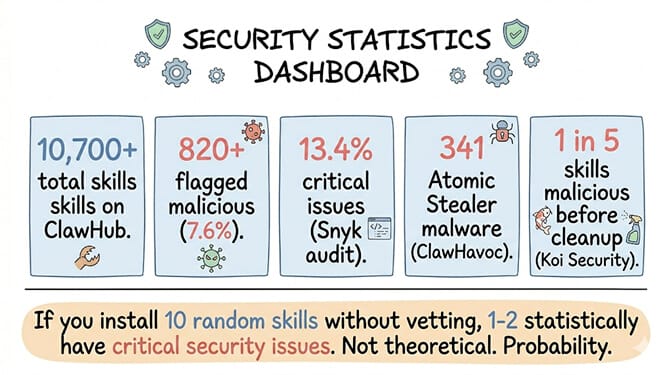
Here's the data.
10,700+ skills on ClawHub as of May 2026. After the ClawHavoc cleanup removed 2,419, the count has grown back.
820+ flagged malicious by Cisco's analysis. That's 7.6% of the registry.
13.4% have critical issues according to Snyk's independent audit. Malware, prompt injection, exposed API keys.
341 skills distributed Atomic Stealer malware in the ClawHavoc campaign. Typosquatted names. Reverse shells. SSH key exfiltration.
1 in 5 skills were malicious before the February 2026 cleanup, according to Koi Security's audit of 2,857 skills.
The math: If you install 10 random skills from ClawHub without vetting, statistically 1-2 of them have critical security issues. That's not a theoretical risk. That's a probability.
For the complete OpenClaw security analysis including CVEs and enterprise risks, our security guide covers the broader attack surface.
The honest take (why we built a verified marketplace instead)
Here's the perspective.
ClawHub is the most feature-rich skill ecosystem in AI agents. 10,700+ skills covering every use case imaginable. But an ecosystem with 7.6% malicious content and no mandatory code review is fundamentally different from an ecosystem where every skill is tested before publication.
We built BetterClaw's verified marketplace specifically because of ClawHavoc. After seeing 341 malicious skills steal SSH keys from real users, we decided that "user beware" is not an acceptable security model for an agent that has access to your email, calendar, files, and messaging apps.
The trade-off is real. BetterClaw's verified marketplace has fewer skills than ClawHub. We test every one. That takes time. The breadth is smaller. But every skill in our marketplace is verified safe. No credential harvesters. No cryptominers. No prompt injection. No typosquatting.
The 10 skills listed above are genuinely excellent. Install them with confidence after running the verification checklist. For everything else on ClawHub, proceed with the same caution you'd apply to installing a random npm package from an anonymous publisher on day one.
If you want the skill ecosystem without the security lottery, give BetterClaw a try. Free tier with 1 agent and BYOK. $49/month for Pro. Verified skills marketplace. Every skill tested. Zero ClawHub registry risk. The agent does the work. The skills are safe.
Frequently Asked Questions
What are the best OpenClaw skills to install in 2026?
The top 10 by safety and utility: Web Browsing (180K installs, first-party), Web Search (Tavily or Brave), Telegram Gateway (145K installs), GOG Google Workspace (14K installs), Screenshot & OCR, Task Automation (cron), N8N Workflow, ElevenLabs Voice, Capability Evolver (35K installs), and Home Assistant. Start with the 53 bundled first-party skills before adding ClawHub community skills.
Are OpenClaw skills on ClawHub safe?
Not all of them. 820+ skills (7.6%) are flagged malicious. A Snyk audit found 13.4% have critical security issues. The ClawHavoc campaign distributed 341 malicious skills with Atomic Stealer malware through typosquatted names. ClawHub partnered with VirusTotal for scanning in February 2026, but verification is not mandatory. Always check the VirusTotal status, GitHub repo, permissions, and install count before installing.
How do I install OpenClaw skills from ClawHub?
Run npx clawhub@latest install <skill-name> from your terminal. The installer shows the permissions the skill requests. Review them before confirming. After installation, run npx clawhub@latest list to see installed skills and npx clawhub@latest update to update all. Enable sandbox mode (openclaw config --global --sandbox=strict) before testing untrusted skills.
How much do OpenClaw skills cost?
Most ClawHub skills are free. The underlying services may have costs: Tavily search (1,000 free/month, then paid), ElevenLabs voice ($5+/month), N8N (self-hosted free, cloud $24+/month). BetterClaw's curated skill library is included on Pro ($49/month); the free tier ships the basic skill set. No separate skill costs. No ClawHub registry risk.
What is the ClawHavoc attack and should I be worried?
ClawHavoc was a coordinated attack in January 2026 where 341 malicious skills were uploaded to ClawHub using typosquatted names. These skills installed Atomic Stealer malware that exfiltrated SSH keys, API tokens, and browser session cookies via reverse shells. ClawHub removed 2,419 suspicious skills and implemented VirusTotal scanning. You should be cautious, not panicked. Use the verification checklist before every install. Or use BetterClaw's verified marketplace where every skill is tested before publication.