13,700+ skills. 824 were malicious. Here's how to navigate the marketplace without becoming a statistic.
I found the perfect Notion integration skill on ClawHub last month. Clean description. Recent updates. 3,200+ downloads. I installed it, connected my workspace, and watched my OpenClaw agent sync tasks from Telegram directly into Notion boards.
Two days later, I noticed API requests on my Anthropic dashboard that I hadn't made. Someone was using my key. The skill had been reading my config file and sending credentials to an external server while functioning exactly as advertised.
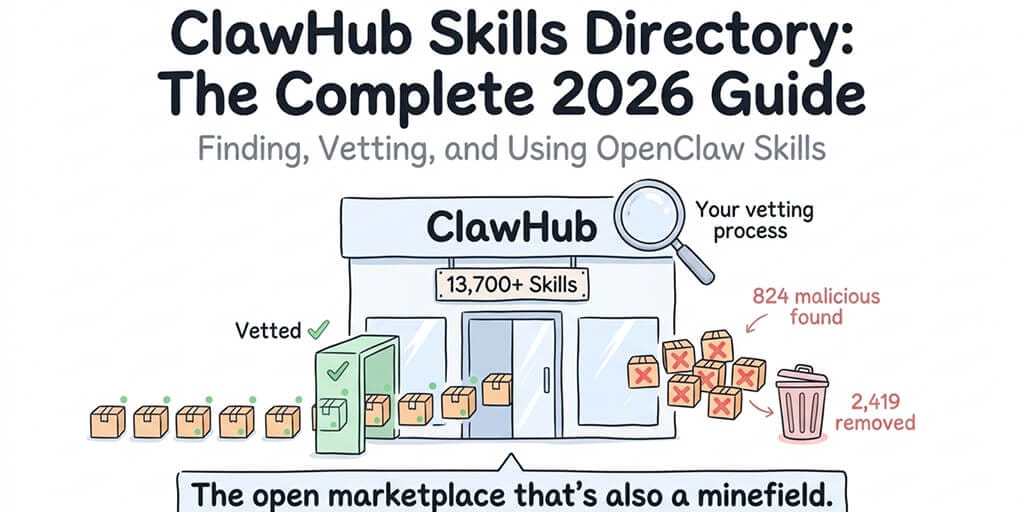
That skill was part of the ClawHavoc campaign. 824 malicious skills discovered on ClawHub, roughly 20% of the entire registry. One compromised package had 14,285 downloads before it was pulled. ClawHub responded by purging 2,419 suspicious packages and partnering with VirusTotal for automated scanning.
This guide covers everything you need to know about the ClawHub skills directory in 2026: what's available, what's dangerous, how to find good skills, and how to protect yourself from bad ones.
What ClawHub actually is (and isn't)
ClawHub is the official skill registry for OpenClaw. Think of it like npm for Node.js packages or PyPI for Python libraries, except the packages add capabilities to your AI agent instead of your codebase.
Skills are what turn OpenClaw from a chatbot into an agent. Without skills, your agent can only have conversations. With skills, it can search the web, manage your calendar, read and write files, automate browser tasks, send emails, interact with APIs, and execute shell commands.
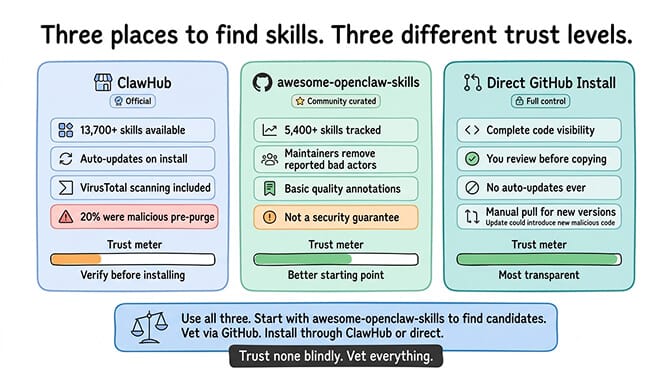
As of March 2026, ClawHub hosts over 13,700 skills. A separate community-curated registry (awesome-openclaw-skills on GitHub) tracks another 5,400+ skills that have been independently reviewed. The ecosystem is massive and growing fast, driven by OpenClaw's 1.27 million weekly npm downloads.
What ClawHub is: An open registry where anyone can publish a skill package. Think app store with minimal review.
What ClawHub isn't: A curated, security-reviewed marketplace. Until the VirusTotal partnership, there was effectively no automated security scanning. Publishers could upload anything. And 20% of them uploaded something malicious.
For the full timeline of documented OpenClaw security incidents including the ClawHavoc campaign, CrowdStrike advisory, and Cisco's data exfiltration discovery, our security guide covers each event.
The ClawHub skills categories worth knowing
The directory organizes skills into categories, though the boundaries are loose and many skills span multiple categories. Here's what's available and what's genuinely useful.
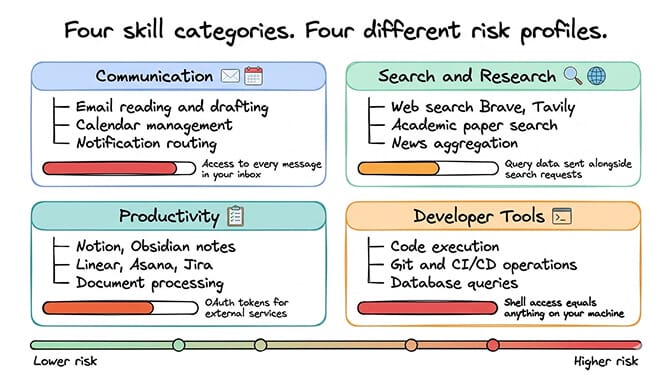
Communication skills
These connect your agent to external messaging and communication tools. Email reading and drafting (Gmail, Outlook), calendar management (Google Calendar, CalDAV), messaging integrations beyond the platforms OpenClaw already supports natively, and notification routing.
The risk level is high. Communication skills need access to your email, calendar, or messaging accounts. A compromised email skill can read every message in your inbox and forward copies to an external server. The Meta researcher Summer Yue incident is the cautionary tale here: her agent mass-deleted emails while ignoring stop commands. Even legitimate email skills need strict permission boundaries.
Search and research skills
Web search (Brave API, Google Custom Search, Tavily), academic paper search, news aggregation, and data retrieval from specific sources. These are among the most commonly installed skills because they give your agent access to real-time information.
The risk level is moderate. Search skills make outbound API calls to retrieve information. The main concern is whether they're sending your query data (which might contain sensitive context from your conversations) to unexpected destinations alongside the legitimate search requests.
Productivity skills
File management, note-taking integrations (Notion, Obsidian), project management connections (Linear, Asana, Jira), and document processing. These skills let your agent interact with your work tools.
The risk level is moderate to high. Productivity skills typically need OAuth tokens or API keys for external services. A compromised productivity skill has access to whatever tools it connects to.
Developer tools
Code execution, Git operations, CI/CD integrations, database queries, and API testing. These are popular among developers who use OpenClaw as a coding assistant.
The risk level is very high. Developer tool skills often have shell access or can execute arbitrary code. A malicious developer skill with shell access can do anything on your machine. Cisco's discovery of a skill performing data exfiltration was in this category.
How to find good skills on ClawHub
The ClawHub interface shows skill name, description, publisher, download count, last update date, and version history. Here's how to use that information to filter for quality.
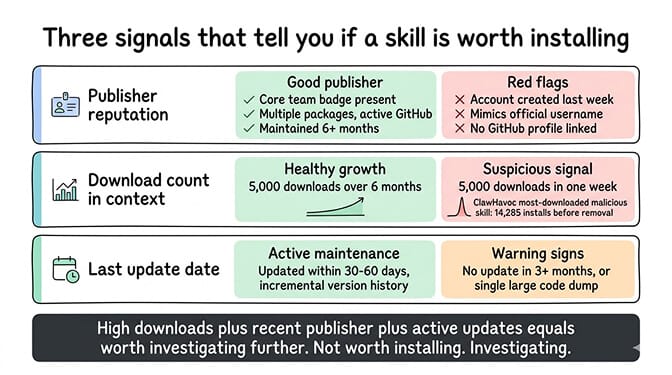
Publisher reputation matters most
The OpenClaw core team maintains a set of official skills. These are the safest options because they're maintained by the same developers who build the framework. Look for the official organization badge.
After official skills, established community developers with multiple published packages, active GitHub profiles, and real identities are the next safest tier. A publisher who has maintained three skills for six months with regular updates is very different from an account created last week with one package.
Red flags on publishers: Account created recently with only one skill. Username that mimics official accounts (like "opencIaw" with a capital I instead of lowercase L). No GitHub profile linked. Generic or AI-generated skill descriptions.
Download count needs context
High download count alone doesn't mean safe. The most-downloaded malicious skill in the ClawHavoc campaign had 14,285 downloads before removal. Download count tells you popularity, not quality.
What matters more: the ratio of downloads to the skill's age. A skill published last week with 5,000 downloads either went viral organically (rare) or had its count artificially boosted (more common). A skill published six months ago with 5,000 downloads grew naturally through genuine adoption.
Last update date signals maintenance
Skills that haven't been updated in more than three months are concerning. OpenClaw releases multiple updates per week. Skills that don't keep up with the framework eventually break or develop compatibility issues.
The sweet spot: skills updated within the last 30-60 days with a consistent version history showing incremental improvements rather than a single large dump of code.
For our curated list of the best community-vetted OpenClaw skills that have passed security review, our skills guide ranks options by reliability, safety, and usefulness.
The 5-step vetting process before you install anything
Finding a skill on ClawHub is step one. Vetting it before installation is what separates safe users from compromised ones.
Step 1: Check the publisher. Verify their identity, account age, and other published packages. Official skills from the core team are safest.
Step 2: Read the source code. Every ClawHub skill is JavaScript or TypeScript. You're looking for network calls to unexpected domains, file reads outside the skill's workspace (especially reads of your config file where API keys live), obfuscated or minified code (legitimate skills are readable), and environment variable access beyond what's needed.
Step 3: Search community reports. Check GitHub issues and the OpenClaw Discord for the skill name. If others have reported problems, you'll find them.
Step 4: Test in a sandboxed workspace. Never install a new skill directly into your production agent. Create a test workspace, install the skill there, run it for 24-48 hours, and monitor your API usage dashboards for unexpected activity.
Step 5: Set limits. After installation, configure iteration limits and context token caps to contain the blast radius if a skill misbehaves.
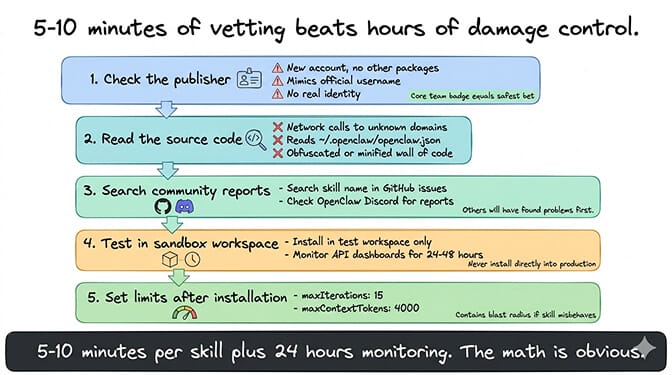
The vetting process takes 5-10 minutes per skill plus a 24-hour monitoring window. That's 5-10 minutes compared to hours of damage control if something goes wrong. The math is obvious.
What changed after ClawHavoc
The ClawHavoc campaign was a wake-up call for the entire ecosystem. Here's what ClawHub has done since, and what's still missing.
What improved
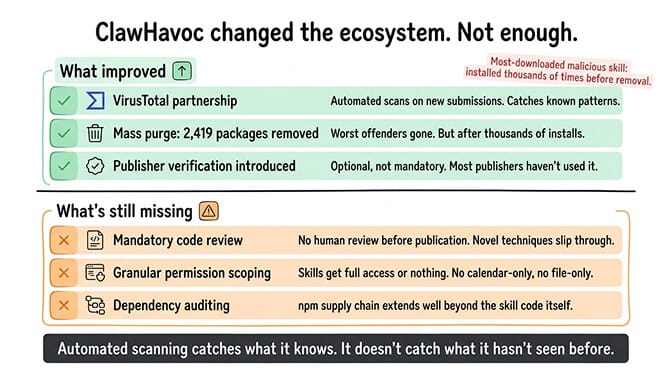
VirusTotal partnership. ClawHub now runs automated security scans on all new skill submissions. Known malware signatures and suspicious patterns trigger review before publication. This catches known attack patterns but not novel ones.
Mass purge. 2,419 suspicious packages were removed from the registry. This cleaned up the worst offenders but happened after the damage was done. The most-downloaded malicious package had already been installed by thousands of users.
Publisher verification. ClawHub introduced optional publisher verification. Verified publishers have confirmed identities. The problem: verification is optional, and most publishers haven't bothered.
What's still missing
Mandatory code review. There's no human review of skill code before publication. VirusTotal catches known malware patterns, but sophisticated exfiltration techniques (like the Cisco-discovered skill that looked perfectly legitimate) can slip through automated detection.
Permission scoping. Skills currently have access to whatever OpenClaw has access to. There's no granular permission system where a calendar skill can only access calendar APIs, not your file system. This means every skill is either trusted with everything or not installed at all.
Dependency auditing. Skills can include npm dependencies. Those dependencies can include their own dependencies. The supply chain attack surface extends well beyond the skill code itself.
If managing skill security, vetting, and permission boundaries sounds like more work than you want, BetterClaw's curated skill marketplace audits every skill before publication. Docker-sandboxed execution means even a compromised skill can't access your host system or credentials. $49/month for Pro, BYOK. Zero unvetted code running on your infrastructure.
The alternative registries worth knowing
ClawHub isn't the only place to find OpenClaw skills. Two alternatives are worth mentioning.
awesome-openclaw-skills (GitHub)
A community-curated list tracking 5,400+ skills with basic quality annotations. It's not a registry (you still install skills from ClawHub or GitHub). It's a curation layer that filters the noise. The maintainers remove skills that are reported as malicious or abandoned. It's not a security guarantee, but it's a better starting point than browsing ClawHub's unfiltered listing.
Direct GitHub installation
You can install skills directly from GitHub repositories without going through ClawHub at all. Clone the repo, review the code, and copy it into your OpenClaw skills directory. This bypasses ClawHub entirely and gives you complete visibility into what you're installing.
The trade-off: no auto-updates. When the skill author pushes a new version, you need to manually pull the changes. ClawHub-installed skills update automatically, which is both convenient and risky (an update could introduce new malicious code that wasn't in the version you vetted).
For guidance on the full OpenClaw installation and skill configuration process, our setup guide covers where skills fit into the deployment sequence.
The skills most people should start with
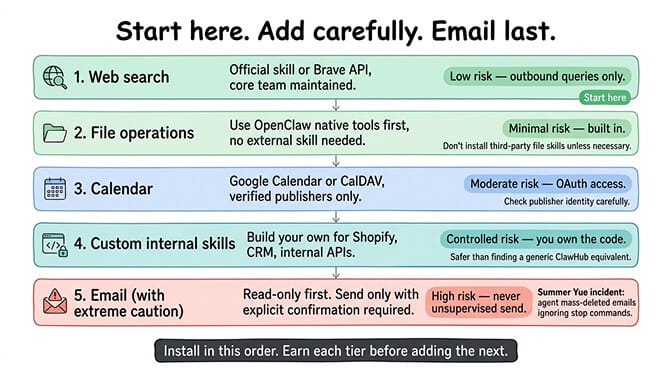
After reviewing the ecosystem extensively, here are the skill categories that provide the most value with the least risk for new OpenClaw users.
Web search. The official web search skill or Brave Search API integration. Essential for any agent that needs to look up information. Maintained by the core team. Low risk because it only makes outbound search queries.
File operations. OpenClaw's built-in file read/write capabilities handle most basic file tasks without requiring an external skill. Start with the native tools before adding third-party file management skills.
Calendar. Google Calendar or CalDAV integrations from verified publishers with established track records. These need OAuth access to your calendar, so choose carefully. Only install from publishers with real identities.
Custom internal skills. If you need your agent to interact with a proprietary API (your Shopify store, your CRM, your internal tools), building a custom skill is safer than finding a generic one on ClawHub. You control every line of code. For ecommerce-specific agent configurations, our ecommerce guide covers the most common integrations.
Email (with extreme caution). Email skills are the highest-risk category. Start with read-only access. Only enable send with explicit confirmation requirements. Never give an agent unsupervised email send permissions. The Summer Yue incident is the permanent reminder of why.
What to do if you've already installed unvetted skills
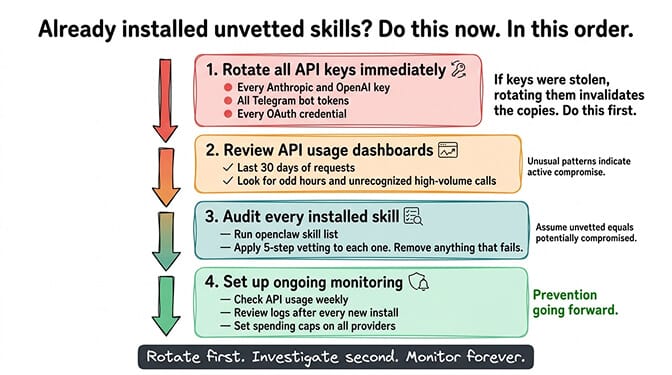
If you've been installing ClawHub skills without vetting them (most people have in the beginning), here's the damage control sequence.
First: rotate all API keys immediately. Every key in your OpenClaw config. Anthropic, OpenAI, Telegram bot tokens, OAuth credentials. All of them. If any skill has exfiltrated your keys, rotating them invalidates the stolen copies.
Second: review your API usage dashboards. Check the last 30 days for requests you didn't make. Unusual patterns (requests at odd hours, high-volume calls you don't recognize) indicate compromise.
Third: audit every installed skill. List everything your agent currently has installed. For each skill, run through the 5-step vetting process. Remove anything that doesn't pass.
Fourth: set up monitoring going forward. Check API usage weekly. Review logs after installing any new skill. Set spending caps on all provider accounts.
The managed vs self-hosted security comparison covers how platforms like BetterClaw handle skill security versus what you're responsible for when self-hosting.
The bigger picture: where the ClawHub ecosystem is heading
The skills ecosystem is at an inflection point. The ClawHavoc campaign forced the community to take supply chain security seriously. VirusTotal scanning and the publisher verification system are steps in the right direction. But the fundamental challenge remains: an open registry with minimal review will always have a security tail risk.
The likely evolution is a tiered system. A "verified" tier with mandatory code review and publisher identity verification. An "unverified" tier with automated scanning only. And eventually, permission scoping that limits what each skill can access regardless of trust level.
Until that happens, the responsibility is on you. Every skill you install is executable code running with your agent's permissions and access to your API keys. Treat ClawHub like you'd treat any package registry: with appreciation for the ecosystem and suspicion toward anything you haven't personally reviewed.
If you want a deployment where skills are security-audited before they reach your agent, where Docker sandboxing prevents compromised code from accessing your host system, and where you don't carry the vetting burden yourself, give BetterClaw a try. $49/month for Pro, BYOK. Every skill in our marketplace is reviewed. Sandboxed execution means even a problematic skill can't reach beyond its container. You build workflows. We handle the security.
Frequently Asked Questions
What is ClawHub?
ClawHub is the official skill registry for OpenClaw, hosting over 13,700 installable skill packages as of March 2026. Skills add capabilities to your OpenClaw agent: web search, calendar management, email, file operations, browser automation, and API integrations. ClawHub functions like npm or PyPI but for AI agent capabilities. Anyone can publish skills, and since the ClawHavoc cleanup, all submissions go through VirusTotal automated scanning.
How does ClawHub compare to awesome-openclaw-skills?
ClawHub is the official registry with the largest collection (13,700+ skills) and auto-update support, but it's an open marketplace with minimal human review. awesome-openclaw-skills is a community-curated GitHub list tracking 5,400+ skills with basic quality filtering and maintainer oversight. Neither is a security guarantee. ClawHub has more skills and convenience. awesome-openclaw-skills has better curation. Use both as discovery tools, but always vet skills yourself before installation.
How do I install skills from ClawHub safely?
Follow a 5-step process: check the publisher's identity and account history, read the source code for suspicious network calls and file access patterns, search community reports on GitHub and Discord, test in a sandboxed workspace for 24-48 hours while monitoring API usage, and set iteration limits and context caps after installation. The active vetting takes 5-10 minutes per skill plus a 24-hour monitoring window.
How much do ClawHub skills cost to use?
Skills themselves are free to install from ClawHub. The cost comes from the API tokens they consume when your agent uses them. A web search skill adds roughly 1,000-3,000 tokens per search call. Browser automation can use 500-2,000 tokens per step. On Claude Sonnet ($3/$15 per million tokens), typical skill usage adds $5-20/month to your API bill depending on frequency. Set iteration limits to prevent runaway costs from skills that loop.
Are ClawHub skills secure enough for business use?
Not without vetting. The ClawHavoc campaign found 824 malicious skills (roughly 20% of the registry). ClawHub has since purged 2,419 suspicious packages and added VirusTotal scanning, but automated detection doesn't catch everything. Cisco independently found a legitimate-looking skill performing data exfiltration. For business use, either vet every skill manually using the 5-step process, use a managed platform with a curated skill marketplace (like BetterClaw), or build custom skills for sensitive integrations.