Updated September 2026 for OpenClaw 2.0 (v2026.9.x).
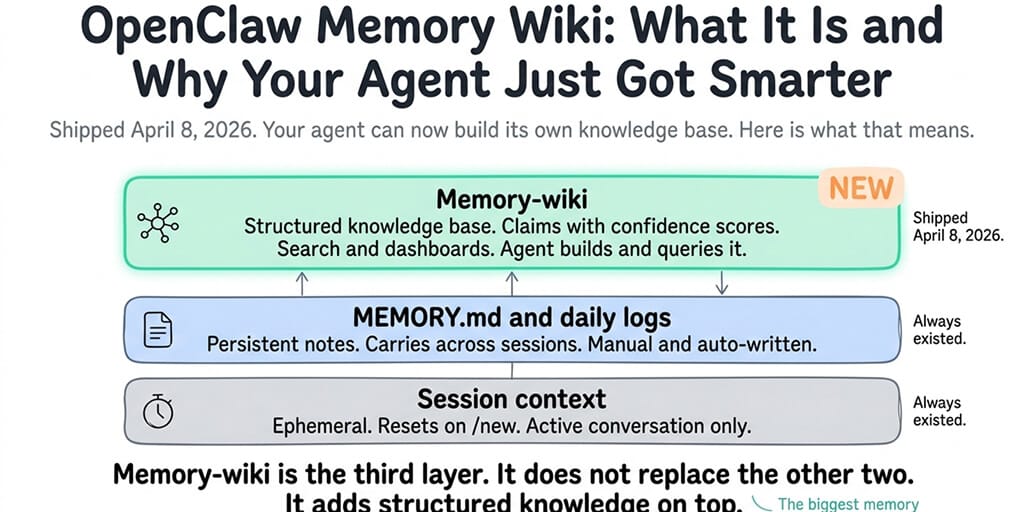
Memory-wiki turns your OpenClaw agent's notes into a structured knowledge base: claims, evidence, timestamps and staleness checks. It shipped in 2026.4.7, and OpenClaw 2.0 changed how it works (QMD is gone, Dreaming is on by default, and vaults can now be per-agent). This guide is updated for 2.0.
I asked my agent yesterday who manages our auth permissions. It checked the wiki, found the entry, and responded in under two seconds: "Alice manages the auth team. She handles all permission changes. Last updated three days ago."
Before memory-wiki, the same question triggered a semantic search across hundreds of memory chunks, returned six vaguely related results, and the agent guessed based on partial matches. Sometimes it got Alice right. Sometimes it didn't.
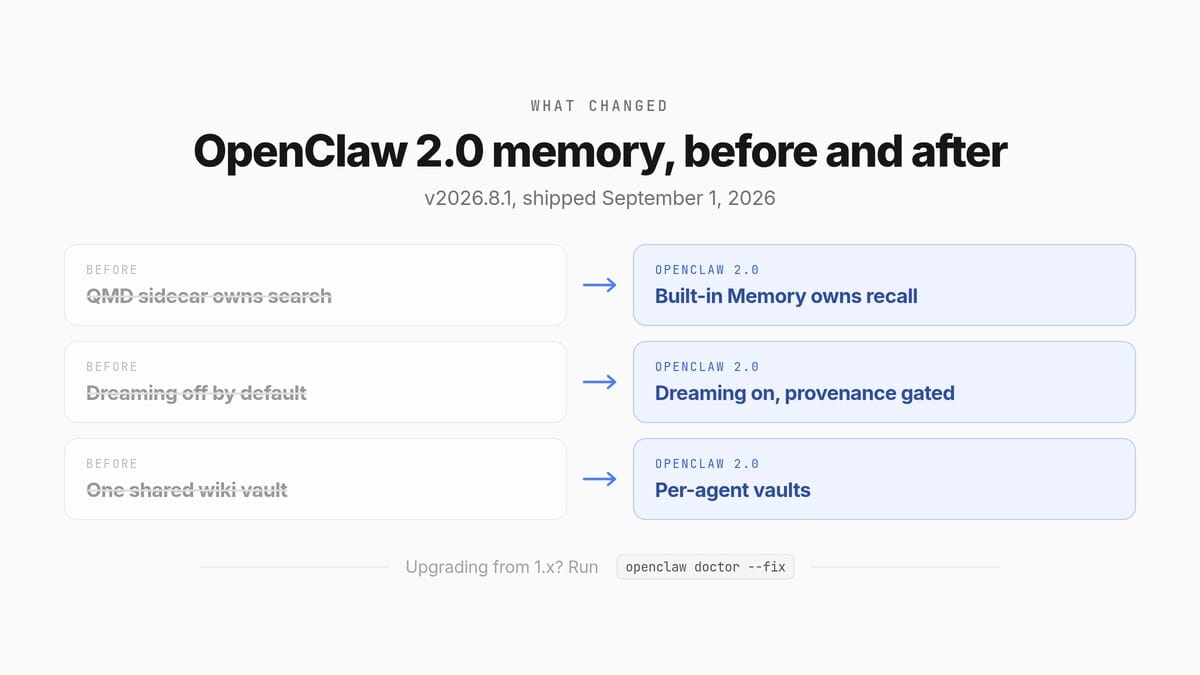
What changed in OpenClaw 2.0 (and 2026.9.x)
OpenClaw 2.0 (v2026.8.1) landed on September 1, 2026, and it is the biggest memory update since memory-wiki itself.
- QMD is retired. Built-in Memory now owns the core search and recall path. Upgrading from 1.x? Run
openclaw doctor --fixto migrate your data and rebuild the index from your canonical Markdown files. QMD-only reranking, query expansion and cross-agent transcript search are gone. - Per-agent wiki vaults. Each agent can now have its own isolated vault. Set
vault.scope: "agent". - Faster dashboards. Wiki dashboards read a persisted snapshot from OpenClaw's shared plugin state. Dashboard requests never scan raw vault pages or wait for a full vault compile.
- Dreaming is on by default, with provenance gating so untrusted writes are not promoted blindly.
- Active Memory can now recall across a personal agent's own private conversations, with a deterministic lane first so ordinary replies stay fast.
- You can make the agent forget with
openclaw memory forget.
The older releases, for context:
- 2026.4.5: Dreaming ships.
- 2026.4.7: memory-wiki ships.
- 2026.4.9 to 4.12: REM backfill, Memory Palace and Imported Insights tabs, Unicode slugs.
- 2026.8.1 (OpenClaw 2.0): the changes above.
If you are on the latest release, v2026.9.5, everything in this guide applies unchanged.
What memory-wiki actually is (in plain English)
Memory-wiki is a plugin that compiles durable knowledge into a wiki vault: deterministic page structure, structured claims and evidence, contradiction and freshness tracking, generated dashboards, and five wiki-native tools.
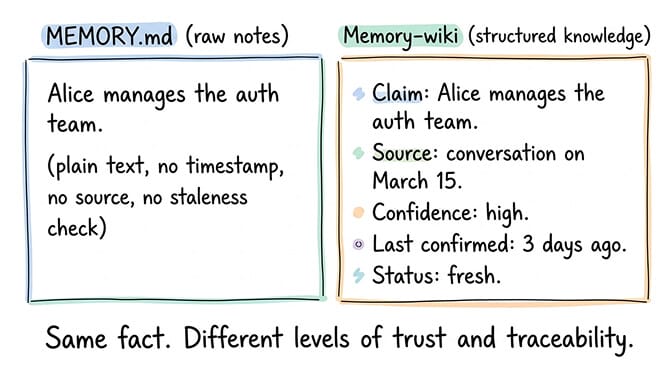
The key difference from MEMORY.md is that memory-wiki entries are structured. They are not just text notes. They have claims (factual statements the agent believes), evidence (where the claim came from), timestamps (when it was learned or updated), and health status (whether the claim is fresh or potentially stale).
When your agent writes "Alice manages the auth team" to memory-wiki, it stores not just the fact but when it learned this, from which conversation, and how confident it is. When you ask about auth permissions weeks later, wiki search returns the structured claim with its provenance, not a text chunk that might or might not contain the answer.
Memory-wiki is a knowledge base, not a notebook. MEMORY.md is raw notes. Memory-wiki is structured facts with sources, timestamps and health tracking.
How OpenClaw memory works in 2.0 (the full picture)
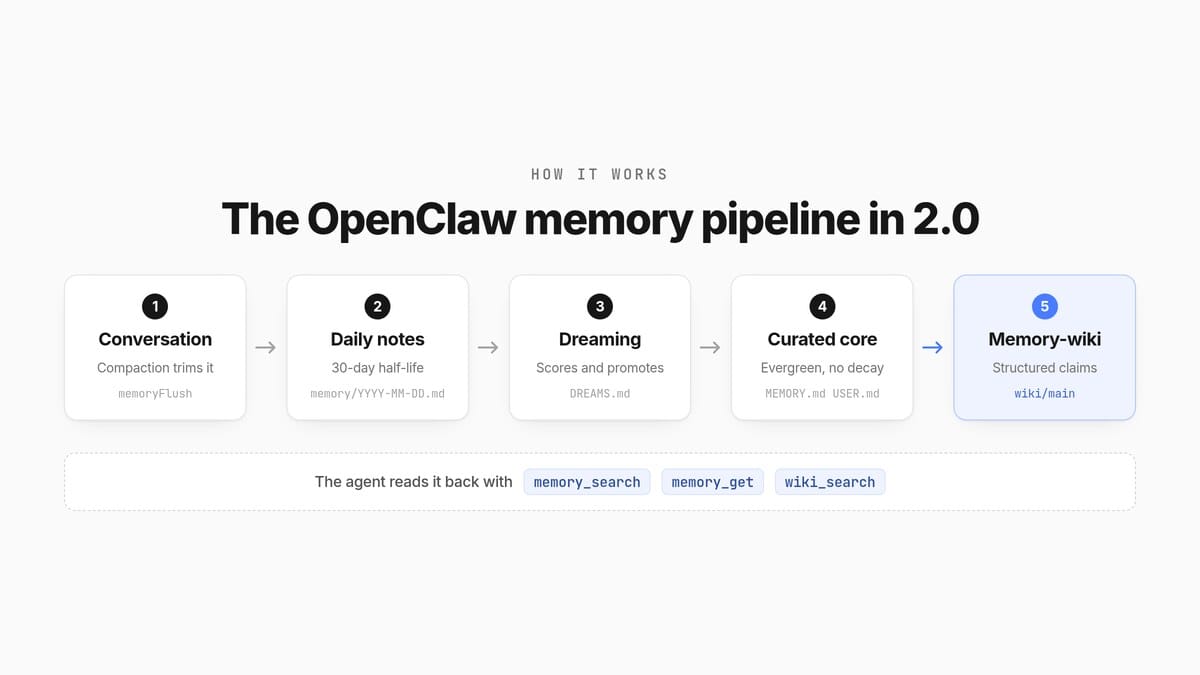
Memory-wiki is one layer in a larger system, and in 2.0 that system has five parts. Think of it as a pipeline.
- Conversation. The live session. Compaction trims it, and a memory flush saves the important parts before trimming. The config key is
agents.defaults.compaction.memoryFlush. - Daily notes. The agent writes observations to
memory/YYYY-MM-DD.md(ormemory/YYYY-MM-DD-<slug>.md). These decay with a 30-day half-life, so a note from last month scores at half its original weight. - Dreaming. In the background, Dreaming scores those notes and promotes the durable ones into
MEMORY.md, with directives landing inUSER.md. It logs what it did inDREAMS.mdso you can review it. USER.mdandMEMORY.md. The curated core.USER.mdholds stable preferences and communication directives.MEMORY.mdholds long-term durable facts and decisions. Both are evergreen: they do not decay.- Memory-wiki. Compiles all of that into structured claims with evidence and freshness checks.
The agent reads it back with three tools: memory_search (hybrid retrieval that runs vector search and BM25 keyword search in parallel), memory_get (reads specific memory files or line ranges), and intent (creates, lists and cancels event-conditioned standing intents). Add the five wiki tools when the plugin is on.
From the command line:
openclaw memory status          # index status, provider, embedding readiness
openclaw memory status --deep   # fuller diagnostic
openclaw memory search "auth team"
openclaw memory index --force   # rebuild the index
Active Memory
Active Memory is the part that decides what gets recalled into a conversation, and when. Its default escalate mode runs a blocking recall sub-agent only when the message actually asks about the past and the deterministic memory lane found no strong trusted trigger match. Ordinary replies stay fast; questions about prior decisions, temporal questions and multi-hop questions get the deeper search. Query modes are message, recent and full.
In 2.0, an eligible personal agent can also recall relevant context from its own other private conversations, subject to isolation policies and access controls.
Memory-wiki does not replace Active Memory. With vaultMode: "bridge", the wiki reads from it.
What memory-wiki can do that raw notes can't
Claim-level search instead of chunk-level search
When you search raw notes, the system returns the most similar chunks. If the answer spans two chunks or the wording does not match, results get noisy.
When you search memory-wiki, the system returns structured claims. "Alice manages the auth team" is a single claim with a single source. The search finds the claim directly, not a chunk that might contain it. Structured knowledge is inherently more precise than full-text search over raw notes.
Freshness tracking and staleness detection
Memory-wiki tracks when each claim was created and last confirmed. Over time, facts go stale. Alice might move to a different team. Your API key might expire. A project deadline might change.
The wiki_lint tool checks claims for staleness and flags entries that have not been confirmed recently. Your agent can then tell you "Alice manages the auth team, but this has not been confirmed in 30 days" instead of confidently stating a potentially outdated fact.
Contradiction detection
If two wiki entries contradict each other ("project deadline is March 15" and "project deadline is April 1"), the system can identify and flag the contradiction. Raw MEMORY.md notes have no way to detect that two entries conflict. Memory-wiki's structured format makes contradiction clustering possible.
MEMORY.md vs memory-wiki at a glance
| Feature | MEMORY.md | Memory-wiki |
|---|---|---|
| Format | Raw text notes | Structured claims with frontmatter |
| Search method | Hybrid chunk retrieval (vector + BM25) | Claim-level lookup |
| Freshness tracking | Evergreen, no per-fact timestamps | Per-claim timestamps + staleness flags |
| Contradiction detection | None | Clustering across conflicting claims |
| Provenance | None | Source conversation + confidence |
| Best for | Quick notes, preferences, ephemeral context | Durable facts: people, projects, policies |
How to set up memory-wiki (self-hosted)
Memory-wiki ships as a bundled plugin. If you are running a pre-2.0 version, update first and run openclaw doctor --fix. For the safe update process including backup and rollback, our update guide covers how to upgrade without breaking your setup.
The working config
Enable the plugin under plugins.entries.memory-wiki. JSON5 syntax is supported, so unquoted keys and // comments are fine. If you deploy an AI agent on a managed platform instead, memory retention is a plan setting rather than a config block.
{
  plugins: {
    entries: {
      "memory-wiki": {
        enabled: true,
        config: {
          vaultMode: "bridge",        // or "isolated", "unsafe-local"
          vault: {
            scope: "global",          // or "agent"
            path: "~/.openclaw/wiki/main",
            renderMode: "obsidian",   // or "native"
          },
          bridge: {
            enabled: true,
            readMemoryArtifacts: true,
          },
          search: {
            backend: "shared",        // or "local"
            corpus: "all",            // or "wiki", "memory"
          },
          render: {
            createDashboards: true,
          },
        },
      },
    },
  },
}
Three values that older guides still recommend do not exist. vaultMode: "managed", vault.renderMode: "plain" and search.backend: "auto" are all invalid. Here is what the current plugin actually accepts:
| Key | Allowed values |
|---|---|
vaultMode | isolated (default), bridge, unsafe-local |
vault.scope | global (default), agent |
vault.renderMode | native (default), obsidian |
search.backend | shared (default), local |
search.corpus | wiki (default), memory, all |
render.createDashboards | true (default), false |
The default vault lives at ~/.openclaw/wiki/main, with subdirectories for entities/, concepts/, syntheses/, sources/, reports/, _attachments/ and _views/. Setting vault.renderMode: "obsidian" generates Obsidian-compatible Markdown, so you can point Obsidian at the vault folder and browse the agent's knowledge base in a graph view.
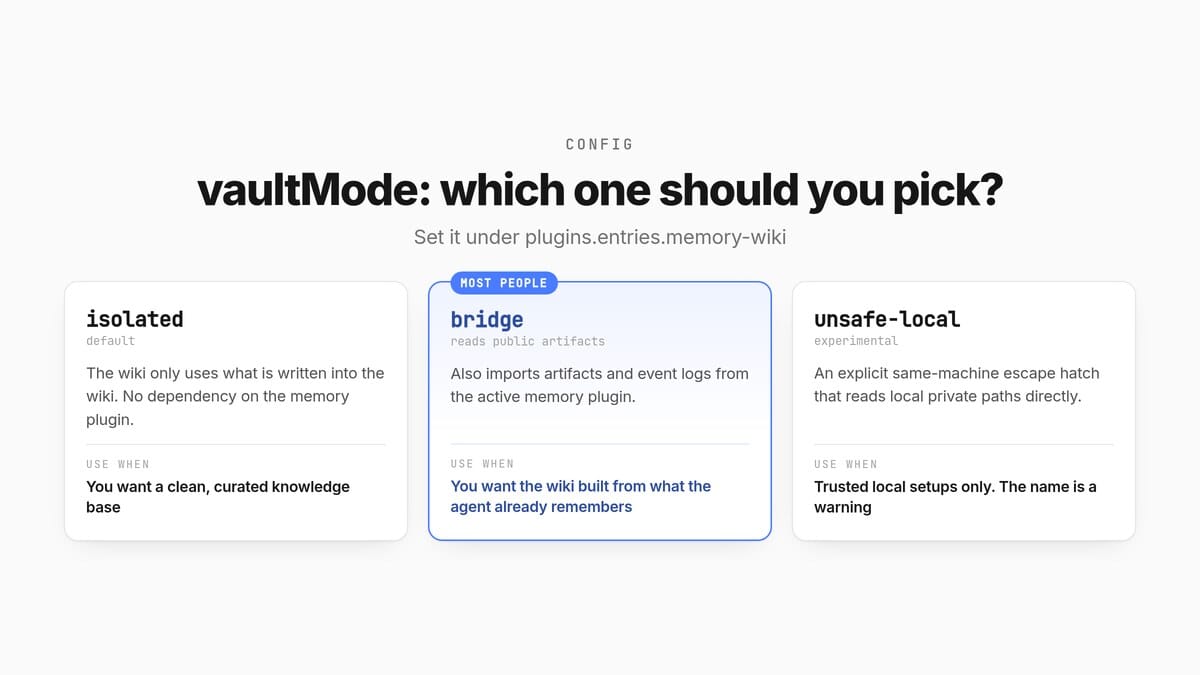
vaultMode: which one should you pick?
| Mode | What it does | Use it when |
|---|---|---|
isolated (default) | The wiki only uses what is written into the wiki | You want a clean, curated knowledge base with no dependency on the memory plugin |
bridge | Also imports public artifacts and event logs from the active memory plugin | You want the wiki built from what the agent already remembers. The best choice for most people |
unsafe-local | Reads local private paths directly | Only for trusted local setups. The name is a warning |
One vault, or one per agent?
By default every agent shares one vault at ~/.openclaw/wiki/main. If you run a sales agent and a support agent, you probably do not want them sharing "facts".
Set vault.scope: "agent" and each configured agent gets its own wiki. In that scope, vault.path becomes a parent directory and OpenClaw appends the normalized agent id, so the default main agent resolves to <state-dir>/wiki/main. You can move the base folder with the OPENCLAW_STATE_DIR environment variable, which defaults to ~/.openclaw.
One caveat worth knowing: per-agent vaults are a same-process knowledge boundary, not an operating-system security boundary.
The five wiki tools
The plugin adds these tools to your agent:
wiki_status: reports vault mode, scope, agent resolution and health status. No params.wiki_search: finds claims by topic, with optional access to the shared memory corpus.wiki_get: reads a specific wiki page by ID or path.wiki_apply: narrow synthesis or metadata updates on existing claims. Not for freeform page rewrites.wiki_lint: structural validation, provenance gaps and contradictions. No params.
Wiki commands you'll actually use
openclaw wiki status            # vault mode, health, Obsidian availability
openclaw wiki doctor            # confirm the memory plugin exposes public artifacts
openclaw wiki compile           # build and refresh wiki pages
openclaw wiki search "auth team"
openclaw wiki get alice-chen
openclaw wiki bridge import     # pull in active memory artifacts (bridge mode)
openclaw wiki obsidian status   # check the Obsidian integration
openclaw wiki init, ingest, lint, apply and okf import are also available.
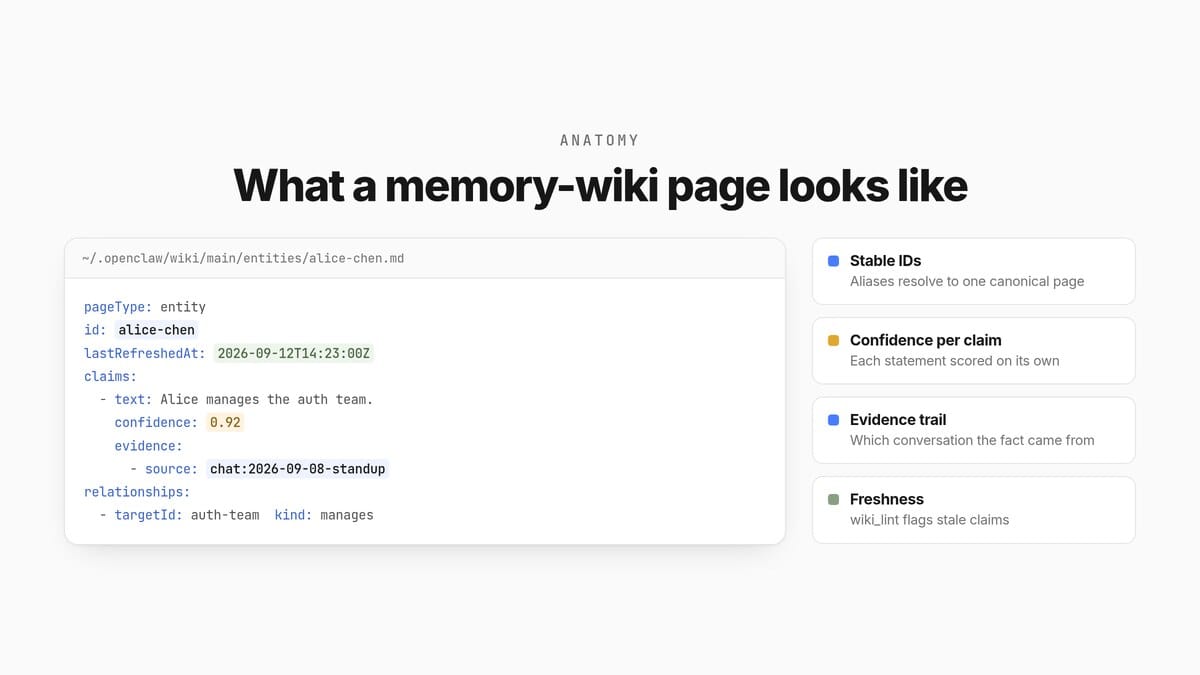
What a wiki page actually looks like
Memory-wiki pages are Markdown with structured YAML frontmatter. A typical person-entity page:
---
pageType: entity
entityType: person
id: alice-chen
canonicalId: alice-chen
aliases: [Alice, A. Chen]
privacyTier: team
lastRefreshedAt: 2026-09-12T14:23:00Z
bestUsedFor: [auth-permissions, security-reviews]
personCard:
  emails: [alice@example.com]
  timezone: America/Los_Angeles
  askForHints: [permission changes, SSO config]
claims:
  - id: c1
    text: Alice manages the auth team.
    status: active
    confidence: 0.92
    evidence:
      - source: chat:2026-09-08-standup
        kind: stated
  - id: c2
    text: Alice handles all permission changes for prod.
    status: active
    confidence: 0.88
    evidence:
      - source: doc:auth-runbook
        kind: written
relationships:
  - targetId: auth-team
    kind: manages
    confidence: 0.95
    evidenceKind: stated
---
The claims[] array is what makes wiki search precise: each statement has its own ID, confidence score and evidence trail. relationships[] lets the agent traverse the graph (who reports to whom, which project owns which service).
Practical setup tips
Tell the agent to check the wiki first. Add a line to your SOUL.md like "For questions about people, projects or policies, check the wiki before answering from general knowledge." This makes the agent use the structured knowledge base instead of guessing from session context.
Run wiki_lint regularly. Schedule it as a cron job to flag stale claims. The agent can then confirm, update or remove outdated entries, keeping the knowledge base accurate instead of accumulating quietly-wrong facts.
What to store in memory-wiki (and what to leave in MEMORY.md)
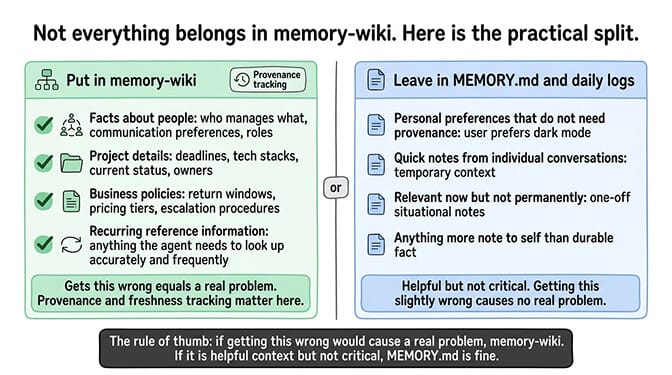
Not everything belongs in memory-wiki. Here is the practical split.
Put in memory-wiki: Facts about people (who manages what, who prefers what communication style). Project details (deadlines, tech stacks, current status). Business policies (return windows, pricing tiers, escalation procedures). Recurring reference information the agent needs to look up accurately and frequently.
Leave in MEMORY.md and daily notes: Personal preferences that do not need provenance tracking. Quick notes from individual conversations. Temporary context that is relevant now but not permanently. Anything that is more "note to self" than "durable fact."
The rule of thumb: if getting this wrong would cause a problem (wrong deadline, wrong policy, wrong person), put it in memory-wiki where it has provenance and freshness tracking. If it is helpful but not critical ("user prefers dark mode"), MEMORY.md is fine.
If managing memory plugins, wiki configuration and staleness maintenance feels like more infrastructure work than you want, Better Claw includes persistent memory with hybrid search built into the platform. $49/month for Pro, 5 agents, 200+ verified skills, BYOK with 28+ providers. The memory layer is managed alongside everything else.
Making the agent forget
New in 2.0: openclaw memory forget removes memory the agent derived, while your original transcripts stay intact.
openclaw memory forget --session <id-or-key> --dry-run
openclaw memory forget --hook-source <source>
openclaw memory forget --participant <actor-id> --since 2026-08-01
Run it with --dry-run first to preview what would go. The selectors work cumulatively: matching any of them includes a session, and --since narrows the window. Use it when a wrong "fact" keeps coming back, or when someone asks to be removed.
Memory-wiki plus Dreaming: the compound effect
Dreaming shipped in OpenClaw 2026.4.5, two days before memory-wiki, as background memory consolidation inside the memory-core plugin. Since 2.0 it is on by default. You can disable it with plugins.entries.memory-core.config.dreaming.enabled: false.
The Deep phase is the one that writes: it scores candidates and promotes durable ones into the curated core. Candidates are ranked by weighted signals, specifically retrieval relevance, recall frequency, query diversity, recency, multi-day recurrence and conceptual richness. The Light and REM phases stage and reflect without making permanent writes.
The important 2.0 change is provenance gating. Candidates with an origin class of untrusted or system are excluded structurally, before any prompt is built. That is a precondition, not a score penalty: no amount of recall frequency promotes untrusted content into MEMORY.md. In practice, memory written after a network or provider call stays untrusted and out of automatic context, though an explicit search can still surface it.
Memory-wiki is the foundation. Dreaming is the process that keeps it current.
For the broader comparison of memory plugins and how they complement memory-wiki, our plugins guide covers Mem0, Cognee, Honcho and the rest of the memory stack alongside memory-wiki.
Troubleshooting memory-wiki
The wiki is empty. Check openclaw wiki status. In isolated mode nothing is imported automatically. Switch to bridge or run openclaw wiki bridge import, then openclaw wiki compile.
wiki_search finds nothing, but the fact is in MEMORY.md. Your search.corpus is probably "wiki", which is the default. Set it to "all".
Bridge mode reports zero exported artifacts. The active memory plugin is not currently exposing public bridge inputs. Run openclaw wiki doctor to confirm.
Search broke after upgrading to 2.0. QMD is gone. Run openclaw doctor --fix, then openclaw memory index --force.
Obsidian shows plain files, no links or graph. Set vault.renderMode: "obsidian" and recompile. Check with openclaw wiki obsidian status.
The agent ignores the wiki. Add the SOUL.md instruction from the setup tips above.
Why this matters
Memory-wiki is the first time OpenClaw's memory system moved from "store and search text" to "maintain structured knowledge." It is the difference between an assistant with a pile of sticky notes and an assistant with a well-organized reference manual. OpenClaw 2.0 finished the job by folding search and recall back into the core, so there is now one memory system instead of a plugin stack you have to assemble.
If you want your agent's memory managed for you on a no-code AI agent platform, start with Better Claw. $49/month for Pro, 5 agents, 200+ verified skills, BYOK with 28+ providers, and a 7-day money-back guarantee. Updates land automatically and memory persistence is built in, so your agent builds its knowledge base while you focus on what the knowledge is about, not how it is stored.
Frequently Asked Questions
What is OpenClaw memory-wiki?
Memory-wiki is a structured, persistent knowledge base introduced in OpenClaw 2026.4.7. Unlike MEMORY.md (raw text notes), it stores claims with evidence, timestamps and freshness tracking. Agents search, write and maintain wiki entries across sessions using five tools: wiki_status, wiki_search, wiki_get, wiki_apply and wiki_lint.
How does memory-wiki differ from MEMORY.md?
MEMORY.md stores raw text notes; memory-wiki stores structured claims with provenance (source, timestamp, confidence, freshness). Memory-wiki supports claim-level search, staleness detection and contradiction clustering. MEMORY.md is for quick notes. Memory-wiki is for durable facts that need accuracy tracking over time.
Is QMD still supported in OpenClaw?
No. OpenClaw 2.0 (v2026.8.1) retired QMD and moved search and recall into built-in Memory. Run openclaw doctor --fix after upgrading to migrate your data and rebuild the index. QMD-only reranking, query expansion and cross-agent transcript search were removed.
What is OpenClaw Active Memory?
Active Memory is the layer that decides what the agent recalls into a conversation. Its default escalate mode only runs the blocking recall sub-agent when a message asks about the past and the deterministic lane found no strong match, so ordinary replies stay fast. Since 2.0, an eligible personal agent can also recall across its own private conversations.
How does the OpenClaw memory system work?
Five layers. The live conversation is trimmed by compaction, with a memory flush saving important parts first. Observations go to daily notes in memory/YYYY-MM-DD.md. Dreaming scores those in the background and promotes durable ones into MEMORY.md and USER.md, logging its work in DREAMS.md. Memory-wiki then compiles all of it into structured claims. The agent reads it back with memory_search, memory_get and the wiki tools.
Can each agent have its own wiki?
Yes, since 2.0. Set vault.scope: "agent" in the memory-wiki config. In that scope vault.path becomes a parent directory and OpenClaw appends the normalized agent id. Note that per-agent vaults are a knowledge boundary, not an operating-system security boundary.
How do I make OpenClaw forget something?
Run openclaw memory forget with a --session, --hook-source or --participant filter, optionally narrowed with --since. Use --dry-run to preview. It removes attributable derived memory but keeps the original transcripts.
What's the difference between Dreaming and memory-wiki?
They solve different problems. Memory-wiki is the storage layer, a structured knowledge base of claims. Dreaming is the consolidation process that scores short-term signals and promotes qualified items into MEMORY.md. Memory-wiki holds the knowledge; Dreaming decides what becomes long-term memory. Dreaming is on by default since 2.0.
How do I enable memory-wiki in OpenClaw?
Enable the bundled memory-wiki plugin under plugins.entries.memory-wiki in your config and restart the gateway. The plugin adds five tools to your agent: wiki_status, wiki_search, wiki_get, wiki_apply and wiki_lint. Set vaultMode: "bridge" and search.corpus: "all" for the most useful default, then add a SOUL.md instruction telling the agent to check the wiki before answering recurring questions.
Does memory-wiki work with other memory plugins?
Yes. Memory-wiki sits on top of OpenClaw's built-in memory and Active Memory rather than replacing them. In bridge mode it imports what active memory already knows. External plugins like Mem0 can still handle automatic fact capture alongside it.
Does memory-wiki cost extra?
The plugin is free and bundled with OpenClaw. Wiki operations use your existing model provider, so they add marginal API costs comparable to regular memory search. BetterClaw ($49/month for Pro), a no-code AI agent platform rather than an OpenClaw host, uses its own built-in persistent memory instead.
Related Reading
- OpenClaw Memory Plugins Compared: how memory-wiki fits alongside Mem0, Cognee and Honcho
- OpenClaw Memory Compaction Explained: the session context layer that memory-wiki builds on top of
- OpenClaw Memory Fix Guide: other memory issues memory-wiki does not solve
- How to Update OpenClaw Without Breaking Your Setup: safely upgrade to 2.0 before enabling memory-wiki
- The OpenClaw SOUL.md Guide: how to instruct your agent to use memory-wiki effectively
- What Is OpenClaw & How Does It Work?: the architecture memory-wiki plugs into
- OpenClaw vs Hermes: how the two frameworks compare on memory and everything else