Your agent forgets things. Several tools promise to fix it. Here's what each one actually does and which one, if any, you should install.
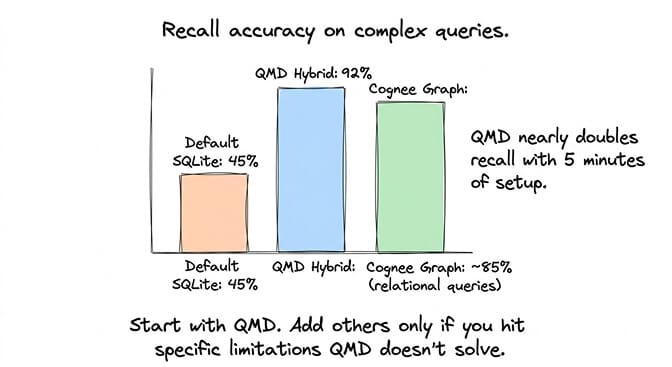
Updated September 28, 2026 for OpenClaw 2.0. OpenClaw 2.0 (v2026.8.1, shipped September 1, 2026) removed the QMD backend. Built-in Memory is now the only memory engine and handles keyword, vector, and hybrid search itself. Earlier versions of this post recommended QMD first and repeated a community "45% to 92% recall" figure; that figure never had a primary source, and the advice no longer applies. This version reflects the current plugins and adds a Honcho vs Mem0 comparison.
Three weeks into using OpenClaw, I asked my agent who managed our auth team. I'd told it this in a conversation ten days earlier. The agent searched its memory, retrieved six chunks of text about authentication, and couldn't connect any of them to the person I'd mentioned.
The information was there. The retrieval couldn't find it. That's the difference between storing memory and understanding memory.
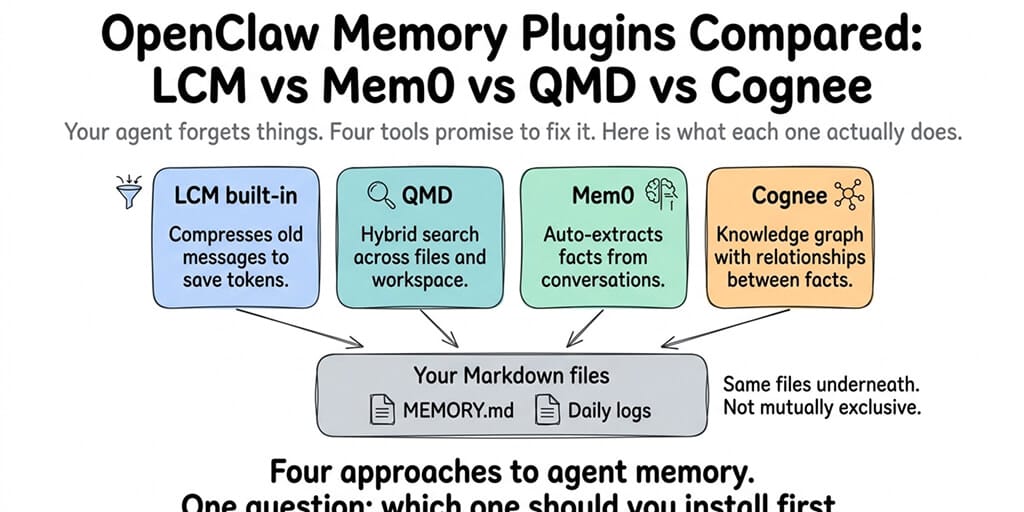
OpenClaw's default memory system works fine for the first few weeks. After that, the limitations show up in specific, predictable ways. The current ecosystem has several memory layers and plugins that address them differently: OpenClaw's built-in compaction (the active-session layer), built-in Memory (hybrid keyword and vector search over your Markdown files), Mem0 (automatic fact extraction), Honcho (cross-session user modeling), Memory LanceDB (open-source vector store), and Cognee (knowledge graph). Memory Wiki and Dreaming sit alongside these as structured-knowledge and consolidation layers respectively, covered in our Memory Wiki guide. QMD, the hybrid-search sidecar many guides still recommend, was removed in OpenClaw 2.0.
They solve different problems. They're not interchangeable. And most people install the wrong one first. Here's the honest comparison.
At a glance
| Plugin | Layer | Cost | Setup | Privacy | Best for |
|---|---|---|---|---|---|
| Built-in compaction | Active session | Free | Built-in | Local | Default; tune freshTailCount for long sessions |
| Lossless Claw (LCM) | Active session | Free | ~5 min | Local | Drop-in compaction replacement |
| Built-in Memory (SQLite) | Cross-session retrieval | Free | Built-in | Local | Default for most users; keyword (BM25) + vector + hybrid |
| QMD | Removed in OpenClaw 2.0 | n/a | n/a | n/a | Migrate with openclaw doctor --fix |
| Memory LanceDB | Cross-session retrieval | Free | ~5 min | Local (with Ollama embeddings) | Local-first auto-capture, larger stores |
| Mem0 | Auto-capture | Free Hobby / $19 Starter / $249 Pro | 30s-15min | Cloud or self-hosted | Hands-off users who don't curate MEMORY.md |
| Honcho | User modeling | Free self-hosted / usage-based managed | ~10 min | Self-hosted or managed | Multi-user agents, implicit preference tracking |
| Cognee | Knowledge graph | Free / $200 Cloud Team | ~15 min | Local or cloud | Relational queries across people/projects/teams |
| Memory Wiki | Structured knowledge | Free | ~10 min | Local | Durable facts with provenance & freshness |
| Dreaming | Consolidation | Free | Built-in, on by default in 2.0 | Local | Automated promotion of short-term signals |
Compaction (top two rows) handles the active session. Built-in Memory, LanceDB, Mem0, and Honcho compete for OpenClaw's single memory slot (plugins.slots.memory), so you run one of them at a time. Memory Wiki runs alongside whichever one owns the slot, and Dreaming is part of built-in Memory.
What the default memory actually does (and where it breaks)
OpenClaw's built-in memory indexes your Markdown files (USER.md, MEMORY.md, and daily notes in memory/YYYY-MM-DD.md) in a per-agent SQLite database. It supports keyword search (SQLite FTS5 with BM25 scoring), vector search over embeddings, and hybrid search that combines the two, with ranking by relevance, recency, and importance.
That covers the retrieval gap QMD used to fill. It still breaks in three specific ways.
No embedding provider, no semantic search. The built-in engine uses OpenAI embeddings by default, so if you have an OpenAI key configured, hybrid search just works. Without any embedding provider, it falls back to keyword search only: store "Docker configuration" and search for "container setup" and you'll get nothing. Configure an embedding provider (or local GGUF embeddings via the llama.cpp provider) and this problem mostly disappears. There's also no model-based reranking stage, which QMD used to add.
Only what's written down. Once a conversation ends, the context fades unless something was written to a memory file. Dreaming (on by default in 2.0) now consolidates daily notes into MEMORY.md in the background, but information that never reached a memory file is still gone.
No relational understanding. The system stores text chunks. It doesn't understand that Alice manages the auth team, that the auth team handles permissions, and that you should ask Alice about permission issues. Those are three separate chunks that require reasoning to connect.
For the detailed explanation of how OpenClaw memory and compaction work, our compaction guide covers what happens to your context window during long conversations.
Built-in compaction (and Lossless Claw, the third-party LCM)
OpenClaw ships with default LLM-summarization compaction that manages your active conversation context. There's no formal product name for it in the docs — it's just "built-in compaction" or "default LLM summarization."
A third-party plugin called Lossless Claw (by Martian-Engineering, published as @martian-engineering/lossless-claw on npm) implements an LCM (Lossless Context Management) algorithm as a drop-in replacement. People sometimes refer to either by "LCM," which has caused confusion in the community.
What the compaction layer does: Compresses older messages in the conversation window to keep the context from overflowing. Preserves recent messages in full while summarizing older ones. Controls how much of the context window is used for conversation history versus system prompts and tool results.
What it doesn't do: Cross-session recall. Semantic search. Relationship understanding. Compaction manages the current conversation. It doesn't improve how the agent retrieves information from past conversations.
When to tune it: If your agent forgets things mid-conversation (within a single session), adjust freshTailCount (how many recent messages stay uncompressed) and contextThreshold (when compression triggers). The defaults work for most conversations. Long, complex sessions benefit from a higher freshTailCount (32 instead of the default).
Cost: Free. Built in. No additional API calls beyond the summarization model. Lossless Claw is also free, but is an optional install if the built-in compaction doesn't suit your workload.
Compaction manages the current session. Built-in Memory, Mem0, Honcho, LanceDB, and Cognee manage everything else. Don't compare compaction to the retrieval plugins. They work on different problems.
QMD: retired in OpenClaw 2.0 (what to do instead)
QMD combined BM25 keyword search, vector search, and LLM reranking in a local sidecar, and for most of 2026 it was the go-to retrieval upgrade. OpenClaw 2.0 removed it. The builtin engine docs are blunt: "QMD has been removed; builtin is the only memory engine."
If you ran QMD: after upgrading, run openclaw doctor --fix. Doctor removes the retired memory.backend, memory.qmd, and memory.search.qmd settings, carries your QMD paths and extra collections over as memory.search.extraPaths, and turns on built-in session indexing if you had QMD session indexing enabled. It only deletes empty per-agent QMD directories, so back up and remove any leftover QMD indexes yourself.
What you lose: the LLM reranking step. Built-in Memory ranks deterministically (relevance, recency, importance, plus an MMR diversity pass) rather than with a model.
What you keep: hybrid keyword and vector search, now built in, with nothing extra to install. For the complete guide to OpenClaw best practices including memory file organization, our practices guide covers how to structure memory files so built-in search finds them. On BetterClaw, retrieval is part of the runtime and memory retention is a plan setting.
Mem0: Automatic fact extraction (for people who hate writing notes)
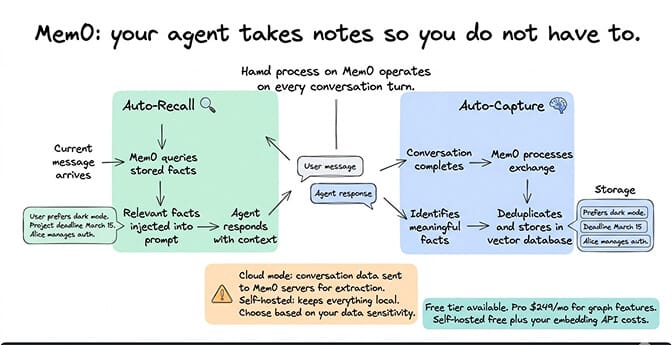
Mem0 watches your conversations, automatically extracts structured facts ("user prefers dark mode," "project deadline is March 15," "Alice manages auth"), deduplicates them, and stores them in a vector database. Before each response, it queries those stored facts and injects relevant ones into the prompt.
What it does: Two processes run on every conversation turn. Auto-Recall searches stored facts for anything relevant to the current message and injects them. Auto-Capture processes the conversation after each exchange, identifies meaningful facts, and stores them. You don't write MEMORY.md entries manually. The system does it for you.
What it doesn't do: Relationship reasoning. Mem0 stores individual facts. It doesn't build connections between them. It's a smart note-taker, not a knowledge graph.
Setup complexity: Low for cloud mode (30 seconds with an API key from app.mem0.ai). Moderate for self-hosted mode (requires configuring vector store and embedding provider). Cloud mode sends conversation data to Mem0's servers. Self-hosted mode keeps everything local.
Cost: Mem0's platform pricing: Hobby is free (10,000 add requests and 1,000 retrieval requests a month), Starter is $19/month (50,000 adds, 5,000 retrievals), and Pro is $249/month (500,000 adds, 50,000 retrievals, graph memory). Self-hosted: free, requires your own embedding and LLM API costs.
Setup in 2026: the plugin is @mem0/openclaw-mem0 (supported on OpenClaw 2026.4.25 and later). Like every memory engine it has to own the memory slot: set plugins.slots.memory to openclaw-mem0, or it won't activate.
Best for: Users who interact with OpenClaw conversationally across many sessions and don't want to manually curate memory files. Also strong for multi-user deployments where each user needs isolated memory (Mem0's userId namespace handles this natively).
The privacy trade-off: Mem0 Cloud sends your conversation data to external servers for extraction. If data privacy is a concern, use self-hosted mode or skip Mem0 entirely. The extraction process adds API costs because every conversation turn gets processed twice: once by your agent's model and once by Mem0's extraction model.
Cognee: Knowledge graph for relationship reasoning
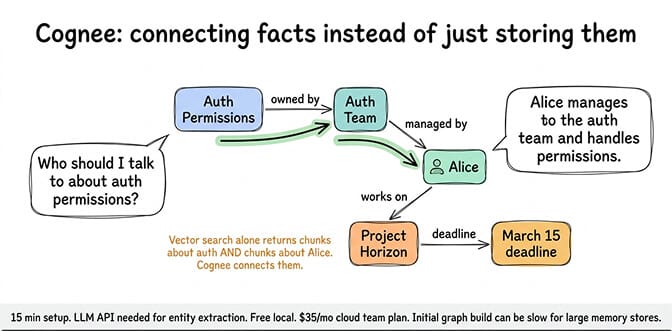
Cognee builds a knowledge graph from your Markdown memory files. Instead of searching for similar text, it extracts entities and relationships, then traverses the graph to answer queries that require connecting multiple facts.
What it does: On startup, scans your MEMORY.md and daily logs. Extracts entities (people, projects, teams, dates) and relationships between them. When you ask "who should I talk to about auth permissions?", Cognee traverses: Auth Permissions → Auth Team → Alice (manages). The agent gets structured context: "Alice manages the auth team and handles permissions." Vector search alone would return chunks about auth and chunks about Alice but might not connect them.
What it doesn't do: Keyword search. Simple text retrieval. Cognee is designed for relational queries, not "find the paragraph where I mentioned X." Use built-in Memory for text retrieval and Cognee for relationship reasoning.
Setup complexity: Moderate. Takes about 15 minutes. Requires LLM API for entity extraction during indexing. The initial graph build processes all your memory files, which can be slow and costly for large memory stores.
Cost: Free for local deployment. Cognee Cloud Team plan is $200/month (2,500 docs / 2 GB / 10 users / 10K API calls) — the $35 figure that circulates online is the per-1,000-docs storage top-up, not the Team plan itself. The entity extraction process also uses LLM calls during indexing, adding ongoing API costs as memory files grow.
Best for: Teams managing complex, long-running projects where relationships between people, systems, and decisions matter. If you're tracking "who manages what, which team owns which system, and what was decided about X project three weeks ago," Cognee answers these queries that no other plugin handles well.
If managing memory plugins, retrieval tuning, and extraction costs feels like more infrastructure work than you want, BetterClaw includes hybrid vector plus keyword search built into the platform. Free plan with 7-day memory; Pro is $49/month for 5 agents with 90-day memory, BYOK. The memory layer is pre-optimized. No plugins to install or configure.
Honcho: Cross-session user modeling (when "who you're talking to" matters)
Honcho is an AI-native memory system that builds a persistent user model over time. Where Mem0 captures discrete facts ("user prefers dark mode"), Honcho models the user (their preferences, drift over time, communication patterns, implicit signals) and exposes that as queryable context. The plugin (@honcho-ai/openclaw-honcho, repo at plastic-labs/openclaw-honcho) plugs into OpenClaw's memory slot.
What it does: Persists every turn to Honcho, builds separate models of the user and the agent, semantic-searches past observations, and tracks parent/child relationships when sub-agents are involved. The agent gets tools like honcho_context, honcho_search_messages, and honcho_ask (which answers questions about the user at a quick or thorough depth).
What it doesn't do: It doesn't keep searching your workspace Markdown the way built-in Memory does. Setup uploads your existing USER.md, MEMORY.md, and memory/ files to Honcho (non-destructively), and from then on memory lives in the Honcho service. It's about who the user is, not what's in the files.
Setup complexity: Moderate (~10 minutes): openclaw plugins install @honcho-ai/openclaw-honcho, openclaw plugins enable openclaw-honcho (which sets the memory slot; on OpenClaw 2026.8.x and earlier, install alone leaves the plugin silently disabled), allow conversation access, then openclaw honcho setup and restart the gateway.
Cost: The Honcho server is open source (AGPL-3.0) and free to self-host. The managed service at api.honcho.dev is usage-based: $2.00 per million tokens ingested, with reasoning queries priced from $0.001 to $0.50 each depending on depth.
Best for: Multi-user agents where each user needs an isolated, evolving model. Personal assistants where implicit-preference tracking matters. Community evaluation in OpenClaw issue #60572 ("Multi-Slot Memory Architecture") rated Honcho 9/10 on implicit preference detection with low false-inference rate and strong preference-drift tracking.
Honcho vs Mem0: which one for OpenClaw?
Both plugins fix the same complaint ("my agent doesn't remember me across sessions"), both auto-capture from conversations so you don't curate MEMORY.md by hand, and both have to take OpenClaw's single memory slot. The difference is what they remember.
| Honcho | Mem0 | |
|---|---|---|
| What it stores | A reasoned model of each user (and the agent), built from every turn | Discrete facts extracted from conversations, deduplicated |
| How it recalls | Context injected before each prompt, plus honcho_ask for questions about the user | Relevant facts retrieved (with reranking) and injected before each turn, plus eight memory tools |
| Best at | Implicit preferences, preference drift, "how does this person like to work" | Explicit facts: names, deadlines, decisions, settings |
| Multi-user | Per-user peer models; parent agents observe sub-agent sessions | Per-user isolation via userId; sub-agents can recall parent memories |
| Self-hosting | Yes, open source (AGPL-3.0) | Yes, open-source mode |
| Managed pricing | Usage-based: $2.00/M tokens ingested, $0.001-$0.50 per reasoning query | Tiers: free Hobby, $19 Starter, $249 Pro (graph memory on Pro) |
| OpenClaw plugin | @honcho-ai/openclaw-honcho | @mem0/openclaw-mem0 |
Pick Mem0 if you want a reliable note-taker: the agent should remember that the launch moved to the 14th, that Alice owns auth, and that you use pnpm. Its tier pricing is easy to budget, and the free Hobby tier covers a personal agent.
Pick Honcho if the agent talks to several people, or if the thing it keeps getting wrong is how someone likes things done rather than what they told it. In OpenClaw issue #60572, a community evaluation rated Honcho 9/10 on implicit preference detection (with low false inference and strong preference-drift tracking), but only 3/10 on integration, because it has to replace built-in memory rather than sit beside it.
The catch for both: whichever you choose replaces built-in Memory in the slot, so you give up hybrid search over your workspace files and built-in Dreaming. Honcho's plugin README says running it alongside memory-core isn't supported yet (a companion mode is planned), even though OpenClaw's own Honcho page describes the two working together. Test on a non-critical agent first. If you just want better recall of what's in your files, stay on built-in Memory and skip both.
Memory LanceDB: Open-source vector store
Memory LanceDB (@openclaw/memory-lancedb on npm) is the official LanceDB-backed memory engine. Install it via openclaw plugins install @openclaw/memory-lancedb — it's not bundled into the OpenClaw runtime image even though it's labeled "official."
What it does: Stores memory in a LanceDB-backed vector database with auto-recall (search past observations on every turn) and auto-capture (write new facts from conversations into the store). Supports local Ollama embeddings, which means you can run the entire memory layer offline without sending data to a cloud embedding API.
What it doesn't do: No knowledge graph (use Cognee), no user modeling (use Honcho), no claim-level structured knowledge (use Memory Wiki).
Setup complexity: Low (~5 minutes). Plugin install + provider config.
Cost: Free. If you point it at Ollama for embeddings, there's no API cost at all. Otherwise the embedding provider you choose carries its usual rates.
Best for: Self-hosted setups that want Mem0-style auto-capture without sending data to a cloud service. Larger memory stores where SQLite starts to feel slow. A practical local-first alternative to Mem0 Cloud.
A note on the single-slot problem
OpenClaw exposes one memory plugin slot (plugins.slots.memory). Picking Honcho replaces the built-in memory. Picking Memory LanceDB or Mem0 replaces it too. You can run Memory Wiki (a companion plugin) alongside whichever engine owns the slot, but you can't run two memory engines at once. OpenClaw issue #60572 proposes a multi-slot architecture (separate slots for recall, capture, and user modeling) to fix this; it's still open as of September 2026.
Which one should you install first?
Here's the practical recommendation.
Most users: install nothing. On OpenClaw 2.0, built-in Memory already does hybrid keyword and vector search, and Dreaming consolidates your notes in the background. Make sure an embedding provider is configured (OpenAI by default, or local GGUF embeddings), run openclaw doctor --fix if you're upgrading from a QMD setup, and see whether the problem is actually solved before adding anything. This is the 80/20 answer now.
Add Memory Wiki and let Dreaming feed it. Memory Wiki (2026.4.7) gives you structured claims with provenance; Dreaming (2026.4.5, on by default since 2.0) handles the persistence side automatically. The pair closes the "agent only remembers what gets written down" gap that retrieval plugins alone can't fix.
Pick one capture/modeling engine for the memory slot: Mem0 if you want hands-off fact capture (cloud or self-hosted), Honcho if you need cross-session user modeling (multi-user agents, implicit preferences), or Memory LanceDB if you want Mem0-style auto-capture entirely local with Ollama embeddings. You can only fill the memory slot with one of these at a time.
Add Cognee if relationships matter. If your work involves connecting people to projects, teams to systems, and decisions to timelines, Cognee's graph retrieval answers queries that text search can't. But it's overkill for personal assistant use cases.
Recommended stacks
- Beginner: built-in compaction + built-in Memory with an embedding provider configured. Zero installs.
- Solo power user: built-in Memory + Dreaming + Memory Wiki. Retrieval, automated consolidation, and structured durable facts.
- Privacy-first / offline: Memory LanceDB (with Ollama embeddings) + Memory Wiki. Everything local, no cloud calls. Or stay on built-in Memory with local GGUF embeddings.
- Hands-off fact capture: Mem0 in the memory slot + Memory Wiki.
- Multi-user agent: Honcho in the memory slot. Per-user modeling, at the cost of built-in hybrid search over your files.
- Knowledge-graph-heavy team: built-in Memory + Cognee + Memory Wiki. Text retrieval, relational reasoning, and structured claims.
Start with the beginner stack. Add layers only when you hit a specific limitation. Don't install everything because you can — install the layer that fixes the problem you actually have.
The memory problem that plugins can't fix on their own
Retrieval plugins improve how the agent finds stored information. None of them fix the fundamental problem on their own: your agent only remembers what gets written down. If a fact from a conversation doesn't get persisted to a memory file, it's gone after the session ends. LCM can keep it in the active context for a while, but compaction eventually summarizes it away, and no retrieval plugin can find information that was never stored.
OpenClaw 2026.4.5 introduced Dreaming, an automated memory consolidation system with three phases (Light / Deep / REM) that closes part of this gap. Dreaming scores short-term signals from your sessions and promotes durable items into MEMORY.md automatically, so the persistence side of the equation no longer has to be entirely manual. Pair that with Memory Wiki (shipped in 2026.4.7), the structured-claims layer that sits alongside MEMORY.md, and you get persistence with provenance — see our Memory Wiki guide for the setup.
The best memory setup still combines a persistence strategy (manual notes, Mem0 or Honcho capture, or Dreaming + Memory Wiki) with a retrieval strategy (built-in hybrid search, plus Cognee if you need relationships). Both layers matter. Most people focus on retrieval and ignore persistence.
For the complete memory troubleshooting guide including how memory persistence interacts with your system prompt, our guide covers the persistence side of the equation.
If you want memory that works without installing and configuring plugins, give BetterClaw a try. It's a no-code AI agent platform with 200+ verified skills: free plan with 1 agent and 7-day memory, or $49/month for Pro with 5 agents and 90-day memory, BYOK with 28+ providers. Hybrid vector plus keyword search is built into the platform. No memory slot juggling, no Mem0 API keys, no Cognee graph builds.
Frequently Asked Questions
What are the main memory plugins for OpenClaw?
OpenClaw's current memory landscape spans compaction (built-in summarization, plus the third-party Lossless Claw LCM plugin), memory engines (built-in Memory, Memory LanceDB, Mem0, Honcho), Cognee for knowledge graphs, and the structured-knowledge layer (Memory Wiki, with Dreaming feeding it). QMD was removed in OpenClaw 2.0. OpenClaw has only one memory slot, so you pick one engine; Memory Wiki can sit alongside whichever you choose.
Which OpenClaw memory plugin should I install first?
On OpenClaw 2.0, usually none. Built-in Memory now does hybrid keyword and vector search and QMD has been removed, so start by configuring an embedding provider and letting Dreaming run. Add Mem0 (auto fact capture), Honcho (per-user modeling), or Cognee (relational reasoning) only when you hit a specific limitation built-in Memory doesn't address. If you're upgrading from QMD, run openclaw doctor --fix.
How much do OpenClaw memory plugins cost?
Built-in Memory: free. Mem0 platform: free Hobby tier, $19/month Starter, $249/month Pro (graph memory). Honcho: free to self-host; the managed service charges $2.00 per million tokens ingested plus $0.001-$0.50 per reasoning query. Mem0 self-hosted: free, requires your own embedding API costs. Cognee local: free, requires LLM API for entity extraction. Cognee Cloud Team: $200/month. Memory LanceDB: free open-source plugin. Built-in compaction (and the third-party Lossless Claw LCM plugin): free. The hidden cost with Mem0 and Cognee is ongoing API consumption — both run LLM calls for extraction, doubling the per-turn token cost.
Can I use multiple OpenClaw memory plugins at the same time?
Partly. Only one plugin can own OpenClaw's memory slot, so built-in Memory, Mem0, Honcho, and LanceDB are either/or. Memory Wiki runs alongside any of them, and Cognee can add relational queries on top. The tradeoff is token overhead: each retrieval system injects context into the prompt before every response, increasing input tokens and API costs.
Honcho vs Mem0: which is better for OpenClaw?
Mem0 is better for remembering explicit facts (names, deadlines, decisions) and has simple tiered pricing: free Hobby, $19 Starter, $249 Pro. Honcho is better at modeling the user over time, such as implicit preferences and how they change, and suits multi-user agents; it's open source and free to self-host, or usage-based on the managed service. Both take OpenClaw's single memory slot, replacing built-in Memory, so only add one if built-in hybrid search and Dreaming aren't enough.
Does BetterClaw include memory plugins?
BetterClaw includes hybrid vector plus keyword search built into the platform with no plugin installation required. Persistent memory with automatic capture is part of the managed infrastructure. If you want Cognee's knowledge graph or Mem0's specific extraction features, those would need to be configured separately. For most users, BetterClaw's built-in memory handles the 80% use case without plugin management.
Related Reading
- OpenClaw Memory Fix Guide — Memory loss, OOM crashes, and the persistence problem
- OpenClaw Memory Compaction Explained — How LCM manages your active context window
- OpenClaw Session Length Is Costing You Money — How memory size affects your API bill
- The OpenClaw SOUL.md Guide — How system prompts interact with memory retrieval
- OpenClaw API Costs: What You'll Actually Pay — The cost impact of stacking memory plugins