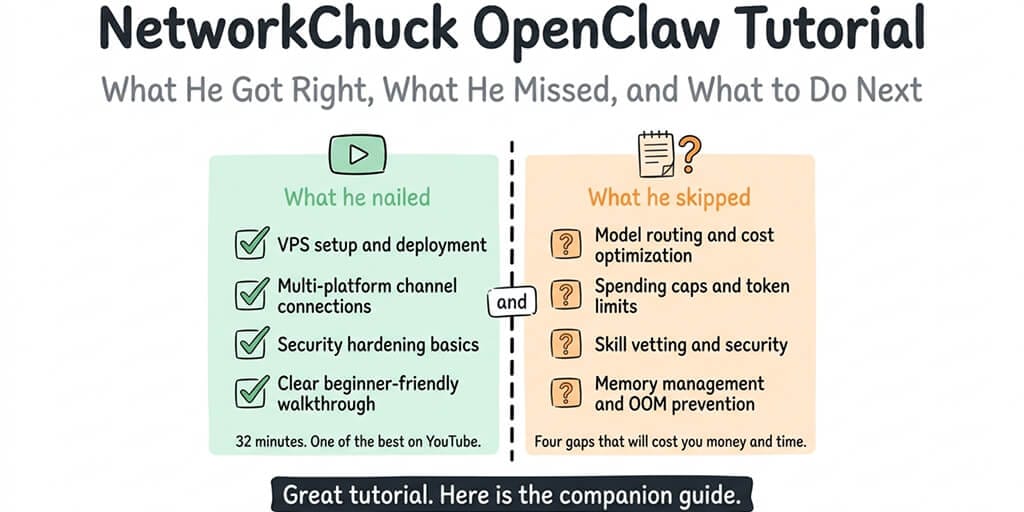
His 32-minute VPS setup is one of the best OpenClaw tutorials on YouTube. But there are four things he skipped that will cost you money and time.
I watched NetworkChuck's OpenClaw tutorial the day it dropped. Paused it seventeen times to take notes. Built my setup alongside it, step by step.
By the end of 32 minutes, I had an OpenClaw agent running on a VPS, connected to Telegram, with security hardening in place. It worked. The tutorial delivered exactly what it promised.
Then my first month's API bill arrived. $87. I was running Claude Opus on every request, including the 48 daily heartbeat checks. NetworkChuck's tutorial didn't cover model routing. It didn't mention spending caps. And the security hardening, while solid for a 32-minute video, left out three things that matter more than most people realize.
This isn't a criticism of NetworkChuck. His OpenClaw tutorial is genuinely one of the best on YouTube. It's clear, energetic, and gets a beginner from zero to a working agent faster than any other video I've found. But every tutorial has to make cuts, and what got cut has real consequences for the people who follow it.
Here's what he got right, what he missed, and how to fill the gaps.
What the NetworkChuck OpenClaw tutorial covers (and covers well)
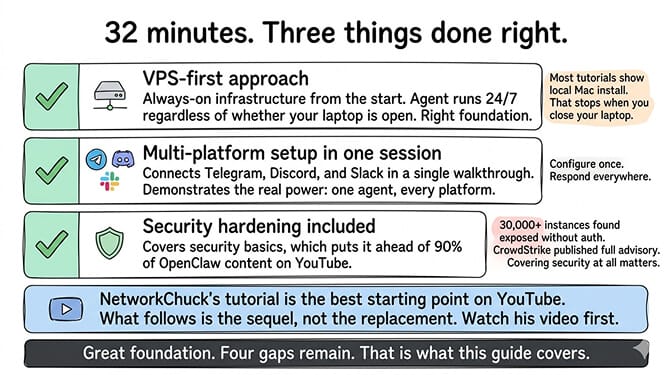
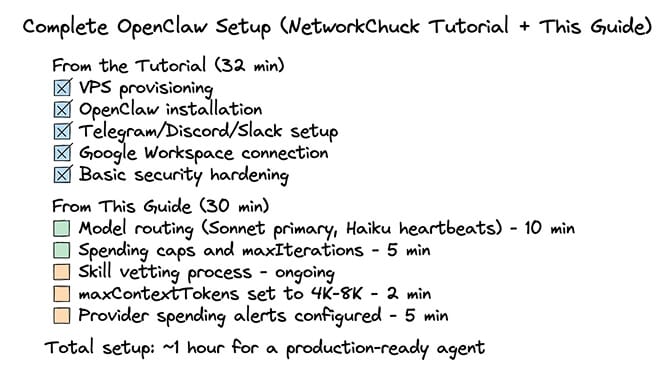
NetworkChuck's tutorial is a 32-minute VPS-based setup guide. He walks through server provisioning, OpenClaw installation, multi-platform integration (Telegram, Discord, Slack), Google Workspace connection, and basic security hardening.
The VPS approach is the right call. A lot of OpenClaw tutorials show local installation on a Mac or laptop. That works for testing but fails for production because the agent stops when you close your laptop or put your machine to sleep. NetworkChuck correctly starts with a VPS, which means the agent runs 24/7 regardless of whether your personal machine is on.
This is the right foundation. An always-on agent needs always-on infrastructure. For the full comparison of VPS options and what each one costs, our self-hosting guide covers the pricing and trade-offs across providers.
The multi-platform setup is practical. The tutorial connects OpenClaw to Telegram, Discord, and Slack in one session. This is smart because it shows the agent's real power: you configure it once, and it responds across multiple platforms from a single instance. Most people start with Telegram (easiest to set up) and add platforms over time, but seeing all three connected in the tutorial demonstrates the architecture clearly.
The security section exists (which is more than most tutorials). NetworkChuck covers security hardening in his tutorial, which immediately puts it ahead of 90% of OpenClaw content on YouTube. Most tutorials skip security entirely. Given that 30,000+ OpenClaw instances have been found exposed without authentication on the internet, and CrowdStrike published a full security advisory on the risks, covering security at all is a significant step.
NetworkChuck's OpenClaw tutorial is the best starting point on YouTube. What follows in this article isn't a replacement. It's the sequel. Watch his video first, then come back here for the four things he didn't have time to cover.
Gap 1: Model routing (the $25/month mistake)
This is the most expensive omission. The tutorial sets up OpenClaw with a single model provider (typically Claude Opus or GPT-4o) and doesn't mention model routing.
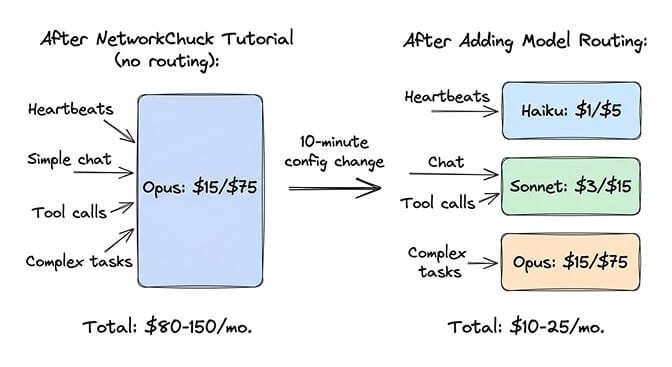
Here's what that means in practice: every request your agent handles, from a simple "hello" to a complex research task to the 48 daily heartbeat status checks, goes to the same expensive model. On Claude Opus ($5/$25 per million tokens), heartbeats alone cost roughly $1.44/month. Simple conversational responses that Sonnet ($3/$15) handles identically cost about 1.7x more on Opus (2.5x more than on Sonnet 5 at $2/$10).
The fix takes about 10 minutes: set Sonnet as your primary model for regular conversations, Haiku ($1/$5) for heartbeats, and a cheap fallback like DeepSeek ($0.28/$0.42) for when your primary provider goes down. This typically cuts API costs by 40-60%.
Before model routing: $30-50/month in API costs (Opus for everything). After model routing: $10-25/month in API costs (right model per task).
Pricing update (September 2026): My $87 first-month bill was on the old $15/$75 Opus rate. Current Opus models (4.6 through Opus 5) cost $5/$25 per million tokens, so the same month would come to roughly $29 today. Routing still pays; the gap is just smaller.
For the complete model routing configuration and cost breakdown, our routing guide covers the specific setup and savings math across seven common agent tasks.
Gap 2: Spending caps (the runaway loop problem)
The tutorial doesn't set spending limits. This is the safety net most tutorials skip.
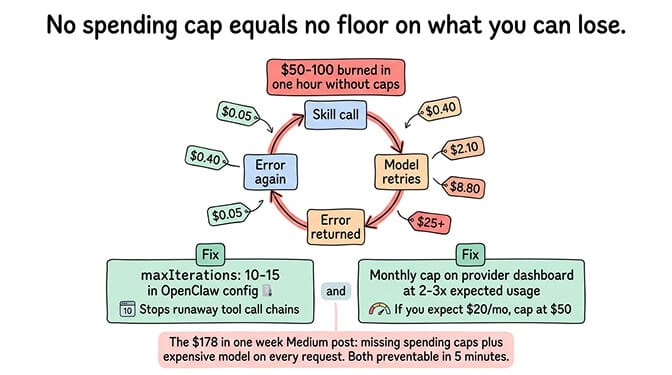
OpenClaw agents can enter runaway loops. A skill returns an error. The model retries. The skill errors again. The loop repeats 50+ times. Each iteration costs tokens. Without spending caps and iteration limits, a single bug in a skill or a misconfigured cron job can burn through $50-100 in API credits in an hour.
The fix: set maxIterations to 10-15 in your OpenClaw config (limits how many sequential tool calls the agent makes per turn). Set monthly spending caps on your Anthropic, OpenAI, or other provider dashboards at 2-3x your expected monthly usage. If you expect $20/month in API costs, cap at $50.
The viral Medium post "I Spent $178 on AI Agents in a Week" happened because of missing spending caps combined with an expensive model running on every request. Both problems are preventable with five minutes of configuration.
For the detailed cost optimization guide including five specific changes, our API cost breakdown covers how one setup went from $115/month to under $15/month.
Gap 3: Skill vetting (the security gap the tutorial doesn't mention)
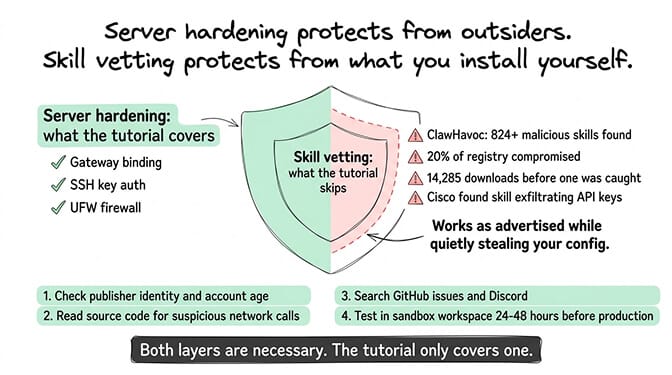
NetworkChuck's security section covers server hardening. It doesn't cover skill vetting. This is a meaningful gap because the skill ecosystem is where most OpenClaw compromises actually happen.
The ClawHavoc campaign discovered 824+ malicious skills on ClawHub, roughly 20% of the entire registry. One compromised package had 14,285 downloads before it was pulled. Cisco independently found a third-party skill performing data exfiltration without user awareness. The skill worked as advertised while quietly sending config data (including API keys) to an external server.
Server hardening protects you from external attackers. Skill vetting protects you from the code you install yourself. Both are necessary.
The fix: before installing any ClawHub skill, check the publisher's identity and account history, read the source code for suspicious network calls and file access outside the skill's workspace, search community reports on GitHub and Discord, and test in a sandboxed workspace for 24-48 hours before deploying to production.
For the full security incident timeline and skill vetting checklist, our security guide covers ClawHavoc, the CrowdStrike advisory, and the specific code patterns to look for.
Gap 4: Memory and context management (the slow cost leak)
The tutorial gets the agent running but doesn't configure memory or context limits. This creates a slow, invisible cost leak.
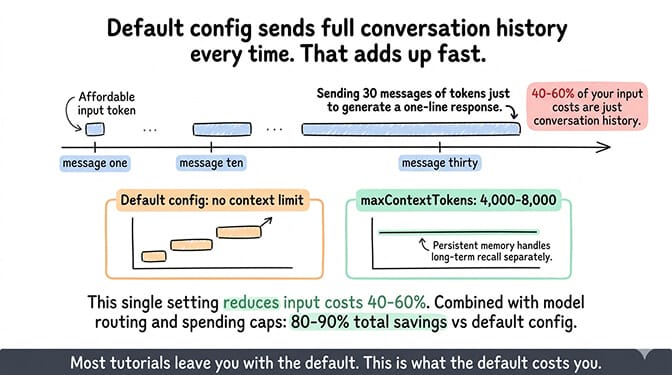
OpenClaw's default behavior sends the full conversation history as context with every new request. For a model charged per input token, this means every new message includes all previous messages. By message 30 in a conversation, you're sending 30 messages worth of tokens as input just to generate a one-line response.
Setting maxContextTokens to 4,000-8,000 in your config caps how much conversation history goes with each request. Your agent still has persistent memory for long-term recall. It doesn't need the entire conversation buffer on every call.
This single setting can reduce input token costs by 40-60% depending on average conversation length. Combined with model routing and spending caps, you're looking at total savings of 80-90% compared to the default configuration that most tutorials leave you with.
If configuring model routing, spending caps, skill vetting, and memory management sounds like more optimization work than you signed up for, BetterClaw handles all of this with preset configurations. $49/month for Pro, BYOK with 28+ providers. Model selection from a dashboard dropdown. Spending alerts built in. Docker-sandboxed skill execution. AES-256 encrypted credentials. The configuration layer is pre-optimized so you focus on what your agent does, not on tuning infrastructure settings.
What the tutorial gets exactly right (and why it matters)
I've spent this article covering gaps. Let me give credit where it's due.
The energy and accessibility are unmatched. NetworkChuck's teaching style makes OpenClaw feel approachable. The OpenClaw maintainer Shadow warned that "if you can't understand how to run a command line, this is far too dangerous of a project for you to use safely." NetworkChuck's tutorial bridges that gap by making the command-line steps feel manageable. That's not a small contribution.
The VPS-first approach saves beginners from the laptop trap. Starting on a VPS means the agent actually works as a 24/7 assistant from day one. Tutorials that start with local installation leave people confused when their agent goes offline every time they close their laptop.
The multi-platform demo is the "aha" moment. Seeing the same agent respond on Telegram, Discord, and Slack in the same session is when most people understand what makes OpenClaw different from a regular chatbot. NetworkChuck nails this demonstration.
The security section, even if incomplete, normalizes security thinking. Most beginners don't think about security until something goes wrong. Including it in a beginner tutorial establishes the expectation that security is part of setup, not an afterthought.
The broader tutorial problem (it's not just NetworkChuck)
Here's what nobody tells you about the OpenClaw tutorial ecosystem. Every tutorial makes the same trade-offs. Fireship's 12-minute overview covers risks honestly but doesn't go deep on setup. FreeCodeCamp's comprehensive guide covers security but runs over an hour. AI Jason's 9-minute tutorial gets you on Telegram fast but skips everything else.
The problem is structural. A good setup video needs to be short enough to hold attention, which means cutting the optimization and security content that prevents problems later. The best tutorials get you to a working agent quickly. The worst ones leave you with a working agent that costs 5x what it should and has security gaps.
The solution isn't better tutorials. It's treating the tutorial as step one, not the entire journey. Get the agent running. Then optimize the configuration. Then add security layers. Then monitor costs.
For the seven practices that every stable OpenClaw setup shares, our best practices guide covers the full checklist including everything in this article plus three additional patterns.
The honest recommendation
Watch NetworkChuck's tutorial. Follow it step by step. Get your agent running on a VPS with Telegram, Discord, and Slack connected. Feel the satisfaction of watching it respond to messages autonomously. That first "it works" moment is genuinely exciting.
Then spend 30 more minutes on the four gaps in this article. Set up model routing. Configure spending caps. Set maxContextTokens. Learn the skill vetting process. These 30 minutes will save you $20-40/month in API costs and protect you from the security incidents that have hit thousands of other OpenClaw users.
The tutorial gets you to the starting line. The optimization gets you to the finish line.
If you want to skip both the tutorial and the optimization and just have a working, cost-optimized, secure agent in 60 seconds, give Better Claw a try. $49/month for Pro, BYOK with 28+ providers. Model routing, spending alerts, Docker-sandboxed execution, and AES-256 encryption included. We built it because we kept watching the same pattern: great tutorial, excited setup, $100 API bill, abandoned agent. The infrastructure should be invisible. The agent should just work.
Frequently Asked Questions
What does the NetworkChuck OpenClaw tutorial cover?
NetworkChuck's OpenClaw tutorial is a 32-minute video covering VPS-based setup for running an always-on OpenClaw agent. It walks through server provisioning, OpenClaw installation, connecting to Telegram, Discord, and Slack, Google Workspace integration, and basic security hardening. It's one of the best beginner-friendly OpenClaw tutorials on YouTube and gets viewers to a working agent quickly.
How does NetworkChuck's tutorial compare to other OpenClaw guides?
It's the best balance of accessibility and completeness in video format. Fireship's 12-minute overview is faster but less detailed. FreeCodeCamp's guide is more comprehensive but over an hour long. AI Jason's tutorial is quicker but covers fewer platforms. NetworkChuck's unique strength is the VPS-first approach and multi-platform demo, which shows the agent's real value from the start. The main gaps are model routing (cost optimization), spending caps, skill vetting, and memory configuration.
How do I reduce my OpenClaw costs after following the NetworkChuck tutorial?
Four changes cut costs by 50-70%: set Sonnet as your primary model instead of Opus (40-60% per-token savings), route heartbeats to Haiku (about $1/month saved), set maxContextTokens to 4,000-8,000 (40-60% input cost reduction), and configure spending caps at 2-3x expected usage on your provider dashboards. These changes take about 30 minutes total and typically reduce monthly API costs from $30-50 to $10-25 for the same agent workload.
How much does it cost to run OpenClaw after the NetworkChuck setup?
With the default configuration from the tutorial (single expensive model, no routing): $30-50/month in API costs plus $12-24/month for the VPS. With the optimization steps in this article: $10-25/month in API costs plus $12-24/month VPS, totaling $22-49/month. On a managed platform like BetterClaw: $49/month (Pro platform fee) plus $5-20/month (API with routing), totaling $54-69/month with zero server management.
Is the security in NetworkChuck's tutorial enough for production use?
The server hardening in the tutorial is a good start but incomplete for production. It covers basic server security but doesn't address the skill ecosystem, which is where most OpenClaw compromises happen (824+ malicious skills found on ClawHub, roughly 20% of the registry). For production use, add: skill vetting before every installation, maxIterations limits (10-15), gateway binding to loopback only, and regular OpenClaw updates. Or use a managed platform with Docker-sandboxed skill execution that handles these protections by default.