Swapping a model ID takes one line. Swapping it without a single failed request takes seven steps. Here's the procedure, and the provider differences that quietly break migrations.
It's Tuesday afternoon. Your app handles a few million LLM calls a day. Finance wants the cheaper provider, and someone on Slack says "it's just a base URL change."
It isn't. Flip that base URL on a busy app and the first thing to break is usually tool calls. The errors look like normal model mistakes, so nobody notices for hours.
This guide is the procedure we'd follow now for an LLM provider migration with zero downtime.
What is the process for moving a high-volume LLM application to a new provider?
The process is: put an abstraction layer in front of every model call, mirror real traffic to the new provider, score both sides on a fixed eval set, then shift traffic in small steps with automatic fallback and a one-switch rollback.
The order matters more than the tools. Each step catches a different failure, and skipping one moves that failure into production.
What does a zero-downtime inference provider migration look like?
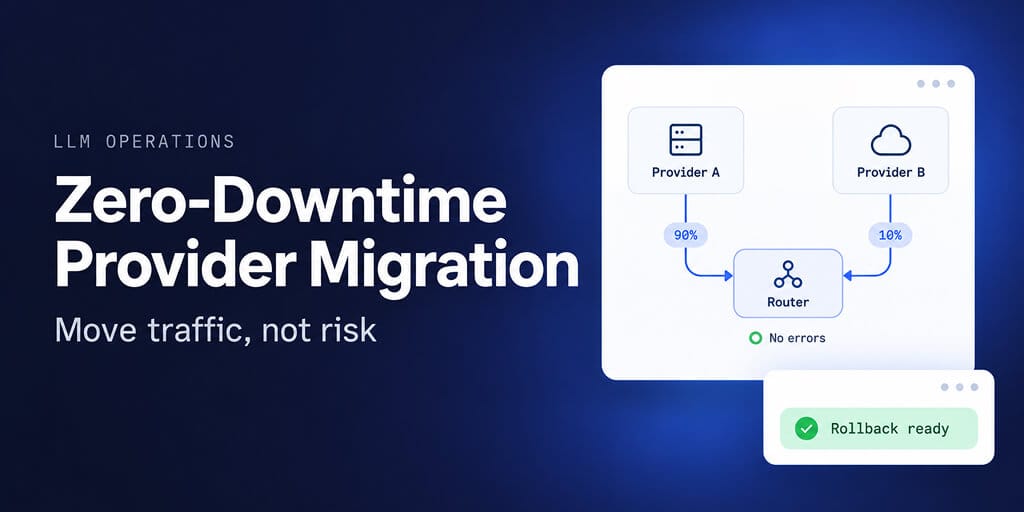
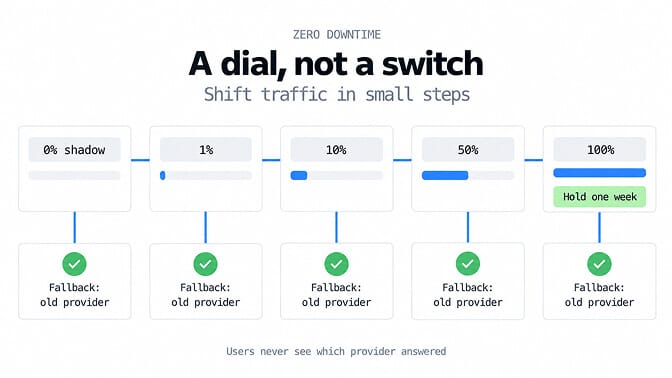
A zero-downtime inference provider migration looks like a dial, not a switch. Traffic moves from 0% to 1%, 10%, 50% and 100% on the new provider over days. At every step, a failed or slow request is retried on the old provider before your user ever sees it.
From the outside, nothing happens. That's the point. Your users should never be able to tell which provider answered.
How do I migrate from one inference provider to another with minimal downtime?
You migrate with minimal downtime by never sending a request to the new provider that the old one can't catch. Keep the old provider configured as a fallback for every call until the new one has handled full production traffic cleanly for at least a week.
Downtime in a migration rarely comes from the new provider being down. It comes from the new provider being different.
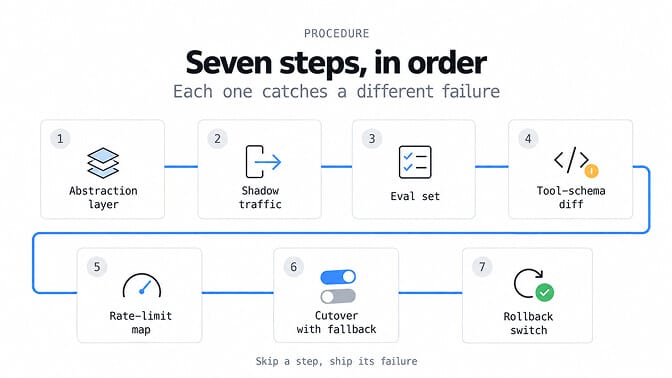
The 7-step migration procedure
1. Build an abstraction layer
Every model call goes through one internal function or gateway that takes your own request shape and translates it per provider. If provider SDK calls are scattered across your codebase, fix that first. It's the step that makes every later one possible.
2. Run shadow traffic
Send a copy of real production requests to the new provider in the background, and throw the responses away. You're measuring latency, error rates and token counts on your actual traffic, not a vendor benchmark.
3. Score both sides on a fixed eval set
Pull a few hundred real requests with known-good outcomes and run them on both providers. Score what you actually care about: correct tool chosen, valid JSON, task completed. "The answers look fine" is not an eval.
4. Diff the tool schemas
Run every tool definition through the new provider and compare the calls that come back. This is where most migrations quietly break (more on why below).
5. Map your rate limits
Providers measure limits differently. Anthropic limits requests per minute and counts input and output tokens per minute separately. OpenAI limits requests and tokens per minute and per day. Check that your new tier covers your real peak, not your average, before any live traffic arrives.
6. Cut over with fallbacks
Shift traffic in steps: 1%, 10%, 50%, 100%. Every request carries a fallback to the old provider on errors, timeouts and rate limits. Watch your eval metrics at each step, not just the error rate.
7. Keep rollback to one switch
Rolling back should be a config change, not a deploy. Keep the old provider's keys, quota and code path alive for at least a week after you reach 100%.
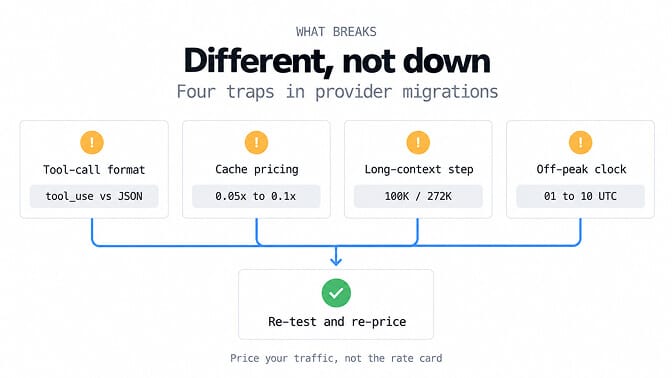
Provider differences that break migrations
Here's what nobody tells you: the failures are rarely outages. They're differences in shape and in price.
Tool-call formats
OpenAI and Anthropic don't speak the same tool language:
- OpenAI returns tool calls with arguments as a JSON string you parse.
- Anthropic returns
tool_usecontent blocks with an input object, and expectstool_resultblocks back.
One more for OpenAI: GPT-6.1 Sol only supports tool calling through the Responses API. OpenAI's model page says Chat Completions works for it without tool calling. So if your app is built on Chat Completions, moving to GPT-6.1 Sol is an API migration too, not just a model swap.
Cache pricing
Every provider prices prompt caching differently, so a cache-heavy workload can change cost far more than the headline rates suggest:
- Anthropic: cache writes cost 1.25x input. Reads cost 0.1x on Haiku 5.5, and 0.05x on Sonnet 5.5 and Opus 5.5.
- OpenAI (GPT-6.1 Sol): cached input is $0.10 against $2.00 uncached, with cache writes at $2.50.
Re-run your cost model with your real cache hit rate.
Long-context price steps
Some models charge more per token once a prompt gets long, and the higher rate covers the whole request:
- Claude Haiku 5.5: prompts over 100K tokens pay $0.50 input and $2.50 output per million, instead of $0.10 and $0.50.
- GPT-6.1 Sol and GPT-6 Luna: OpenAI charges 2x input and 1.5x output for the full request once input passes 272K tokens.
An agent that averages 90K tokens of context costs one thing. One that drifts to 110K costs about five times as much on Haiku 5.5.
DeepSeek's off-peak clock
DeepSeek prices by time of day. Peak hours are 01:00 to 04:00 and 06:00 to 10:00 UTC on weekdays, and off-peak rates are half the peak rate. Weekends and Chinese public holidays are off-peak all day.
Those windows are Beijing business hours, which land in the early-to-mid morning in Europe. If your cost model assumed off-peak prices but your traffic runs in those hours, you'll pay double for that traffic. Third-party hosts of DeepSeek models usually charge one flat price around the clock instead.
The cheapest provider on the pricing page is not always the cheapest provider for your traffic shape.
If this is starting to look like a quarter of platform work just to change vendors, that's exactly why we built model choice into BetterClaw per agent. Switching models is a dropdown, and your agents keep running on your own keys.
Doing it with OpenRouter vs a BYOK platform
There are two shortcuts to the abstraction layer.
OpenRouter
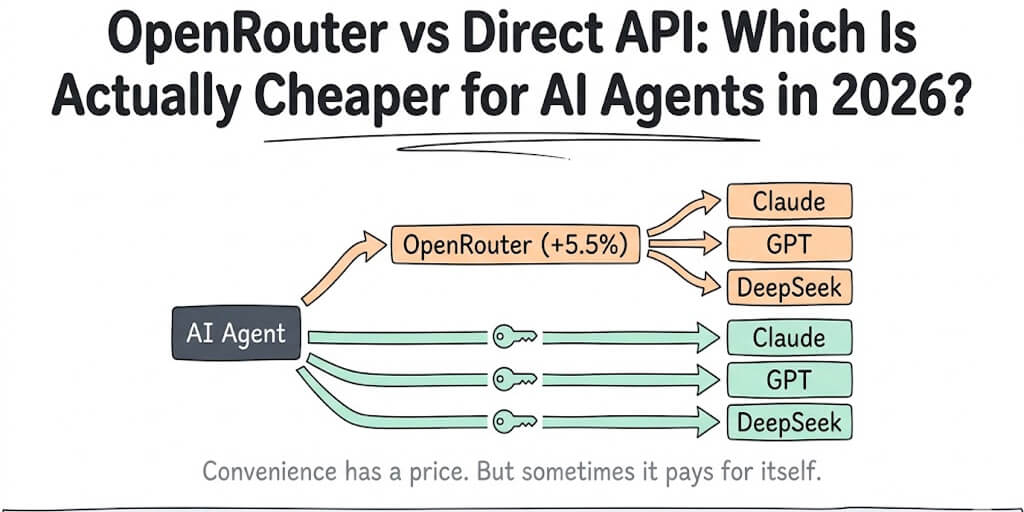
OpenRouter gives you one API across many providers. Its models parameter takes a priority-ordered list of fallbacks. Per its docs, any error can trigger the next model, including context-length errors, moderation flags, rate limiting and downtime. You're billed for the model that actually served the request, and the response tells you which one it was.
The trade-off is cost. OpenRouter charges 5.5% on card credit purchases. With your own keys, its BYOK mode is free up to $25,000 a month of usage, then charges 5%. Our OpenRouter vs direct API breakdown runs those numbers, including the DeepSeek off-peak catch.
A BYOK platform
A BYOK platform skips the middleman entirely. On BetterClaw, each agent calls the provider directly with your key, and you pay the provider's own price with no inference markup.
Migrating an agent then becomes a model change on that agent, not a code change. You can move one low-risk agent first, watch it for a week, and move the rest.
Our earlier guide to migrating an agent between LLM providers covers the agent-side checklist in more depth.
Either way, the procedure above still applies. A router or a platform removes step 1. It doesn't remove your evals, your schema diff or your rollback plan.
The honest lesson: the switch is never the hard part. Knowing that the new provider behaves the same on your traffic is. Build the habit of measuring that, and changing providers stops being a project and becomes a Tuesday.
If any of this resonated, give BetterClaw a try. The free plan gives you one agent and 100 credits a month, with no card. Basic is $19 a month, and Pro is $49 a month for five agents. Every plan is bring-your-own-key with zero inference markup. Start free or see full pricing.
Frequently Asked Questions
What is a zero-downtime LLM provider migration?
It's moving an LLM application from one inference provider to another without any failed or degraded requests reaching users. You do it by mirroring traffic first, shifting it gradually, and keeping the old provider as an automatic fallback until the new one is proven on full traffic.
How does migrating through OpenRouter compare to calling providers directly?
OpenRouter gives you one API and built-in fallbacks across models, which removes most of the abstraction work. The cost is a fee on credit purchases, or a percentage above the free BYOK allowance. Calling providers directly, or through a BYOK platform, avoids that fee but means you handle fallbacks yourself or let the platform do it.
How long does an LLM provider migration take?
For a high-volume app, plan on one to three weeks. That's a few days of shadow traffic and evals, a staged cutover over several days, and a week at 100% with rollback still available. The code change itself is usually the shortest part.
How much can switching inference providers save?
It depends on your traffic shape more than on rate cards. Long prompts can cross price steps, such as 100K tokens on Haiku 5.5 or 272K on GPT-6.1 Sol. Cache hit rates, and DeepSeek's peak hours, can move the real bill well away from the advertised price. Price a week of your own shadow traffic before you commit.
Is it safe to migrate a production LLM app without downtime?
Yes, if you never send a request the old provider can't catch. Keep fallback on errors, timeouts and rate limits for every call. Shift traffic in small steps, and keep rollback to a single config switch for at least a week after cutover.