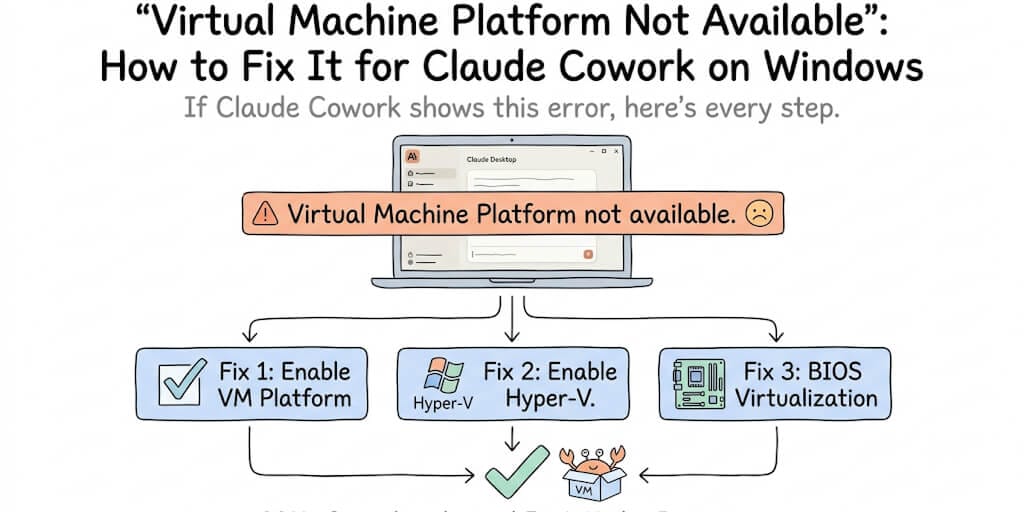
Cowork runs its workspace inside a VM. If that VM layer is switched off, you get this error. Here's every step to turn it on.
If Claude Cowork shows "Virtual Machine Platform not available" or "Claude's workspace requires the Virtual Machine Platform on Windows. Enable this feature, then restart," it means Windows' built-in virtualization layer is switched off. Cowork runs its workspace inside a lightweight virtual machine, and it can't start until you enable Virtual Machine Platform (and usually Hyper-V) in Windows Features, and make sure CPU virtualization is turned on in your BIOS. On most machines this takes under five minutes.
What this error actually means
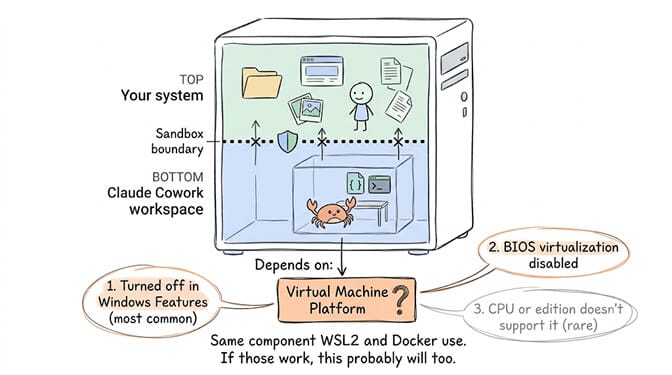
Claude Cowork doesn't run directly on Windows. It spins up an isolated workspace inside a virtual machine so its actions stay sandboxed from the rest of your system. That sandbox depends on a Windows component called Virtual Machine Platform, the same underlying feature WSL2 and Docker Desktop use.
When you see "not available," one of three things is true. Virtual Machine Platform is turned off in Windows Features (most common). Hardware virtualization is disabled in your BIOS/UEFI. Or your CPU or Windows edition doesn't fully support it (rare, covered below).
Fix 1: Enable Virtual Machine Platform (works on Windows 11 and 10, including Home)
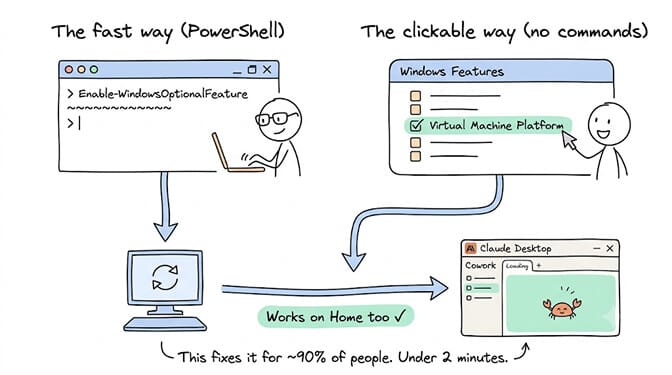
This is the fix for about 90% of cases.
The fast way (PowerShell): right-click Start, open Terminal (Admin) or Windows PowerShell (Admin), and run:
Enable-WindowsOptionalFeature -Online -FeatureName VirtualMachinePlatform -All
Then restart your PC. Reopen Claude Desktop and try Cowork again.
The clickable way (no commands): press Windows+S, type "Turn Windows features on or off," and open it. Scroll to Virtual Machine Platform and tick the box. Click OK, let it install, and restart when prompted.
Fix 2: Enable Hyper-V (if the error persists after Fix 1)
If Cowork still complains after enabling Virtual Machine Platform, enable Hyper-V too. Run this in an admin PowerShell:
Enable-WindowsOptionalFeature -Online -FeatureName Microsoft-Hyper-V -All
Restart afterward.
Note: full Hyper-V is available on Windows Pro, Enterprise, and Education. If you're on Home, skip to the Windows Home section below. You don't need full Hyper-V, only Virtual Machine Platform, which Home does support.
Fix 3: Turn on virtualization in your BIOS/UEFI
If Windows says the feature is enabled but Cowork still won't start, virtualization is likely switched off at the hardware level.
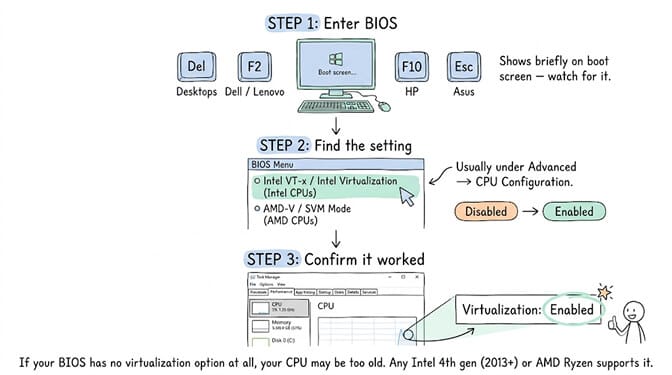
Step 1: Restart and enter BIOS/UEFI. The key varies by manufacturer: Del for most desktops, F2 for Dell and Lenovo laptops, F10 for HP, Esc for some Asus boards. The key shows briefly on the boot screen.
Step 2: Find the setting named Intel VT-x, Intel Virtualization Technology (Intel CPUs), or AMD-V, SVM Mode (AMD CPUs). It's usually under Advanced, CPU Configuration, or Security.
Step 3: Set it to Enabled. Save and exit.
To confirm it worked: open Task Manager (Ctrl+Shift+Esc), click Performance, click CPU, and check that "Virtualization" reads Enabled in the details at the bottom right.
Claude Cowork on Windows Home (and Windows 10 Home)
You do not need Windows Pro to run Claude Cowork. Home edition supports Virtual Machine Platform, which is what Cowork strictly requires. It just doesn't include the full Hyper-V management tools.
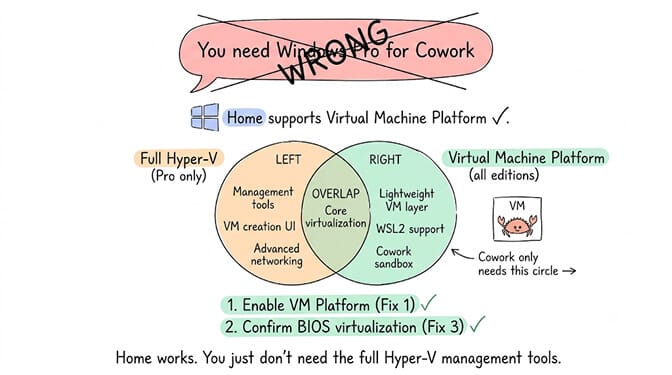
On Home, enable Virtual Machine Platform using Fix 1 above. Both the PowerShell command and the Windows Features checkbox work on Home. Confirm virtualization is on in BIOS using Fix 3. Restart.
If you've done both and Cowork still fails on Home, the issue is usually one of the HCS services that Cowork's sandbox depends on. Our Cowork readiness guide will tell you exactly which component is missing and how to fix it.
If you're troubleshooting this on a Home machine and it feels like the wrong use of your evening, that's a reaction we understand well. BetterClaw's free plan runs your AI agent entirely in the cloud. No VM. No Windows edition requirements. No BIOS changes. 200+ verified skills, 25+ OAuth integrations, 60-second deploy, no credit card.
Can you install Claude Cowork without admin rights?
Short answer: enabling Virtual Machine Platform requires administrator rights, because it modifies Windows system features. If you're on a personal machine, run the PowerShell command as admin (right-click, Run as administrator).
On a locked-down work or school machine, you likely can't enable it yourself. You'll need your IT administrator to turn on Virtual Machine Platform and hardware virtualization. Send them Fix 1 and Fix 3 from this page. That's everything they need.
Still getting the error? Run the readiness check
If you've enabled everything and Cowork still won't start, Claude's readiness check pinpoints the exact failing component. Our Cowork readiness guide explains what each test means and how to fix each failure.
If you see a different error like "Cowork requires Claude Desktop to be installed via a modern installer," that's a separate issue with a separate fix.
And if Cowork starts but you're hitting usage limits, our Claude rate limit guide covers the five-hour rolling window and shared-pool mechanics that affect Cowork sessions differently from regular chat.
An AI agent that runs in your browser, zero setup
No VM, no Windows features, no BIOS. BetterClaw runs entirely in the cloud. Start free → No credit card · One agent with every feature on the free plan · $19/mo per agent for Pro · Deploy in ~60 seconds
Frequently Asked Questions
Does Claude Cowork need Hyper-V or just Virtual Machine Platform?
Just Virtual Machine Platform in most cases. That's the lightweight virtualization layer Cowork depends on, and it's available on all Windows editions including Home. Enable Hyper-V only if the error persists after enabling Virtual Machine Platform and restarting.
Will enabling Virtual Machine Platform slow down my PC?
No. It's the same lightweight component that WSL2 and Docker Desktop use. It has no meaningful impact on everyday performance. The Cowork VM itself consumes about 1.8 GB of RAM when running, but the Virtual Machine Platform feature alone adds no overhead.
I enabled it but nothing changed. Why?
You almost certainly need to restart. Use Restart, not Shutdown and power on. With Windows Fast Startup enabled, a shutdown cycle can leave virtualization services uninitialized. If you've restarted properly and it still fails, check BIOS virtualization using Fix 3 above.
Can I run Claude Cowork on Windows Home?
Yes. Home edition supports Virtual Machine Platform, which is what Cowork requires. It doesn't include full Hyper-V management tools, but Cowork doesn't need those. Enable Virtual Machine Platform using Fix 1, confirm BIOS virtualization with Fix 3, and restart.
Do I need admin rights to enable Virtual Machine Platform?
Yes. Enabling this Windows feature requires administrator permission because it modifies system-level components. On a personal machine, run PowerShell as administrator. On a work machine managed by IT, ask your IT team to enable Virtual Machine Platform and hardware virtualization for you.