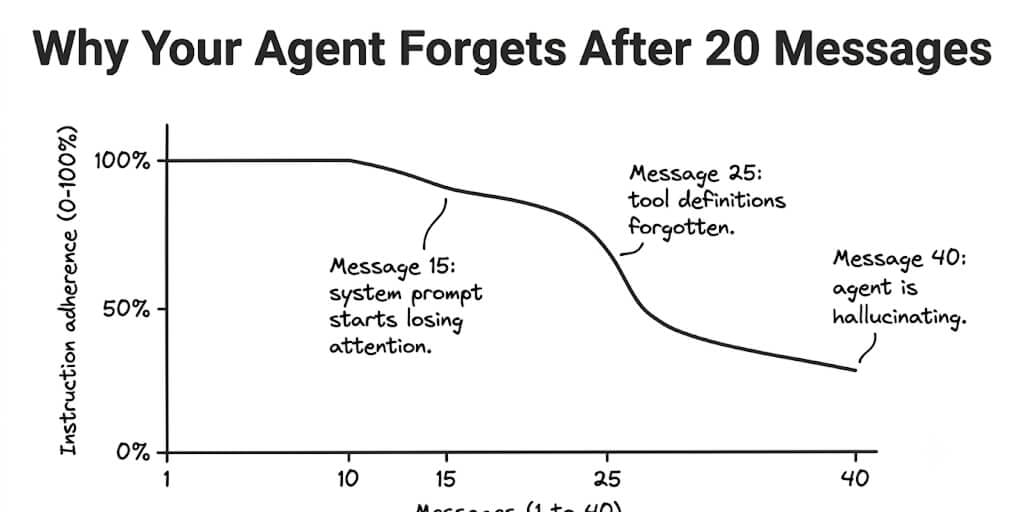
Your agent followed instructions perfectly for the first 15 messages. By message 25, it forgot your system prompt existed. By message 40, it was making up tools that don't exist. Here's why that happens and how every major platform handles it differently.
Memory management, built into the platform.
BetterClaw uses hybrid vector + keyword memory that retrieves only what's relevant per turn — no drift, no token bloat. Free forever, not a trial. Start free → No credit card · Secrets auto-purge · BYOK
Tuesday afternoon. My support agent had been running for three hours. Handling tickets. Calling the right tools. Following the escalation rules we'd spent a week perfecting.
Then ticket #47 came in. The agent classified it as "billing" (correct), looked up the customer (correct), and then... drafted a response using a template that didn't exist. Cited a refund policy we never wrote. Addressed the customer by the wrong name, pulled from a conversation 30 messages ago.
The agent hadn't crashed. It hadn't lost connectivity. It was still generating fluent, confident text. But it had quietly forgotten its own instructions.
This is AI agent memory in 2026. And understanding how it works (and fails) is the difference between agents that run for 10 messages and agents that run for 10 hours.
How context windows actually work (the expensive truth)
Here's what most people don't realize about how LLMs process conversations. Every message gets re-sent with every new API call. The model doesn't "remember" your conversation. It re-reads the entire conversation from scratch on every single turn.
Message 1 gets sent once. Message 2 gets sent with message 1 (2 messages total). Message 3 gets sent with messages 1 and 2 (3 messages total). By message 20, the model is re-reading 19 previous messages plus your system prompt plus every tool definition plus every tool response.
The token count doesn't grow linearly. It grows triangularly. A 30-message conversation where each message averages 500 tokens doesn't consume 15,000 tokens total. It consumes roughly 232,500 tokens across all API calls (the triangular sum).
On Claude Sonnet at $3/M input, that's $0.70 for one conversation. Run 200 conversations per day and you're at $140/day just on context re-reads. Our cost reduction guide covers how to cut this by 80%.
The #1 hidden cost in AI agents is not the work the model does. It's the context the model re-reads on every turn. A 30-message conversation costs 15x more than 30 individual messages would.
Why agents drift after message 20 (the attention problem)
Context windows have a size limit (200K for Sonnet, 1M for GLM 5.2). But the real limit isn't size. It's attention quality.
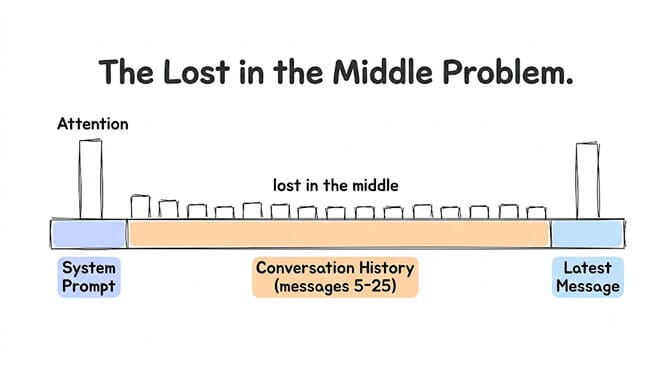
LLMs pay more attention to the beginning and end of the context window. The middle gets less attention. This is called the "lost in the middle" phenomenon and it's been documented across every major model family.
Your system prompt sits at the very beginning of the context. For the first 10-15 messages, it gets strong attention. But as the conversation grows, the middle fills with tool responses, conversation history, and intermediate reasoning. Your system prompt's effective "weight" in the model's attention shrinks.
By message 20-30:
- Your system prompt (at the beginning) competes with 15,000+ tokens of conversation history for attention. The model starts "drifting" from its instructions. It follows the most recent messages more closely than the system prompt.
- Tool definitions (also at the beginning) lose attention. The model may call tools with wrong parameters, call tools that don't exist, or skip tool calls entirely.
- Escalation rules, formatting instructions, and behavioral constraints degrade. The agent gradually becomes a generic chatbot instead of your specialized agent.
For the deeper mechanics of how context limits cause this, see our context window guide.
Memory files vs chat history (the distinction that fixes everything)
Here's the insight that separates agents that work for 10 messages from agents that work for 10 hours.
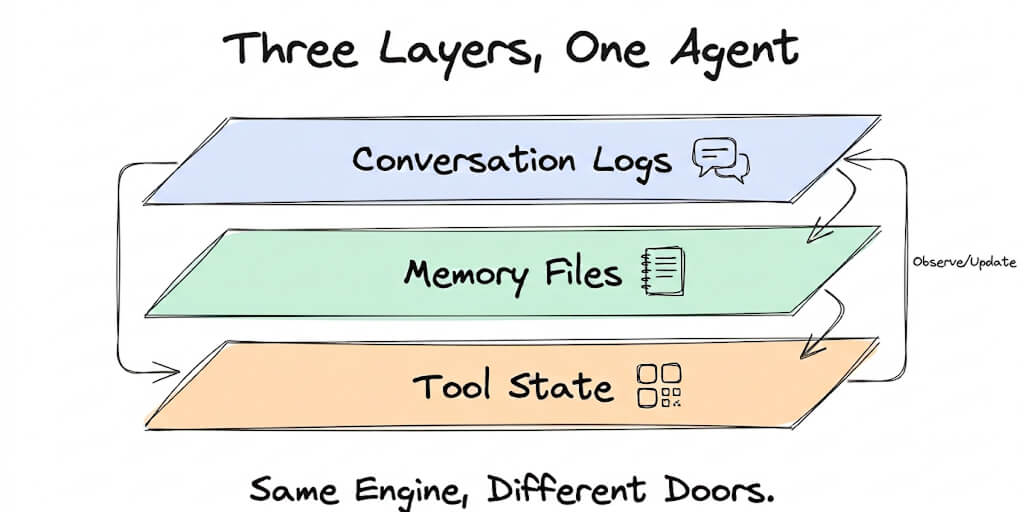
Chat history is what the model re-reads every turn. It grows with every message. It's expensive. It degrades attention. And it eventually gets truncated or summarized.
Memory files are persistent documents that live outside the conversation. They're re-injected into the system prompt on every turn, but they don't grow. They're the same size whether the conversation is 5 messages or 500 messages.
The pattern: put everything your agent needs to "remember" into memory files. Let chat history be disposable.
SOUL.md (personality and identity): Who the agent is. Tone. Behavior. Constraints. This never changes conversation to conversation.
AGENTS.md (operational procedures): How the agent handles specific tasks. Escalation rules. Response templates. Decision trees. This is the operational playbook.
The key insight: SOUL.md and AGENTS.md are separate concepts. Personality (how you sound) is different from procedures (what you do). Mixing them into one system prompt creates a blob that the model struggles to parse after 20 messages. Separating them lets you update procedures without touching personality, and vice versa.
The /new command (clear context without losing memory)
Most agent frameworks support some form of session reset. In OpenClaw and Hermes, the /new command (or equivalent) starts a fresh conversation context while preserving memory files.
What /new does: Clears the chat history (the expensive, growing part). Reloads the system prompt and memory files (the stable part). Resets the context window to its clean starting state.
What it doesn't do: It doesn't erase what the agent "knows" from memory files. SOUL.md, AGENTS.md, and any persistent memory stores remain intact.
When to use it: After 15-20 messages in a complex tool-calling session. After the agent starts showing signs of drift (wrong tool calls, forgotten instructions, repetitive responses). Before switching to a different task type within the same agent.
For background agents running on schedules, session management should happen automatically. Every new scheduled run starts with a clean context. The memory files carry the persistent knowledge. The chat history starts fresh.
How different platforms handle memory
OpenClaw
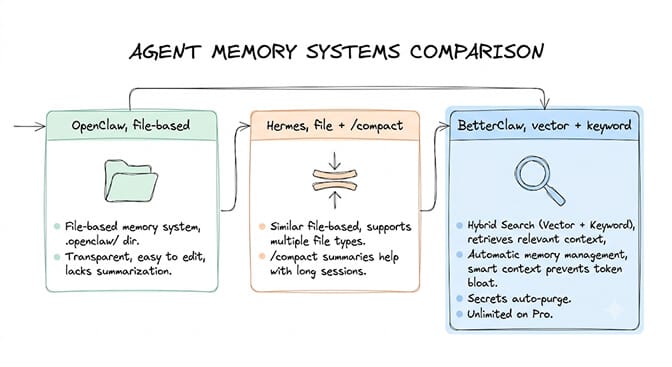
OpenClaw uses a file-based memory system. The .openclaw/ directory contains memory files that persist between sessions. The agent reads these files as part of its context on every turn. Chat history is stored separately and can be cleared with /new.
Strengths: Simple file-based approach. Easy to edit manually. Transparent.
Weaknesses: No automatic summarization. No vector search. Memory grows until you manually prune it. No built-in context management for long conversations. With 230K+ stars and 7,900+ open issues, memory management is one of the most requested improvements.
Hermes
Hermes uses a similar file-based approach with some improvements. It supports multiple memory file types and has better context management than vanilla OpenClaw. The /compact command summarizes the current conversation and starts fresh with the summary.
Strengths: Better context management. /compact helps with long sessions.
Weaknesses: Still manual. No persistent vector memory. Limited to what fits in the context window.
BetterClaw
BetterClaw uses a hybrid vector + keyword search persistent memory system. The agent stores facts, preferences, and learned information in a searchable memory store. On each turn, the platform retrieves only the relevant memories (not all memories) and injects them into the context.
Strengths: Automatic memory management. Relevant memories retrieved per-turn (not everything dumped in). Smart context management prevents token bloat. Secrets auto-purge from memory after 5 minutes (AES-256). 7-day memory on free plan, unlimited on Pro.
Weaknesses: Less manual control than file-based systems (tradeoff for automation).
The architectural difference matters: BetterClaw's approach scales to conversations of any length because it retrieves relevant context per-turn instead of carrying all context all the time. Free plan with 1 agent and 500 credits a month. $49/month on Pro.
The five fixes (in order of impact)
Fix 1: Cap session length and summarize. After 10-15 messages, summarize the conversation into a brief (200-300 tokens) and start a new session with the summary as context. This single change reduces token costs by 30-40% and eliminates attention degradation.
Fix 2: Separate system prompt from conversation history. Put your system prompt in a separate "system" role message, not mixed into the first "user" message. Most API providers give system messages higher attention weight. This keeps instructions stable even as conversation history grows.
Fix 3: Use memory files for persistent knowledge. Don't rely on chat history for anything your agent needs to "remember" across sessions. Put it in a memory file (SOUL.md, AGENTS.md, or a persistent store). Memory files survive session resets. Chat history doesn't.
Fix 4: Compress tool responses. Tool responses are often the biggest context consumers. A CRM lookup might return 2,000 tokens of customer data when your agent only needs the customer's name, plan, and last interaction. Trim tool responses before they enter the context. Keep only what the agent needs for the current task.
Fix 5: Re-inject critical instructions at the end. If your agent's instructions are at the beginning of the context and the latest messages are at the end, the "lost in the middle" effect weakens your instructions. Some frameworks support injecting a shortened version of critical instructions in the last system message. This gives your instructions attention at both the beginning AND end of the context.
The fundamental problem with AI agent memory in 2026: the model doesn't remember. It re-reads. Every turn, from scratch. Everything we call "memory" is actually "what we inject into the context window before the model re-reads."
Understanding this changes how you build agents. You stop treating conversations as something the agent "remembers" and start treating them as something you manage, compress, and optimize. The agents that run reliably for hours aren't the ones with the best models. They're the ones with the best context management.
Give BetterClaw a look if you want memory management built into the platform. Hybrid vector + keyword search memory. Smart context management. Secrets auto-purge. Free plan with 1 agent and 500 credits a month. $49/month for Pro. We handle the context engineering. You handle the agent logic.
Frequently Asked Questions
Why does my AI agent forget instructions after 20 messages?
LLMs don't "remember" conversations. They re-read the entire context on every turn. As the conversation grows beyond 15-20 messages, the system prompt (at the beginning) loses attention relative to recent messages (at the end). This "lost in the middle" effect causes the agent to drift from its original instructions. The fix: cap sessions at 10-15 messages, summarize, and start fresh with the summary plus the original system prompt.
What is the difference between agent memory and chat history?
Chat history is the raw conversation that gets re-sent to the model every turn. It grows with every message and gets expensive. Agent memory is persistent information stored outside the conversation (in files, databases, or vector stores) that gets selectively injected into each turn. Chat history is disposable. Memory persists. The best agent architectures treat chat history as temporary and memory as permanent.
How do I prevent my AI agent from losing context in long conversations?
Five fixes in order of impact: (1) Cap sessions at 10-15 messages and summarize. (2) Put instructions in the system role, not user messages. (3) Use memory files (SOUL.md, AGENTS.md) for persistent knowledge instead of relying on chat history. (4) Compress tool responses to only include what the agent needs. (5) Re-inject critical instructions at the end of the context window.
How much does agent memory cost in API tokens?
A 30-message conversation costs roughly 232,500 tokens in total re-reads (triangular growth). On Claude Sonnet at $3/M, that's about $0.70 per conversation. Run 200 conversations daily: $140/day or $4,200/month just on context. Session management (summarize after 10-15 messages) reduces this by 30-40%. Combined with prompt caching (90% discount on repeated system prompts), total memory costs drop by 60-70%.
Which agent platform has the best memory management?
BetterClaw uses hybrid vector + keyword search with automatic relevant memory retrieval per-turn. OpenClaw uses file-based memory (simple, transparent, but no automatic management). Hermes adds /compact for session summarization. AutoGen is stateless (no persistent memory). n8n has no built-in agent memory. For agents that need to run reliably across long sessions, platforms with automatic context management (like BetterClaw) prevent the drift that file-based systems require manual intervention to fix.