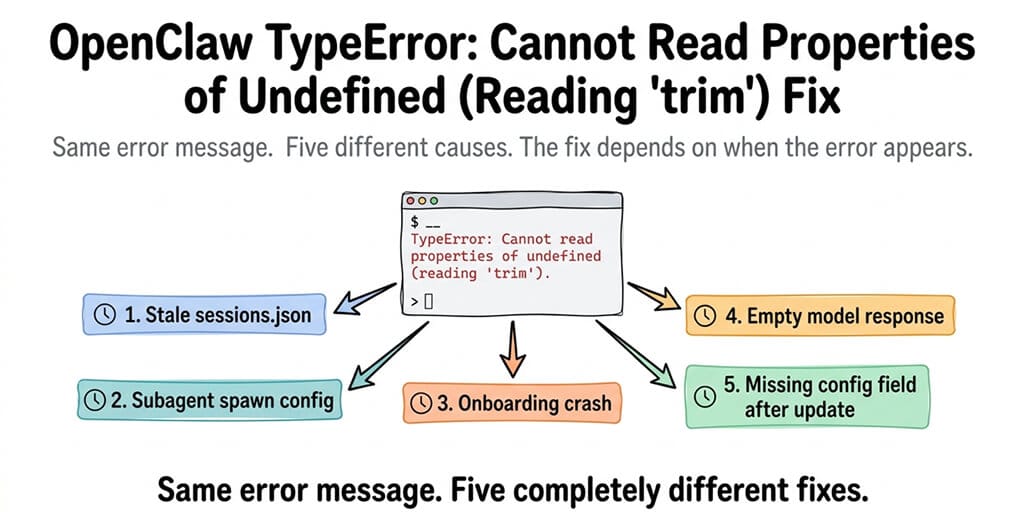
This error has five different causes depending on when it appears. Here's how to identify which one you're hitting and fix it in under 5 minutes.
This error has been reported at least six times on GitHub since February 2026 (issues #7443, #8445, #15125, #66848, #67353, #7912) and dozens of times on the OpenClaw Discord. Every time, the same cryptic message:
TypeError: Cannot read properties of undefined (reading 'trim')
No indication of what's undefined. No indication of which file. Just a JavaScript error that tells you something tried to call .trim() on a value that doesn't exist. Helpful.
Here's what nobody tells you about this error: it has at least five different causes depending on when it appears. During onboarding, during subagent spawn, during a normal conversation, during bootstrap, or after an update. The error message is identical every time. The fix is completely different for each.
Here's how to identify which cause you're hitting and fix it.
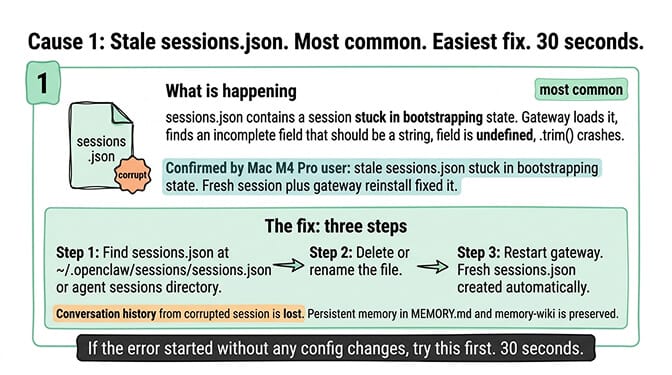
Cause 1: Stale sessions.json (most common, easiest fix)
When it appears: During bootstrap or on every message. The error started suddenly without any config changes.
What's happening: Your sessions.json file contains a session stuck in a "bootstrapping" state. When the gateway tries to load it, the session data is incomplete and a field the system expects to contain a string is undefined. The .trim() call on that undefined value crashes.
A Discord user on a Mac M4 Pro confirmed this exact cause and fix: "Root cause was a stale sessions.json file that was stuck in bootstrapping state. Fresh session + gateway reinstall did the trick."
The fix: Delete or rename your sessions.json file (typically at ~/.openclaw/sessions/sessions.json or within your agent's sessions directory). Restart the gateway. A fresh sessions.json is created automatically. Your conversation history from the corrupted session is lost, but your persistent memory (MEMORY.md, memory-wiki) is preserved.
The stale sessions.json cause accounts for the majority of trim errors on the Discord. If the error started without any config changes, try this fix first. It takes 30 seconds.
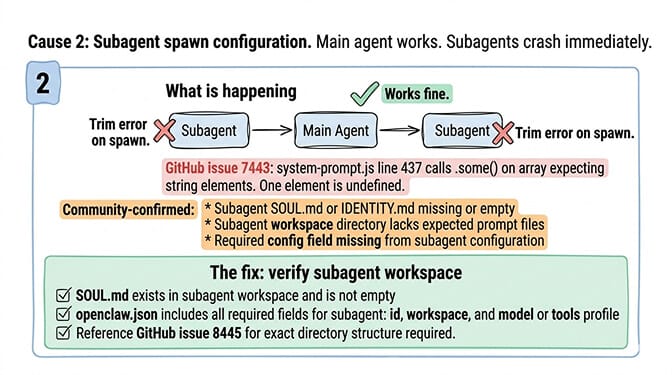
Cause 2: Subagent spawn configuration (multi-agent setups)
When it appears: When your agent tries to spawn a subagent via sessions_spawn. The main agent works fine. Subagents crash immediately with the trim error.
What's happening: The subagent's system prompt construction encounters a missing or undefined field. GitHub issue #7443 traces this to system-prompt.js line 437 where the code calls .some() on an array that expects string elements, and one element is undefined.
Community-confirmed causes:
The subagent's SOUL.md or IDENTITY.md is missing or empty. The subagent's workspace directory doesn't contain the expected prompt files. A required config field (like the model name) is missing from the subagent's configuration.
The fix: Check your subagent's workspace directory. Verify that SOUL.md exists and isn't empty. Verify that the subagent's configuration in your openclaw.json includes all required fields (id, workspace, and either a model or tools profile). GitHub issue #8445 documents the exact directory structure required.
For the general troubleshooting guide when OpenClaw stops working, our guide covers the broader diagnosis when the error isn't trim-specific.
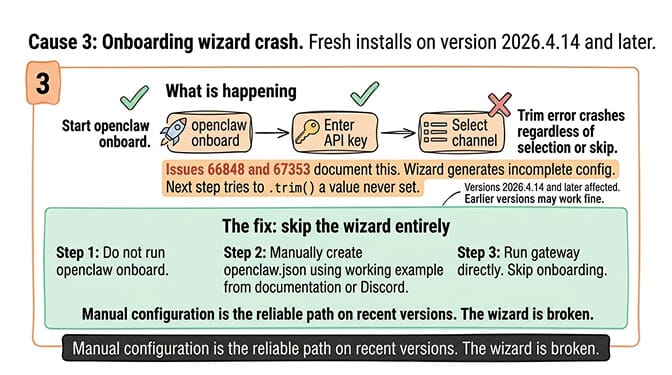
Cause 3: Onboarding crash (fresh installs)
When it appears: During initial setup, specifically at the "Select channel" step of openclaw onboard.
What's happening: GitHub issues #66848 and #67353 document this: the onboarding process crashes at the channel selection step with the trim error regardless of whether you select a channel or skip. The onboarding wizard generates an incomplete configuration file, and a subsequent step tries to .trim() a value that was never set.
The fix: Skip the onboarding wizard entirely. Manually create your openclaw.json configuration file. Copy a working example from the OpenClaw documentation or community Discord. Run the gateway directly instead of going through onboard. For the step-by-step OpenClaw update and installation guide, our guide covers manual configuration.
Version note: This specific onboarding bug was reported on versions 2026.4.14 and later. If you're on an earlier version, the onboarding may work fine. If you're on a recent version and the onboarding crashes, manual configuration is the reliable path.
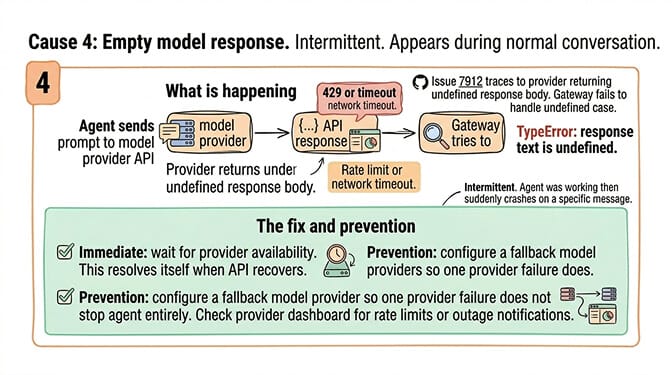
Cause 4: Empty model response (rate limit or network)
When it appears: Intermittently during normal conversation. The agent was working, then suddenly throws the trim error on a specific message.
What's happening: GitHub issue #7912 traces this to the model provider returning an undefined response body (due to a rate limit, network timeout, or API error). The gateway tries to .trim() the response text, but the response text is undefined because the API call failed silently.
The fix: This one resolves itself when the API provider is available again. If it happens frequently, configure a fallback model provider so that when one provider fails, the other handles the request. Check your provider's dashboard for rate limit metrics or outage notifications. For the rate limit troubleshooting walkthrough, our rate limit post covers the three types of rate limits and how to identify which one you're hitting.
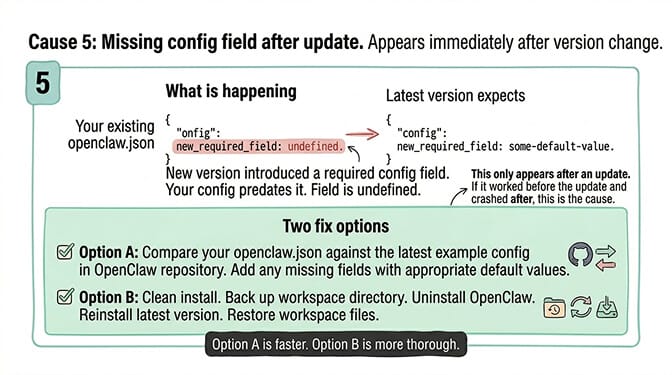
Cause 5: Missing config field after update
When it appears: Immediately after updating OpenClaw to a new version.
What's happening: A new version introduced a config field that your existing configuration doesn't include. The code expects the field to be a string. Your config doesn't define it. The field is undefined. The .trim() call crashes.
The fix: Compare your current openclaw.json against the latest example configuration in the OpenClaw repository. Look for new required fields. Add any missing fields with appropriate default values. Alternatively, do a clean install: back up your workspace directory, uninstall OpenClaw, reinstall the latest version, and restore your workspace files.
If debugging JavaScript TypeError stack traces, checking sessions.json corruption, verifying subagent workspace directories, and bypassing broken onboarding wizards sounds like more Node.js troubleshooting than you signed up for, BetterClaw eliminates these errors entirely. No sessions.json to corrupt. No onboarding wizard to crash. No subagent config files to misconfigure. No raw model responses to .trim(). Free tier with 1 agent and BYOK. $49/month for Pro (5 agents included). 60-second deploy. The trim error doesn't exist because the conditions that cause it don't exist on a managed platform.
The real problem behind Cannot read properties of undefined (reading 'trim')
Here's the honest take.
The trim error is a symptom of insufficient null checking in OpenClaw's codebase. Every instance of this error is a place where the code assumes a value is a string without verifying it. When the value is undefined (stale session, missing file, empty API response, missing config field), the .trim() call crashes instead of handling the undefined case gracefully.
OpenClaw has 230,000+ GitHub stars and 7,900+ open issues. The project moves fast. New features ship weekly. But defensive programming (checking for undefined before calling string methods) is inconsistent. This specific error pattern has been reported at least six times since February 2026, each with a slightly different root cause but the same underlying problem: missing null checks.
For a framework that OpenClaw's maintainer Shadow described as "far too dangerous" for users who can't run a command line, errors like this confirm the point. The framework is powerful. The error handling assumes you can read a JavaScript stack trace and trace it to the source.
If you want the agent without the stack traces, give BetterClaw a try. Free tier with 1 agent and BYOK. $49/month for Pro (5 agents included). The error handling is our problem. The conversations are yours.
Frequently Asked Questions
What causes the OpenClaw "Cannot read properties of undefined (reading 'trim')" error?
Five different causes: stale sessions.json file (most common, delete and restart), missing subagent SOUL.md or config fields, broken onboarding wizard (versions 2026.4.14+), empty model API response (rate limit or network), or missing config field after an update. The error message is identical for all five. The timing of when it appears tells you which cause you're hitting.
How do I fix the OpenClaw trim error during onboarding?
Skip the onboarding wizard entirely. GitHub issues #66848 and #67353 confirm the wizard crashes at the channel selection step on recent versions. Manually create your openclaw.json configuration file using an example from the documentation. Run the gateway directly instead of going through openclaw onboard.
Why does the trim error happen with subagents?
The subagent's workspace directory is missing required files (SOUL.md, IDENTITY.md) or the subagent configuration in openclaw.json is missing required fields (id, workspace, model). The system prompt builder expects these values to be strings. When they're undefined, the .trim() call crashes. Verify the subagent workspace contains all required files and the config includes all required fields.
Does the trim error cause data loss?
If the fix involves deleting sessions.json (Cause 1), the corrupted session's conversation history is lost. Persistent memory (MEMORY.md, memory-wiki, daily logs) is preserved because those are separate files. For the other four causes, the fix doesn't involve deleting any data.
Does BetterClaw have the trim error?
No. BetterClaw manages session state, configuration, and API response handling at the platform level with proper null checking. The conditions that cause the trim error on self-hosted OpenClaw (stale sessions, missing config fields, unchecked API responses) don't exist on the managed platform. Free tier with 1 agent and BYOK. $49/month for Pro (5 agents included).