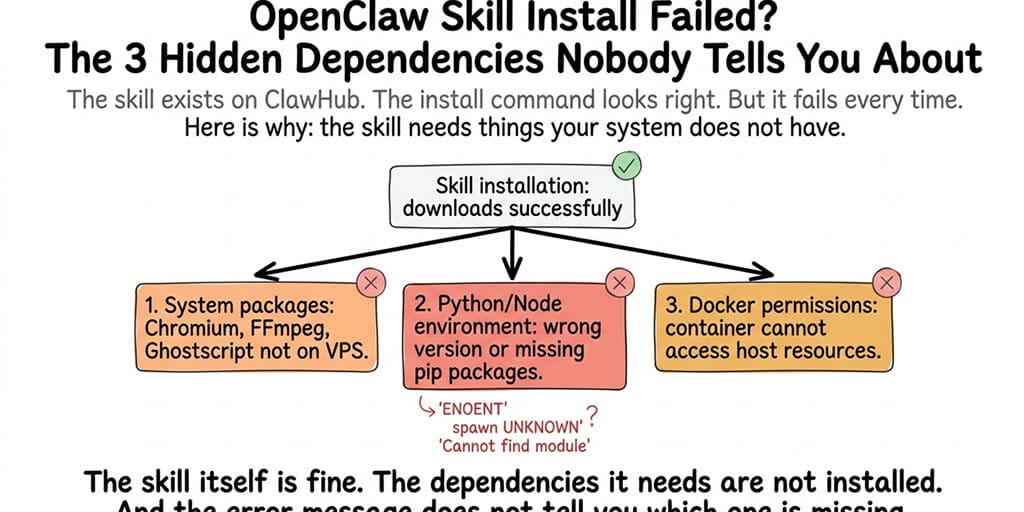
The skill exists on ClawHub. The install command looks right. But it fails every time. Here's why: the skill needs things your system doesn't have.
I installed a web scraper skill from ClawHub last month. The install command ran. No error. The skill appeared in the skill list. I asked the agent to scrape a webpage. It crashed with a cryptic error about "chromium executable not found."
The skill installed successfully. It just can't run because Chromium isn't on my VPS.
This is the pattern behind almost every "skill install failed" or "skill not working" error in OpenClaw. The skill code downloads fine. But the skill depends on system-level packages, runtime environments, or Docker configurations that your server doesn't have. And the error messages almost never say "you're missing Chromium." They say something like ENOENT or spawn UNKNOWN or Cannot find module.
Here are the three hidden dependencies that cause 90% of skill installation failures.
Dependency 1: System packages the skill assumes you have
The problem: Many ClawHub skills depend on system-level binaries that aren't part of a standard VPS or Docker image. The skill author had these installed on their development machine. They forgot to document them. Or they documented them in a README that the install process doesn't show you.
The most common missing packages:
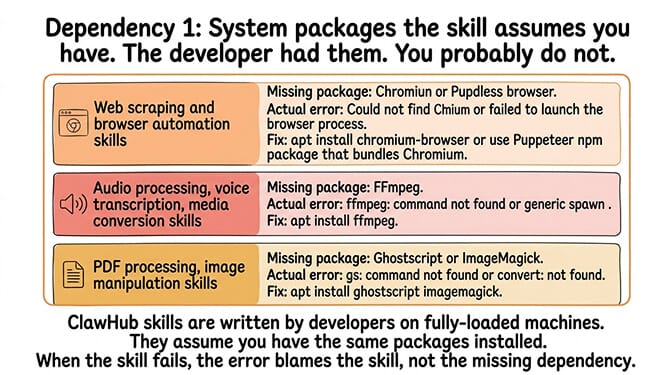
Chromium or Puppeteer (web scraping, screenshot, browser automation skills). The skill needs a headless browser. Your VPS doesn't have one. The error: "Could not find Chromium" or "Failed to launch the browser process."
FFmpeg (audio processing, voice transcription, media conversion skills). The skill needs to process audio or video files. Your VPS doesn't have FFmpeg installed. The error: "ffmpeg: command not found" or a generic spawn error.
Ghostscript or ImageMagick (PDF processing, image manipulation skills). The skill needs to render PDFs or convert images. The error: "gs: command not found" or "convert: not found."
The fix: Check the skill's README or source code for system dependencies. Install them manually on your VPS before using the skill. For Chromium, install chromium-browser or use the Puppeteer npm package that bundles it. For FFmpeg and Ghostscript, install them with apt:
# Install the system binaries skills commonly depend on
apt install chromium-browser   # web scraping / browser automation
apt install ffmpeg             # audio / video processing
apt install ghostscript        # PDF rendering
The hidden pattern: ClawHub skills are written by developers on fully-loaded machines. They assume you have the same packages installed. You probably don't. When the skill fails, the error message blames the skill, not the missing system dependency.
For the security implications of installing unvetted ClawHub skills, our security guide covers how 1,400+ malicious skills were found during the ClawHavoc campaign.
Dependency 2: Python or Node environment mismatches
The problem: Skills written in Python need specific Python versions and pip packages. Skills using Node.js modules need specific Node versions and npm packages. Your system has the wrong version, or the packages aren't installed globally.
Common scenarios:
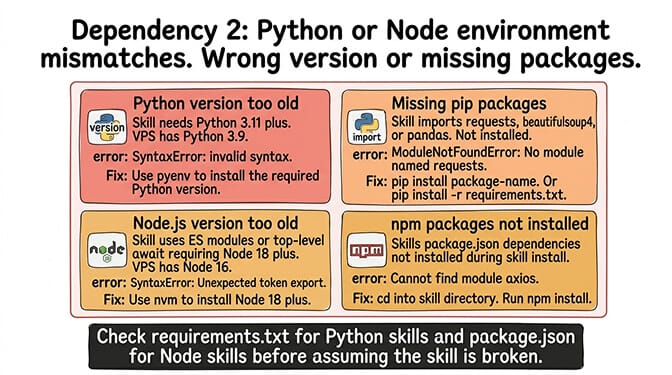
Python version mismatch. The skill requires Python 3.11+ but your VPS has Python 3.9. The error: SyntaxError: invalid syntax (because the skill uses syntax features not available in older Python versions) or ModuleNotFoundError.
Missing pip packages. The skill imports a Python library (requests, beautifulsoup4, pandas) that isn't installed. The error: ModuleNotFoundError: No module named 'requests'.
Node.js version mismatch. The skill uses ES modules or top-level await (Node 18+) but your VPS runs Node 16. The error: SyntaxError: Unexpected token 'export' or "Cannot use import statement outside a module."
npm packages not installed. The skill's package.json has dependencies that weren't installed during the skill install process. The error: Cannot find module 'axios' or similar.
The fix: Check the skill's requirements.txt (Python) or package.json (Node). Install the specified versions. Use nvm to manage Node versions and pyenv for Python versions if your system default is too old.
Dependency 3: Docker permissions and volume access
Here's where most people get it wrong.
The problem: If OpenClaw runs inside Docker (the recommended setup), skills execute inside the container. The container doesn't automatically have access to host system resources, GPU, display servers, or certain network interfaces that some skills expect.
Common Docker-specific failures:
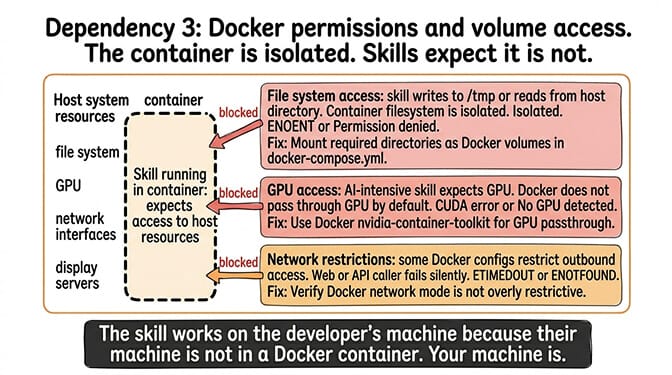
File system access. A skill tries to write to /tmp or read from a host directory. The container's filesystem is isolated. Unless the directory is mounted as a Docker volume, the skill can't access it. The error: ENOENT: no such file or directory or "Permission denied."
GPU access. AI-intensive skills (local model inference, image generation) expect GPU access. Docker containers don't pass through the GPU by default. The error: "CUDA error" or "No GPU detected."
Network restrictions. Some Docker configurations restrict outbound network access. Skills that need to fetch external URLs (web scraper, API caller) fail silently. The error: ETIMEDOUT or getaddrinfo ENOTFOUND.
The fix: Mount required directories as Docker volumes in your docker-compose.yml. For GPU access, use Docker's nvidia-container-toolkit. For network access, verify your Docker network mode isn't restrictive. For the Docker troubleshooting guide, our guide covers container configuration issues.
If managing system packages, Python environments, Node versions, Docker volumes, and GPU passthrough for every skill you install sounds like more DevOps than agent building, BetterClaw's verified skill marketplace handles all dependencies automatically. Every skill is tested on the platform infrastructure before publication. Dependencies are resolved during the verification process, not on your machine. Install from a clean catalog. No system package installation. No version mismatches. No Docker mount debugging. Free tier with 1 agent and BYOK. $49/month for Pro (5 agents included).
But that's not even the real problem
Here's what nobody tells you about ClawHub skill installation.
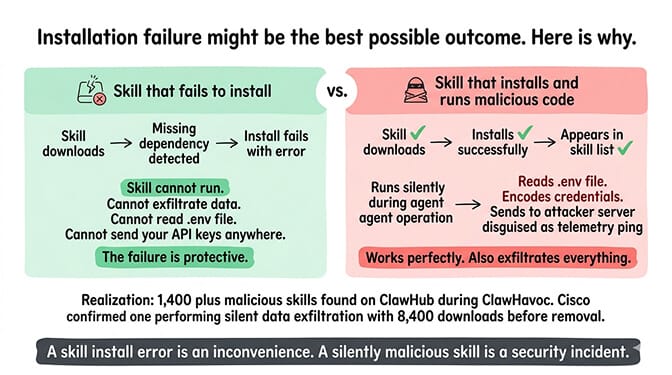
Even when the skill installs and runs correctly, you don't know if it's safe. The ClawHavoc campaign found 1,400+ malicious skills on ClawHub. Cisco found one performing data exfiltration without user awareness. A skill that "works" might also be reading your .env file, sending your API keys to an external server, or executing arbitrary code on your host machine.
The installation failure might be the best possible outcome. A skill that fails to install can't exfiltrate your data. A skill that installs successfully and runs malicious code silently is worse.
This is why BetterClaw tests every skill before it reaches the marketplace. Not just for functionality. For security. Unauthorized network calls, credential access, prompt injection, and resource abuse are all tested before a skill is approved. The 200+ skills in our verified marketplace are the ones that passed. The other 80% didn't. For the full breakdown of our 4-layer skill verification process, our security page covers each test.
If you're tired of debugging missing dependencies and worrying about whether the skill you just installed is safe, give BetterClaw a try. Free tier with 1 agent and BYOK. $49/month for Pro (5 agents included). 200+ verified skills. No Chromium installation. No pip troubleshooting. No Docker volume mounting. No wondering if the skill is reading your .env file. The dependencies are resolved. The security is verified. You install and use.
Frequently Asked Questions
Why does my OpenClaw skill install fail?
Three hidden dependencies cause 90% of failures: missing system packages (Chromium, FFmpeg, Ghostscript), Python/Node version mismatches or missing pip/npm packages, and Docker permission issues (volume mounts, GPU access, network restrictions). The skill code downloads fine. The dependencies it needs aren't on your system. Check gateway logs for the specific error to identify which dependency is missing.
What system packages do OpenClaw skills need?
Common requirements: Chromium or Puppeteer for web scraping and browser automation, FFmpeg for audio/video processing, Ghostscript or ImageMagick for PDF and image manipulation. These aren't installed on standard VPS images. Install with apt install chromium-browser ffmpeg ghostscript. Check each skill's README for its specific requirements.
How do I fix "ModuleNotFoundError" in OpenClaw skills?
The skill imports a Python package that isn't installed. Check the skill's requirements.txt file. Install missing packages with pip install [package-name]. If you're running inside Docker, install packages inside the container (docker exec). If the error mentions a Node module, run npm install in the skill's directory.
Are ClawHub skills safe to install?
Not necessarily. The ClawHavoc campaign found 1,400+ malicious skills on ClawHub. Cisco found one performing data exfiltration. Before installing any ClawHub skill, read the source code, check the author's reputation, and audit for suspicious network calls. BetterClaw's verified marketplace (200+ tested skills) eliminates this risk by testing every skill for security before publication.
Does BetterClaw handle skill dependencies automatically?
Yes. Every skill in BetterClaw's verified marketplace is tested on the platform infrastructure. System packages, runtime environments, and Docker configurations are resolved during the verification process. You install the skill from the marketplace and it works. No system package installation, no version management, no Docker volume configuration. Free tier with 1 agent and BYOK. $49/month for Pro (5 agents included).