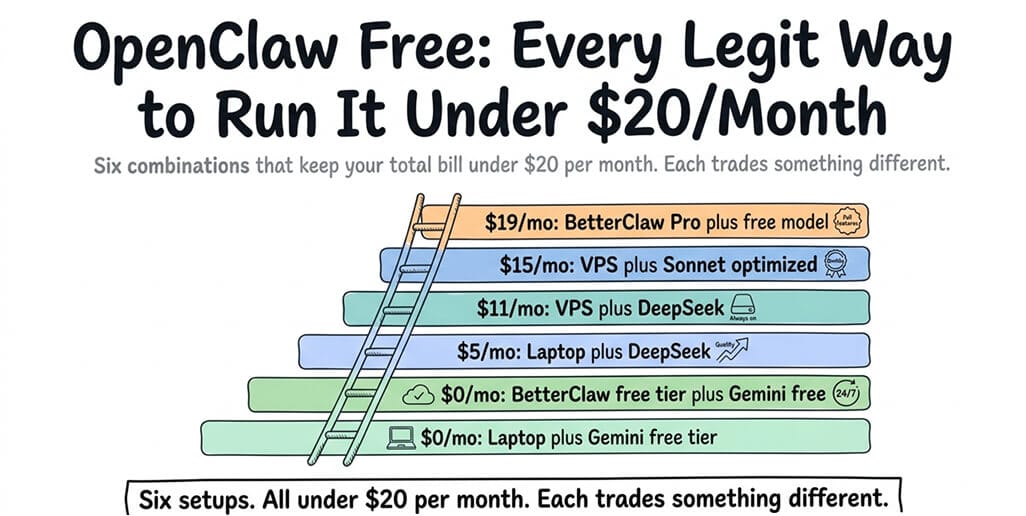
OpenClaw is free to download. Running it costs money. But not as much as most people think. Here are six combinations, five of which keep your total bill under $20/month.
After the Anthropic ban on Claude Pro/Max for third-party tools hit on April 4, 2026, the OpenClaw subreddit filled with a single question: "Can I still use this without spending $50/month?"
Yes. Six different ways. Two are completely free, three more land under $20, and the sixth trades a higher fee for zero infrastructure work. Each makes a different trade-off between quality, uptime, privacy, and convenience. Here's every legit option, with the honest trade-offs for each. And if you'd rather not run anything yourself, BetterClaw's free plan is a free OpenClaw alternative that hosts the agent for you.
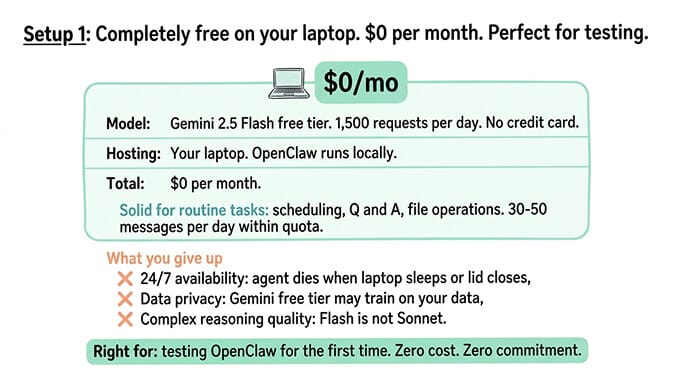
Setup 1: Completely free on your laptop ($0/month)
Model: Gemini 2.5 Flash free tier (1,500 requests/day, no credit card). Hosting: Your laptop. OpenClaw runs locally. Total: $0/month.
This works for personal use and experimentation. The agent runs when your computer is on. Gemini free tier handles 30-50 messages per day within the quota. Quality is solid for routine tasks (scheduling, Q&A, file operations).
What you give up: 24/7 availability (agent dies when laptop sleeps). Data privacy (Gemini free tier may train on your data). Complex reasoning quality (Flash isn't Sonnet).
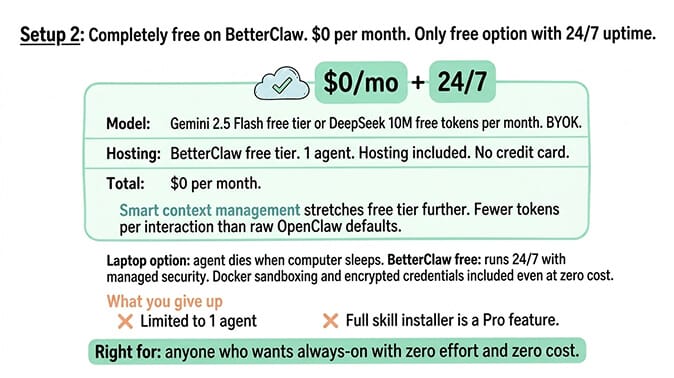
Setup 2: Completely free on BetterClaw ($0/month)
Model: Gemini 2.5 Flash free tier or DeepSeek free allocation (~10M tokens/month). Hosting: BetterClaw free plan (1 agent, 100 credits/month, BYOK, hosting included, no credit card). Total: $0/month.
This is the only free option with 24/7 uptime and zero infrastructure management. You bring your Gemini or DeepSeek API key. BetterClaw hosts the agent for free. Smart context management means you use fewer tokens per interaction, which stretches the free tier further.
What you give up: Limited to 1 agent and 100 credits/month, which meter the agent's work and reset monthly. Three connectors on a single account. Seven-day memory retention. Basic skills only — the curated skill library is a Pro feature. But the agent runs 24/7 with managed security, which the laptop option doesn't offer.
For the full comparison of free model options, our model guide ranks five free models by what actually works.
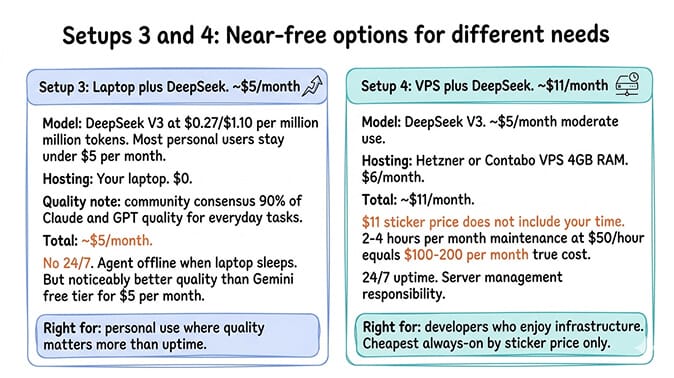
Setup 3: Near-free on your laptop ($5/month)
Model: DeepSeek V3 ($0.27/$1.10 per million tokens). Most personal users stay under $5/month. Hosting: Your laptop. Total: ~$5/month.
DeepSeek V3 is roughly 90% of Claude/GPT quality for everyday tasks. The community consensus calls it the best quality-to-cost ratio available. At $0.27 per million input tokens, heavy daily usage costs under $1/day.
What you give up: 24/7 availability. But you get significantly better quality than Gemini free tier for $5/month.
Setup 4: Always-on for $11/month (VPS + DeepSeek)
Model: DeepSeek V3 (~$5/month for moderate use). Hosting: Hetzner or Contabo VPS ($6/month for 4GB RAM). Total: ~$11/month.
This is the cheapest always-on setup. Your agent runs 24/7 on a remote server. DeepSeek handles the AI at near-zero cost. The VPS stays online regardless of your personal machine.
What you give up: You manage the server. Ubuntu setup. Docker installation. Firewall configuration. Gateway security (500,000+ instances found exposed on the public internet). Monthly maintenance (2-4 hours for updates, monitoring, security patching). The $11/month sticker price doesn't include your time.
For the VPS security hardening guide, our security post covers the seven steps to protect your instance.
The $11/month VPS setup is the cheapest always-on option by sticker price. Including 2-4 hours/month of maintenance time, it's the most expensive option in total cost of ownership. Know which cost you're comparing.
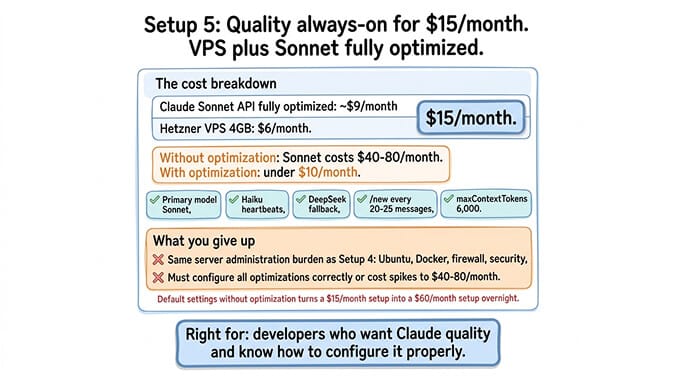
Setup 5: Quality always-on for $15/month (VPS + Sonnet optimized)
Model: Claude Sonnet ($3/$15 per million tokens) with full optimization (model routing, session hygiene, context limits). Budget about $9/month for light use. Hosting: Hetzner VPS ($6/month). Total: ~$15/month.
This is the cheapest way to run a Claude-quality agent 24/7. The optimization is critical. Without it (default settings), Sonnet alone costs $40-80/month. With model routing (Haiku for heartbeats, DeepSeek fallback), session resets every 20-25 messages, and contextTokens capped at 32,000 on the model entry, a request carries at most about 32,000 input tokens, roughly $0.10 of input on Sonnet. A $9 monthly API budget covers about 90 messages at that cap, so the $15 total is a light-use figure: a few messages a day. Session resets keep many requests well under the cap, which stretches the budget, but heavier daily use costs more.
What you give up: Same infrastructure management burden as Setup 4. Also requires configuring model routing, session management, and context limits correctly. For the complete cost optimization stack, our guide covers each setting in priority order.
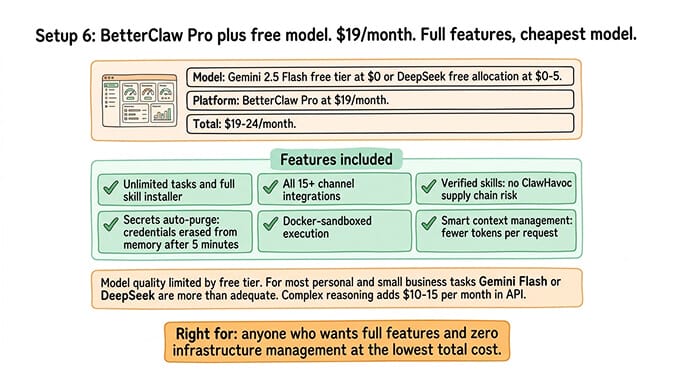
Setup 6: BetterClaw Pro with a free model ($49/month)
Model: Gemini 2.5 Flash free tier ($0) or DeepSeek free allocation ($0-5). Hosting: BetterClaw Pro ($49/month, 5 agents included). Total: $49-54/month.
This is the only setup on the list that breaks the $20 ceiling, and it's the convenience option: full BetterClaw Pro features (5 agents, 12,000 credits/month, unlimited skills (the curated library plus custom skills), all integrations, Telegram, Slack, Discord and Gmail) with the cheapest possible model. Smart context management keeps token usage low. Curated skills eliminate the ClawHub supply chain risk (1,400+ malicious skills found during ClawHavoc). Secrets auto-purge protects your API keys.
What you give up: The model quality is limited by the free tier. For most personal and small business tasks, Gemini Flash or DeepSeek are more than adequate. For complex reasoning tasks, you'd want Sonnet or Opus, which adds $10-15/month in API costs.
The setup most people should actually choose
Here's the honest recommendation.
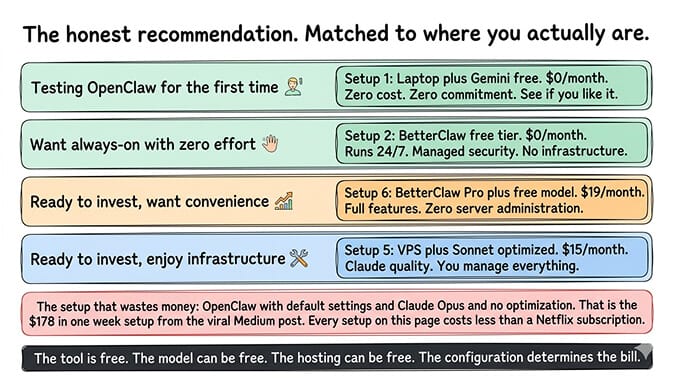
If you're testing OpenClaw for the first time: Setup 1 (laptop + Gemini free). Zero cost. Zero commitment. See if you like it.
If you want always-on with zero effort: Setup 2 (BetterClaw free tier). Still $0/month but runs 24/7 with managed security. No infrastructure to manage.
If you're ready to invest and want quality: Setup 6 (BetterClaw Pro + free model at $49/month) or Setup 5 (VPS + Sonnet optimized at $15/month). BetterClaw Pro if you don't want to manage infrastructure and want the 5 agents and curated skills that come with it. VPS + Sonnet if you'd rather keep the bill under $20 and do the ops yourself.
The option that wastes money: Running OpenClaw on default settings with Claude Opus and no optimization. That's the "$178 in one week" setup from the viral Medium post. For the user-profile cost breakdown, our cost guide shows what each type of user actually pays.
Five of the six setups on this page cost less than a Netflix subscription. The agent space has a cost perception problem. People hear "$178 in one week" and assume OpenClaw is expensive. It's not. Unoptimized defaults are expensive. The tool is free. The model can be free. The hosting can be free. The configuration is what determines the bill.
The thing free setups can't give you
Here's what nobody tells you about running OpenClaw free.
Free setups work for personal use. They don't work for business-critical deployments where a security incident costs more than a year of hosting fees.
Gemini free tier may train on your data. Self-hosted setups need manual security hardening (500,000+ exposed instances prove most people skip this). ClawHub skills aren't vetted (1,400+ were malicious). Credentials sit in agent memory until manually purged.
The cost of running OpenClaw cheaply is accepting these trade-offs. If you can't accept them, the cheapest safe option is BetterClaw's free plan ($0, 1 agent, 100 credits/month), which includes Docker-sandboxed execution and AES-256 encrypted credentials. Pro at $49/month adds the curated skill library on top, which is the part that removes the ClawHub supply chain risk.
If you want the cheapest possible agent with managed security, give BetterClaw a try. Free plan with 1 agent, 100 credits/month, and BYOK for $0/month. Pro at $49/month (5 agents, 12,000 credits/month) for full features. 60-second deploy. Smart context management stretches every free model tier further. The infrastructure, security, and optimization are handled. You handle the SOUL.md and the workflows.
Frequently Asked Questions
Can I run OpenClaw completely free?
Yes. Two options: run it on your laptop with Gemini 2.5 Flash free tier (1,500 requests/day, $0), or use BetterClaw's free plan (1 agent, 100 credits/month, BYOK with a free model key, hosting included, $0). The laptop option only works when your computer is on. BetterClaw free runs 24/7 with managed hosting. Both require bringing your own API key from a provider with a free tier.
What is the cheapest way to run OpenClaw 24/7?
By sticker price: a Hetzner VPS ($6/month) with DeepSeek ($5/month API) for $11/month total. By total cost of ownership (including your maintenance time): BetterClaw's free plan ($0) or BetterClaw Pro ($49/month). The VPS requires 2-4 hours/month of server maintenance. BetterClaw requires zero infrastructure management.
Is OpenClaw free to use?
OpenClaw itself is free and open source (230K+ GitHub stars, MIT license). Running it costs money for two things: AI model API fees (ranging from $0 with Gemini free tier to $150+/month with Opus unoptimized) and hosting (ranging from $0 on your laptop or BetterClaw's free plan, to $24/month on a VPS, to $49/month on BetterClaw Pro). The framework is free. The infrastructure and AI processing are not.
How do I run OpenClaw under $20/month?
Five options land under $20: laptop + Gemini free ($0), BetterClaw free plan ($0), laptop + DeepSeek ($5), VPS + DeepSeek ($11), and VPS + Sonnet optimized ($15). A sixth, BetterClaw Pro + free model, costs $49 and buys you out of infrastructure work entirely. Each trades something different (uptime, quality, privacy, convenience). Most people should start with BetterClaw's free plan ($0, 1 agent, 100 credits/month, 24/7 uptime, no infra management) and upgrade to Pro ($49) when they need more agents, more credits, or the curated skill library.
Is a free OpenClaw setup safe enough to use?
For personal experimentation, yes. For business use, probably not without additional security measures. Free model tiers may train on your data. Self-hosted setups without hardening contributed to 500,000+ exposed instances. ClawHub skills aren't vetted (1,400+ were malicious during ClawHavoc). BetterClaw's free plan includes managed security (Docker sandboxing, AES-256 encrypted credentials), which addresses these risks even at $0/month.