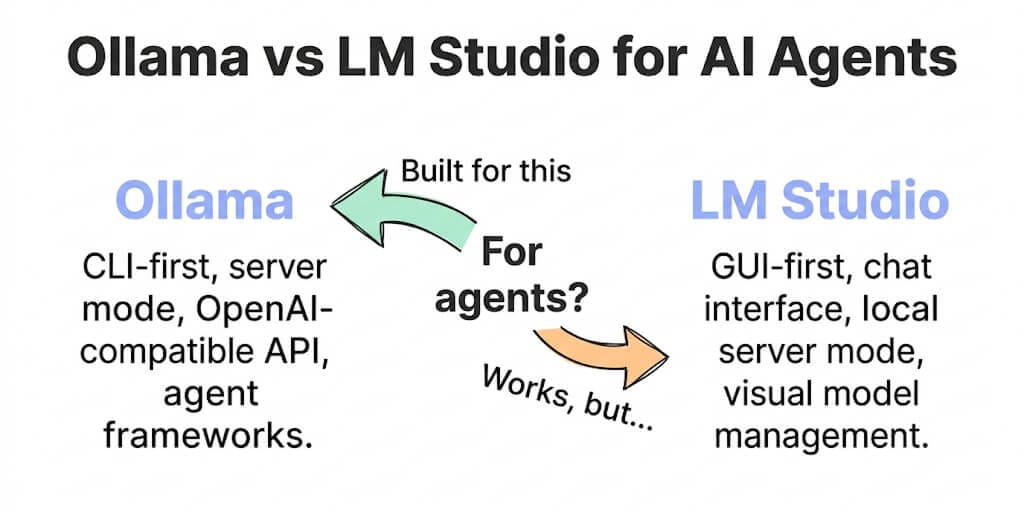
Both run local models. Both are free. But one was built for chat and the other was built for serving. If you're connecting a local model to an agent framework, the difference matters more than you think.
I set up a support triage agent last month. Local model. Zero API costs. Privacy-first. The agent reads incoming emails, classifies them, and routes them to the right team.
I started with LM Studio because the GUI is beautiful. Download a model. Click "Start Server." Get an OpenAI-compatible endpoint at localhost:1234. Easy.
The agent worked. For about three hours. Then LM Studio's UI went into screensaver mode, the server process didn't survive, and my agent stopped classifying emails at 2 AM. No log. No auto-restart. Just... silence.
I switched to Ollama. ollama serve in a systemd unit. Auto-start on boot. Auto-restart on crash. The agent has been running for four weeks without interruption.
That's the entire Ollama vs LM Studio debate for agents in one story. LM Studio is a better experience for chatting with models. Ollama is a better foundation for running agents.
The core difference (one sentence each)
Ollama: A CLI-first local inference server designed to run models as a background service. Headless. Daemonized. Built for programmatic access.
LM Studio: A GUI-first desktop application designed for interactive model exploration. Visual. User-friendly. Built for chatting with models locally.
Both expose an OpenAI-compatible API endpoint. Both run GGUF models. Both are free. Both support Apple Silicon, NVIDIA, and AMD GPUs.
But their design priorities are fundamentally different, and those priorities determine which one works better as an agent backend.
Ollama is a server that happens to have a CLI. LM Studio is a chat app that happens to have a server.
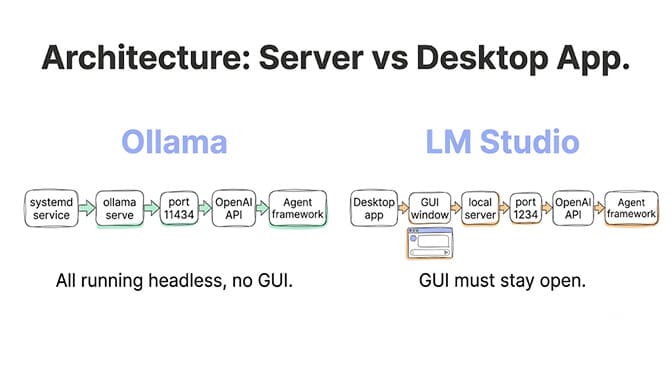
Stability for agents (where Ollama wins decisively)
Auto-restart on crash
Ollama: Runs as a systemd service on Linux, a launchd agent on macOS, or a background process on Windows. If it crashes, the service manager restarts it automatically. Your agent never notices the interruption.
LM Studio: Runs as a desktop application. If it crashes, it stays crashed until you manually relaunch it. If your laptop screen locks, LM Studio may lose focus and the server process can become unresponsive on some systems.
Boot persistence
Ollama: sudo systemctl enable ollama starts it on every boot. Your agent's model backend is available before you even log in.
LM Studio: You need to manually open the application and click "Start Server" after every reboot. There's no built-in "start on boot" option for the server mode.
Headless operation
Ollama: No GUI required. Runs perfectly on a headless Linux server, a Raspberry Pi, a cloud VM, or a Docker container. SSH in, start Ollama, walk away.
LM Studio: Requires a display. The server mode is tied to the GUI application. On a headless server, you'd need a virtual display (Xvfb) to run it, which defeats the purpose.
Resource management
Ollama: Loads and unloads models on demand. When no requests come in, the model is unloaded from memory. When a request arrives, it reloads. This prevents idle memory consumption on shared machines.
LM Studio: Keeps the model loaded in memory as long as the server is running. Better for consistent response times but uses memory even when idle.
Model management (where LM Studio wins on experience)
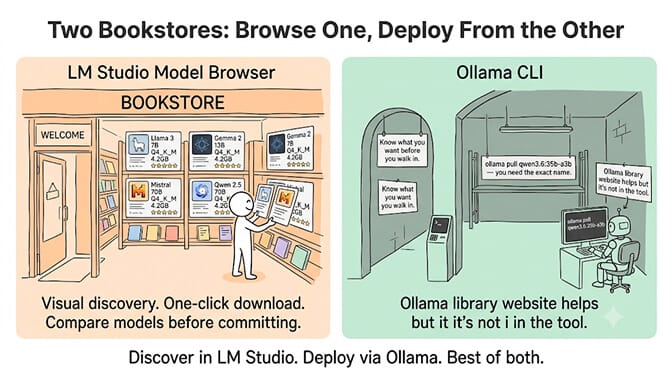
LM Studio's GUI: Browse models visually. See parameter counts, quant levels, file sizes, and community ratings. Download with one click. Compare models side by side. Preview model cards. It's genuinely the best model discovery experience available.
Ollama's CLI: ollama pull qwen3.6:35b-a3b. You need to know the exact model name. No browsing. No visual comparison. The Ollama library website helps, but it's not in the tool itself.
For exploring and testing models, LM Studio is better. For deploying a specific model as an agent backend, Ollama is better.
API compatibility (both work, with caveats)
Both expose OpenAI-compatible endpoints.
Ollama: http://localhost:11434/v1/chat/completions. Supports tool calling (model-dependent). Supports streaming. Supports Modelfile configuration for parameters like num_ctx, num_predict, temperature.
LM Studio: http://localhost:1234/v1/chat/completions. Supports tool calling (model-dependent). Supports streaming. Configuration through the GUI settings panel.
The agent framework compatibility issue: OpenClaw, Hermes, and most agent frameworks expect the server to be always available. If the server process dies (LM Studio crash, screensaver, app focus loss), the agent retries, times out, and either fails silently or falls back to a cloud model. With Ollama, systemd restarts the server before the agent's retry timeout expires. With LM Studio, the server stays dead until you notice.
For the full guide on connecting Ollama to agent frameworks (OpenClaw, Hermes, n8n), including the Docker networking fix and the /v1 endpoint requirement, see our troubleshooting decision tree.
Speed comparison (nearly identical)
Both use llama.cpp under the hood. On the same hardware with the same model and same quantization, inference speeds are within 5-10% of each other. Neither has a meaningful speed advantage.
Typical speeds on 16 GB Apple Silicon (Qwen 3.6 35B-A3B Q4):
Ollama: 25-35 tok/s. LM Studio: 25-35 tok/s.
The speed difference is noise. Pick based on stability and workflow, not speed.
The comparison table (screenshot this)
| Ollama | LM Studio | |
|---|---|---|
| Primary design | Server/daemon | Desktop app |
| GUI | No (CLI only) | Yes (beautiful) |
| Auto-restart | Yes (systemd/launchd) | No |
| Start on boot | Yes (systemctl enable) | No |
| Headless server | Yes | No (needs display) |
| Model browsing | CLI only | Visual browser |
| API endpoint | localhost:11434/v1 | localhost:1234/v1 |
| Tool calling | Yes (model-dependent) | Yes (model-dependent) |
| Docker support | Official image | No |
| Memory management | Load/unload on demand | Always loaded |
| Config | Modelfile (text) | GUI settings |
| Price | Free | Free |
| Best for | Agent backends | Model exploration |
If you're running agents that need to operate 24/7 without supervision, BetterClaw handles the model backend entirely. Connect your API key via BYOK (28+ providers supported) or point to your local Ollama instance. No local server to manage. Free plan with 1 agent and 500 credits a month. $49/month on Pro.
When to use which
Use Ollama when: You're connecting a local model to an agent framework (OpenClaw, Hermes, n8n, BetterClaw). The agent runs on a schedule or 24/7. You need auto-restart, boot persistence, and headless operation. You're deploying on a server or Docker container.
Use LM Studio when: You're exploring models and want to compare outputs visually. You're testing prompts interactively before deploying to an agent. You want to download and try 5 models in 10 minutes with a visual interface. You're chatting with local models personally, not running agents.
Use both when: LM Studio for discovery and testing. Ollama for production agent deployment. Find the model in LM Studio's visual browser. Note the exact GGUF name. Pull it on Ollama. Deploy to your agent.
The hybrid approach (and when to skip local entirely)
Here's the honest take: local inference is powerful but comes with maintenance. Ollama connection errors, sleep/wake issues, port conflicts, VRAM limits. LM Studio crashes, focus loss, no auto-restart.
For development and privacy-sensitive work, local is worth the overhead. For production agents that need to run reliably, cloud APIs via BYOK on a managed platform eliminate all of these issues. No server to manage. No connection to debug. No crash to recover from.
The best setup for most builders: Ollama locally for development and testing. Cloud API for production. Switch between them without changing your agent logic.
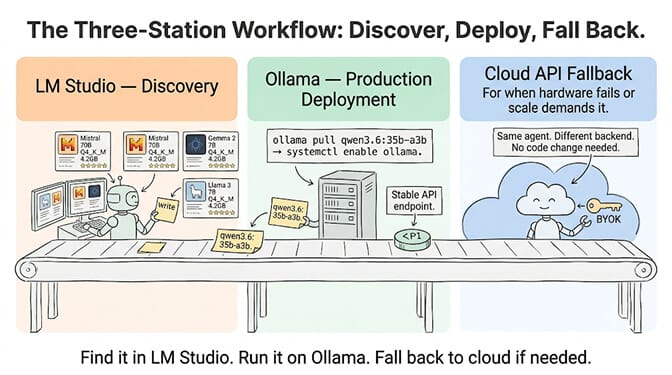
Give BetterClaw a look if you want both local and cloud models on one dashboard. Free plan with 1 agent and 500 credits a month. $49/month for Pro. BYOK with zero markup. We handle the model connections. You handle the agent logic.
Frequently Asked Questions
Is Ollama or LM Studio better for AI agents?
Ollama is better for agent backends. It runs as a background service with auto-restart (systemd/launchd), starts on boot, operates headless, and survives crashes without intervention. LM Studio requires a GUI window to stay open, doesn't auto-restart, and can become unresponsive when the desktop locks. For interactive model exploration and testing, LM Studio's visual interface is superior. For production agent deployment, Ollama is the clear choice.
Can I use LM Studio with OpenClaw or Hermes?
Yes. LM Studio exposes an OpenAI-compatible API at localhost:1234/v1. Point your agent framework at this endpoint. The caveat: if LM Studio crashes or loses focus, the server dies and your agent stops working until you manually relaunch. For reliable agent operation, consider Ollama (which auto-restarts) or a cloud API via BYOK.
Is Ollama faster than LM Studio?
No meaningful difference. Both use llama.cpp for inference. On the same hardware with the same model and quantization, speeds are within 5-10% of each other (typically 25-35 tok/s on 16 GB Apple Silicon with Qwen 3.6 35B-A3B). Pick based on stability and workflow, not speed.
Can I run Ollama and LM Studio at the same time?
Yes, but they must use different ports. Ollama defaults to 11434, LM Studio defaults to 1234. They won't conflict. You can run both simultaneously for different purposes (e.g., LM Studio for interactive testing, Ollama serving your agent). The only constraint is VRAM. Both loading models simultaneously will consume twice the GPU memory.
Should I use local inference or cloud APIs for agents?
Local inference (Ollama or LM Studio) is best for development, privacy-sensitive workloads, and zero-cost personal agents. Cloud APIs are best for production reliability (no crashes, no connection errors, no maintenance), access to proprietary models (Claude, GPT-5.5), and 24/7 uptime without hardware management. The recommended setup: local for development, cloud for production. On BetterClaw, switch between them without changing your agent configuration.