I built the same agent on all three frameworks. A support triage agent that reads tickets, looks up customers, and drafts responses. One framework took 2 hours. One took 2 days. One I abandoned after the third crash. Here's what actually happened.
Three weeks ago I set aside a weekend to answer the question every agent builder asks: which framework should I actually use?
I had the same agent spec for all three. Read a support ticket from a queue. Look up the customer in a CRM API. Check their subscription tier. Search the knowledge base for relevant articles. Draft a tier-appropriate response. Route to human review if confidence is low.
Five tools. One workflow. Three frameworks. Here's what broke and where.
The verdict (top of page, you're welcome)
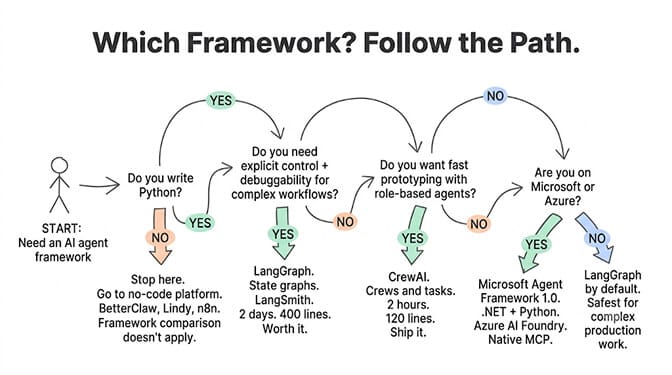
LangGraph wins for: Complex, stateful workflows where you need explicit control over every step. Multi-agent orchestration with conditional branching. Production deployments where debuggability matters more than development speed.
CrewAI wins for: Fast prototyping of multi-agent workflows. Role-based agent design where each agent has a clear specialty. Teams that want to go from idea to working prototype in hours, not days.
AutoGen (now Microsoft Agent Framework) wins for: Microsoft/.NET shops. Conversational multi-agent patterns. Teams already on Azure AI Foundry who want first-party tooling.
None of them wins for: Non-technical founders. Solopreneurs. Anyone who doesn't write Python. That's a different category entirely.
The framework that's "best" is the one that matches your team's skills and your workflow's complexity. LangGraph for control. CrewAI for speed. Microsoft Agent Framework for enterprise .NET. And if you don't write code, none of these are for you.
LangGraph: the control freak's framework
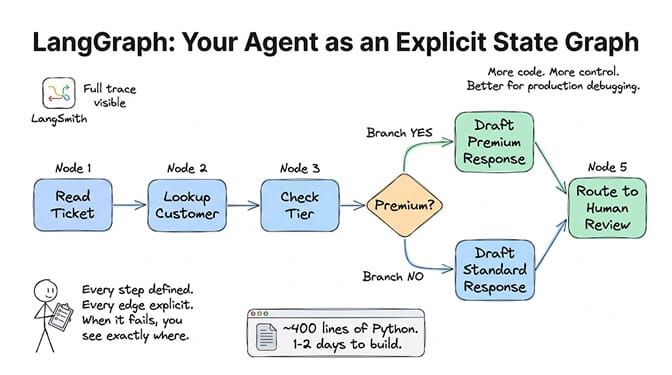
LangGraph models your agent as a state graph. Nodes are actions (call a tool, make a decision, format output). Edges are transitions (if customer is premium, go to this node; if not, go to that one). You define every step, every condition, every fallback.
What I liked: I could see exactly what was happening at every step. When the agent made a wrong decision, I could trace it to the specific node. LangSmith (the observability layer) showed me the full execution trace. Debugging was... actually possible.
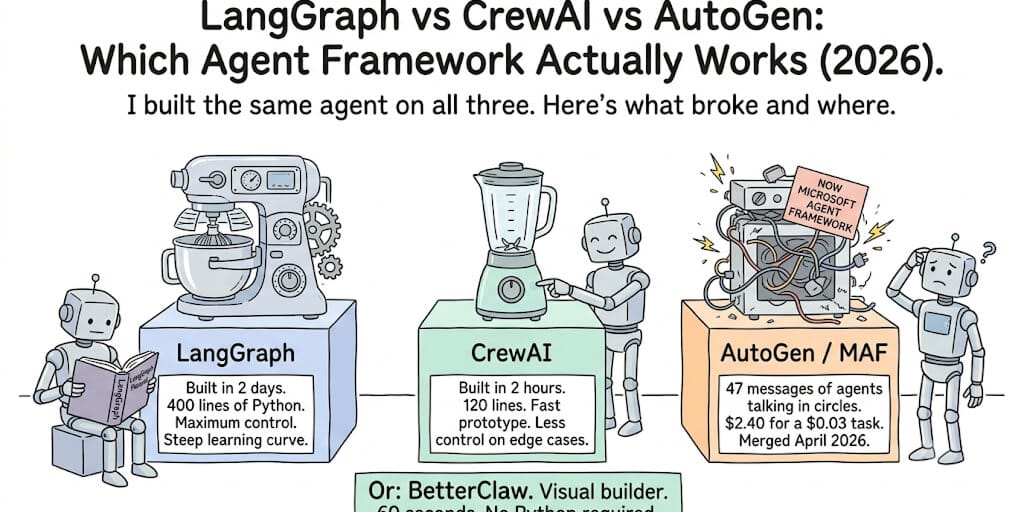
What broke: The learning curve. My support triage agent took 2 days to build in LangGraph. Not because the agent logic was complex, but because LangGraph requires you to think in graphs. Define state schemas. Write reducers. Configure checkpointers. It's powerful, but it's a lot of code for a 5-tool workflow.
The code reality: My triage agent was ~400 lines of Python in LangGraph. The equivalent in CrewAI was ~120 lines.
June 2026 updates (verified): LangGraph 1.0 went GA in October 2025. Q2 2026 added per-node timeouts (your nodes no longer hang forever), DeltaChannel for efficient state streaming, and v2 streaming. These are real production improvements.
CrewAI: the "just ship it" framework
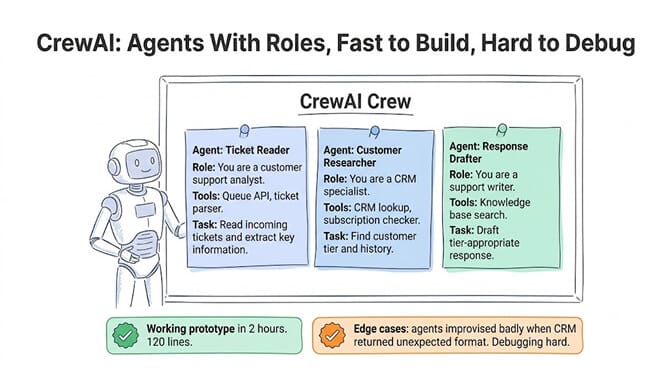
CrewAI thinks in crews and tasks. You define agents with roles ("you are a customer researcher"), give them tools, and assign them tasks in sequence or parallel. The framework handles the inter-agent communication.
What I liked: My support triage agent was running in 2 hours. Not 2 days. CrewAI's role-based approach mapped naturally to my workflow: one agent reads tickets, one looks up customers, one drafts responses. The mental model is intuitive. This agent does this job.
What broke: Edge cases. When the CRM returned an unexpected format, CrewAI's agent retried the same call three times and then gave a wrong answer confidently. In LangGraph, I would have seen the error in the graph trace. In CrewAI, the agent just... improvised. Badly.
CrewAI abstracts away the control flow. That's great for speed. It's terrible for debugging production failures.
The numbers: CrewAI has 47K+ GitHub stars. 100K+ certified developers through their learning platform. Used by IBM, PepsiCo, DocuSign. CrewAI 1.14 (May-June 2026) added pluggable memory/knowledge/RAG backends and a Chat API. The enterprise tier (AMP) handles lifecycle management.
For more on how CrewAI compares to no-code alternatives, see our builder comparison.
AutoGen: the one that merged into something else
Here's the awkward part. AutoGen doesn't really exist as a standalone framework anymore. On April 3, 2026, Microsoft merged AutoGen and Semantic Kernel into Microsoft Agent Framework 1.0. Same teams. New name. Single SDK for Python and .NET.
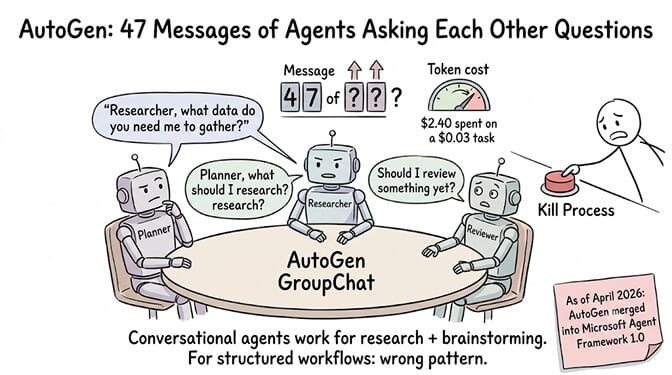
What I tried: The original AutoGen conversational pattern. Define agents (Planner, Researcher, Reviewer). Put them in a GroupChat. They talk to each other to solve the problem.
What broke: Everything. The agents started having circular conversations. The Planner asked the Researcher for data. The Researcher asked the Planner what data to get. They went back and forth for 47 messages before I killed it. Token cost for that failure: $2.40 on a task that should have cost $0.03.
AutoGen's conversational pattern works well for research and brainstorming tasks where open-ended discussion is the point. For structured workflows with clear steps (like support triage), the pattern is wrong. The agents don't know when to stop talking and start acting.
The current state (June 2026): If you're on Microsoft/Azure, use Microsoft Agent Framework 1.0 (the merged product). It combines AutoGen's multi-agent orchestration with Semantic Kernel's enterprise features (session state, type safety, middleware, telemetry). Native MCP and A2A protocol support. Python and .NET with feature parity. New projects should start here, not on standalone AutoGen.
If you're not on Microsoft, AutoGen's legacy version (AG2) still works for research-style conversational agents. But for production workflows, LangGraph or CrewAI are more reliable.
The comparison table (screenshot this)
| LangGraph | CrewAI | AutoGen/MAF | |
|---|---|---|---|
| Architecture | State graph | Role-based crews | Conversational agents |
| Best for | Complex stateful workflows | Fast multi-agent prototyping | Microsoft/.NET enterprise |
| Learning curve | Steep (2-4 weeks) | Moderate (1-2 weeks) | Moderate to steep |
| Lines of code (triage agent) | ~400 | ~120 | ~200 |
| Time to first prototype | 1-2 days | 2-4 hours | 4-8 hours |
| Debugging | Excellent (LangSmith) | Limited (logs only) | Good (Azure AI Foundry) |
| GitHub stars | LangChain ecosystem | 47K+ | AutoGen legacy |
| Production-ready | Yes (GA since Oct 2025) | Yes (enterprise tier) | Yes (MAF 1.0 Apr 2026) |
| Hosting included | No (you manage infra) | No (open-source) / Yes (enterprise) | No (Azure optional) |
| Requires code | Yes (Python) | Yes (Python) | Yes (Python or .NET) |
| Pricing | Free + LangSmith ($39-399/mo) | Free + enterprise custom | Free + Azure costs |
The part nobody talks about: what all three have in common
All three require Python. If you don't write Python, stop reading framework comparisons.
All three require you to manage infrastructure. Hosting, scaling, monitoring, security. The framework gives you the orchestration layer. You provide everything else.
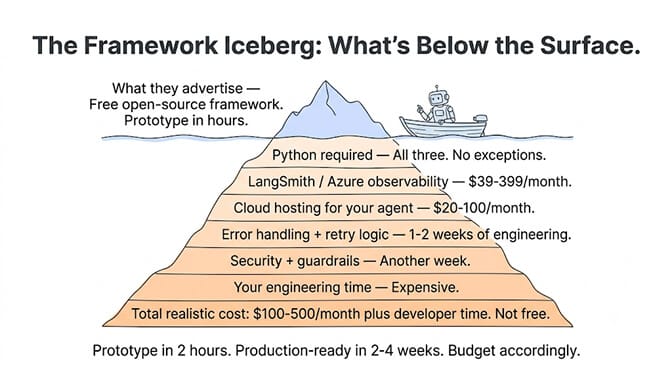
All three take 1-4 weeks to reach production. The "prototype in 2 hours" on CrewAI is real. The "production-ready in 2 hours" is not. Adding error handling, retry logic, guardrails, monitoring, and security takes weeks on any framework.
All three cost more than you think. The framework is free. LangSmith for observability: $39-399/month. Cloud hosting: $20-100/month. Your engineering time: priceless (and expensive). The total cost of a framework-built agent in production: $100-500/month plus your time.
If you're reading this and thinking I don't write Python, I just need an agent that works, you're in the wrong article. What you need is a no-code AI agent builder. BetterClaw deploys agents in 60 seconds with a visual builder. No Python. No infrastructure. 200+ verified skills. 28+ model providers via BYOK with zero markup. Free plan with 1 agent and 100 credits a month. $49/month on Pro.
The honest recommendation
If you're a developer building complex workflows: Start with LangGraph. The learning curve is steep, but the control and debuggability pay for themselves in production. The state graph model prevents the "agents talking in circles" problem. LangSmith gives you real observability. If you're weighing it against the simpler tool-loop approach, see our Claude Agent SDK vs LangGraph breakdown.
If you're prototyping and need speed: Start with CrewAI. Get a working prototype in hours. If it works well enough for production, keep it. If you hit edge cases that need more control, migrate the critical parts to LangGraph. The role-based model is genuinely intuitive.
If you're on Microsoft/Azure: Use Microsoft Agent Framework 1.0. First-class .NET support. Azure AI Foundry integration. Native MCP and A2A. This is the clear choice for enterprise Microsoft shops.
If you don't write code: Skip all three. Use a no-code platform. BetterClaw, Lindy, Gumloop, n8n. The framework comparison doesn't apply to you. For the full landscape, see the best AI agent builder platforms compared.
McKinsey estimates AI agents represent $2.6-4.4 trillion in addressable value. Gartner projects 40% of enterprise applications will embed agents by end of 2026. The market is huge. But the framework you pick matters less than whether your agent actually ships and runs reliably. The best framework is the one your team can maintain.
If you've read this entire comparison and your takeaway is "I don't want to spend 2 weeks learning a framework just to automate my email triage," that's a valid conclusion. BetterClaw deploys the same agent in 60 seconds with a visual builder. No Python. No state graphs. No role definitions. Connect your model via BYOK, pick your skills, deploy. The trade-off: less customization than LangGraph. The benefit: your agent ships today, not next month. Free to try. $49/month for Pro.
Frequently Asked Questions
Which is better, LangGraph or CrewAI?
LangGraph is better for complex, stateful workflows where you need explicit control over every step and strong debuggability (via LangSmith). CrewAI is better for fast prototyping of role-based multi-agent systems where development speed matters more than fine-grained control. LangGraph: ~400 lines for a triage agent, 1-2 days to build. CrewAI: ~120 lines, 2-4 hours to build. Pick based on your workflow complexity and your patience for debugging.
Is AutoGen still worth using in 2026?
For new projects on the Microsoft stack, no. Use Microsoft Agent Framework 1.0 instead (the merged successor, shipped April 3, 2026). It combines AutoGen's multi-agent orchestration with Semantic Kernel's enterprise features and adds native MCP/A2A support. For non-Microsoft teams, AutoGen's legacy conversational pattern is outclassed by LangGraph and CrewAI for structured production workflows. AutoGen still works for research and brainstorming patterns.
How long does it take to build an agent with these frameworks?
First prototype: CrewAI 2-4 hours, LangGraph 1-2 days, AutoGen/MAF 4-8 hours. Production-ready (with error handling, guardrails, monitoring, hosting): 1-4 weeks on any framework. The gap between prototype and production is where most projects stall. For comparison, no-code platforms like BetterClaw deploy production agents in 60 seconds but with less customization.
How much does it cost to run an agent on LangGraph, CrewAI, or AutoGen?
The frameworks are free (open-source). Hidden costs: LangSmith observability ($39-399/month), cloud hosting ($20-100/month), LLM API costs ($30-300/month depending on model and volume), and your engineering time. Total realistic cost for one production agent: $100-500/month. On BetterClaw: $0 (free plan) or $49/month (Pro) plus your LLM API costs via BYOK.
Can I build an AI agent without LangGraph, CrewAI, or AutoGen?
Yes. These are code-first frameworks for developers. If you don't write Python, use a no-code platform: BetterClaw (visual builder, 200+ skills, 28+ providers, $0-19/month), Lindy (SOC 2, sales focus), Gumloop (enterprise, visual builder), or n8n (workflow automation, 1,200+ connectors). For simple single-agent tasks, you can also build directly with the OpenAI or Anthropic SDKs without any framework.
Related Reading
- AI Agent Frameworks in 2026 — The category overview, including the no-code alternative
- LangChain vs LlamaIndex — The orchestration-vs-retrieval distinction underneath all three
- Pydantic AI vs LangChain — A fourth option worth knowing before you commit
- CrewAI Alternative — If CrewAI came out ahead but still isn't quite right